<!DOCTYPE html>
    <html lang="vi" xmlns="http://www.w3.org/1999/xhtml" prefix="og: http://ogp.me/ns#">
    <head>
<title>Cách thiết lập giới hạn băng thông tải xuống của Windows Updates trong Windows 10</title>
<meta name="description" content="Cách thiết lập giới hạn băng thông tải xuống của Windows Updates trong Windows 10 - Savefile - Tin Tức -...">
<meta name="author" content=".: Nguoicodonvn2008.info - Cõi lòng người cô đơn :.">
<meta name="copyright" content=".: Nguoicodonvn2008.info - Cõi lòng người cô đơn :. [admin@nguoicodonvn2008.info]">
<meta name="robots" content="index, archive, follow, noodp">
<meta name="googlebot" content="index,archive,follow,noodp">
<meta name="msnbot" content="all,index,follow">
<meta name="generator" content="NukeViet v4.5">
<meta http-equiv="Content-Type" content="text/html; charset=utf-8">
<meta property="og:title" content="Cách thiết lập giới hạn băng thông tải xuống của Windows Updates trong Windows 10">
<meta property="og:type" content="website">
<meta property="og:description" content="Savefile - Tin Tức -...">
<meta property="og:site_name" content=".&#x3A; Nguoicodonvn2008.info - Cõi lòng người cô đơn &#x3A;.">
<meta property="og:url" content="https://www.nguoicodonvn2008.info/vi/news/savefile/kien-thuc-may-tinh/cach-thiet-lap-gioi-han-bang-thong-tai-xuong-cua-windows-updates-trong-windows-10-3839.html">
<link rel="shortcut icon" href="https://nguoicodonvn2008.info/favicon.ico">
<link rel="canonical" href="https://www.nguoicodonvn2008.info/vi/news/savefile/kien-thuc-may-tinh/cach-thiet-lap-gioi-han-bang-thong-tai-xuong-cua-windows-updates-trong-windows-10-3839.html">
<link rel="alternate" href="https://nguoicodonvn2008.info/vi/news/rss/" title="Tin Tức" type="application/rss+xml">
<link rel="alternate" href="https://nguoicodonvn2008.info/vi/news/rss/karaoke-dual/" title="Tin Tức - Karaoke Dual" type="application/rss+xml">
<link rel="alternate" href="https://nguoicodonvn2008.info/vi/news/rss/nhac-tre/" title="Tin Tức - Nhạc trẻ" type="application/rss+xml">
<link rel="alternate" href="https://nguoicodonvn2008.info/vi/news/rss/tru-tinh/" title="Tin Tức - Trữ tình" type="application/rss+xml">
<link rel="alternate" href="https://nguoicodonvn2008.info/vi/news/rss/nuoc-ngoai/" title="Tin Tức - Nước ngoài" type="application/rss+xml">
<link rel="alternate" href="https://nguoicodonvn2008.info/vi/news/rss/remix/" title="Tin Tức - Remix" type="application/rss+xml">
<link rel="alternate" href="https://nguoicodonvn2008.info/vi/news/rss/tam-su-tinh-yeu/" title="Tin Tức - Tâm sự tình yêu" type="application/rss+xml">
<link rel="alternate" href="https://nguoicodonvn2008.info/vi/news/rss/tho-suu-tam/" title="Tin Tức - Thơ sưu tầm" type="application/rss+xml">
<link rel="alternate" href="https://nguoicodonvn2008.info/vi/news/rss/cuoc-song/" title="Tin Tức - Cuộc sống" type="application/rss+xml">
<link rel="alternate" href="https://nguoicodonvn2008.info/vi/news/rss/phan-mem/" title="Tin Tức - Phần mềm" type="application/rss+xml">
<link rel="alternate" href="https://nguoicodonvn2008.info/vi/news/rss/kien-thuc-may-tinh/" title="Tin Tức - Kiến thức máy tính" type="application/rss+xml">
<link rel="alternate" href="https://nguoicodonvn2008.info/vi/news/rss/hoc-tap/" title="Tin Tức - Học tập" type="application/rss+xml">
<link rel="alternate" href="https://nguoicodonvn2008.info/vi/news/rss/tai-lieu/" title="Tin Tức - Tài liệu" type="application/rss+xml">
<link rel="alternate" href="https://nguoicodonvn2008.info/vi/news/rss/de-thi/" title="Tin Tức - Đề thi" type="application/rss+xml">
<link rel="preload" as="style" href="https://nguoicodonvn2008.info/assets/css/font-awesome.min.css" type="text/css">
<link rel="preload" as="style" href="https://nguoicodonvn2008.info/themes/default/css/bootstrap.non-responsive.css" type="text/css">
<link rel="preload" as="style" href="https://nguoicodonvn2008.info/themes/default/css/style.css" type="text/css">
<link rel="preload" as="style" href="https://nguoicodonvn2008.info/themes/default/css/style.non-responsive.css" type="text/css">
<link rel="preload" as="style" href="https://nguoicodonvn2008.info/themes/default/css/news.css" type="text/css">
<link rel="preload" as="style" href="https://nguoicodonvn2008.info/themes/default/css/custom.css" type="text/css">
<link rel="preload" as="script" href="https://nguoicodonvn2008.info/assets/js/jquery/jquery.min.js" type="text/javascript">
<link rel="preload" as="script" href="https://nguoicodonvn2008.info/assets/js/language/vi.js" type="text/javascript">
<link rel="preload" as="script" href="https://nguoicodonvn2008.info/assets/js/DOMPurify/purify3.js" type="text/javascript">
<link rel="preload" as="script" href="https://nguoicodonvn2008.info/assets/js/global.js" type="text/javascript">
<link rel="preload" as="script" href="https://nguoicodonvn2008.info/assets/js/site.js" type="text/javascript">
<link rel="preload" as="script" href="https://nguoicodonvn2008.info/themes/default/js/news.js" type="text/javascript">
<link rel="preload" as="script" href="https://nguoicodonvn2008.info/themes/default/js/main.js" type="text/javascript">
<link rel="preload" as="script" href="https://nguoicodonvn2008.info/themes/default/js/custom.js" type="text/javascript">
<link rel="preload" as="script" href="https://nguoicodonvn2008.info/themes/default/js/bootstrap.min.js" type="text/javascript">
<link rel="stylesheet" href="https://nguoicodonvn2008.info/assets/css/font-awesome.min.css">
<link rel="stylesheet" href="https://nguoicodonvn2008.info/themes/default/css/bootstrap.non-responsive.css">
<link rel="stylesheet" href="https://nguoicodonvn2008.info/themes/default/css/style.css">
<link rel="stylesheet" href="https://nguoicodonvn2008.info/themes/default/css/style.non-responsive.css">
<link rel="StyleSheet" href="https://nguoicodonvn2008.info/themes/default/css/news.css">
<link rel="stylesheet" href="https://nguoicodonvn2008.info/themes/default/css/custom.css">
<style type="text/css">
	body{background: #fff;}
</style>
    </head>
    <body>
<div id="print">
	<div id="hd_print">
		<h2 class="pull-left">.&#x3A; Nguoicodonvn2008.info - Cõi lòng người cô đơn &#x3A;.</h2>
		<p class="pull-right"><a title=".&#x3A; Nguoicodonvn2008.info - Cõi lòng người cô đơn &#x3A;." href="https://nguoicodonvn2008.info/">https://nguoicodonvn2008.info</a></p>
	</div>
	<div class="clear"></div>
	<hr />
	<div id="content">
		<h1>Cách thiết lập giới hạn băng thông tải xuống của Windows Updates trong Windows 10</h1>
		<ul class="list-inline">
			<li>Thứ bảy - 27/03/2021 01:00</li>
			<li class="hidden-print txtrequired"><em class="fa fa-print">&nbsp;</em><a title="In ra" href="javascript:;" onclick="window.print()">In ra</a></li>
			<li class="hidden-print txtrequired"><em class="fa fa-power-off">&nbsp;</em><a title="Đóng cửa sổ này" href="javascript:;" onclick="window.close()">Đóng cửa sổ này</a></li>
		</ul>
		<div class="clear"></div>
		<div id="hometext">
		</div>
				<div class="imghome">
			<img alt="Cách thiết lập giới hạn băng thông tải xuống của Windows Updates trong Windows 10" src="https://st.quantrimang.com/photos/image/2021/03/26/gioi-han-bang-thong-tai-xuong-2.jpg" width="460" class="img-thumbnail" />
		</div>
		<div class="clear"></div>
		<div id="bodytext" class="clearfix">
			<p style="text-align: justify;">Nếu bản cập nhật Windows đang sử dụng hết băng thông hiện có, hãy làm theo các bước sau để giới hạn băng thông hoặc tốc độ tải xuống của Windows Updates.</p>

<h2 style="text-align: justify;">Tại sao phải giới hạn tốc độ tải xuống của Windows Updates?</h2>

<p style="text-align: justify;">Microsoft phát hành bản cập nhật cho hầu hết các phiên bản Windows 10 ít nhất một lần một tuần. Cụ thể, bạn có thể mong đợi một bản cập nhật mới vào thứ Ba hàng tuần. Khi có bản cập nhật, Windows 10 sẽ cố gắng tự động tải xuống và cài đặt trong thời gian sớm nhất. Theo mặc định, Windows 10 sẽ sử dụng nhiều băng thông khả dụng nhất có thể để tải xuống bản cập nhật. Tất nhiên, nếu bạn đang làm việc gì đó chuyên sâu về mạng, chẳng hạn như phát trực tuyến, Windows 10 có thể tự giới hạn một cách thông minh việc sử dụng hết băng thông và cản trở các hoạt động khác.</p>

<div style="text-align: justify;">&nbsp;</div>

<p style="text-align: justify;">Mặc dù Windows 10 làm khá tốt trong việc tự kiểm soát việc sử dụng hết băng thông có sẵn, nhưng đôi khi nó không hoạt động như bình thường. Trong những trường hợp đó, bạn có thể đặt giới hạn theo cách thủ công cho lượng băng thông mà Windows Updates sử dụng. Ví dụ, nếu bạn có kết nối 10Mbps, bạn có thể giới hạn Windows Updates chỉ sử dụng 5Mbps. Bằng cách đó, bạn vẫn có thể sử dụng 5Mbps băng thông còn lại mà không gặp vấn đề gì.</p>

<p style="text-align: justify;">Điều tốt là Windows 10 giúp bạn dễ dàng giới hạn băng thông cập nhật Windows thông qua trang&nbsp;<strong>Delivery Optimization</strong>&nbsp;trong ứng dụng&nbsp;<strong>Settings.</strong>&nbsp;Hãy làm theo các bước bên dưới để giới hạn tốc độ tải xuống hay băng thông của Windows Updates bằng ứng dụng Settings nhé!</p>

<h2 style="text-align: justify;">Giới hạn băng thông hay tốc độ tải xuống Windows Updates</h2>

<p style="text-align: justify;">Để giới hạn băng thông Windows Updates, hãy làm theo các bước dưới đây.</p>

<div style="text-align: justify;">&nbsp;</div>

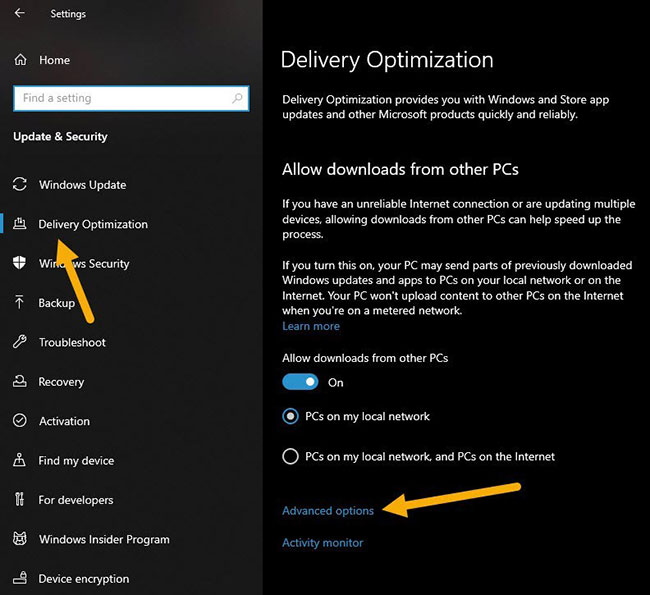
<p style="text-align: justify;">Nhấn phím tắt&nbsp;<strong>Win + I</strong>&nbsp;để&nbsp;mở ứng dụng Settings. Trong ứng dụng&nbsp;<strong>Settings</strong>, chuyển đến trang&nbsp;<strong>Update &amp; Security &gt; Delivery Optimization</strong>. Trên bảng điều khiển bên phải, nhấp vào liên kết&nbsp;<strong>Advanced options.</strong></p>

<figure>
<div style="text-align: justify;"><img alt="Nhấp vào liên kết Advanced options" data-i="0" data-src="https://st.quantrimang.com/photos/image/2021/03/26/gioi-han-bang-thong-tai-xuong-1.jpg" data-was-processed="true" height="595" src="https://st.quantrimang.com/photos/image/2021/03/26/gioi-han-bang-thong-tai-xuong-1.jpg" width="650" /></div>

<figcaption>
<div style="text-align: justify;">Nhấp vào liên kết Advanced options</div>
</figcaption>
</figure>

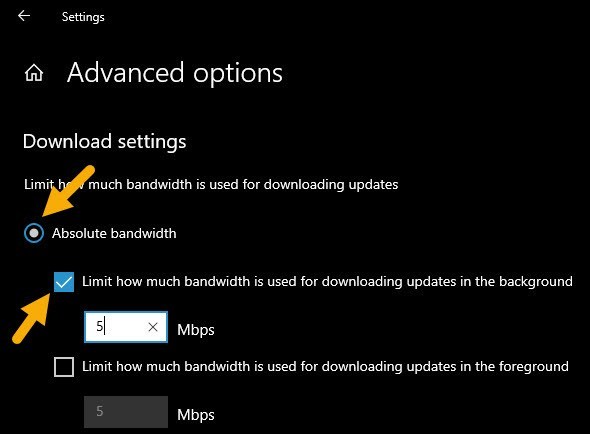
<p style="text-align: justify;">Trong phần&nbsp;<strong>Download Settings</strong>, hãy chọn tùy chọn&nbsp;<strong>Absolute bandwidth</strong>. Sau đó, chọn hộp kiểm&nbsp;<strong>Limit how much bandwidth is used for downloading updates in the background</strong>&nbsp;và đặt băng thông trong trường khả dụng.</p>

<figure>
<div style="text-align: justify;"><img alt="Chọn tùy chọn Absolute bandwidth" data-i="1" data-src="https://st.quantrimang.com/photos/image/2021/03/26/gioi-han-bang-thong-tai-xuong-2.jpg" data-was-processed="true" height="434" src="https://st.quantrimang.com/photos/image/2021/03/26/gioi-han-bang-thong-tai-xuong-2.jpg" width="590" /></div>

<figcaption>
<div style="text-align: justify;">Chọn tùy chọn Absolute bandwidth</div>
</figcaption>
</figure>

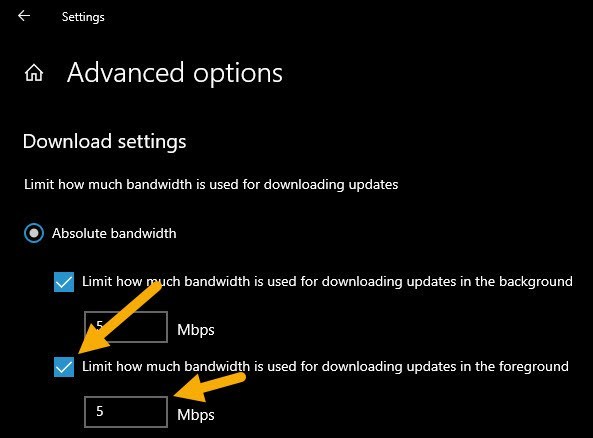
<p style="text-align: justify;">Tiếp theo, chọn hộp kiểm&nbsp;<strong>Limit how much bandwidth is used for downloading updates in the foreground</strong>&nbsp;và đặt băng thông trong trường khả dụng.</p>

<figure>
<div style="text-align: justify;"><img alt="Chọn hộp kiểm Limit how much bandwidth is used for downloading updates in the foreground" data-i="2" data-src="https://st.quantrimang.com/photos/image/2021/03/26/gioi-han-bang-thong-tai-xuong-3.jpg" data-was-processed="true" height="438" src="https://st.quantrimang.com/photos/image/2021/03/26/gioi-han-bang-thong-tai-xuong-3.jpg" width="593" /></div>

<figcaption>
<div style="text-align: justify;">Chọn hộp kiểm Limit how much bandwidth is used for downloading updates in the foreground</div>
</figcaption>
</figure>

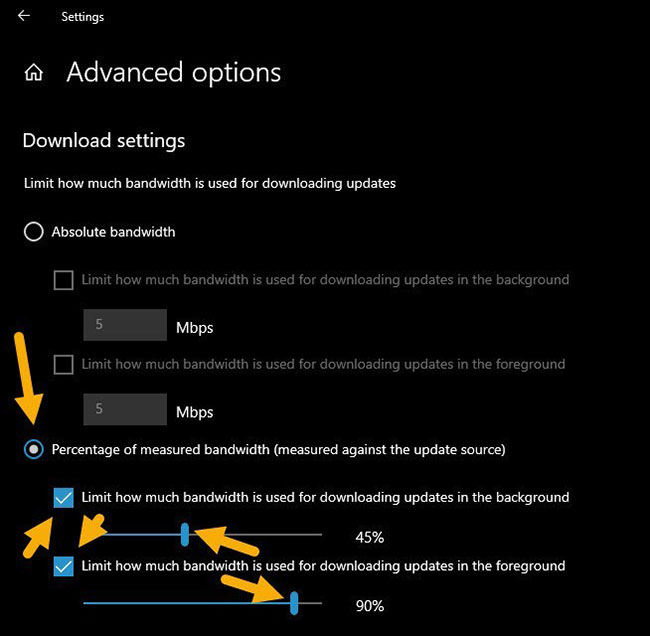
<p style="text-align: justify;">Nếu không muốn đặt giới hạn cứng, bạn có thể chọn tùy chọn&nbsp;<strong>Percentage of measured bandwidth</strong>&nbsp;và sử dụng các thanh trượt để đặt lượng băng thông mà Windows Updates có thể sử dụng. Một điều cần lưu ý là Windows sẽ tự động kiểm tra và xác định băng thông thực của bạn là bao nhiêu. Bạn không có quyền kiểm soát nó. Đó là một trong những lý do tại sao khuyên bạn nên sử dụng tùy chọn&nbsp;<strong>Absolute bandwidth.</strong></p>

<figure>
<div style="text-align: justify;"><img alt="Bạn có thể chọn tùy chọn Percentage of measured bandwidth" data-i="3" data-src="https://st.quantrimang.com/photos/image/2021/03/26/gioi-han-bang-thong-tai-xuong-4.jpg" data-was-processed="true" height="636" src="https://st.quantrimang.com/photos/image/2021/03/26/gioi-han-bang-thong-tai-xuong-4.jpg" width="650" /></div>

<figcaption>
<div style="text-align: justify;">Bạn có thể chọn tùy chọn Percentage of measured bandwidth</div>
</figcaption>
</figure>

<p style="text-align: justify;">Cuối cùng, đóng ứng dụng Settings và&nbsp;khởi động lại Windows 10. Sau khi khởi động lại, Windows Update sẽ tự xử lý các cài đặt và giới hạn băng thông.</p>
		</div>
				<div id="author">
						<p>
				<strong>Nguồn tin:</strong>
				Quantrimang.com
			</p>
		</div>
	</div>
	<div id="footer" class="clearfix">
		<div id="url">
			<strong>URL của bản tin này: </strong><a href="https://www.nguoicodonvn2008.info/vi/news/savefile/kien-thuc-may-tinh/cach-thiet-lap-gioi-han-bang-thong-tai-xuong-cua-windows-updates-trong-windows-10-3839.html" title="Cách thiết lập giới hạn băng thông tải xuống của Windows Updates trong Windows 10">https://www.nguoicodonvn2008.info/vi/news/savefile/kien-thuc-may-tinh/cach-thiet-lap-gioi-han-bang-thong-tai-xuong-cua-windows-updates-trong-windows-10-3839.html</a>

		</div>
		<div class="clear"></div>
		<div class="copyright">
			&copy; .&#x3A; Nguoicodonvn2008.info - Cõi lòng người cô đơn &#x3A;.
		</div>
		<div id="contact">
			<a href="mailto:admin@nguoicodonvn2008.info">admin@nguoicodonvn2008.info</a>
		</div>
	</div>
</div>
        <div id="timeoutsess" class="chromeframe">
            Bạn đã không sử dụng Site, <a onclick="timeoutsesscancel();" href="https://nguoicodonvn2008.info/#">Bấm vào đây để duy trì trạng thái đăng nhập</a>. Thời gian chờ: <span id="secField"> 60 </span> giây
        </div>
        <div id="openidResult" class="nv-alert" style="display:none"></div>
        <div id="openidBt" data-result="" data-redirect=""></div>
		</script>
		<div class="car-top">
  <span><img src="https://nguoicodonvn2008.info/themes/default/images/car.png" alt=""></span>
</div>
<script src="https://nguoicodonvn2008.info/assets/js/jquery/jquery.min.js"></script>
<script>var nv_base_siteurl="/",nv_lang_data="vi",nv_lang_interface="vi",nv_name_variable="nv",nv_fc_variable="op",nv_lang_variable="language",nv_module_name="news",nv_func_name="savefile",nv_is_user=0, nv_my_ofs=-4,nv_my_abbr="EDT",nv_cookie_prefix="nv4c_e856T",nv_check_pass_mstime=1738000,nv_area_admin=0,nv_safemode=0,theme_responsive=0,nv_recaptcha_ver=2,nv_recaptcha_sitekey="",nv_recaptcha_type="image",XSSsanitize=1;</script>
<script src="https://nguoicodonvn2008.info/assets/js/language/vi.js"></script>
<script src="https://nguoicodonvn2008.info/assets/js/DOMPurify/purify3.js"></script>
<script src="https://nguoicodonvn2008.info/assets/js/global.js"></script>
<script src="https://nguoicodonvn2008.info/assets/js/site.js"></script>
<script src="https://nguoicodonvn2008.info/themes/default/js/news.js"></script>
<script src="https://nguoicodonvn2008.info/themes/default/js/main.js"></script>
<script src="https://nguoicodonvn2008.info/themes/default/js/custom.js"></script>
<script type="application/ld+json">
        {
            "@context": "https://schema.org",
            "@type": "Organization",
            "url": "https://nguoicodonvn2008.info",
            "logo": "https://nguoicodonvn2008.info/uploads/angel.gif"
        }
        </script>
<script src="https://nguoicodonvn2008.info/themes/default/js/bootstrap.min.js"></script>
<script type="text/javascript">
var $scrolltop = $('.car-top');
$scrolltop.on('click', function () {
    $('html,body').animate({
        scrollTop: 0
    }, 800);
    $(this).addClass("car-run");
    setTimeout(function(){ $scrolltop.removeClass('car-run');}, 1000);
    return false;
});
$(window).on('scroll', function ()
{ 
    if($(window).scrollTop() >= 200)
    {
        $scrolltop.addClass("show");
        $scrolltop.addClass("car-down");
    }
    else
    {
       $scrolltop.removeClass("show");
       setTimeout(function(){ $scrolltop.removeClass('car-down');}, 300);
    }
});
</script>
</body>
</html>