<!DOCTYPE html>
    <html lang="vi" xmlns="http://www.w3.org/1999/xhtml" prefix="og: http://ogp.me/ns#">
    <head>
<title>Cách thiết lập biến môi trường trong ZSH</title>
<meta name="description" content="Cách thiết lập biến môi trường trong ZSH - Savefile - Tin Tức -...">
<meta name="author" content=".: Nguoicodonvn2008.info - Cõi lòng người cô đơn :.">
<meta name="copyright" content=".: Nguoicodonvn2008.info - Cõi lòng người cô đơn :. [admin@nguoicodonvn2008.info]">
<meta name="robots" content="index, archive, follow, noodp">
<meta name="googlebot" content="index,archive,follow,noodp">
<meta name="msnbot" content="all,index,follow">
<meta name="generator" content="NukeViet v4.5">
<meta http-equiv="Content-Type" content="text/html; charset=utf-8">
<meta property="og:title" content="Cách thiết lập biến môi trường trong ZSH">
<meta property="og:type" content="website">
<meta property="og:description" content="Savefile - Tin Tức - https&#x3A;&#x002F;&#x002F;www.nguoicodonvn2008.info&#x002F;vi&#x002F;news&#x002F;savefile&#x002F;kien-thuc-may-tinh&#x002F;cach-thiet-lap-bien-moi-truong-trong-zsh-10252.html">
<meta property="og:site_name" content=".&#x3A; Nguoicodonvn2008.info - Cõi lòng người cô đơn &#x3A;.">
<meta property="og:url" content="https://www.nguoicodonvn2008.info/vi/news/savefile/kien-thuc-may-tinh/cach-thiet-lap-bien-moi-truong-trong-zsh-10252.html">
<link rel="shortcut icon" href="https://nguoicodonvn2008.info/favicon.ico">
<link rel="canonical" href="https://www.nguoicodonvn2008.info/vi/news/savefile/kien-thuc-may-tinh/cach-thiet-lap-bien-moi-truong-trong-zsh-10252.html">
<link rel="alternate" href="https://nguoicodonvn2008.info/vi/news/rss/" title="Tin Tức" type="application/rss+xml">
<link rel="alternate" href="https://nguoicodonvn2008.info/vi/news/rss/karaoke-dual/" title="Tin Tức - Karaoke Dual" type="application/rss+xml">
<link rel="alternate" href="https://nguoicodonvn2008.info/vi/news/rss/nhac-tre/" title="Tin Tức - Nhạc trẻ" type="application/rss+xml">
<link rel="alternate" href="https://nguoicodonvn2008.info/vi/news/rss/tru-tinh/" title="Tin Tức - Trữ tình" type="application/rss+xml">
<link rel="alternate" href="https://nguoicodonvn2008.info/vi/news/rss/nuoc-ngoai/" title="Tin Tức - Nước ngoài" type="application/rss+xml">
<link rel="alternate" href="https://nguoicodonvn2008.info/vi/news/rss/remix/" title="Tin Tức - Remix" type="application/rss+xml">
<link rel="alternate" href="https://nguoicodonvn2008.info/vi/news/rss/tam-su-tinh-yeu/" title="Tin Tức - Tâm sự tình yêu" type="application/rss+xml">
<link rel="alternate" href="https://nguoicodonvn2008.info/vi/news/rss/tho-suu-tam/" title="Tin Tức - Thơ sưu tầm" type="application/rss+xml">
<link rel="alternate" href="https://nguoicodonvn2008.info/vi/news/rss/cuoc-song/" title="Tin Tức - Cuộc sống" type="application/rss+xml">
<link rel="alternate" href="https://nguoicodonvn2008.info/vi/news/rss/phan-mem/" title="Tin Tức - Phần mềm" type="application/rss+xml">
<link rel="alternate" href="https://nguoicodonvn2008.info/vi/news/rss/kien-thuc-may-tinh/" title="Tin Tức - Kiến thức máy tính" type="application/rss+xml">
<link rel="alternate" href="https://nguoicodonvn2008.info/vi/news/rss/hoc-tap/" title="Tin Tức - Học tập" type="application/rss+xml">
<link rel="alternate" href="https://nguoicodonvn2008.info/vi/news/rss/tai-lieu/" title="Tin Tức - Tài liệu" type="application/rss+xml">
<link rel="alternate" href="https://nguoicodonvn2008.info/vi/news/rss/de-thi/" title="Tin Tức - Đề thi" type="application/rss+xml">
<link rel="preload" as="style" href="https://nguoicodonvn2008.info/assets/css/font-awesome.min.css" type="text/css">
<link rel="preload" as="style" href="https://nguoicodonvn2008.info/themes/default/css/bootstrap.non-responsive.css" type="text/css">
<link rel="preload" as="style" href="https://nguoicodonvn2008.info/themes/default/css/style.css" type="text/css">
<link rel="preload" as="style" href="https://nguoicodonvn2008.info/themes/default/css/style.non-responsive.css" type="text/css">
<link rel="preload" as="style" href="https://nguoicodonvn2008.info/themes/default/css/news.css" type="text/css">
<link rel="preload" as="style" href="https://nguoicodonvn2008.info/themes/default/css/custom.css" type="text/css">
<link rel="preload" as="script" href="https://nguoicodonvn2008.info/assets/js/jquery/jquery.min.js" type="text/javascript">
<link rel="preload" as="script" href="https://nguoicodonvn2008.info/assets/js/language/vi.js" type="text/javascript">
<link rel="preload" as="script" href="https://nguoicodonvn2008.info/assets/js/DOMPurify/purify3.js" type="text/javascript">
<link rel="preload" as="script" href="https://nguoicodonvn2008.info/assets/js/global.js" type="text/javascript">
<link rel="preload" as="script" href="https://nguoicodonvn2008.info/assets/js/site.js" type="text/javascript">
<link rel="preload" as="script" href="https://nguoicodonvn2008.info/themes/default/js/news.js" type="text/javascript">
<link rel="preload" as="script" href="https://nguoicodonvn2008.info/themes/default/js/main.js" type="text/javascript">
<link rel="preload" as="script" href="https://nguoicodonvn2008.info/themes/default/js/custom.js" type="text/javascript">
<link rel="preload" as="script" href="https://nguoicodonvn2008.info/themes/default/js/bootstrap.min.js" type="text/javascript">
<link rel="stylesheet" href="https://nguoicodonvn2008.info/assets/css/font-awesome.min.css">
<link rel="stylesheet" href="https://nguoicodonvn2008.info/themes/default/css/bootstrap.non-responsive.css">
<link rel="stylesheet" href="https://nguoicodonvn2008.info/themes/default/css/style.css">
<link rel="stylesheet" href="https://nguoicodonvn2008.info/themes/default/css/style.non-responsive.css">
<link rel="StyleSheet" href="https://nguoicodonvn2008.info/themes/default/css/news.css">
<link rel="stylesheet" href="https://nguoicodonvn2008.info/themes/default/css/custom.css">
<style type="text/css">
	body{background: #fff;}
</style>
    </head>
    <body>
<div id="print">
	<div id="hd_print">
		<h2 class="pull-left">.&#x3A; Nguoicodonvn2008.info - Cõi lòng người cô đơn &#x3A;.</h2>
		<p class="pull-right"><a title=".&#x3A; Nguoicodonvn2008.info - Cõi lòng người cô đơn &#x3A;." href="https://nguoicodonvn2008.info/">https://nguoicodonvn2008.info</a></p>
	</div>
	<div class="clear"></div>
	<hr />
	<div id="content">
		<h1>Cách thiết lập biến môi trường trong ZSH</h1>
		<ul class="list-inline">
			<li>Thứ năm - 24/04/2025 22:58</li>
			<li class="hidden-print txtrequired"><em class="fa fa-print">&nbsp;</em><a title="In ra" href="javascript:;" onclick="window.print()">In ra</a></li>
			<li class="hidden-print txtrequired"><em class="fa fa-power-off">&nbsp;</em><a title="Đóng cửa sổ này" href="javascript:;" onclick="window.close()">Đóng cửa sổ này</a></li>
		</ul>
		<div class="clear"></div>
		<div id="hometext">
		</div>
				<div class="imghome">
			<img alt="Cách thiết lập biến môi trường trong ZSH" src="https://st.quantrimang.com/photos/image/2025/04/24/thiet-lap-bien-moi-truong-trong-zsh-7.jpg" width="460" class="img-thumbnail" />
		</div>
		<div class="clear"></div>
		<div id="bodytext" class="clearfix">
			<p style="text-align: justify;">Biến môi trường là các thiết lập đơn giản kiểm soát cách chương trình chạy trên&nbsp;&nbsp;máy tính. Bạn có thể sử dụng chúng để thay đổi cách phần mềm hoạt động (mà không cần chỉnh sửa code thực tế). ZSH hoặc Z shell là shell dòng lệnh được sử dụng trong các hệ thống giống Unix. Nó cung cấp các tính năng như tự động hoàn thành nâng cao, tùy chọn tùy chỉnh, lịch sử lệnh, sửa lỗi chính tả, v.v... Trong ZSH, bạn có thể dễ dàng thiết lập các biến môi trường, tạm thời hoặc vĩnh viễn, tùy thuộc vào nhu cầu của mình. Hãy cùng tìm hiểu cách chúng ta có thể thực hiện việc này qua bài viết sau đây!</p>

<div style="text-align: justify;">Linh kiện máy tính</div>

<h2 style="text-align: justify;">Biến môi trường trong ZSH</h2>

<p style="text-align: justify;">Trong Zsh, biến môi trường (ENV) là các cặp key-value cấu hình và kiểm soát cách những chương trình và tiến trình chạy. Chúng cung cấp thông tin cần thiết cho hệ thống và hướng dẫn hành vi của chương trình.</p>

<p style="text-align: justify;">Biến môi trường phân biệt chữ hoa chữ thường, nghĩa là chữ hoa và chữ thường được xử lý khác nhau. Biến môi trường thường được viết bằng chữ in hoa để dễ nhận biết hơn.</p>

<h2 style="text-align: justify;">Biến môi trường tạm thời so với vĩnh viễn</h2>

<p style="text-align: justify;">Biến tạm thời chỉ hoạt động trong thời gian của phiên terminal hiện tại. Khi bạn đăng xuất, đóng terminal hoặc khởi động lại hệ thống, chúng sẽ tự động bị xóa. Mặt khác, các biến cố định được lưu trữ trong các file cấu hình như “~/.zshrc”. Bạn có thể thiết lập một biến môi trường cố định bằng cách thêm nó vào file cấu hình, như “~/.zshrc”. Điều này đảm bảo biến được tự động thiết lập và khả dụng mỗi khi bạn bắt đầu một phiên terminal mới.</p>

<h2 style="text-align: justify;">Cách thiết lập các biến môi trường tạm thời</h2>

<div style="text-align: justify;">&nbsp;</div>

<p style="text-align: justify;">Lệnh export là cách dễ nhất để thiết lập tạm thời các biến môi trường. Lệnh này tạo ra một biến môi trường cho phiên terminal hiện tại. Bạn có thể sử dụng cú pháp sau để tạo một biến môi trường tạm thời trong ZSH:</p>

<pre id="pre0">
<code>export VARNAME=VARVALUE</code></pre>

<p style="text-align: justify;">Ví dụ, chạy lệnh export sau sẽ tạo ra một biến MTE và gán cho nó một giá trị là “7”:</p>

<pre id="pre1">
<code>export MTE=7</code></pre>

<figure>
<div style="text-align: justify;"><img alt="" data-i="0" data-src="https://st.quantrimang.com/photos/image/2025/04/24/thiet-lap-bien-moi-truong-trong-zsh-1.jpg" data-was-processed="true" height="55" src="https://st.quantrimang.com/photos/image/2025/04/24/thiet-lap-bien-moi-truong-trong-zsh-1.jpg" width="800" /></div>
</figure>

<p style="text-align: justify;">Hãy sử dụng lệnh printenv hoặc echo để xác minh việc tạo biến:</p>

<pre id="pre2">
<code>echo $MTE</code></pre>

<figure>
<div style="text-align: justify;"><img alt="" data-i="1" data-src="https://st.quantrimang.com/photos/image/2025/04/24/thiet-lap-bien-moi-truong-trong-zsh-2.jpg" data-was-processed="true" height="69" src="https://st.quantrimang.com/photos/image/2025/04/24/thiet-lap-bien-moi-truong-trong-zsh-2.jpg" width="731" /></div>
</figure>

<p style="text-align: justify;">Ngoài ra, chúng ta có thể sử dụng lệnh set để thiết lập các biến tạm thời:</p>

<pre id="pre3">
<code>set varName=varValue</code></pre>

<p style="text-align: justify;">Với lệnh set, chúng ta có thể thiết lập nhiều giá trị của một biến. Nhưng trong trường hợp đó, chúng ta cần phân tách từng giá trị bằng dấu hai chấm “:”, như thế này:</p>

<pre id="pre4">
<code>export VARNAME=VAL1:VAL2:VAL3</code></pre>

<p style="text-align: justify;">Nếu bạn muốn chỉ định giá trị phân cách bằng dấu cách cho biến, hãy đặt giá trị trong dấu ngoặc kép:</p>

<pre id="pre5">
<code>export VARNAME=&quot;MAKE TECH EASIER&quot;</code></pre>

<h2 style="text-align: justify;">Cách thiết lập biến môi trường vĩnh viễn trong ZSH</h2>

<p style="text-align: justify;">Để giữ biến môi trường hoạt động vĩnh viễn, hãy thêm biến đó vào file “.zshrc”. Nếu file không tồn tại, bạn có thể tạo file đó bằng bất kỳ trình soạn thảo văn bản nào.</p>

<p style="text-align: justify;">Hãy thực hiện lệnh bên dưới để tạo file “.zshrc” mới hoặc chỉnh sửa file hiện có trong trình soạn thảo Nano:</p>

<pre id="pre6">
<code>nano ~/.zshrc</code></pre>

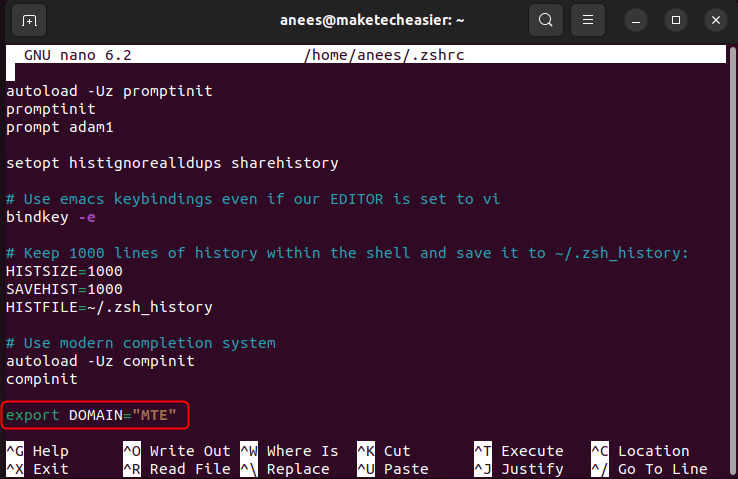
<p style="text-align: justify;">Bây giờ, hãy sử dụng lệnh export để thêm biến mới vào môi trường vĩnh viễn:</p>

<pre id="pre7">
<code>export VARNAME=VALUE</code></pre>

<p style="text-align: justify;">Thay thế&nbsp;<strong>VARNAME</strong>&nbsp;và&nbsp;<strong>VALUE</strong>&nbsp;bằng tên và giá trị tương ứng:</p>

<figure>
<div style="text-align: justify;"><img alt="" data-i="2" data-src="https://st.quantrimang.com/photos/image/2025/04/24/thiet-lap-bien-moi-truong-trong-zsh-3.jpg" data-was-processed="true" height="479" src="https://st.quantrimang.com/photos/image/2025/04/24/thiet-lap-bien-moi-truong-trong-zsh-3.jpg" width="738" /></div>
</figure>

<p style="text-align: justify;">Lưu và thoát file. Sử dụng lệnh source để áp dụng các thay đổi từ file “.zshrc” mà không cần khởi động lại terminal. Ngoài ra, bạn có thể đóng và mở lại terminal để bắt đầu phiên mới với các thay đổi đã cập nhật:</p>

<pre id="pre8">
<code>source ~/.zshrc</code></pre>

<figure>
<div style="text-align: justify;"><img alt="Áp dụng file cấu hình thay đổi" data-i="3" data-src="https://st.quantrimang.com/photos/image/2025/04/24/thiet-lap-bien-moi-truong-trong-zsh-4.jpg" data-was-processed="true" height="57" src="https://st.quantrimang.com/photos/image/2025/04/24/thiet-lap-bien-moi-truong-trong-zsh-4.jpg" width="731" /></div>

<figcaption>
<div style="text-align: justify;">Áp dụng file cấu hình thay đổi</div>
</figcaption>
</figure>

<p style="text-align: justify;">Cuối cùng, bạn có thể xác minh biến môi trường được đặt vĩnh viễn bằng&nbsp;<a data-type="internal" href="https://quantrimang.com/cong-nghe/cach-su-dung-lenh-echo-trong-linux-166943" title="Cách sử dụng lệnh &#039;echo&#039; trong Linux">lệnh echo</a>&nbsp;như sau:</p>

<pre id="pre9">
<code>echo $VARIABLE_NAME</code></pre>

<figure>
<div style="text-align: justify;"><img alt="" data-i="4" data-src="https://st.quantrimang.com/photos/image/2025/04/24/thiet-lap-bien-moi-truong-trong-zsh-5.jpg" data-was-processed="true" src="https://st.quantrimang.com/photos/image/2025/04/24/thiet-lap-bien-moi-truong-trong-zsh-5.jpg" /></div>
</figure>

<p style="text-align: justify;">Tương tự, bạn có thể sử dụng lệnh printenv để kiểm tra các biến môi trường:</p>

<pre id="pre10">
<code>printenv VARIABLE_NAME</code></pre>

<figure>
<div style="text-align: justify;"><img alt="Xác minh biến môi trường" data-i="5" data-src="https://st.quantrimang.com/photos/image/2025/04/24/thiet-lap-bien-moi-truong-trong-zsh-6.jpg" data-was-processed="true" height="68" src="https://st.quantrimang.com/photos/image/2025/04/24/thiet-lap-bien-moi-truong-trong-zsh-6.jpg" width="734" /></div>

<figcaption>
<div style="text-align: justify;">Xác minh biến môi trường</div>
</figcaption>
</figure>

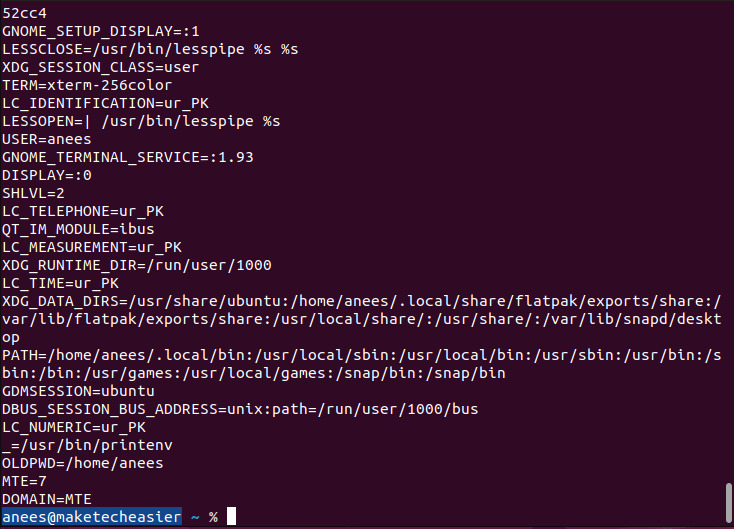
<p style="text-align: justify;">Ngoài ra, bạn có thể sử dụng printenve mà không có bất kỳ đối số nào để có được cái nhìn tổng quan về tất cả các biến trong môi trường hiện tại:</p>

<pre id="pre11">
<code>printenv</code></pre>

<figure>
<div style="text-align: justify;"><img alt="Tất cả các biến môi trường" data-i="6" data-src="https://st.quantrimang.com/photos/image/2025/04/24/thiet-lap-bien-moi-truong-trong-zsh-7.jpg" data-was-processed="true" height="529" src="https://st.quantrimang.com/photos/image/2025/04/24/thiet-lap-bien-moi-truong-trong-zsh-7.jpg" width="734" /></div>

<figcaption>
<div style="text-align: justify;">Tất cả các biến môi trường</div>
</figcaption>
</figure>

<h2 style="text-align: justify;">Các phương pháp hay nhất để quản lý biến môi trường trong ZSH</h2>

<p style="text-align: justify;">Sau đây là một số phương pháp được khuyến nghị giúp nâng cao khả năng quản lý biến trong Z Shell:</p>

<ul>
	<li style="text-align: justify;">Sử dụng tên biến rõ ràng và có tính mô tả, mô tả rõ mục đích của chúng (ví dụ, JAVA_HOME, PROJECT_PATH).</li>
	<li style="text-align: justify;">Sử dụng quy ước viết hoa để viết tên biến môi trường. Điều này giúp dễ nhận biết và tránh nhầm lẫn với các biến shell thông thường.</li>
	<li style="text-align: justify;">Nếu một giá trị chứa khoảng trắng hoặc ký tự đặc biệt, hãy đặt giá trị đó trong dấu ngoặc kép để tránh lỗi. Ví dụ,&nbsp;<em>export DOMAIN=&quot;MAKE TECH EASIER&quot;.</em></li>
	<li style="text-align: justify;">Chạy&nbsp;<strong>source ~/.zshrc</strong>&nbsp;sau khi thực hiện các bản cập nhật để áp dụng ngay mà không cần khởi động lại terminal.</li>
	<li style="text-align: justify;">Tạo bản sao lưu file “.zshrc” của bạn trước khi thực hiện các thay đổi, đặc biệt là nếu bạn không quen với cú pháp.</li>
</ul>

<p style="text-align: justify;">Theo cách này, bạn có thể đặt biến môi trường trong ZSH một cách hiệu quả.</p>

<p style="text-align: justify;">Đặt biến môi trường trong ZSH là một cách đơn giản nhưng hiệu quả để kiểm soát cách hệ thống và ứng dụng của bạn hoạt động. Cho dù bạn cần thay đổi tạm thời cho phiên hiện tại hay muốn một biến tồn tại vĩnh viễn, ZSH giúp bạn dễ dàng quản lý chúng thông qua các lệnh như export hoặc bằng cách chỉnh sửa file “.zshrc”. Chỉ cần đảm bảo sử dụng tên rõ ràng và mô tả, đóng gói giá trị trong dấu ngoặc kép khi cần và áp dụng đúng các thay đổi bằng source. Ngoài ra, hãy đảm bảo hiểu cách bạn có thể thiết lập và liệt kê các biến môi trường trong Linux để quản lý tốt hơn những cấu hình hệ thống của bạn.</p>
		</div>
				<div id="author">
						<p>
				<strong>Nguồn tin:</strong>
				Quantrimang.com:
			</p>
		</div>
	</div>
	<div id="footer" class="clearfix">
		<div id="url">
			<strong>URL của bản tin này: </strong><a href="https://www.nguoicodonvn2008.info/vi/news/savefile/kien-thuc-may-tinh/cach-thiet-lap-bien-moi-truong-trong-zsh-10252.html" title="Cách thiết lập biến môi trường trong ZSH">https://www.nguoicodonvn2008.info/vi/news/savefile/kien-thuc-may-tinh/cach-thiet-lap-bien-moi-truong-trong-zsh-10252.html</a>

		</div>
		<div class="clear"></div>
		<div class="copyright">
			&copy; .&#x3A; Nguoicodonvn2008.info - Cõi lòng người cô đơn &#x3A;.
		</div>
		<div id="contact">
			<a href="mailto:admin@nguoicodonvn2008.info">admin@nguoicodonvn2008.info</a>
		</div>
	</div>
</div>
        <div id="timeoutsess" class="chromeframe">
            Bạn đã không sử dụng Site, <a onclick="timeoutsesscancel();" href="https://nguoicodonvn2008.info/#">Bấm vào đây để duy trì trạng thái đăng nhập</a>. Thời gian chờ: <span id="secField"> 60 </span> giây
        </div>
        <div id="openidResult" class="nv-alert" style="display:none"></div>
        <div id="openidBt" data-result="" data-redirect=""></div>
		</script>
		<div class="car-top">
  <span><img src="https://nguoicodonvn2008.info/themes/default/images/car.png" alt=""></span>
</div>
<script src="https://nguoicodonvn2008.info/assets/js/jquery/jquery.min.js"></script>
<script>var nv_base_siteurl="/",nv_lang_data="vi",nv_lang_interface="vi",nv_name_variable="nv",nv_fc_variable="op",nv_lang_variable="language",nv_module_name="news",nv_func_name="savefile",nv_is_user=0, nv_my_ofs=-4,nv_my_abbr="EDT",nv_cookie_prefix="nv4c_e856T",nv_check_pass_mstime=1738000,nv_area_admin=0,nv_safemode=0,theme_responsive=0,nv_recaptcha_ver=2,nv_recaptcha_sitekey="",nv_recaptcha_type="image",XSSsanitize=1;</script>
<script src="https://nguoicodonvn2008.info/assets/js/language/vi.js"></script>
<script src="https://nguoicodonvn2008.info/assets/js/DOMPurify/purify3.js"></script>
<script src="https://nguoicodonvn2008.info/assets/js/global.js"></script>
<script src="https://nguoicodonvn2008.info/assets/js/site.js"></script>
<script src="https://nguoicodonvn2008.info/themes/default/js/news.js"></script>
<script src="https://nguoicodonvn2008.info/themes/default/js/main.js"></script>
<script src="https://nguoicodonvn2008.info/themes/default/js/custom.js"></script>
<script type="application/ld+json">
        {
            "@context": "https://schema.org",
            "@type": "Organization",
            "url": "https://nguoicodonvn2008.info",
            "logo": "https://nguoicodonvn2008.info/uploads/angel.gif"
        }
        </script>
<script src="https://nguoicodonvn2008.info/themes/default/js/bootstrap.min.js"></script>
<script type="text/javascript">
var $scrolltop = $('.car-top');
$scrolltop.on('click', function () {
    $('html,body').animate({
        scrollTop: 0
    }, 800);
    $(this).addClass("car-run");
    setTimeout(function(){ $scrolltop.removeClass('car-run');}, 1000);
    return false;
});
$(window).on('scroll', function ()
{ 
    if($(window).scrollTop() >= 200)
    {
        $scrolltop.addClass("show");
        $scrolltop.addClass("car-down");
    }
    else
    {
       $scrolltop.removeClass("show");
       setTimeout(function(){ $scrolltop.removeClass('car-down');}, 300);
    }
});
</script>
</body>
</html>