<!DOCTYPE html>
    <html lang="vi" xmlns="http://www.w3.org/1999/xhtml" prefix="og: http://ogp.me/ns#">
    <head>
<title>Cách thêm&#x002F;xóa thẻ thông tin cho News and Interests trong Windows 10</title>
<meta name="description" content="Cách thêm&#x002F;xóa thẻ thông tin cho News and Interests trong Windows 10 - Savefile - Tin Tức -...">
<meta name="author" content=".: Nguoicodonvn2008.info - Cõi lòng người cô đơn :.">
<meta name="copyright" content=".: Nguoicodonvn2008.info - Cõi lòng người cô đơn :. [admin@nguoicodonvn2008.info]">
<meta name="robots" content="index, archive, follow, noodp">
<meta name="googlebot" content="index,archive,follow,noodp">
<meta name="msnbot" content="all,index,follow">
<meta name="generator" content="NukeViet v4.5">
<meta http-equiv="Content-Type" content="text/html; charset=utf-8">
<meta property="og:title" content="Cách thêm&#x002F;xóa thẻ thông tin cho News and Interests trong Windows 10">
<meta property="og:type" content="website">
<meta property="og:description" content="Savefile - Tin Tức - https&#x3A;&#x002F;&#x002F;www.nguoicodonvn2008.info&#x002F;vi&#x002F;news&#x002F;savefile&#x002F;kien-thuc-may-tinh&#x002F;cach-them-xoa-the-thong-tin-cho-news-and-interests-trong-windows-10-4100.html">
<meta property="og:site_name" content=".&#x3A; Nguoicodonvn2008.info - Cõi lòng người cô đơn &#x3A;.">
<meta property="og:url" content="https://www.nguoicodonvn2008.info/vi/news/savefile/kien-thuc-may-tinh/cach-them-xoa-the-thong-tin-cho-news-and-interests-trong-windows-10-4100.html">
<link rel="shortcut icon" href="https://nguoicodonvn2008.info/favicon.ico">
<link rel="canonical" href="https://www.nguoicodonvn2008.info/vi/news/savefile/kien-thuc-may-tinh/cach-them-xoa-the-thong-tin-cho-news-and-interests-trong-windows-10-4100.html">
<link rel="alternate" href="https://nguoicodonvn2008.info/vi/news/rss/" title="Tin Tức" type="application/rss+xml">
<link rel="alternate" href="https://nguoicodonvn2008.info/vi/news/rss/karaoke-dual/" title="Tin Tức - Karaoke Dual" type="application/rss+xml">
<link rel="alternate" href="https://nguoicodonvn2008.info/vi/news/rss/nhac-tre/" title="Tin Tức - Nhạc trẻ" type="application/rss+xml">
<link rel="alternate" href="https://nguoicodonvn2008.info/vi/news/rss/tru-tinh/" title="Tin Tức - Trữ tình" type="application/rss+xml">
<link rel="alternate" href="https://nguoicodonvn2008.info/vi/news/rss/nuoc-ngoai/" title="Tin Tức - Nước ngoài" type="application/rss+xml">
<link rel="alternate" href="https://nguoicodonvn2008.info/vi/news/rss/remix/" title="Tin Tức - Remix" type="application/rss+xml">
<link rel="alternate" href="https://nguoicodonvn2008.info/vi/news/rss/tam-su-tinh-yeu/" title="Tin Tức - Tâm sự tình yêu" type="application/rss+xml">
<link rel="alternate" href="https://nguoicodonvn2008.info/vi/news/rss/tho-suu-tam/" title="Tin Tức - Thơ sưu tầm" type="application/rss+xml">
<link rel="alternate" href="https://nguoicodonvn2008.info/vi/news/rss/cuoc-song/" title="Tin Tức - Cuộc sống" type="application/rss+xml">
<link rel="alternate" href="https://nguoicodonvn2008.info/vi/news/rss/phan-mem/" title="Tin Tức - Phần mềm" type="application/rss+xml">
<link rel="alternate" href="https://nguoicodonvn2008.info/vi/news/rss/kien-thuc-may-tinh/" title="Tin Tức - Kiến thức máy tính" type="application/rss+xml">
<link rel="alternate" href="https://nguoicodonvn2008.info/vi/news/rss/hoc-tap/" title="Tin Tức - Học tập" type="application/rss+xml">
<link rel="alternate" href="https://nguoicodonvn2008.info/vi/news/rss/tai-lieu/" title="Tin Tức - Tài liệu" type="application/rss+xml">
<link rel="alternate" href="https://nguoicodonvn2008.info/vi/news/rss/de-thi/" title="Tin Tức - Đề thi" type="application/rss+xml">
<link rel="preload" as="style" href="https://nguoicodonvn2008.info/assets/css/font-awesome.min.css" type="text/css">
<link rel="preload" as="style" href="https://nguoicodonvn2008.info/themes/default/css/bootstrap.non-responsive.css" type="text/css">
<link rel="preload" as="style" href="https://nguoicodonvn2008.info/themes/default/css/style.css" type="text/css">
<link rel="preload" as="style" href="https://nguoicodonvn2008.info/themes/default/css/style.non-responsive.css" type="text/css">
<link rel="preload" as="style" href="https://nguoicodonvn2008.info/themes/default/css/news.css" type="text/css">
<link rel="preload" as="style" href="https://nguoicodonvn2008.info/themes/default/css/custom.css" type="text/css">
<link rel="preload" as="script" href="https://nguoicodonvn2008.info/assets/js/jquery/jquery.min.js" type="text/javascript">
<link rel="preload" as="script" href="https://nguoicodonvn2008.info/assets/js/language/vi.js" type="text/javascript">
<link rel="preload" as="script" href="https://nguoicodonvn2008.info/assets/js/DOMPurify/purify3.js" type="text/javascript">
<link rel="preload" as="script" href="https://nguoicodonvn2008.info/assets/js/global.js" type="text/javascript">
<link rel="preload" as="script" href="https://nguoicodonvn2008.info/assets/js/site.js" type="text/javascript">
<link rel="preload" as="script" href="https://nguoicodonvn2008.info/themes/default/js/news.js" type="text/javascript">
<link rel="preload" as="script" href="https://nguoicodonvn2008.info/themes/default/js/main.js" type="text/javascript">
<link rel="preload" as="script" href="https://nguoicodonvn2008.info/themes/default/js/custom.js" type="text/javascript">
<link rel="preload" as="script" href="https://nguoicodonvn2008.info/themes/default/js/bootstrap.min.js" type="text/javascript">
<link rel="stylesheet" href="https://nguoicodonvn2008.info/assets/css/font-awesome.min.css">
<link rel="stylesheet" href="https://nguoicodonvn2008.info/themes/default/css/bootstrap.non-responsive.css">
<link rel="stylesheet" href="https://nguoicodonvn2008.info/themes/default/css/style.css">
<link rel="stylesheet" href="https://nguoicodonvn2008.info/themes/default/css/style.non-responsive.css">
<link rel="StyleSheet" href="https://nguoicodonvn2008.info/themes/default/css/news.css">
<link rel="stylesheet" href="https://nguoicodonvn2008.info/themes/default/css/custom.css">
<style type="text/css">
	body{background: #fff;}
</style>
    </head>
    <body>
<div id="print">
	<div id="hd_print">
		<h2 class="pull-left">.&#x3A; Nguoicodonvn2008.info - Cõi lòng người cô đơn &#x3A;.</h2>
		<p class="pull-right"><a title=".&#x3A; Nguoicodonvn2008.info - Cõi lòng người cô đơn &#x3A;." href="https://nguoicodonvn2008.info/">https://nguoicodonvn2008.info</a></p>
	</div>
	<div class="clear"></div>
	<hr />
	<div id="content">
		<h1>Cách thêm&#x002F;xóa thẻ thông tin cho News and Interests trong Windows 10</h1>
		<ul class="list-inline">
			<li>Thứ tư - 19/05/2021 00:58</li>
			<li class="hidden-print txtrequired"><em class="fa fa-print">&nbsp;</em><a title="In ra" href="javascript:;" onclick="window.print()">In ra</a></li>
			<li class="hidden-print txtrequired"><em class="fa fa-power-off">&nbsp;</em><a title="Đóng cửa sổ này" href="javascript:;" onclick="window.close()">Đóng cửa sổ này</a></li>
		</ul>
		<div class="clear"></div>
		<div id="hometext">
		</div>
				<div class="imghome">
			<img alt="Cách thêm&#x002F;xóa thẻ thông tin cho News and Interests trong Windows 10" src="https://st.quantrimang.com/photos/image/2021/05/18/them-the-thong-tin-cho-news-and-interests-1.jpg" width="460" class="img-thumbnail" />
		</div>
		<div class="clear"></div>
		<div id="bodytext" class="clearfix">
			<p style="text-align: justify;"><strong>News and interests</strong>&nbsp;trên Taskbar đã bắt đầu ra mắt người dùng Windows 10 vào ngày 22 tháng 4 năm 2021.</p>

<p style="text-align: justify;">News and interests trên Taskbar giúp bạn dễ dàng truy cập thông tin quan trọng mà không bị phân tâm khi chuyển đổi giữa các ứng dụng, trang web và những thiết bị khác. Xem điều kiện thời tiết hiện tại ở vị trí của bạn trực tiếp trên thanh tác vụ và di chuột qua biểu tượng để xem thông tin ngắn gọn từ tin tức thể thao và cổ phiếu đến tin tức địa phương và những tin nóng.</p>

<div style="text-align: justify;">&nbsp;</div>

<p style="text-align: justify;">News and interests hiển thị cho bạn nội dung về nhiều chủ đề khác nhau. Mỗi chủ đề - tin bài hàng đầu, thời tiết, thể thao, chứng khoán và giao thông - được chứa trong một thẻ thông tin và sẽ cập nhật theo thời gian.</p>

<p style="text-align: justify;">Thẻ thông tin về thời tiết, tài chính, thể thao và giao thông có thể được bật (thêm) hoặc tắt (loại bỏ). Hướng dẫn này sẽ chỉ cho bạn cách thêm và xóa thẻ thông tin cho nguồn cấp dữ liệu News and interests trong&nbsp;Windows 10.</p>

<h2 style="text-align: justify;">Xóa thẻ thông tin cho News and interests</h2>

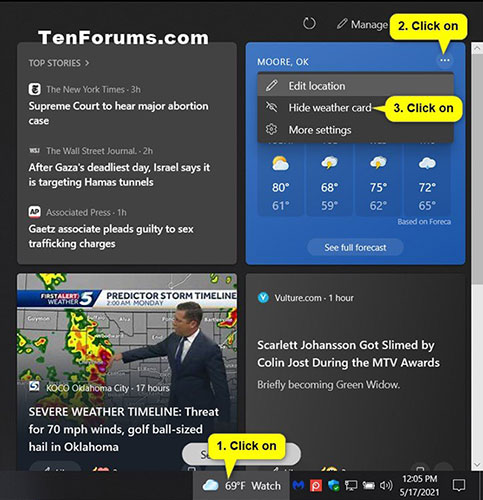
<p style="text-align: justify;">1. Nhấp vào biểu tượng&nbsp;<strong>News and interests</strong>&nbsp;trên thanh tác vụ.</p>

<p style="text-align: justify;">2. Nhấp vào nút&nbsp;<strong>More options</strong>&nbsp;(3 chấm) ở góc trên cùng bên phải của thẻ thông tin (ví dụ,&nbsp;<strong>&quot;Weather&quot;</strong>) mà bạn muốn xóa.</p>

<p style="text-align: justify;">3. Nhấp vào&nbsp;<strong>Hide &lt;name&gt; card</strong>.</p>

<figure>
<div style="text-align: justify;"><img alt="Xóa thẻ thông tin cho News and interests" data-i="0" data-src="https://st.quantrimang.com/photos/image/2021/05/18/them-the-thong-tin-cho-news-and-interests-1.jpg" data-was-processed="true" height="500" src="https://st.quantrimang.com/photos/image/2021/05/18/them-the-thong-tin-cho-news-and-interests-1.jpg" width="483" /></div>

<figcaption>
<div style="text-align: justify;">Xóa thẻ thông tin cho News and interests</div>
</figcaption>
</figure>

<div style="text-align: justify;">&nbsp;</div>

<h2 style="text-align: justify;">Thêm và xóa thẻ thông tin cho News and interests trong Experience Settings</h2>

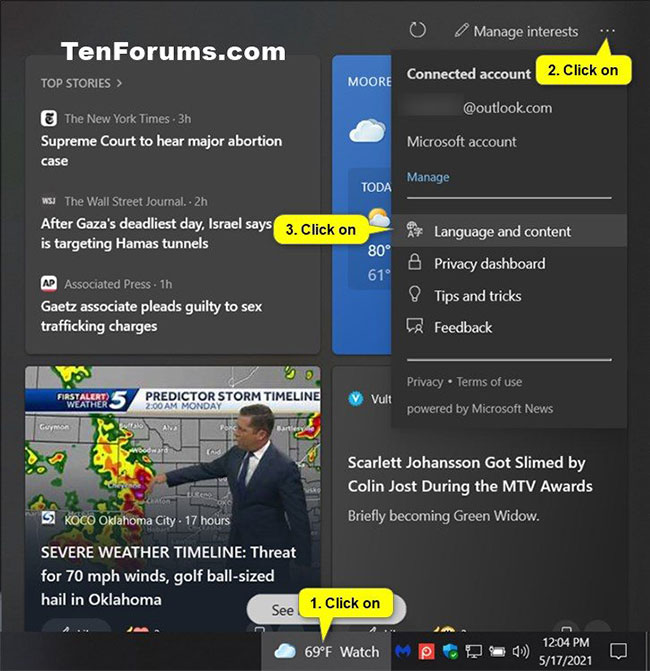
<p style="text-align: justify;">1. Nhấp vào biểu tượng&nbsp;<strong>News and Interests</strong>&nbsp;trên thanh tác vụ.</p>

<div style="text-align: justify;">&nbsp;</div>

<p style="text-align: justify;">2. Nhấp vào nút&nbsp;<strong>Settings</strong>&nbsp;(3 chấm) ở góc trên cùng bên phải của&nbsp;<strong>News and Interests</strong>&nbsp;và nhấn vào&nbsp;<strong>Language and content</strong>.</p>

<p style="text-align: justify;"><strong>Lưu ý</strong>: Nếu thiếu cài đặt&nbsp;<strong>Language and content</strong>, bạn có thể mở liên kết trực tiếp trong Microsoft Edge để thay thế:</p>

<pre id="pre0">
<code>https://www.msn.com/en-us/feed/personalize/settings</code></pre>

<figure>
<div style="text-align: justify;"><img alt="Nhấn vào Language and content" data-i="1" data-src="https://st.quantrimang.com/photos/image/2021/05/18/them-the-thong-tin-cho-news-and-interests-2.jpg" data-was-processed="true" height="671" src="https://st.quantrimang.com/photos/image/2021/05/18/them-the-thong-tin-cho-news-and-interests-2.jpg" width="650" /></div>

<figcaption>
<div style="text-align: justify;">Nhấn vào Language and content</div>
</figcaption>
</figure>

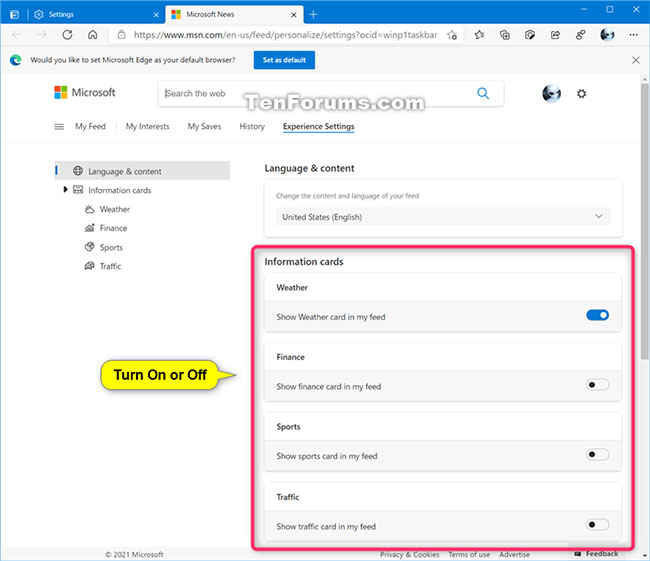
<p style="text-align: justify;">3. Trên trang&nbsp;<strong>Experience Settings &gt; Language &amp; content</strong>&nbsp;trong Microsoft Edge, hãy bật (thêm) hoặc tắt (xóa) những thẻ thông tin trong<strong>&nbsp;Information cards</strong>&nbsp;bạn muốn.</p>

<p style="text-align: justify;"><strong>Lưu ý</strong>: Liên kết này phải được mở trong Microsoft Edge. Nó sẽ không hoạt động trong bất kỳ trình duyệt web nào khác:</p>

<pre id="pre1">
<code>https://www.msn.com/en-us/feed/personalize/settings</code></pre>

<figure>
<div style="text-align: justify;"><img alt="Thêm/xóa những thẻ thông tin trong Information cards bạn muốn" data-i="2" data-src="https://st.quantrimang.com/photos/image/2021/05/18/them-the-thong-tin-cho-news-and-interests-3.jpg" data-was-processed="true" height="561" src="https://st.quantrimang.com/photos/image/2021/05/18/them-the-thong-tin-cho-news-and-interests-3.jpg" width="650" /></div>

<figcaption>
<div style="text-align: justify;">Thêm/xóa những thẻ thông tin trong&nbsp;Information cards bạn muốn</div>
</figcaption>
</figure>

<p style="text-align: justify;">4. Đóng Microsoft Edge.</p>

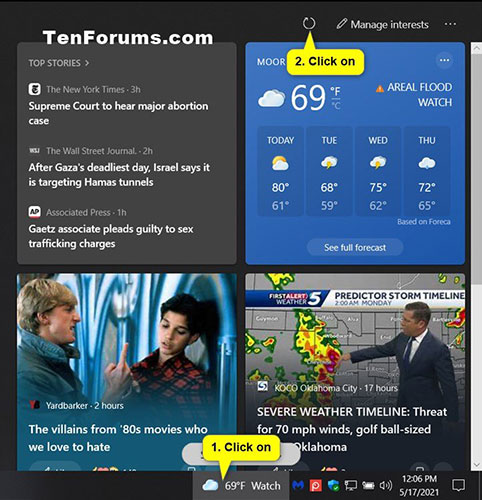
<p style="text-align: justify;">5. Nhấp vào biểu tượng&nbsp;<strong>News and Interests</strong>&nbsp;trên thanh tác vụ và nhấn vào nút&nbsp;<strong>Refresh feed</strong>&nbsp;để xem các thay đổi.</p>

<figure>
<div style="text-align: justify;"><img alt="Nhấn vào nút Refresh feed để xem các thay đổi" data-i="3" data-src="https://st.quantrimang.com/photos/image/2021/05/18/them-the-thong-tin-cho-news-and-interests-4.jpg" data-was-processed="true" height="500" src="https://st.quantrimang.com/photos/image/2021/05/18/them-the-thong-tin-cho-news-and-interests-4.jpg" width="482" /></div>

<figcaption>
<div style="text-align: justify;">Nhấn vào nút Refresh feed để xem các thay đổi</div>
</figcaption>
</figure>

<p style="text-align: justify;">Chúc bạn thực hiện thành công!</p>
		</div>
				<div id="author">
						<p>
				<strong>Nguồn tin:</strong>
				Quantrimang.com
			</p>
		</div>
	</div>
	<div id="footer" class="clearfix">
		<div id="url">
			<strong>URL của bản tin này: </strong><a href="https://www.nguoicodonvn2008.info/vi/news/savefile/kien-thuc-may-tinh/cach-them-xoa-the-thong-tin-cho-news-and-interests-trong-windows-10-4100.html" title="Cách thêm&#x002F;xóa thẻ thông tin cho News and Interests trong Windows 10">https://www.nguoicodonvn2008.info/vi/news/savefile/kien-thuc-may-tinh/cach-them-xoa-the-thong-tin-cho-news-and-interests-trong-windows-10-4100.html</a>

		</div>
		<div class="clear"></div>
		<div class="copyright">
			&copy; .&#x3A; Nguoicodonvn2008.info - Cõi lòng người cô đơn &#x3A;.
		</div>
		<div id="contact">
			<a href="mailto:admin@nguoicodonvn2008.info">admin@nguoicodonvn2008.info</a>
		</div>
	</div>
</div>
        <div id="timeoutsess" class="chromeframe">
            Bạn đã không sử dụng Site, <a onclick="timeoutsesscancel();" href="https://nguoicodonvn2008.info/#">Bấm vào đây để duy trì trạng thái đăng nhập</a>. Thời gian chờ: <span id="secField"> 60 </span> giây
        </div>
        <div id="openidResult" class="nv-alert" style="display:none"></div>
        <div id="openidBt" data-result="" data-redirect=""></div>
		</script>
		<div class="car-top">
  <span><img src="https://nguoicodonvn2008.info/themes/default/images/car.png" alt=""></span>
</div>
<script src="https://nguoicodonvn2008.info/assets/js/jquery/jquery.min.js"></script>
<script>var nv_base_siteurl="/",nv_lang_data="vi",nv_lang_interface="vi",nv_name_variable="nv",nv_fc_variable="op",nv_lang_variable="language",nv_module_name="news",nv_func_name="savefile",nv_is_user=0, nv_my_ofs=-4,nv_my_abbr="EDT",nv_cookie_prefix="nv4c_e856T",nv_check_pass_mstime=1738000,nv_area_admin=0,nv_safemode=0,theme_responsive=0,nv_recaptcha_ver=2,nv_recaptcha_sitekey="",nv_recaptcha_type="image",XSSsanitize=1;</script>
<script src="https://nguoicodonvn2008.info/assets/js/language/vi.js"></script>
<script src="https://nguoicodonvn2008.info/assets/js/DOMPurify/purify3.js"></script>
<script src="https://nguoicodonvn2008.info/assets/js/global.js"></script>
<script src="https://nguoicodonvn2008.info/assets/js/site.js"></script>
<script src="https://nguoicodonvn2008.info/themes/default/js/news.js"></script>
<script src="https://nguoicodonvn2008.info/themes/default/js/main.js"></script>
<script src="https://nguoicodonvn2008.info/themes/default/js/custom.js"></script>
<script type="application/ld+json">
        {
            "@context": "https://schema.org",
            "@type": "Organization",
            "url": "https://nguoicodonvn2008.info",
            "logo": "https://nguoicodonvn2008.info/uploads/angel.gif"
        }
        </script>
<script src="https://nguoicodonvn2008.info/themes/default/js/bootstrap.min.js"></script>
<script type="text/javascript">
var $scrolltop = $('.car-top');
$scrolltop.on('click', function () {
    $('html,body').animate({
        scrollTop: 0
    }, 800);
    $(this).addClass("car-run");
    setTimeout(function(){ $scrolltop.removeClass('car-run');}, 1000);
    return false;
});
$(window).on('scroll', function ()
{ 
    if($(window).scrollTop() >= 200)
    {
        $scrolltop.addClass("show");
        $scrolltop.addClass("car-down");
    }
    else
    {
       $scrolltop.removeClass("show");
       setTimeout(function(){ $scrolltop.removeClass('car-down');}, 300);
    }
});
</script>
</body>
</html>