<!DOCTYPE html>
    <html lang="vi" xmlns="http://www.w3.org/1999/xhtml" prefix="og: http://ogp.me/ns#">
    <head>
<title>Cách thêm&#x002F;xóa menu ngữ cảnh &quot;Open in Windows Terminal&quot; trong Windows 10</title>
<meta name="description" content="Cách thêm&#x002F;xóa menu ngữ cảnh &quot;Open in Windows Terminal&quot; trong Windows 10 - Savefile - Tin Tức -...">
<meta name="author" content=".: Nguoicodonvn2008.info - Cõi lòng người cô đơn :.">
<meta name="copyright" content=".: Nguoicodonvn2008.info - Cõi lòng người cô đơn :. [admin@nguoicodonvn2008.info]">
<meta name="robots" content="index, archive, follow, noodp">
<meta name="googlebot" content="index,archive,follow,noodp">
<meta name="msnbot" content="all,index,follow">
<meta name="generator" content="NukeViet v4.5">
<meta http-equiv="Content-Type" content="text/html; charset=utf-8">
<meta property="og:title" content="Cách thêm&#x002F;xóa menu ngữ cảnh &quot;Open in Windows Terminal&quot; trong Windows 10">
<meta property="og:type" content="website">
<meta property="og:description" content="Savefile - Tin Tức - https&#x3A;&#x002F;&#x002F;www.nguoicodonvn2008.info&#x002F;vi&#x002F;news&#x002F;savefile&#x002F;kien-thuc-may-tinh&#x002F;cach-them-xoa-menu-ngu-canh-open-in-windows-terminal-trong-windows-10-3844.html">
<meta property="og:site_name" content=".&#x3A; Nguoicodonvn2008.info - Cõi lòng người cô đơn &#x3A;.">
<meta property="og:url" content="https://www.nguoicodonvn2008.info/vi/news/savefile/kien-thuc-may-tinh/cach-them-xoa-menu-ngu-canh-open-in-windows-terminal-trong-windows-10-3844.html">
<link rel="shortcut icon" href="https://nguoicodonvn2008.info/favicon.ico">
<link rel="canonical" href="https://www.nguoicodonvn2008.info/vi/news/savefile/kien-thuc-may-tinh/cach-them-xoa-menu-ngu-canh-open-in-windows-terminal-trong-windows-10-3844.html">
<link rel="alternate" href="https://nguoicodonvn2008.info/vi/news/rss/" title="Tin Tức" type="application/rss+xml">
<link rel="alternate" href="https://nguoicodonvn2008.info/vi/news/rss/karaoke-dual/" title="Tin Tức - Karaoke Dual" type="application/rss+xml">
<link rel="alternate" href="https://nguoicodonvn2008.info/vi/news/rss/nhac-tre/" title="Tin Tức - Nhạc trẻ" type="application/rss+xml">
<link rel="alternate" href="https://nguoicodonvn2008.info/vi/news/rss/tru-tinh/" title="Tin Tức - Trữ tình" type="application/rss+xml">
<link rel="alternate" href="https://nguoicodonvn2008.info/vi/news/rss/nuoc-ngoai/" title="Tin Tức - Nước ngoài" type="application/rss+xml">
<link rel="alternate" href="https://nguoicodonvn2008.info/vi/news/rss/remix/" title="Tin Tức - Remix" type="application/rss+xml">
<link rel="alternate" href="https://nguoicodonvn2008.info/vi/news/rss/tam-su-tinh-yeu/" title="Tin Tức - Tâm sự tình yêu" type="application/rss+xml">
<link rel="alternate" href="https://nguoicodonvn2008.info/vi/news/rss/tho-suu-tam/" title="Tin Tức - Thơ sưu tầm" type="application/rss+xml">
<link rel="alternate" href="https://nguoicodonvn2008.info/vi/news/rss/cuoc-song/" title="Tin Tức - Cuộc sống" type="application/rss+xml">
<link rel="alternate" href="https://nguoicodonvn2008.info/vi/news/rss/phan-mem/" title="Tin Tức - Phần mềm" type="application/rss+xml">
<link rel="alternate" href="https://nguoicodonvn2008.info/vi/news/rss/kien-thuc-may-tinh/" title="Tin Tức - Kiến thức máy tính" type="application/rss+xml">
<link rel="alternate" href="https://nguoicodonvn2008.info/vi/news/rss/hoc-tap/" title="Tin Tức - Học tập" type="application/rss+xml">
<link rel="alternate" href="https://nguoicodonvn2008.info/vi/news/rss/tai-lieu/" title="Tin Tức - Tài liệu" type="application/rss+xml">
<link rel="alternate" href="https://nguoicodonvn2008.info/vi/news/rss/de-thi/" title="Tin Tức - Đề thi" type="application/rss+xml">
<link rel="preload" as="style" href="https://nguoicodonvn2008.info/assets/css/font-awesome.min.css" type="text/css">
<link rel="preload" as="style" href="https://nguoicodonvn2008.info/themes/default/css/bootstrap.non-responsive.css" type="text/css">
<link rel="preload" as="style" href="https://nguoicodonvn2008.info/themes/default/css/style.css" type="text/css">
<link rel="preload" as="style" href="https://nguoicodonvn2008.info/themes/default/css/style.non-responsive.css" type="text/css">
<link rel="preload" as="style" href="https://nguoicodonvn2008.info/themes/default/css/news.css" type="text/css">
<link rel="preload" as="style" href="https://nguoicodonvn2008.info/themes/default/css/custom.css" type="text/css">
<link rel="preload" as="script" href="https://nguoicodonvn2008.info/assets/js/jquery/jquery.min.js" type="text/javascript">
<link rel="preload" as="script" href="https://nguoicodonvn2008.info/assets/js/language/vi.js" type="text/javascript">
<link rel="preload" as="script" href="https://nguoicodonvn2008.info/assets/js/DOMPurify/purify3.js" type="text/javascript">
<link rel="preload" as="script" href="https://nguoicodonvn2008.info/assets/js/global.js" type="text/javascript">
<link rel="preload" as="script" href="https://nguoicodonvn2008.info/assets/js/site.js" type="text/javascript">
<link rel="preload" as="script" href="https://nguoicodonvn2008.info/themes/default/js/news.js" type="text/javascript">
<link rel="preload" as="script" href="https://nguoicodonvn2008.info/themes/default/js/main.js" type="text/javascript">
<link rel="preload" as="script" href="https://nguoicodonvn2008.info/themes/default/js/custom.js" type="text/javascript">
<link rel="preload" as="script" href="https://nguoicodonvn2008.info/themes/default/js/bootstrap.min.js" type="text/javascript">
<link rel="stylesheet" href="https://nguoicodonvn2008.info/assets/css/font-awesome.min.css">
<link rel="stylesheet" href="https://nguoicodonvn2008.info/themes/default/css/bootstrap.non-responsive.css">
<link rel="stylesheet" href="https://nguoicodonvn2008.info/themes/default/css/style.css">
<link rel="stylesheet" href="https://nguoicodonvn2008.info/themes/default/css/style.non-responsive.css">
<link rel="StyleSheet" href="https://nguoicodonvn2008.info/themes/default/css/news.css">
<link rel="stylesheet" href="https://nguoicodonvn2008.info/themes/default/css/custom.css">
<style type="text/css">
	body{background: #fff;}
</style>
    </head>
    <body>
<div id="print">
	<div id="hd_print">
		<h2 class="pull-left">.&#x3A; Nguoicodonvn2008.info - Cõi lòng người cô đơn &#x3A;.</h2>
		<p class="pull-right"><a title=".&#x3A; Nguoicodonvn2008.info - Cõi lòng người cô đơn &#x3A;." href="https://nguoicodonvn2008.info/">https://nguoicodonvn2008.info</a></p>
	</div>
	<div class="clear"></div>
	<hr />
	<div id="content">
		<h1>Cách thêm&#x002F;xóa menu ngữ cảnh &quot;Open in Windows Terminal&quot; trong Windows 10</h1>
		<ul class="list-inline">
			<li>Chủ nhật - 28/03/2021 03:59</li>
			<li class="hidden-print txtrequired"><em class="fa fa-print">&nbsp;</em><a title="In ra" href="javascript:;" onclick="window.print()">In ra</a></li>
			<li class="hidden-print txtrequired"><em class="fa fa-power-off">&nbsp;</em><a title="Đóng cửa sổ này" href="javascript:;" onclick="window.close()">Đóng cửa sổ này</a></li>
		</ul>
		<div class="clear"></div>
		<div id="hometext">
		</div>
				<div class="imghome">
			<img alt="Cách thêm&#x002F;xóa menu ngữ cảnh &quot;Open in Windows Terminal&quot; trong Windows 10" src="https://st.quantrimang.com/photos/image/2021/03/24/xoa-menu-ngu-canh-open-in-windows-terminal-1.jpg" width="460" class="img-thumbnail" />
		</div>
		<div class="clear"></div>
		<div id="bodytext" class="clearfix">
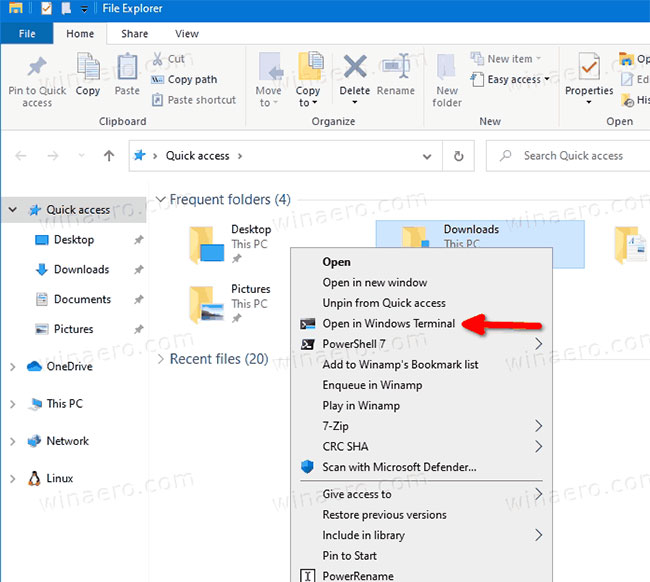
			<p style="text-align: justify;">Khi bạn đã cài đặt Windows Terminal, nó sẽ thêm mục nhập&nbsp;<strong>Open in Windows Terminal</strong>&nbsp;vào menu chuột phải của các thư mục trong File Explorer. Nếu bạn không hài lòng khi có tùy chọn này, đây là cách để loại bỏ nó khỏi menu ngữ cảnh.</p>

<h2 style="text-align: justify;">Windows Terminal là gì?</h2>

<p style="text-align: justify;">Windows Terminal là một phần mềm terminal hiện đại dành cho người dùng dòng lệnh, có nhiều tính năng mà bạn sẽ không tìm thấy trong các công cụ&nbsp;Command Prompt&nbsp;và&nbsp;PowerShell&nbsp;cổ điển. Nó đi kèm với các tab, công cụ kết xuất văn bản dựa trên DirectWrite/DirectX được tăng tốc GPU, profile, v.v...</p>

<p style="text-align: justify;">Nhờ các profile, bạn có thể có những phiên bản Command Prompt, PowerShell và Windows Subsystem for Linux đang chạy trong các tab. Một điều tuyệt vời khác về ứng dụng là nó hoàn toàn có mã nguồn mở, có sẵn trên GitHub, vì vậy bất kỳ ai cũng có thể đóng góp.</p>

<div style="text-align: justify;">&nbsp;</div>

<p style="text-align: justify;">Khi được cài đặt, Windows Terminal thêm một lệnh menu ngữ cảnh,&nbsp;<strong>Open in Windows Terminal</strong>, khi nhấp chuột phải vào File Explorer. Bạn có thể sử dụng nó để mở ứng dụng trực tiếp đến vị trí cụ thể. Nếu bạn thấy mình không sử dụng đến lệnh này, bạn có thể dễ dàng loại bỏ nó.</p>

<figure>
<div style="text-align: justify;"><img alt="Khi được cài đặt, Windows Terminal thêm menu ngữ cảnh Open in Windows Terminal" data-i="0" data-src="https://st.quantrimang.com/photos/image/2021/03/24/xoa-menu-ngu-canh-open-in-windows-terminal-1.jpg" data-was-processed="true" height="582" src="https://st.quantrimang.com/photos/image/2021/03/24/xoa-menu-ngu-canh-open-in-windows-terminal-1.jpg" width="650" /></div>

<figcaption>
<div style="text-align: justify;">Khi được cài đặt, Windows Terminal thêm menu ngữ cảnh Open in Windows Terminal</div>
</figcaption>
</figure>

<div style="text-align: justify;">&nbsp;</div>

<h2 style="text-align: justify;">Cách loại bỏ &quot;Open in Windows Terminal&quot; trong menu ngữ cảnh?</h2>

<p style="text-align: justify;">1.&nbsp;Mở ứng dụng Registry Editor.</p>

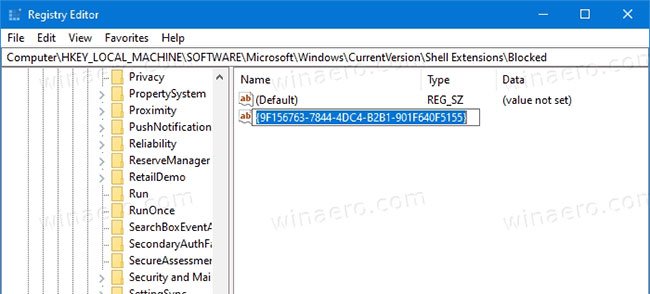
<p style="text-align: justify;">2. Đi tới Registry key sau.</p>

<pre id="pre0">
<code>HKEY_LOCAL_MACHINE\SOFTWARE\Microsoft\Windows\CurrentVersion\Shell Extensions\Blocked</code></pre>

<p style="text-align: justify;">3. Ở bên phải, sửa đổi hoặc tạo giá trị chuỗi (REG_SZ) mới&nbsp;<strong>{9F156763-7844-4DC4-B2B1-901F640F5155}.</strong></p>

<figure>
<div style="text-align: justify;"><img alt="Tạo chuỗi {9F156763-7844-4DC4-B2B1-901F640F5155} mới" data-i="1" data-src="https://st.quantrimang.com/photos/image/2021/03/24/xoa-menu-ngu-canh-open-in-windows-terminal-2.jpg" data-was-processed="true" height="294" src="https://st.quantrimang.com/photos/image/2021/03/24/xoa-menu-ngu-canh-open-in-windows-terminal-2.jpg" width="650" /></div>

<figcaption>
<div style="text-align: justify;">Tạo chuỗi {9F156763-7844-4DC4-B2B1-901F640F5155} mới</div>
</figcaption>
</figure>

<p style="text-align: justify;">4. Để trống phần dữ liệu giá trị của nó.</p>

<p style="text-align: justify;">5. Để các thay đổi có hiệu lực, hãy đăng xuất và đăng nhập vào tài khoản người dùng của bạn. Ngoài ra, bạn có thể khởi động lại Explorer shell.</p>

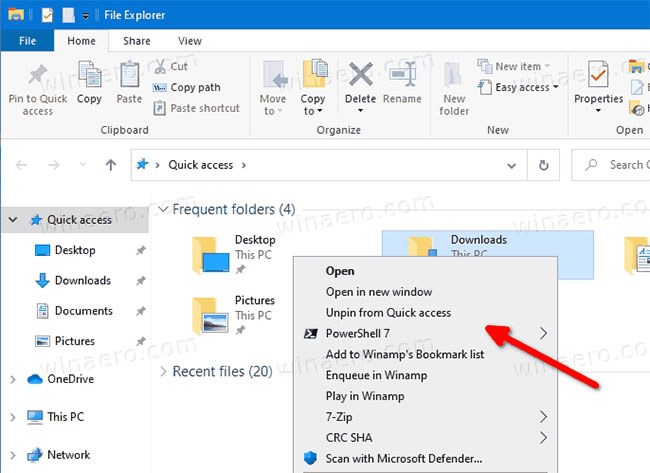
<p style="text-align: justify;">Mọi thao tác đã hoàn tất! Mục nhập menu ngữ cảnh hiện đã bị xóa.</p>

<figure>
<div style="text-align: justify;"><img alt="Mục nhập menu ngữ cảnh hiện đã bị xóa" data-i="2" data-src="https://st.quantrimang.com/photos/image/2021/03/24/xoa-menu-ngu-canh-open-in-windows-terminal-3.jpg" data-was-processed="true" height="473" src="https://st.quantrimang.com/photos/image/2021/03/24/xoa-menu-ngu-canh-open-in-windows-terminal-3.jpg" width="650" /></div>

<figcaption>
<div style="text-align: justify;">Mục nhập menu ngữ cảnh hiện đã bị xóa</div>
</figcaption>
</figure>

<div style="text-align: justify;">&nbsp;</div>

<p style="text-align: justify;">Để hoàn tác thay đổi và khôi phục tùy chọn&nbsp;<strong>Open in Windows Terminal</strong>&nbsp;trong menu ngữ cảnh, bạn cần xóa giá trị chuỗi&nbsp;<strong>{9F156763-7844-4DC4-B2B1-901F640F5155}</strong>&nbsp;và khởi động lại Explorer hoặc đăng xuất khỏi tài khoản Windows.</p>
		</div>
				<div id="author">
						<p>
				<strong>Nguồn tin:</strong>
				Quantrimang.com
			</p>
		</div>
	</div>
	<div id="footer" class="clearfix">
		<div id="url">
			<strong>URL của bản tin này: </strong><a href="https://www.nguoicodonvn2008.info/vi/news/savefile/kien-thuc-may-tinh/cach-them-xoa-menu-ngu-canh-open-in-windows-terminal-trong-windows-10-3844.html" title="Cách thêm&#x002F;xóa menu ngữ cảnh &quot;Open in Windows Terminal&quot; trong Windows 10">https://www.nguoicodonvn2008.info/vi/news/savefile/kien-thuc-may-tinh/cach-them-xoa-menu-ngu-canh-open-in-windows-terminal-trong-windows-10-3844.html</a>

		</div>
		<div class="clear"></div>
		<div class="copyright">
			&copy; .&#x3A; Nguoicodonvn2008.info - Cõi lòng người cô đơn &#x3A;.
		</div>
		<div id="contact">
			<a href="mailto:admin@nguoicodonvn2008.info">admin@nguoicodonvn2008.info</a>
		</div>
	</div>
</div>
        <div id="timeoutsess" class="chromeframe">
            Bạn đã không sử dụng Site, <a onclick="timeoutsesscancel();" href="https://nguoicodonvn2008.info/#">Bấm vào đây để duy trì trạng thái đăng nhập</a>. Thời gian chờ: <span id="secField"> 60 </span> giây
        </div>
        <div id="openidResult" class="nv-alert" style="display:none"></div>
        <div id="openidBt" data-result="" data-redirect=""></div>
		</script>
		<div class="car-top">
  <span><img src="https://nguoicodonvn2008.info/themes/default/images/car.png" alt=""></span>
</div>
<div id="run_cronjobs" style="visibility:hidden;display:none;"><img alt="cron" src="/index.php?second=cronjobs&amp;p=a061gL0h" width="1" height="1" /></div>
<script src="https://nguoicodonvn2008.info/assets/js/jquery/jquery.min.js"></script>
<script>var nv_base_siteurl="/",nv_lang_data="vi",nv_lang_interface="vi",nv_name_variable="nv",nv_fc_variable="op",nv_lang_variable="language",nv_module_name="news",nv_func_name="savefile",nv_is_user=0, nv_my_ofs=-4,nv_my_abbr="EDT",nv_cookie_prefix="nv4c_e856T",nv_check_pass_mstime=1738000,nv_area_admin=0,nv_safemode=0,theme_responsive=0,nv_recaptcha_ver=2,nv_recaptcha_sitekey="",nv_recaptcha_type="image",XSSsanitize=1;</script>
<script src="https://nguoicodonvn2008.info/assets/js/language/vi.js"></script>
<script src="https://nguoicodonvn2008.info/assets/js/DOMPurify/purify3.js"></script>
<script src="https://nguoicodonvn2008.info/assets/js/global.js"></script>
<script src="https://nguoicodonvn2008.info/assets/js/site.js"></script>
<script src="https://nguoicodonvn2008.info/themes/default/js/news.js"></script>
<script src="https://nguoicodonvn2008.info/themes/default/js/main.js"></script>
<script src="https://nguoicodonvn2008.info/themes/default/js/custom.js"></script>
<script type="application/ld+json">
        {
            "@context": "https://schema.org",
            "@type": "Organization",
            "url": "https://nguoicodonvn2008.info",
            "logo": "https://nguoicodonvn2008.info/uploads/angel.gif"
        }
        </script>
<script src="https://nguoicodonvn2008.info/themes/default/js/bootstrap.min.js"></script>
<script type="text/javascript">
var $scrolltop = $('.car-top');
$scrolltop.on('click', function () {
    $('html,body').animate({
        scrollTop: 0
    }, 800);
    $(this).addClass("car-run");
    setTimeout(function(){ $scrolltop.removeClass('car-run');}, 1000);
    return false;
});
$(window).on('scroll', function ()
{ 
    if($(window).scrollTop() >= 200)
    {
        $scrolltop.addClass("show");
        $scrolltop.addClass("car-down");
    }
    else
    {
       $scrolltop.removeClass("show");
       setTimeout(function(){ $scrolltop.removeClass('car-down');}, 300);
    }
});
</script>
</body>
</html>