<!DOCTYPE html>
    <html lang="vi" xmlns="http://www.w3.org/1999/xhtml" prefix="og: http://ogp.me/ns#">
    <head>
<title>Cách thêm System Configuration &#40;msconfig&#41; vào Control Panel</title>
<meta name="description" content="Cách thêm System Configuration &#40;msconfig&#41; vào Control Panel - Savefile - Tin Tức -...">
<meta name="author" content=".: Nguoicodonvn2008.info - Cõi lòng người cô đơn :.">
<meta name="copyright" content=".: Nguoicodonvn2008.info - Cõi lòng người cô đơn :. [admin@nguoicodonvn2008.info]">
<meta name="robots" content="index, archive, follow, noodp">
<meta name="googlebot" content="index,archive,follow,noodp">
<meta name="msnbot" content="all,index,follow">
<meta name="generator" content="NukeViet v4.5">
<meta http-equiv="Content-Type" content="text/html; charset=utf-8">
<meta property="og:title" content="Cách thêm System Configuration &#40;msconfig&#41; vào Control Panel">
<meta property="og:type" content="website">
<meta property="og:description" content="Savefile - Tin Tức - https&#x3A;&#x002F;&#x002F;www.nguoicodonvn2008.info&#x002F;vi&#x002F;news&#x002F;savefile&#x002F;kien-thuc-may-tinh&#x002F;cach-them-system-configuration-msconfig-vao-control-panel-2107.html">
<meta property="og:site_name" content=".&#x3A; Nguoicodonvn2008.info - Cõi lòng người cô đơn &#x3A;.">
<meta property="og:url" content="https://www.nguoicodonvn2008.info/vi/news/savefile/kien-thuc-may-tinh/cach-them-system-configuration-msconfig-vao-control-panel-2107.html">
<link rel="shortcut icon" href="https://nguoicodonvn2008.info/favicon.ico">
<link rel="canonical" href="https://www.nguoicodonvn2008.info/vi/news/savefile/kien-thuc-may-tinh/cach-them-system-configuration-msconfig-vao-control-panel-2107.html">
<link rel="alternate" href="https://nguoicodonvn2008.info/vi/news/rss/" title="Tin Tức" type="application/rss+xml">
<link rel="alternate" href="https://nguoicodonvn2008.info/vi/news/rss/karaoke-dual/" title="Tin Tức - Karaoke Dual" type="application/rss+xml">
<link rel="alternate" href="https://nguoicodonvn2008.info/vi/news/rss/nhac-tre/" title="Tin Tức - Nhạc trẻ" type="application/rss+xml">
<link rel="alternate" href="https://nguoicodonvn2008.info/vi/news/rss/tru-tinh/" title="Tin Tức - Trữ tình" type="application/rss+xml">
<link rel="alternate" href="https://nguoicodonvn2008.info/vi/news/rss/nuoc-ngoai/" title="Tin Tức - Nước ngoài" type="application/rss+xml">
<link rel="alternate" href="https://nguoicodonvn2008.info/vi/news/rss/remix/" title="Tin Tức - Remix" type="application/rss+xml">
<link rel="alternate" href="https://nguoicodonvn2008.info/vi/news/rss/tam-su-tinh-yeu/" title="Tin Tức - Tâm sự tình yêu" type="application/rss+xml">
<link rel="alternate" href="https://nguoicodonvn2008.info/vi/news/rss/tho-suu-tam/" title="Tin Tức - Thơ sưu tầm" type="application/rss+xml">
<link rel="alternate" href="https://nguoicodonvn2008.info/vi/news/rss/cuoc-song/" title="Tin Tức - Cuộc sống" type="application/rss+xml">
<link rel="alternate" href="https://nguoicodonvn2008.info/vi/news/rss/phan-mem/" title="Tin Tức - Phần mềm" type="application/rss+xml">
<link rel="alternate" href="https://nguoicodonvn2008.info/vi/news/rss/kien-thuc-may-tinh/" title="Tin Tức - Kiến thức máy tính" type="application/rss+xml">
<link rel="alternate" href="https://nguoicodonvn2008.info/vi/news/rss/hoc-tap/" title="Tin Tức - Học tập" type="application/rss+xml">
<link rel="alternate" href="https://nguoicodonvn2008.info/vi/news/rss/tai-lieu/" title="Tin Tức - Tài liệu" type="application/rss+xml">
<link rel="alternate" href="https://nguoicodonvn2008.info/vi/news/rss/de-thi/" title="Tin Tức - Đề thi" type="application/rss+xml">
<link rel="preload" as="style" href="https://nguoicodonvn2008.info/assets/css/font-awesome.min.css" type="text/css">
<link rel="preload" as="style" href="https://nguoicodonvn2008.info/themes/default/css/bootstrap.non-responsive.css" type="text/css">
<link rel="preload" as="style" href="https://nguoicodonvn2008.info/themes/default/css/style.css" type="text/css">
<link rel="preload" as="style" href="https://nguoicodonvn2008.info/themes/default/css/style.non-responsive.css" type="text/css">
<link rel="preload" as="style" href="https://nguoicodonvn2008.info/themes/default/css/news.css" type="text/css">
<link rel="preload" as="style" href="https://nguoicodonvn2008.info/themes/default/css/custom.css" type="text/css">
<link rel="preload" as="script" href="https://nguoicodonvn2008.info/assets/js/jquery/jquery.min.js" type="text/javascript">
<link rel="preload" as="script" href="https://nguoicodonvn2008.info/assets/js/language/vi.js" type="text/javascript">
<link rel="preload" as="script" href="https://nguoicodonvn2008.info/assets/js/DOMPurify/purify3.js" type="text/javascript">
<link rel="preload" as="script" href="https://nguoicodonvn2008.info/assets/js/global.js" type="text/javascript">
<link rel="preload" as="script" href="https://nguoicodonvn2008.info/assets/js/site.js" type="text/javascript">
<link rel="preload" as="script" href="https://nguoicodonvn2008.info/themes/default/js/news.js" type="text/javascript">
<link rel="preload" as="script" href="https://nguoicodonvn2008.info/themes/default/js/main.js" type="text/javascript">
<link rel="preload" as="script" href="https://nguoicodonvn2008.info/themes/default/js/custom.js" type="text/javascript">
<link rel="preload" as="script" href="https://nguoicodonvn2008.info/themes/default/js/bootstrap.min.js" type="text/javascript">
<link rel="stylesheet" href="https://nguoicodonvn2008.info/assets/css/font-awesome.min.css">
<link rel="stylesheet" href="https://nguoicodonvn2008.info/themes/default/css/bootstrap.non-responsive.css">
<link rel="stylesheet" href="https://nguoicodonvn2008.info/themes/default/css/style.css">
<link rel="stylesheet" href="https://nguoicodonvn2008.info/themes/default/css/style.non-responsive.css">
<link rel="StyleSheet" href="https://nguoicodonvn2008.info/themes/default/css/news.css">
<link rel="stylesheet" href="https://nguoicodonvn2008.info/themes/default/css/custom.css">
<style type="text/css">
	body{background: #fff;}
</style>
    </head>
    <body>
<div id="print">
	<div id="hd_print">
		<h2 class="pull-left">.&#x3A; Nguoicodonvn2008.info - Cõi lòng người cô đơn &#x3A;.</h2>
		<p class="pull-right"><a title=".&#x3A; Nguoicodonvn2008.info - Cõi lòng người cô đơn &#x3A;." href="https://nguoicodonvn2008.info/">https://nguoicodonvn2008.info</a></p>
	</div>
	<div class="clear"></div>
	<hr />
	<div id="content">
		<h1>Cách thêm System Configuration &#40;msconfig&#41; vào Control Panel</h1>
		<ul class="list-inline">
			<li>Thứ tư - 27/05/2020 01:00</li>
			<li class="hidden-print txtrequired"><em class="fa fa-print">&nbsp;</em><a title="In ra" href="javascript:;" onclick="window.print()">In ra</a></li>
			<li class="hidden-print txtrequired"><em class="fa fa-power-off">&nbsp;</em><a title="Đóng cửa sổ này" href="javascript:;" onclick="window.close()">Đóng cửa sổ này</a></li>
		</ul>
		<div class="clear"></div>
		<div id="hometext">
		</div>
				<div class="imghome">
			<img alt="Cách thêm System Configuration &#40;msconfig&#41; vào Control Panel" src="https://st.quantrimang.com/photos/image/2020/05/26/them-system-configuration-vao-control-panel-6.png" width="460" class="img-thumbnail" />
		</div>
		<div class="clear"></div>
		<div id="bodytext" class="clearfix">
			<p style="text-align: justify;">Nếu Control Panel và&nbsp;System Configuration&nbsp;là công cụ bạn sử dụng thường xuyên, vậy làm thế nào để thêm msconfig vào Control Panel? Vào Registry, bạn có thể thêm System Configuration vào Control Panel trên Windows 10. Microsoft đã di chuyển hầu hết các tính năng sang Windows Settings. Tuy nhiên, Control Panel vẫn là một phần quan trọng, và nếu thường xuyên sử dụng nó trên máy tính, bạn nên thêm nhiều lựa chọn khác. Thay vì chạy msconfig qua Run prompt, bạn có thể thêm nó vào Control Panel.</p>

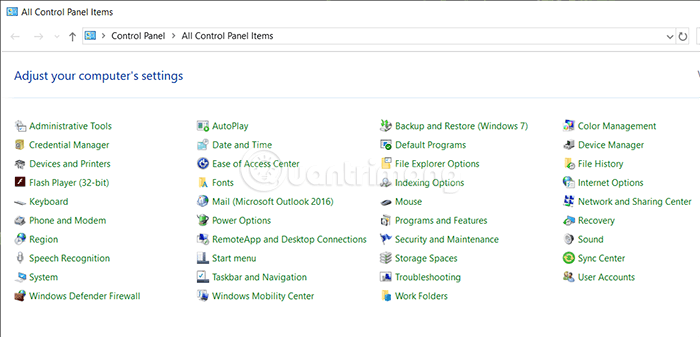
<p style="text-align: justify;">Theo cài đặt mặc định trên Windows, System Configuration không có trong Control Panel, như hình dưới đây:</p>

<figure>
<div style="text-align: justify;"><img alt="Các tùy chọn mặc định trong Control Panel" data-i="0" data-src="https://st.quantrimang.com/photos/image/2020/05/26/them-system-configuration-vao-control-panel-5.png" data-was-processed="true" height="337" src="https://st.quantrimang.com/photos/image/2020/05/26/them-system-configuration-vao-control-panel-5.png" width="700" /></div>

<figcaption>
<div style="text-align: justify;">Các tùy chọn mặc định trong Control Panel</div>
</figcaption>
</figure>

<p style="text-align: justify;">Công cụ System Configuration sẽ cho bạn biết những thay đổi như Startup selection, Safe boot,... Và đừng quên xuất file Registry và tạo điểm khôi phục hệ thống trước khi thay đổi bất cứ thứ gì trong&nbsp;<a href="https://quantrimang.com/cach-mo-registry-editor-tren-windows-143522" title="Cách mở Registry Editor trên Windows">Registry Editor</a>.</p>

<h2 style="text-align: justify;">Thêm System Configuration vào Control Panel</h2>

<p style="text-align: justify;">Làm theo những bước sau để thêm công cụ msconfig vào Control Panel trên Windows 10</p>

<ol>
	<li style="text-align: justify;">Mở&nbsp;<strong>Notepad</strong></li>
	<li style="text-align: justify;">Dán giá trị Registry vào đó</li>
	<li style="text-align: justify;">Chọn&nbsp;<strong>File &gt; Save As</strong></li>
	<li style="text-align: justify;">Chọn nơi bạn muốn lưu file</li>
	<li style="text-align: justify;">Đặt tên với đuôi là&nbsp;<strong>.reg</strong></li>
	<li style="text-align: justify;">Chọn&nbsp;<strong>All Files</strong>&nbsp;từ&nbsp;<strong>Save as type</strong></li>
	<li style="text-align: justify;">Ấn&nbsp;<strong>Save</strong></li>
	<li style="text-align: justify;">Click đúp vào file</li>
	<li style="text-align: justify;">Chọn&nbsp;<strong>Yes</strong>&nbsp;trong UAC prompt</li>
	<li style="text-align: justify;">Chọn&nbsp;<strong>Yes</strong>&nbsp;để hoàn thành việc thêm vào</li>
</ol>

<p style="text-align: justify;">Chi tiết các bước như sau.</p>

<p style="text-align: justify;">Đầu tiên, bạn cần tạo một file đuôi .reg với các giá trị Registry thích hợp. Để làm được việc đó, mở cửa sổ Notepad trên máy và dán các lệnh dưới đây:</p>

<pre id="pre0">
<code>Windows Registry Editor Version 5.00
 &#91;HKEY_LOCAL_MACHINE\SOFTWARE\Classes\CLSID\{D14ED2E1-C75B-443c-BD7C-FC03B2F08C15}&#93;
 @=&quot;System Configuration&quot;
 &quot;InfoTip&quot;=&quot;Perform advanced troubleshooting and system configuration&quot;
 &quot;System.ControlPanel.Category&quot;=&quot;5&quot;
 &#91;HKEY_LOCAL_MACHINE\SOFTWARE\Classes\CLSID\{D14ED2E1-C75B-443c-BD7C-FC03B2F08C15}\DefaultIcon&#93;
 @=&quot;msconfig.exe&quot;
 &#91;HKEY_LOCAL_MACHINE\SOFTWARE\Classes\CLSID\{D14ED2E1-C75B-443c-BD7C-FC03B2F08C15}\Shell\Open\Command&#93;
 @=&quot;msconfig.exe&quot;
 &#91;HKEY_LOCAL_MACHINE\SOFTWARE\Microsoft\Windows\CurrentVersion\Explorer\ControlPanel\NameSpace\{D14ED2E1-C75B-443c-BD7C-FC03B2F08C15}&#93;
 @=&quot;System Configuration&quot;</code></pre>

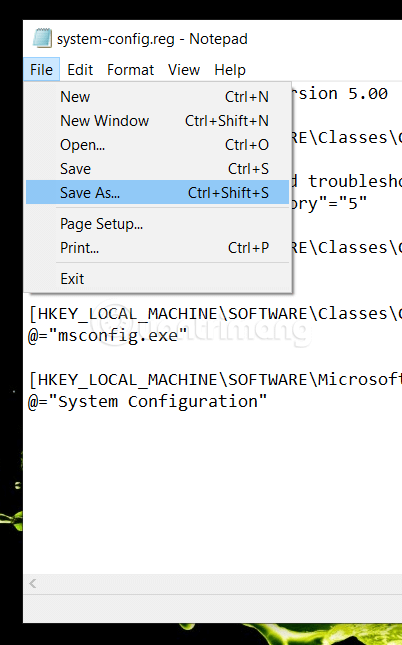
<p style="text-align: justify;">Bây giờ, vào&nbsp;<strong>File</strong>, chọn&nbsp;<strong>Save As</strong>. Bạn có thể bấm tổ hợp&nbsp;<strong>Ctrl + Shift + S</strong>&nbsp;để thay thế.</p>

<figure>
<div style="text-align: justify;"><img alt="Dán lệnh vào Notepad &gt; File &gt; Save As... " data-i="1" data-src="https://st.quantrimang.com/photos/image/2020/05/26/them-system-configuration-vao-control-panel-0.png" data-was-processed="true" height="645" src="https://st.quantrimang.com/photos/image/2020/05/26/them-system-configuration-vao-control-panel-0.png" width="402" /></div>

<figcaption>
<div style="text-align: justify;">Dán lệnh vào Notepad &gt; File &gt; Save As...</div>
</figcaption>
</figure>

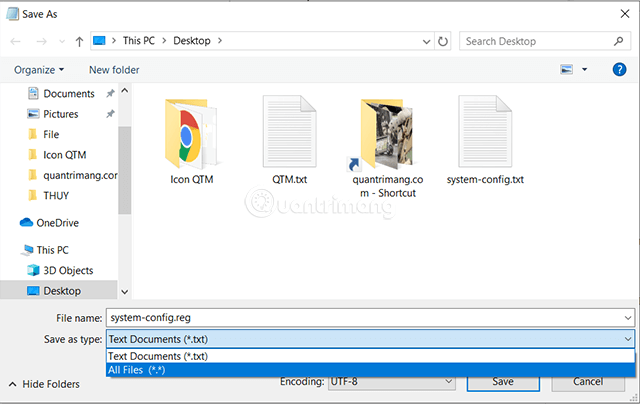
<p style="text-align: justify;">Sau đó, chọn nơi bạn muốn lưu file, đặt tên có đuôi&nbsp;<strong>.reg</strong>, rồi chọn&nbsp;<strong>All Files</strong>&nbsp;trong danh sách&nbsp;<strong>Save as type</strong>, ấn nút&nbsp;<strong>Save</strong>.</p>

<figure>
<div style="text-align: justify;"><img alt="Đặt tên file với phần mở rộng là .reg" data-i="2" data-src="https://st.quantrimang.com/photos/image/2020/05/26/them-system-configuration-vao-control-panel-1.png" data-was-processed="true" height="404" src="https://st.quantrimang.com/photos/image/2020/05/26/them-system-configuration-vao-control-panel-1.png" width="640" /></div>

<figcaption>
<div style="text-align: justify;">Đặt tên file với phần mở rộng là .reg</div>
</figcaption>
</figure>

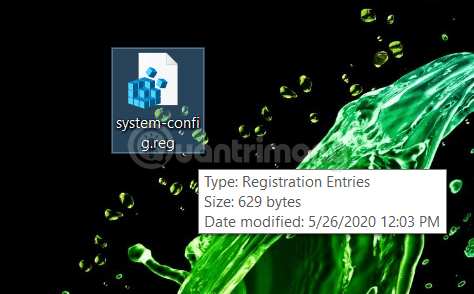
<p style="text-align: justify;">Tiếp đến, bạn mở file .reg vừa lưu trong máy bằng cách nhấp đúp chuột.&nbsp;</p>

<figure>
<div style="text-align: justify;"><img alt="Nhấp đúp vào file .reg vừa tạo" data-i="3" data-src="https://st.quantrimang.com/photos/image/2020/05/26/them-system-configuration-vao-control-panel-2.png" data-was-processed="true" height="294" src="https://st.quantrimang.com/photos/image/2020/05/26/them-system-configuration-vao-control-panel-2.png" width="474" /></div>

<figcaption>
<div style="text-align: justify;">Nhấp đúp vào file .reg vừa tạo</div>
</figcaption>
</figure>

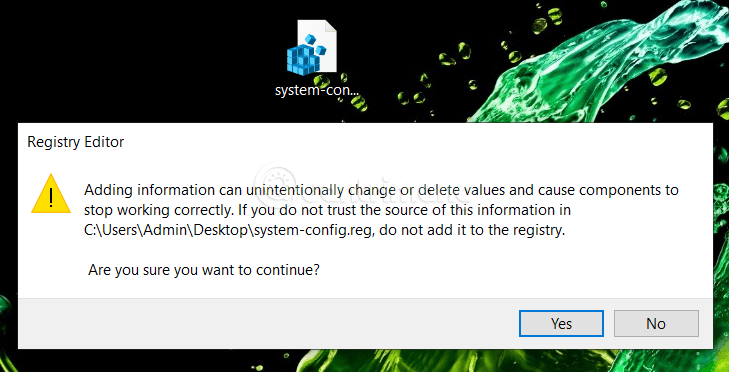
<p style="text-align: justify;">Cửa sổ UAC prompt sẽ hiện lên. Chọn Yes hai lần để các giá trị Registry được thêm vào Registry Editor.</p>

<figure>
<div style="text-align: justify;"><img alt="Nhấp Yes trong thông báo UAC và Yes trong hình trên" data-i="4" data-src="https://st.quantrimang.com/photos/image/2020/05/26/them-system-configuration-vao-control-panel-3.png" data-was-processed="true" height="372" src="https://st.quantrimang.com/photos/image/2020/05/26/them-system-configuration-vao-control-panel-3.png" width="729" /></div>

<figcaption>
<div style="text-align: justify;">Nhấp Yes trong thông báo UAC và Yes trong hình trên</div>
</figcaption>
</figure>

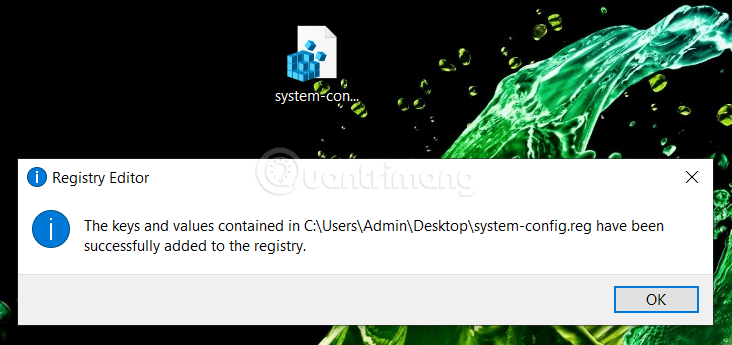
<p style="text-align: justify;">Khi hoàn tất và thành công, bạn sẽ nhận được thông báo như sau:</p>

<figure>
<div style="text-align: justify;"><img alt="File .reg đã được thêm vào Registry thành công" data-i="5" data-src="https://st.quantrimang.com/photos/image/2020/05/26/them-system-configuration-vao-control-panel-4.png" data-was-processed="true" height="345" src="https://st.quantrimang.com/photos/image/2020/05/26/them-system-configuration-vao-control-panel-4.png" width="732" /></div>

<figcaption>
<div style="text-align: justify;">File .reg đã được thêm vào Registry thành công</div>
</figcaption>
</figure>

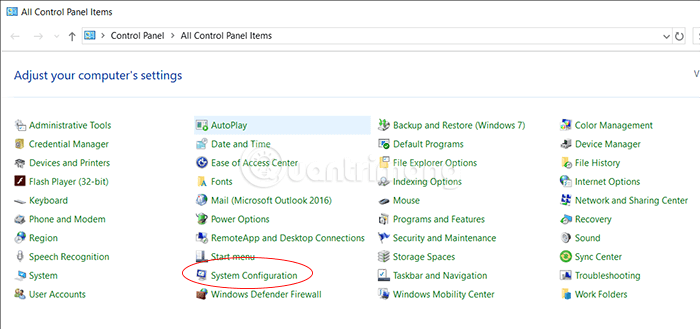
<p style="text-align: justify;">Bây giờ, mở Control Panel ra (nếu bạn đã mở sẵn trước đó, hãy đóng và mở lại), bạn sẽ&nbsp;nhìn thấy tùy chọn&nbsp;<strong>System Configuration</strong>&nbsp;đã được thêm vào.</p>

<figure>
<div style="text-align: justify;"><img alt="System Configuration đã có trong Control Panel" data-i="6" data-src="https://st.quantrimang.com/photos/image/2020/05/26/them-system-configuration-vao-control-panel-6.png" data-was-processed="true" height="329" src="https://st.quantrimang.com/photos/image/2020/05/26/them-system-configuration-vao-control-panel-6.png" width="700" /></div>

<figcaption>
<div style="text-align: justify;">System Configuration đã có trong Control Panel</div>
</figcaption>
</figure>

<div style="text-align: justify;">&nbsp;</div>

<h2 style="text-align: justify;">Xóa System Configuration trong Control Panel</h2>

<p style="text-align: justify;">Trong trường hợp bạn muốn xóa System Configuration khỏi Control Panell, bạn có thể di chuyển đến Registry Editor.</p>

<pre id="pre1">
<code>HKEY_LOCAL_MACHINE\SOFTWARE\Classes\CLSID\</code></pre>

<p style="text-align: justify;">Và xóa dãy<strong>&nbsp;{D14ED2E1-C75B-443c-BD7C-FC03B2F08C15}</strong>.</p>

<p style="text-align: justify;">Click chuột phải vào dãy này, chọn&nbsp;<strong>Delete</strong>&nbsp;và nhấn&nbsp;<strong>Yes</strong>&nbsp;để xác nhận.</p>

<p style="text-align: justify;">Hi vọng bài viết hữu ích với bạn, chúc các bạn ngày mới nhiều may mắn!</p>
		</div>
				<div id="author">
						<p>
				<strong>Nguồn tin:</strong>
				Quantrimang.com
			</p>
		</div>
	</div>
	<div id="footer" class="clearfix">
		<div id="url">
			<strong>URL của bản tin này: </strong><a href="https://www.nguoicodonvn2008.info/vi/news/savefile/kien-thuc-may-tinh/cach-them-system-configuration-msconfig-vao-control-panel-2107.html" title="Cách thêm System Configuration &#40;msconfig&#41; vào Control Panel">https://www.nguoicodonvn2008.info/vi/news/savefile/kien-thuc-may-tinh/cach-them-system-configuration-msconfig-vao-control-panel-2107.html</a>

		</div>
		<div class="clear"></div>
		<div class="copyright">
			&copy; .&#x3A; Nguoicodonvn2008.info - Cõi lòng người cô đơn &#x3A;.
		</div>
		<div id="contact">
			<a href="mailto:admin@nguoicodonvn2008.info">admin@nguoicodonvn2008.info</a>
		</div>
	</div>
</div>
        <div id="timeoutsess" class="chromeframe">
            Bạn đã không sử dụng Site, <a onclick="timeoutsesscancel();" href="https://nguoicodonvn2008.info/#">Bấm vào đây để duy trì trạng thái đăng nhập</a>. Thời gian chờ: <span id="secField"> 60 </span> giây
        </div>
        <div id="openidResult" class="nv-alert" style="display:none"></div>
        <div id="openidBt" data-result="" data-redirect=""></div>
		</script>
		<div class="car-top">
  <span><img src="https://nguoicodonvn2008.info/themes/default/images/car.png" alt=""></span>
</div>
<script src="https://nguoicodonvn2008.info/assets/js/jquery/jquery.min.js"></script>
<script>var nv_base_siteurl="/",nv_lang_data="vi",nv_lang_interface="vi",nv_name_variable="nv",nv_fc_variable="op",nv_lang_variable="language",nv_module_name="news",nv_func_name="savefile",nv_is_user=0, nv_my_ofs=-4,nv_my_abbr="EDT",nv_cookie_prefix="nv4c_e856T",nv_check_pass_mstime=1738000,nv_area_admin=0,nv_safemode=0,theme_responsive=0,nv_recaptcha_ver=2,nv_recaptcha_sitekey="",nv_recaptcha_type="image",XSSsanitize=1;</script>
<script src="https://nguoicodonvn2008.info/assets/js/language/vi.js"></script>
<script src="https://nguoicodonvn2008.info/assets/js/DOMPurify/purify3.js"></script>
<script src="https://nguoicodonvn2008.info/assets/js/global.js"></script>
<script src="https://nguoicodonvn2008.info/assets/js/site.js"></script>
<script src="https://nguoicodonvn2008.info/themes/default/js/news.js"></script>
<script src="https://nguoicodonvn2008.info/themes/default/js/main.js"></script>
<script src="https://nguoicodonvn2008.info/themes/default/js/custom.js"></script>
<script type="application/ld+json">
        {
            "@context": "https://schema.org",
            "@type": "Organization",
            "url": "https://nguoicodonvn2008.info",
            "logo": "https://nguoicodonvn2008.info/uploads/angel.gif"
        }
        </script>
<script src="https://nguoicodonvn2008.info/themes/default/js/bootstrap.min.js"></script>
<script type="text/javascript">
var $scrolltop = $('.car-top');
$scrolltop.on('click', function () {
    $('html,body').animate({
        scrollTop: 0
    }, 800);
    $(this).addClass("car-run");
    setTimeout(function(){ $scrolltop.removeClass('car-run');}, 1000);
    return false;
});
$(window).on('scroll', function ()
{ 
    if($(window).scrollTop() >= 200)
    {
        $scrolltop.addClass("show");
        $scrolltop.addClass("car-down");
    }
    else
    {
       $scrolltop.removeClass("show");
       setTimeout(function(){ $scrolltop.removeClass('car-down');}, 300);
    }
});
</script>
</body>
</html>