<!DOCTYPE html>
    <html lang="vi" xmlns="http://www.w3.org/1999/xhtml" prefix="og: http://ogp.me/ns#">
    <head>
<title>Cách thay đổi vị trí lưu trữ của Search Index trong Windows 10</title>
<meta name="description" content="Cách thay đổi vị trí lưu trữ của Search Index trong Windows 10 - Savefile - Tin Tức -...">
<meta name="author" content=".: Nguoicodonvn2008.info - Cõi lòng người cô đơn :.">
<meta name="copyright" content=".: Nguoicodonvn2008.info - Cõi lòng người cô đơn :. [admin@nguoicodonvn2008.info]">
<meta name="robots" content="index, archive, follow, noodp">
<meta name="googlebot" content="index,archive,follow,noodp">
<meta name="msnbot" content="all,index,follow">
<meta name="generator" content="NukeViet v4.5">
<meta http-equiv="Content-Type" content="text/html; charset=utf-8">
<meta property="og:title" content="Cách thay đổi vị trí lưu trữ của Search Index trong Windows 10">
<meta property="og:type" content="website">
<meta property="og:description" content="Savefile - Tin Tức - https&#x3A;&#x002F;&#x002F;www.nguoicodonvn2008.info&#x002F;vi&#x002F;news&#x002F;savefile&#x002F;kien-thuc-may-tinh&#x002F;cach-thay-doi-vi-tri-luu-tru-cua-search-index-trong-windows-10-1889.html">
<meta property="og:site_name" content=".&#x3A; Nguoicodonvn2008.info - Cõi lòng người cô đơn &#x3A;.">
<meta property="og:url" content="https://www.nguoicodonvn2008.info/vi/news/savefile/kien-thuc-may-tinh/cach-thay-doi-vi-tri-luu-tru-cua-search-index-trong-windows-10-1889.html">
<link rel="shortcut icon" href="https://nguoicodonvn2008.info/favicon.ico">
<link rel="canonical" href="https://www.nguoicodonvn2008.info/vi/news/savefile/kien-thuc-may-tinh/cach-thay-doi-vi-tri-luu-tru-cua-search-index-trong-windows-10-1889.html">
<link rel="alternate" href="https://nguoicodonvn2008.info/vi/news/rss/" title="Tin Tức" type="application/rss+xml">
<link rel="alternate" href="https://nguoicodonvn2008.info/vi/news/rss/karaoke-dual/" title="Tin Tức - Karaoke Dual" type="application/rss+xml">
<link rel="alternate" href="https://nguoicodonvn2008.info/vi/news/rss/nhac-tre/" title="Tin Tức - Nhạc trẻ" type="application/rss+xml">
<link rel="alternate" href="https://nguoicodonvn2008.info/vi/news/rss/tru-tinh/" title="Tin Tức - Trữ tình" type="application/rss+xml">
<link rel="alternate" href="https://nguoicodonvn2008.info/vi/news/rss/nuoc-ngoai/" title="Tin Tức - Nước ngoài" type="application/rss+xml">
<link rel="alternate" href="https://nguoicodonvn2008.info/vi/news/rss/remix/" title="Tin Tức - Remix" type="application/rss+xml">
<link rel="alternate" href="https://nguoicodonvn2008.info/vi/news/rss/tam-su-tinh-yeu/" title="Tin Tức - Tâm sự tình yêu" type="application/rss+xml">
<link rel="alternate" href="https://nguoicodonvn2008.info/vi/news/rss/tho-suu-tam/" title="Tin Tức - Thơ sưu tầm" type="application/rss+xml">
<link rel="alternate" href="https://nguoicodonvn2008.info/vi/news/rss/cuoc-song/" title="Tin Tức - Cuộc sống" type="application/rss+xml">
<link rel="alternate" href="https://nguoicodonvn2008.info/vi/news/rss/phan-mem/" title="Tin Tức - Phần mềm" type="application/rss+xml">
<link rel="alternate" href="https://nguoicodonvn2008.info/vi/news/rss/kien-thuc-may-tinh/" title="Tin Tức - Kiến thức máy tính" type="application/rss+xml">
<link rel="alternate" href="https://nguoicodonvn2008.info/vi/news/rss/hoc-tap/" title="Tin Tức - Học tập" type="application/rss+xml">
<link rel="alternate" href="https://nguoicodonvn2008.info/vi/news/rss/tai-lieu/" title="Tin Tức - Tài liệu" type="application/rss+xml">
<link rel="alternate" href="https://nguoicodonvn2008.info/vi/news/rss/de-thi/" title="Tin Tức - Đề thi" type="application/rss+xml">
<link rel="preload" as="style" href="https://nguoicodonvn2008.info/assets/css/font-awesome.min.css" type="text/css">
<link rel="preload" as="style" href="https://nguoicodonvn2008.info/themes/default/css/bootstrap.non-responsive.css" type="text/css">
<link rel="preload" as="style" href="https://nguoicodonvn2008.info/themes/default/css/style.css" type="text/css">
<link rel="preload" as="style" href="https://nguoicodonvn2008.info/themes/default/css/style.non-responsive.css" type="text/css">
<link rel="preload" as="style" href="https://nguoicodonvn2008.info/themes/default/css/news.css" type="text/css">
<link rel="preload" as="style" href="https://nguoicodonvn2008.info/themes/default/css/custom.css" type="text/css">
<link rel="preload" as="script" href="https://nguoicodonvn2008.info/assets/js/jquery/jquery.min.js" type="text/javascript">
<link rel="preload" as="script" href="https://nguoicodonvn2008.info/assets/js/language/vi.js" type="text/javascript">
<link rel="preload" as="script" href="https://nguoicodonvn2008.info/assets/js/DOMPurify/purify3.js" type="text/javascript">
<link rel="preload" as="script" href="https://nguoicodonvn2008.info/assets/js/global.js" type="text/javascript">
<link rel="preload" as="script" href="https://nguoicodonvn2008.info/assets/js/site.js" type="text/javascript">
<link rel="preload" as="script" href="https://nguoicodonvn2008.info/themes/default/js/news.js" type="text/javascript">
<link rel="preload" as="script" href="https://nguoicodonvn2008.info/themes/default/js/main.js" type="text/javascript">
<link rel="preload" as="script" href="https://nguoicodonvn2008.info/themes/default/js/custom.js" type="text/javascript">
<link rel="preload" as="script" href="https://nguoicodonvn2008.info/themes/default/js/bootstrap.min.js" type="text/javascript">
<link rel="stylesheet" href="https://nguoicodonvn2008.info/assets/css/font-awesome.min.css">
<link rel="stylesheet" href="https://nguoicodonvn2008.info/themes/default/css/bootstrap.non-responsive.css">
<link rel="stylesheet" href="https://nguoicodonvn2008.info/themes/default/css/style.css">
<link rel="stylesheet" href="https://nguoicodonvn2008.info/themes/default/css/style.non-responsive.css">
<link rel="StyleSheet" href="https://nguoicodonvn2008.info/themes/default/css/news.css">
<link rel="stylesheet" href="https://nguoicodonvn2008.info/themes/default/css/custom.css">
<style type="text/css">
	body{background: #fff;}
</style>
    </head>
    <body>
<div id="print">
	<div id="hd_print">
		<h2 class="pull-left">.&#x3A; Nguoicodonvn2008.info - Cõi lòng người cô đơn &#x3A;.</h2>
		<p class="pull-right"><a title=".&#x3A; Nguoicodonvn2008.info - Cõi lòng người cô đơn &#x3A;." href="https://nguoicodonvn2008.info/">https://nguoicodonvn2008.info</a></p>
	</div>
	<div class="clear"></div>
	<hr />
	<div id="content">
		<h1>Cách thay đổi vị trí lưu trữ của Search Index trong Windows 10</h1>
		<ul class="list-inline">
			<li>Thứ năm - 26/03/2020 01:02</li>
			<li class="hidden-print txtrequired"><em class="fa fa-print">&nbsp;</em><a title="In ra" href="javascript:;" onclick="window.print()">In ra</a></li>
			<li class="hidden-print txtrequired"><em class="fa fa-power-off">&nbsp;</em><a title="Đóng cửa sổ này" href="javascript:;" onclick="window.close()">Đóng cửa sổ này</a></li>
		</ul>
		<div class="clear"></div>
		<div id="hometext">
		</div>
				<div class="imghome">
			<img alt="Cách thay đổi vị trí lưu trữ của Search Index trong Windows 10" src="https://st.quantrimang.com/photos/image/2020/03/25/doi-vi-tri-luu-tru-cua-search-index-6.jpg" width="460" class="img-thumbnail" />
		</div>
		<div class="clear"></div>
		<div id="bodytext" class="clearfix">
			<p style="text-align: justify;">Theo mặc định, Windows sẽ sử dụng chỉ mục (index) khi tìm kiếm để cung cấp cho bạn kết quả tìm kiếm nhanh hơn. Chỉ mục tìm kiếm (Search Index) chỉ bao gồm các vị trí bạn đã chọn. Những vị trí này có thể được lọc theo loại file (phần mở rộng), thuộc tính file và nội dung file bạn muốn lập chỉ mục.</p>

<p style="text-align: justify;">Các file dữ liệu Search Index được lưu trữ trong vị trí thư mục&nbsp;<strong>%ProgramData%\Microsoft\Search\Data</strong>&nbsp;theo mặc định. Bạn có thể chọn lưu trữ chỉ mục ở bất kỳ vị trí nội bộ nào khác mình muốn. Bạn sẽ không thể chọn sử dụng phương tiện di động, mạng hoặc các vị trí bên ngoài làm vị trí lưu chỉ mục.</p>

<p style="text-align: justify;">Hướng dẫn này sẽ chỉ cho bạn cách thay đổi vị trí lưu trữ của file dữ liệu Search Index trong&nbsp;Windows 10.</p>

<p style="text-align: justify;"><strong>Lưu ý</strong>: Bạn phải đăng nhập với quyền admin để thực hiện thay đổi.</p>

<h2 style="text-align: justify;">Thay đổi vị trí lưu trữ của Search Index trong Indexing Options</h2>

<p style="text-align: justify;">1.&nbsp;Mở Control Panel&nbsp;(chế độ xem biểu tượng), nhấn vào biểu tượng&nbsp;<strong>Indexing Options</strong>&nbsp;và đóng&nbsp;<strong>Control Panel.</strong></p>

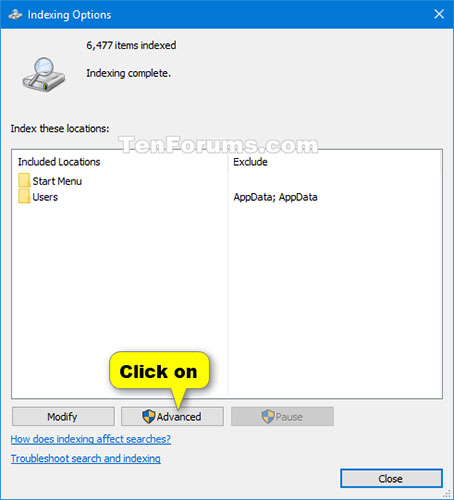
<p style="text-align: justify;">2. Nhấn vào nút&nbsp;<strong>Advanced.</strong></p>

<figure>
<div style="text-align: justify;"><img alt="Nhấn vào nút Advanced" data-i="0" data-src="https://st.quantrimang.com/photos/image/2020/03/25/doi-vi-tri-luu-tru-cua-search-index-1.jpg" data-was-processed="true" height="500" src="https://st.quantrimang.com/photos/image/2020/03/25/doi-vi-tri-luu-tru-cua-search-index-1.jpg" width="454" /></div>

<figcaption>
<div style="text-align: justify;">Nhấn vào nút Advanced</div>
</figcaption>
</figure>

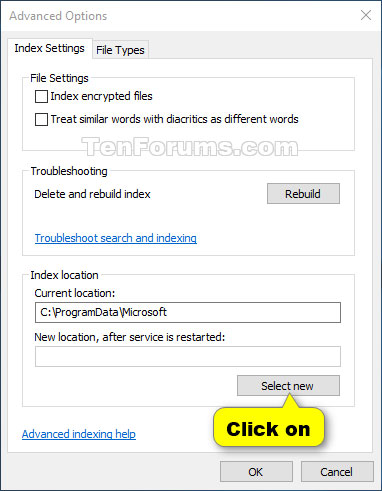
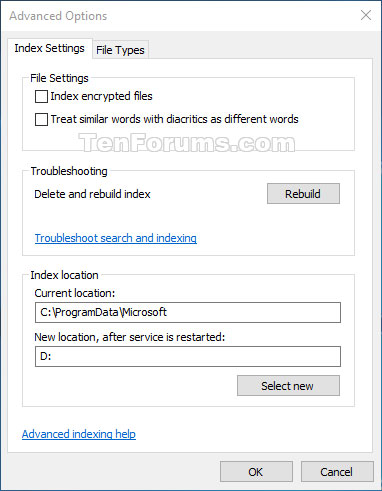
<p style="text-align: justify;">3. Nhấn vào nút&nbsp;<strong>Select new</strong>&nbsp;trong&nbsp;<strong>Index Location.</strong></p>

<figure>
<div style="text-align: justify;"><img alt="Nhấn vào nút Select new" data-i="1" data-src="https://st.quantrimang.com/photos/image/2020/03/25/doi-vi-tri-luu-tru-cua-search-index-2.jpg" data-was-processed="true" height="491" src="https://st.quantrimang.com/photos/image/2020/03/25/doi-vi-tri-luu-tru-cua-search-index-2.jpg" width="382" /></div>

<figcaption>
<div style="text-align: justify;">Nhấn vào nút Select new</div>
</figcaption>
</figure>

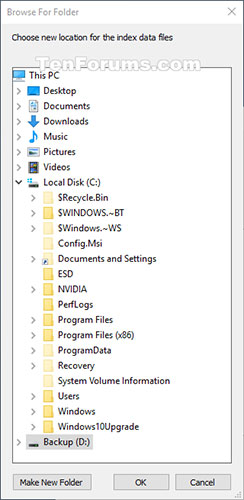
<p style="text-align: justify;">4. Duyệt đến và chọn vị trí mới (ví dụ:&nbsp;<strong>&quot;D&quot;</strong>) bạn muốn lưu các file dữ liệu chỉ mục và nhấn&nbsp;<strong>OK.</strong></p>

<p style="text-align: justify;"><strong>Ghi chú</strong>: Vị trí mới là nơi các thư mục&nbsp;<strong>Search/Data</strong>&nbsp;sẽ được lưu.</p>

<figure>
<div style="text-align: justify;"><img alt="Duyệt đến và chọn vị trí mới" data-i="2" data-src="https://st.quantrimang.com/photos/image/2020/03/25/doi-vi-tri-luu-tru-cua-search-index-3.jpg" data-was-processed="true" height="500" src="https://st.quantrimang.com/photos/image/2020/03/25/doi-vi-tri-luu-tru-cua-search-index-3.jpg" width="244" /></div>

<figcaption>
<div style="text-align: justify;">Duyệt đến và chọn vị trí mới</div>
</figcaption>
</figure>

<p style="text-align: justify;">5. Nhấn&nbsp;<strong>OK</strong>&nbsp;để áp dụng.</p>

<figure>
<div style="text-align: justify;"><img alt="Nhấn OK để áp dụng" data-i="3" data-src="https://st.quantrimang.com/photos/image/2020/03/25/doi-vi-tri-luu-tru-cua-search-index-4.jpg" data-was-processed="true" height="491" src="https://st.quantrimang.com/photos/image/2020/03/25/doi-vi-tri-luu-tru-cua-search-index-4.jpg" width="382" /></div>

<figcaption>
<div style="text-align: justify;">Nhấn OK để áp dụng</div>
</figcaption>
</figure>

<p style="text-align: justify;">6. Nhấn&nbsp;<strong>Close.</strong></p>

<div style="text-align: justify;">&nbsp;</div>

<h2 style="text-align: justify;">Thay đổi vị trí lưu trữ của Search Index trong Registry Editor</h2>

<p style="text-align: justify;">1. Nhấn các phím&nbsp;<code>Win</code>+<code>R</code>&nbsp;để mở hộp thoại&nbsp;<strong>Run</strong>, nhập&nbsp;<strong>regedit</strong>&nbsp;và nhấn&nbsp;<strong>OK</strong>&nbsp;để&nbsp;mở Registry Editor.</p>

<p style="text-align: justify;">2. Nếu được nhắc bởi UAC, nhấp vào&nbsp;<strong>Yes.</strong></p>

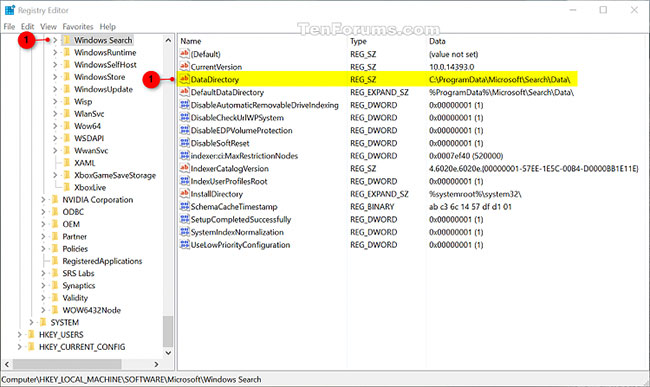
<p style="text-align: justify;">3. Điều hướng đến vị trí của key bên dưới trong Registry Editor.</p>

<pre id="pre0">
<code>HKEY_LOCAL_MACHINE\SOFTWARE\Microsoft\Windows Search</code></pre>

<figure>
<div style="text-align: justify;"><img alt="Điều hướng đến vị trí của key" data-i="4" data-src="https://st.quantrimang.com/photos/image/2020/03/25/doi-vi-tri-luu-tru-cua-search-index-5.jpg" data-was-processed="true" height="387" src="https://st.quantrimang.com/photos/image/2020/03/25/doi-vi-tri-luu-tru-cua-search-index-5.jpg" width="650" /></div>

<figcaption>
<div style="text-align: justify;">Điều hướng đến vị trí của key</div>
</figcaption>
</figure>

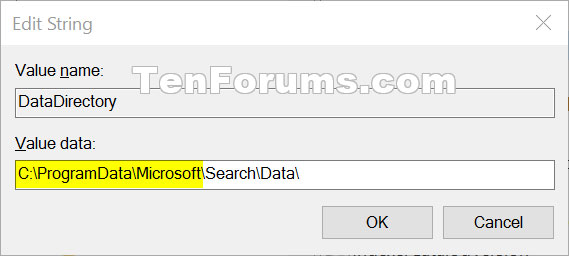
<p style="text-align: justify;">4. Ở bên phải của key Windows Search, nhấp đúp vào giá trị chuỗi&nbsp;<strong>DataDirectory</strong>&nbsp;để sửa đổi nó.</p>

<p style="text-align: justify;">5. Nhập đường dẫn đầy đủ của vị trí bạn muốn lưu trữ chỉ mục, thêm&nbsp;<strong>\Search\Data\</strong>&nbsp;vào cuối đường dẫn này và nhấn&nbsp;<strong>OK.</strong></p>

<figure>
<div style="text-align: justify;"><img alt="Thêm \Search\Data\ vào cuối đường dẫn" data-i="5" data-src="https://st.quantrimang.com/photos/image/2020/03/25/doi-vi-tri-luu-tru-cua-search-index-6.jpg" data-was-processed="true" height="256" src="https://st.quantrimang.com/photos/image/2020/03/25/doi-vi-tri-luu-tru-cua-search-index-6.jpg" width="569" /></div>

<figcaption>
<div style="text-align: justify;">Thêm \Search\Data\ vào cuối đường dẫn</div>
</figcaption>
</figure>

<p style="text-align: justify;">6. Đóng&nbsp;<strong>Registry Editor.</strong></p>

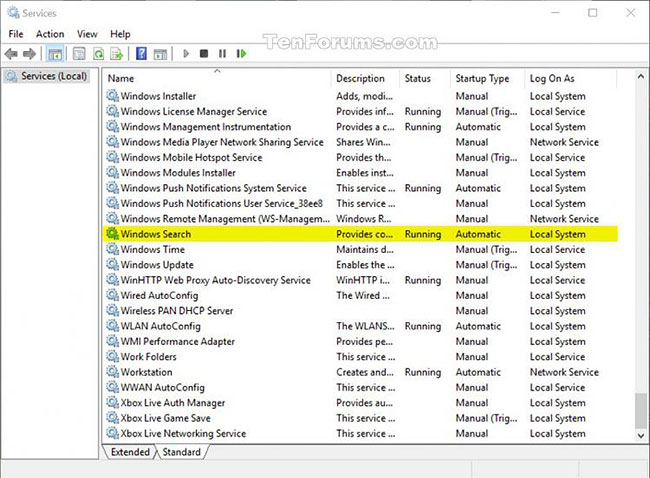
<p style="text-align: justify;">7. Dừng và bắt đầu lại service Windows Search để áp dụng thay đổi.</p>

<figure>
<div style="text-align: justify;"><img alt="Dừng và bắt đầu lại service Windows Search" data-i="6" data-src="https://st.quantrimang.com/photos/image/2020/03/25/doi-vi-tri-luu-tru-cua-search-index-7.jpg" data-was-processed="true" height="478" src="https://st.quantrimang.com/photos/image/2020/03/25/doi-vi-tri-luu-tru-cua-search-index-7.jpg" width="650" /></div>

<figcaption>
<div style="text-align: justify;">Dừng và bắt đầu lại service Windows Search</div>
</figcaption>
</figure>
		</div>
				<div id="author">
						<p>
				<strong>Nguồn tin:</strong>
				Quantrimang.com
			</p>
		</div>
	</div>
	<div id="footer" class="clearfix">
		<div id="url">
			<strong>URL của bản tin này: </strong><a href="https://www.nguoicodonvn2008.info/vi/news/savefile/kien-thuc-may-tinh/cach-thay-doi-vi-tri-luu-tru-cua-search-index-trong-windows-10-1889.html" title="Cách thay đổi vị trí lưu trữ của Search Index trong Windows 10">https://www.nguoicodonvn2008.info/vi/news/savefile/kien-thuc-may-tinh/cach-thay-doi-vi-tri-luu-tru-cua-search-index-trong-windows-10-1889.html</a>

		</div>
		<div class="clear"></div>
		<div class="copyright">
			&copy; .&#x3A; Nguoicodonvn2008.info - Cõi lòng người cô đơn &#x3A;.
		</div>
		<div id="contact">
			<a href="mailto:admin@nguoicodonvn2008.info">admin@nguoicodonvn2008.info</a>
		</div>
	</div>
</div>
        <div id="timeoutsess" class="chromeframe">
            Bạn đã không sử dụng Site, <a onclick="timeoutsesscancel();" href="https://nguoicodonvn2008.info/#">Bấm vào đây để duy trì trạng thái đăng nhập</a>. Thời gian chờ: <span id="secField"> 60 </span> giây
        </div>
        <div id="openidResult" class="nv-alert" style="display:none"></div>
        <div id="openidBt" data-result="" data-redirect=""></div>
		</script>
		<div class="car-top">
  <span><img src="https://nguoicodonvn2008.info/themes/default/images/car.png" alt=""></span>
</div>
<script src="https://nguoicodonvn2008.info/assets/js/jquery/jquery.min.js"></script>
<script>var nv_base_siteurl="/",nv_lang_data="vi",nv_lang_interface="vi",nv_name_variable="nv",nv_fc_variable="op",nv_lang_variable="language",nv_module_name="news",nv_func_name="savefile",nv_is_user=0, nv_my_ofs=-4,nv_my_abbr="EDT",nv_cookie_prefix="nv4c_e856T",nv_check_pass_mstime=1738000,nv_area_admin=0,nv_safemode=0,theme_responsive=0,nv_recaptcha_ver=2,nv_recaptcha_sitekey="",nv_recaptcha_type="image",XSSsanitize=1;</script>
<script src="https://nguoicodonvn2008.info/assets/js/language/vi.js"></script>
<script src="https://nguoicodonvn2008.info/assets/js/DOMPurify/purify3.js"></script>
<script src="https://nguoicodonvn2008.info/assets/js/global.js"></script>
<script src="https://nguoicodonvn2008.info/assets/js/site.js"></script>
<script src="https://nguoicodonvn2008.info/themes/default/js/news.js"></script>
<script src="https://nguoicodonvn2008.info/themes/default/js/main.js"></script>
<script src="https://nguoicodonvn2008.info/themes/default/js/custom.js"></script>
<script type="application/ld+json">
        {
            "@context": "https://schema.org",
            "@type": "Organization",
            "url": "https://nguoicodonvn2008.info",
            "logo": "https://nguoicodonvn2008.info/uploads/angel.gif"
        }
        </script>
<script src="https://nguoicodonvn2008.info/themes/default/js/bootstrap.min.js"></script>
<script type="text/javascript">
var $scrolltop = $('.car-top');
$scrolltop.on('click', function () {
    $('html,body').animate({
        scrollTop: 0
    }, 800);
    $(this).addClass("car-run");
    setTimeout(function(){ $scrolltop.removeClass('car-run');}, 1000);
    return false;
});
$(window).on('scroll', function ()
{ 
    if($(window).scrollTop() >= 200)
    {
        $scrolltop.addClass("show");
        $scrolltop.addClass("car-down");
    }
    else
    {
       $scrolltop.removeClass("show");
       setTimeout(function(){ $scrolltop.removeClass('car-down');}, 300);
    }
});
</script>
</body>
</html>