<!DOCTYPE html>
    <html lang="vi" xmlns="http://www.w3.org/1999/xhtml" prefix="og: http://ogp.me/ns#">
    <head>
<title>Cách thay đổi tốc độ cuộn trang với chuột hoặc bàn di chuột trên máy Mac</title>
<meta name="description" content="Cách thay đổi tốc độ cuộn trang với chuột hoặc bàn di chuột trên máy Mac - Savefile - Tin Tức -...">
<meta name="author" content=".: Nguoicodonvn2008.info - Cõi lòng người cô đơn :.">
<meta name="copyright" content=".: Nguoicodonvn2008.info - Cõi lòng người cô đơn :. [admin@nguoicodonvn2008.info]">
<meta name="robots" content="index, archive, follow, noodp">
<meta name="googlebot" content="index,archive,follow,noodp">
<meta name="msnbot" content="all,index,follow">
<meta name="generator" content="NukeViet v4.5">
<meta http-equiv="Content-Type" content="text/html; charset=utf-8">
<meta property="og:title" content="Cách thay đổi tốc độ cuộn trang với chuột hoặc bàn di chuột trên máy Mac">
<meta property="og:type" content="website">
<meta property="og:description" content="Savefile - Tin Tức -...">
<meta property="og:site_name" content=".&#x3A; Nguoicodonvn2008.info - Cõi lòng người cô đơn &#x3A;.">
<meta property="og:url" content="https://www.nguoicodonvn2008.info/vi/news/savefile/kien-thuc-may-tinh/cach-thay-doi-toc-do-cuon-trang-voi-chuot-hoac-ban-di-chuot-tren-may-mac-5443.html">
<link rel="shortcut icon" href="https://nguoicodonvn2008.info/favicon.ico">
<link rel="canonical" href="https://www.nguoicodonvn2008.info/vi/news/savefile/kien-thuc-may-tinh/cach-thay-doi-toc-do-cuon-trang-voi-chuot-hoac-ban-di-chuot-tren-may-mac-5443.html">
<link rel="alternate" href="https://nguoicodonvn2008.info/vi/news/rss/" title="Tin Tức" type="application/rss+xml">
<link rel="alternate" href="https://nguoicodonvn2008.info/vi/news/rss/karaoke-dual/" title="Tin Tức - Karaoke Dual" type="application/rss+xml">
<link rel="alternate" href="https://nguoicodonvn2008.info/vi/news/rss/nhac-tre/" title="Tin Tức - Nhạc trẻ" type="application/rss+xml">
<link rel="alternate" href="https://nguoicodonvn2008.info/vi/news/rss/tru-tinh/" title="Tin Tức - Trữ tình" type="application/rss+xml">
<link rel="alternate" href="https://nguoicodonvn2008.info/vi/news/rss/nuoc-ngoai/" title="Tin Tức - Nước ngoài" type="application/rss+xml">
<link rel="alternate" href="https://nguoicodonvn2008.info/vi/news/rss/remix/" title="Tin Tức - Remix" type="application/rss+xml">
<link rel="alternate" href="https://nguoicodonvn2008.info/vi/news/rss/tam-su-tinh-yeu/" title="Tin Tức - Tâm sự tình yêu" type="application/rss+xml">
<link rel="alternate" href="https://nguoicodonvn2008.info/vi/news/rss/tho-suu-tam/" title="Tin Tức - Thơ sưu tầm" type="application/rss+xml">
<link rel="alternate" href="https://nguoicodonvn2008.info/vi/news/rss/cuoc-song/" title="Tin Tức - Cuộc sống" type="application/rss+xml">
<link rel="alternate" href="https://nguoicodonvn2008.info/vi/news/rss/phan-mem/" title="Tin Tức - Phần mềm" type="application/rss+xml">
<link rel="alternate" href="https://nguoicodonvn2008.info/vi/news/rss/kien-thuc-may-tinh/" title="Tin Tức - Kiến thức máy tính" type="application/rss+xml">
<link rel="alternate" href="https://nguoicodonvn2008.info/vi/news/rss/hoc-tap/" title="Tin Tức - Học tập" type="application/rss+xml">
<link rel="alternate" href="https://nguoicodonvn2008.info/vi/news/rss/tai-lieu/" title="Tin Tức - Tài liệu" type="application/rss+xml">
<link rel="alternate" href="https://nguoicodonvn2008.info/vi/news/rss/de-thi/" title="Tin Tức - Đề thi" type="application/rss+xml">
<link rel="preload" as="style" href="https://nguoicodonvn2008.info/assets/css/font-awesome.min.css" type="text/css">
<link rel="preload" as="style" href="https://nguoicodonvn2008.info/themes/default/css/bootstrap.non-responsive.css" type="text/css">
<link rel="preload" as="style" href="https://nguoicodonvn2008.info/themes/default/css/style.css" type="text/css">
<link rel="preload" as="style" href="https://nguoicodonvn2008.info/themes/default/css/style.non-responsive.css" type="text/css">
<link rel="preload" as="style" href="https://nguoicodonvn2008.info/themes/default/css/news.css" type="text/css">
<link rel="preload" as="style" href="https://nguoicodonvn2008.info/themes/default/css/custom.css" type="text/css">
<link rel="preload" as="script" href="https://nguoicodonvn2008.info/assets/js/jquery/jquery.min.js" type="text/javascript">
<link rel="preload" as="script" href="https://nguoicodonvn2008.info/assets/js/language/vi.js" type="text/javascript">
<link rel="preload" as="script" href="https://nguoicodonvn2008.info/assets/js/DOMPurify/purify3.js" type="text/javascript">
<link rel="preload" as="script" href="https://nguoicodonvn2008.info/assets/js/global.js" type="text/javascript">
<link rel="preload" as="script" href="https://nguoicodonvn2008.info/assets/js/site.js" type="text/javascript">
<link rel="preload" as="script" href="https://nguoicodonvn2008.info/themes/default/js/news.js" type="text/javascript">
<link rel="preload" as="script" href="https://nguoicodonvn2008.info/themes/default/js/main.js" type="text/javascript">
<link rel="preload" as="script" href="https://nguoicodonvn2008.info/themes/default/js/custom.js" type="text/javascript">
<link rel="preload" as="script" href="https://nguoicodonvn2008.info/themes/default/js/bootstrap.min.js" type="text/javascript">
<link rel="stylesheet" href="https://nguoicodonvn2008.info/assets/css/font-awesome.min.css">
<link rel="stylesheet" href="https://nguoicodonvn2008.info/themes/default/css/bootstrap.non-responsive.css">
<link rel="stylesheet" href="https://nguoicodonvn2008.info/themes/default/css/style.css">
<link rel="stylesheet" href="https://nguoicodonvn2008.info/themes/default/css/style.non-responsive.css">
<link rel="StyleSheet" href="https://nguoicodonvn2008.info/themes/default/css/news.css">
<link rel="stylesheet" href="https://nguoicodonvn2008.info/themes/default/css/custom.css">
<style type="text/css">
	body{background: #fff;}
</style>
    </head>
    <body>
<div id="print">
	<div id="hd_print">
		<h2 class="pull-left">.&#x3A; Nguoicodonvn2008.info - Cõi lòng người cô đơn &#x3A;.</h2>
		<p class="pull-right"><a title=".&#x3A; Nguoicodonvn2008.info - Cõi lòng người cô đơn &#x3A;." href="https://nguoicodonvn2008.info/">https://nguoicodonvn2008.info</a></p>
	</div>
	<div class="clear"></div>
	<hr />
	<div id="content">
		<h1>Cách thay đổi tốc độ cuộn trang với chuột hoặc bàn di chuột trên máy Mac</h1>
		<ul class="list-inline">
			<li>Thứ năm - 14/04/2022 00:54</li>
			<li class="hidden-print txtrequired"><em class="fa fa-print">&nbsp;</em><a title="In ra" href="javascript:;" onclick="window.print()">In ra</a></li>
			<li class="hidden-print txtrequired"><em class="fa fa-power-off">&nbsp;</em><a title="Đóng cửa sổ này" href="javascript:;" onclick="window.close()">Đóng cửa sổ này</a></li>
		</ul>
		<div class="clear"></div>
		<div id="hometext">
		</div>
				<div class="imghome">
			<img alt="Cách thay đổi tốc độ cuộn trang với chuột hoặc bàn di chuột trên máy Mac" src="https://st.quantrimang.com/photos/image/2022/04/05/tang-toc-do-cuon-trang-tren-may-mac3.jpg" width="460" class="img-thumbnail" />
		</div>
		<div class="clear"></div>
		<div id="bodytext" class="clearfix">
			<p style="text-align: justify;">Mọi người có thể không đồng ý rằng Magic Mouse, hoặc thậm chí Magic Trackpad là những thiết bị đầu vào tốt nhất, nhưng chúng chắc chắn được tối ưu tuyệt vời cho máy Mac. Trên thực tế, ây là hai thiết bị duy nhất cung cấp khả năng cuộn trang cực kỳ mượt mà trên Mac, đi kèm với đó là các cử chỉ giúp việc theo tác trở nên thông minh và dễ dàng hơn nhiều.</p>

<p style="text-align: justify;">Bài viết này sẽ hướng dẫn bạn các tùy chỉnh tốc độ cuộn trang với chuột hoặc bàn di chuột trên máy Mac, qua đó có được trải nghiệm tối ưu nhất trong từng tình huống sử dụng nhất định. Cùng tìm hiểu ngay sau đây.</p>

<h2 style="text-align: justify;">Thay đổi tốc độ cuộn trang trên máy Mac</h2>

<p style="text-align: justify;"><strong>Bước 1.&nbsp;</strong>Với Magic Mouse hoặc Trackpad đang được kết nối với máy Mac, trước tiên bạn truy cập System Preferences từ Dock, Spotlight hoặc bằng cách nhấp vào biểu tượng Apple trong thanh menu ở góc trên cùng bên trái màn hình.</p>

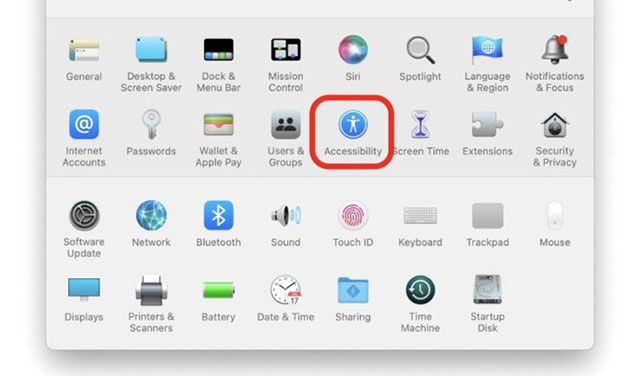
<p style="text-align: justify;"><strong>Bước 2.</strong>&nbsp;Trên cửa sổ<strong>&nbsp;System Preferences&nbsp;</strong>hiện ra, hãy nhấp vào mục&nbsp;<strong>Accessibility</strong>.</p>

<p style="text-align: justify;"><img alt="Nhấp vào mục Accessibility" data-i="0" data-src="https://st.quantrimang.com/photos/image/2022/04/05/tang-toc-do-cuon-trang-tren-may-mac1.jpg" data-was-processed="true" height="376" src="https://st.quantrimang.com/photos/image/2022/04/05/tang-toc-do-cuon-trang-tren-may-mac1.jpg" width="640" /></p>

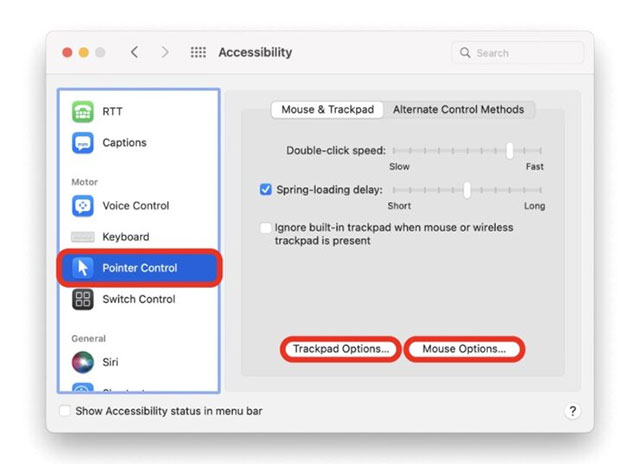
<p style="text-align: justify;"><strong>Bước 3.</strong>&nbsp;Bấm chọn mục&nbsp;<strong>Pointer Control&nbsp;</strong>trong ngăn bên trái.</p>

<p style="text-align: justify;"><strong>Bước 4.&nbsp;</strong>Bất kể bạn đã kết nối Magic Trackpad hay Magic Mouse, hãy nhấp vào “<strong>Trackpad options</strong>” hoặc “<strong>Mouse options</strong>”.</p>

<p style="text-align: justify;"><img alt="Nhấp vào “Trackpad options” hoặc “Mouse options”" data-i="1" data-src="https://st.quantrimang.com/photos/image/2022/04/05/tang-toc-do-cuon-trang-tren-may-mac2.jpg" data-was-processed="true" height="464" src="https://st.quantrimang.com/photos/image/2022/04/05/tang-toc-do-cuon-trang-tren-may-mac2.jpg" width="640" /></p>

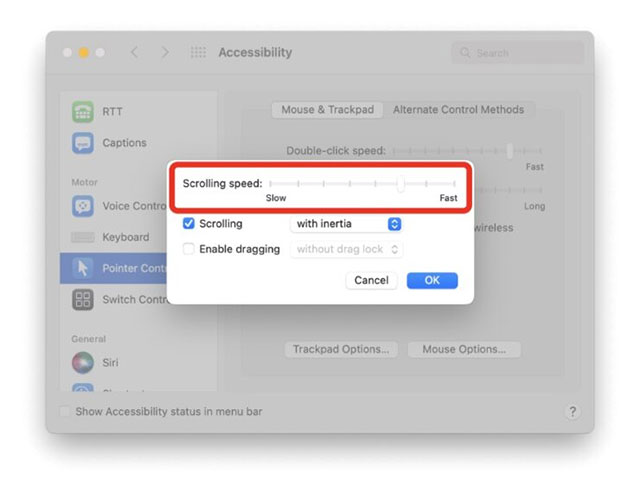
<p style="text-align: justify;"><strong>Bước 5.&nbsp;</strong>Điều chỉnh tốc độ cuộn trang mà bạn muốn từ đây và sau đó đóng cửa sổ. Bạn cũng có thể thực hiện một số điều chỉnh và kiểm tra các thay đổi một cách nhanh chóng, tất cả cho phép bạn thiết lập tốc độ cuộn phù hợp với mình nhất.</p>

<p style="text-align: justify;"><img alt="Thay đổi tốc độ cuộn" data-i="2" data-src="https://st.quantrimang.com/photos/image/2022/04/05/tang-toc-do-cuon-trang-tren-may-mac3.jpg" data-was-processed="true" height="494" src="https://st.quantrimang.com/photos/image/2022/04/05/tang-toc-do-cuon-trang-tren-may-mac3.jpg" width="640" /></p>

<p style="text-align: justify;">Về cơ bản, việc thiết lập tốc độ cuộn chậm sẽ giúp bạn tránh gặp phải tình huống vô tình “nhảy cóc” một vài trang khi thao tác nhầm. Ngược lại, nếu bạn nếu bạn muốn việc cuộn trang với chuột phải thật nhanh, hãy tăng tốc độ cuộn. Tất cả phụ thuộc vào nhu cầu và thói quen sử dụng của bạn.</p>
		</div>
				<div id="author">
						<p>
				<strong>Nguồn tin:</strong>
				Quantrimang.com
			</p>
		</div>
	</div>
	<div id="footer" class="clearfix">
		<div id="url">
			<strong>URL của bản tin này: </strong><a href="https://www.nguoicodonvn2008.info/vi/news/savefile/kien-thuc-may-tinh/cach-thay-doi-toc-do-cuon-trang-voi-chuot-hoac-ban-di-chuot-tren-may-mac-5443.html" title="Cách thay đổi tốc độ cuộn trang với chuột hoặc bàn di chuột trên máy Mac">https://www.nguoicodonvn2008.info/vi/news/savefile/kien-thuc-may-tinh/cach-thay-doi-toc-do-cuon-trang-voi-chuot-hoac-ban-di-chuot-tren-may-mac-5443.html</a>

		</div>
		<div class="clear"></div>
		<div class="copyright">
			&copy; .&#x3A; Nguoicodonvn2008.info - Cõi lòng người cô đơn &#x3A;.
		</div>
		<div id="contact">
			<a href="mailto:admin@nguoicodonvn2008.info">admin@nguoicodonvn2008.info</a>
		</div>
	</div>
</div>
        <div id="timeoutsess" class="chromeframe">
            Bạn đã không sử dụng Site, <a onclick="timeoutsesscancel();" href="https://nguoicodonvn2008.info/#">Bấm vào đây để duy trì trạng thái đăng nhập</a>. Thời gian chờ: <span id="secField"> 60 </span> giây
        </div>
        <div id="openidResult" class="nv-alert" style="display:none"></div>
        <div id="openidBt" data-result="" data-redirect=""></div>
		</script>
		<div class="car-top">
  <span><img src="https://nguoicodonvn2008.info/themes/default/images/car.png" alt=""></span>
</div>
<script src="https://nguoicodonvn2008.info/assets/js/jquery/jquery.min.js"></script>
<script>var nv_base_siteurl="/",nv_lang_data="vi",nv_lang_interface="vi",nv_name_variable="nv",nv_fc_variable="op",nv_lang_variable="language",nv_module_name="news",nv_func_name="savefile",nv_is_user=0, nv_my_ofs=-4,nv_my_abbr="EDT",nv_cookie_prefix="nv4c_e856T",nv_check_pass_mstime=1738000,nv_area_admin=0,nv_safemode=0,theme_responsive=0,nv_recaptcha_ver=2,nv_recaptcha_sitekey="",nv_recaptcha_type="image",XSSsanitize=1;</script>
<script src="https://nguoicodonvn2008.info/assets/js/language/vi.js"></script>
<script src="https://nguoicodonvn2008.info/assets/js/DOMPurify/purify3.js"></script>
<script src="https://nguoicodonvn2008.info/assets/js/global.js"></script>
<script src="https://nguoicodonvn2008.info/assets/js/site.js"></script>
<script src="https://nguoicodonvn2008.info/themes/default/js/news.js"></script>
<script src="https://nguoicodonvn2008.info/themes/default/js/main.js"></script>
<script src="https://nguoicodonvn2008.info/themes/default/js/custom.js"></script>
<script type="application/ld+json">
        {
            "@context": "https://schema.org",
            "@type": "Organization",
            "url": "https://nguoicodonvn2008.info",
            "logo": "https://nguoicodonvn2008.info/uploads/angel.gif"
        }
        </script>
<script src="https://nguoicodonvn2008.info/themes/default/js/bootstrap.min.js"></script>
<script type="text/javascript">
var $scrolltop = $('.car-top');
$scrolltop.on('click', function () {
    $('html,body').animate({
        scrollTop: 0
    }, 800);
    $(this).addClass("car-run");
    setTimeout(function(){ $scrolltop.removeClass('car-run');}, 1000);
    return false;
});
$(window).on('scroll', function ()
{ 
    if($(window).scrollTop() >= 200)
    {
        $scrolltop.addClass("show");
        $scrolltop.addClass("car-down");
    }
    else
    {
       $scrolltop.removeClass("show");
       setTimeout(function(){ $scrolltop.removeClass('car-down');}, 300);
    }
});
</script>
</body>
</html>