<!DOCTYPE html>
    <html lang="vi" xmlns="http://www.w3.org/1999/xhtml" prefix="og: http://ogp.me/ns#">
    <head>
<title>Cách thay đổi ảnh profile trong Microsoft Edge Chromium Công ng</title>
<meta name="description" content="Cách thay đổi ảnh profile trong Microsoft Edge Chromium Công ng - Savefile - Tin Tức -...">
<meta name="author" content=".: Nguoicodonvn2008.info - Cõi lòng người cô đơn :.">
<meta name="copyright" content=".: Nguoicodonvn2008.info - Cõi lòng người cô đơn :. [admin@nguoicodonvn2008.info]">
<meta name="robots" content="index, archive, follow, noodp">
<meta name="googlebot" content="index,archive,follow,noodp">
<meta name="msnbot" content="all,index,follow">
<meta name="generator" content="NukeViet v4.5">
<meta http-equiv="Content-Type" content="text/html; charset=utf-8">
<meta property="og:title" content="Cách thay đổi ảnh profile trong Microsoft Edge Chromium Công ng">
<meta property="og:type" content="website">
<meta property="og:description" content="Savefile - Tin Tức - https&#x3A;&#x002F;&#x002F;www.nguoicodonvn2008.info&#x002F;vi&#x002F;news&#x002F;savefile&#x002F;kien-thuc-may-tinh&#x002F;cach-thay-doi-anh-profile-trong-microsoft-edge-chromium-cong-ng-1351.html">
<meta property="og:site_name" content=".&#x3A; Nguoicodonvn2008.info - Cõi lòng người cô đơn &#x3A;.">
<meta property="og:url" content="https://www.nguoicodonvn2008.info/vi/news/savefile/kien-thuc-may-tinh/cach-thay-doi-anh-profile-trong-microsoft-edge-chromium-cong-ng-1351.html">
<link rel="shortcut icon" href="https://nguoicodonvn2008.info/favicon.ico">
<link rel="canonical" href="https://www.nguoicodonvn2008.info/vi/news/savefile/kien-thuc-may-tinh/cach-thay-doi-anh-profile-trong-microsoft-edge-chromium-cong-ng-1351.html">
<link rel="alternate" href="https://nguoicodonvn2008.info/vi/news/rss/" title="Tin Tức" type="application/rss+xml">
<link rel="alternate" href="https://nguoicodonvn2008.info/vi/news/rss/karaoke-dual/" title="Tin Tức - Karaoke Dual" type="application/rss+xml">
<link rel="alternate" href="https://nguoicodonvn2008.info/vi/news/rss/nhac-tre/" title="Tin Tức - Nhạc trẻ" type="application/rss+xml">
<link rel="alternate" href="https://nguoicodonvn2008.info/vi/news/rss/tru-tinh/" title="Tin Tức - Trữ tình" type="application/rss+xml">
<link rel="alternate" href="https://nguoicodonvn2008.info/vi/news/rss/nuoc-ngoai/" title="Tin Tức - Nước ngoài" type="application/rss+xml">
<link rel="alternate" href="https://nguoicodonvn2008.info/vi/news/rss/remix/" title="Tin Tức - Remix" type="application/rss+xml">
<link rel="alternate" href="https://nguoicodonvn2008.info/vi/news/rss/tam-su-tinh-yeu/" title="Tin Tức - Tâm sự tình yêu" type="application/rss+xml">
<link rel="alternate" href="https://nguoicodonvn2008.info/vi/news/rss/tho-suu-tam/" title="Tin Tức - Thơ sưu tầm" type="application/rss+xml">
<link rel="alternate" href="https://nguoicodonvn2008.info/vi/news/rss/cuoc-song/" title="Tin Tức - Cuộc sống" type="application/rss+xml">
<link rel="alternate" href="https://nguoicodonvn2008.info/vi/news/rss/phan-mem/" title="Tin Tức - Phần mềm" type="application/rss+xml">
<link rel="alternate" href="https://nguoicodonvn2008.info/vi/news/rss/kien-thuc-may-tinh/" title="Tin Tức - Kiến thức máy tính" type="application/rss+xml">
<link rel="alternate" href="https://nguoicodonvn2008.info/vi/news/rss/hoc-tap/" title="Tin Tức - Học tập" type="application/rss+xml">
<link rel="alternate" href="https://nguoicodonvn2008.info/vi/news/rss/tai-lieu/" title="Tin Tức - Tài liệu" type="application/rss+xml">
<link rel="alternate" href="https://nguoicodonvn2008.info/vi/news/rss/de-thi/" title="Tin Tức - Đề thi" type="application/rss+xml">
<link rel="preload" as="style" href="https://nguoicodonvn2008.info/assets/css/font-awesome.min.css" type="text/css">
<link rel="preload" as="style" href="https://nguoicodonvn2008.info/themes/default/css/bootstrap.non-responsive.css" type="text/css">
<link rel="preload" as="style" href="https://nguoicodonvn2008.info/themes/default/css/style.css" type="text/css">
<link rel="preload" as="style" href="https://nguoicodonvn2008.info/themes/default/css/style.non-responsive.css" type="text/css">
<link rel="preload" as="style" href="https://nguoicodonvn2008.info/themes/default/css/news.css" type="text/css">
<link rel="preload" as="style" href="https://nguoicodonvn2008.info/themes/default/css/custom.css" type="text/css">
<link rel="preload" as="script" href="https://nguoicodonvn2008.info/assets/js/jquery/jquery.min.js" type="text/javascript">
<link rel="preload" as="script" href="https://nguoicodonvn2008.info/assets/js/language/vi.js" type="text/javascript">
<link rel="preload" as="script" href="https://nguoicodonvn2008.info/assets/js/DOMPurify/purify3.js" type="text/javascript">
<link rel="preload" as="script" href="https://nguoicodonvn2008.info/assets/js/global.js" type="text/javascript">
<link rel="preload" as="script" href="https://nguoicodonvn2008.info/assets/js/site.js" type="text/javascript">
<link rel="preload" as="script" href="https://nguoicodonvn2008.info/themes/default/js/news.js" type="text/javascript">
<link rel="preload" as="script" href="https://nguoicodonvn2008.info/themes/default/js/main.js" type="text/javascript">
<link rel="preload" as="script" href="https://nguoicodonvn2008.info/themes/default/js/custom.js" type="text/javascript">
<link rel="preload" as="script" href="https://nguoicodonvn2008.info/themes/default/js/bootstrap.min.js" type="text/javascript">
<link rel="stylesheet" href="https://nguoicodonvn2008.info/assets/css/font-awesome.min.css">
<link rel="stylesheet" href="https://nguoicodonvn2008.info/themes/default/css/bootstrap.non-responsive.css">
<link rel="stylesheet" href="https://nguoicodonvn2008.info/themes/default/css/style.css">
<link rel="stylesheet" href="https://nguoicodonvn2008.info/themes/default/css/style.non-responsive.css">
<link rel="StyleSheet" href="https://nguoicodonvn2008.info/themes/default/css/news.css">
<link rel="stylesheet" href="https://nguoicodonvn2008.info/themes/default/css/custom.css">
<style type="text/css">
	body{background: #fff;}
</style>
    </head>
    <body>
<div id="print">
	<div id="hd_print">
		<h2 class="pull-left">.&#x3A; Nguoicodonvn2008.info - Cõi lòng người cô đơn &#x3A;.</h2>
		<p class="pull-right"><a title=".&#x3A; Nguoicodonvn2008.info - Cõi lòng người cô đơn &#x3A;." href="https://nguoicodonvn2008.info/">https://nguoicodonvn2008.info</a></p>
	</div>
	<div class="clear"></div>
	<hr />
	<div id="content">
		<h1>Cách thay đổi ảnh profile trong Microsoft Edge Chromium Công ng</h1>
		<ul class="list-inline">
			<li>Thứ tư - 20/11/2019 07:14</li>
			<li class="hidden-print txtrequired"><em class="fa fa-print">&nbsp;</em><a title="In ra" href="javascript:;" onclick="window.print()">In ra</a></li>
			<li class="hidden-print txtrequired"><em class="fa fa-power-off">&nbsp;</em><a title="Đóng cửa sổ này" href="javascript:;" onclick="window.close()">Đóng cửa sổ này</a></li>
		</ul>
		<div class="clear"></div>
		<div id="hometext">
		</div>
				<div class="imghome">
			<img alt="Cách thay đổi ảnh profile trong Microsoft Edge Chromium Công ng" src="https://st.quantrimang.com/photos/image/2019/11/20/doi-anh-profile-trong-ms-edge-chromium-6.jpg" width="460" class="img-thumbnail" />
		</div>
		<div class="clear"></div>
		<div id="bodytext" class="clearfix">
			<p style="text-align: justify;">Microsoft đã áp dụng dự án mã nguồn mở Chromium trong quá trình phát triển Microsoft Edge trên desktop để tạo khả năng tương thích web tốt hơn. Microsoft Edge mới này chạy trên cùng một công cụ web Chromium với trình duyệt&nbsp;Google Chrome, cung cấp cho bạn hiệu suất và khả năng tương thích web tốt nhất.</p>

<p style="text-align: justify;">Microsoft cũng đã giới thiệu logo Microsoft Edge mới được thiết kế để ghi lại những làn sóng đổi mới mà hãng này dự định mang đến cho người dùng.</p>

<p style="text-align: justify;">Hiện tại, trình duyệt web Microsoft Edge dựa trên Chromium mới chỉ có sẵn để tải xuống và cài đặt dưới dạng Microsoft Edge Insider. Dự kiến ​​sẽ ra mắt công chúng vào ngày 15 tháng 1 năm 2020 với hơn 90 ngôn ngữ.</p>

<p style="text-align: justify;">Microsoft Edge mới sẽ được hỗ trợ trên tất cả các phiên bản Windows 7, Windows 8.1, Windows 10, Windows Server (2016 trở lên), Windows Server (2008 R2 đến 2012 R2) và macOS.</p>

<p style="text-align: justify;">Microsoft Edge dựa trên Chromium hỗ trợ việc có nhiều profile. Mỗi profile có danh tính, mục yêu thích, cài đặt và tiện ích mở rộng riêng. Profile trong Microsoft Edge giống như profile cho các tài khoản trong Windows, mà thay vào đó là ở cấp độ trình duyệt.</p>

<p style="text-align: justify;">Bạn có thể đăng nhập vào profile bằng tài khoản Microsoft, tài khoản tại cơ quan/trường học của mình hoặc đăng xuất khỏi profile để nó chỉ là profile cục bộ. Khi đăng nhập vào profile bằng tài khoản Microsoft, bạn có thể kích hoạt để Microsoft Edge đồng bộ lịch sử, mục yêu thích, mật khẩu và dữ liệu trình duyệt khác trên tất cả các thiết bị bạn đã đăng nhập, vào profile trong Microsoft Edge với cùng một tài khoản.</p>

<p style="text-align: justify;">Hướng dẫn này sẽ chỉ cho bạn cách thay đổi ảnh profile trong Microsoft Edge dựa trên Chromium.</p>

<p style="text-align: justify;">Đây là cách thực hiện:</p>

<p style="text-align: justify;">1. Mở&nbsp;<strong>Microsoft Edge</strong>.</p>

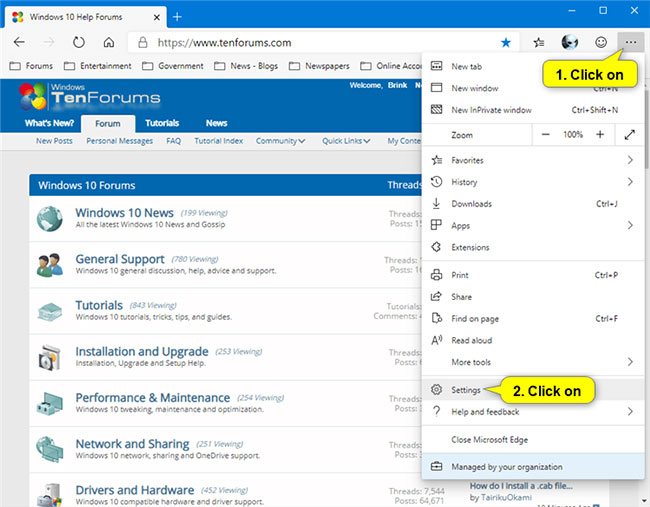
<p style="text-align: justify;">2. Nhấp vào biểu tượng menu 3 chấm và chọn&nbsp;<strong>Settings.</strong></p>

<p style="text-align: justify;"><strong><img alt="More &gt; Settings" data-i="0" data-src="https://st.quantrimang.com/photos/image/2019/11/20/doi-anh-profile-trong-ms-edge-chromium-1.jpg" data-was-processed="true" height="507" src="https://st.quantrimang.com/photos/image/2019/11/20/doi-anh-profile-trong-ms-edge-chromium-1.jpg" width="650" /></strong></p>

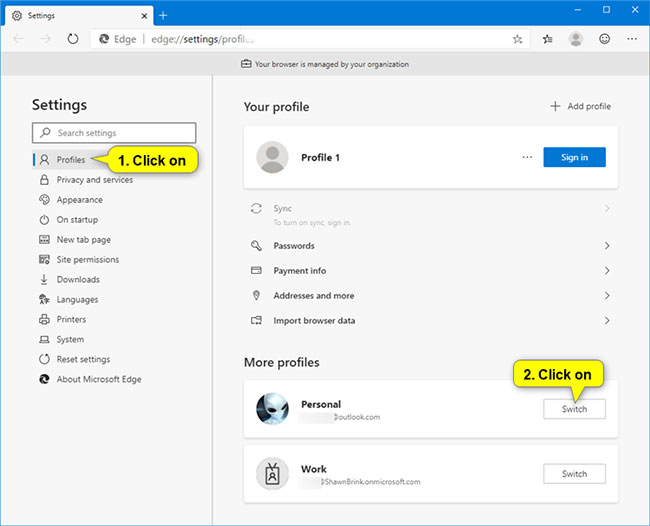
<p style="text-align: justify;">3. Nhấp vào&nbsp;<strong>Profiles</strong>&nbsp;ở phía bên trái. Nếu bạn chưa sử dụng profile muốn thay đổi ảnh, hãy nhấp vào nút&nbsp;<strong>Switch</strong>&nbsp;ở bên phải cho profile bạn muốn thay đổi ảnh.</p>

<p style="text-align: justify;"><strong>Lưu ý:</strong>&nbsp;Nếu bạn không thấy bảng điều khiển bên trái, thì hãy mở rộng các đường viền ngang của cửa sổ Microsoft Edge.</p>

<p style="text-align: justify;"><img alt="Nhấp vào Profiles ở phía bên trái" data-i="1" data-src="https://st.quantrimang.com/photos/image/2019/11/20/doi-anh-profile-trong-ms-edge-chromium-2.jpg" data-was-processed="true" height="526" src="https://st.quantrimang.com/photos/image/2019/11/20/doi-anh-profile-trong-ms-edge-chromium-2.jpg" width="650" /></p>

<p style="text-align: justify;">4. Thực hiện bước 5 (để đăng xuất) hoặc bước 6 (để đăng nhập bằng tài khoản Microsoft) bên dưới tùy thuộc vào việc bạn đã đăng nhập profile bằng tài khoản Microsoft hay chưa.</p>

<p style="text-align: justify;">5. Thay đổi ảnh profile chưa đăng nhập.</p>

<p style="text-align: justify;">A) Nhấp nút 3 dấu chấm và chọn&nbsp;<strong>Edit</strong>&nbsp;trong menu drop-down.</p>

<p style="text-align: justify;"><img alt="Nhấp nút 3 dấu chấm và chọn Edit trong menu drop-down" data-i="2" data-src="https://st.quantrimang.com/photos/image/2019/11/20/doi-anh-profile-trong-ms-edge-chromium-3.jpg" data-was-processed="true" height="526" src="https://st.quantrimang.com/photos/image/2019/11/20/doi-anh-profile-trong-ms-edge-chromium-3.jpg" width="650" /></p>

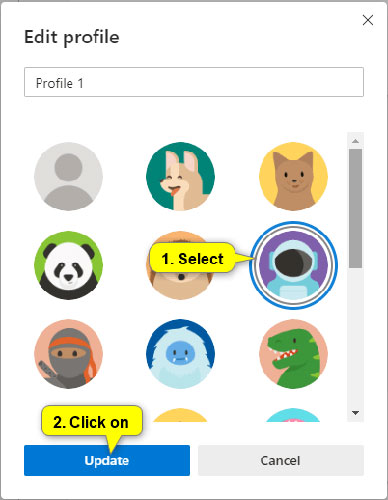
<p style="text-align: justify;">B) Chọn ảnh profile bạn muốn và nhấn vào&nbsp;<strong>Update.</strong></p>

<p style="text-align: justify;"><strong><img alt="Chọn ảnh profile bạn muốn và nhấn vào Update" data-i="3" data-src="https://st.quantrimang.com/photos/image/2019/11/20/doi-anh-profile-trong-ms-edge-chromium-4.jpg" data-was-processed="true" height="500" src="https://st.quantrimang.com/photos/image/2019/11/20/doi-anh-profile-trong-ms-edge-chromium-4.jpg" width="388" /></strong></p>

<p style="text-align: justify;">6. Thay đổi ảnh profile đã đăng nhập bằng tài khoản Microsoft.</p>

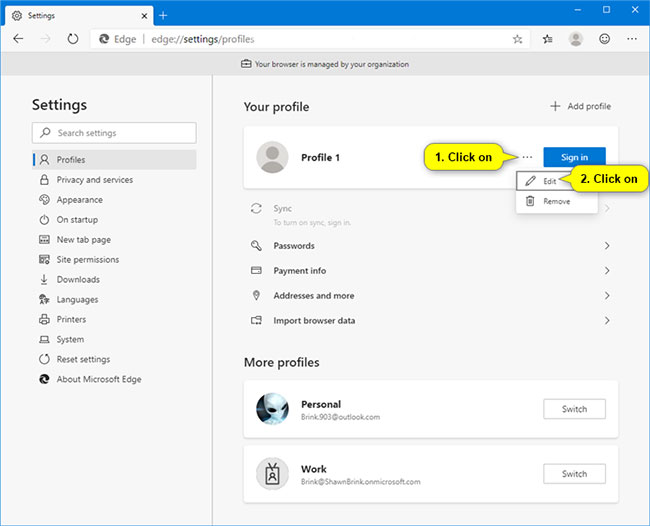
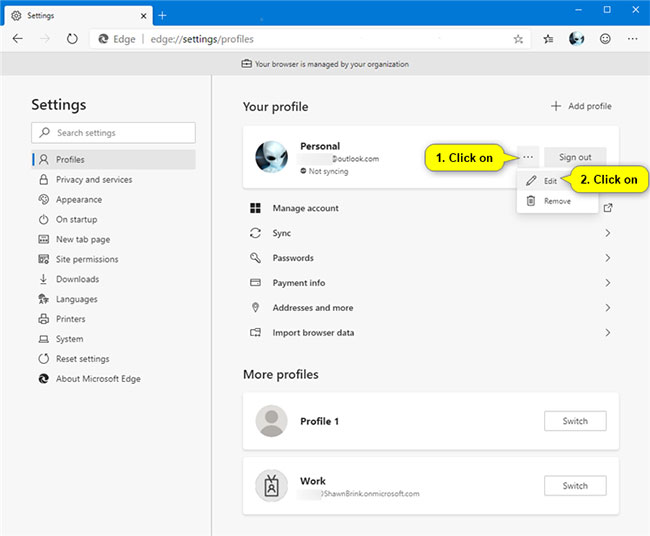
<p style="text-align: justify;">A) Nhấp vào nút 3 dấu chấm và chọn&nbsp;<strong>Edit</strong>&nbsp;trong menu drop-down.</p>

<p style="text-align: justify;"><img alt="Nhấp vào nút 3 dấu chấm và chọn Edit trong menu drop-down" data-i="4" data-src="https://st.quantrimang.com/photos/image/2019/11/20/doi-anh-profile-trong-ms-edge-chromium-5.jpg" data-was-processed="true" height="536" src="https://st.quantrimang.com/photos/image/2019/11/20/doi-anh-profile-trong-ms-edge-chromium-5.jpg" width="650" /></p>

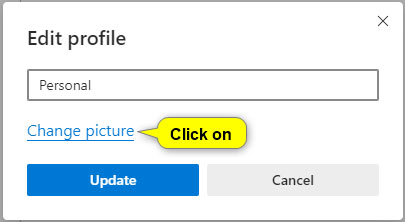
<p style="text-align: justify;">B) Nhấp vào liên kết&nbsp;<strong>Change picture.</strong>&nbsp;</p>

<p style="text-align: justify;"><img alt="Nhấp vào liên kết Change picture" data-i="5" data-src="https://st.quantrimang.com/photos/image/2019/11/20/doi-anh-profile-trong-ms-edge-chromium-6.jpg" data-was-processed="true" height="222" src="https://st.quantrimang.com/photos/image/2019/11/20/doi-anh-profile-trong-ms-edge-chromium-6.jpg" width="405" /></p>

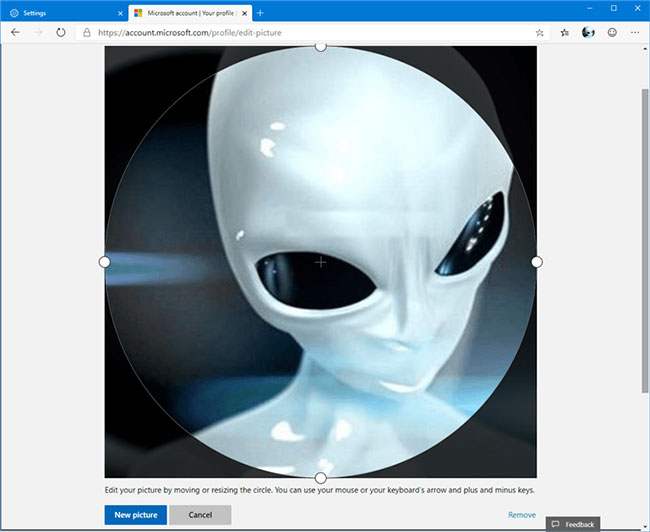
<p style="text-align: justify;">C) Một tab mới sẽ mở ra trang chỉnh sửa ảnh trực tuyến cho tài khoản Microsoft. Thay đổi ảnh tài khoản Microsoft bằng cách chọn&nbsp;<strong>New picture &gt; Save</strong>.</p>

<p style="text-align: justify;"><img alt="Thay đổi ảnh tài khoản Microsoft bằng cách chọn New picture &gt; Save" data-i="6" data-src="https://st.quantrimang.com/photos/image/2019/11/20/doi-anh-profile-trong-ms-edge-chromium-7.jpg" data-was-processed="true" height="532" src="https://st.quantrimang.com/photos/image/2019/11/20/doi-anh-profile-trong-ms-edge-chromium-7.jpg" width="650" /></p>

<p style="text-align: justify;">D) Các thay đổi cuối cùng sẽ đồng bộ với tất cả mọi PC và thiết bị mà bạn đăng nhập bằng tài khoản Microsoft này để cập nhật ảnh profile trong Microsoft Edge.</p>

<p style="text-align: justify;">Nếu bạn muốn áp dụng thay đổi ảnh profile ngay bây giờ:</p>

<p style="text-align: justify;">A) Nếu bạn đăng nhập vào Windows 10 bằng tài khoản Microsoft này, hãy thay đổi ảnh tài khoản Microsoft trong&nbsp;Windows 10.</p>

<p style="text-align: justify;">B) Đăng xuất khỏi profile này trong Microsoft Edge, đồng thời bỏ tích ở tùy chọn&nbsp;<strong>“Clear favorites, history, passwords, and other browsing data from this device”</strong>&nbsp;và đăng nhập lại vào profile bằng tài khoản Microsoft này.</p>

<p style="text-align: justify;">Chúc bạn thực hiện thành công!</p>
		</div>
				<div id="author">
						<p>
				<strong>Nguồn tin:</strong>
				Quantrimang.com
			</p>
		</div>
	</div>
	<div id="footer" class="clearfix">
		<div id="url">
			<strong>URL của bản tin này: </strong><a href="https://www.nguoicodonvn2008.info/vi/news/savefile/kien-thuc-may-tinh/cach-thay-doi-anh-profile-trong-microsoft-edge-chromium-cong-ng-1351.html" title="Cách thay đổi ảnh profile trong Microsoft Edge Chromium Công ng">https://www.nguoicodonvn2008.info/vi/news/savefile/kien-thuc-may-tinh/cach-thay-doi-anh-profile-trong-microsoft-edge-chromium-cong-ng-1351.html</a>

		</div>
		<div class="clear"></div>
		<div class="copyright">
			&copy; .&#x3A; Nguoicodonvn2008.info - Cõi lòng người cô đơn &#x3A;.
		</div>
		<div id="contact">
			<a href="mailto:admin@nguoicodonvn2008.info">admin@nguoicodonvn2008.info</a>
		</div>
	</div>
</div>
        <div id="timeoutsess" class="chromeframe">
            Bạn đã không sử dụng Site, <a onclick="timeoutsesscancel();" href="https://nguoicodonvn2008.info/#">Bấm vào đây để duy trì trạng thái đăng nhập</a>. Thời gian chờ: <span id="secField"> 60 </span> giây
        </div>
        <div id="openidResult" class="nv-alert" style="display:none"></div>
        <div id="openidBt" data-result="" data-redirect=""></div>
		</script>
		<div class="car-top">
  <span><img src="https://nguoicodonvn2008.info/themes/default/images/car.png" alt=""></span>
</div>
<script src="https://nguoicodonvn2008.info/assets/js/jquery/jquery.min.js"></script>
<script>var nv_base_siteurl="/",nv_lang_data="vi",nv_lang_interface="vi",nv_name_variable="nv",nv_fc_variable="op",nv_lang_variable="language",nv_module_name="news",nv_func_name="savefile",nv_is_user=0, nv_my_ofs=-4,nv_my_abbr="EDT",nv_cookie_prefix="nv4c_e856T",nv_check_pass_mstime=1738000,nv_area_admin=0,nv_safemode=0,theme_responsive=0,nv_recaptcha_ver=2,nv_recaptcha_sitekey="",nv_recaptcha_type="image",XSSsanitize=1;</script>
<script src="https://nguoicodonvn2008.info/assets/js/language/vi.js"></script>
<script src="https://nguoicodonvn2008.info/assets/js/DOMPurify/purify3.js"></script>
<script src="https://nguoicodonvn2008.info/assets/js/global.js"></script>
<script src="https://nguoicodonvn2008.info/assets/js/site.js"></script>
<script src="https://nguoicodonvn2008.info/themes/default/js/news.js"></script>
<script src="https://nguoicodonvn2008.info/themes/default/js/main.js"></script>
<script src="https://nguoicodonvn2008.info/themes/default/js/custom.js"></script>
<script type="application/ld+json">
        {
            "@context": "https://schema.org",
            "@type": "Organization",
            "url": "https://nguoicodonvn2008.info",
            "logo": "https://nguoicodonvn2008.info/uploads/angel.gif"
        }
        </script>
<script src="https://nguoicodonvn2008.info/themes/default/js/bootstrap.min.js"></script>
<script type="text/javascript">
var $scrolltop = $('.car-top');
$scrolltop.on('click', function () {
    $('html,body').animate({
        scrollTop: 0
    }, 800);
    $(this).addClass("car-run");
    setTimeout(function(){ $scrolltop.removeClass('car-run');}, 1000);
    return false;
});
$(window).on('scroll', function ()
{ 
    if($(window).scrollTop() >= 200)
    {
        $scrolltop.addClass("show");
        $scrolltop.addClass("car-down");
    }
    else
    {
       $scrolltop.removeClass("show");
       setTimeout(function(){ $scrolltop.removeClass('car-down');}, 300);
    }
});
</script>
</body>
</html>