<!DOCTYPE html>
    <html lang="vi" xmlns="http://www.w3.org/1999/xhtml" prefix="og: http://ogp.me/ns#">
    <head>
<title>Cách tạo và chạy script shell trong Ubuntu 20.04 LTS</title>
<meta name="description" content="Cách tạo và chạy script shell trong Ubuntu 20.04 LTS - Savefile - Tin Tức -...">
<meta name="author" content=".: Nguoicodonvn2008.info - Cõi lòng người cô đơn :.">
<meta name="copyright" content=".: Nguoicodonvn2008.info - Cõi lòng người cô đơn :. [admin@nguoicodonvn2008.info]">
<meta name="robots" content="index, archive, follow, noodp">
<meta name="googlebot" content="index,archive,follow,noodp">
<meta name="msnbot" content="all,index,follow">
<meta name="generator" content="NukeViet v4.5">
<meta http-equiv="Content-Type" content="text/html; charset=utf-8">
<meta property="og:title" content="Cách tạo và chạy script shell trong Ubuntu 20.04 LTS">
<meta property="og:type" content="website">
<meta property="og:description" content="Savefile - Tin Tức - https&#x3A;&#x002F;&#x002F;www.nguoicodonvn2008.info&#x002F;vi&#x002F;news&#x002F;savefile&#x002F;kien-thuc-may-tinh&#x002F;cach-tao-va-chay-script-shell-trong-ubuntu-20-04-lts-2923.html">
<meta property="og:site_name" content=".&#x3A; Nguoicodonvn2008.info - Cõi lòng người cô đơn &#x3A;.">
<meta property="og:url" content="https://www.nguoicodonvn2008.info/vi/news/savefile/kien-thuc-may-tinh/cach-tao-va-chay-script-shell-trong-ubuntu-20-04-lts-2923.html">
<link rel="shortcut icon" href="https://nguoicodonvn2008.info/favicon.ico">
<link rel="canonical" href="https://www.nguoicodonvn2008.info/vi/news/savefile/kien-thuc-may-tinh/cach-tao-va-chay-script-shell-trong-ubuntu-20-04-lts-2923.html">
<link rel="alternate" href="https://nguoicodonvn2008.info/vi/news/rss/" title="Tin Tức" type="application/rss+xml">
<link rel="alternate" href="https://nguoicodonvn2008.info/vi/news/rss/karaoke-dual/" title="Tin Tức - Karaoke Dual" type="application/rss+xml">
<link rel="alternate" href="https://nguoicodonvn2008.info/vi/news/rss/nhac-tre/" title="Tin Tức - Nhạc trẻ" type="application/rss+xml">
<link rel="alternate" href="https://nguoicodonvn2008.info/vi/news/rss/tru-tinh/" title="Tin Tức - Trữ tình" type="application/rss+xml">
<link rel="alternate" href="https://nguoicodonvn2008.info/vi/news/rss/nuoc-ngoai/" title="Tin Tức - Nước ngoài" type="application/rss+xml">
<link rel="alternate" href="https://nguoicodonvn2008.info/vi/news/rss/remix/" title="Tin Tức - Remix" type="application/rss+xml">
<link rel="alternate" href="https://nguoicodonvn2008.info/vi/news/rss/tam-su-tinh-yeu/" title="Tin Tức - Tâm sự tình yêu" type="application/rss+xml">
<link rel="alternate" href="https://nguoicodonvn2008.info/vi/news/rss/tho-suu-tam/" title="Tin Tức - Thơ sưu tầm" type="application/rss+xml">
<link rel="alternate" href="https://nguoicodonvn2008.info/vi/news/rss/cuoc-song/" title="Tin Tức - Cuộc sống" type="application/rss+xml">
<link rel="alternate" href="https://nguoicodonvn2008.info/vi/news/rss/phan-mem/" title="Tin Tức - Phần mềm" type="application/rss+xml">
<link rel="alternate" href="https://nguoicodonvn2008.info/vi/news/rss/kien-thuc-may-tinh/" title="Tin Tức - Kiến thức máy tính" type="application/rss+xml">
<link rel="alternate" href="https://nguoicodonvn2008.info/vi/news/rss/hoc-tap/" title="Tin Tức - Học tập" type="application/rss+xml">
<link rel="alternate" href="https://nguoicodonvn2008.info/vi/news/rss/tai-lieu/" title="Tin Tức - Tài liệu" type="application/rss+xml">
<link rel="alternate" href="https://nguoicodonvn2008.info/vi/news/rss/de-thi/" title="Tin Tức - Đề thi" type="application/rss+xml">
<link rel="preload" as="style" href="https://nguoicodonvn2008.info/assets/css/font-awesome.min.css" type="text/css">
<link rel="preload" as="style" href="https://nguoicodonvn2008.info/themes/default/css/bootstrap.non-responsive.css" type="text/css">
<link rel="preload" as="style" href="https://nguoicodonvn2008.info/themes/default/css/style.css" type="text/css">
<link rel="preload" as="style" href="https://nguoicodonvn2008.info/themes/default/css/style.non-responsive.css" type="text/css">
<link rel="preload" as="style" href="https://nguoicodonvn2008.info/themes/default/css/news.css" type="text/css">
<link rel="preload" as="style" href="https://nguoicodonvn2008.info/themes/default/css/custom.css" type="text/css">
<link rel="preload" as="script" href="https://nguoicodonvn2008.info/assets/js/jquery/jquery.min.js" type="text/javascript">
<link rel="preload" as="script" href="https://nguoicodonvn2008.info/assets/js/language/vi.js" type="text/javascript">
<link rel="preload" as="script" href="https://nguoicodonvn2008.info/assets/js/DOMPurify/purify3.js" type="text/javascript">
<link rel="preload" as="script" href="https://nguoicodonvn2008.info/assets/js/global.js" type="text/javascript">
<link rel="preload" as="script" href="https://nguoicodonvn2008.info/assets/js/site.js" type="text/javascript">
<link rel="preload" as="script" href="https://nguoicodonvn2008.info/themes/default/js/news.js" type="text/javascript">
<link rel="preload" as="script" href="https://nguoicodonvn2008.info/themes/default/js/main.js" type="text/javascript">
<link rel="preload" as="script" href="https://nguoicodonvn2008.info/themes/default/js/custom.js" type="text/javascript">
<link rel="preload" as="script" href="https://nguoicodonvn2008.info/themes/default/js/bootstrap.min.js" type="text/javascript">
<link rel="stylesheet" href="https://nguoicodonvn2008.info/assets/css/font-awesome.min.css">
<link rel="stylesheet" href="https://nguoicodonvn2008.info/themes/default/css/bootstrap.non-responsive.css">
<link rel="stylesheet" href="https://nguoicodonvn2008.info/themes/default/css/style.css">
<link rel="stylesheet" href="https://nguoicodonvn2008.info/themes/default/css/style.non-responsive.css">
<link rel="StyleSheet" href="https://nguoicodonvn2008.info/themes/default/css/news.css">
<link rel="stylesheet" href="https://nguoicodonvn2008.info/themes/default/css/custom.css">
<style type="text/css">
	body{background: #fff;}
</style>
    </head>
    <body>
<div id="print">
	<div id="hd_print">
		<h2 class="pull-left">.&#x3A; Nguoicodonvn2008.info - Cõi lòng người cô đơn &#x3A;.</h2>
		<p class="pull-right"><a title=".&#x3A; Nguoicodonvn2008.info - Cõi lòng người cô đơn &#x3A;." href="https://nguoicodonvn2008.info/">https://nguoicodonvn2008.info</a></p>
	</div>
	<div class="clear"></div>
	<hr />
	<div id="content">
		<h1>Cách tạo và chạy script shell trong Ubuntu 20.04 LTS</h1>
		<ul class="list-inline">
			<li>Thứ hai - 19/10/2020 00:57</li>
			<li class="hidden-print txtrequired"><em class="fa fa-print">&nbsp;</em><a title="In ra" href="javascript:;" onclick="window.print()">In ra</a></li>
			<li class="hidden-print txtrequired"><em class="fa fa-power-off">&nbsp;</em><a title="Đóng cửa sổ này" href="javascript:;" onclick="window.close()">Đóng cửa sổ này</a></li>
		</ul>
		<div class="clear"></div>
		<div id="hometext">
		</div>
				<div class="imghome">
			<img alt="Cách tạo và chạy script shell trong Ubuntu 20.04 LTS" src="https://st.quantrimang.com/photos/image/2020/10/15/tao-va-chay-script-shell-trong-ubuntu-2.jpg" width="460" class="img-thumbnail" />
		</div>
		<div class="clear"></div>
		<div id="bodytext" class="clearfix">
			<p style="text-align: justify;">Một script được sử dụng trong&nbsp;<a href="https://quantrimang.com/linux-os" title="Chuyên mục Linux">Linux</a>&nbsp;và các lệnh được viết vào đó theo đặc điểm công việc và nhiệm vụ. Khi thực thi một script như vậy, mỗi lệnh trong đó sẽ thực hiện từng cái một theo thứ tự. Shell là trình thông dịch lệnh do người dùng viết. Script shell giúp người dùng viết và thực thi nhiều lệnh cùng một lúc.</p>

<p style="text-align: justify;">Trong bài này, bạn đọc sẽ học cách thực thi các script shell thông qua đầu vào dòng lệnh. Bài viết đang sử dụng Ubuntu 20.04 LTS. Trước khi trình bày cách thực thi script shell thông qua CLI, trước tiên, hãy xem xét cách tạo script shell.</p>

<h2 style="text-align: justify;">Điều kiện tiên quyết</h2>

<ul>
	<li style="text-align: justify;">Hệ thống Ubuntu 20.04 LTS</li>
	<li style="text-align: justify;">Người dùng có đặc quyền sudo</li>
</ul>

<div style="text-align: justify;">&nbsp;</div>

<h2 style="text-align: justify;">Tạo file có đuôi “.sh”</h2>

<p style="text-align: justify;">Để tạo file “.sh”, hãy làm theo các bước sau:</p>

<h3 style="text-align: justify;">1. Mở trình soạn thảo mặc định thông qua thanh menu</h3>

<p style="text-align: justify;">Bạn có thể sử dụng trình soạn thảo mặc định trong Ubuntu 20.04 LTS hoặc nếu có bất kỳ trình soạn thảo nào khác được cài đặt trong hệ thống của bạn, chẳng hạn như&nbsp;<a href="https://quantrimang.com/cach-su-dung-trinh-bien-soan-vim-54249" title="Cách sử dụng trình biên soạn Vim">Vim</a>. Đối với hướng dẫn cụ thể này, bài viết đang sử dụng trình soạn thảo mặc định.</p>

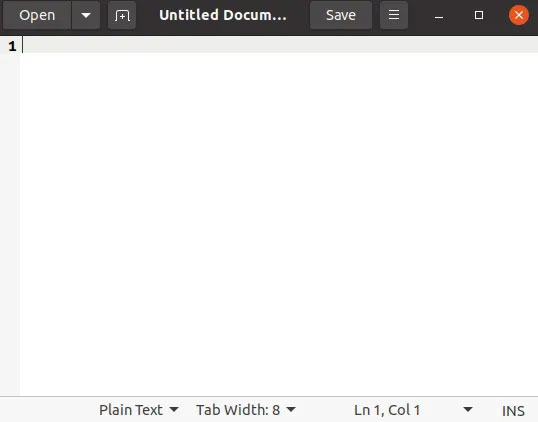
<p style="text-align: justify;">Gõ&nbsp;<strong>“editor”</strong>&nbsp;và nhấp vào&nbsp;<strong>“Text Editor”</strong>.</p>

<p style="text-align: justify;">Trình soạn thảo mặc định sẽ được mở.</p>

<figure>
<div style="text-align: justify;"><img alt="Trình soạn thảo mặc định sẽ được mở" data-i="0" data-src="https://st.quantrimang.com/photos/image/2020/10/15/tao-va-chay-script-shell-trong-ubuntu-1.jpg" data-was-processed="true" height="422" src="https://st.quantrimang.com/photos/image/2020/10/15/tao-va-chay-script-shell-trong-ubuntu-1.jpg" width="538" /></div>

<figcaption>
<div style="text-align: justify;">Trình soạn thảo mặc định sẽ được mở</div>
</figcaption>
</figure>

<div style="text-align: justify;">&nbsp;</div>

<h3 style="text-align: justify;">2. Viết các lệnh trong tài liệu không có tiêu đề và lưu nó với phần mở rộng “.sh”</h3>

<p style="text-align: justify;">Bạn có thể viết bất kỳ lệnh nào theo yêu cầu công việc hoặc nhiệm vụ được giao. Đối với bài viết cụ thể này, các lệnh/code sau sẽ được viết trong tài liệu không có tiêu đề.</p>

<pre id="pre0">
<code>echo &quot;Hello World&quot;
 echo &quot;Ubuntu 20.04 LTS tutorial&quot;
 echo &quot;Today’s task&quot;</code></pre>

<p style="text-align: justify;">Bây giờ, hãy lưu file với phần mở rộng&nbsp;<strong>“.sh”</strong>&nbsp;trong thư mục mà bạn chọn. Đối với bài viết cụ thể này, file được lưu trong thư mục mặc định, là thư mục chính có tên&nbsp;<strong>“tutorial.sh”.</strong></p>

<p style="text-align: justify;">Bây giờ, script&nbsp;<strong>“tutorial.sh”</strong>&nbsp;sẽ trông giống như thế này trong trình soạn thảo sau khi được lưu.</p>

<figure>
<div style="text-align: justify;"><img alt="Script “tutorial.sh” trong trình soạn thảo" data-i="1" data-src="https://st.quantrimang.com/photos/image/2020/10/15/tao-va-chay-script-shell-trong-ubuntu-2.jpg" data-was-processed="true" height="104" src="https://st.quantrimang.com/photos/image/2020/10/15/tao-va-chay-script-shell-trong-ubuntu-2.jpg" width="546" /></div>

<figcaption>
<div style="text-align: justify;">Script “tutorial.sh” trong trình soạn thảo</div>
</figcaption>
</figure>

<h3 style="text-align: justify;">3. Thực thi script shell “tutorial.sh” thông qua CLI</h3>

<p style="text-align: justify;">Bạn phải thực thi script shell thông qua đầu vào dòng lệnh.</p>

<p style="text-align: justify;">Đầu tiên, bạn phải làm cho script shell có thể thực thi được bằng cách chạy lệnh sau:</p>

<pre id="pre1">
<code>$ ./scriptname</code></pre>

<p style="text-align: justify;">Thay tên script shell của bạn vào vị trí&nbsp;<strong>“scriptname”</strong>&nbsp;trong lệnh trên. Đối với hướng dẫn cụ thể này, tên script là&nbsp;<strong>“tutorial.sh”.</strong></p>

<figure>
<div style="text-align: justify;"><img alt="Làm cho script shell có thể thực thi được" data-i="2" data-src="https://st.quantrimang.com/photos/image/2020/10/15/tao-va-chay-script-shell-trong-ubuntu-3.jpg" data-was-processed="true" height="51" src="https://st.quantrimang.com/photos/image/2020/10/15/tao-va-chay-script-shell-trong-ubuntu-3.jpg" width="650" /></div>

<figcaption>
<div style="text-align: justify;">Làm cho script shell có thể thực thi được</div>
</figcaption>
</figure>

<p style="text-align: justify;">Chạy script bằng lệnh sau:</p>

<pre id="pre2">
<code>$ ./scriptname</code></pre>

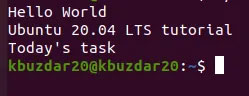
<p style="text-align: justify;">Tên script là&nbsp;<strong>“tutorial.sh”</strong>&nbsp;như đã đề cập ở trên.</p>

<p style="text-align: justify;">Khi chạy lệnh trên, từng dòng script một sẽ được thực thi và hiển thị kết quả sau:</p>

<figure>
<div style="text-align: justify;"><img alt="Kết quả được hiển thị" data-i="3" data-src="https://st.quantrimang.com/photos/image/2020/10/15/tao-va-chay-script-shell-trong-ubuntu-4.jpg" data-was-processed="true" height="96" src="https://st.quantrimang.com/photos/image/2020/10/15/tao-va-chay-script-shell-trong-ubuntu-4.jpg" width="249" /></div>

<figcaption>
<div style="text-align: justify;">Kết quả được hiển thị</div>
</figcaption>
</figure>
		</div>
				<div id="author">
						<p>
				<strong>Nguồn tin:</strong>
				Quantrimang.com
			</p>
		</div>
	</div>
	<div id="footer" class="clearfix">
		<div id="url">
			<strong>URL của bản tin này: </strong><a href="https://www.nguoicodonvn2008.info/vi/news/savefile/kien-thuc-may-tinh/cach-tao-va-chay-script-shell-trong-ubuntu-20-04-lts-2923.html" title="Cách tạo và chạy script shell trong Ubuntu 20.04 LTS">https://www.nguoicodonvn2008.info/vi/news/savefile/kien-thuc-may-tinh/cach-tao-va-chay-script-shell-trong-ubuntu-20-04-lts-2923.html</a>

		</div>
		<div class="clear"></div>
		<div class="copyright">
			&copy; .&#x3A; Nguoicodonvn2008.info - Cõi lòng người cô đơn &#x3A;.
		</div>
		<div id="contact">
			<a href="mailto:admin@nguoicodonvn2008.info">admin@nguoicodonvn2008.info</a>
		</div>
	</div>
</div>
        <div id="timeoutsess" class="chromeframe">
            Bạn đã không sử dụng Site, <a onclick="timeoutsesscancel();" href="https://nguoicodonvn2008.info/#">Bấm vào đây để duy trì trạng thái đăng nhập</a>. Thời gian chờ: <span id="secField"> 60 </span> giây
        </div>
        <div id="openidResult" class="nv-alert" style="display:none"></div>
        <div id="openidBt" data-result="" data-redirect=""></div>
		</script>
		<div class="car-top">
  <span><img src="https://nguoicodonvn2008.info/themes/default/images/car.png" alt=""></span>
</div>
<script src="https://nguoicodonvn2008.info/assets/js/jquery/jquery.min.js"></script>
<script>var nv_base_siteurl="/",nv_lang_data="vi",nv_lang_interface="vi",nv_name_variable="nv",nv_fc_variable="op",nv_lang_variable="language",nv_module_name="news",nv_func_name="savefile",nv_is_user=0, nv_my_ofs=-4,nv_my_abbr="EDT",nv_cookie_prefix="nv4c_e856T",nv_check_pass_mstime=1738000,nv_area_admin=0,nv_safemode=0,theme_responsive=0,nv_recaptcha_ver=2,nv_recaptcha_sitekey="",nv_recaptcha_type="image",XSSsanitize=1;</script>
<script src="https://nguoicodonvn2008.info/assets/js/language/vi.js"></script>
<script src="https://nguoicodonvn2008.info/assets/js/DOMPurify/purify3.js"></script>
<script src="https://nguoicodonvn2008.info/assets/js/global.js"></script>
<script src="https://nguoicodonvn2008.info/assets/js/site.js"></script>
<script src="https://nguoicodonvn2008.info/themes/default/js/news.js"></script>
<script src="https://nguoicodonvn2008.info/themes/default/js/main.js"></script>
<script src="https://nguoicodonvn2008.info/themes/default/js/custom.js"></script>
<script type="application/ld+json">
        {
            "@context": "https://schema.org",
            "@type": "Organization",
            "url": "https://nguoicodonvn2008.info",
            "logo": "https://nguoicodonvn2008.info/uploads/angel.gif"
        }
        </script>
<script src="https://nguoicodonvn2008.info/themes/default/js/bootstrap.min.js"></script>
<script type="text/javascript">
var $scrolltop = $('.car-top');
$scrolltop.on('click', function () {
    $('html,body').animate({
        scrollTop: 0
    }, 800);
    $(this).addClass("car-run");
    setTimeout(function(){ $scrolltop.removeClass('car-run');}, 1000);
    return false;
});
$(window).on('scroll', function ()
{ 
    if($(window).scrollTop() >= 200)
    {
        $scrolltop.addClass("show");
        $scrolltop.addClass("car-down");
    }
    else
    {
       $scrolltop.removeClass("show");
       setTimeout(function(){ $scrolltop.removeClass('car-down');}, 300);
    }
});
</script>
</body>
</html>