<!DOCTYPE html>
    <html lang="vi" xmlns="http://www.w3.org/1999/xhtml" prefix="og: http://ogp.me/ns#">
    <head>
<title>Cách tạo user mới trong Raspberry Pi OS</title>
<meta name="description" content="Cách tạo user mới trong Raspberry Pi OS - Savefile - Tin Tức -...">
<meta name="author" content=".: Nguoicodonvn2008.info - Cõi lòng người cô đơn :.">
<meta name="copyright" content=".: Nguoicodonvn2008.info - Cõi lòng người cô đơn :. [admin@nguoicodonvn2008.info]">
<meta name="robots" content="index, archive, follow, noodp">
<meta name="googlebot" content="index,archive,follow,noodp">
<meta name="msnbot" content="all,index,follow">
<meta name="generator" content="NukeViet v4.5">
<meta http-equiv="Content-Type" content="text/html; charset=utf-8">
<meta property="og:title" content="Cách tạo user mới trong Raspberry Pi OS">
<meta property="og:type" content="website">
<meta property="og:description" content="Savefile - Tin Tức - https&#x3A;&#x002F;&#x002F;www.nguoicodonvn2008.info&#x002F;vi&#x002F;news&#x002F;savefile&#x002F;kien-thuc-may-tinh&#x002F;cach-tao-user-moi-trong-raspberry-pi-os-6724.html">
<meta property="og:site_name" content=".&#x3A; Nguoicodonvn2008.info - Cõi lòng người cô đơn &#x3A;.">
<meta property="og:url" content="https://www.nguoicodonvn2008.info/vi/news/savefile/kien-thuc-may-tinh/cach-tao-user-moi-trong-raspberry-pi-os-6724.html">
<link rel="shortcut icon" href="https://nguoicodonvn2008.info/favicon.ico">
<link rel="canonical" href="https://www.nguoicodonvn2008.info/vi/news/savefile/kien-thuc-may-tinh/cach-tao-user-moi-trong-raspberry-pi-os-6724.html">
<link rel="alternate" href="https://nguoicodonvn2008.info/vi/news/rss/" title="Tin Tức" type="application/rss+xml">
<link rel="alternate" href="https://nguoicodonvn2008.info/vi/news/rss/karaoke-dual/" title="Tin Tức - Karaoke Dual" type="application/rss+xml">
<link rel="alternate" href="https://nguoicodonvn2008.info/vi/news/rss/nhac-tre/" title="Tin Tức - Nhạc trẻ" type="application/rss+xml">
<link rel="alternate" href="https://nguoicodonvn2008.info/vi/news/rss/tru-tinh/" title="Tin Tức - Trữ tình" type="application/rss+xml">
<link rel="alternate" href="https://nguoicodonvn2008.info/vi/news/rss/nuoc-ngoai/" title="Tin Tức - Nước ngoài" type="application/rss+xml">
<link rel="alternate" href="https://nguoicodonvn2008.info/vi/news/rss/remix/" title="Tin Tức - Remix" type="application/rss+xml">
<link rel="alternate" href="https://nguoicodonvn2008.info/vi/news/rss/tam-su-tinh-yeu/" title="Tin Tức - Tâm sự tình yêu" type="application/rss+xml">
<link rel="alternate" href="https://nguoicodonvn2008.info/vi/news/rss/tho-suu-tam/" title="Tin Tức - Thơ sưu tầm" type="application/rss+xml">
<link rel="alternate" href="https://nguoicodonvn2008.info/vi/news/rss/cuoc-song/" title="Tin Tức - Cuộc sống" type="application/rss+xml">
<link rel="alternate" href="https://nguoicodonvn2008.info/vi/news/rss/phan-mem/" title="Tin Tức - Phần mềm" type="application/rss+xml">
<link rel="alternate" href="https://nguoicodonvn2008.info/vi/news/rss/kien-thuc-may-tinh/" title="Tin Tức - Kiến thức máy tính" type="application/rss+xml">
<link rel="alternate" href="https://nguoicodonvn2008.info/vi/news/rss/hoc-tap/" title="Tin Tức - Học tập" type="application/rss+xml">
<link rel="alternate" href="https://nguoicodonvn2008.info/vi/news/rss/tai-lieu/" title="Tin Tức - Tài liệu" type="application/rss+xml">
<link rel="alternate" href="https://nguoicodonvn2008.info/vi/news/rss/de-thi/" title="Tin Tức - Đề thi" type="application/rss+xml">
<link rel="preload" as="style" href="https://nguoicodonvn2008.info/assets/css/font-awesome.min.css" type="text/css">
<link rel="preload" as="style" href="https://nguoicodonvn2008.info/themes/default/css/bootstrap.non-responsive.css" type="text/css">
<link rel="preload" as="style" href="https://nguoicodonvn2008.info/themes/default/css/style.css" type="text/css">
<link rel="preload" as="style" href="https://nguoicodonvn2008.info/themes/default/css/style.non-responsive.css" type="text/css">
<link rel="preload" as="style" href="https://nguoicodonvn2008.info/themes/default/css/news.css" type="text/css">
<link rel="preload" as="style" href="https://nguoicodonvn2008.info/themes/default/css/custom.css" type="text/css">
<link rel="preload" as="script" href="https://nguoicodonvn2008.info/assets/js/jquery/jquery.min.js" type="text/javascript">
<link rel="preload" as="script" href="https://nguoicodonvn2008.info/assets/js/language/vi.js" type="text/javascript">
<link rel="preload" as="script" href="https://nguoicodonvn2008.info/assets/js/DOMPurify/purify3.js" type="text/javascript">
<link rel="preload" as="script" href="https://nguoicodonvn2008.info/assets/js/global.js" type="text/javascript">
<link rel="preload" as="script" href="https://nguoicodonvn2008.info/assets/js/site.js" type="text/javascript">
<link rel="preload" as="script" href="https://nguoicodonvn2008.info/themes/default/js/news.js" type="text/javascript">
<link rel="preload" as="script" href="https://nguoicodonvn2008.info/themes/default/js/main.js" type="text/javascript">
<link rel="preload" as="script" href="https://nguoicodonvn2008.info/themes/default/js/custom.js" type="text/javascript">
<link rel="preload" as="script" href="https://nguoicodonvn2008.info/themes/default/js/bootstrap.min.js" type="text/javascript">
<link rel="stylesheet" href="https://nguoicodonvn2008.info/assets/css/font-awesome.min.css">
<link rel="stylesheet" href="https://nguoicodonvn2008.info/themes/default/css/bootstrap.non-responsive.css">
<link rel="stylesheet" href="https://nguoicodonvn2008.info/themes/default/css/style.css">
<link rel="stylesheet" href="https://nguoicodonvn2008.info/themes/default/css/style.non-responsive.css">
<link rel="StyleSheet" href="https://nguoicodonvn2008.info/themes/default/css/news.css">
<link rel="stylesheet" href="https://nguoicodonvn2008.info/themes/default/css/custom.css">
<style type="text/css">
	body{background: #fff;}
</style>
    </head>
    <body>
<div id="print">
	<div id="hd_print">
		<h2 class="pull-left">.&#x3A; Nguoicodonvn2008.info - Cõi lòng người cô đơn &#x3A;.</h2>
		<p class="pull-right"><a title=".&#x3A; Nguoicodonvn2008.info - Cõi lòng người cô đơn &#x3A;." href="https://nguoicodonvn2008.info/">https://nguoicodonvn2008.info</a></p>
	</div>
	<div class="clear"></div>
	<hr />
	<div id="content">
		<h1>Cách tạo user mới trong Raspberry Pi OS</h1>
		<ul class="list-inline">
			<li>Thứ hai - 13/02/2023 23:58</li>
			<li class="hidden-print txtrequired"><em class="fa fa-print">&nbsp;</em><a title="In ra" href="javascript:;" onclick="window.print()">In ra</a></li>
			<li class="hidden-print txtrequired"><em class="fa fa-power-off">&nbsp;</em><a title="Đóng cửa sổ này" href="javascript:;" onclick="window.close()">Đóng cửa sổ này</a></li>
		</ul>
		<div class="clear"></div>
		<div id="hometext">
		</div>
				<div class="imghome">
			<img alt="Cách tạo user mới trong Raspberry Pi OS" src="https://st.quantrimang.com/photos/image/2023/02/14/tao-user-moi-trong-raspberry-pi-os-6.jpg" width="460" class="img-thumbnail" />
		</div>
		<div class="clear"></div>
		<div id="bodytext" class="clearfix">
			<p style="text-align: justify;">Các phiên bản cũ hơn của Raspberry Pi OS từng có thông tin xác thực người dùng tiêu chuẩn theo mặc định. Mặc dù phiên bản mới hơn yêu cầu bạn tạo tên người dùng và mật khẩu tùy chỉnh trong khi cài đặt, nhưng bạn có thể cần tạo thêm user sau này để đáp ứng các yêu cầu bổ sung.</p>

<p style="text-align: justify;">Bạn có thể thực hiện việc này một cách dễ dàng bằng cách sử dụng các lệnh Linux và vì Raspberry Pi OS là một phiên bản của Linux, nên các lệnh tương tự cũng áp dụng được cho những bản phân phối khác.</p>

<h2 style="text-align: justify;">Tạo user mới trong Raspberry Pi OS</h2>

<p style="text-align: justify;">Bạn có thể sử dụng cả useradd và adduser để tạo người dùng mới trên Linux; các lệnh hơi khác nhau mặc dù. useradd là lệnh cấp thấp và hoạt động với tất cả&nbsp;các bản phân phối Linux, trong khi adduser là lệnh cấp cao và hoạt động với ít bản phân phối hơn. Cả hai lệnh đều hoạt động tốt trên Raspberry Pi OS.</p>

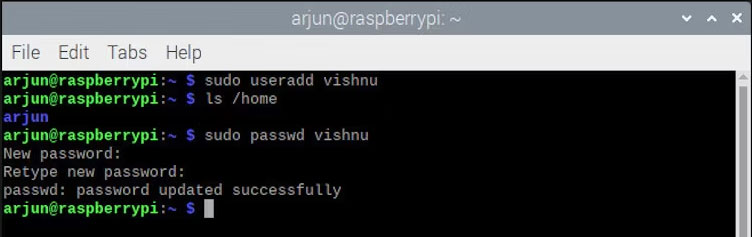
<p style="text-align: justify;">Sử dụng lệnh này để tạo người dùng có tên vishnu bằng useradd:</p>

<pre id="pre0">
<code>sudo useradd vishnu</code></pre>

<p style="text-align: justify;">Tuy nhiên, lệnh không tạo thư mục home cho người dùng mới. Đây là cách bạn tạo người dùng hệ thống không cần thư mục home. Ngoài ra, bạn phải đặt mật khẩu cho user mới bằng cách sử dụng:</p>

<pre id="pre1">
<code>sudo passwd vishnu</code></pre>

<figure>
<div style="text-align: justify;"><img alt="Tạo user mới bằng lệnh useradd trong Linux" data-i="0" data-src="https://st.quantrimang.com/photos/image/2023/02/14/tao-user-moi-trong-raspberry-pi-os-1.jpg" data-was-processed="true" height="237" src="https://st.quantrimang.com/photos/image/2023/02/14/tao-user-moi-trong-raspberry-pi-os-1.jpg" width="752" /></div>

<figcaption>
<div style="text-align: justify;">Tạo user mới bằng lệnh useradd trong Linux</div>
</figcaption>
</figure>

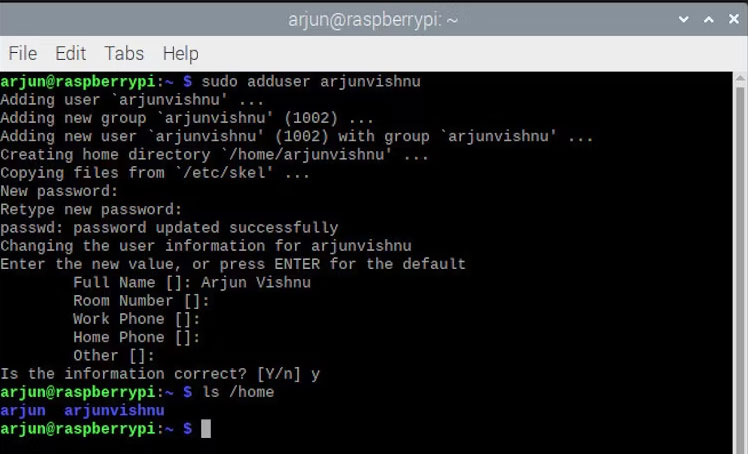
<p style="text-align: justify;">Ngược lại, lệnh adduser yêu cầu bạn đặt mật khẩu tại thời điểm tạo user.</p>

<pre id="pre2">
<code>sudo adduser vishnu</code></pre>

<p style="text-align: justify;">Ngoài ra, nó tạo ra một thư mục home với tên của user. Bạn có thể kiểm tra với:</p>

<pre id="pre3">
<code>ls /home</code></pre>

<figure>
<div style="text-align: justify;"><img alt="Tạo user mới bằng lệnh adduser trong Linux" data-i="1" data-src="https://st.quantrimang.com/photos/image/2023/02/14/tao-user-moi-trong-raspberry-pi-os-2.jpg" data-was-processed="true" height="454" src="https://st.quantrimang.com/photos/image/2023/02/14/tao-user-moi-trong-raspberry-pi-os-2.jpg" width="748" /></div>

<figcaption>
<div style="text-align: justify;">Tạo user mới bằng lệnh adduser trong Linux</div>
</figcaption>
</figure>

<h2 style="text-align: justify;">Tạo user mới với một ID cụ thể</h2>

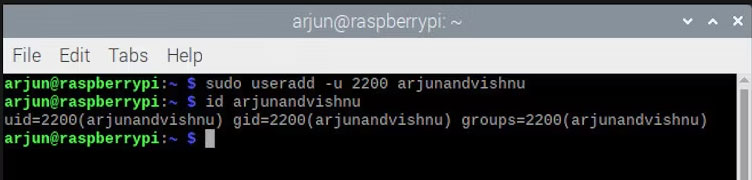
<p style="text-align: justify;">Theo mặc định, user mới sẽ nhận được&nbsp;<a href="https://quantrimang.com/cong-nghe/uid-trong-linux-172393" title="UID trong Linux là gì? Cách tìm và thay đổi UID">UID</a>&nbsp;có sẵn tiếp theo. Đôi khi, bạn nên tạo user mới với UID tùy chỉnh. Bạn có thể làm điều này bằng cách sử dụng:</p>

<pre id="pre4">
<code>sudo useradd -u 2200 vishnu</code></pre>

<p style="text-align: justify;"><strong>-u</strong>&nbsp;chỉ định UID,&nbsp;<strong>2200</strong>&nbsp;trong trường hợp này. Sau khi user mới được tạo, bạn có thể kiểm tra bằng lệnh id, lệnh này hiển thị UID cũng như các nhóm mà user thuộc về.</p>

<pre id="pre5">
<code>id vishnu</code></pre>

<figure>
<div style="text-align: justify;"><img alt="Tạo user mới với UID cụ thể trong Linux" data-i="2" data-src="https://st.quantrimang.com/photos/image/2023/02/14/tao-user-moi-trong-raspberry-pi-os-3.jpg" data-was-processed="true" height="180" src="https://st.quantrimang.com/photos/image/2023/02/14/tao-user-moi-trong-raspberry-pi-os-3.jpg" width="752" /></div>

<figcaption>
<div style="text-align: justify;">Tạo user mới với UID cụ thể trong Linux</div>
</figcaption>
</figure>

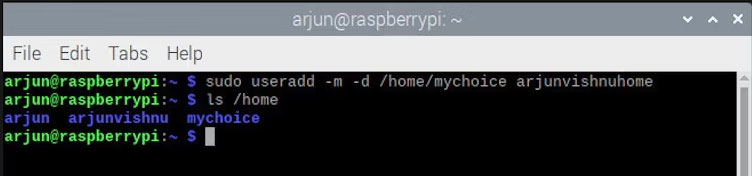
<h2 style="text-align: justify;">Cách tạo user mới với thư mục home tùy chỉnh</h2>

<p style="text-align: justify;">Nếu bạn muốn một tên tùy chỉnh cho thư mục home của mình, bạn có thể sử dụng lệnh:</p>

<pre id="pre6">
<code>sudo useradd -m -d /home/mychoice vishnuhome</code></pre>

<p style="text-align: justify;"><strong>-m</strong>&nbsp;chỉ định rằng thư mục home phải được tạo và&nbsp;<strong>-d</strong>&nbsp;chỉ định vị trí của thư mục.</p>

<figure>
<div style="text-align: justify;"><img alt="Tạo user mới và thư mục home tùy chỉnh bằng lệnh useradd trong Linux" data-i="3" data-src="https://st.quantrimang.com/photos/image/2023/02/14/tao-user-moi-trong-raspberry-pi-os-4.jpg" data-was-processed="true" height="176" src="https://st.quantrimang.com/photos/image/2023/02/14/tao-user-moi-trong-raspberry-pi-os-4.jpg" width="752" /></div>

<figcaption>
<div style="text-align: justify;">Tạo user mới và thư mục home tùy chỉnh bằng lệnh useradd trong Linux</div>
</figcaption>
</figure>

<h2 style="text-align: justify;">Cung cấp cho user mới các đặc quyền phù hợp</h2>

<p style="text-align: justify;">Bạn đã tạo một user mới, nhưng đó là một user tiêu chuẩn và không thuộc nhóm mà user mặc định của Raspberry Pi thuộc về. Nếu không phải là thành viên của các nhóm đó, user mới không thể quản trị hệ thống và quản lý các tình huống cần có đặc quyền admin. Ví dụ:</p>

<ul>
	<li style="text-align: justify;">Nâng cấp hệ thống sẽ yêu cầu đặc quyền sudo</li>
	<li style="text-align: justify;">Kết nối với các mạng WiFi mới bằng trình quản lý mạng sẽ yêu cầu người dùng phải ở trong nhóm netdev</li>
</ul>

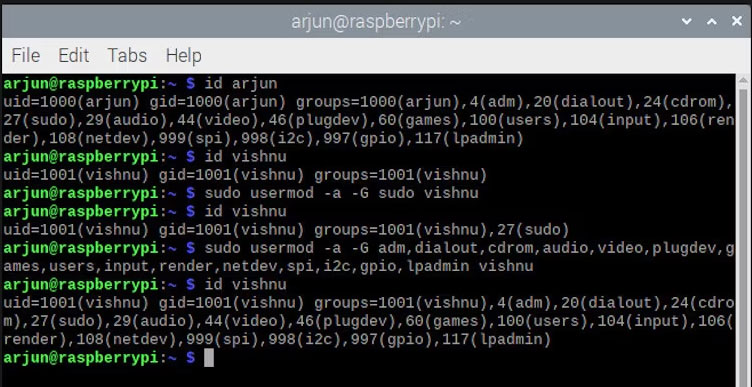
<p style="text-align: justify;">Để thêm user mới vào nhóm sudo, hãy chạy:</p>

<pre id="pre7">
<code>sudo usermod -a -G sudo vishnu</code></pre>

<p style="text-align: justify;">... trong đó&nbsp;<strong>-a</strong>&nbsp;chỉ định thêm và&nbsp;<strong>-G</strong>&nbsp;chỉ định nhóm.</p>

<p style="text-align: justify;">Để thêm user mới vào tất cả các nhóm như user mặc định, trước tiên hãy liệt kê các nhóm của user mặc định với:</p>

<pre id="pre8">
<code>id vishnu</code></pre>

<p style="text-align: justify;">Sau đó, thêm user mới vào các nhóm đó bằng:</p>

<pre id="pre9">
<code>sudo usermod -a -G comma,separated,group,names vishnu</code></pre>

<figure>
<div style="text-align: justify;"><img alt="Cung cấp cho user mới các đặc quyền tương tự như user mặc định" data-i="4" data-src="https://st.quantrimang.com/photos/image/2023/02/14/tao-user-moi-trong-raspberry-pi-os-5.jpg" data-was-processed="true" height="387" src="https://st.quantrimang.com/photos/image/2023/02/14/tao-user-moi-trong-raspberry-pi-os-5.jpg" width="752" /></div>

<figcaption>
<div style="text-align: justify;">Cung cấp cho user mới các đặc quyền tương tự như user mặc định</div>
</figcaption>
</figure>

<h2 style="text-align: justify;">Xóa người dùng không mong muốn trên Raspberry Pi OS</h2>

<p style="text-align: justify;">Trên Raspberry Pi OS, bạn cần xóa user mặc định pi nếu không cần thiết. Điều này là vì lý do bảo mật. Nếu bạn đã&nbsp;<a href="https://quantrimang.com/cong-nghe/kich-hoat-ssh-tren-pi-174287" title="Cách kích hoạt SSH trên Raspberry Pi">bật SSH trên Raspberry Pi</a>&nbsp;với tên người dùng mặc định là pi, thì nó rất dễ bị&nbsp;<a href="https://quantrimang.com/cong-nghe/cuoc-tan-cong-brute-force-la-gi-157987" title="Tìm hiểu về tấn công Brute Force">tấn công Brute Force</a>&nbsp;trừ khi nó được bảo vệ bởi một ứng dụng giới hạn tốc độ như Fail2Ban.</p>

<p style="text-align: justify;">Trên Raspbian, phiên bản cũ hơn của hệ điều hành, gần như bắt buộc phải xóa user pi khi SSH được bật vì tên người dùng và mật khẩu mặc định đã được đặt trước.</p>

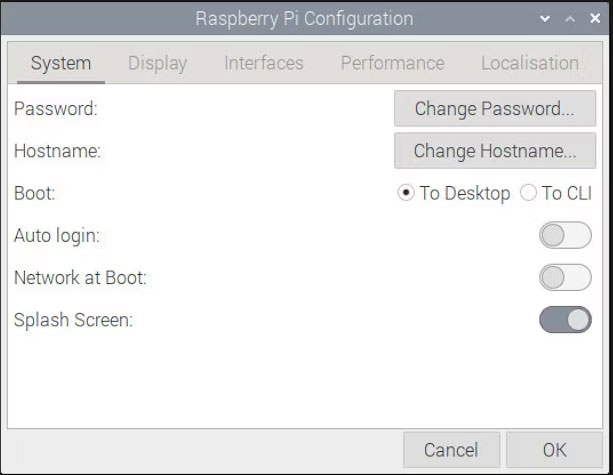
<p style="text-align: justify;">Để xóa người dùng mặc định, bạn phải đăng nhập với tư cách user khác. Để làm điều đó, trước tiên bạn cần tắt&nbsp;<strong>Auto login.</strong></p>

<figure>
<div style="text-align: justify;"><img alt="Cách tắt đăng nhập tự động trên Raspberry Pi" data-i="5" data-src="https://st.quantrimang.com/photos/image/2023/02/14/tao-user-moi-trong-raspberry-pi-os-6.jpg" data-was-processed="true" height="475" src="https://st.quantrimang.com/photos/image/2023/02/14/tao-user-moi-trong-raspberry-pi-os-6.jpg" width="613" /></div>

<figcaption>
<div style="text-align: justify;">Cách tắt đăng nhập tự động trên Raspberry Pi</div>
</figcaption>
</figure>

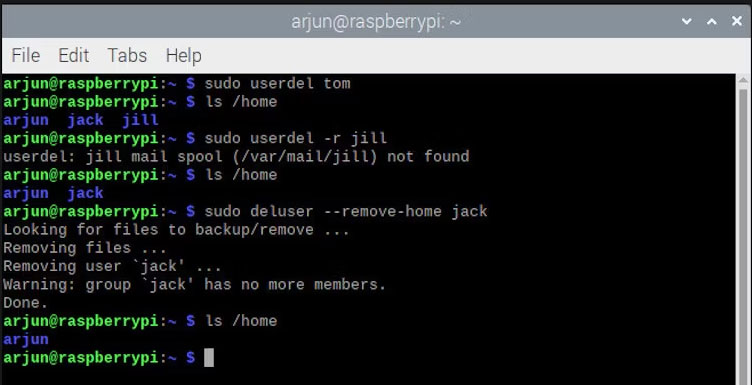
<p style="text-align: justify;">Bây giờ, hãy đăng nhập với tư cách user khác có đặc quyền sudo và xóa người dùng được yêu cầu bằng cách sử dụng:</p>

<pre id="pre10">
<code>sudo userdel tom</code></pre>

<p style="text-align: justify;">Nếu bạn cũng muốn xóa thư mục home của người dùng, hãy sử dụng:</p>

<pre id="pre11">
<code>sudo userdel -r jill</code></pre>

<p style="text-align: justify;">... trong đó&nbsp;<strong>-r</strong>&nbsp;là để xóa thư mục home.</p>

<p style="text-align: justify;">Bạn cũng có thể sử dụng lệnh deluser để thực hiện tương tự; mặc dù các đối số khác nhau.</p>

<pre id="pre12">
<code>sudo deluser --remove-home jack</code></pre>

<figure>
<div style="text-align: justify;"><img alt="Xóa người dùng bằng lệnh userdel và deluser trong Linux" data-i="6" data-src="https://st.quantrimang.com/photos/image/2023/02/14/tao-user-moi-trong-raspberry-pi-os-7.jpg" data-was-processed="true" height="385" src="https://st.quantrimang.com/photos/image/2023/02/14/tao-user-moi-trong-raspberry-pi-os-7.jpg" width="752" /></div>

<figcaption>
<div style="text-align: justify;">Xóa người dùng bằng lệnh userdel và deluser trong Linux</div>
</figcaption>
</figure>

<div style="text-align: justify;">&nbsp;</div>
		</div>
				<div id="author">
						<p>
				<strong>Nguồn tin:</strong>
				Quantrimang.com
			</p>
		</div>
	</div>
	<div id="footer" class="clearfix">
		<div id="url">
			<strong>URL của bản tin này: </strong><a href="https://www.nguoicodonvn2008.info/vi/news/savefile/kien-thuc-may-tinh/cach-tao-user-moi-trong-raspberry-pi-os-6724.html" title="Cách tạo user mới trong Raspberry Pi OS">https://www.nguoicodonvn2008.info/vi/news/savefile/kien-thuc-may-tinh/cach-tao-user-moi-trong-raspberry-pi-os-6724.html</a>

		</div>
		<div class="clear"></div>
		<div class="copyright">
			&copy; .&#x3A; Nguoicodonvn2008.info - Cõi lòng người cô đơn &#x3A;.
		</div>
		<div id="contact">
			<a href="mailto:admin@nguoicodonvn2008.info">admin@nguoicodonvn2008.info</a>
		</div>
	</div>
</div>
        <div id="timeoutsess" class="chromeframe">
            Bạn đã không sử dụng Site, <a onclick="timeoutsesscancel();" href="https://nguoicodonvn2008.info/#">Bấm vào đây để duy trì trạng thái đăng nhập</a>. Thời gian chờ: <span id="secField"> 60 </span> giây
        </div>
        <div id="openidResult" class="nv-alert" style="display:none"></div>
        <div id="openidBt" data-result="" data-redirect=""></div>
		</script>
		<div class="car-top">
  <span><img src="https://nguoicodonvn2008.info/themes/default/images/car.png" alt=""></span>
</div>
<div id="run_cronjobs" style="visibility:hidden;display:none;"><img alt="cron" src="/index.php?second=cronjobs&amp;p=a8htYw3Y" width="1" height="1" /></div>
<script src="https://nguoicodonvn2008.info/assets/js/jquery/jquery.min.js"></script>
<script>var nv_base_siteurl="/",nv_lang_data="vi",nv_lang_interface="vi",nv_name_variable="nv",nv_fc_variable="op",nv_lang_variable="language",nv_module_name="news",nv_func_name="savefile",nv_is_user=0, nv_my_ofs=-4,nv_my_abbr="EDT",nv_cookie_prefix="nv4c_e856T",nv_check_pass_mstime=1738000,nv_area_admin=0,nv_safemode=0,theme_responsive=0,nv_recaptcha_ver=2,nv_recaptcha_sitekey="",nv_recaptcha_type="image",XSSsanitize=1;</script>
<script src="https://nguoicodonvn2008.info/assets/js/language/vi.js"></script>
<script src="https://nguoicodonvn2008.info/assets/js/DOMPurify/purify3.js"></script>
<script src="https://nguoicodonvn2008.info/assets/js/global.js"></script>
<script src="https://nguoicodonvn2008.info/assets/js/site.js"></script>
<script src="https://nguoicodonvn2008.info/themes/default/js/news.js"></script>
<script src="https://nguoicodonvn2008.info/themes/default/js/main.js"></script>
<script src="https://nguoicodonvn2008.info/themes/default/js/custom.js"></script>
<script type="application/ld+json">
        {
            "@context": "https://schema.org",
            "@type": "Organization",
            "url": "https://nguoicodonvn2008.info",
            "logo": "https://nguoicodonvn2008.info/uploads/angel.gif"
        }
        </script>
<script src="https://nguoicodonvn2008.info/themes/default/js/bootstrap.min.js"></script>
<script type="text/javascript">
var $scrolltop = $('.car-top');
$scrolltop.on('click', function () {
    $('html,body').animate({
        scrollTop: 0
    }, 800);
    $(this).addClass("car-run");
    setTimeout(function(){ $scrolltop.removeClass('car-run');}, 1000);
    return false;
});
$(window).on('scroll', function ()
{ 
    if($(window).scrollTop() >= 200)
    {
        $scrolltop.addClass("show");
        $scrolltop.addClass("car-down");
    }
    else
    {
       $scrolltop.removeClass("show");
       setTimeout(function(){ $scrolltop.removeClass('car-down');}, 300);
    }
});
</script>
</body>
</html>