<!DOCTYPE html>
    <html lang="vi" xmlns="http://www.w3.org/1999/xhtml" prefix="og: http://ogp.me/ns#">
    <head>
<title>Cách tạo thư viện ảnh đơn giản bằng HTML, CSS và JavaScript</title>
<meta name="description" content="Cách tạo thư viện ảnh đơn giản bằng HTML, CSS và JavaScript - Savefile - Tin Tức -...">
<meta name="author" content=".: Nguoicodonvn2008.info - Cõi lòng người cô đơn :.">
<meta name="copyright" content=".: Nguoicodonvn2008.info - Cõi lòng người cô đơn :. [admin@nguoicodonvn2008.info]">
<meta name="robots" content="index, archive, follow, noodp">
<meta name="googlebot" content="index,archive,follow,noodp">
<meta name="msnbot" content="all,index,follow">
<meta name="generator" content="NukeViet v4.5">
<meta http-equiv="Content-Type" content="text/html; charset=utf-8">
<meta property="og:title" content="Cách tạo thư viện ảnh đơn giản bằng HTML, CSS và JavaScript">
<meta property="og:type" content="website">
<meta property="og:description" content="Savefile - Tin Tức - https&#x3A;&#x002F;&#x002F;www.nguoicodonvn2008.info&#x002F;vi&#x002F;news&#x002F;savefile&#x002F;kien-thuc-may-tinh&#x002F;cach-tao-thu-vien-anh-don-gian-bang-html-css-va-javascript-6674.html">
<meta property="og:site_name" content=".&#x3A; Nguoicodonvn2008.info - Cõi lòng người cô đơn &#x3A;.">
<meta property="og:url" content="https://www.nguoicodonvn2008.info/vi/news/savefile/kien-thuc-may-tinh/cach-tao-thu-vien-anh-don-gian-bang-html-css-va-javascript-6674.html">
<link rel="shortcut icon" href="https://nguoicodonvn2008.info/favicon.ico">
<link rel="canonical" href="https://www.nguoicodonvn2008.info/vi/news/savefile/kien-thuc-may-tinh/cach-tao-thu-vien-anh-don-gian-bang-html-css-va-javascript-6674.html">
<link rel="alternate" href="https://nguoicodonvn2008.info/vi/news/rss/" title="Tin Tức" type="application/rss+xml">
<link rel="alternate" href="https://nguoicodonvn2008.info/vi/news/rss/karaoke-dual/" title="Tin Tức - Karaoke Dual" type="application/rss+xml">
<link rel="alternate" href="https://nguoicodonvn2008.info/vi/news/rss/nhac-tre/" title="Tin Tức - Nhạc trẻ" type="application/rss+xml">
<link rel="alternate" href="https://nguoicodonvn2008.info/vi/news/rss/tru-tinh/" title="Tin Tức - Trữ tình" type="application/rss+xml">
<link rel="alternate" href="https://nguoicodonvn2008.info/vi/news/rss/nuoc-ngoai/" title="Tin Tức - Nước ngoài" type="application/rss+xml">
<link rel="alternate" href="https://nguoicodonvn2008.info/vi/news/rss/remix/" title="Tin Tức - Remix" type="application/rss+xml">
<link rel="alternate" href="https://nguoicodonvn2008.info/vi/news/rss/tam-su-tinh-yeu/" title="Tin Tức - Tâm sự tình yêu" type="application/rss+xml">
<link rel="alternate" href="https://nguoicodonvn2008.info/vi/news/rss/tho-suu-tam/" title="Tin Tức - Thơ sưu tầm" type="application/rss+xml">
<link rel="alternate" href="https://nguoicodonvn2008.info/vi/news/rss/cuoc-song/" title="Tin Tức - Cuộc sống" type="application/rss+xml">
<link rel="alternate" href="https://nguoicodonvn2008.info/vi/news/rss/phan-mem/" title="Tin Tức - Phần mềm" type="application/rss+xml">
<link rel="alternate" href="https://nguoicodonvn2008.info/vi/news/rss/kien-thuc-may-tinh/" title="Tin Tức - Kiến thức máy tính" type="application/rss+xml">
<link rel="alternate" href="https://nguoicodonvn2008.info/vi/news/rss/hoc-tap/" title="Tin Tức - Học tập" type="application/rss+xml">
<link rel="alternate" href="https://nguoicodonvn2008.info/vi/news/rss/tai-lieu/" title="Tin Tức - Tài liệu" type="application/rss+xml">
<link rel="alternate" href="https://nguoicodonvn2008.info/vi/news/rss/de-thi/" title="Tin Tức - Đề thi" type="application/rss+xml">
<link rel="preload" as="style" href="https://nguoicodonvn2008.info/assets/css/font-awesome.min.css" type="text/css">
<link rel="preload" as="style" href="https://nguoicodonvn2008.info/themes/default/css/bootstrap.non-responsive.css" type="text/css">
<link rel="preload" as="style" href="https://nguoicodonvn2008.info/themes/default/css/style.css" type="text/css">
<link rel="preload" as="style" href="https://nguoicodonvn2008.info/themes/default/css/style.non-responsive.css" type="text/css">
<link rel="preload" as="style" href="https://nguoicodonvn2008.info/themes/default/css/news.css" type="text/css">
<link rel="preload" as="style" href="https://nguoicodonvn2008.info/themes/default/css/custom.css" type="text/css">
<link rel="preload" as="script" href="https://nguoicodonvn2008.info/assets/js/jquery/jquery.min.js" type="text/javascript">
<link rel="preload" as="script" href="https://nguoicodonvn2008.info/assets/js/language/vi.js" type="text/javascript">
<link rel="preload" as="script" href="https://nguoicodonvn2008.info/assets/js/DOMPurify/purify3.js" type="text/javascript">
<link rel="preload" as="script" href="https://nguoicodonvn2008.info/assets/js/global.js" type="text/javascript">
<link rel="preload" as="script" href="https://nguoicodonvn2008.info/assets/js/site.js" type="text/javascript">
<link rel="preload" as="script" href="https://nguoicodonvn2008.info/themes/default/js/news.js" type="text/javascript">
<link rel="preload" as="script" href="https://nguoicodonvn2008.info/themes/default/js/main.js" type="text/javascript">
<link rel="preload" as="script" href="https://nguoicodonvn2008.info/themes/default/js/custom.js" type="text/javascript">
<link rel="preload" as="script" href="https://nguoicodonvn2008.info/themes/default/js/bootstrap.min.js" type="text/javascript">
<link rel="stylesheet" href="https://nguoicodonvn2008.info/assets/css/font-awesome.min.css">
<link rel="stylesheet" href="https://nguoicodonvn2008.info/themes/default/css/bootstrap.non-responsive.css">
<link rel="stylesheet" href="https://nguoicodonvn2008.info/themes/default/css/style.css">
<link rel="stylesheet" href="https://nguoicodonvn2008.info/themes/default/css/style.non-responsive.css">
<link rel="StyleSheet" href="https://nguoicodonvn2008.info/themes/default/css/news.css">
<link rel="stylesheet" href="https://nguoicodonvn2008.info/themes/default/css/custom.css">
<style type="text/css">
	body{background: #fff;}
</style>
    </head>
    <body>
<div id="print">
	<div id="hd_print">
		<h2 class="pull-left">.&#x3A; Nguoicodonvn2008.info - Cõi lòng người cô đơn &#x3A;.</h2>
		<p class="pull-right"><a title=".&#x3A; Nguoicodonvn2008.info - Cõi lòng người cô đơn &#x3A;." href="https://nguoicodonvn2008.info/">https://nguoicodonvn2008.info</a></p>
	</div>
	<div class="clear"></div>
	<hr />
	<div id="content">
		<h1>Cách tạo thư viện ảnh đơn giản bằng HTML, CSS và JavaScript</h1>
		<ul class="list-inline">
			<li>Chủ nhật - 05/02/2023 23:58</li>
			<li class="hidden-print txtrequired"><em class="fa fa-print">&nbsp;</em><a title="In ra" href="javascript:;" onclick="window.print()">In ra</a></li>
			<li class="hidden-print txtrequired"><em class="fa fa-power-off">&nbsp;</em><a title="Đóng cửa sổ này" href="javascript:;" onclick="window.close()">Đóng cửa sổ này</a></li>
		</ul>
		<div class="clear"></div>
		<div id="hometext">
		</div>
				<div class="imghome">
			<img alt="Cách tạo thư viện ảnh đơn giản bằng HTML, CSS và JavaScript" src="https://st.quantrimang.com/photos/image/2023/02/06/tao-imagegalary-web-3.jpg" width="460" class="img-thumbnail" />
		</div>
		<div class="clear"></div>
		<div id="bodytext" class="clearfix">
			<p style="text-align: justify;">Bạn muốn&nbsp;<strong>hiện một bộ sưu tập ảnh trên web</strong>? Dưới đây là cách làm việc này với một&nbsp;<strong>thư viện ảnh cơ bản được tạo bằng code HTML, CSS và JavaScript dễ hiểu nhất</strong>.</p>

<p style="text-align: justify;"><img alt="Tạo thư viện ảnh cho web" data-i="0" data-src="https://st.quantrimang.com/photos/image/2023/02/06/thu-vien-anh-HTML-7.jpg" data-was-processed="true" height="340" src="https://st.quantrimang.com/photos/image/2023/02/06/thu-vien-anh-HTML-7.jpg" width="650" /></p>

<p style="text-align: justify;">Tạo thư viện ảnh đơn giản bằng HTML, CSS và JavaScript là cách tuyệt vời để học những kiến thức cơ bản vè phát triển web. Trong thư viện ảnh, bạn có thể lướt qua các hình ảnh bằng cách chọn ảnh đại diện để làm lướn ảnh trên trang web.</p>

<p style="text-align: justify;">Để tạo thư viện ảnh, bạn có thể dùng HTML để thêm nội dung trên trang web và CSS để thêm kiểu. Bạn có thể dùng JavaScript để làm thư viện ảnh tương tác khi người dùng click vào bất kỳ thumbnail.</p>

<h2 style="text-align: justify;">Cách tạo UI cho thư viện ảnh</h2>

<p style="text-align: justify;">Thêm UI cho thư viện ảnh bằng HTML và CSS. Hành động này bao gồm thêm một ảnh lớn ở giữa trang web. Nó sẽ thay đổi dựa trên thumbnail được chọn. Chi tiết các bước thực hiện như sau:</p>

<p style="text-align: justify;">1. Tạo một file mới mang tên “<strong>index.html</strong>”.</p>

<p style="text-align: justify;">2. Bên trong file này, thêm cấu trúc code HTML cơ bản:</p>

<pre id="pre0" style="text-align: justify;">
&lt;!doctype html&gt;
&lt;html lang=&quot;en-US&quot;&gt; 
  &lt;head&gt; 
    &lt;title&gt;Image Gallery&lt;/title&gt; 
  &lt;/head&gt; 
  &lt;body&gt; 
    &lt;div class=&quot;intro&quot;&gt; 
      &lt;h2&gt;Image Gallery&lt;/h2&gt; 
      &lt;p&gt;Select a thumbnail below to view the image&lt;/p&gt; 
    &lt;/div&gt; 
  &lt;/body&gt;
&lt;/html&gt;</pre>

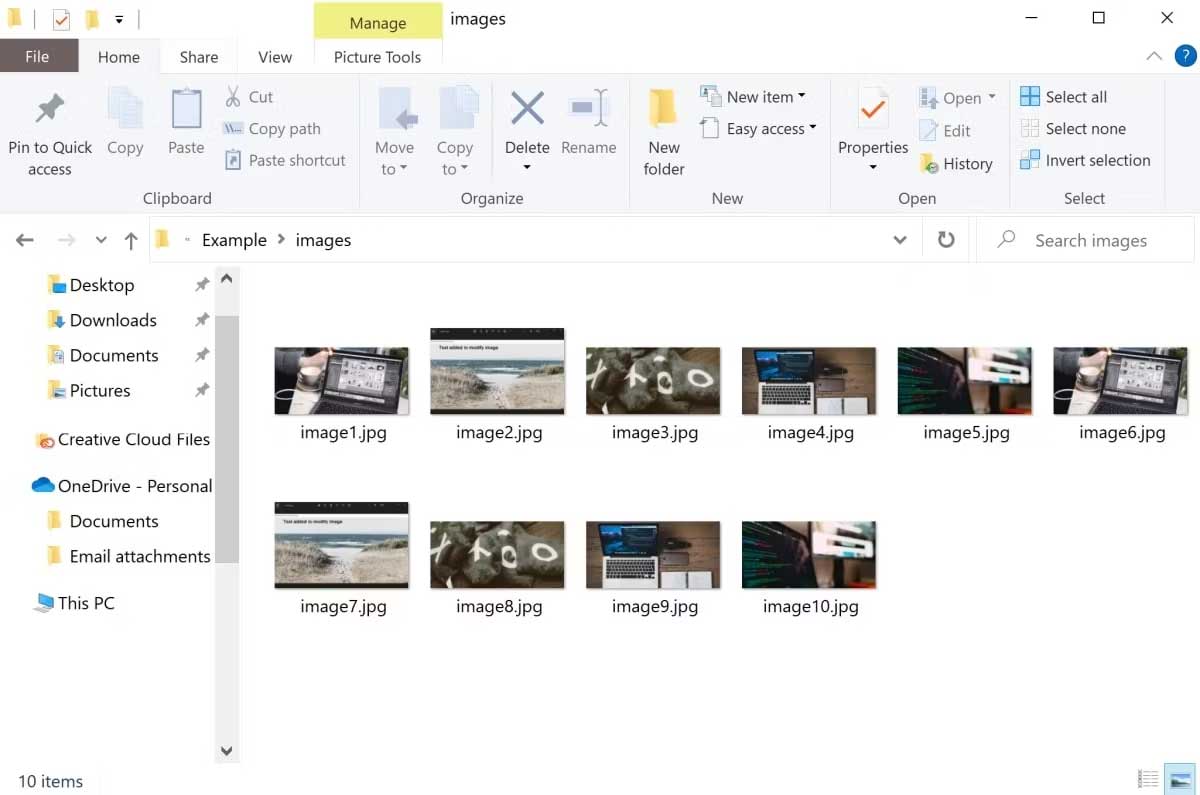
<p style="text-align: justify;">3. Tạo một thư mục phụ mang tên images. Điền vào đó một số hình ảnh, rồi đặt tên cho chúng từ &quot;image1.jpg&quot; tới &quot;image10.jpg&quot;.</p>

<p style="text-align: justify;"><img alt="Thư viện ảnh" data-i="1" data-src="https://st.quantrimang.com/photos/image/2023/02/06/tao-imagegalary-web-1.jpg" data-was-processed="true" height="431" src="https://st.quantrimang.com/photos/image/2023/02/06/tao-imagegalary-web-1.jpg" width="650" /></p>

<p style="text-align: justify;">4. Trong file HTML, thêm một div cho thư viện ảnh:</p>

<pre id="pre1" style="text-align: justify;">
&lt;div id=&quot;image-gallery&quot;&gt;

&lt;/div&gt;</pre>

<p style="text-align: justify;">5. Bên trong thư viện ảnh div, thêm một tag ảnh để hiện ảnh đã chọn được phóng to. Mặc định, hiện ảnh đầu tiên trong thư mục “images”:</p>

<pre id="pre2" style="text-align: justify;">
&lt;img id=&quot;current-image&quot; src=&quot;images/image1.jpg&quot; alt=&quot;Image 1&quot;&gt;</pre>

<p style="text-align: justify;">6. Trong cùng một thư mục với tệp HTML của bạn, thêm một file mang tên “<strong>styles.css</strong>” cùng CSS sau. Thoải mái chỉnh sửa CSS để thêm các thành phần thiết kế đa dạng.</p>

<p style="text-align: justify;">7.</p>

<pre id="pre3" style="text-align: justify;">
.intro { 
  text-align: center; 
  font-family: Arial;
}

h2 { 
  font-size: 36px;
}

p { 
  font-size: 14pt;
}

#image-gallery { 
  width: 600px; 
  margin: 0 auto;
}

#current-image { 
  width: 100%;
} </pre>

<p style="text-align: justify;">8. Thêm link vào file CSS trong thẻ đầu của file HTML:</p>

<pre id="pre4" style="text-align: justify;">
&lt;link rel=&quot;stylesheet&quot; type=&quot;text/css&quot; href=&quot;styles.css&quot;&gt;</pre>

<h2 style="text-align: justify;">Cách thêm thumbnail cho ảnh khác trong thư viện</h2>

<p style="text-align: justify;">Hiện tại, thư viện ảnh chỉ hiện ảnh đầu tiên. Bên dưới ảnh được chọn, thêm một danh sách thumbnail. Những thumbnail này sẽ hiện một cửa sổ xem trước tất cả ảnh trong thư mục “images”.</p>

<p style="text-align: justify;">1. Trong thư viện ảnh div ở file HTML, thêm dive khác để hiện thumbnail cho ảnh khác:</p>

<pre id="pre5" style="text-align: justify;">
&lt;div id=&quot;image-thumbs&quot;&gt;&lt;/div&gt;</pre>

<p style="text-align: justify;">2. Trong file CSS, thêm một số kiểu cho danh sách thumbnail:</p>

<pre id="pre6" style="text-align: justify;">
#image-thumbs { 
  display: flex; 
  justify-content: center; 
  margin-top: 20px;
}</pre>

<p style="text-align: justify;">3. Trong cùng thư mục với các tệp HTML và CSS, thêm file mới mang tên “script.js”.</p>

<p style="text-align: justify;">4. Thêm một link tới file JavaScript ở phía dưới cùng của thẻ body HTML:</p>

<pre id="pre7" style="text-align: justify;">
&lt;body&gt; 
  &lt;!-- Your code here --&gt; 
  &lt;script src=&quot;script.js&quot;&gt;&lt;/script&gt;
&lt;/body&gt;</pre>

<p style="text-align: justify;">5. Bên trong file JavaScript, lấy phần tử HTML của div sẽ lưu trữ danh sách các thumbnail.</p>

<pre id="pre8" style="text-align: justify;">
var imageThumbs = document.getElementById(&quot;image-thumbs&quot;);</pre>

<p style="text-align: justify;">6. Thêm một for-loop để lặp qua từng hình ảnh trong số 10 ảnh ở thư viện:</p>

<pre id="pre9" style="text-align: justify;">
for (var i = 1; i &lt;= 10; i++) {

}</pre>

<p style="text-align: justify;">7. Trong vòng lặp, tạo một phần tử img mới cho từng ảnh:</p>

<pre id="pre10" style="text-align: justify;">
var thumb = document.createElement(&quot;img&quot;);</pre>

<p style="text-align: justify;">8. Thêm giá trị cho thuộc tính src và alt. Trong trường hợp này, thuộc tính src là đường dẫn file tới ảnh có cùng index bên trong thư mục “images”:</p>

<pre id="pre11" style="text-align: justify;">
thumb.src = &quot;images/image&quot; + i + &quot;.jpg&quot;;
thumb.alt = &quot;Image &quot; + i;</pre>

<p style="text-align: justify;">9. Bên trong file CSS, thêm một class mới để tạo thumbnail cho ảnh.</p>

<pre id="pre12" style="text-align: justify;">
.thumb { 
  width: 80px; 
  height: 80px; 
  object-fit: cover; 
  margin-right: 10px; 
  cursor: pointer;
}
</pre>

<p style="text-align: justify;">10. Bên trong file JavaScript, thêm class trên vào thumbnail mới:</p>

<pre id="pre13" style="text-align: justify;">
thumb.classList.add(&quot;thumb&quot;);</pre>

<p style="text-align: justify;">11. Thêm thumbnail mới cho phần tử HTML chứa danh sách thumbnail:</p>

<pre id="pre14" style="text-align: justify;">
imageThumbs.appendChild(thumb);</pre>

<h2 style="text-align: justify;">Cách thay đổi ảnh khi người dùng click vào thumbnail</h2>

<p style="text-align: justify;">Khi người dùng click vào một trong số thumbnail, thay đổi ảnh được phóng to ở giữa của trang tới ảnh được chọn. Bạn có thể thêm chức năng này vào bên trong file JavaScript.</p>

<p style="text-align: justify;">1. Ở phía trên cùng của file JavaScript, lấy phần tử HTML của ảnh được chọn hiện tại:</p>

<pre id="pre15" style="text-align: justify;">
var currentImage = document.getElementById(&quot;current-image&quot;);</pre>

<p style="text-align: justify;">2. Bên trong for-loop, thêm một trình xử lý sự kiện kích hoạt khi người dùng chọn bất kỳ thumbnail ở phía dưới cùng của trang:</p>

<pre id="pre16" style="text-align: justify;">
thumb.addEventListener(
  &quot;click&quot;, function() {

  }
);</pre>

<p style="text-align: justify;">3. Bên trong trình xử lý sự kiện, thay đổi thuộc tính src của ảnh hiện tại sang ảnh mới được chọn. Bạn cũng có thể update thuộc tính “alt”:</p>

<pre id="pre17" style="text-align: justify;">
currentImage.src = this.src;
currentImage.alt = this.alt;</pre>

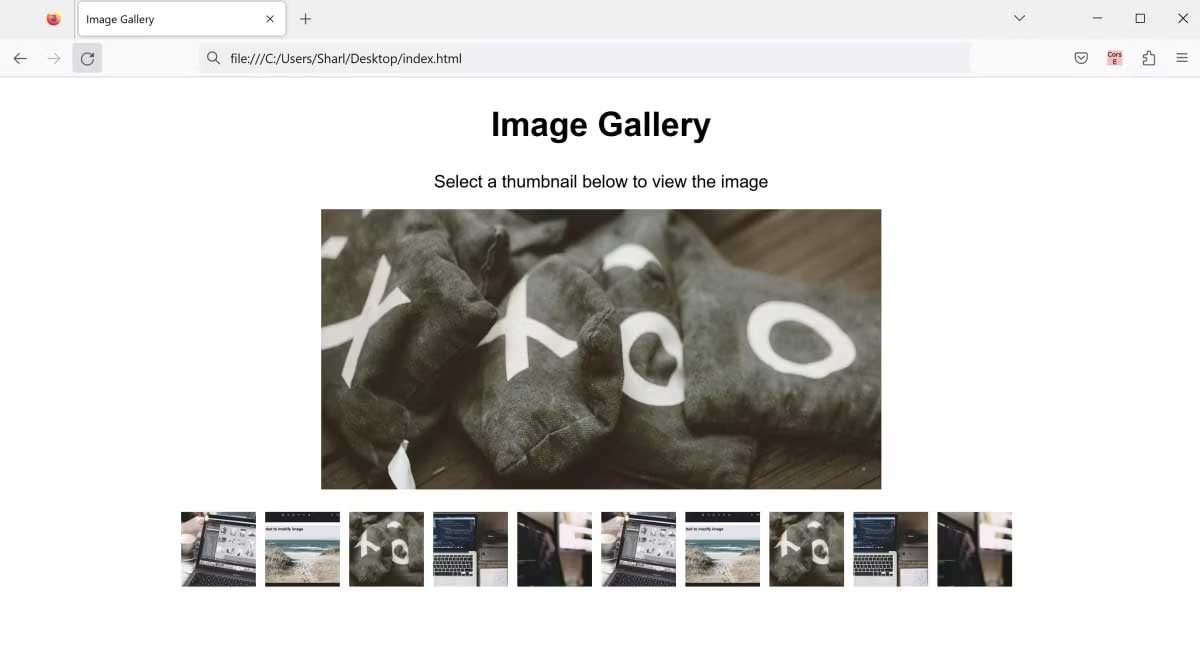
<p style="text-align: justify;">4. Click vào file “index.html” để mở nó trong trình duyệt web.</p>

<p style="text-align: justify;"><img alt="Thư viện ảnh cho web" data-i="2" data-src="https://st.quantrimang.com/photos/image/2023/02/06/tao-imagegalary-web-2.jpg" data-was-processed="true" height="350" src="https://st.quantrimang.com/photos/image/2023/02/06/tao-imagegalary-web-2.jpg" width="650" /></p>

<p style="text-align: justify;">5. Chọn bất kỳ thumbnail để xem ảnh.</p>

<p style="text-align: justify;"><img alt="Click vào thumbnail để xem ảnh" data-i="3" data-src="https://st.quantrimang.com/photos/image/2023/02/06/tao-imagegalary-web-3.jpg" data-was-processed="true" height="350" src="https://st.quantrimang.com/photos/image/2023/02/06/tao-imagegalary-web-3.jpg" width="650" /></p>

<p style="text-align: justify;">Trên đây là&nbsp;<strong>cách tạo một thư viện ảnh đơn giản cho web bằng HTML, CSS và JavaScript</strong>. Hi vọng bài viết hữu ích với các bạn</p>
		</div>
				<div id="author">
						<p>
				<strong>Nguồn tin:</strong>
				Quantrimang.com
			</p>
		</div>
	</div>
	<div id="footer" class="clearfix">
		<div id="url">
			<strong>URL của bản tin này: </strong><a href="https://www.nguoicodonvn2008.info/vi/news/savefile/kien-thuc-may-tinh/cach-tao-thu-vien-anh-don-gian-bang-html-css-va-javascript-6674.html" title="Cách tạo thư viện ảnh đơn giản bằng HTML, CSS và JavaScript">https://www.nguoicodonvn2008.info/vi/news/savefile/kien-thuc-may-tinh/cach-tao-thu-vien-anh-don-gian-bang-html-css-va-javascript-6674.html</a>

		</div>
		<div class="clear"></div>
		<div class="copyright">
			&copy; .&#x3A; Nguoicodonvn2008.info - Cõi lòng người cô đơn &#x3A;.
		</div>
		<div id="contact">
			<a href="mailto:admin@nguoicodonvn2008.info">admin@nguoicodonvn2008.info</a>
		</div>
	</div>
</div>
        <div id="timeoutsess" class="chromeframe">
            Bạn đã không sử dụng Site, <a onclick="timeoutsesscancel();" href="https://nguoicodonvn2008.info/#">Bấm vào đây để duy trì trạng thái đăng nhập</a>. Thời gian chờ: <span id="secField"> 60 </span> giây
        </div>
        <div id="openidResult" class="nv-alert" style="display:none"></div>
        <div id="openidBt" data-result="" data-redirect=""></div>
		</script>
		<div class="car-top">
  <span><img src="https://nguoicodonvn2008.info/themes/default/images/car.png" alt=""></span>
</div>
<script src="https://nguoicodonvn2008.info/assets/js/jquery/jquery.min.js"></script>
<script>var nv_base_siteurl="/",nv_lang_data="vi",nv_lang_interface="vi",nv_name_variable="nv",nv_fc_variable="op",nv_lang_variable="language",nv_module_name="news",nv_func_name="savefile",nv_is_user=0, nv_my_ofs=-4,nv_my_abbr="EDT",nv_cookie_prefix="nv4c_e856T",nv_check_pass_mstime=1738000,nv_area_admin=0,nv_safemode=0,theme_responsive=0,nv_recaptcha_ver=2,nv_recaptcha_sitekey="",nv_recaptcha_type="image",XSSsanitize=1;</script>
<script src="https://nguoicodonvn2008.info/assets/js/language/vi.js"></script>
<script src="https://nguoicodonvn2008.info/assets/js/DOMPurify/purify3.js"></script>
<script src="https://nguoicodonvn2008.info/assets/js/global.js"></script>
<script src="https://nguoicodonvn2008.info/assets/js/site.js"></script>
<script src="https://nguoicodonvn2008.info/themes/default/js/news.js"></script>
<script src="https://nguoicodonvn2008.info/themes/default/js/main.js"></script>
<script src="https://nguoicodonvn2008.info/themes/default/js/custom.js"></script>
<script type="application/ld+json">
        {
            "@context": "https://schema.org",
            "@type": "Organization",
            "url": "https://nguoicodonvn2008.info",
            "logo": "https://nguoicodonvn2008.info/uploads/angel.gif"
        }
        </script>
<script src="https://nguoicodonvn2008.info/themes/default/js/bootstrap.min.js"></script>
<script type="text/javascript">
var $scrolltop = $('.car-top');
$scrolltop.on('click', function () {
    $('html,body').animate({
        scrollTop: 0
    }, 800);
    $(this).addClass("car-run");
    setTimeout(function(){ $scrolltop.removeClass('car-run');}, 1000);
    return false;
});
$(window).on('scroll', function ()
{ 
    if($(window).scrollTop() >= 200)
    {
        $scrolltop.addClass("show");
        $scrolltop.addClass("car-down");
    }
    else
    {
       $scrolltop.removeClass("show");
       setTimeout(function(){ $scrolltop.removeClass('car-down');}, 300);
    }
});
</script>
</body>
</html>