<!DOCTYPE html>
    <html lang="vi" xmlns="http://www.w3.org/1999/xhtml" prefix="og: http://ogp.me/ns#">
    <head>
<title>Cách tạo thư mục trên máy Mac</title>
<meta name="description" content="Cách tạo thư mục trên máy Mac - Savefile - Tin Tức - https&#x3A;&#x002F;&#x002F;www.nguoicodonvn2008.info&#x002F;vi&#x002F;news&#x002F;savefile&#x002F;kien-thuc-may-tinh&#x002F;cach-tao-thu-muc-tren-may-mac-7248.html">
<meta name="author" content=".: Nguoicodonvn2008.info - Cõi lòng người cô đơn :.">
<meta name="copyright" content=".: Nguoicodonvn2008.info - Cõi lòng người cô đơn :. [admin@nguoicodonvn2008.info]">
<meta name="robots" content="index, archive, follow, noodp">
<meta name="googlebot" content="index,archive,follow,noodp">
<meta name="msnbot" content="all,index,follow">
<meta name="generator" content="NukeViet v4.5">
<meta http-equiv="Content-Type" content="text/html; charset=utf-8">
<meta property="og:title" content="Cách tạo thư mục trên máy Mac">
<meta property="og:type" content="website">
<meta property="og:description" content="Savefile - Tin Tức - https&#x3A;&#x002F;&#x002F;www.nguoicodonvn2008.info&#x002F;vi&#x002F;news&#x002F;savefile&#x002F;kien-thuc-may-tinh&#x002F;cach-tao-thu-muc-tren-may-mac-7248.html">
<meta property="og:site_name" content=".&#x3A; Nguoicodonvn2008.info - Cõi lòng người cô đơn &#x3A;.">
<meta property="og:url" content="https://www.nguoicodonvn2008.info/vi/news/savefile/kien-thuc-may-tinh/cach-tao-thu-muc-tren-may-mac-7248.html">
<link rel="shortcut icon" href="https://nguoicodonvn2008.info/favicon.ico">
<link rel="canonical" href="https://www.nguoicodonvn2008.info/vi/news/savefile/kien-thuc-may-tinh/cach-tao-thu-muc-tren-may-mac-7248.html">
<link rel="alternate" href="https://nguoicodonvn2008.info/vi/news/rss/" title="Tin Tức" type="application/rss+xml">
<link rel="alternate" href="https://nguoicodonvn2008.info/vi/news/rss/karaoke-dual/" title="Tin Tức - Karaoke Dual" type="application/rss+xml">
<link rel="alternate" href="https://nguoicodonvn2008.info/vi/news/rss/nhac-tre/" title="Tin Tức - Nhạc trẻ" type="application/rss+xml">
<link rel="alternate" href="https://nguoicodonvn2008.info/vi/news/rss/tru-tinh/" title="Tin Tức - Trữ tình" type="application/rss+xml">
<link rel="alternate" href="https://nguoicodonvn2008.info/vi/news/rss/nuoc-ngoai/" title="Tin Tức - Nước ngoài" type="application/rss+xml">
<link rel="alternate" href="https://nguoicodonvn2008.info/vi/news/rss/remix/" title="Tin Tức - Remix" type="application/rss+xml">
<link rel="alternate" href="https://nguoicodonvn2008.info/vi/news/rss/tam-su-tinh-yeu/" title="Tin Tức - Tâm sự tình yêu" type="application/rss+xml">
<link rel="alternate" href="https://nguoicodonvn2008.info/vi/news/rss/tho-suu-tam/" title="Tin Tức - Thơ sưu tầm" type="application/rss+xml">
<link rel="alternate" href="https://nguoicodonvn2008.info/vi/news/rss/cuoc-song/" title="Tin Tức - Cuộc sống" type="application/rss+xml">
<link rel="alternate" href="https://nguoicodonvn2008.info/vi/news/rss/phan-mem/" title="Tin Tức - Phần mềm" type="application/rss+xml">
<link rel="alternate" href="https://nguoicodonvn2008.info/vi/news/rss/kien-thuc-may-tinh/" title="Tin Tức - Kiến thức máy tính" type="application/rss+xml">
<link rel="alternate" href="https://nguoicodonvn2008.info/vi/news/rss/hoc-tap/" title="Tin Tức - Học tập" type="application/rss+xml">
<link rel="alternate" href="https://nguoicodonvn2008.info/vi/news/rss/tai-lieu/" title="Tin Tức - Tài liệu" type="application/rss+xml">
<link rel="alternate" href="https://nguoicodonvn2008.info/vi/news/rss/de-thi/" title="Tin Tức - Đề thi" type="application/rss+xml">
<link rel="preload" as="style" href="https://nguoicodonvn2008.info/assets/css/font-awesome.min.css" type="text/css">
<link rel="preload" as="style" href="https://nguoicodonvn2008.info/themes/default/css/bootstrap.non-responsive.css" type="text/css">
<link rel="preload" as="style" href="https://nguoicodonvn2008.info/themes/default/css/style.css" type="text/css">
<link rel="preload" as="style" href="https://nguoicodonvn2008.info/themes/default/css/style.non-responsive.css" type="text/css">
<link rel="preload" as="style" href="https://nguoicodonvn2008.info/themes/default/css/news.css" type="text/css">
<link rel="preload" as="style" href="https://nguoicodonvn2008.info/themes/default/css/custom.css" type="text/css">
<link rel="preload" as="script" href="https://nguoicodonvn2008.info/assets/js/jquery/jquery.min.js" type="text/javascript">
<link rel="preload" as="script" href="https://nguoicodonvn2008.info/assets/js/language/vi.js" type="text/javascript">
<link rel="preload" as="script" href="https://nguoicodonvn2008.info/assets/js/DOMPurify/purify3.js" type="text/javascript">
<link rel="preload" as="script" href="https://nguoicodonvn2008.info/assets/js/global.js" type="text/javascript">
<link rel="preload" as="script" href="https://nguoicodonvn2008.info/assets/js/site.js" type="text/javascript">
<link rel="preload" as="script" href="https://nguoicodonvn2008.info/themes/default/js/news.js" type="text/javascript">
<link rel="preload" as="script" href="https://nguoicodonvn2008.info/themes/default/js/main.js" type="text/javascript">
<link rel="preload" as="script" href="https://nguoicodonvn2008.info/themes/default/js/custom.js" type="text/javascript">
<link rel="preload" as="script" href="https://nguoicodonvn2008.info/themes/default/js/bootstrap.min.js" type="text/javascript">
<link rel="stylesheet" href="https://nguoicodonvn2008.info/assets/css/font-awesome.min.css">
<link rel="stylesheet" href="https://nguoicodonvn2008.info/themes/default/css/bootstrap.non-responsive.css">
<link rel="stylesheet" href="https://nguoicodonvn2008.info/themes/default/css/style.css">
<link rel="stylesheet" href="https://nguoicodonvn2008.info/themes/default/css/style.non-responsive.css">
<link rel="StyleSheet" href="https://nguoicodonvn2008.info/themes/default/css/news.css">
<link rel="stylesheet" href="https://nguoicodonvn2008.info/themes/default/css/custom.css">
<style type="text/css">
	body{background: #fff;}
</style>
    </head>
    <body>
<div id="print">
	<div id="hd_print">
		<h2 class="pull-left">.&#x3A; Nguoicodonvn2008.info - Cõi lòng người cô đơn &#x3A;.</h2>
		<p class="pull-right"><a title=".&#x3A; Nguoicodonvn2008.info - Cõi lòng người cô đơn &#x3A;." href="https://nguoicodonvn2008.info/">https://nguoicodonvn2008.info</a></p>
	</div>
	<div class="clear"></div>
	<hr />
	<div id="content">
		<h1>Cách tạo thư mục trên máy Mac</h1>
		<ul class="list-inline">
			<li>Thứ hai - 03/07/2023 10:25</li>
			<li class="hidden-print txtrequired"><em class="fa fa-print">&nbsp;</em><a title="In ra" href="javascript:;" onclick="window.print()">In ra</a></li>
			<li class="hidden-print txtrequired"><em class="fa fa-power-off">&nbsp;</em><a title="Đóng cửa sổ này" href="javascript:;" onclick="window.close()">Đóng cửa sổ này</a></li>
		</ul>
		<div class="clear"></div>
		<div id="hometext">
		</div>
				<div class="imghome">
			<img alt="Cách tạo thư mục trên máy Mac" src="https://st.quantrimang.com/photos/image/2023/06/30/tao-thu-muc-tren-may-mac4.jpg" width="460" class="img-thumbnail" />
		</div>
		<div class="clear"></div>
		<div id="bodytext" class="clearfix">
			<p style="text-align: justify;">Bạn có thể tạo các thư mục trên máy Mac bằng Finder và trình quản lý tệp tích hợp của Apple. Ngoài các thư mục đơn giản, còn có các thư mục thông minh, một số shortcut gọn gàng và các thủ thuật khác cần lưu ý. Bài viết này sẽ hướng dẫn bạn cách tạo mọi thứ, từ những thư mục đơn giản đến thông minh trên máy Mac.</p>

<h2 style="text-align: justify;">Sử dụng Finder để tạo thư mục</h2>

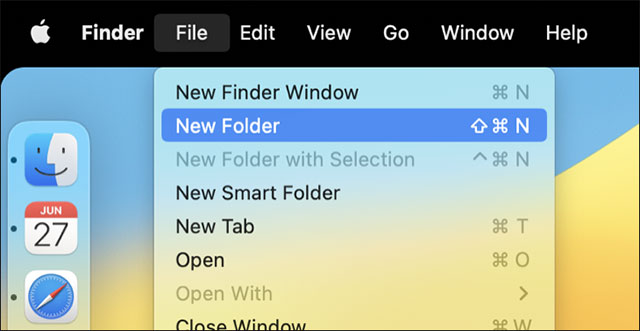
<p style="text-align: justify;">Để tạo một thư mục thông thường, hãy khởi chạy Finder (biểu tượng mặt cười màu xanh trắng) và điều hướng đến vị trí bạn muốn tạo thư mục.</p>

<p style="text-align: justify;">Bây giờ hãy vào&nbsp;<strong>File &gt; New Folder</strong>&nbsp;để tạo một thư mục. Bạn sẽ cần đặt tên cho thư mục, sau đó nhấn Enter để hoàn tất. Giờ đây, bạn có thể thoải mái kéo các tệp và thư mục khác vào thư mục mới tạo của mình.</p>

<p style="text-align: justify;"><img alt="File &gt; New Folder" data-i="0" data-src="https://st.quantrimang.com/photos/image/2023/06/30/tao-thu-muc-tren-may-mac1.jpg" data-was-processed="true" height="331" src="https://st.quantrimang.com/photos/image/2023/06/30/tao-thu-muc-tren-may-mac1.jpg" width="640" /></p>

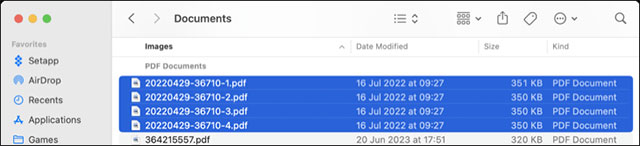
<p style="text-align: justify;">Bạn cũng có thể sử dụng phím tắt<strong>&nbsp;Command+Shift+N&nbsp;</strong>để tạo thư mục mới. Ngoài ra, còn có thủ thuật hữu ích khác là tạo một thư mục từ một tập hợp các mục. Để thực hiện việc này, hãy chọn những mục bạn muốn đưa vào thư mục mới của mình bằng cách nhấp và kéo các biểu tượng, hoặc bằng cách sử dụng tổ hợp phím&nbsp;<strong>Command+Click&nbsp;</strong>để chọn nhiều mục.</p>

<p style="text-align: justify;"><img alt="Chọn nhiều mục" data-i="1" data-src="https://st.quantrimang.com/photos/image/2023/06/30/tao-thu-muc-tren-may-mac2.jpg" data-was-processed="true" height="146" src="https://st.quantrimang.com/photos/image/2023/06/30/tao-thu-muc-tren-may-mac2.jpg" width="640" /></p>

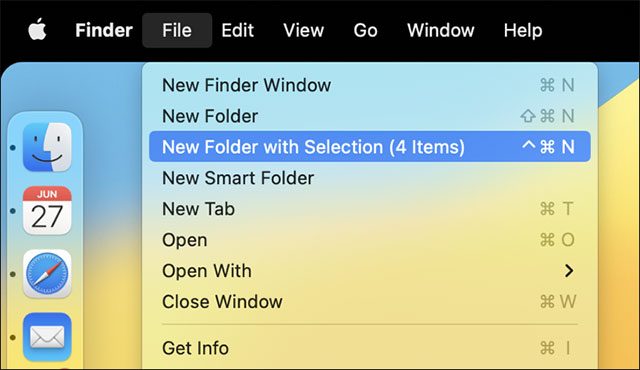
<p style="text-align: justify;">Bây giờ, hãy điều hướng tới&nbsp;<strong>File &gt; New Folder with Selection</strong>&nbsp;(hoặc sử dụng&nbsp;<strong>Command+Control+N</strong>) để tạo một thư mục và di chuyển các thư mục này vào đó. Bạn cũng sẽ tìm thấy tùy chọn này trong menu hiện ra khi nhấp chuột phải (<strong>Command+Click</strong>) trên các mục đã được đánh giấu.</p>

<p style="text-align: justify;"><img alt="File &gt; New Folder with Selection" data-i="2" data-src="https://st.quantrimang.com/photos/image/2023/06/30/tao-thu-muc-tren-may-mac3.jpg" data-was-processed="true" height="370" src="https://st.quantrimang.com/photos/image/2023/06/30/tao-thu-muc-tren-may-mac3.jpg" width="640" /></p>

<h2 style="text-align: justify;">Tạo thư mục từ dòng lệnh</h2>

<p style="text-align: justify;">Bạn có thể làm rất nhiều việc với công cụ dòng lệnh trên máy Mac, bao gồm cả tạo thư mục. Để thực hiện việc này, trước tiên, hãy khởi chạy Terminal và điều hướng đến vị trí mà bạn muốn tạo thư mục. Ví dụ: sử dụng lệnh&nbsp;<strong>cd ~/Documents/&nbsp;</strong>sẽ đưa bạn đến mục Documents trong thư mục người dùng của hệ thống.</p>

<p style="text-align: justify;">Bây giờ bạn có thể sử dụng lệnh&nbsp;<strong>mkdir foldername</strong>&nbsp;(thay thế foldername bằng tên của thư mục bạn muốn tạo) để tạo một thư mục mới. Nếu chưa quen với Mac, bạn có thể thấy các thao tác trên Terminal hơi khó khăn.</p>

<h2 style="text-align: justify;">Tận dụng Smart Folders</h2>

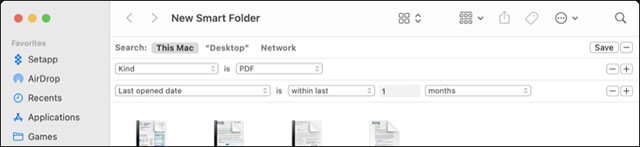
<p style="text-align: justify;">Smart Folders (Thư mục thông minh) là một cách khác để sắp xếp các mục trên máy Mac của bạn, có thể truy cập qua File &gt; New Smart Folder trong Finder. Thư mục thông minh hoạt động bằng cách biến chuỗi tìm kiếm thành thư mục tự động điền dựa trên tiêu chí đã đặt. Vì vậy, chẳng hạn nếu bạn muốn có một thư mục chỉ chứa các tài liệu PDF mà bạn đã mở trong tháng trước, bạn có thể kết hợp tìm kiếm và lưu nó thành một thư mục mà mình có thể truy cập nhanh bằng Finder.</p>

<p style="text-align: justify;"><img alt=" Smart Folders" data-i="3" data-src="https://st.quantrimang.com/photos/image/2023/06/30/tao-thu-muc-tren-may-mac4.jpg" data-was-processed="true" height="147" src="https://st.quantrimang.com/photos/image/2023/06/30/tao-thu-muc-tren-may-mac4.jpg" width="640" /></p>

<p style="text-align: justify;">Tạo Thư mục thông minh trên máy Mac là một quy trình dễ dàng và các tính năng tương tự tồn tại trong nhiều ứng dụng khác của Apple. Ví dụ: bạn có thể tạo Thư mục thông minh trong Apple Notes, tạo Danh sách phát thông minh trong iTunes (Apple Music) hoặc Album thông minh trong Apple Photos hoạt động theo cách tương tự.</p>

<div style="text-align: justify;">&nbsp;</div>
		</div>
				<div id="author">
						<p>
				<strong>Nguồn tin:</strong>
				Quantrimang.com
			</p>
		</div>
	</div>
	<div id="footer" class="clearfix">
		<div id="url">
			<strong>URL của bản tin này: </strong><a href="https://www.nguoicodonvn2008.info/vi/news/savefile/kien-thuc-may-tinh/cach-tao-thu-muc-tren-may-mac-7248.html" title="Cách tạo thư mục trên máy Mac">https://www.nguoicodonvn2008.info/vi/news/savefile/kien-thuc-may-tinh/cach-tao-thu-muc-tren-may-mac-7248.html</a>

		</div>
		<div class="clear"></div>
		<div class="copyright">
			&copy; .&#x3A; Nguoicodonvn2008.info - Cõi lòng người cô đơn &#x3A;.
		</div>
		<div id="contact">
			<a href="mailto:admin@nguoicodonvn2008.info">admin@nguoicodonvn2008.info</a>
		</div>
	</div>
</div>
        <div id="timeoutsess" class="chromeframe">
            Bạn đã không sử dụng Site, <a onclick="timeoutsesscancel();" href="https://nguoicodonvn2008.info/#">Bấm vào đây để duy trì trạng thái đăng nhập</a>. Thời gian chờ: <span id="secField"> 60 </span> giây
        </div>
        <div id="openidResult" class="nv-alert" style="display:none"></div>
        <div id="openidBt" data-result="" data-redirect=""></div>
		</script>
		<div class="car-top">
  <span><img src="https://nguoicodonvn2008.info/themes/default/images/car.png" alt=""></span>
</div>
<script src="https://nguoicodonvn2008.info/assets/js/jquery/jquery.min.js"></script>
<script>var nv_base_siteurl="/",nv_lang_data="vi",nv_lang_interface="vi",nv_name_variable="nv",nv_fc_variable="op",nv_lang_variable="language",nv_module_name="news",nv_func_name="savefile",nv_is_user=0, nv_my_ofs=-4,nv_my_abbr="EDT",nv_cookie_prefix="nv4c_e856T",nv_check_pass_mstime=1738000,nv_area_admin=0,nv_safemode=0,theme_responsive=0,nv_recaptcha_ver=2,nv_recaptcha_sitekey="",nv_recaptcha_type="image",XSSsanitize=1;</script>
<script src="https://nguoicodonvn2008.info/assets/js/language/vi.js"></script>
<script src="https://nguoicodonvn2008.info/assets/js/DOMPurify/purify3.js"></script>
<script src="https://nguoicodonvn2008.info/assets/js/global.js"></script>
<script src="https://nguoicodonvn2008.info/assets/js/site.js"></script>
<script src="https://nguoicodonvn2008.info/themes/default/js/news.js"></script>
<script src="https://nguoicodonvn2008.info/themes/default/js/main.js"></script>
<script src="https://nguoicodonvn2008.info/themes/default/js/custom.js"></script>
<script type="application/ld+json">
        {
            "@context": "https://schema.org",
            "@type": "Organization",
            "url": "https://nguoicodonvn2008.info",
            "logo": "https://nguoicodonvn2008.info/uploads/angel.gif"
        }
        </script>
<script src="https://nguoicodonvn2008.info/themes/default/js/bootstrap.min.js"></script>
<script type="text/javascript">
var $scrolltop = $('.car-top');
$scrolltop.on('click', function () {
    $('html,body').animate({
        scrollTop: 0
    }, 800);
    $(this).addClass("car-run");
    setTimeout(function(){ $scrolltop.removeClass('car-run');}, 1000);
    return false;
});
$(window).on('scroll', function ()
{ 
    if($(window).scrollTop() >= 200)
    {
        $scrolltop.addClass("show");
        $scrolltop.addClass("car-down");
    }
    else
    {
       $scrolltop.removeClass("show");
       setTimeout(function(){ $scrolltop.removeClass('car-down');}, 300);
    }
});
</script>
</body>
</html>