<!DOCTYPE html>
    <html lang="vi" xmlns="http://www.w3.org/1999/xhtml" prefix="og: http://ogp.me/ns#">
    <head>
<title>Cách tạo SSH key trên Linux</title>
<meta name="description" content="Cách tạo SSH key trên Linux - Savefile - Tin Tức - https&#x3A;&#x002F;&#x002F;www.nguoicodonvn2008.info&#x002F;vi&#x002F;news&#x002F;savefile&#x002F;kien-thuc-may-tinh&#x002F;cach-tao-ssh-key-tren-linux-8029.html">
<meta name="author" content=".: Nguoicodonvn2008.info - Cõi lòng người cô đơn :.">
<meta name="copyright" content=".: Nguoicodonvn2008.info - Cõi lòng người cô đơn :. [admin@nguoicodonvn2008.info]">
<meta name="robots" content="index, archive, follow, noodp">
<meta name="googlebot" content="index,archive,follow,noodp">
<meta name="msnbot" content="all,index,follow">
<meta name="generator" content="NukeViet v4.5">
<meta http-equiv="Content-Type" content="text/html; charset=utf-8">
<meta property="og:title" content="Cách tạo SSH key trên Linux">
<meta property="og:type" content="website">
<meta property="og:description" content="Savefile - Tin Tức - https&#x3A;&#x002F;&#x002F;www.nguoicodonvn2008.info&#x002F;vi&#x002F;news&#x002F;savefile&#x002F;kien-thuc-may-tinh&#x002F;cach-tao-ssh-key-tren-linux-8029.html">
<meta property="og:site_name" content=".&#x3A; Nguoicodonvn2008.info - Cõi lòng người cô đơn &#x3A;.">
<meta property="og:url" content="https://www.nguoicodonvn2008.info/vi/news/savefile/kien-thuc-may-tinh/cach-tao-ssh-key-tren-linux-8029.html">
<link rel="shortcut icon" href="https://nguoicodonvn2008.info/favicon.ico">
<link rel="canonical" href="https://www.nguoicodonvn2008.info/vi/news/savefile/kien-thuc-may-tinh/cach-tao-ssh-key-tren-linux-8029.html">
<link rel="alternate" href="https://nguoicodonvn2008.info/vi/news/rss/" title="Tin Tức" type="application/rss+xml">
<link rel="alternate" href="https://nguoicodonvn2008.info/vi/news/rss/karaoke-dual/" title="Tin Tức - Karaoke Dual" type="application/rss+xml">
<link rel="alternate" href="https://nguoicodonvn2008.info/vi/news/rss/nhac-tre/" title="Tin Tức - Nhạc trẻ" type="application/rss+xml">
<link rel="alternate" href="https://nguoicodonvn2008.info/vi/news/rss/tru-tinh/" title="Tin Tức - Trữ tình" type="application/rss+xml">
<link rel="alternate" href="https://nguoicodonvn2008.info/vi/news/rss/nuoc-ngoai/" title="Tin Tức - Nước ngoài" type="application/rss+xml">
<link rel="alternate" href="https://nguoicodonvn2008.info/vi/news/rss/remix/" title="Tin Tức - Remix" type="application/rss+xml">
<link rel="alternate" href="https://nguoicodonvn2008.info/vi/news/rss/tam-su-tinh-yeu/" title="Tin Tức - Tâm sự tình yêu" type="application/rss+xml">
<link rel="alternate" href="https://nguoicodonvn2008.info/vi/news/rss/tho-suu-tam/" title="Tin Tức - Thơ sưu tầm" type="application/rss+xml">
<link rel="alternate" href="https://nguoicodonvn2008.info/vi/news/rss/cuoc-song/" title="Tin Tức - Cuộc sống" type="application/rss+xml">
<link rel="alternate" href="https://nguoicodonvn2008.info/vi/news/rss/phan-mem/" title="Tin Tức - Phần mềm" type="application/rss+xml">
<link rel="alternate" href="https://nguoicodonvn2008.info/vi/news/rss/kien-thuc-may-tinh/" title="Tin Tức - Kiến thức máy tính" type="application/rss+xml">
<link rel="alternate" href="https://nguoicodonvn2008.info/vi/news/rss/hoc-tap/" title="Tin Tức - Học tập" type="application/rss+xml">
<link rel="alternate" href="https://nguoicodonvn2008.info/vi/news/rss/tai-lieu/" title="Tin Tức - Tài liệu" type="application/rss+xml">
<link rel="alternate" href="https://nguoicodonvn2008.info/vi/news/rss/de-thi/" title="Tin Tức - Đề thi" type="application/rss+xml">
<link rel="preload" as="style" href="https://nguoicodonvn2008.info/assets/css/font-awesome.min.css" type="text/css">
<link rel="preload" as="style" href="https://nguoicodonvn2008.info/themes/default/css/bootstrap.non-responsive.css" type="text/css">
<link rel="preload" as="style" href="https://nguoicodonvn2008.info/themes/default/css/style.css" type="text/css">
<link rel="preload" as="style" href="https://nguoicodonvn2008.info/themes/default/css/style.non-responsive.css" type="text/css">
<link rel="preload" as="style" href="https://nguoicodonvn2008.info/themes/default/css/news.css" type="text/css">
<link rel="preload" as="style" href="https://nguoicodonvn2008.info/themes/default/css/custom.css" type="text/css">
<link rel="preload" as="script" href="https://nguoicodonvn2008.info/assets/js/jquery/jquery.min.js" type="text/javascript">
<link rel="preload" as="script" href="https://nguoicodonvn2008.info/assets/js/language/vi.js" type="text/javascript">
<link rel="preload" as="script" href="https://nguoicodonvn2008.info/assets/js/DOMPurify/purify3.js" type="text/javascript">
<link rel="preload" as="script" href="https://nguoicodonvn2008.info/assets/js/global.js" type="text/javascript">
<link rel="preload" as="script" href="https://nguoicodonvn2008.info/assets/js/site.js" type="text/javascript">
<link rel="preload" as="script" href="https://nguoicodonvn2008.info/themes/default/js/news.js" type="text/javascript">
<link rel="preload" as="script" href="https://nguoicodonvn2008.info/themes/default/js/main.js" type="text/javascript">
<link rel="preload" as="script" href="https://nguoicodonvn2008.info/themes/default/js/custom.js" type="text/javascript">
<link rel="preload" as="script" href="https://nguoicodonvn2008.info/themes/default/js/bootstrap.min.js" type="text/javascript">
<link rel="stylesheet" href="https://nguoicodonvn2008.info/assets/css/font-awesome.min.css">
<link rel="stylesheet" href="https://nguoicodonvn2008.info/themes/default/css/bootstrap.non-responsive.css">
<link rel="stylesheet" href="https://nguoicodonvn2008.info/themes/default/css/style.css">
<link rel="stylesheet" href="https://nguoicodonvn2008.info/themes/default/css/style.non-responsive.css">
<link rel="StyleSheet" href="https://nguoicodonvn2008.info/themes/default/css/news.css">
<link rel="stylesheet" href="https://nguoicodonvn2008.info/themes/default/css/custom.css">
<style type="text/css">
	body{background: #fff;}
</style>
    </head>
    <body>
<div id="print">
	<div id="hd_print">
		<h2 class="pull-left">.&#x3A; Nguoicodonvn2008.info - Cõi lòng người cô đơn &#x3A;.</h2>
		<p class="pull-right"><a title=".&#x3A; Nguoicodonvn2008.info - Cõi lòng người cô đơn &#x3A;." href="https://nguoicodonvn2008.info/">https://nguoicodonvn2008.info</a></p>
	</div>
	<div class="clear"></div>
	<hr />
	<div id="content">
		<h1>Cách tạo SSH key trên Linux</h1>
		<ul class="list-inline">
			<li>Thứ sáu - 02/02/2024 02:57</li>
			<li class="hidden-print txtrequired"><em class="fa fa-print">&nbsp;</em><a title="In ra" href="javascript:;" onclick="window.print()">In ra</a></li>
			<li class="hidden-print txtrequired"><em class="fa fa-power-off">&nbsp;</em><a title="Đóng cửa sổ này" href="javascript:;" onclick="window.close()">Đóng cửa sổ này</a></li>
		</ul>
		<div class="clear"></div>
		<div id="hometext">
		</div>
				<div class="imghome">
			<img alt="Cách tạo SSH key trên Linux" src="https://st.quantrimang.com/photos/image/2024/02/01/tao-ssh-key-tren-linux-3.jpg" width="460" class="img-thumbnail" />
		</div>
		<div class="clear"></div>
		<div id="bodytext" class="clearfix">
			<p style="text-align: justify;">SSH key cho phép bạn giữ an toàn cho các tài khoản máy chủ từ xa của mình đồng thời cấp quyền truy cập không cần mật khẩu. Thật dễ dàng để tạo một SSH key trên&nbsp;<a data-type="internal" href="https://quantrimang.com/cong-nghe/linux-os" title="Linux">Linux</a>.</p>

<h2 style="text-align: justify;">SSH key là gì?</h2>

<p style="text-align: justify;">SSH key là key được tạo bằng mật mã cho phép bạn đăng nhập vào các máy từ xa. SSH key là &quot;cặp key&quot; chứa một public key và một private key. Bạn có thể sao chép public key sang các máy từ xa và chúng sẽ sử dụng nó để xác thực bạn. Private key, đúng như tên gọi của nó, là riêng&nbsp;tư và phải ở trên máy cục bộ của bạn.</p>

<p style="text-align: justify;"><strong>Cảnh báo</strong>: Đừng chia sẻ SSH private key của bạn với bất kỳ ai!</p>

<p style="text-align: justify;">Tại thời điểm đăng nhập, máy chủ từ xa sẽ sử dụng&nbsp;SSH&nbsp;để so sánh public key với private key của bạn. Nếu chúng khớp nhau, bạn được phép truy cập vào hệ thống từ xa. Hệ thống cặp key này cho phép bạn thiết lập tài khoản dễ dàng mà vẫn đảm bảo tính bảo mật.</p>

<h2 style="text-align: justify;">Cách tạo key từ xa</h2>

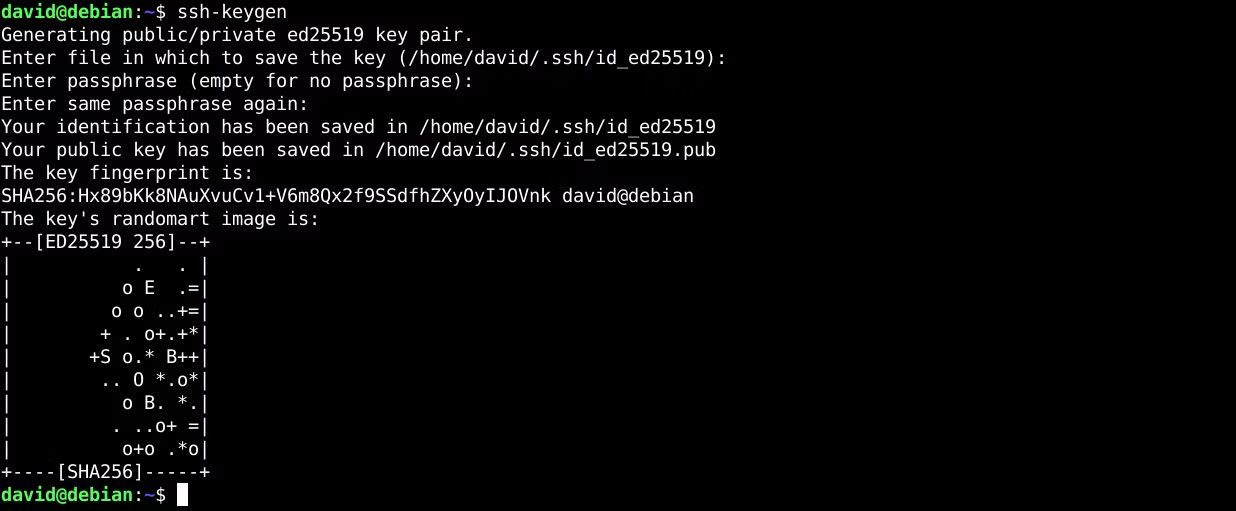
<p style="text-align: justify;">Để tạo cặp SSH key, chỉ cần sử dụng lệnh&nbsp;<strong>&quot;ssh-keygen&quot;</strong>&nbsp;trên dòng lệnh Linux. Nó sẽ nhắc bạn chọn vị trí file, sau đó nhập và xác nhận cụm mật khẩu nếu bạn chọn sử dụng một cụm mật khẩu. Cụm mật khẩu cho phép bạn thêm một lớp bảo mật bổ sung cho key của mình.</p>

<p style="text-align: justify;"><strong>Cảnh báo</strong>: Nếu bạn sử dụng cụm mật khẩu, đừng quên nó! Bạn sẽ không thể đăng nhập bằng key đó nếu quên.</p>

<p style="text-align: justify;">Nếu bạn muốn đăng nhập mà không cần mật khẩu, chỉ cần để trống cụm mật khẩu.</p>

<figure>
<div style="text-align: justify;"><img alt="Tạo SSH key trong Linux" data-i="0" data-src="https://st.quantrimang.com/photos/image/2024/02/01/tao-ssh-key-tren-linux-1.jpg" data-was-processed="true" height="511" src="https://st.quantrimang.com/photos/image/2024/02/01/tao-ssh-key-tren-linux-1.jpg" width="1236" /></div>

<figcaption>
<div style="text-align: justify;">Tạo SSH key trong Linux</div>
</figcaption>
</figure>

<div style="text-align: justify;"><iframe allowtransparency="true" data-google-container-id="a!2" data-google-query-id="CMDW95yXjIQDFVk9ewcdK2sDbg" data-load-complete="true" frameborder="0" height="0" hspace="0" id="aswift_1" marginheight="0" marginwidth="0" name="aswift_1" sandbox="" scrolling="no" vspace="0" width="694"></iframe></div>

<p style="text-align: justify;">Theo mặc định, ssh-keygen sử dụng thuật toán Ed25519. Điều này là đủ cho hầu hết các trường hợp vì nó rất an toàn. Bạn có thể chỉ định loại thuật toán bạn muốn bằng flag&nbsp;<strong>-t</strong>. Thông thường bạn không cần phải làm điều này trừ khi máy chủ không hỗ trợ bất kỳ thuật toán nào bạn đã sử dụng. Bạn có thể đọc&nbsp;trang hướng dẫn sử dụng ssh-keygen&nbsp;để tìm hiểu cách tạo một cặp key khác.</p>

<h2 style="text-align: justify;">Nhập SSH key mới của bạn vào máy từ xa</h2>

<p style="text-align: justify;">Bây giờ, bạn đã tạo cặp key của mình. Bạn cần sao chép key của mình sang máy chủ từ xa. Có hai cách để làm điều này.</p>

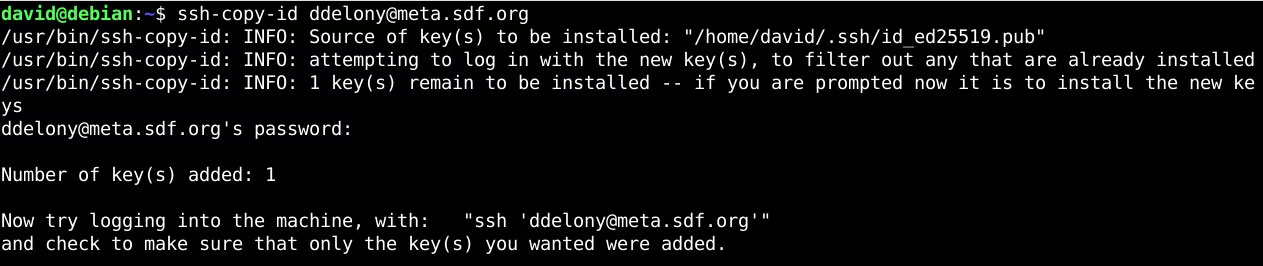
<p style="text-align: justify;">Đầu tiên và dễ dàng nhất là sử dụng tiện ích&nbsp;<strong>ssh-copy-id</strong>. Để làm như vậy, chỉ cần gọi nó bằng tên người dùng và địa chỉ tài khoản máy chủ từ xa của bạn:</p>

<pre id="pre0">
<code>ssh-copy-id user@example.com</code></pre>

<p style="text-align: justify;">Nhập mật khẩu và nó sẽ sao chép private key của bạn.</p>

<figure>
<div style="text-align: justify;"><img alt="Tiện ích ssh-copy-id trong Linux terminal" data-adbro-processed="true" data-i="1" data-src="https://st.quantrimang.com/photos/image/2024/02/01/tao-ssh-key-tren-linux-2.jpg" data-was-processed="true" height="266" src="https://st.quantrimang.com/photos/image/2024/02/01/tao-ssh-key-tren-linux-2.jpg" width="1263" /></div>

<figcaption>
<div style="text-align: justify;">Tiện ích ssh-copy-id trong Linux terminal</div>
</figcaption>
</figure>

<p style="text-align: justify;">Bây giờ, bạn có thể đăng nhập vào máy chủ từ xa:</p>

<pre id="pre1">
<code>ssh user@example.com</code></pre>

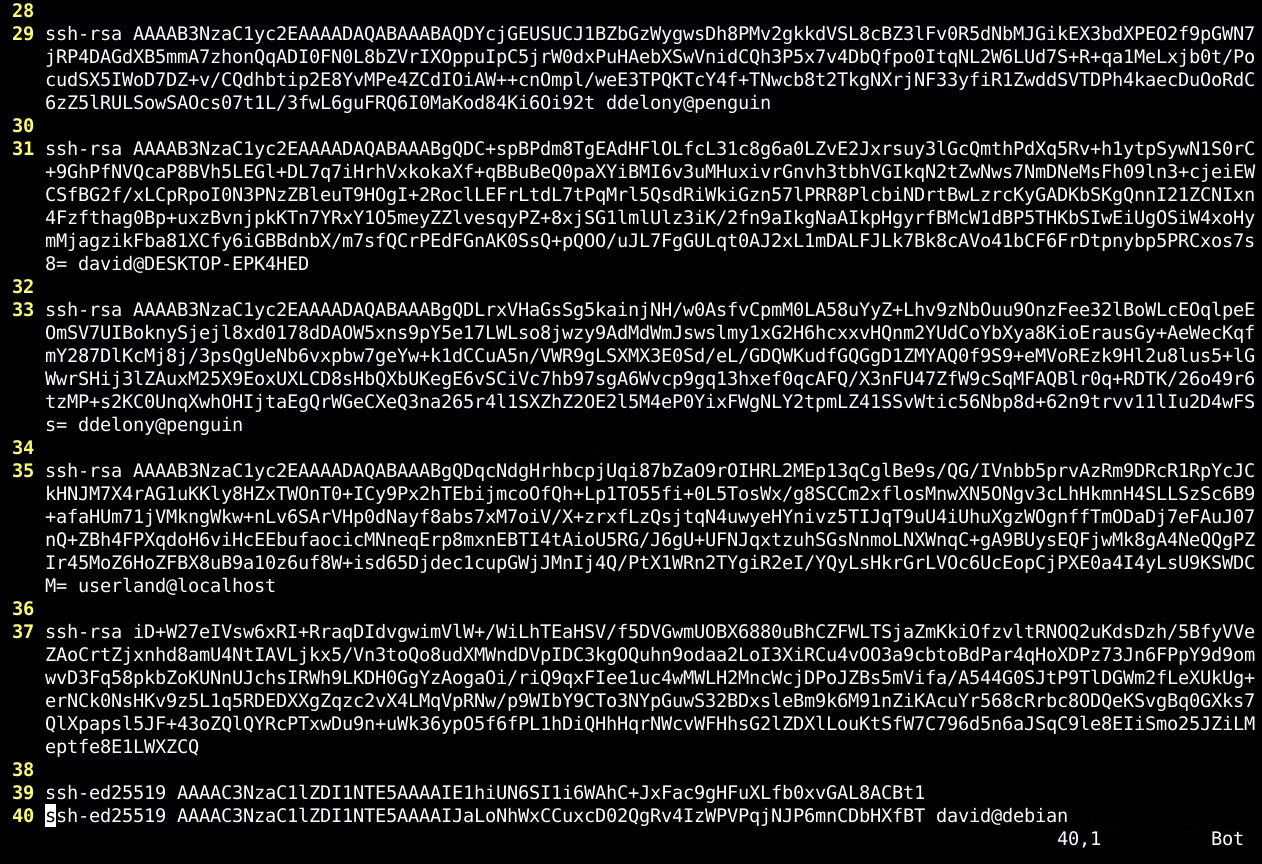
<p style="text-align: justify;">Nếu cách đó không hiệu quả, bạn sẽ phải sao chép và dán public key của mình theo cách thủ công. Public key của bạn sẽ là một file có đuôi&nbsp;<strong>&quot;.pub&quot;</strong>&nbsp;trong&nbsp;<strong>.ssh directory</strong>&nbsp;thuộc thư mục home. Mở nó rồi sao chép và dán nội dung trong đó vào file&nbsp;<strong>.ssh/authorized_keys</strong>&nbsp;trên máy từ xa.</p>

<figure>
<div style="text-align: justify;"><img alt="File .ssh/authorized trên Linux" data-i="2" data-src="https://st.quantrimang.com/photos/image/2024/02/01/tao-ssh-key-tren-linux-3.jpg" data-was-processed="true" height="864" src="https://st.quantrimang.com/photos/image/2024/02/01/tao-ssh-key-tren-linux-3.jpg" width="1262" /></div>

<figcaption>
<div style="text-align: justify;">File .ssh/authorized trên Linux</div>
</figcaption>
</figure>

<div style="text-align: justify;"><iframe allowtransparency="true" data-google-container-id="a!3" data-google-query-id="CJ_995yXjIQDFavITAIdow4A2g" data-load-complete="true" frameborder="0" height="0" hspace="0" id="aswift_2" marginheight="0" marginwidth="0" name="aswift_2" sandbox="" scrolling="no" vspace="0" width="694"></iframe></div>

<p style="text-align: justify;">Lưu file và bây giờ, bạn có thể đăng nhập vào máy chủ bằng SSH. Đảm bảo rằng chỉ bạn mới có thể ghi file, nếu không bạn có thể gặp lỗi.</p>
		</div>
				<div id="author">
						<p>
				<strong>Nguồn tin:</strong>
				Quantrimang.com
			</p>
		</div>
	</div>
	<div id="footer" class="clearfix">
		<div id="url">
			<strong>URL của bản tin này: </strong><a href="https://www.nguoicodonvn2008.info/vi/news/savefile/kien-thuc-may-tinh/cach-tao-ssh-key-tren-linux-8029.html" title="Cách tạo SSH key trên Linux">https://www.nguoicodonvn2008.info/vi/news/savefile/kien-thuc-may-tinh/cach-tao-ssh-key-tren-linux-8029.html</a>

		</div>
		<div class="clear"></div>
		<div class="copyright">
			&copy; .&#x3A; Nguoicodonvn2008.info - Cõi lòng người cô đơn &#x3A;.
		</div>
		<div id="contact">
			<a href="mailto:admin@nguoicodonvn2008.info">admin@nguoicodonvn2008.info</a>
		</div>
	</div>
</div>
        <div id="timeoutsess" class="chromeframe">
            Bạn đã không sử dụng Site, <a onclick="timeoutsesscancel();" href="https://nguoicodonvn2008.info/#">Bấm vào đây để duy trì trạng thái đăng nhập</a>. Thời gian chờ: <span id="secField"> 60 </span> giây
        </div>
        <div id="openidResult" class="nv-alert" style="display:none"></div>
        <div id="openidBt" data-result="" data-redirect=""></div>
		</script>
		<div class="car-top">
  <span><img src="https://nguoicodonvn2008.info/themes/default/images/car.png" alt=""></span>
</div>
<div id="run_cronjobs" style="visibility:hidden;display:none;"><img alt="cron" src="/index.php?second=cronjobs&amp;p=w8fVlX3T" width="1" height="1" /></div>
<script src="https://nguoicodonvn2008.info/assets/js/jquery/jquery.min.js"></script>
<script>var nv_base_siteurl="/",nv_lang_data="vi",nv_lang_interface="vi",nv_name_variable="nv",nv_fc_variable="op",nv_lang_variable="language",nv_module_name="news",nv_func_name="savefile",nv_is_user=0, nv_my_ofs=-4,nv_my_abbr="EDT",nv_cookie_prefix="nv4c_e856T",nv_check_pass_mstime=1738000,nv_area_admin=0,nv_safemode=0,theme_responsive=0,nv_recaptcha_ver=2,nv_recaptcha_sitekey="",nv_recaptcha_type="image",XSSsanitize=1;</script>
<script src="https://nguoicodonvn2008.info/assets/js/language/vi.js"></script>
<script src="https://nguoicodonvn2008.info/assets/js/DOMPurify/purify3.js"></script>
<script src="https://nguoicodonvn2008.info/assets/js/global.js"></script>
<script src="https://nguoicodonvn2008.info/assets/js/site.js"></script>
<script src="https://nguoicodonvn2008.info/themes/default/js/news.js"></script>
<script src="https://nguoicodonvn2008.info/themes/default/js/main.js"></script>
<script src="https://nguoicodonvn2008.info/themes/default/js/custom.js"></script>
<script type="application/ld+json">
        {
            "@context": "https://schema.org",
            "@type": "Organization",
            "url": "https://nguoicodonvn2008.info",
            "logo": "https://nguoicodonvn2008.info/uploads/angel.gif"
        }
        </script>
<script src="https://nguoicodonvn2008.info/themes/default/js/bootstrap.min.js"></script>
<script type="text/javascript">
var $scrolltop = $('.car-top');
$scrolltop.on('click', function () {
    $('html,body').animate({
        scrollTop: 0
    }, 800);
    $(this).addClass("car-run");
    setTimeout(function(){ $scrolltop.removeClass('car-run');}, 1000);
    return false;
});
$(window).on('scroll', function ()
{ 
    if($(window).scrollTop() >= 200)
    {
        $scrolltop.addClass("show");
        $scrolltop.addClass("car-down");
    }
    else
    {
       $scrolltop.removeClass("show");
       setTimeout(function(){ $scrolltop.removeClass('car-down');}, 300);
    }
});
</script>
</body>
</html>