<!DOCTYPE html>
    <html lang="vi" xmlns="http://www.w3.org/1999/xhtml" prefix="og: http://ogp.me/ns#">
    <head>
<title>Cách tạo Office 365 tự host của riêng bạn với CryptPad</title>
<meta name="description" content="Cách tạo Office 365 tự host của riêng bạn với CryptPad - Savefile - Tin Tức -...">
<meta name="author" content=".: Nguoicodonvn2008.info - Cõi lòng người cô đơn :.">
<meta name="copyright" content=".: Nguoicodonvn2008.info - Cõi lòng người cô đơn :. [admin@nguoicodonvn2008.info]">
<meta name="robots" content="index, archive, follow, noodp">
<meta name="googlebot" content="index,archive,follow,noodp">
<meta name="msnbot" content="all,index,follow">
<meta name="generator" content="NukeViet v4.5">
<meta http-equiv="Content-Type" content="text/html; charset=utf-8">
<meta property="og:title" content="Cách tạo Office 365 tự host của riêng bạn với CryptPad">
<meta property="og:type" content="website">
<meta property="og:description" content="Savefile - Tin Tức - https&#x3A;&#x002F;&#x002F;www.nguoicodonvn2008.info&#x002F;vi&#x002F;news&#x002F;savefile&#x002F;kien-thuc-may-tinh&#x002F;cach-tao-office-365-tu-host-cua-rieng-ban-voi-cryptpad-10776.html">
<meta property="og:site_name" content=".&#x3A; Nguoicodonvn2008.info - Cõi lòng người cô đơn &#x3A;.">
<meta property="og:url" content="https://www.nguoicodonvn2008.info/vi/news/savefile/kien-thuc-may-tinh/cach-tao-office-365-tu-host-cua-rieng-ban-voi-cryptpad-10776.html">
<link rel="shortcut icon" href="https://nguoicodonvn2008.info/favicon.ico">
<link rel="canonical" href="https://www.nguoicodonvn2008.info/vi/news/savefile/kien-thuc-may-tinh/cach-tao-office-365-tu-host-cua-rieng-ban-voi-cryptpad-10776.html">
<link rel="alternate" href="https://nguoicodonvn2008.info/vi/news/rss/" title="Tin Tức" type="application/rss+xml">
<link rel="alternate" href="https://nguoicodonvn2008.info/vi/news/rss/karaoke-dual/" title="Tin Tức - Karaoke Dual" type="application/rss+xml">
<link rel="alternate" href="https://nguoicodonvn2008.info/vi/news/rss/nhac-tre/" title="Tin Tức - Nhạc trẻ" type="application/rss+xml">
<link rel="alternate" href="https://nguoicodonvn2008.info/vi/news/rss/tru-tinh/" title="Tin Tức - Trữ tình" type="application/rss+xml">
<link rel="alternate" href="https://nguoicodonvn2008.info/vi/news/rss/nuoc-ngoai/" title="Tin Tức - Nước ngoài" type="application/rss+xml">
<link rel="alternate" href="https://nguoicodonvn2008.info/vi/news/rss/remix/" title="Tin Tức - Remix" type="application/rss+xml">
<link rel="alternate" href="https://nguoicodonvn2008.info/vi/news/rss/tam-su-tinh-yeu/" title="Tin Tức - Tâm sự tình yêu" type="application/rss+xml">
<link rel="alternate" href="https://nguoicodonvn2008.info/vi/news/rss/tho-suu-tam/" title="Tin Tức - Thơ sưu tầm" type="application/rss+xml">
<link rel="alternate" href="https://nguoicodonvn2008.info/vi/news/rss/cuoc-song/" title="Tin Tức - Cuộc sống" type="application/rss+xml">
<link rel="alternate" href="https://nguoicodonvn2008.info/vi/news/rss/phan-mem/" title="Tin Tức - Phần mềm" type="application/rss+xml">
<link rel="alternate" href="https://nguoicodonvn2008.info/vi/news/rss/kien-thuc-may-tinh/" title="Tin Tức - Kiến thức máy tính" type="application/rss+xml">
<link rel="alternate" href="https://nguoicodonvn2008.info/vi/news/rss/hoc-tap/" title="Tin Tức - Học tập" type="application/rss+xml">
<link rel="alternate" href="https://nguoicodonvn2008.info/vi/news/rss/tai-lieu/" title="Tin Tức - Tài liệu" type="application/rss+xml">
<link rel="alternate" href="https://nguoicodonvn2008.info/vi/news/rss/de-thi/" title="Tin Tức - Đề thi" type="application/rss+xml">
<link rel="preload" as="style" href="https://nguoicodonvn2008.info/assets/css/font-awesome.min.css" type="text/css">
<link rel="preload" as="style" href="https://nguoicodonvn2008.info/themes/default/css/bootstrap.non-responsive.css" type="text/css">
<link rel="preload" as="style" href="https://nguoicodonvn2008.info/themes/default/css/style.css" type="text/css">
<link rel="preload" as="style" href="https://nguoicodonvn2008.info/themes/default/css/style.non-responsive.css" type="text/css">
<link rel="preload" as="style" href="https://nguoicodonvn2008.info/themes/default/css/news.css" type="text/css">
<link rel="preload" as="style" href="https://nguoicodonvn2008.info/themes/default/css/custom.css" type="text/css">
<link rel="preload" as="script" href="https://nguoicodonvn2008.info/assets/js/jquery/jquery.min.js" type="text/javascript">
<link rel="preload" as="script" href="https://nguoicodonvn2008.info/assets/js/language/vi.js" type="text/javascript">
<link rel="preload" as="script" href="https://nguoicodonvn2008.info/assets/js/DOMPurify/purify3.js" type="text/javascript">
<link rel="preload" as="script" href="https://nguoicodonvn2008.info/assets/js/global.js" type="text/javascript">
<link rel="preload" as="script" href="https://nguoicodonvn2008.info/assets/js/site.js" type="text/javascript">
<link rel="preload" as="script" href="https://nguoicodonvn2008.info/themes/default/js/news.js" type="text/javascript">
<link rel="preload" as="script" href="https://nguoicodonvn2008.info/themes/default/js/main.js" type="text/javascript">
<link rel="preload" as="script" href="https://nguoicodonvn2008.info/themes/default/js/custom.js" type="text/javascript">
<link rel="preload" as="script" href="https://nguoicodonvn2008.info/themes/default/js/bootstrap.min.js" type="text/javascript">
<link rel="stylesheet" href="https://nguoicodonvn2008.info/assets/css/font-awesome.min.css">
<link rel="stylesheet" href="https://nguoicodonvn2008.info/themes/default/css/bootstrap.non-responsive.css">
<link rel="stylesheet" href="https://nguoicodonvn2008.info/themes/default/css/style.css">
<link rel="stylesheet" href="https://nguoicodonvn2008.info/themes/default/css/style.non-responsive.css">
<link rel="StyleSheet" href="https://nguoicodonvn2008.info/themes/default/css/news.css">
<link rel="stylesheet" href="https://nguoicodonvn2008.info/themes/default/css/custom.css">
<style type="text/css">
	body{background: #fff;}
</style>
    </head>
    <body>
<div id="print">
	<div id="hd_print">
		<h2 class="pull-left">.&#x3A; Nguoicodonvn2008.info - Cõi lòng người cô đơn &#x3A;.</h2>
		<p class="pull-right"><a title=".&#x3A; Nguoicodonvn2008.info - Cõi lòng người cô đơn &#x3A;." href="https://nguoicodonvn2008.info/">https://nguoicodonvn2008.info</a></p>
	</div>
	<div class="clear"></div>
	<hr />
	<div id="content">
		<h1>Cách tạo Office 365 tự host của riêng bạn với CryptPad</h1>
		<ul class="list-inline">
			<li>Thứ ba - 15/07/2025 05:03</li>
			<li class="hidden-print txtrequired"><em class="fa fa-print">&nbsp;</em><a title="In ra" href="javascript:;" onclick="window.print()">In ra</a></li>
			<li class="hidden-print txtrequired"><em class="fa fa-power-off">&nbsp;</em><a title="Đóng cửa sổ này" href="javascript:;" onclick="window.close()">Đóng cửa sổ này</a></li>
		</ul>
		<div class="clear"></div>
		<div id="hometext">
		</div>
				<div class="imghome">
			<img alt="Cách tạo Office 365 tự host của riêng bạn với CryptPad" src="https://st.quantrimang.com/photos/image/2025/05/30/tao-office-365-tu-host-voi-cryptpad-26.jpg" width="460" class="img-thumbnail" />
		</div>
		<div class="clear"></div>
		<div id="bodytext" class="clearfix">
			<p style="text-align: justify;">CryptPad là một chương trình bộ ứng dụng office mã nguồn mở mà bạn có thể tự host trên máy chủ của mình. Nó tương tự như Office 365, cho phép bạn truy cập bộ ứng dụng office ngay từ trình duyệt. Điểm khác biệt chính là CryptPad tập trung vào quyền riêng tư của người dùng, cho phép bạn tạo và chia sẻ tài liệu mà không có nguy cơ rò rỉ bất kỳ thông tin cá nhân nào.</p>

<div style="text-align: justify;">&nbsp;</div>

<p style="text-align: justify;">&nbsp;</p>

<h2 id="mcetoc_1j03l9u4e10h" style="text-align: justify;">CryptPad là gì? Tại sao bạn nên sử dụng nó?</h2>

<p style="text-align: justify;">CryptPad là một bộ ứng dụng office trực tuyến cung cấp cho bạn một giải pháp thay thế hướng đến quyền riêng tư để chỉnh sửa tài liệu cộng tác. Tương tự như các bộ ứng dụng trực tuyến như Office 365 và Google Docs, CryptPad cho phép bạn tạo và chia sẻ tài liệu với người khác qua Internet.</p>

<figure>
<div style="text-align: justify;"><img alt="Một phiên làm việc cơ bản trên Wordpad của CryptPad." data-i="0" data-src="https://st.quantrimang.com/photos/image/2025/07/14/tao-office-365-tu-host-voi-cryptpad-1.jpg" data-was-processed="true" height="424" src="https://st.quantrimang.com/photos/image/2025/07/14/tao-office-365-tu-host-voi-cryptpad-1.jpg" width="1081" /></div>

<figcaption>
<div style="text-align: justify;">Một phiên làm việc cơ bản trên Wordpad của CryptPad.</div>
</figcaption>
</figure>

<p style="text-align: justify;">Một trong những lợi thế lớn nhất của CryptPad so với Office 365 là nó được mã hóa hoàn toàn từ đầu đến cuối. Chỉ bạn và cộng tác viên mới có thể truy cập tài liệu bạn đang chỉnh sửa, điều này có thể hữu ích khi chia sẻ tài liệu chứa thông tin nhạy cảm với người khác.</p>

<p style="text-align: justify;">CryptPad cũng vượt trội hơn Office 365 ở chỗ bạn có thể tự host hoàn toàn trên phần cứng của riêng mình. Điều này đặc biệt hữu ích nếu bạn lo ngại về việc lưu trữ thông tin của mình trên một nhà cung cấp bên thứ ba.</p>

<h2 id="mcetoc_1j03l9u4e10i" style="text-align: justify;">Yêu cầu</h2>

<p style="text-align: justify;">Trước khi cài đặt CryptPad, bạn cần đảm bảo đã chuẩn bị sẵn các tài nguyên sau:</p>

<ul>
	<li style="text-align: justify;">Máy tính có thể truy cập từ mạng bên ngoài</li>
	<li style="text-align: justify;">Tối thiểu 2GB RAM và 20GB dung lượng lưu trữ</li>
	<li style="text-align: justify;">Tên miền (và tên miền phụ) trỏ đến địa chỉ IP của máy chủ</li>
</ul>

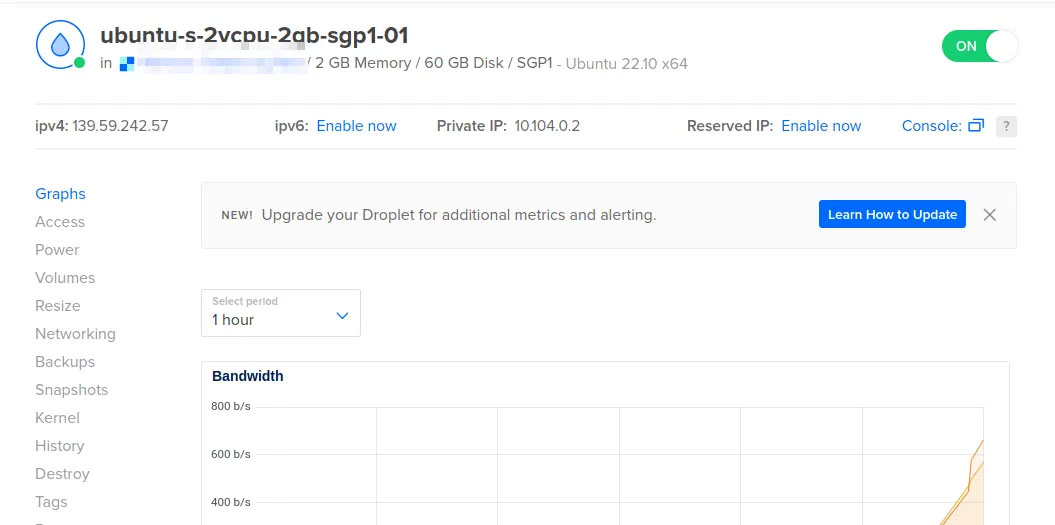
<p style="text-align: justify;"><strong>Lưu ý</strong>: Hướng dẫn này được tạo trên Ubuntu VPS của Digitalocean.</p>

<figure>
<div style="text-align: justify;"><img alt="Một cửa sổ hiển thị thông tin của droplet Digitalocean." data-i="1" data-src="https://st.quantrimang.com/photos/image/2025/07/14/tao-office-365-tu-host-voi-cryptpad-2.jpg" data-was-processed="true" height="525" src="https://st.quantrimang.com/photos/image/2025/07/14/tao-office-365-tu-host-voi-cryptpad-2.jpg" width="1055" /></div>

<figcaption>
<div style="text-align: justify;">Một cửa sổ hiển thị thông tin của droplet Digitalocean.</div>
</figcaption>
</figure>

<p style="text-align: justify;"><strong>Mẹo</strong>: Mặc dù Cryptpad có thể hoạt động trên VPS gốc, nhưng các nhà phát triển khuyến nghị bạn nên bảo mật máy chủ Linux của mình trước khi cài đặt chương trình.</p>

<h2 id="mcetoc_1j03l9u4e10j" style="text-align: justify;">Cài đặt CryptPad</h2>

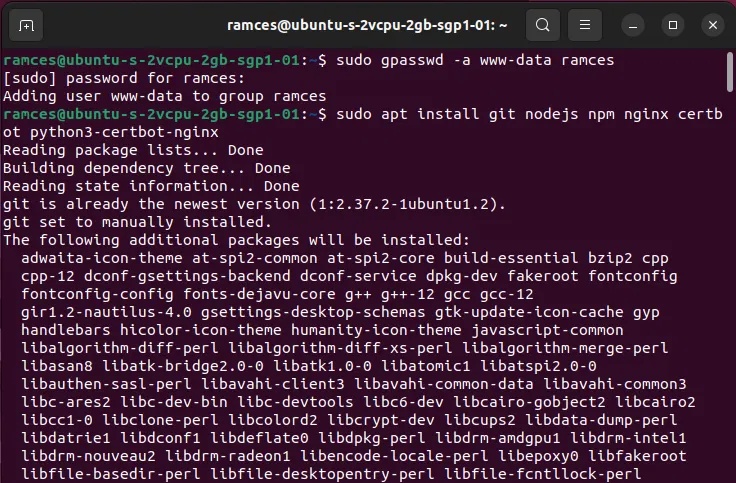
<p style="text-align: justify;">Cài đặt các dependency của CryptPad:</p>

<pre id="pre0">
<code>sudo gpasswd -a www-data ramces
sudo apt install git nodejs npm nginx certbot python3-certbot-nginx</code></pre>

<figure>
<div style="text-align: justify;"><img alt="Các dependency của Cryptpad." data-adbro-processed="true" data-i="2" data-src="https://st.quantrimang.com/photos/image/2025/05/30/tao-office-365-tu-host-voi-cryptpad-1.jpg" data-was-processed="true" height="483" src="https://st.quantrimang.com/photos/image/2025/05/30/tao-office-365-tu-host-voi-cryptpad-1.jpg" width="736" /></div>

<figcaption>
<div style="text-align: justify;">Các dependency của Cryptpad.</div>
</figcaption>
</figure>

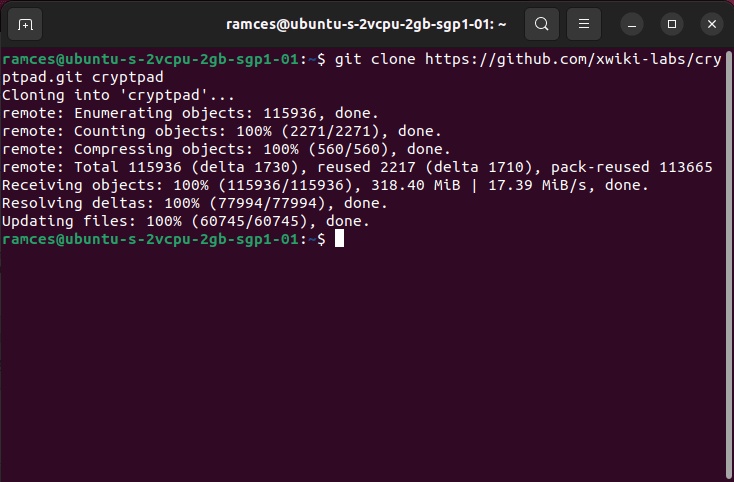
<p style="text-align: justify;">Sao chép mã nguồn của chương trình từ kho lưu trữ của nó:</p>

<pre id="pre1">
<code>git clone https://github.com/xwiki-labs/cryptpad.git cryptpad</code></pre>

<figure>
<div style="text-align: justify;"><img alt="Bản sao git." data-i="3" data-src="https://st.quantrimang.com/photos/image/2025/05/30/tao-office-365-tu-host-voi-cryptpad-2.jpg" data-was-processed="true" height="482" src="https://st.quantrimang.com/photos/image/2025/05/30/tao-office-365-tu-host-voi-cryptpad-2.jpg" width="734" /></div>

<figcaption>
<div style="text-align: justify;">Bản sao git.</div>
</figcaption>
</figure>

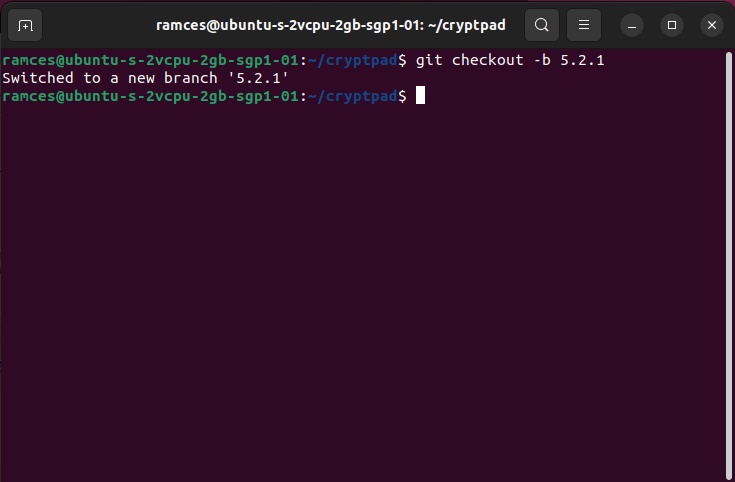
<p style="text-align: justify;">Vào bên trong kho lưu trữ và chuyển sang nhánh mới nhất:</p>

<pre id="pre2">
<code>cd cryptpad
git checkout -b 5.2.1</code></pre>

<figure>
<div style="text-align: justify;"><img alt="Lệnh chuyển nhánh git." data-i="4" data-src="https://st.quantrimang.com/photos/image/2025/05/30/tao-office-365-tu-host-voi-cryptpad-3.jpg" data-was-processed="true" height="482" src="https://st.quantrimang.com/photos/image/2025/05/30/tao-office-365-tu-host-voi-cryptpad-3.jpg" width="735" /></div>

<figcaption>
<div style="text-align: justify;">Lệnh chuyển nhánh git.</div>
</figcaption>
</figure>

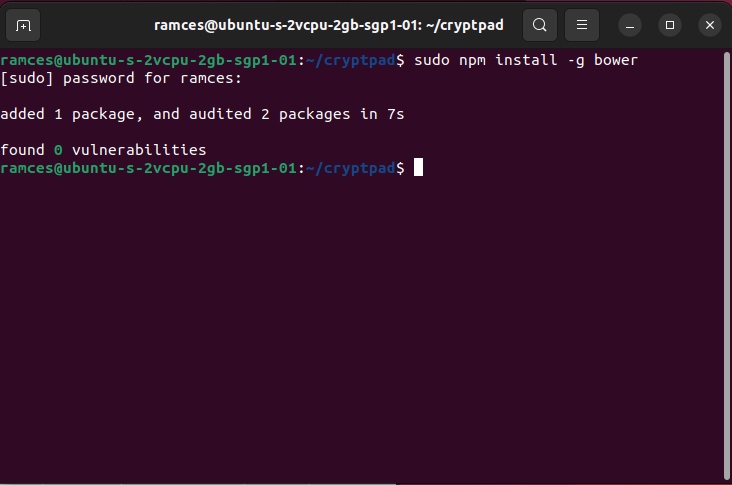
<p style="text-align: justify;">Sử dụng npm để cài đặt Bower, trình quản lý gói giúp cài đặt một số thư viện mà CryptPad cần.</p>

<pre id="pre3">
<code>sudo npm install -g bower</code></pre>

<figure>
<div style="text-align: justify;"><img alt="Quy trình cài đặt bower." data-i="5" data-src="https://st.quantrimang.com/photos/image/2025/05/30/tao-office-365-tu-host-voi-cryptpad-4.jpg" data-was-processed="true" height="485" src="https://st.quantrimang.com/photos/image/2025/05/30/tao-office-365-tu-host-voi-cryptpad-4.jpg" width="732" /></div>

<figcaption>
<div style="text-align: justify;">Quy trình cài đặt bower.</div>
</figcaption>
</figure>

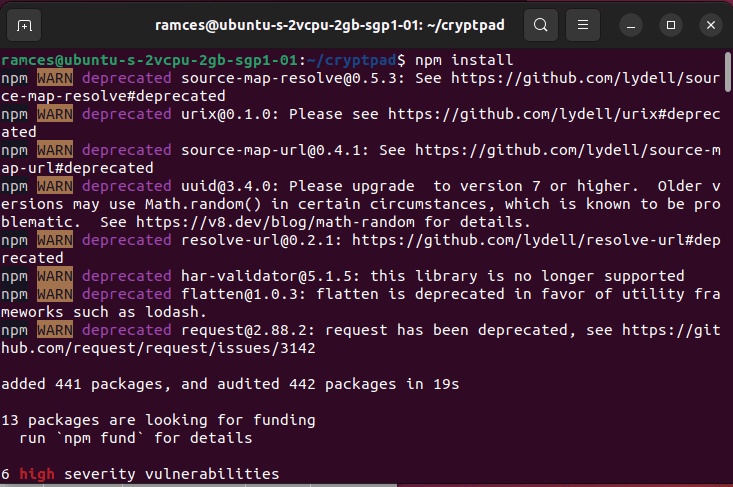
<p style="text-align: justify;">Cài đặt nhị phân CryptPad bằng cách chạy cả npm và bower bên trong kho lưu trữ.</p>

<pre id="pre4">
<code>npm install
bower install</code></pre>

<figure>
<div style="text-align: justify;"><img alt="Quá trình cài đặt Cryptpad." data-i="6" data-src="https://st.quantrimang.com/photos/image/2025/05/30/tao-office-365-tu-host-voi-cryptpad-5.jpg" data-was-processed="true" height="487" src="https://st.quantrimang.com/photos/image/2025/05/30/tao-office-365-tu-host-voi-cryptpad-5.jpg" width="733" /></div>

<figcaption>
<div style="text-align: justify;">Quá trình cài đặt Cryptpad.</div>
</figcaption>
</figure>

<h3 id="mcetoc_1j03l9u4e10k" style="text-align: justify;">Cấu hình chứng chỉ SSL</h3>

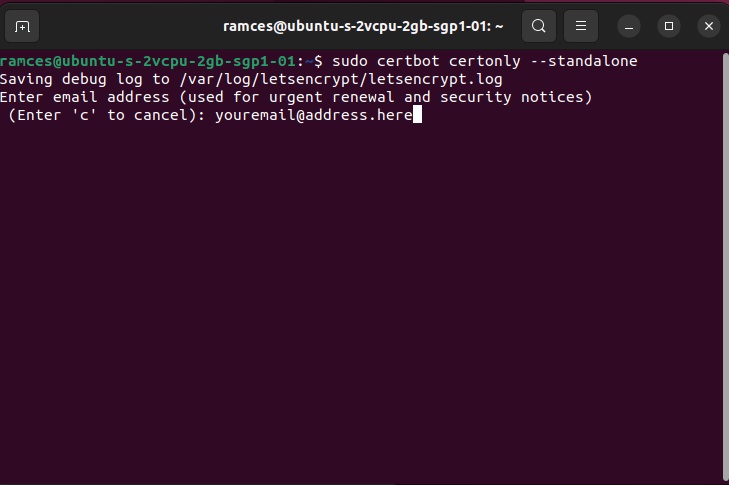
<p style="text-align: justify;">Sau khi CryptPad đã có trong máy của bạn, bạn có thể chạy Certbot để tạo chứng chỉ cho phiên bản của mình:</p>

<pre id="pre5">
<code>sudo certbot certonly --standalone</code></pre>

<p style="text-align: justify;">Điều này sẽ đưa ra lời nhắc yêu cầu địa chỉ email của bạn.</p>

<figure>
<div style="text-align: justify;"><img alt="Certbot yêu cầu địa chỉ email." data-i="7" data-src="https://st.quantrimang.com/photos/image/2025/05/30/tao-office-365-tu-host-voi-cryptpad-6.jpg" data-was-processed="true" height="485" src="https://st.quantrimang.com/photos/image/2025/05/30/tao-office-365-tu-host-voi-cryptpad-6.jpg" width="729" /></div>

<figcaption>
<div style="text-align: justify;">Certbot yêu cầu địa chỉ email.</div>
</figcaption>
</figure>

<p style="text-align: justify;">Tiện ích Certbot sẽ yêu cầu các domain mà bạn muốn liên kết với chứng chỉ của mình. Nhập cả root và subdomain.</p>

<figure>
<div style="text-align: justify;"><img alt="Certbot yêu cầu domain." data-i="8" data-src="https://st.quantrimang.com/photos/image/2025/05/30/tao-office-365-tu-host-voi-cryptpad-7.jpg" data-was-processed="true" height="74" src="https://st.quantrimang.com/photos/image/2025/05/30/tao-office-365-tu-host-voi-cryptpad-7.jpg" width="728" /></div>

<figcaption>
<div style="text-align: justify;">Certbot yêu cầu domain.</div>
</figcaption>
</figure>

<p style="text-align: justify;">Tạo file tham số Diffie-Hellman cho phiên bản của bạn. Đây là biện pháp bảo mật mà các nhà phát triển yêu cầu để đảm bảo rằng phiên bản của bạn an toàn.</p>

<pre id="pre6">
<code>sudo openssl dhparam -out /etc/nginx/dhparam.pem 4096</code></pre>

<h3 id="mcetoc_1j03l9u4e10l" style="text-align: justify;">Cấu hình Nginx</h3>

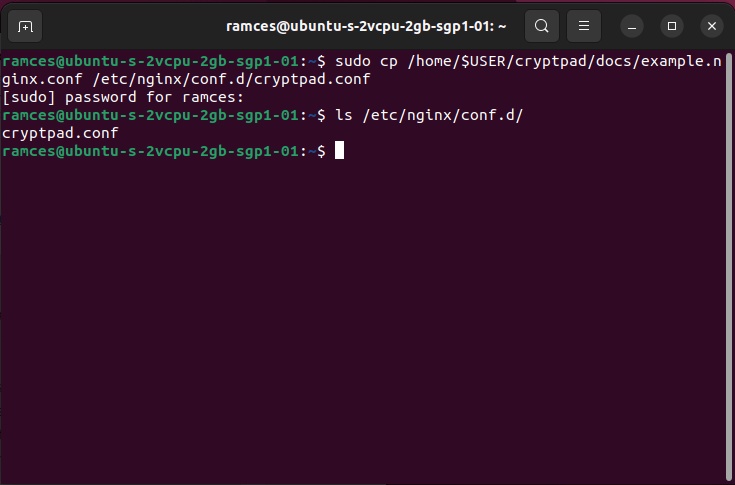
<p style="text-align: justify;">Để cấu hình Nginx phục vụ CryptPad cho domain của bạn, bạn có thể sử dụng file cấu hình mẫu do các nhà phát triển cung cấp.</p>

<pre id="pre7">
<code>sudo cp /home/$USER/cryptpad/docs/example.nginx.conf /etc/nginx/conf.d/cryptpad.conf</code></pre>

<figure>
<div style="text-align: justify;"><img alt="Lệnh sao chép mẫu." data-i="9" data-src="https://st.quantrimang.com/photos/image/2025/05/30/tao-office-365-tu-host-voi-cryptpad-8.jpg" data-was-processed="true" height="485" src="https://st.quantrimang.com/photos/image/2025/05/30/tao-office-365-tu-host-voi-cryptpad-8.jpg" width="735" /></div>

<figcaption>
<div style="text-align: justify;">Lệnh sao chép mẫu.</div>
</figcaption>
</figure>

<p style="text-align: justify;">Sửa đổi file cấu hình mới của bạn bằng trình soạn thảo văn bản.</p>

<pre id="pre8">
<code>sudo nano /etc/nginx/conf.d/cryptpad.conf</code></pre>

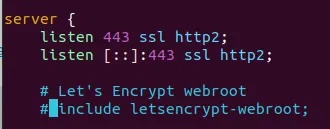
<p style="text-align: justify;">Thay đổi một số biến để file này hoạt động. Đầu tiên, hãy chú thích dòng&nbsp;<strong>include letsencrypt-webroot;</strong>.</p>

<figure>
<div style="text-align: justify;"><img alt="Dòng webroot disabled." data-i="10" data-src="https://st.quantrimang.com/photos/image/2025/05/30/tao-office-365-tu-host-voi-cryptpad-9.jpg" data-was-processed="true" height="129" src="https://st.quantrimang.com/photos/image/2025/05/30/tao-office-365-tu-host-voi-cryptpad-9.jpg" width="330" /></div>

<figcaption>
<div style="text-align: justify;">Dòng webroot disabled.</div>
</figcaption>
</figure>

<p style="text-align: justify;">Tiếp theo, hãy sửa đổi cả 2 biến&nbsp;<strong>$main_domain</strong>&nbsp;và&nbsp;<strong>$sandbox_domain.</strong>&nbsp;Biến trước phải chứa root domain, trong khi biến sau phải chứa subdomain của bạn.</p>

<figure>
<div style="text-align: justify;"><img alt="Các biến domain." data-i="11" data-src="https://st.quantrimang.com/photos/image/2025/05/30/tao-office-365-tu-host-voi-cryptpad-10.jpg" data-was-processed="true" height="80" src="https://st.quantrimang.com/photos/image/2025/05/30/tao-office-365-tu-host-voi-cryptpad-10.jpg" width="658" /></div>

<figcaption>
<div style="text-align: justify;">Các biến domain.</div>
</figcaption>
</figure>

<p style="text-align: justify;">Ngoài ra, hãy sửa đổi&nbsp;<strong>$api_domain</strong>&nbsp;và&nbsp;<strong>$files_domain.</strong>&nbsp;Không giống như các biến trên, bạn chỉ cần thay đổi chúng thành root domain của máy.</p>

<figure>
<div style="text-align: justify;"><img alt="Tập hợp các biến domain khác." data-i="12" data-src="https://st.quantrimang.com/photos/image/2025/05/30/tao-office-365-tu-host-voi-cryptpad-11.jpg" data-was-processed="true" height="61" src="https://st.quantrimang.com/photos/image/2025/05/30/tao-office-365-tu-host-voi-cryptpad-11.jpg" width="687" /></div>

<figcaption>
<div style="text-align: justify;">Tập hợp các biến domain khác.</div>
</figcaption>
</figure>

<p style="text-align: justify;">Thay đổi biến&nbsp;<strong>server_name</strong>&nbsp;thành root và subdomain.</p>

<figure>
<div style="text-align: justify;"><img alt="Biến server_name." data-i="13" data-src="https://st.quantrimang.com/photos/image/2025/05/30/tao-office-365-tu-host-voi-cryptpad-12.jpg" data-was-processed="true" height="64" src="https://st.quantrimang.com/photos/image/2025/05/30/tao-office-365-tu-host-voi-cryptpad-12.jpg" width="728" /></div>

<figcaption>
<div style="text-align: justify;">Biến server_name.</div>
</figcaption>
</figure>

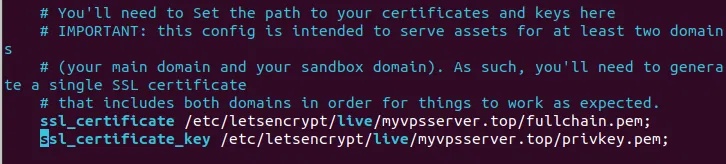
<p style="text-align: justify;">Thay đổi&nbsp;<strong>ssl_certificate</strong>&nbsp;và&nbsp;<strong>ssl_certificate_key</strong>&nbsp;thành vị trí chứng chỉ SSL của bạn.</p>

<figure>
<div style="text-align: justify;"><img alt="Các biến đường dẫn SSL." data-i="14" data-src="https://st.quantrimang.com/photos/image/2025/05/30/tao-office-365-tu-host-voi-cryptpad-13.jpg" data-was-processed="true" height="164" src="https://st.quantrimang.com/photos/image/2025/05/30/tao-office-365-tu-host-voi-cryptpad-13.jpg" width="726" /></div>

<figcaption>
<div style="text-align: justify;">Các biến đường dẫn SSL.</div>
</figcaption>
</figure>

<p style="text-align: justify;">Cuối cùng, thay thế giá trị của biến root bằng vị trí kho lưu trữ Cryptpad của bạn.</p>

<figure>
<div style="text-align: justify;"><img alt="Biến root của phiên bản." data-i="15" data-src="https://st.quantrimang.com/photos/image/2025/05/30/tao-office-365-tu-host-voi-cryptpad-14.jpg" data-was-processed="true" height="91" src="https://st.quantrimang.com/photos/image/2025/05/30/tao-office-365-tu-host-voi-cryptpad-14.jpg" width="545" /></div>

<figcaption>
<div style="text-align: justify;">Biến root của phiên bản.</div>
</figcaption>
</figure>

<h3 id="mcetoc_1j03l9u4e10m" style="text-align: justify;">Cấu hình CryptPad</h3>

<p style="text-align: justify;">Sử dụng file cấu hình mẫu do nhà phát triển cung cấp bằng cách chạy:</p>

<pre id="pre9">
<code>cp /home/$USER/cryptpad/config/config.example.js /home/$USER/cryptpad/config/config.js</code></pre>

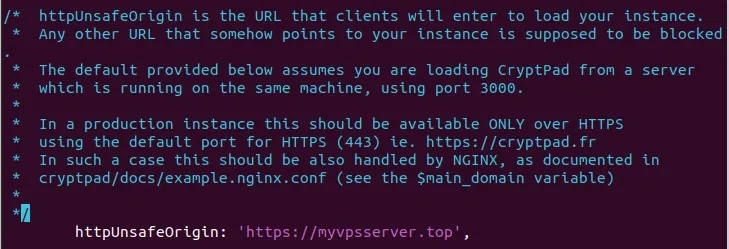
<p style="text-align: justify;">Mở file này bằng trình soạn thảo văn bản và thay đổi biến&nbsp;<strong>httpUnsafeOrigin:</strong>&nbsp;thành root domain.</p>

<figure>
<div style="text-align: justify;"><img alt="Root domain" data-i="16" data-src="https://st.quantrimang.com/photos/image/2025/05/30/tao-office-365-tu-host-voi-cryptpad-15.jpg" data-was-processed="true" height="249" src="https://st.quantrimang.com/photos/image/2025/05/30/tao-office-365-tu-host-voi-cryptpad-15.jpg" width="729" /></div>

<figcaption>
<div style="text-align: justify;">Root domain</div>
</figcaption>
</figure>

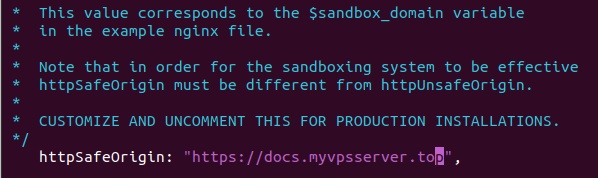
<p style="text-align: justify;">Thay đổi biến&nbsp;<strong>httpSafeOrigin:</strong>&nbsp;thành subdomain.</p>

<figure>
<div style="text-align: justify;"><img alt="Subdomain" data-i="17" data-src="https://st.quantrimang.com/photos/image/2025/05/30/tao-office-365-tu-host-voi-cryptpad-16.jpg" data-was-processed="true" height="178" src="https://st.quantrimang.com/photos/image/2025/05/30/tao-office-365-tu-host-voi-cryptpad-16.jpg" width="598" /></div>

<figcaption>
<div style="text-align: justify;">Subdomain</div>
</figcaption>
</figure>

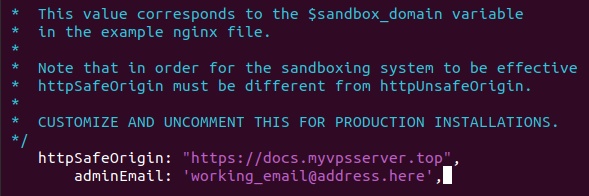
<p style="text-align: justify;">Thêm dòng code sau ngay sau biến httpSafeOrigin:.</p>

<pre id="pre10">
<code>adminEmail: &#039;working_email@address.here&#039;,</code></pre>

<figure>
<div style="text-align: justify;"><img alt="Email của quản trị viên." data-i="18" data-src="https://st.quantrimang.com/photos/image/2025/05/30/tao-office-365-tu-host-voi-cryptpad-17.jpg" data-was-processed="true" height="196" src="https://st.quantrimang.com/photos/image/2025/05/30/tao-office-365-tu-host-voi-cryptpad-17.jpg" width="589" /></div>

<figcaption>
<div style="text-align: justify;">Email của quản trị viên.</div>
</figcaption>
</figure>

<h3 id="mcetoc_1j03l9u4e10n" style="text-align: justify;">Tạo service SystemD</h3>

<p style="text-align: justify;">Bạn cũng có thể liên kết CryptPad với một service SystemD để cho phép bạn khởi chạy nó trong khi hệ thống khởi động bằng cách chạy lệnh sau:</p>

<pre id="pre11">
<code>nano /home/$USER/cryptpad/docs/cryptpad.service</code></pre>

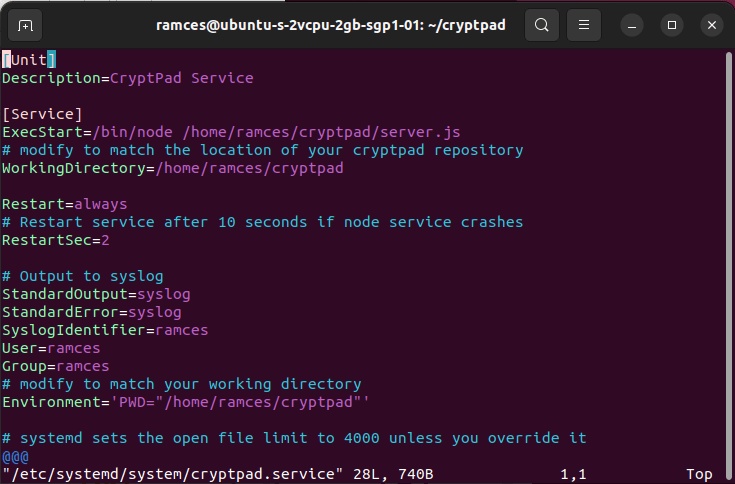
<p style="text-align: justify;">Block code bên dưới là phiên bản mà tác giả đã sửa đổi để hoạt động với máy của mình.</p>

<pre id="pre12">
<code>&#91;Unit&#93;
Description=Cryptpad Service

# Replace the username values with your own username.

&#91;Service&#93;
ExecStart=/bin/node /home/ramces/cryptpad/server.js
WorkingDirectory=/home/ramces/cryptpad

Restart=always
RestartSec=2

StandardOutput=syslog
StandardError=syslog
SyslogIdentifier=ramces
User=ramces
Group=ramces
Environment=&#039;PWD=&quot;/home/ramces/cryptpad&quot;&#039;
LimitNOFILE=1000000

&#91;Install&#93;
WantedBy=multi-user.target</code></pre>

<figure>
<div style="text-align: justify;"><img alt="Mẫu service systemd." data-i="19" data-src="https://st.quantrimang.com/photos/image/2025/05/30/tao-office-365-tu-host-voi-cryptpad-18.jpg" data-was-processed="true" height="484" src="https://st.quantrimang.com/photos/image/2025/05/30/tao-office-365-tu-host-voi-cryptpad-18.jpg" width="735" /></div>

<figcaption>
<div style="text-align: justify;">Mẫu service systemd.</div>
</figcaption>
</figure>

<p style="text-align: justify;">Lưu và thoát file này, sau đó sao chép vào thư mục service Systemd:</p>

<pre id="pre13">
<code>sudo cp /home/$USER/cryptpad/docs/cryptpad.service /etc/systemd/system/cryptpad.service</code></pre>

<p style="text-align: justify;">Load lại Systemd để kích hoạt file service của bạn:</p>

<pre id="pre14">
<code>sudo systemctl daemon-reload
sudo systemctl enable cryptpad
sudo systemctl start cryptpad
sudo systemctl reload nginx</code></pre>

<h2 id="mcetoc_1j03l9u4e10o" style="text-align: justify;">Chạy CryptPad</h2>

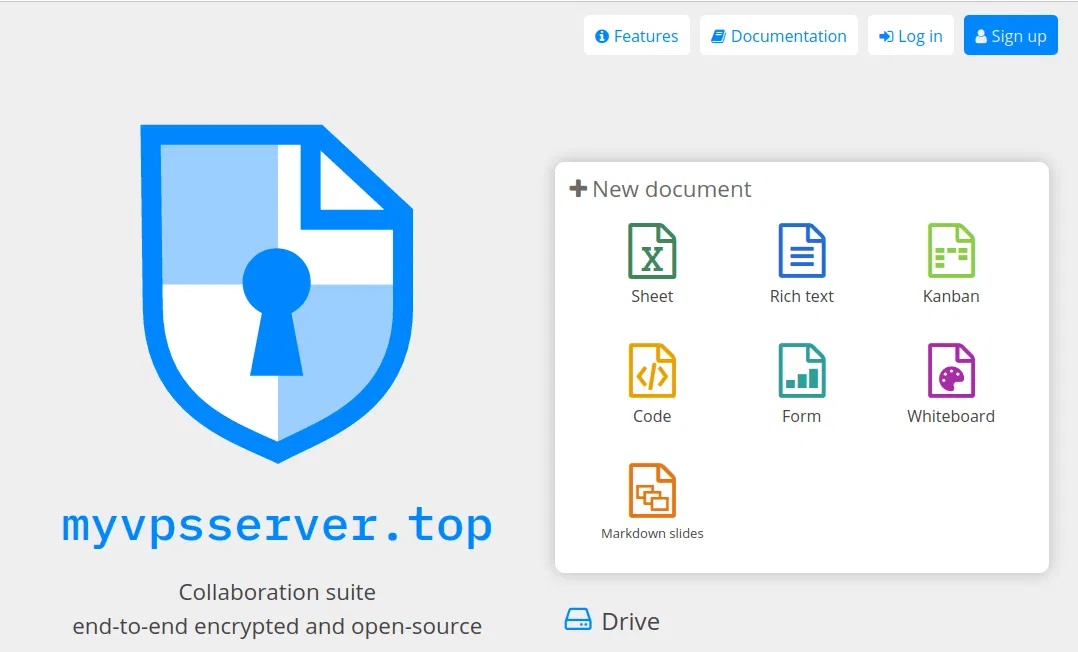
<p style="text-align: justify;">Nếu mọi thứ được thực hiện đúng, bạn sẽ có thể truy cập CryptPad thông qua root domain của mình.</p>

<figure>
<div style="text-align: justify;"><img alt="Cài đặt CryptPad đang hoạt động." data-i="20" data-src="https://st.quantrimang.com/photos/image/2025/05/30/tao-office-365-tu-host-voi-cryptpad-19.jpg" data-was-processed="true" height="652" src="https://st.quantrimang.com/photos/image/2025/05/30/tao-office-365-tu-host-voi-cryptpad-19.jpg" width="1078" /></div>

<figcaption>
<div style="text-align: justify;">Cài đặt CryptPad đang hoạt động.</div>
</figcaption>
</figure>

<h3 id="mcetoc_1j03l9u4e10p" style="text-align: justify;">Tạo tài khoản admin trong CryptPad</h3>

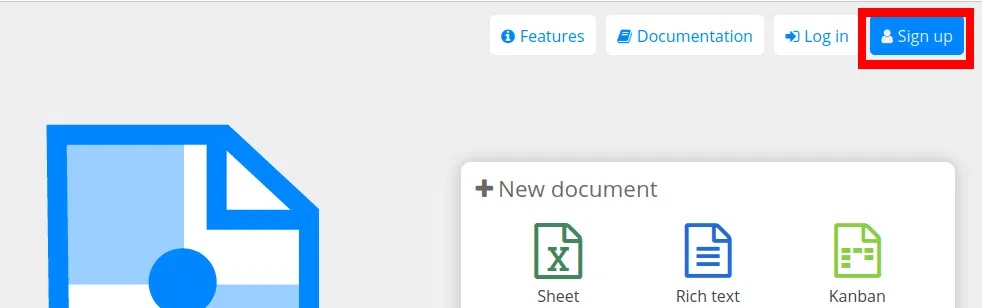
<p style="text-align: justify;">Mặc dù bạn có thể sử dụng CryptPad mà không cần tài khoản, nhưng bạn nên tạo admin để có thể quản lý phiên bản của mình thông qua giao diện web.</p>

<p style="text-align: justify;">Nhấn&nbsp;<strong>Sign Up</strong>&nbsp;trên trang chủ của CryptPad.</p>

<figure>
<div style="text-align: justify;"><img alt="Cài đặt Cryptpad Linux " data-i="21" data-src="https://st.quantrimang.com/photos/image/2025/05/30/tao-office-365-tu-host-voi-cryptpad-20.jpg" data-was-processed="true" height="308" src="https://st.quantrimang.com/photos/image/2025/05/30/tao-office-365-tu-host-voi-cryptpad-20.jpg" width="982" /></div>

<figcaption>
<div style="text-align: justify;">Cài đặt Cryptpad Linux</div>
</figcaption>
</figure>

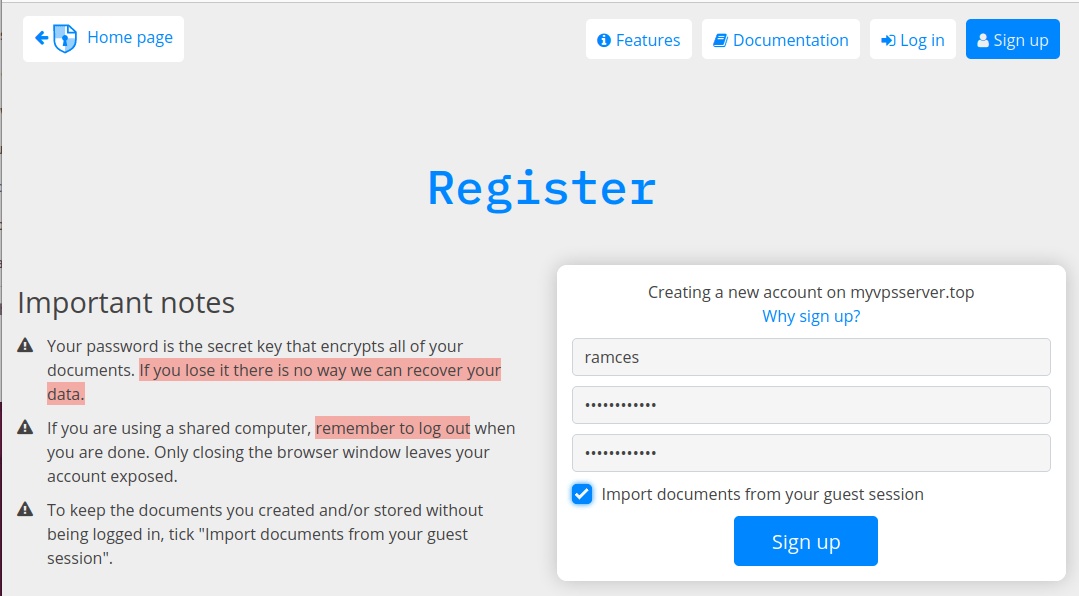
<p style="text-align: justify;">Nhập tên người dùng và mật khẩu để tạo tài khoản mới.</p>

<figure>
<div style="text-align: justify;"><img alt="Quy trình tạo người dùng cơ bản." data-i="22" data-src="https://st.quantrimang.com/photos/image/2025/05/30/tao-office-365-tu-host-voi-cryptpad-21.jpg" data-was-processed="true" height="596" src="https://st.quantrimang.com/photos/image/2025/05/30/tao-office-365-tu-host-voi-cryptpad-21.jpg" width="1079" /></div>

<figcaption>
<div style="text-align: justify;">Quy trình tạo người dùng cơ bản.</div>
</figcaption>
</figure>

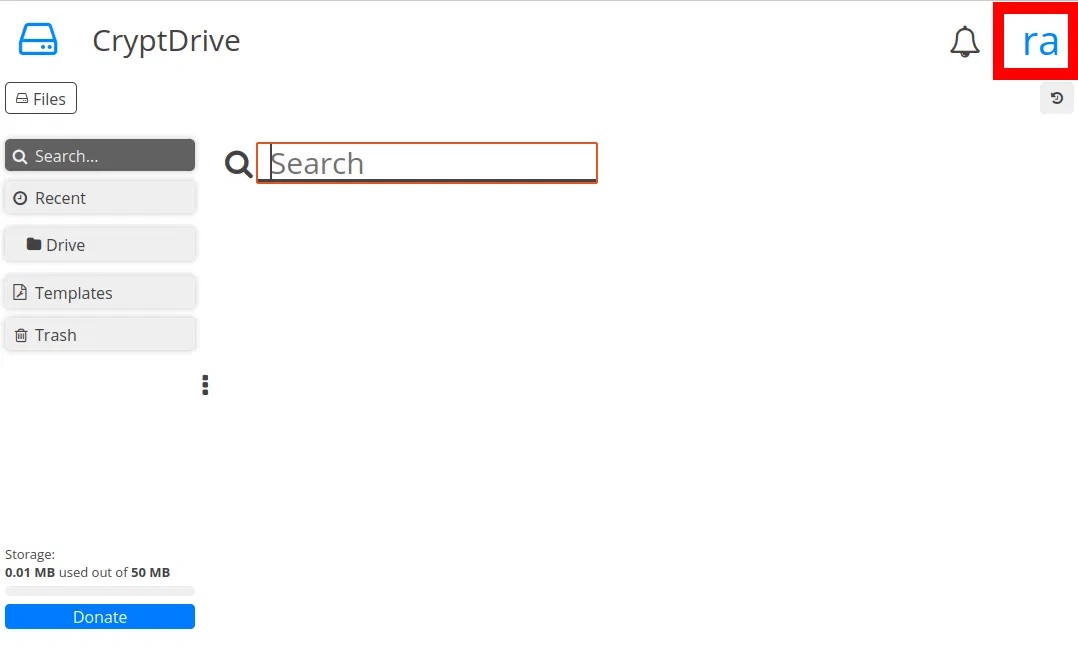
<p style="text-align: justify;">Sau khi đăng nhập, hãy nhấp vào nút&nbsp;<strong>User Menu</strong>&nbsp;ở góc trên bên phải của trang.</p>

<figure>
<div style="text-align: justify;"><img alt="Giao diện Cryptpad cơ bản." data-i="23" data-src="https://st.quantrimang.com/photos/image/2025/05/30/tao-office-365-tu-host-voi-cryptpad-22.jpg" data-was-processed="true" height="649" src="https://st.quantrimang.com/photos/image/2025/05/30/tao-office-365-tu-host-voi-cryptpad-22.jpg" width="1078" /></div>

<figcaption>
<div style="text-align: justify;">Giao diện Cryptpad cơ bản.</div>
</figcaption>
</figure>

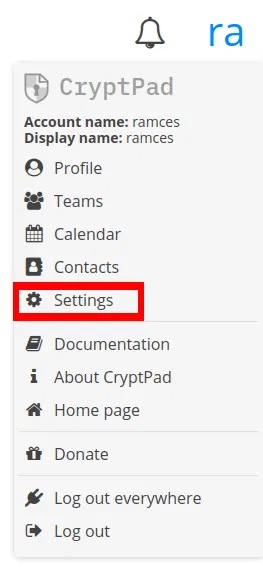
<p style="text-align: justify;">Nhấp vào&nbsp;<strong>Settings.</strong></p>

<figure>
<div style="text-align: justify;"><img alt="Menu người dùng Cryptpad." data-i="24" data-src="https://st.quantrimang.com/photos/image/2025/05/30/tao-office-365-tu-host-voi-cryptpad-23.jpg" data-was-processed="true" height="568" src="https://st.quantrimang.com/photos/image/2025/05/30/tao-office-365-tu-host-voi-cryptpad-23.jpg" width="263" /></div>

<figcaption>
<div style="text-align: justify;">Menu người dùng Cryptpad.</div>
</figcaption>
</figure>

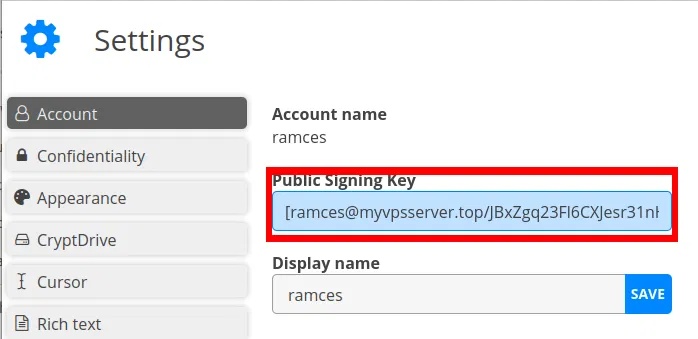
<p style="text-align: justify;">Sao chép nội dung của hộp văn bản&nbsp;<strong>Public Signing Key</strong>.</p>

<figure>
<div style="text-align: justify;"><img alt="Public key cho tài khoản người dùng" data-i="25" data-src="https://st.quantrimang.com/photos/image/2025/05/30/tao-office-365-tu-host-voi-cryptpad-24.jpg" data-was-processed="true" height="339" src="https://st.quantrimang.com/photos/image/2025/05/30/tao-office-365-tu-host-voi-cryptpad-24.jpg" width="698" /></div>

<figcaption>
<div style="text-align: justify;">Public key cho tài khoản người dùng</div>
</figcaption>
</figure>

<p style="text-align: justify;">Quay lại thư mục kho lưu trữ và mở file cấu hình:</p>

<pre id="pre15">
<code>nano /home/$USER/cryptpad/config/config.js</code></pre>

<p style="text-align: justify;">Tìm biến&nbsp;<strong>adminKeys:</strong>&nbsp;và dán khóa ký của bạn vào giữa các dấu ngoặc vuông:</p>

<figure>
<div style="text-align: justify;"><img alt="Cài đặt file cấu hình adminKeys:" data-i="26" data-src="https://st.quantrimang.com/photos/image/2025/05/30/tao-office-365-tu-host-voi-cryptpad-25.jpg" data-was-processed="true" height="96" src="https://st.quantrimang.com/photos/image/2025/05/30/tao-office-365-tu-host-voi-cryptpad-25.jpg" width="727" /></div>

<figcaption>
<div style="text-align: justify;">Cài đặt file cấu hình adminKeys:</div>
</figcaption>
</figure>

<p style="text-align: justify;">Load lại phiên bản CryptPad thông qua SystemD:</p>

<pre id="pre16">
<code>sudo systemctl restart cryptpad</code></pre>

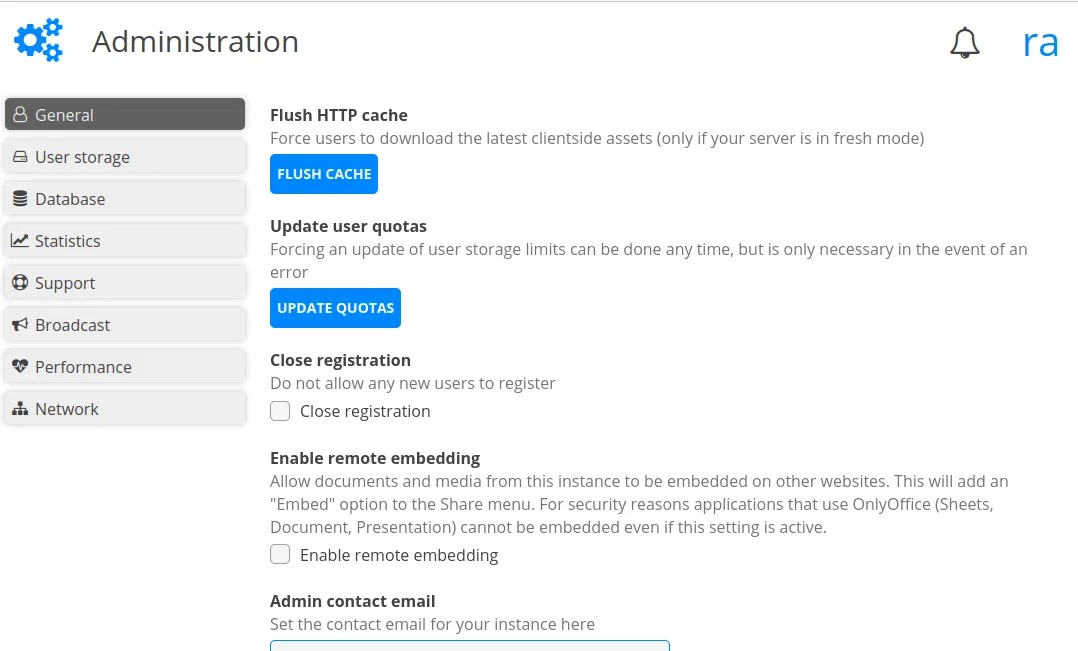
<figure>
<div style="text-align: justify;"><img alt="Màn hình quản trị Cryptpad cơ bản." data-i="27" data-src="https://st.quantrimang.com/photos/image/2025/05/30/tao-office-365-tu-host-voi-cryptpad-26.jpg" data-was-processed="true" height="651" src="https://st.quantrimang.com/photos/image/2025/05/30/tao-office-365-tu-host-voi-cryptpad-26.jpg" width="1078" /></div>

<figcaption>
<div style="text-align: justify;">Màn hình quản trị Cryptpad cơ bản.</div>
</figcaption>
</figure>

<div style="text-align: justify;">&nbsp;</div>
		</div>
				<div id="author">
						<p>
				<strong>Nguồn tin:</strong>
				Quantrimang.com:
			</p>
		</div>
	</div>
	<div id="footer" class="clearfix">
		<div id="url">
			<strong>URL của bản tin này: </strong><a href="https://www.nguoicodonvn2008.info/vi/news/savefile/kien-thuc-may-tinh/cach-tao-office-365-tu-host-cua-rieng-ban-voi-cryptpad-10776.html" title="Cách tạo Office 365 tự host của riêng bạn với CryptPad">https://www.nguoicodonvn2008.info/vi/news/savefile/kien-thuc-may-tinh/cach-tao-office-365-tu-host-cua-rieng-ban-voi-cryptpad-10776.html</a>

		</div>
		<div class="clear"></div>
		<div class="copyright">
			&copy; .&#x3A; Nguoicodonvn2008.info - Cõi lòng người cô đơn &#x3A;.
		</div>
		<div id="contact">
			<a href="mailto:admin@nguoicodonvn2008.info">admin@nguoicodonvn2008.info</a>
		</div>
	</div>
</div>
        <div id="timeoutsess" class="chromeframe">
            Bạn đã không sử dụng Site, <a onclick="timeoutsesscancel();" href="https://nguoicodonvn2008.info/#">Bấm vào đây để duy trì trạng thái đăng nhập</a>. Thời gian chờ: <span id="secField"> 60 </span> giây
        </div>
        <div id="openidResult" class="nv-alert" style="display:none"></div>
        <div id="openidBt" data-result="" data-redirect=""></div>
		</script>
		<div class="car-top">
  <span><img src="https://nguoicodonvn2008.info/themes/default/images/car.png" alt=""></span>
</div>
<script src="https://nguoicodonvn2008.info/assets/js/jquery/jquery.min.js"></script>
<script>var nv_base_siteurl="/",nv_lang_data="vi",nv_lang_interface="vi",nv_name_variable="nv",nv_fc_variable="op",nv_lang_variable="language",nv_module_name="news",nv_func_name="savefile",nv_is_user=0, nv_my_ofs=-4,nv_my_abbr="EDT",nv_cookie_prefix="nv4c_e856T",nv_check_pass_mstime=1738000,nv_area_admin=0,nv_safemode=0,theme_responsive=0,nv_recaptcha_ver=2,nv_recaptcha_sitekey="",nv_recaptcha_type="image",XSSsanitize=1;</script>
<script src="https://nguoicodonvn2008.info/assets/js/language/vi.js"></script>
<script src="https://nguoicodonvn2008.info/assets/js/DOMPurify/purify3.js"></script>
<script src="https://nguoicodonvn2008.info/assets/js/global.js"></script>
<script src="https://nguoicodonvn2008.info/assets/js/site.js"></script>
<script src="https://nguoicodonvn2008.info/themes/default/js/news.js"></script>
<script src="https://nguoicodonvn2008.info/themes/default/js/main.js"></script>
<script src="https://nguoicodonvn2008.info/themes/default/js/custom.js"></script>
<script type="application/ld+json">
        {
            "@context": "https://schema.org",
            "@type": "Organization",
            "url": "https://nguoicodonvn2008.info",
            "logo": "https://nguoicodonvn2008.info/uploads/angel.gif"
        }
        </script>
<script src="https://nguoicodonvn2008.info/themes/default/js/bootstrap.min.js"></script>
<script type="text/javascript">
var $scrolltop = $('.car-top');
$scrolltop.on('click', function () {
    $('html,body').animate({
        scrollTop: 0
    }, 800);
    $(this).addClass("car-run");
    setTimeout(function(){ $scrolltop.removeClass('car-run');}, 1000);
    return false;
});
$(window).on('scroll', function ()
{ 
    if($(window).scrollTop() >= 200)
    {
        $scrolltop.addClass("show");
        $scrolltop.addClass("car-down");
    }
    else
    {
       $scrolltop.removeClass("show");
       setTimeout(function(){ $scrolltop.removeClass('car-down');}, 300);
    }
});
</script>
</body>
</html>