<!DOCTYPE html>
    <html lang="vi" xmlns="http://www.w3.org/1999/xhtml" prefix="og: http://ogp.me/ns#">
    <head>
<title>Cách tạo Live Tile tùy chỉnh với Better StartMenu</title>
<meta name="description" content="Cách tạo Live Tile tùy chỉnh với Better StartMenu - Savefile - Tin Tức -...">
<meta name="author" content=".: Nguoicodonvn2008.info - Cõi lòng người cô đơn :.">
<meta name="copyright" content=".: Nguoicodonvn2008.info - Cõi lòng người cô đơn :. [admin@nguoicodonvn2008.info]">
<meta name="robots" content="index, archive, follow, noodp">
<meta name="googlebot" content="index,archive,follow,noodp">
<meta name="msnbot" content="all,index,follow">
<meta name="generator" content="NukeViet v4.5">
<meta http-equiv="Content-Type" content="text/html; charset=utf-8">
<meta property="og:title" content="Cách tạo Live Tile tùy chỉnh với Better StartMenu">
<meta property="og:type" content="website">
<meta property="og:description" content="Savefile - Tin Tức - https&#x3A;&#x002F;&#x002F;www.nguoicodonvn2008.info&#x002F;vi&#x002F;news&#x002F;savefile&#x002F;kien-thuc-may-tinh&#x002F;cach-tao-live-tile-tuy-chinh-voi-better-startmenu-1739.html">
<meta property="og:site_name" content=".&#x3A; Nguoicodonvn2008.info - Cõi lòng người cô đơn &#x3A;.">
<meta property="og:url" content="https://www.nguoicodonvn2008.info/vi/news/savefile/kien-thuc-may-tinh/cach-tao-live-tile-tuy-chinh-voi-better-startmenu-1739.html">
<link rel="shortcut icon" href="https://nguoicodonvn2008.info/favicon.ico">
<link rel="canonical" href="https://www.nguoicodonvn2008.info/vi/news/savefile/kien-thuc-may-tinh/cach-tao-live-tile-tuy-chinh-voi-better-startmenu-1739.html">
<link rel="alternate" href="https://nguoicodonvn2008.info/vi/news/rss/" title="Tin Tức" type="application/rss+xml">
<link rel="alternate" href="https://nguoicodonvn2008.info/vi/news/rss/karaoke-dual/" title="Tin Tức - Karaoke Dual" type="application/rss+xml">
<link rel="alternate" href="https://nguoicodonvn2008.info/vi/news/rss/nhac-tre/" title="Tin Tức - Nhạc trẻ" type="application/rss+xml">
<link rel="alternate" href="https://nguoicodonvn2008.info/vi/news/rss/tru-tinh/" title="Tin Tức - Trữ tình" type="application/rss+xml">
<link rel="alternate" href="https://nguoicodonvn2008.info/vi/news/rss/nuoc-ngoai/" title="Tin Tức - Nước ngoài" type="application/rss+xml">
<link rel="alternate" href="https://nguoicodonvn2008.info/vi/news/rss/remix/" title="Tin Tức - Remix" type="application/rss+xml">
<link rel="alternate" href="https://nguoicodonvn2008.info/vi/news/rss/tam-su-tinh-yeu/" title="Tin Tức - Tâm sự tình yêu" type="application/rss+xml">
<link rel="alternate" href="https://nguoicodonvn2008.info/vi/news/rss/tho-suu-tam/" title="Tin Tức - Thơ sưu tầm" type="application/rss+xml">
<link rel="alternate" href="https://nguoicodonvn2008.info/vi/news/rss/cuoc-song/" title="Tin Tức - Cuộc sống" type="application/rss+xml">
<link rel="alternate" href="https://nguoicodonvn2008.info/vi/news/rss/phan-mem/" title="Tin Tức - Phần mềm" type="application/rss+xml">
<link rel="alternate" href="https://nguoicodonvn2008.info/vi/news/rss/kien-thuc-may-tinh/" title="Tin Tức - Kiến thức máy tính" type="application/rss+xml">
<link rel="alternate" href="https://nguoicodonvn2008.info/vi/news/rss/hoc-tap/" title="Tin Tức - Học tập" type="application/rss+xml">
<link rel="alternate" href="https://nguoicodonvn2008.info/vi/news/rss/tai-lieu/" title="Tin Tức - Tài liệu" type="application/rss+xml">
<link rel="alternate" href="https://nguoicodonvn2008.info/vi/news/rss/de-thi/" title="Tin Tức - Đề thi" type="application/rss+xml">
<link rel="preload" as="style" href="https://nguoicodonvn2008.info/assets/css/font-awesome.min.css" type="text/css">
<link rel="preload" as="style" href="https://nguoicodonvn2008.info/themes/default/css/bootstrap.non-responsive.css" type="text/css">
<link rel="preload" as="style" href="https://nguoicodonvn2008.info/themes/default/css/style.css" type="text/css">
<link rel="preload" as="style" href="https://nguoicodonvn2008.info/themes/default/css/style.non-responsive.css" type="text/css">
<link rel="preload" as="style" href="https://nguoicodonvn2008.info/themes/default/css/news.css" type="text/css">
<link rel="preload" as="style" href="https://nguoicodonvn2008.info/themes/default/css/custom.css" type="text/css">
<link rel="preload" as="script" href="https://nguoicodonvn2008.info/assets/js/jquery/jquery.min.js" type="text/javascript">
<link rel="preload" as="script" href="https://nguoicodonvn2008.info/assets/js/language/vi.js" type="text/javascript">
<link rel="preload" as="script" href="https://nguoicodonvn2008.info/assets/js/DOMPurify/purify3.js" type="text/javascript">
<link rel="preload" as="script" href="https://nguoicodonvn2008.info/assets/js/global.js" type="text/javascript">
<link rel="preload" as="script" href="https://nguoicodonvn2008.info/assets/js/site.js" type="text/javascript">
<link rel="preload" as="script" href="https://nguoicodonvn2008.info/themes/default/js/news.js" type="text/javascript">
<link rel="preload" as="script" href="https://nguoicodonvn2008.info/themes/default/js/main.js" type="text/javascript">
<link rel="preload" as="script" href="https://nguoicodonvn2008.info/themes/default/js/custom.js" type="text/javascript">
<link rel="preload" as="script" href="https://nguoicodonvn2008.info/themes/default/js/bootstrap.min.js" type="text/javascript">
<link rel="stylesheet" href="https://nguoicodonvn2008.info/assets/css/font-awesome.min.css">
<link rel="stylesheet" href="https://nguoicodonvn2008.info/themes/default/css/bootstrap.non-responsive.css">
<link rel="stylesheet" href="https://nguoicodonvn2008.info/themes/default/css/style.css">
<link rel="stylesheet" href="https://nguoicodonvn2008.info/themes/default/css/style.non-responsive.css">
<link rel="StyleSheet" href="https://nguoicodonvn2008.info/themes/default/css/news.css">
<link rel="stylesheet" href="https://nguoicodonvn2008.info/themes/default/css/custom.css">
<style type="text/css">
	body{background: #fff;}
</style>
    </head>
    <body>
<div id="print">
	<div id="hd_print">
		<h2 class="pull-left">.&#x3A; Nguoicodonvn2008.info - Cõi lòng người cô đơn &#x3A;.</h2>
		<p class="pull-right"><a title=".&#x3A; Nguoicodonvn2008.info - Cõi lòng người cô đơn &#x3A;." href="https://nguoicodonvn2008.info/">https://nguoicodonvn2008.info</a></p>
	</div>
	<div class="clear"></div>
	<hr />
	<div id="content">
		<h1>Cách tạo Live Tile tùy chỉnh với Better StartMenu</h1>
		<ul class="list-inline">
			<li>Thứ năm - 27/02/2020 00:09</li>
			<li class="hidden-print txtrequired"><em class="fa fa-print">&nbsp;</em><a title="In ra" href="javascript:;" onclick="window.print()">In ra</a></li>
			<li class="hidden-print txtrequired"><em class="fa fa-power-off">&nbsp;</em><a title="Đóng cửa sổ này" href="javascript:;" onclick="window.close()">Đóng cửa sổ này</a></li>
		</ul>
		<div class="clear"></div>
		<div id="hometext">
		</div>
				<div class="imghome">
			<img alt="Cách tạo Live Tile tùy chỉnh với Better StartMenu" src="https://st.quantrimang.com/photos/image/2020/02/20/tao-live-tile-tuy-chinh-voi-better-startmenu-1.jpg" width="460" class="img-thumbnail" />
		</div>
		<div class="clear"></div>
		<div id="bodytext" class="clearfix">
			<p style="text-align: justify;">Better StartMenu là một công cụ tạo các tile tùy chỉnh trong menu Start của Windows 10 ở mọi kích thước và với bất kỳ hình ảnh nào bạn muốn!</p>

<p style="text-align: justify;">Bạn có thể chạy các ứng dụng desktop, lưu trữ ứng dụng, mở các trang web, file và thư mục từ tile tùy chỉnh.</p>

<p style="text-align: justify;">Better StartMenu hoạt động hoàn hảo trên&nbsp;Windows 10! Sau đây là cách tạo Live Tile tùy chỉnh với Better StartMenu.</p>

<p style="text-align: justify;">Công cụ này có hai phần:&nbsp;<strong>Better StartMenu</strong>&nbsp;và&nbsp;<strong>StartMenu Helper.</strong></p>

<p style="text-align: justify;">Chương trình&nbsp;<strong>Helper</strong>&nbsp;giúp lưu dữ liệu tile, bao gồm tên, biểu tượng và đường dẫn của chương trình, còn&nbsp;<strong>Better StartMenu</strong>&nbsp;thêm tile vào menu Start. Bạn phải cài đặt cả hai để thêm Live Tile tùy chỉnh vào&nbsp;menu Start Windows 10&nbsp;của mình bằng phương pháp này.</p>

<ul>
	<li style="text-align: justify;">Tải Better StartMenu cho Windows&nbsp;(Dùng thử miễn phí/$2,99 - 69.000VND):</li>
</ul>

<div style="text-align: justify;"><strong><span style="color:rgb(192, 57, 43);">https://www.microsoft.com/vi-vn/p/better-startmenu/9nblggh1xtdx?activetab=pivot:overviewtab</span></strong></div>

<ul>
	<li style="text-align: justify;">Tải StartMenu Helper cho Windows (Miễn phí):</li>
</ul>

<pre id="pre0">
<code>http://www.win10controller.com/betterstart/</code></pre>

<p style="text-align: justify;">Khi StartMenu Helper hoàn tất tải xuống, hãy nhấp chuột phải và trích xuất nội dung file. Sau khi trích xuất nội dung của kho lưu trữ, hãy chạy BetterStartMenuHelper.</p>

<h2 style="text-align: justify;">Tạo biểu tượng Live Tile trong Better StartMenu Helper</h2>

<p style="text-align: justify;">Better StartMenu Helper là công cụ bạn sử dụng để tạo biểu tượng Live Tile. Nó giúp bạn thay đổi kích thước và sửa đổi một hình ảnh để phù hợp với các kích thước Live Tile khác nhau. Nhưng để tạo Live Tile tùy chỉnh, bạn cần một số biểu tượng Live Tile tùy chỉnh.</p>

<p style="text-align: justify;">Cách dễ nhất để tìm một nguồn lựa chọn gồm nhiều biểu tượng chất lượng cao miễn phí là thông qua&nbsp;Flaticons. Đây là nơi cung cấp các gói biểu tượng có thể tải xuống miễn phí.</p>

<p style="text-align: justify;">Bạn phải tạo một tài khoản Flaticons miễn phí để hoàn tất việc tải xuống. Khi quá trình tải xuống hoàn tất, hãy trích xuất nội dung lưu trữ, sau đó quay lại Better StartMenu Helper.</p>

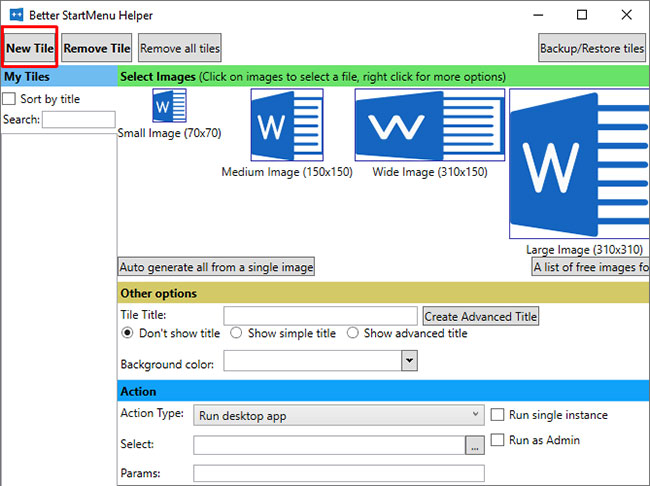
<p style="text-align: justify;">Chọn&nbsp;<strong>New Tile</strong>&nbsp;để tạo một Live Tile mới. Sau đó, chọn&nbsp;<strong>Auto Generate all from a single image</strong>. Xin lưu ý rằng Better StartMenu yêu cầu các file PNG để tạo các Live Tile menu Start tùy chỉnh.</p>

<figure>
<div style="text-align: justify;"><img alt="Chọn New Tile để tạo một Live Tile mới" data-i="0" data-src="https://st.quantrimang.com/photos/image/2020/02/20/tao-live-tile-tuy-chinh-voi-better-startmenu-1.jpg" data-was-processed="true" height="486" src="https://st.quantrimang.com/photos/image/2020/02/20/tao-live-tile-tuy-chinh-voi-better-startmenu-1.jpg" width="650" /></div>

<figcaption>
<div style="text-align: justify;">Chọn New Tile để tạo một Live Tile mới</div>
</figcaption>
</figure>

<h2 style="text-align: justify;">Cấu hình biểu tượng Live Tile tùy chỉnh</h2>

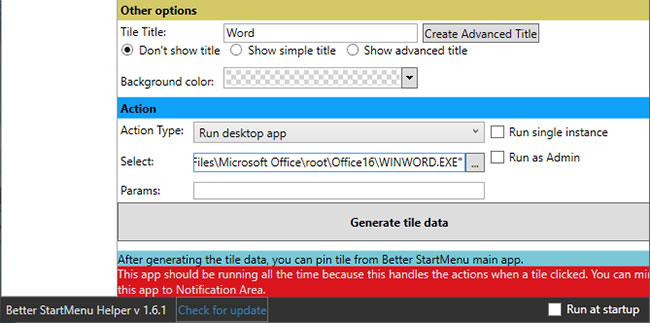
<p style="text-align: justify;">Bây giờ, trong&nbsp;<strong>Other options</strong>, đặt tên cho Live Tile tùy chỉnh mới của bạn và quyết định xem bạn có muốn hiển thị tiêu đề trên tile đó không. Tiếp theo, chọn cho Live Tile một nền tùy chỉnh hoặc để nền trong suốt.</p>

<p style="text-align: justify;">Phần&nbsp;<strong>Action</strong>&nbsp;là nơi bạn xác định chương trình nào Live Tile tùy chỉnh mới sẽ mở. Đầu tiên, chọn một tùy chọn từ menu drop-down. Trong trường hợp này,&nbsp;<strong>Run desktop app</strong>&nbsp;là những gì bạn muốn, nhưng bạn có thể thấy các tùy chọn để mở thư mục, vị trí file, v.v...</p>

<figure>
<div style="text-align: justify;"><img alt="Chọn đường dẫn file của phần mềm bạn muốn mở trong Select" data-i="1" data-src="https://st.quantrimang.com/photos/image/2020/02/20/tao-live-tile-tuy-chinh-voi-better-startmenu-2.jpg" data-was-processed="true" height="323" src="https://st.quantrimang.com/photos/image/2020/02/20/tao-live-tile-tuy-chinh-voi-better-startmenu-2.jpg" width="650" /></div>

<figcaption>
<div style="text-align: justify;">Chọn đường dẫn file của phần mềm bạn muốn mở trong Select</div>
</figcaption>
</figure>

<p style="text-align: justify;">Bây giờ, chọn đường dẫn file của phần mềm bạn muốn mở trong&nbsp;<strong>Select.</strong>&nbsp;Nhấp vào biểu tượng ba chấm và duyệt đến chương trình, chọn nó và nhấn&nbsp;<strong>OK.</strong></p>

<p style="text-align: justify;">Hoặc, duyệt đến phần mềm trong menu Start, sau đó nhấp chuột phải và chọn&nbsp;<strong>More &gt; Open file location</strong>. Sau đó, bấm chuột phải vào ứng dụng và chọn&nbsp;<strong>Properties.</strong></p>

<p style="text-align: justify;">Bạn sẽ tìm thấy vị trí file chính xác cùng với&nbsp;<strong>Target.</strong>&nbsp;Bạn có thể sao chép và dán đường dẫn file này vào Better StartMenu Helper.</p>

<p style="text-align: justify;">Bên dưới, bạn có thể đặt bất kỳ tham số mở cụ thể nào cho phần mềm. Chỉ làm điều này nếu bạn biết chắc những gì mình đang làm.</p>

<p style="text-align: justify;">Cuối cùng, nhấn&nbsp;<strong>Generate tile data</strong>.</p>

<div style="text-align: justify;">&nbsp;</div>

<h2 style="text-align: justify;">Ghim Live Tile tùy chỉnh vào menu Start Windows 10</h2>

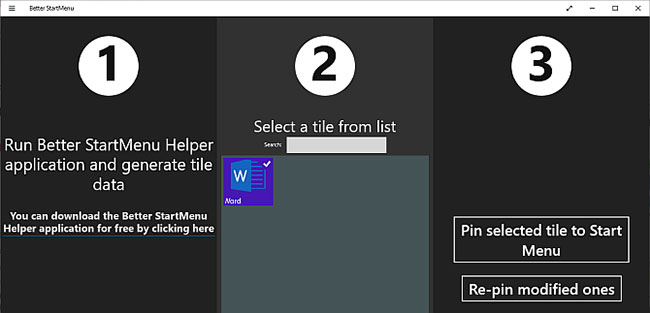
<p style="text-align: justify;">Bây giờ, bạn cần mở phần mềm Better StartMenu. Tuy nhiên, đừng đóng Better StartMenu Helper. Better StartMenu vẫn cần Helper mở để xử lý các liên kết Live Tile tùy chỉnh.</p>

<p style="text-align: justify;">Ở góc dưới bên phải của Better StartMenu Helper, hãy chọn&nbsp;<strong>Run at startup</strong>. Bằng cách đó, bạn mới biết chắc Live Tile tùy chỉnh của mình luôn hoạt động.</p>

<figure>
<div style="text-align: justify;"><img alt="Nhấn Pin select tile to Start Menu" data-i="2" data-src="https://st.quantrimang.com/photos/image/2020/02/20/tao-live-tile-tuy-chinh-voi-better-startmenu-3.jpg" data-was-processed="true" height="313" src="https://st.quantrimang.com/photos/image/2020/02/20/tao-live-tile-tuy-chinh-voi-better-startmenu-3.jpg" width="650" /></div>

<figcaption>
<div style="text-align: justify;">Nhấn Pin select tile to Start Menu</div>
</figcaption>
</figure>

<p style="text-align: justify;">Sau khi mở Better StartMenu, bạn sẽ phát hiện thấy Live Tile tùy chỉnh của mình. Chọn Live Tile tùy chỉnh, sau đó trong cột thứ ba, nhấn&nbsp;<strong>Pin select tile to Start Menu</strong>.</p>

<h2 style="text-align: justify;">3 lựa chọn thay thế Better StartMenu</h2>

<p style="text-align: justify;">Có 3 lựa chọn thay thế cho Better StartMenu, với những chất lượng khác nhau. Hầu hết các lựa chọn thay thế đều cho phép các liên kết Live Tile tùy chỉnh hoạt động mà không cần chương trình phụ.</p>

<p style="text-align: justify;">Dưới đây là 3 lựa chọn thay thế Better StartMenu:</p>

<ul>
	<li style="text-align: justify;">Pin More: Xây dựng các lưới Live Tile tùy chỉnh lớn, bao gồm nhiều nguồn và ghim tất cả vào màn hình Start.</li>
	<li style="text-align: justify;">Win10Tile: Tạo và ghim các Live Tile tùy chỉnh vào menu Start Windows 10.</li>
	<li style="text-align: justify;">TileIconifier: Ứng dụng Live Tile tùy chỉnh mã nguồn mở cho Windows 10.</li>
</ul>
		</div>
				<div id="author">
						<p>
				<strong>Nguồn tin:</strong>
				Quantrimang.com
			</p>
		</div>
	</div>
	<div id="footer" class="clearfix">
		<div id="url">
			<strong>URL của bản tin này: </strong><a href="https://www.nguoicodonvn2008.info/vi/news/savefile/kien-thuc-may-tinh/cach-tao-live-tile-tuy-chinh-voi-better-startmenu-1739.html" title="Cách tạo Live Tile tùy chỉnh với Better StartMenu">https://www.nguoicodonvn2008.info/vi/news/savefile/kien-thuc-may-tinh/cach-tao-live-tile-tuy-chinh-voi-better-startmenu-1739.html</a>

		</div>
		<div class="clear"></div>
		<div class="copyright">
			&copy; .&#x3A; Nguoicodonvn2008.info - Cõi lòng người cô đơn &#x3A;.
		</div>
		<div id="contact">
			<a href="mailto:admin@nguoicodonvn2008.info">admin@nguoicodonvn2008.info</a>
		</div>
	</div>
</div>
        <div id="timeoutsess" class="chromeframe">
            Bạn đã không sử dụng Site, <a onclick="timeoutsesscancel();" href="https://nguoicodonvn2008.info/#">Bấm vào đây để duy trì trạng thái đăng nhập</a>. Thời gian chờ: <span id="secField"> 60 </span> giây
        </div>
        <div id="openidResult" class="nv-alert" style="display:none"></div>
        <div id="openidBt" data-result="" data-redirect=""></div>
		</script>
		<div class="car-top">
  <span><img src="https://nguoicodonvn2008.info/themes/default/images/car.png" alt=""></span>
</div>
<script src="https://nguoicodonvn2008.info/assets/js/jquery/jquery.min.js"></script>
<script>var nv_base_siteurl="/",nv_lang_data="vi",nv_lang_interface="vi",nv_name_variable="nv",nv_fc_variable="op",nv_lang_variable="language",nv_module_name="news",nv_func_name="savefile",nv_is_user=0, nv_my_ofs=-4,nv_my_abbr="EDT",nv_cookie_prefix="nv4c_e856T",nv_check_pass_mstime=1738000,nv_area_admin=0,nv_safemode=0,theme_responsive=0,nv_recaptcha_ver=2,nv_recaptcha_sitekey="",nv_recaptcha_type="image",XSSsanitize=1;</script>
<script src="https://nguoicodonvn2008.info/assets/js/language/vi.js"></script>
<script src="https://nguoicodonvn2008.info/assets/js/DOMPurify/purify3.js"></script>
<script src="https://nguoicodonvn2008.info/assets/js/global.js"></script>
<script src="https://nguoicodonvn2008.info/assets/js/site.js"></script>
<script src="https://nguoicodonvn2008.info/themes/default/js/news.js"></script>
<script src="https://nguoicodonvn2008.info/themes/default/js/main.js"></script>
<script src="https://nguoicodonvn2008.info/themes/default/js/custom.js"></script>
<script type="application/ld+json">
        {
            "@context": "https://schema.org",
            "@type": "Organization",
            "url": "https://nguoicodonvn2008.info",
            "logo": "https://nguoicodonvn2008.info/uploads/angel.gif"
        }
        </script>
<script src="https://nguoicodonvn2008.info/themes/default/js/bootstrap.min.js"></script>
<script type="text/javascript">
var $scrolltop = $('.car-top');
$scrolltop.on('click', function () {
    $('html,body').animate({
        scrollTop: 0
    }, 800);
    $(this).addClass("car-run");
    setTimeout(function(){ $scrolltop.removeClass('car-run');}, 1000);
    return false;
});
$(window).on('scroll', function ()
{ 
    if($(window).scrollTop() >= 200)
    {
        $scrolltop.addClass("show");
        $scrolltop.addClass("car-down");
    }
    else
    {
       $scrolltop.removeClass("show");
       setTimeout(function(){ $scrolltop.removeClass('car-down');}, 300);
    }
});
</script>
</body>
</html>