<!DOCTYPE html>
    <html lang="vi" xmlns="http://www.w3.org/1999/xhtml" prefix="og: http://ogp.me/ns#">
    <head>
<title>Cách tạo Daemon trên Linux</title>
<meta name="description" content="Cách tạo Daemon trên Linux - Savefile - Tin Tức - https&#x3A;&#x002F;&#x002F;www.nguoicodonvn2008.info&#x002F;vi&#x002F;news&#x002F;savefile&#x002F;kien-thuc-may-tinh&#x002F;cach-tao-daemon-tren-linux-5636.html">
<meta name="author" content=".: Nguoicodonvn2008.info - Cõi lòng người cô đơn :.">
<meta name="copyright" content=".: Nguoicodonvn2008.info - Cõi lòng người cô đơn :. [admin@nguoicodonvn2008.info]">
<meta name="robots" content="index, archive, follow, noodp">
<meta name="googlebot" content="index,archive,follow,noodp">
<meta name="msnbot" content="all,index,follow">
<meta name="generator" content="NukeViet v4.5">
<meta http-equiv="Content-Type" content="text/html; charset=utf-8">
<meta property="og:title" content="Cách tạo Daemon trên Linux">
<meta property="og:type" content="website">
<meta property="og:description" content="Savefile - Tin Tức - https&#x3A;&#x002F;&#x002F;www.nguoicodonvn2008.info&#x002F;vi&#x002F;news&#x002F;savefile&#x002F;kien-thuc-may-tinh&#x002F;cach-tao-daemon-tren-linux-5636.html">
<meta property="og:site_name" content=".&#x3A; Nguoicodonvn2008.info - Cõi lòng người cô đơn &#x3A;.">
<meta property="og:url" content="https://www.nguoicodonvn2008.info/vi/news/savefile/kien-thuc-may-tinh/cach-tao-daemon-tren-linux-5636.html">
<link rel="shortcut icon" href="https://nguoicodonvn2008.info/favicon.ico">
<link rel="canonical" href="https://www.nguoicodonvn2008.info/vi/news/savefile/kien-thuc-may-tinh/cach-tao-daemon-tren-linux-5636.html">
<link rel="alternate" href="https://nguoicodonvn2008.info/vi/news/rss/" title="Tin Tức" type="application/rss+xml">
<link rel="alternate" href="https://nguoicodonvn2008.info/vi/news/rss/karaoke-dual/" title="Tin Tức - Karaoke Dual" type="application/rss+xml">
<link rel="alternate" href="https://nguoicodonvn2008.info/vi/news/rss/nhac-tre/" title="Tin Tức - Nhạc trẻ" type="application/rss+xml">
<link rel="alternate" href="https://nguoicodonvn2008.info/vi/news/rss/tru-tinh/" title="Tin Tức - Trữ tình" type="application/rss+xml">
<link rel="alternate" href="https://nguoicodonvn2008.info/vi/news/rss/nuoc-ngoai/" title="Tin Tức - Nước ngoài" type="application/rss+xml">
<link rel="alternate" href="https://nguoicodonvn2008.info/vi/news/rss/remix/" title="Tin Tức - Remix" type="application/rss+xml">
<link rel="alternate" href="https://nguoicodonvn2008.info/vi/news/rss/tam-su-tinh-yeu/" title="Tin Tức - Tâm sự tình yêu" type="application/rss+xml">
<link rel="alternate" href="https://nguoicodonvn2008.info/vi/news/rss/tho-suu-tam/" title="Tin Tức - Thơ sưu tầm" type="application/rss+xml">
<link rel="alternate" href="https://nguoicodonvn2008.info/vi/news/rss/cuoc-song/" title="Tin Tức - Cuộc sống" type="application/rss+xml">
<link rel="alternate" href="https://nguoicodonvn2008.info/vi/news/rss/phan-mem/" title="Tin Tức - Phần mềm" type="application/rss+xml">
<link rel="alternate" href="https://nguoicodonvn2008.info/vi/news/rss/kien-thuc-may-tinh/" title="Tin Tức - Kiến thức máy tính" type="application/rss+xml">
<link rel="alternate" href="https://nguoicodonvn2008.info/vi/news/rss/hoc-tap/" title="Tin Tức - Học tập" type="application/rss+xml">
<link rel="alternate" href="https://nguoicodonvn2008.info/vi/news/rss/tai-lieu/" title="Tin Tức - Tài liệu" type="application/rss+xml">
<link rel="alternate" href="https://nguoicodonvn2008.info/vi/news/rss/de-thi/" title="Tin Tức - Đề thi" type="application/rss+xml">
<link rel="preload" as="style" href="https://nguoicodonvn2008.info/assets/css/font-awesome.min.css" type="text/css">
<link rel="preload" as="style" href="https://nguoicodonvn2008.info/themes/default/css/bootstrap.non-responsive.css" type="text/css">
<link rel="preload" as="style" href="https://nguoicodonvn2008.info/themes/default/css/style.css" type="text/css">
<link rel="preload" as="style" href="https://nguoicodonvn2008.info/themes/default/css/style.non-responsive.css" type="text/css">
<link rel="preload" as="style" href="https://nguoicodonvn2008.info/themes/default/css/news.css" type="text/css">
<link rel="preload" as="style" href="https://nguoicodonvn2008.info/themes/default/css/custom.css" type="text/css">
<link rel="preload" as="script" href="https://nguoicodonvn2008.info/assets/js/jquery/jquery.min.js" type="text/javascript">
<link rel="preload" as="script" href="https://nguoicodonvn2008.info/assets/js/language/vi.js" type="text/javascript">
<link rel="preload" as="script" href="https://nguoicodonvn2008.info/assets/js/DOMPurify/purify3.js" type="text/javascript">
<link rel="preload" as="script" href="https://nguoicodonvn2008.info/assets/js/global.js" type="text/javascript">
<link rel="preload" as="script" href="https://nguoicodonvn2008.info/assets/js/site.js" type="text/javascript">
<link rel="preload" as="script" href="https://nguoicodonvn2008.info/themes/default/js/news.js" type="text/javascript">
<link rel="preload" as="script" href="https://nguoicodonvn2008.info/themes/default/js/main.js" type="text/javascript">
<link rel="preload" as="script" href="https://nguoicodonvn2008.info/themes/default/js/custom.js" type="text/javascript">
<link rel="preload" as="script" href="https://nguoicodonvn2008.info/themes/default/js/bootstrap.min.js" type="text/javascript">
<link rel="stylesheet" href="https://nguoicodonvn2008.info/assets/css/font-awesome.min.css">
<link rel="stylesheet" href="https://nguoicodonvn2008.info/themes/default/css/bootstrap.non-responsive.css">
<link rel="stylesheet" href="https://nguoicodonvn2008.info/themes/default/css/style.css">
<link rel="stylesheet" href="https://nguoicodonvn2008.info/themes/default/css/style.non-responsive.css">
<link rel="StyleSheet" href="https://nguoicodonvn2008.info/themes/default/css/news.css">
<link rel="stylesheet" href="https://nguoicodonvn2008.info/themes/default/css/custom.css">
<style type="text/css">
	body{background: #fff;}
</style>
    </head>
    <body>
<div id="print">
	<div id="hd_print">
		<h2 class="pull-left">.&#x3A; Nguoicodonvn2008.info - Cõi lòng người cô đơn &#x3A;.</h2>
		<p class="pull-right"><a title=".&#x3A; Nguoicodonvn2008.info - Cõi lòng người cô đơn &#x3A;." href="https://nguoicodonvn2008.info/">https://nguoicodonvn2008.info</a></p>
	</div>
	<div class="clear"></div>
	<hr />
	<div id="content">
		<h1>Cách tạo Daemon trên Linux</h1>
		<ul class="list-inline">
			<li>Thứ năm - 19/05/2022 00:57</li>
			<li class="hidden-print txtrequired"><em class="fa fa-print">&nbsp;</em><a title="In ra" href="javascript:;" onclick="window.print()">In ra</a></li>
			<li class="hidden-print txtrequired"><em class="fa fa-power-off">&nbsp;</em><a title="Đóng cửa sổ này" href="javascript:;" onclick="window.close()">Đóng cửa sổ này</a></li>
		</ul>
		<div class="clear"></div>
		<div id="hometext">
		</div>
				<div class="imghome">
			<img alt="Cách tạo Daemon trên Linux" src="https://st.quantrimang.com/photos/image/2022/05/18/tao-daemon-tren-linux-1.jpg" width="460" class="img-thumbnail" />
		</div>
		<div class="clear"></div>
		<div id="bodytext" class="clearfix">
			<p style="text-align: justify;">Daemon&nbsp;là các tiến trình không chạy trực tiếp dưới sự kiểm soát của người dùng mà chạy ở chế độ nền. Thông thường, chúng bắt đầu khi khởi động hệ thống và chạy liên tục cho đến khi hệ thống tắt. Sự khác biệt duy nhất giữa các tiến trình này và tiến trình bình thường là chúng không gửi thông báo đến console hoặc màn hình theo bất kỳ cách nào.</p>

<p style="text-align: justify;">Đây là cách bạn có thể tạo daemon trên máy Linux.</p>

<h2 style="text-align: justify;">Giới thiệu ngắn gọn về cách daemon được tạo ra</h2>

<p style="text-align: justify;">Rất nhiều daemon chạy trên hệ thống và một số ví dụ về daemon quen thuộc như sau:</p>

<ul>
	<li style="text-align: justify;"><strong>crond:</strong>&nbsp;Làm cho các lệnh chạy vào thời gian được chỉ định</li>
	<li style="text-align: justify;"><strong>sshd:</strong>&nbsp;Cho phép đăng nhập vào hệ thống từ các máy từ xa</li>
	<li style="text-align: justify;"><strong>httpd:</strong>&nbsp;Cung cấp các trang web</li>
	<li style="text-align: justify;"><strong>nfsd:</strong>&nbsp;Cho phép chia sẻ file qua mạng</li>
</ul>

<p style="text-align: justify;">Ngoài ra, các tiến trình daemon thường được đặt tên kết thúc bằng chữ d, mặc dù điều này là không bắt buộc.</p>

<p style="text-align: justify;">Để tiến trình chạy dưới dạng daemon, hãy làm theo quy trình sau:</p>

<ul>
	<li style="text-align: justify;">Các hoạt động ban đầu, chẳng hạn như đọc file cấu hình hoặc lấy tài nguyên hệ thống cần thiết, phải được thực hiện trước khi tiến trình trở thành một daemon. Bằng cách này, hệ thống có thể báo cáo các lỗi đã nhận cho người dùng và quá trình sẽ được kết thúc bằng một mã lỗi phù hợp.</li>
	<li style="text-align: justify;">Một tiến trình chạy nền được tạo với init là tiến trình mẹ của nó. Với mục đích này, một tiến trình con được tách từ tiến trình init đầu tiên, và sau đó tiến trình trên được kết thúc.</li>
	<li style="text-align: justify;">Một phiên mới sẽ mở bằng cách gọi hàm setid và tiến trình này sẽ được ngắt kết nối khỏi terminal.</li>
	<li style="text-align: justify;">Tất cả các trình mô tả file đang mở được kế thừa từ tiến trình mẹ đều bị đóng.</li>
	<li style="text-align: justify;">Đầu vào, đầu ra và thông báo lỗi tiêu chuẩn được chuyển hướng đến&nbsp;<strong>/dev/null.</strong></li>
	<li style="text-align: justify;">Thư mục làm việc của tiến trình phải thay đổi.</li>
</ul>

<h2 style="text-align: justify;">Phiên Daemon là gì?</h2>

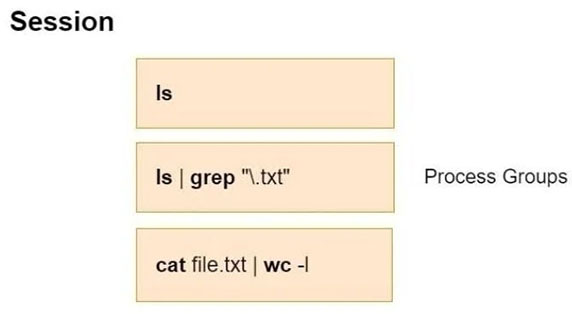
<p style="text-align: justify;">Sau khi đăng nhập vào hệ thống thông qua terminal, người dùng có thể chạy nhiều ứng dụng thông qua chương trình shell. Các tiến trình này sẽ đóng khi người dùng thoát khỏi hệ thống. Hệ điều hành nhóm các tiến trình này thành những nhóm phiên và tiến trình.</p>

<p style="text-align: justify;">Mỗi phiên bao gồm các nhóm tiến trình. Có thể mô tả tình huống này như sau:</p>

<figure>
<div style="text-align: justify;"><img alt="Phiên Daemon" data-i="0" data-src="https://st.quantrimang.com/photos/image/2022/05/18/tao-daemon-tren-linux-1.jpg" data-was-processed="true" height="314" src="https://st.quantrimang.com/photos/image/2022/05/18/tao-daemon-tren-linux-1.jpg" width="572" /></div>

<figcaption>
<div style="text-align: justify;">Phiên Daemon</div>
</figcaption>
</figure>

<p style="text-align: justify;">Terminal nơi các tiến trình nhận đầu vào và gửi đầu ra của chúng được gọi là controlling terminal. Mỗi controlling terminal chỉ được liên kết với một phiên tại một thời điểm.</p>

<p style="text-align: justify;">Một phiên và các nhóm tiến trình trong đó có số nhận dạng (ID). Các số nhận dạng này là số nhận dạng tiến trình (PID) của group leader phiên và tiến trình. Một tiến trình con chia sẻ cùng một nhóm với tiến trình mẹ của nó. Khi nhiều quy trình đang giao tiếp với cơ chế pipe, tiến trình đầu tiên sẽ trở thành process group leader.</p>

<h2 style="text-align: justify;">Tạo tiến trình Daemon trên Linux</h2>

<p style="text-align: justify;">Ở đây, bạn sẽ thấy cách bạn có thể tạo một hàm daemon. Với mục đích này, bạn sẽ tạo một hàm có tên _daemon. Bạn có thể bắt đầu bằng cách đặt tên mã ứng dụng sẽ chạy dưới dạng daemon là&nbsp;<strong>test.c</strong>&nbsp;và mã bạn sẽ tạo hàm daemon là&nbsp;<strong>daemon.c.</strong></p>

<pre id="pre0">
<code>//test.c
#include &lt;stdio.h&gt;
int _daemon(int, int);
int main()
{
	getchar();
	_daemon(0, 0);
	getchar();
	return 0;
}</code></pre>

<pre id="pre1">
<code>//daemon.c
#include &lt;sys/types.h&gt;
#include &lt;sys/stat.h&gt;
#include &lt;stdlib.h&gt;
#include &lt;stdio.h&gt;
#include &lt;fcntl.h&gt;
#include &lt;unistd.h&gt;
#include &lt;linux/fs.h&gt;
#include &lt;linux/limits.h&gt;
int _daemon(int nochdir, int noclose) {
 pid_t pid;
 pid = fork(); // Fork off the parent process
 if (pid &lt; 0) {
   exit(EXIT_FAILURE);
 }
 if (pid &gt; 0) {
   exit(EXIT_SUCCESS);
 }
 return 0;
}</code></pre>

<p style="text-align: justify;">Để tạo một daemon, bạn cần một tiến trình nền có tiến trình mẹ là init. Trong đoạn code trên,&nbsp;<strong>_daemon</strong>&nbsp;tạo một tiến trình con và sau đó kết thúc tiến trình mẹ. Trong trường hợp này, tiến trình mới của bạn sẽ là một tiến trình con của init và sẽ tiếp tục chạy ở chế độ nền.</p>

<p style="text-align: justify;">Bây giờ, hãy biên dịch ứng dụng bằng lệnh sau và kiểm tra trạng thái của tiến trình trước và sau khi _deamon được gọi:</p>

<pre id="pre2">
<code>gcc -o test test.c daemon.c</code></pre>

<p style="text-align: justify;">Chạy ứng dụng và chuyển sang một terminal khác mà không cần nhấn bất kỳ phím nào khác:</p>

<pre id="pre3">
<code>./test</code></pre>

<p style="text-align: justify;">Bạn có thể thấy rằng các giá trị liên quan đến tiến trình của bạn như sau. Tại đây, bạn sẽ phải sử dụng lệnh ps để nhận thông tin liên quan đến tiến trình. Trong trường hợp này, hàm _daemon vẫn chưa được gọi.</p>

<pre id="pre4">
<code>ps -C test -o &quot;pid ppid pgid sid tty stat command&quot;
# Output
PID    PPID    PGID     SID TT       STAT COMMAND
10296  5119   10296    5117 pts/2    S+   ./test </code></pre>

<p style="text-align: justify;">Khi nhìn vào trường STAT, bạn thấy rằng tiến trình của bạn đang chạy nhưng đang đợi một sự kiện không đúng lịch trình xảy ra sẽ khiến nó chạy ở foreground.</p>

<table border="1">
	<tbody>
		<tr>
			<td style="text-align: justify;"><strong>Viết tắt</strong></td>
			<td style="text-align: justify;"><strong>Ý nghĩa</strong></td>
		</tr>
		<tr>
			<td style="text-align: justify;">S</td>
			<td style="text-align: justify;">Đang ngủ chờ một sự kiện xảy ra</td>
		</tr>
		<tr>
			<td style="text-align: justify;">T</td>
			<td style="text-align: justify;">Ứng dụng đã dừng</td>
		</tr>
		<tr>
			<td style="text-align: justify;">s</td>
			<td style="text-align: justify;">Session leader</td>
		</tr>
		<tr>
			<td style="text-align: justify;">+</td>
			<td style="text-align: justify;">Ứng dụng đang chạy ở foreground</td>
		</tr>
	</tbody>
</table>

<p style="text-align: justify;">Bạn có thể thấy rằng tiến trình chính của ứng dụng là shell như mong đợi.</p>

<pre id="pre5">
<code>ps -jp 5119                                 
# Output      
PID    PGID     SID TTY          TIME CMD
5119   5119    5117 pts/2    00:00:02 zsh</code></pre>

<p style="text-align: justify;">Bây giờ quay lại terminal nơi bạn đang chạy ứng dụng của mình và nhấn&nbsp;<strong>Enter</strong>&nbsp;để gọi hàm&nbsp;<strong>_daemon.</strong>&nbsp;Sau đó, xem lại thông tin tiến trình trên terminal khác.</p>

<pre id="pre6">
<code>ps -C test -o &quot;pid ppid pgid sid tty stat command&quot;
# Output
PID    PPID    PGID     SID TT       STAT COMMAND
22504     1   22481    5117 pts/2    S    ./test</code></pre>

<p style="text-align: justify;">Trước hết, bạn có thể nói rằng tiến trình con mới đang chạy ở chế độ nền vì bạn không thấy ký tự&nbsp;<strong>+</strong>&nbsp;trong trường&nbsp;<strong>STAT.</strong>&nbsp;Bây giờ, hãy kiểm tra xem đâu là tiến trình mẹ của tiến trình bằng cách sử dụng lệnh sau:</p>

<pre id="pre7">
<code>ps -jp 1                                      
​​​​​​​# Output    
PID    PGID     SID TTY          TIME CMD
1      1        1   ?        00:00:01 systemd</code></pre>

<p style="text-align: justify;">Bây giờ, bạn có thể thấy rằng tiến trình mẹ cho tiến trình của bạn là systemd. Ở trên đã đề cập rằng đối với bước tiếp theo, một phiên mới sẽ mở ra và tiến trình này nên được ngắt kết nối khỏi controlling terminal. Đối với điều này, bạn sử dụng hàm setid. Thêm lệnh gọi này vào hàm _daemon của bạn.</p>

<p style="text-align: justify;">Đoạn code cần thêm như sau:</p>

<pre id="pre8">
<code>if (setsid() == -1) 
	return -1;</code></pre>

<p style="text-align: justify;">Bây giờ bạn đã kiểm tra trạng thái trước khi&nbsp;<strong>_daemon</strong>&nbsp;được gọi, bây giờ bạn có thể xóa hàm&nbsp;<strong>getchar</strong>&nbsp;đầu tiên trong code&nbsp;<strong>test.c.</strong></p>

<pre id="pre9">
<code>//test.c
#include &lt;stdio.h&gt;
int _daemon(int, int);
int main()
{
	_daemon(0, 0);
	getchar();
	return 0;
}</code></pre>

<p style="text-align: justify;">Sau khi biên dịch và chạy lại ứng dụng, hãy chuyển đến terminal nơi bạn đã thực hiện các đánh giá của mình. Trạng thái mới của tiến trình như sau:</p>

<pre id="pre10">
<code>ps -C test -o &quot;pid ppid pgid sid tty stat command&quot;
​​​​​​​# Output
PID    PPID    PGID     SID TT       STAT COMMAND
25494     1   25494   25494 ?        Ss   ./test</code></pre>

<p style="text-align: justify;">Các ký hiệu&nbsp;<strong>?</strong>&nbsp;trong trường&nbsp;<strong>TT</strong>&nbsp;cho biết rằng tiến trình của bạn không còn được kết nối với terminal. Lưu ý rằng các giá trị PID, PGID và SID trong tiến trình của bạn giống nhau. Tiến trình của bạn bây giờ là một session leader.</p>

<p style="text-align: justify;">Trong bước tiếp theo, thay đổi thư mục làm việc thành thư mục gốc theo giá trị của đối số bạn đã truyền. Bạn có thể thêm đoạn code sau vào hàm&nbsp;<strong>_daemon</strong>&nbsp;cho việc này:</p>

<pre id="pre11">
<code>if (!nochdir) {
   if (chdir(&quot;/&quot;) == -1)
      return -1;
}</code></pre>

<p style="text-align: justify;">Bây giờ, theo đối số được truyền, có thể đóng tất cả các trình mô tả file. Thêm code sau vào hàm _daemon:</p>

<pre id="pre12">
<code>#define NR_OPEN 1024
if (!noclose) {
   for (i = 0; i &lt; NR_OPEN; i++)
      close(i);
   open(&quot;/dev/null&quot;, O_RDWR);
   dup(0);
   dup(0);
}</code></pre>

<p style="text-align: justify;">Sau khi tất cả các trình mô tả file được đóng, những file mới được mở bởi daemon sẽ được hiển thị với các trình mô tả&nbsp;<strong>0, 1</strong>&nbsp;và&nbsp;<strong>2</strong>&nbsp;tương ứng. Trong trường hợp này, ví dụ, các lệnh printf trong code sẽ được chuyển hướng đến file thứ hai được mở. Để tránh điều này, 3 số nhận dạng đầu tiên trỏ đến thiết bị&nbsp;<strong>/dev/null.</strong></p>

<p style="text-align: justify;">Trong trường hợp này, trạng thái cuối cùng của hàm&nbsp;<strong>_daemon</strong>&nbsp;sẽ như sau:</p>

<pre id="pre13">
<code>#include &lt;sys/types.h&gt;
#include &lt;sys/stat.h&gt;
#include &lt;stdio.h&gt;
#include &lt;stdlib.h&gt;
#include &lt;fcntl.h&gt;
#include &lt;errno.h&gt;
#include &lt;unistd.h&gt;
#include &lt;syslog.h&gt;
#include &lt;string.h&gt;
int _daemon(void) {
 // PID: Process ID
 // SID: Session ID
 pid_t pid, sid;
 pid = fork(); // Fork off the parent process
 if (pid &lt; 0) {
   exit(EXIT_FAILURE);
 }
 if (pid &gt; 0) {
   exit(EXIT_SUCCESS);
 }
 // Create a SID for child
 sid = setsid();
 if (sid &lt; 0) {
   // FAIL
   exit(EXIT_FAILURE);
 }
 if ((chdir(&quot;/&quot;)) &lt; 0) {
   // FAIL
   exit(EXIT_FAILURE);
 }
 close(STDIN_FILENO);
 close(STDOUT_FILENO);
 close(STDERR_FILENO);
 while (1) {
   // Some Tasks
   sleep(30);
 }
 exit(EXIT_SUCCESS);
}</code></pre>

<p style="text-align: justify;">Đây là một ví dụ về đoạn code chạy ứng dụng sshd dưới dạng daemon:</p>

<pre id="pre14">
<code>...
if (!(debug_flag || inetd_flag || no_daemon_flag)) {
    int fd;
    if (daemon(0, 0) &lt; 0)
        fatal(&quot;daemon() failed: %.200s&quot;, strerror(errno));
    /* Disconnect from the controlling tty. */
    fd = open(_PATH_TTY, O_RDWR | O_NOCTTY);
    if (fd &gt;= 0) {
        (void) ioctl(fd, TIOCNOTTY, NULL);
        close(fd);
    }
}
...</code></pre>

<p style="text-align: justify;">Daemon là các chương trình thực hiện những hành động khác nhau theo cách thức xác định trước được thiết lập để đáp ứng các sự kiện nhất định. Chúng chạy âm thầm trên máy Linux của bạn. Chúng không chịu sự kiểm soát trực tiếp của người dùng và mỗi service chạy nền đều có daemon của nó.</p>

<p style="text-align: justify;">Điều quan trọng là phải nắm vững các daemon để tìm hiểu cấu trúc kernel của hệ điều hành Linux và hiểu hoạt động của những kiến trúc hệ thống khác nhau.</p>
		</div>
				<div id="author">
						<p>
				<strong>Nguồn tin:</strong>
				Quantrimang.com
			</p>
		</div>
	</div>
	<div id="footer" class="clearfix">
		<div id="url">
			<strong>URL của bản tin này: </strong><a href="https://www.nguoicodonvn2008.info/vi/news/savefile/kien-thuc-may-tinh/cach-tao-daemon-tren-linux-5636.html" title="Cách tạo Daemon trên Linux">https://www.nguoicodonvn2008.info/vi/news/savefile/kien-thuc-may-tinh/cach-tao-daemon-tren-linux-5636.html</a>

		</div>
		<div class="clear"></div>
		<div class="copyright">
			&copy; .&#x3A; Nguoicodonvn2008.info - Cõi lòng người cô đơn &#x3A;.
		</div>
		<div id="contact">
			<a href="mailto:admin@nguoicodonvn2008.info">admin@nguoicodonvn2008.info</a>
		</div>
	</div>
</div>
        <div id="timeoutsess" class="chromeframe">
            Bạn đã không sử dụng Site, <a onclick="timeoutsesscancel();" href="https://nguoicodonvn2008.info/#">Bấm vào đây để duy trì trạng thái đăng nhập</a>. Thời gian chờ: <span id="secField"> 60 </span> giây
        </div>
        <div id="openidResult" class="nv-alert" style="display:none"></div>
        <div id="openidBt" data-result="" data-redirect=""></div>
		</script>
		<div class="car-top">
  <span><img src="https://nguoicodonvn2008.info/themes/default/images/car.png" alt=""></span>
</div>
<script src="https://nguoicodonvn2008.info/assets/js/jquery/jquery.min.js"></script>
<script>var nv_base_siteurl="/",nv_lang_data="vi",nv_lang_interface="vi",nv_name_variable="nv",nv_fc_variable="op",nv_lang_variable="language",nv_module_name="news",nv_func_name="savefile",nv_is_user=0, nv_my_ofs=-4,nv_my_abbr="EDT",nv_cookie_prefix="nv4c_e856T",nv_check_pass_mstime=1738000,nv_area_admin=0,nv_safemode=0,theme_responsive=0,nv_recaptcha_ver=2,nv_recaptcha_sitekey="",nv_recaptcha_type="image",XSSsanitize=1;</script>
<script src="https://nguoicodonvn2008.info/assets/js/language/vi.js"></script>
<script src="https://nguoicodonvn2008.info/assets/js/DOMPurify/purify3.js"></script>
<script src="https://nguoicodonvn2008.info/assets/js/global.js"></script>
<script src="https://nguoicodonvn2008.info/assets/js/site.js"></script>
<script src="https://nguoicodonvn2008.info/themes/default/js/news.js"></script>
<script src="https://nguoicodonvn2008.info/themes/default/js/main.js"></script>
<script src="https://nguoicodonvn2008.info/themes/default/js/custom.js"></script>
<script type="application/ld+json">
        {
            "@context": "https://schema.org",
            "@type": "Organization",
            "url": "https://nguoicodonvn2008.info",
            "logo": "https://nguoicodonvn2008.info/uploads/angel.gif"
        }
        </script>
<script src="https://nguoicodonvn2008.info/themes/default/js/bootstrap.min.js"></script>
<script type="text/javascript">
var $scrolltop = $('.car-top');
$scrolltop.on('click', function () {
    $('html,body').animate({
        scrollTop: 0
    }, 800);
    $(this).addClass("car-run");
    setTimeout(function(){ $scrolltop.removeClass('car-run');}, 1000);
    return false;
});
$(window).on('scroll', function ()
{ 
    if($(window).scrollTop() >= 200)
    {
        $scrolltop.addClass("show");
        $scrolltop.addClass("car-down");
    }
    else
    {
       $scrolltop.removeClass("show");
       setTimeout(function(){ $scrolltop.removeClass('car-down');}, 300);
    }
});
</script>
</body>
</html>