<!DOCTYPE html>
    <html lang="vi" xmlns="http://www.w3.org/1999/xhtml" prefix="og: http://ogp.me/ns#">
    <head>
<title>Cách tạo báo cáo hiệu suất hệ thống trong Windows 10</title>
<meta name="description" content="Cách tạo báo cáo hiệu suất hệ thống trong Windows 10 - Savefile - Tin Tức -...">
<meta name="author" content=".: Nguoicodonvn2008.info - Cõi lòng người cô đơn :.">
<meta name="copyright" content=".: Nguoicodonvn2008.info - Cõi lòng người cô đơn :. [admin@nguoicodonvn2008.info]">
<meta name="robots" content="index, archive, follow, noodp">
<meta name="googlebot" content="index,archive,follow,noodp">
<meta name="msnbot" content="all,index,follow">
<meta name="generator" content="NukeViet v4.5">
<meta http-equiv="Content-Type" content="text/html; charset=utf-8">
<meta property="og:title" content="Cách tạo báo cáo hiệu suất hệ thống trong Windows 10">
<meta property="og:type" content="website">
<meta property="og:description" content="Savefile - Tin Tức - https&#x3A;&#x002F;&#x002F;www.nguoicodonvn2008.info&#x002F;vi&#x002F;news&#x002F;savefile&#x002F;kien-thuc-may-tinh&#x002F;cach-tao-bao-cao-hieu-suat-he-thong-trong-windows-10-2509.html">
<meta property="og:site_name" content=".&#x3A; Nguoicodonvn2008.info - Cõi lòng người cô đơn &#x3A;.">
<meta property="og:url" content="https://www.nguoicodonvn2008.info/vi/news/savefile/kien-thuc-may-tinh/cach-tao-bao-cao-hieu-suat-he-thong-trong-windows-10-2509.html">
<link rel="shortcut icon" href="https://nguoicodonvn2008.info/favicon.ico">
<link rel="canonical" href="https://www.nguoicodonvn2008.info/vi/news/savefile/kien-thuc-may-tinh/cach-tao-bao-cao-hieu-suat-he-thong-trong-windows-10-2509.html">
<link rel="alternate" href="https://nguoicodonvn2008.info/vi/news/rss/" title="Tin Tức" type="application/rss+xml">
<link rel="alternate" href="https://nguoicodonvn2008.info/vi/news/rss/karaoke-dual/" title="Tin Tức - Karaoke Dual" type="application/rss+xml">
<link rel="alternate" href="https://nguoicodonvn2008.info/vi/news/rss/nhac-tre/" title="Tin Tức - Nhạc trẻ" type="application/rss+xml">
<link rel="alternate" href="https://nguoicodonvn2008.info/vi/news/rss/tru-tinh/" title="Tin Tức - Trữ tình" type="application/rss+xml">
<link rel="alternate" href="https://nguoicodonvn2008.info/vi/news/rss/nuoc-ngoai/" title="Tin Tức - Nước ngoài" type="application/rss+xml">
<link rel="alternate" href="https://nguoicodonvn2008.info/vi/news/rss/remix/" title="Tin Tức - Remix" type="application/rss+xml">
<link rel="alternate" href="https://nguoicodonvn2008.info/vi/news/rss/tam-su-tinh-yeu/" title="Tin Tức - Tâm sự tình yêu" type="application/rss+xml">
<link rel="alternate" href="https://nguoicodonvn2008.info/vi/news/rss/tho-suu-tam/" title="Tin Tức - Thơ sưu tầm" type="application/rss+xml">
<link rel="alternate" href="https://nguoicodonvn2008.info/vi/news/rss/cuoc-song/" title="Tin Tức - Cuộc sống" type="application/rss+xml">
<link rel="alternate" href="https://nguoicodonvn2008.info/vi/news/rss/phan-mem/" title="Tin Tức - Phần mềm" type="application/rss+xml">
<link rel="alternate" href="https://nguoicodonvn2008.info/vi/news/rss/kien-thuc-may-tinh/" title="Tin Tức - Kiến thức máy tính" type="application/rss+xml">
<link rel="alternate" href="https://nguoicodonvn2008.info/vi/news/rss/hoc-tap/" title="Tin Tức - Học tập" type="application/rss+xml">
<link rel="alternate" href="https://nguoicodonvn2008.info/vi/news/rss/tai-lieu/" title="Tin Tức - Tài liệu" type="application/rss+xml">
<link rel="alternate" href="https://nguoicodonvn2008.info/vi/news/rss/de-thi/" title="Tin Tức - Đề thi" type="application/rss+xml">
<link rel="preload" as="style" href="https://nguoicodonvn2008.info/assets/css/font-awesome.min.css" type="text/css">
<link rel="preload" as="style" href="https://nguoicodonvn2008.info/themes/default/css/bootstrap.non-responsive.css" type="text/css">
<link rel="preload" as="style" href="https://nguoicodonvn2008.info/themes/default/css/style.css" type="text/css">
<link rel="preload" as="style" href="https://nguoicodonvn2008.info/themes/default/css/style.non-responsive.css" type="text/css">
<link rel="preload" as="style" href="https://nguoicodonvn2008.info/themes/default/css/news.css" type="text/css">
<link rel="preload" as="style" href="https://nguoicodonvn2008.info/themes/default/css/custom.css" type="text/css">
<link rel="preload" as="script" href="https://nguoicodonvn2008.info/assets/js/jquery/jquery.min.js" type="text/javascript">
<link rel="preload" as="script" href="https://nguoicodonvn2008.info/assets/js/language/vi.js" type="text/javascript">
<link rel="preload" as="script" href="https://nguoicodonvn2008.info/assets/js/DOMPurify/purify3.js" type="text/javascript">
<link rel="preload" as="script" href="https://nguoicodonvn2008.info/assets/js/global.js" type="text/javascript">
<link rel="preload" as="script" href="https://nguoicodonvn2008.info/assets/js/site.js" type="text/javascript">
<link rel="preload" as="script" href="https://nguoicodonvn2008.info/themes/default/js/news.js" type="text/javascript">
<link rel="preload" as="script" href="https://nguoicodonvn2008.info/themes/default/js/main.js" type="text/javascript">
<link rel="preload" as="script" href="https://nguoicodonvn2008.info/themes/default/js/custom.js" type="text/javascript">
<link rel="preload" as="script" href="https://nguoicodonvn2008.info/themes/default/js/bootstrap.min.js" type="text/javascript">
<link rel="stylesheet" href="https://nguoicodonvn2008.info/assets/css/font-awesome.min.css">
<link rel="stylesheet" href="https://nguoicodonvn2008.info/themes/default/css/bootstrap.non-responsive.css">
<link rel="stylesheet" href="https://nguoicodonvn2008.info/themes/default/css/style.css">
<link rel="stylesheet" href="https://nguoicodonvn2008.info/themes/default/css/style.non-responsive.css">
<link rel="StyleSheet" href="https://nguoicodonvn2008.info/themes/default/css/news.css">
<link rel="stylesheet" href="https://nguoicodonvn2008.info/themes/default/css/custom.css">
<style type="text/css">
	body{background: #fff;}
</style>
    </head>
    <body>
<div id="print">
	<div id="hd_print">
		<h2 class="pull-left">.&#x3A; Nguoicodonvn2008.info - Cõi lòng người cô đơn &#x3A;.</h2>
		<p class="pull-right"><a title=".&#x3A; Nguoicodonvn2008.info - Cõi lòng người cô đơn &#x3A;." href="https://nguoicodonvn2008.info/">https://nguoicodonvn2008.info</a></p>
	</div>
	<div class="clear"></div>
	<hr />
	<div id="content">
		<h1>Cách tạo báo cáo hiệu suất hệ thống trong Windows 10</h1>
		<ul class="list-inline">
			<li>Thứ tư - 12/08/2020 00:57</li>
			<li class="hidden-print txtrequired"><em class="fa fa-print">&nbsp;</em><a title="In ra" href="javascript:;" onclick="window.print()">In ra</a></li>
			<li class="hidden-print txtrequired"><em class="fa fa-power-off">&nbsp;</em><a title="Đóng cửa sổ này" href="javascript:;" onclick="window.close()">Đóng cửa sổ này</a></li>
		</ul>
		<div class="clear"></div>
		<div id="hometext">
		</div>
				<div class="imghome">
			<img alt="Cách tạo báo cáo hiệu suất hệ thống trong Windows 10" src="https://st.quantrimang.com/photos/image/2020/08/11/tao-bao-cao-hieu-suat-he-thong-1.jpg" width="460" class="img-thumbnail" />
		</div>
		<div class="clear"></div>
		<div id="bodytext" class="clearfix">
			<p style="text-align: justify;">Báo cáo hiệu suất hệ thống là một phần của Performance Monitor, trình bày chi tiết trạng thái của tài nguyên phần cứng cục bộ, thời gian phản hồi hệ thống và các tiến trình trên máy tính cục bộ. Bạn có thể sử dụng thông tin này để xác định các nguyên nhân có thể gây ra sự cố hiệu suất.</p>

<p style="text-align: justify;">Hướng dẫn này sẽ chỉ cho bạn cách tạo và xem báo cáo hiệu suất hệ thống trong Windows 10.</p>

<p style="text-align: justify;"><strong>Lưu ý</strong>: Bạn phải đăng nhập với tư cách admin để có thể tạo và xem báo cáo hiệu suất hệ thống.</p>

<h2 style="text-align: justify;">Tạo báo cáo hiệu suất hệ thống trong Performance Monitor</h2>

<p style="text-align: justify;">1. Nhấn phím&nbsp;<code>Win</code>+<code>R</code>&nbsp;để mở&nbsp;<strong>Run</strong>, nhập&nbsp;<strong>perfmon</strong>&nbsp;vào&nbsp;<strong>Run</strong>&nbsp;và nhấn&nbsp;<strong>OK</strong>&nbsp;để&nbsp;mở Performance Monitor.</p>

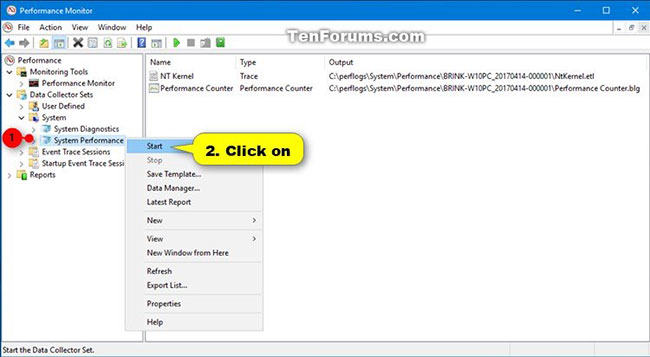
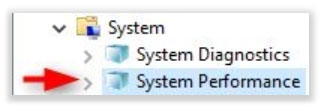
<p style="text-align: justify;">2. Mở rộng&nbsp;<strong>Data Collector Sets</strong>&nbsp;và<strong>&nbsp;System</strong>&nbsp;đang mở trong ngăn bên trái của&nbsp;<strong>Performance</strong><strong>Monitor</strong>, nhấp chuột phải vào&nbsp;<strong>System Performance</strong>&nbsp;và chọn&nbsp;<strong>Start.</strong></p>

<figure>
<div style="text-align: justify;"><img alt="Nhấp chuột phải vào System Performance và chọn Start" data-i="0" data-src="https://st.quantrimang.com/photos/image/2020/08/11/tao-bao-cao-hieu-suat-he-thong-1.jpg" data-was-processed="true" height="357" src="https://st.quantrimang.com/photos/image/2020/08/11/tao-bao-cao-hieu-suat-he-thong-1.jpg" width="650" /></div>

<figcaption>
<div style="text-align: justify;">Nhấp chuột phải vào System Performance và chọn Start</div>
</figcaption>
</figure>

<p style="text-align: justify;">3. Báo cáo này sẽ bắt đầu thu thập dữ liệu trong 60 giây. Có thể mất thêm 60 giây để tạo báo cáo.</p>

<figure>
<div style="text-align: justify;"><img alt="Báo cáo này sẽ bắt đầu thu thập dữ liệu trong 60 giây" data-i="1" data-src="https://st.quantrimang.com/photos/image/2020/08/11/tao-bao-cao-hieu-suat-he-thong-3.jpg" data-was-processed="true" height="108" src="https://st.quantrimang.com/photos/image/2020/08/11/tao-bao-cao-hieu-suat-he-thong-3.jpg" width="323" /></div>

<figcaption>
<div style="text-align: justify;">Báo cáo này sẽ bắt đầu thu thập dữ liệu trong 60 giây</div>
</figcaption>
</figure>

<p style="text-align: justify;">4. Khi hoàn tất, bạn có thể xem báo cáo hiệu suất hệ thống như trong phần 2 bên dưới.</p>

<div style="text-align: justify;">&nbsp;</div>

<h2 style="text-align: justify;">Xem báo cáo hiệu suất hệ thống trong Performance Monitor</h2>

<p style="text-align: justify;">1. Nhấn phím&nbsp;<code>Win</code>+<code>R</code>&nbsp;để mở&nbsp;<strong>Run</strong>, nhập&nbsp;<strong>perfmon</strong>&nbsp;vào&nbsp;<strong>Run</strong>&nbsp;và nhấn&nbsp;<strong>OK</strong>&nbsp;để mở Performance Monitor.</p>

<p style="text-align: justify;">2. Mở rộng&nbsp;<strong>Reports, System</strong>&nbsp;và<strong>&nbsp;System Performance</strong>&nbsp;đang mở trong ngăn bên trái của&nbsp;<strong>Performance Monitor.</strong></p>

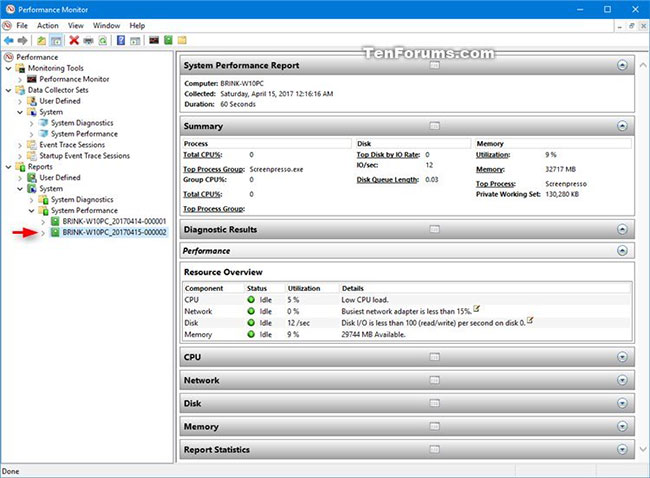
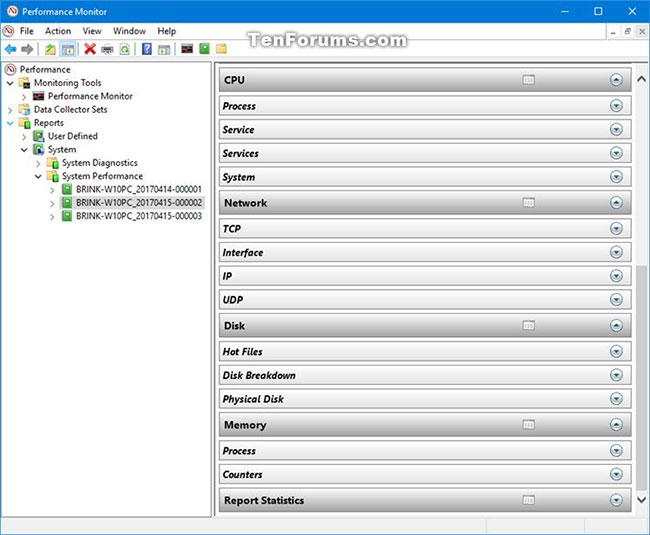
<p style="text-align: justify;">3. Trong&nbsp;<strong>System Performance</strong>, hãy nhấp vào một báo cáo đã được tạo (thu thập) vào ngày và giờ bạn muốn xem.</p>

<figure>
<div style="text-align: justify;"><img alt="Nhấp vào một báo cáo đã được tạo vào ngày và giờ bạn muốn xem" data-i="2" data-src="https://st.quantrimang.com/photos/image/2020/08/11/tao-bao-cao-hieu-suat-he-thong-4.jpg" data-was-processed="true" height="478" src="https://st.quantrimang.com/photos/image/2020/08/11/tao-bao-cao-hieu-suat-he-thong-4.jpg" width="650" /></div>

<figcaption>
<div style="text-align: justify;">Nhấp vào một báo cáo đã được tạo vào ngày và giờ bạn muốn xem</div>
</figcaption>
</figure>

<figure>
<div style="text-align: justify;"><img alt="Xem nội dung báo cáo chi tiết từng phần" data-i="3" data-src="https://st.quantrimang.com/photos/image/2020/08/11/tao-bao-cao-hieu-suat-he-thong-5.jpg" data-was-processed="true" height="535" src="https://st.quantrimang.com/photos/image/2020/08/11/tao-bao-cao-hieu-suat-he-thong-5.jpg" width="650" /></div>

<figcaption>
<div style="text-align: justify;">Xem nội dung báo cáo chi tiết từng phần</div>
</figcaption>
</figure>
		</div>
				<div id="author">
						<p>
				<strong>Nguồn tin:</strong>
				Quantrimang.com
			</p>
		</div>
	</div>
	<div id="footer" class="clearfix">
		<div id="url">
			<strong>URL của bản tin này: </strong><a href="https://www.nguoicodonvn2008.info/vi/news/savefile/kien-thuc-may-tinh/cach-tao-bao-cao-hieu-suat-he-thong-trong-windows-10-2509.html" title="Cách tạo báo cáo hiệu suất hệ thống trong Windows 10">https://www.nguoicodonvn2008.info/vi/news/savefile/kien-thuc-may-tinh/cach-tao-bao-cao-hieu-suat-he-thong-trong-windows-10-2509.html</a>

		</div>
		<div class="clear"></div>
		<div class="copyright">
			&copy; .&#x3A; Nguoicodonvn2008.info - Cõi lòng người cô đơn &#x3A;.
		</div>
		<div id="contact">
			<a href="mailto:admin@nguoicodonvn2008.info">admin@nguoicodonvn2008.info</a>
		</div>
	</div>
</div>
        <div id="timeoutsess" class="chromeframe">
            Bạn đã không sử dụng Site, <a onclick="timeoutsesscancel();" href="https://nguoicodonvn2008.info/#">Bấm vào đây để duy trì trạng thái đăng nhập</a>. Thời gian chờ: <span id="secField"> 60 </span> giây
        </div>
        <div id="openidResult" class="nv-alert" style="display:none"></div>
        <div id="openidBt" data-result="" data-redirect=""></div>
		</script>
		<div class="car-top">
  <span><img src="https://nguoicodonvn2008.info/themes/default/images/car.png" alt=""></span>
</div>
<script src="https://nguoicodonvn2008.info/assets/js/jquery/jquery.min.js"></script>
<script>var nv_base_siteurl="/",nv_lang_data="vi",nv_lang_interface="vi",nv_name_variable="nv",nv_fc_variable="op",nv_lang_variable="language",nv_module_name="news",nv_func_name="savefile",nv_is_user=0, nv_my_ofs=-4,nv_my_abbr="EDT",nv_cookie_prefix="nv4c_e856T",nv_check_pass_mstime=1738000,nv_area_admin=0,nv_safemode=0,theme_responsive=0,nv_recaptcha_ver=2,nv_recaptcha_sitekey="",nv_recaptcha_type="image",XSSsanitize=1;</script>
<script src="https://nguoicodonvn2008.info/assets/js/language/vi.js"></script>
<script src="https://nguoicodonvn2008.info/assets/js/DOMPurify/purify3.js"></script>
<script src="https://nguoicodonvn2008.info/assets/js/global.js"></script>
<script src="https://nguoicodonvn2008.info/assets/js/site.js"></script>
<script src="https://nguoicodonvn2008.info/themes/default/js/news.js"></script>
<script src="https://nguoicodonvn2008.info/themes/default/js/main.js"></script>
<script src="https://nguoicodonvn2008.info/themes/default/js/custom.js"></script>
<script type="application/ld+json">
        {
            "@context": "https://schema.org",
            "@type": "Organization",
            "url": "https://nguoicodonvn2008.info",
            "logo": "https://nguoicodonvn2008.info/uploads/angel.gif"
        }
        </script>
<script src="https://nguoicodonvn2008.info/themes/default/js/bootstrap.min.js"></script>
<script type="text/javascript">
var $scrolltop = $('.car-top');
$scrolltop.on('click', function () {
    $('html,body').animate({
        scrollTop: 0
    }, 800);
    $(this).addClass("car-run");
    setTimeout(function(){ $scrolltop.removeClass('car-run');}, 1000);
    return false;
});
$(window).on('scroll', function ()
{ 
    if($(window).scrollTop() >= 200)
    {
        $scrolltop.addClass("show");
        $scrolltop.addClass("car-down");
    }
    else
    {
       $scrolltop.removeClass("show");
       setTimeout(function(){ $scrolltop.removeClass('car-down');}, 300);
    }
});
</script>
</body>
</html>