<!DOCTYPE html>
    <html lang="vi" xmlns="http://www.w3.org/1999/xhtml" prefix="og: http://ogp.me/ns#">
    <head>
<title>Cách tăng độ tương phản trên màn hình Mac</title>
<meta name="description" content="Cách tăng độ tương phản trên màn hình Mac - Savefile - Tin Tức -...">
<meta name="author" content=".: Nguoicodonvn2008.info - Cõi lòng người cô đơn :.">
<meta name="copyright" content=".: Nguoicodonvn2008.info - Cõi lòng người cô đơn :. [admin@nguoicodonvn2008.info]">
<meta name="robots" content="index, archive, follow, noodp">
<meta name="googlebot" content="index,archive,follow,noodp">
<meta name="msnbot" content="all,index,follow">
<meta name="generator" content="NukeViet v4.5">
<meta http-equiv="Content-Type" content="text/html; charset=utf-8">
<meta property="og:title" content="Cách tăng độ tương phản trên màn hình Mac">
<meta property="og:type" content="website">
<meta property="og:description" content="Savefile - Tin Tức - https&#x3A;&#x002F;&#x002F;www.nguoicodonvn2008.info&#x002F;vi&#x002F;news&#x002F;savefile&#x002F;kien-thuc-may-tinh&#x002F;cach-tang-do-tuong-phan-tren-man-hinh-mac-1491.html">
<meta property="og:site_name" content=".&#x3A; Nguoicodonvn2008.info - Cõi lòng người cô đơn &#x3A;.">
<meta property="og:url" content="https://www.nguoicodonvn2008.info/vi/news/savefile/kien-thuc-may-tinh/cach-tang-do-tuong-phan-tren-man-hinh-mac-1491.html">
<link rel="shortcut icon" href="https://nguoicodonvn2008.info/favicon.ico">
<link rel="canonical" href="https://www.nguoicodonvn2008.info/vi/news/savefile/kien-thuc-may-tinh/cach-tang-do-tuong-phan-tren-man-hinh-mac-1491.html">
<link rel="alternate" href="https://nguoicodonvn2008.info/vi/news/rss/" title="Tin Tức" type="application/rss+xml">
<link rel="alternate" href="https://nguoicodonvn2008.info/vi/news/rss/karaoke-dual/" title="Tin Tức - Karaoke Dual" type="application/rss+xml">
<link rel="alternate" href="https://nguoicodonvn2008.info/vi/news/rss/nhac-tre/" title="Tin Tức - Nhạc trẻ" type="application/rss+xml">
<link rel="alternate" href="https://nguoicodonvn2008.info/vi/news/rss/tru-tinh/" title="Tin Tức - Trữ tình" type="application/rss+xml">
<link rel="alternate" href="https://nguoicodonvn2008.info/vi/news/rss/nuoc-ngoai/" title="Tin Tức - Nước ngoài" type="application/rss+xml">
<link rel="alternate" href="https://nguoicodonvn2008.info/vi/news/rss/remix/" title="Tin Tức - Remix" type="application/rss+xml">
<link rel="alternate" href="https://nguoicodonvn2008.info/vi/news/rss/tam-su-tinh-yeu/" title="Tin Tức - Tâm sự tình yêu" type="application/rss+xml">
<link rel="alternate" href="https://nguoicodonvn2008.info/vi/news/rss/tho-suu-tam/" title="Tin Tức - Thơ sưu tầm" type="application/rss+xml">
<link rel="alternate" href="https://nguoicodonvn2008.info/vi/news/rss/cuoc-song/" title="Tin Tức - Cuộc sống" type="application/rss+xml">
<link rel="alternate" href="https://nguoicodonvn2008.info/vi/news/rss/phan-mem/" title="Tin Tức - Phần mềm" type="application/rss+xml">
<link rel="alternate" href="https://nguoicodonvn2008.info/vi/news/rss/kien-thuc-may-tinh/" title="Tin Tức - Kiến thức máy tính" type="application/rss+xml">
<link rel="alternate" href="https://nguoicodonvn2008.info/vi/news/rss/hoc-tap/" title="Tin Tức - Học tập" type="application/rss+xml">
<link rel="alternate" href="https://nguoicodonvn2008.info/vi/news/rss/tai-lieu/" title="Tin Tức - Tài liệu" type="application/rss+xml">
<link rel="alternate" href="https://nguoicodonvn2008.info/vi/news/rss/de-thi/" title="Tin Tức - Đề thi" type="application/rss+xml">
<link rel="preload" as="style" href="https://nguoicodonvn2008.info/assets/css/font-awesome.min.css" type="text/css">
<link rel="preload" as="style" href="https://nguoicodonvn2008.info/themes/default/css/bootstrap.non-responsive.css" type="text/css">
<link rel="preload" as="style" href="https://nguoicodonvn2008.info/themes/default/css/style.css" type="text/css">
<link rel="preload" as="style" href="https://nguoicodonvn2008.info/themes/default/css/style.non-responsive.css" type="text/css">
<link rel="preload" as="style" href="https://nguoicodonvn2008.info/themes/default/css/news.css" type="text/css">
<link rel="preload" as="style" href="https://nguoicodonvn2008.info/themes/default/css/custom.css" type="text/css">
<link rel="preload" as="script" href="https://nguoicodonvn2008.info/assets/js/jquery/jquery.min.js" type="text/javascript">
<link rel="preload" as="script" href="https://nguoicodonvn2008.info/assets/js/language/vi.js" type="text/javascript">
<link rel="preload" as="script" href="https://nguoicodonvn2008.info/assets/js/DOMPurify/purify3.js" type="text/javascript">
<link rel="preload" as="script" href="https://nguoicodonvn2008.info/assets/js/global.js" type="text/javascript">
<link rel="preload" as="script" href="https://nguoicodonvn2008.info/assets/js/site.js" type="text/javascript">
<link rel="preload" as="script" href="https://nguoicodonvn2008.info/themes/default/js/news.js" type="text/javascript">
<link rel="preload" as="script" href="https://nguoicodonvn2008.info/themes/default/js/main.js" type="text/javascript">
<link rel="preload" as="script" href="https://nguoicodonvn2008.info/themes/default/js/custom.js" type="text/javascript">
<link rel="preload" as="script" href="https://nguoicodonvn2008.info/themes/default/js/bootstrap.min.js" type="text/javascript">
<link rel="stylesheet" href="https://nguoicodonvn2008.info/assets/css/font-awesome.min.css">
<link rel="stylesheet" href="https://nguoicodonvn2008.info/themes/default/css/bootstrap.non-responsive.css">
<link rel="stylesheet" href="https://nguoicodonvn2008.info/themes/default/css/style.css">
<link rel="stylesheet" href="https://nguoicodonvn2008.info/themes/default/css/style.non-responsive.css">
<link rel="StyleSheet" href="https://nguoicodonvn2008.info/themes/default/css/news.css">
<link rel="stylesheet" href="https://nguoicodonvn2008.info/themes/default/css/custom.css">
<style type="text/css">
	body{background: #fff;}
</style>
    </head>
    <body>
<div id="print">
	<div id="hd_print">
		<h2 class="pull-left">.&#x3A; Nguoicodonvn2008.info - Cõi lòng người cô đơn &#x3A;.</h2>
		<p class="pull-right"><a title=".&#x3A; Nguoicodonvn2008.info - Cõi lòng người cô đơn &#x3A;." href="https://nguoicodonvn2008.info/">https://nguoicodonvn2008.info</a></p>
	</div>
	<div class="clear"></div>
	<hr />
	<div id="content">
		<h1>Cách tăng độ tương phản trên màn hình Mac</h1>
		<ul class="list-inline">
			<li>Chủ nhật - 22/12/2019 02:55</li>
			<li class="hidden-print txtrequired"><em class="fa fa-print">&nbsp;</em><a title="In ra" href="javascript:;" onclick="window.print()">In ra</a></li>
			<li class="hidden-print txtrequired"><em class="fa fa-power-off">&nbsp;</em><a title="Đóng cửa sổ này" href="javascript:;" onclick="window.close()">Đóng cửa sổ này</a></li>
		</ul>
		<div class="clear"></div>
		<div id="hometext">
		</div>
				<div class="imghome">
			<img alt="Cách tăng độ tương phản trên màn hình Mac" src="https://st.quantrimang.com/photos/image/2019/12/21/tang-do-tuong-phan-tren-man-hinh-mac-3.jpg" width="460" class="img-thumbnail" />
		</div>
		<div class="clear"></div>
		<div id="bodytext" class="clearfix">
			<p style="text-align: justify;">Trong vài năm qua, Apple đã hiện đại hóa giao diện&nbsp;macOS&nbsp;bằng cách tăng độ trong suốt, làm phẳng các yếu tố và thêm khoảng trắng. Nếu bạn thấy giao diện mới khó sử dụng, hãy thử tăng độ tương phản.</p>

<p style="text-align: justify;"><strong>“Increase Contrast”</strong>&nbsp;(Tăng độ tương phản) là một trong nhiều tính năng hữu ích trong macOS. Nó giúp người dùng có thị lực kém đọc màn hình máy tính dễ dàng hơn, nhưng bất kỳ ai cũng có thể sử dụng tính năng này để làm cho giao diện dễ đọc hơn.</p>

<p style="text-align: justify;">Sau khi được bật, mọi thành phần UI (cho dù chỉ là một hộp văn bản hoặc nút) đều có viền đen rõ rệt xung quanh. Điều này giúp dễ dàng hơn trong việc xác định vị trí một nút và biết nơi một phần của ứng dụng kết thúc, cũng như nơi một phần khác bắt đầu.</p>

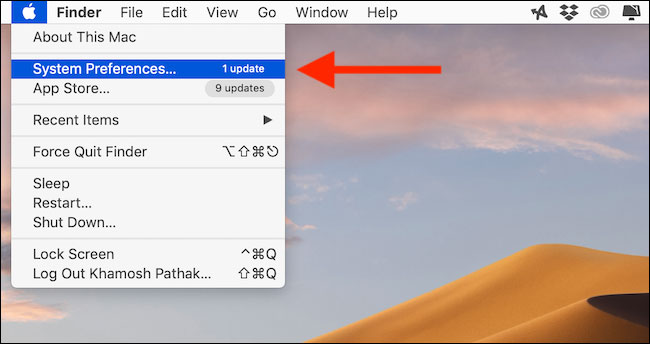
<p style="text-align: justify;">Bạn có thể kích hoạt tính năng này từ&nbsp;<strong>System Preferences</strong>&nbsp;của macOS. Nhấp vào nút&nbsp;<strong>Apple</strong>&nbsp;từ thanh menu và sau đó chọn&nbsp;<strong>System Preferences.</strong></p>

<p style="text-align: justify;"><strong><img alt="Nhấp vào nút Apple từ thanh menu và sau đó chọn System Preferences" data-i="0" data-src="https://st.quantrimang.com/photos/image/2019/12/21/tang-do-tuong-phan-tren-man-hinh-mac-1.jpg" data-was-processed="true" height="344" src="https://st.quantrimang.com/photos/image/2019/12/21/tang-do-tuong-phan-tren-man-hinh-mac-1.jpg" width="650" /></strong></p>

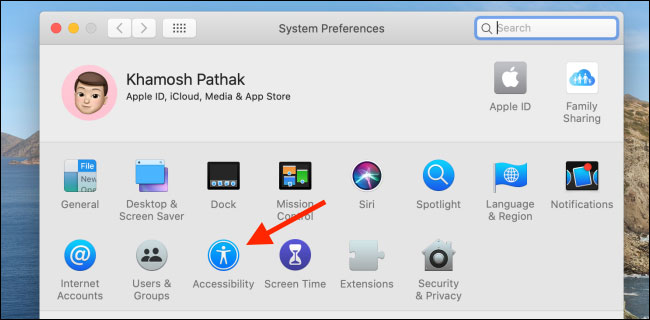
<p style="text-align: justify;">Tiếp theo, nhấp vào nút&nbsp;<strong>“Accessibility”.</strong></p>

<p style="text-align: justify;"><strong><img alt="Nhấp vào nút “Accessibility”" data-i="1" data-src="https://st.quantrimang.com/photos/image/2019/12/21/tang-do-tuong-phan-tren-man-hinh-mac-2.jpg" data-was-processed="true" height="320" src="https://st.quantrimang.com/photos/image/2019/12/21/tang-do-tuong-phan-tren-man-hinh-mac-2.jpg" width="650" /></strong></p>

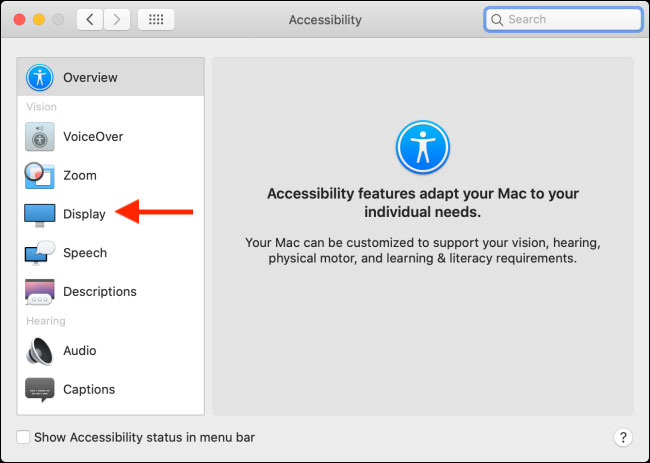
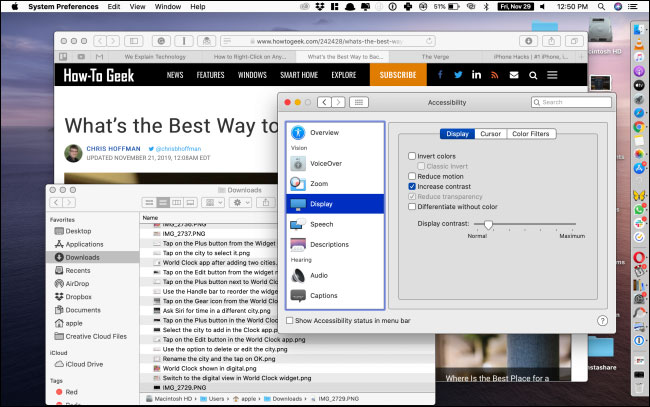
<p style="text-align: justify;">Từ thanh bên trái, chọn tùy chọn&nbsp;<strong>“Display”.</strong></p>

<p style="text-align: justify;"><strong><img alt="Chọn tùy chọn “Display”" data-i="2" data-src="https://st.quantrimang.com/photos/image/2019/12/21/tang-do-tuong-phan-tren-man-hinh-mac-3.jpg" data-was-processed="true" height="463" src="https://st.quantrimang.com/photos/image/2019/12/21/tang-do-tuong-phan-tren-man-hinh-mac-3.jpg" width="650" /></strong></p>

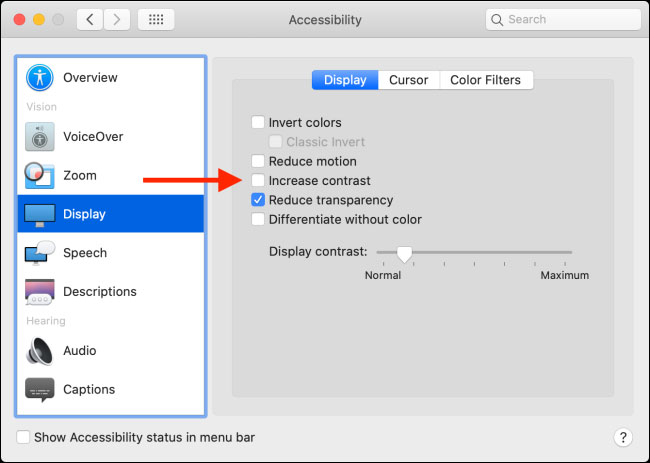
<p style="text-align: justify;">Tại đây, nhấp vào dấu kiểm bên cạnh&nbsp;<strong>“Increase Contrast”.</strong></p>

<p style="text-align: justify;"><strong><img alt="Nhấp vào dấu kiểm bên cạnh “Increase Contrast”" data-i="3" data-src="https://st.quantrimang.com/photos/image/2019/12/21/tang-do-tuong-phan-tren-man-hinh-mac-4.jpg" data-was-processed="true" height="463" src="https://st.quantrimang.com/photos/image/2019/12/21/tang-do-tuong-phan-tren-man-hinh-mac-4.jpg" width="650" /></strong></p>

<p style="text-align: justify;">Bây giờ, bạn sẽ thấy rằng toàn bộ UI có các đường viền xung quanh mọi phần tử và, như một lợi ích bổ sung, hiệu ứng trong suốt sẽ không còn nữa. Khi bạn kích hoạt tính năng&nbsp;<strong>“Increase Contrast”,</strong>&nbsp;macOS cũng tự động kích hoạt tùy chọn&nbsp;<strong>“Reduce Transparency”.</strong></p>

<p style="text-align: justify;"><strong><img alt="Khi bạn kích hoạt tính năng “Increase Contrast”, macOS cũng tự động kích hoạt tùy chọn “Reduce Transparency”" data-i="4" data-src="https://st.quantrimang.com/photos/image/2019/12/21/tang-do-tuong-phan-tren-man-hinh-mac-5.jpg" data-was-processed="true" height="407" src="https://st.quantrimang.com/photos/image/2019/12/21/tang-do-tuong-phan-tren-man-hinh-mac-5.jpg" width="650" /></strong></p>

<p style="text-align: justify;">Khi bạn muốn tắt tính năng này, hãy quay lại phần&nbsp;<strong>Display</strong>&nbsp;trong&nbsp;<strong>Accessibility</strong>&nbsp;và nhấp vào dấu kiểm bên cạnh tùy chọn&nbsp;<strong>“Increase Contrast”.</strong></p>

<p style="text-align: justify;">Chúc bạn thực hiện thành công!</p>
		</div>
				<div id="author">
						<p>
				<strong>Nguồn tin:</strong>
				Quantrimang.com
			</p>
		</div>
	</div>
	<div id="footer" class="clearfix">
		<div id="url">
			<strong>URL của bản tin này: </strong><a href="https://www.nguoicodonvn2008.info/vi/news/savefile/kien-thuc-may-tinh/cach-tang-do-tuong-phan-tren-man-hinh-mac-1491.html" title="Cách tăng độ tương phản trên màn hình Mac">https://www.nguoicodonvn2008.info/vi/news/savefile/kien-thuc-may-tinh/cach-tang-do-tuong-phan-tren-man-hinh-mac-1491.html</a>

		</div>
		<div class="clear"></div>
		<div class="copyright">
			&copy; .&#x3A; Nguoicodonvn2008.info - Cõi lòng người cô đơn &#x3A;.
		</div>
		<div id="contact">
			<a href="mailto:admin@nguoicodonvn2008.info">admin@nguoicodonvn2008.info</a>
		</div>
	</div>
</div>
        <div id="timeoutsess" class="chromeframe">
            Bạn đã không sử dụng Site, <a onclick="timeoutsesscancel();" href="https://nguoicodonvn2008.info/#">Bấm vào đây để duy trì trạng thái đăng nhập</a>. Thời gian chờ: <span id="secField"> 60 </span> giây
        </div>
        <div id="openidResult" class="nv-alert" style="display:none"></div>
        <div id="openidBt" data-result="" data-redirect=""></div>
		</script>
		<div class="car-top">
  <span><img src="https://nguoicodonvn2008.info/themes/default/images/car.png" alt=""></span>
</div>
<script src="https://nguoicodonvn2008.info/assets/js/jquery/jquery.min.js"></script>
<script>var nv_base_siteurl="/",nv_lang_data="vi",nv_lang_interface="vi",nv_name_variable="nv",nv_fc_variable="op",nv_lang_variable="language",nv_module_name="news",nv_func_name="savefile",nv_is_user=0, nv_my_ofs=-4,nv_my_abbr="EDT",nv_cookie_prefix="nv4c_e856T",nv_check_pass_mstime=1738000,nv_area_admin=0,nv_safemode=0,theme_responsive=0,nv_recaptcha_ver=2,nv_recaptcha_sitekey="",nv_recaptcha_type="image",XSSsanitize=1;</script>
<script src="https://nguoicodonvn2008.info/assets/js/language/vi.js"></script>
<script src="https://nguoicodonvn2008.info/assets/js/DOMPurify/purify3.js"></script>
<script src="https://nguoicodonvn2008.info/assets/js/global.js"></script>
<script src="https://nguoicodonvn2008.info/assets/js/site.js"></script>
<script src="https://nguoicodonvn2008.info/themes/default/js/news.js"></script>
<script src="https://nguoicodonvn2008.info/themes/default/js/main.js"></script>
<script src="https://nguoicodonvn2008.info/themes/default/js/custom.js"></script>
<script type="application/ld+json">
        {
            "@context": "https://schema.org",
            "@type": "Organization",
            "url": "https://nguoicodonvn2008.info",
            "logo": "https://nguoicodonvn2008.info/uploads/angel.gif"
        }
        </script>
<script src="https://nguoicodonvn2008.info/themes/default/js/bootstrap.min.js"></script>
<script type="text/javascript">
var $scrolltop = $('.car-top');
$scrolltop.on('click', function () {
    $('html,body').animate({
        scrollTop: 0
    }, 800);
    $(this).addClass("car-run");
    setTimeout(function(){ $scrolltop.removeClass('car-run');}, 1000);
    return false;
});
$(window).on('scroll', function ()
{ 
    if($(window).scrollTop() >= 200)
    {
        $scrolltop.addClass("show");
        $scrolltop.addClass("car-down");
    }
    else
    {
       $scrolltop.removeClass("show");
       setTimeout(function(){ $scrolltop.removeClass('car-down');}, 300);
    }
});
</script>
</body>
</html>