<!DOCTYPE html>
    <html lang="vi" xmlns="http://www.w3.org/1999/xhtml" prefix="og: http://ogp.me/ns#">
    <head>
<title>Cách tận dụng tối đa HDR trên Windows 11</title>
<meta name="description" content="Cách tận dụng tối đa HDR trên Windows 11 - Savefile - Tin Tức -...">
<meta name="author" content=".: Nguoicodonvn2008.info - Cõi lòng người cô đơn :.">
<meta name="copyright" content=".: Nguoicodonvn2008.info - Cõi lòng người cô đơn :. [admin@nguoicodonvn2008.info]">
<meta name="robots" content="index, archive, follow, noodp">
<meta name="googlebot" content="index,archive,follow,noodp">
<meta name="msnbot" content="all,index,follow">
<meta name="generator" content="NukeViet v4.5">
<meta http-equiv="Content-Type" content="text/html; charset=utf-8">
<meta property="og:title" content="Cách tận dụng tối đa HDR trên Windows 11">
<meta property="og:type" content="website">
<meta property="og:description" content="Savefile - Tin Tức - https&#x3A;&#x002F;&#x002F;www.nguoicodonvn2008.info&#x002F;vi&#x002F;news&#x002F;savefile&#x002F;kien-thuc-may-tinh&#x002F;cach-tan-dung-toi-da-hdr-tren-windows-11-9006.html">
<meta property="og:site_name" content=".&#x3A; Nguoicodonvn2008.info - Cõi lòng người cô đơn &#x3A;.">
<meta property="og:url" content="https://www.nguoicodonvn2008.info/vi/news/savefile/kien-thuc-may-tinh/cach-tan-dung-toi-da-hdr-tren-windows-11-9006.html">
<link rel="shortcut icon" href="https://nguoicodonvn2008.info/favicon.ico">
<link rel="canonical" href="https://www.nguoicodonvn2008.info/vi/news/savefile/kien-thuc-may-tinh/cach-tan-dung-toi-da-hdr-tren-windows-11-9006.html">
<link rel="alternate" href="https://nguoicodonvn2008.info/vi/news/rss/" title="Tin Tức" type="application/rss+xml">
<link rel="alternate" href="https://nguoicodonvn2008.info/vi/news/rss/karaoke-dual/" title="Tin Tức - Karaoke Dual" type="application/rss+xml">
<link rel="alternate" href="https://nguoicodonvn2008.info/vi/news/rss/nhac-tre/" title="Tin Tức - Nhạc trẻ" type="application/rss+xml">
<link rel="alternate" href="https://nguoicodonvn2008.info/vi/news/rss/tru-tinh/" title="Tin Tức - Trữ tình" type="application/rss+xml">
<link rel="alternate" href="https://nguoicodonvn2008.info/vi/news/rss/nuoc-ngoai/" title="Tin Tức - Nước ngoài" type="application/rss+xml">
<link rel="alternate" href="https://nguoicodonvn2008.info/vi/news/rss/remix/" title="Tin Tức - Remix" type="application/rss+xml">
<link rel="alternate" href="https://nguoicodonvn2008.info/vi/news/rss/tam-su-tinh-yeu/" title="Tin Tức - Tâm sự tình yêu" type="application/rss+xml">
<link rel="alternate" href="https://nguoicodonvn2008.info/vi/news/rss/tho-suu-tam/" title="Tin Tức - Thơ sưu tầm" type="application/rss+xml">
<link rel="alternate" href="https://nguoicodonvn2008.info/vi/news/rss/cuoc-song/" title="Tin Tức - Cuộc sống" type="application/rss+xml">
<link rel="alternate" href="https://nguoicodonvn2008.info/vi/news/rss/phan-mem/" title="Tin Tức - Phần mềm" type="application/rss+xml">
<link rel="alternate" href="https://nguoicodonvn2008.info/vi/news/rss/kien-thuc-may-tinh/" title="Tin Tức - Kiến thức máy tính" type="application/rss+xml">
<link rel="alternate" href="https://nguoicodonvn2008.info/vi/news/rss/hoc-tap/" title="Tin Tức - Học tập" type="application/rss+xml">
<link rel="alternate" href="https://nguoicodonvn2008.info/vi/news/rss/tai-lieu/" title="Tin Tức - Tài liệu" type="application/rss+xml">
<link rel="alternate" href="https://nguoicodonvn2008.info/vi/news/rss/de-thi/" title="Tin Tức - Đề thi" type="application/rss+xml">
<link rel="preload" as="style" href="https://nguoicodonvn2008.info/assets/css/font-awesome.min.css" type="text/css">
<link rel="preload" as="style" href="https://nguoicodonvn2008.info/themes/default/css/bootstrap.non-responsive.css" type="text/css">
<link rel="preload" as="style" href="https://nguoicodonvn2008.info/themes/default/css/style.css" type="text/css">
<link rel="preload" as="style" href="https://nguoicodonvn2008.info/themes/default/css/style.non-responsive.css" type="text/css">
<link rel="preload" as="style" href="https://nguoicodonvn2008.info/themes/default/css/news.css" type="text/css">
<link rel="preload" as="style" href="https://nguoicodonvn2008.info/themes/default/css/custom.css" type="text/css">
<link rel="preload" as="script" href="https://nguoicodonvn2008.info/assets/js/jquery/jquery.min.js" type="text/javascript">
<link rel="preload" as="script" href="https://nguoicodonvn2008.info/assets/js/language/vi.js" type="text/javascript">
<link rel="preload" as="script" href="https://nguoicodonvn2008.info/assets/js/DOMPurify/purify3.js" type="text/javascript">
<link rel="preload" as="script" href="https://nguoicodonvn2008.info/assets/js/global.js" type="text/javascript">
<link rel="preload" as="script" href="https://nguoicodonvn2008.info/assets/js/site.js" type="text/javascript">
<link rel="preload" as="script" href="https://nguoicodonvn2008.info/themes/default/js/news.js" type="text/javascript">
<link rel="preload" as="script" href="https://nguoicodonvn2008.info/themes/default/js/main.js" type="text/javascript">
<link rel="preload" as="script" href="https://nguoicodonvn2008.info/themes/default/js/custom.js" type="text/javascript">
<link rel="preload" as="script" href="https://nguoicodonvn2008.info/themes/default/js/bootstrap.min.js" type="text/javascript">
<link rel="stylesheet" href="https://nguoicodonvn2008.info/assets/css/font-awesome.min.css">
<link rel="stylesheet" href="https://nguoicodonvn2008.info/themes/default/css/bootstrap.non-responsive.css">
<link rel="stylesheet" href="https://nguoicodonvn2008.info/themes/default/css/style.css">
<link rel="stylesheet" href="https://nguoicodonvn2008.info/themes/default/css/style.non-responsive.css">
<link rel="StyleSheet" href="https://nguoicodonvn2008.info/themes/default/css/news.css">
<link rel="stylesheet" href="https://nguoicodonvn2008.info/themes/default/css/custom.css">
<style type="text/css">
	body{background: #fff;}
</style>
    </head>
    <body>
<div id="print">
	<div id="hd_print">
		<h2 class="pull-left">.&#x3A; Nguoicodonvn2008.info - Cõi lòng người cô đơn &#x3A;.</h2>
		<p class="pull-right"><a title=".&#x3A; Nguoicodonvn2008.info - Cõi lòng người cô đơn &#x3A;." href="https://nguoicodonvn2008.info/">https://nguoicodonvn2008.info</a></p>
	</div>
	<div class="clear"></div>
	<hr />
	<div id="content">
		<h1>Cách tận dụng tối đa HDR trên Windows 11</h1>
		<ul class="list-inline">
			<li>Thứ ba - 17/09/2024 23:22</li>
			<li class="hidden-print txtrequired"><em class="fa fa-print">&nbsp;</em><a title="In ra" href="javascript:;" onclick="window.print()">In ra</a></li>
			<li class="hidden-print txtrequired"><em class="fa fa-power-off">&nbsp;</em><a title="Đóng cửa sổ này" href="javascript:;" onclick="window.close()">Đóng cửa sổ này</a></li>
		</ul>
		<div class="clear"></div>
		<div id="hometext">
		</div>
				<div class="imghome">
			<img alt="Cách tận dụng tối đa HDR trên Windows 11" src="https://st.quantrimang.com/photos/image/2024/09/17/tan-dung-toi-da-hdr-tren-windows-11-1.jpg" width="460" class="img-thumbnail" />
		</div>
		<div class="clear"></div>
		<div id="bodytext" class="clearfix">
			<p style="text-align: justify;">Màn hình HDR hoạt động tốt với Windows 11 để chơi game và phát trực tuyến video. Nhưng thành thật mà nói, nó không đẹp lắm lúc ban đầu. Tuy nhiên, bạn có thể điều chỉnh một số cài đặt để có được trải nghiệm HDR tốt nhất có thể.</p>

<h2 style="text-align: justify;">Cách bật HDR và ​​AutoHDR trong Windows 11</h2>

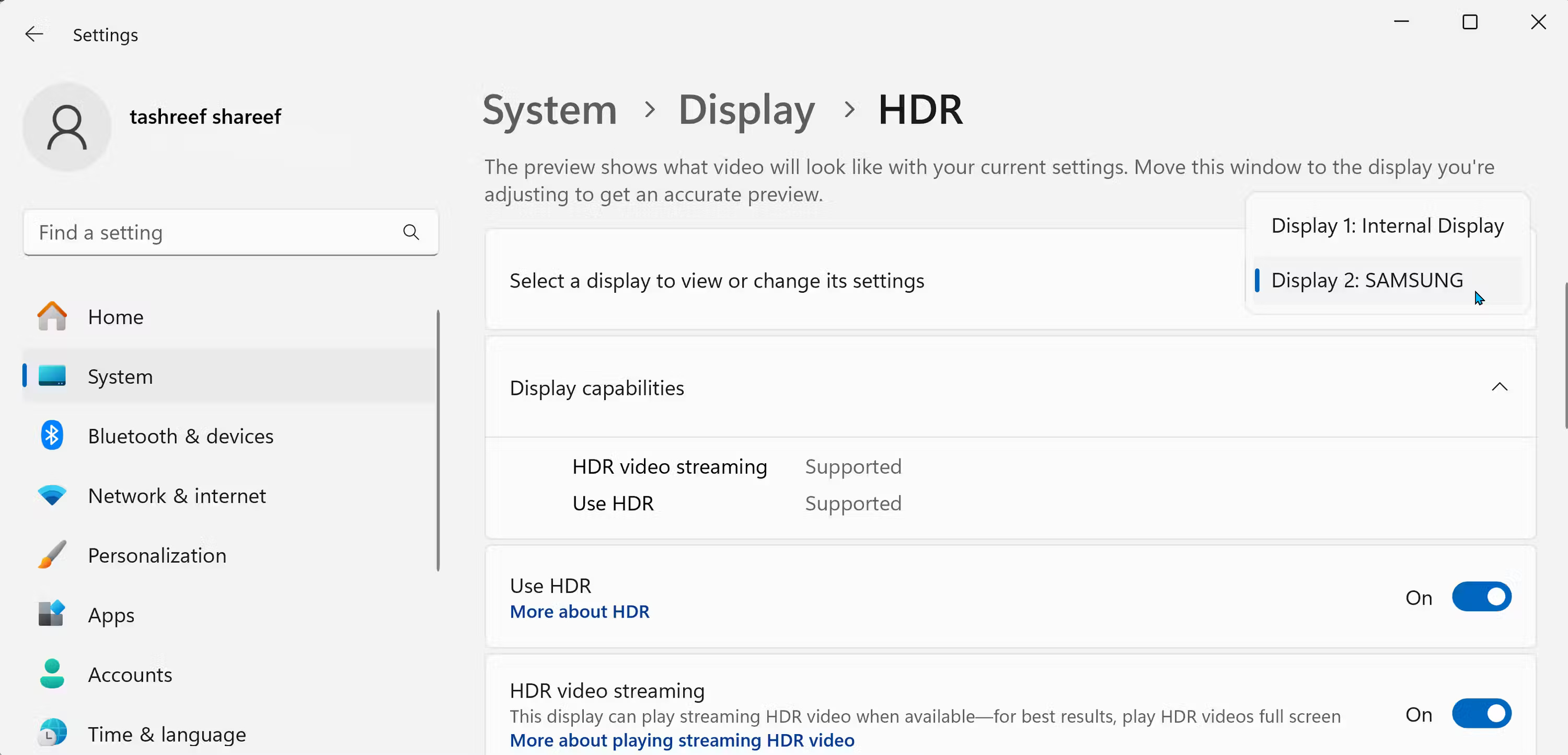
<p style="text-align: justify;">Bạn có thể bật HDR từ ứng dụng Settings. Vào&nbsp;<strong>Settings &gt; System &gt; Display</strong>, sau đó nhấp vào&nbsp;<strong>Use HDR</strong>. Nếu bạn có nhiều màn hình được kết nối, hãy chọn màn hình hỗ trợ HDR từ danh sách drop-down&nbsp;<strong>Select a display to view or change its settings</strong></p>

<figure>
<div style="text-align: justify;"><br />
<img alt="Tùy chọn HDR của Windows 11" data-adbro-processed="true" data-i="0" data-src="https://st.quantrimang.com/photos/image/2024/09/17/tan-dung-toi-da-hdr-tren-windows-11-1.jpg" data-was-processed="true" height="1444" src="https://st.quantrimang.com/photos/image/2024/09/17/tan-dung-toi-da-hdr-tren-windows-11-1.jpg" width="3000" /><br />
<br />
<span style="background-color: rgba(0, 0, 0, 0.05); color: rgb(51, 51, 51); font-family: sans-serif, Arial, Verdana, &#039;Trebuchet MS&#039;, &#039;Apple Color Emoji&#039;, &#039;Segoe UI Emoji&#039;, &#039;Segoe UI Symbol&#039;; font-size: 13px;">Tùy chọn HDR của Windows 11</span></div>
</figure>

<div style="text-align: justify;">&nbsp;</div>

<p style="text-align: justify;">Bật công tắc chuyển đổi&nbsp;<strong>Use HDR</strong>. Màn hình có thể bị tối hoặc nhấp nháy trong giây lát khi HDR bật. Bạn cũng có thể bật&nbsp;<strong>HDR video streaming</strong>&nbsp;để xem nội dung HDR trên các nền tảng phát trực tuyến như&nbsp;YouTube.</p>

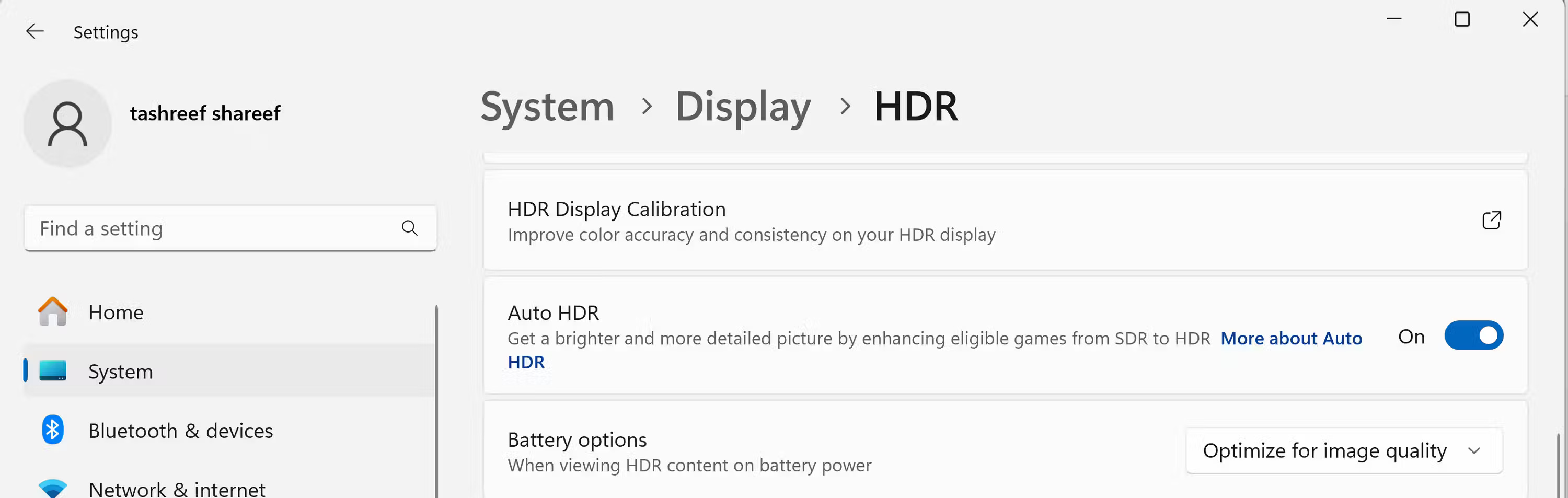
<p style="text-align: justify;">Windows 11&nbsp;cũng cung cấp Auto HDR, tự động bật HDR cho các game SDR tương thích. Mặc dù không phải tất cả các game đều hỗ trợ Auto HDR, nhưng nhiều tựa game phổ biến đều hỗ trợ, bao gồm Minecraft, HALO: Master Chief Collection, Call of Duty: Warzone và Assassin&#039;s Creed Mirage.</p>

<figure>
<div style="text-align: justify;"><img alt="Tùy chọn Auto HDR và ​​Battery của Windows 11" data-i="1" data-src="https://st.quantrimang.com/photos/image/2024/09/17/tan-dung-toi-da-hdr-tren-windows-11-2.jpg" data-was-processed="true" height="953" src="https://st.quantrimang.com/photos/image/2024/09/17/tan-dung-toi-da-hdr-tren-windows-11-2.jpg" width="3000" /></div>

<figcaption>
<div style="text-align: justify;">Tùy chọn Auto HDR và ​​Battery của Windows 11</div>
</figcaption>
</figure>

<div style="text-align: justify;"><iframe allow="autoplay" allowtransparency="true" aria-label="Advertisement" data-google-container-id="a!3" data-google-query-id="CN70uIfFy4gDFX5UDwIdVfwNow" data-load-complete="true" frameborder="0" height="0" hspace="0" id="aswift_2" marginheight="0" marginwidth="0" name="aswift_2" sandbox="allow-scripts allow-same-origin allow-forms allow-presentation allow-popups" scrolling="no" tabindex="0" title="Advertisement" vspace="0" width="694"></iframe></div>

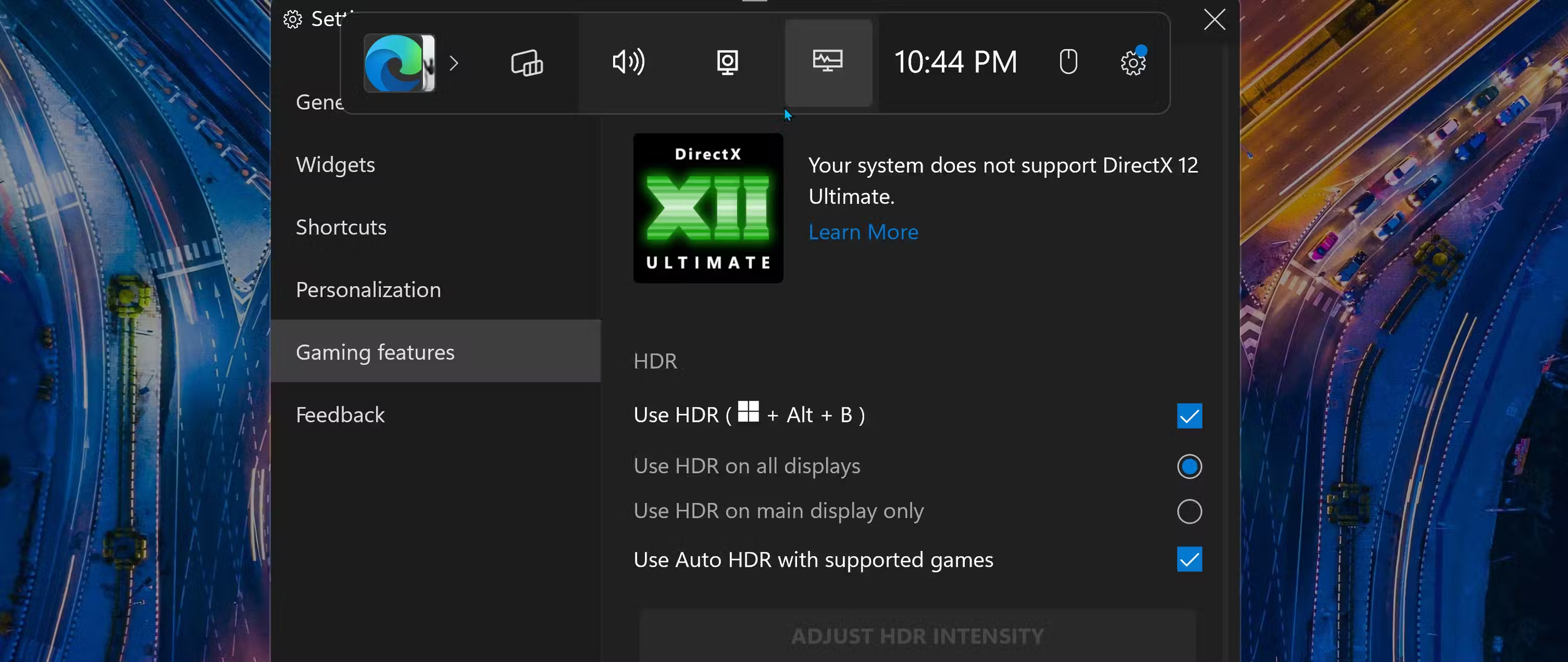
<p style="text-align: justify;">Bạn cũng có thể bật HDR bằng Game Bar. Để thực hiện việc này:</p>

<ol>
	<li style="text-align: justify;">Nhấn&nbsp;<strong>Windows + G</strong>&nbsp;để mở&nbsp;<strong>Game Bar</strong>. Sau đó, nhấp vào&nbsp;<strong>Settings</strong>&nbsp;(biểu tượng bánh răng) trên thanh công cụ ở trên cùng.</li>
	<li style="text-align: justify;">Chọn&nbsp;<strong>Gaming features</strong>&nbsp;từ ngăn bên trái của cửa sổ mở ra.</li>
	<li style="text-align: justify;">Trong HDR, hãy đánh dấu vào ô bên cạnh&nbsp;<strong>Use HDR (Windows + Alt + B)</strong>. Sau đó, chọn&nbsp;<strong>HDR on all displays</strong>&nbsp;hoặc&nbsp;<strong>Use HDR on the main display only</strong>.</li>
</ol>

<figure>
<div style="text-align: justify;"><img alt="Tùy chọn sử dụng HDR trong Game Bar Windows 11" data-i="2" data-src="https://st.quantrimang.com/photos/image/2024/09/17/tan-dung-toi-da-hdr-tren-windows-11-3.jpg" data-was-processed="true" height="1266" src="https://st.quantrimang.com/photos/image/2024/09/17/tan-dung-toi-da-hdr-tren-windows-11-3.jpg" width="3000" /></div>

<figcaption>
<div style="text-align: justify;">Tùy chọn sử dụng HDR trong Game Bar Windows 11</div>
</figcaption>
</figure>

<p style="text-align: justify;">Với các cài đặt Game Bar được cấu hình, bạn có thể nhanh chóng bật hoặc tắt HDR bằng phím tắt&nbsp;<strong>Win + Alt + B</strong>.</p>

<h2 style="text-align: justify;">Hiệu chỉnh màn hình HDR bằng phần mềm Windows HDR Calibration</h2>

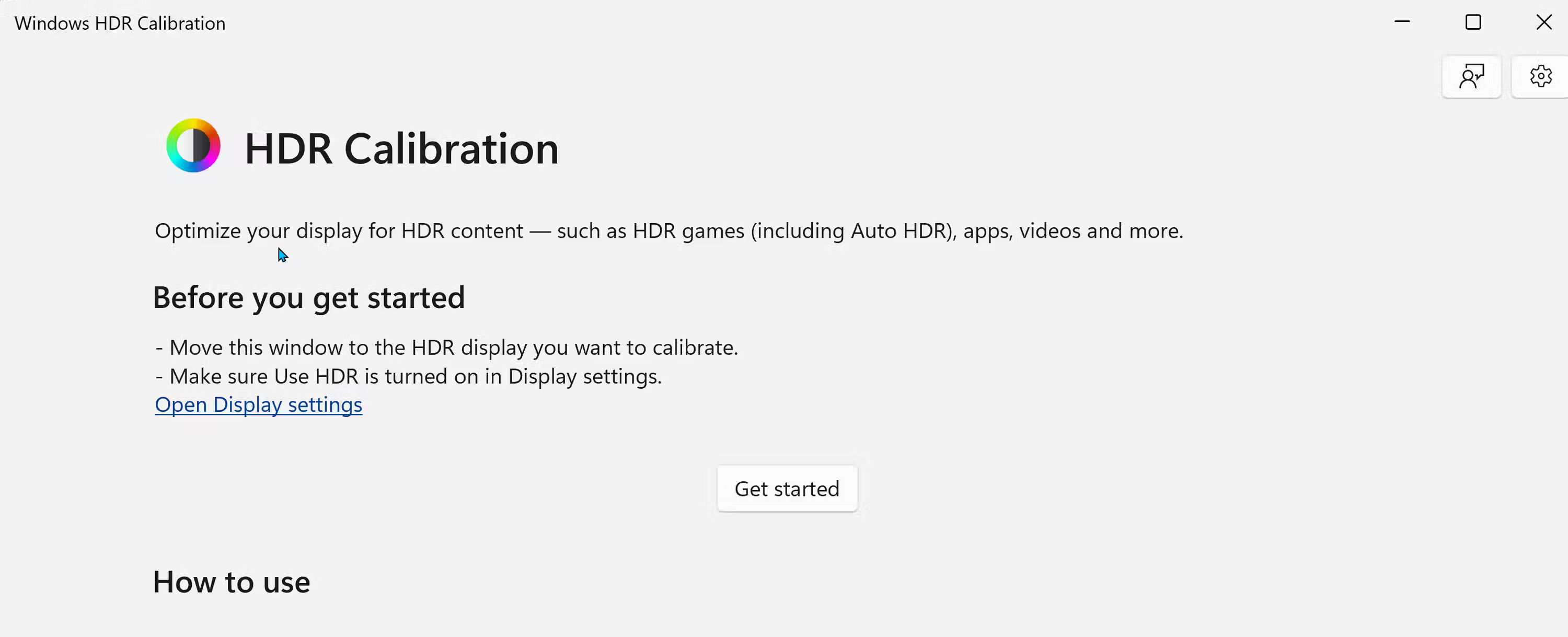
<p style="text-align: justify;">Windows HDR Calibration là công cụ hiệu chỉnh màn hình chính thức giúp bạn tạo cấu hình màu được tối ưu hóa để cải thiện độ chính xác của màu cho màn hình HDR của mình. Để bắt đầu:</p>

<div style="text-align: justify;">&nbsp;</div>

<ol>
	<li style="text-align: justify;">Tải xuống và cài đặt ứng dụng&nbsp;Windows HDR Calibration&nbsp;từ Microsoft Store: <span style="color:rgb(192, 57, 43);"><strong>https://apps.microsoft.com/detail/9n7f2sm5d1lr?hl=en-US&amp;gl=US</strong></span>. Khi khởi chạy, hãy di chuyển ứng dụng đến màn hình HDR mà bạn muốn hiệu chỉnh và nhấp vào&nbsp;<strong>Get Started</strong>.</li>
	<li style="text-align: justify;">Công cụ sẽ hướng dẫn bạn thực hiện quy trình hiệu chỉnh để điều chỉnh&nbsp;<strong>Minimal Luminance</strong>&nbsp;,&nbsp;<strong>Maximum Luminance</strong>&nbsp;,&nbsp;<strong>Max Full-Frame Luminance</strong>&nbsp;và&nbsp;<strong>Color Saturation</strong>. Chỉ cần điều chỉnh các thanh trượt cho đến khi hộp biến mất.</li>
	<li style="text-align: justify;">Sau khi hoàn tất, hãy xem lại cài đặt màu mới của bạn, nhập tên cho cấu hình màu và nhấp vào&nbsp;<strong>Finish</strong>.</li>
</ol>

<figure>
<div style="text-align: justify;"><img alt="Màn hình bắt đầu của phần mềm HDR Calibration trên Windows 11" data-i="3" data-src="https://st.quantrimang.com/photos/image/2024/09/17/tan-dung-toi-da-hdr-tren-windows-11-4.jpg" data-was-processed="true" height="1219" src="https://st.quantrimang.com/photos/image/2024/09/17/tan-dung-toi-da-hdr-tren-windows-11-4.jpg" width="3000" /></div>

<figcaption>
<div style="text-align: justify;">Màn hình bắt đầu của phần mềm HDR Calibration trên Windows 11</div>
</figcaption>
</figure>

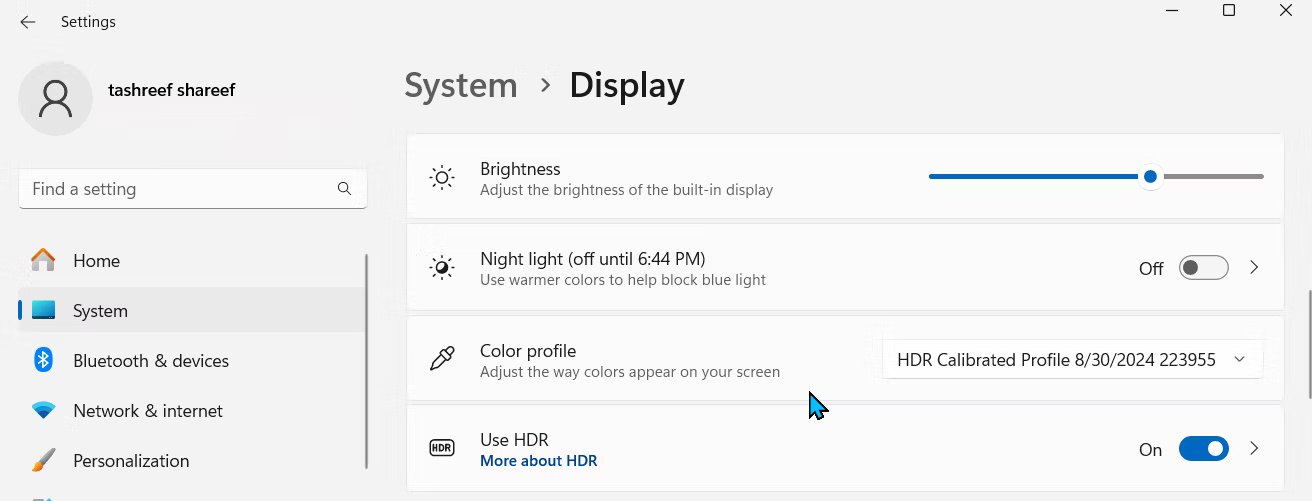
<p style="text-align: justify;">Để áp dụng cấu hình màu mới, hãy vào&nbsp;<strong>Settings &gt; System &gt; Display</strong>. Sau đó, trong mục&nbsp;<strong>Brightness &amp; Color</strong>, hãy nhấp vào menu drop-down&nbsp;<strong>Color profile</strong>&nbsp;và chọn cấu hình màu mới tạo của bạn. Nếu cần điều chỉnh thêm, hãy khám phá các phương pháp hiệu chuẩn bổ sung hiệu chuẩn màn hình để có màu sắc chính xác.</p>

<figure>
<div style="text-align: justify;"><img alt="Cấu hình màu HDR được chọn trong cài đặt màn hình Windows 11" data-i="4" data-src="https://st.quantrimang.com/photos/image/2024/09/17/tan-dung-toi-da-hdr-tren-windows-11-5.jpg" data-was-processed="true" height="501" src="https://st.quantrimang.com/photos/image/2024/09/17/tan-dung-toi-da-hdr-tren-windows-11-5.jpg" width="1312" /></div>

<figcaption>
<div style="text-align: justify;">Cấu hình màu HDR được chọn trong cài đặt màn hình Windows 11</div>
</figcaption>
</figure>

<div style="text-align: justify;"><iframe allow="autoplay" allowtransparency="true" aria-label="Advertisement" data-google-container-id="a!5" data-google-query-id="CL_XoY3Fy4gDFdtYDwIdJgMgGA" data-load-complete="true" frameborder="0" height="0" hspace="0" id="aswift_4" marginheight="0" marginwidth="0" name="aswift_4" sandbox="allow-scripts allow-same-origin allow-forms allow-presentation allow-popups" scrolling="no" tabindex="0" title="Advertisement" vspace="0" width="694"></iframe></div>

<h2 style="text-align: justify;">Điều chỉnh ánh xạ tông màu HDR và ​​cài đặt HDR game trên TV</h2>

<p style="text-align: justify;">Nếu nội dung HDR vẫn chưa chuẩn, hãy kiểm tra cài đặt ánh xạ tông màu của TV. Việc có sử dụng ánh xạ tông màu hay không là tùy thuộc vào sở thích cá nhân, nhưng việc chuyển đổi giữa ánh xạ tông màu động/chủ động và tĩnh có thể giúp bạn duy trì chi tiết mà không làm màn hình quá sáng hoặc quá tối.</p>

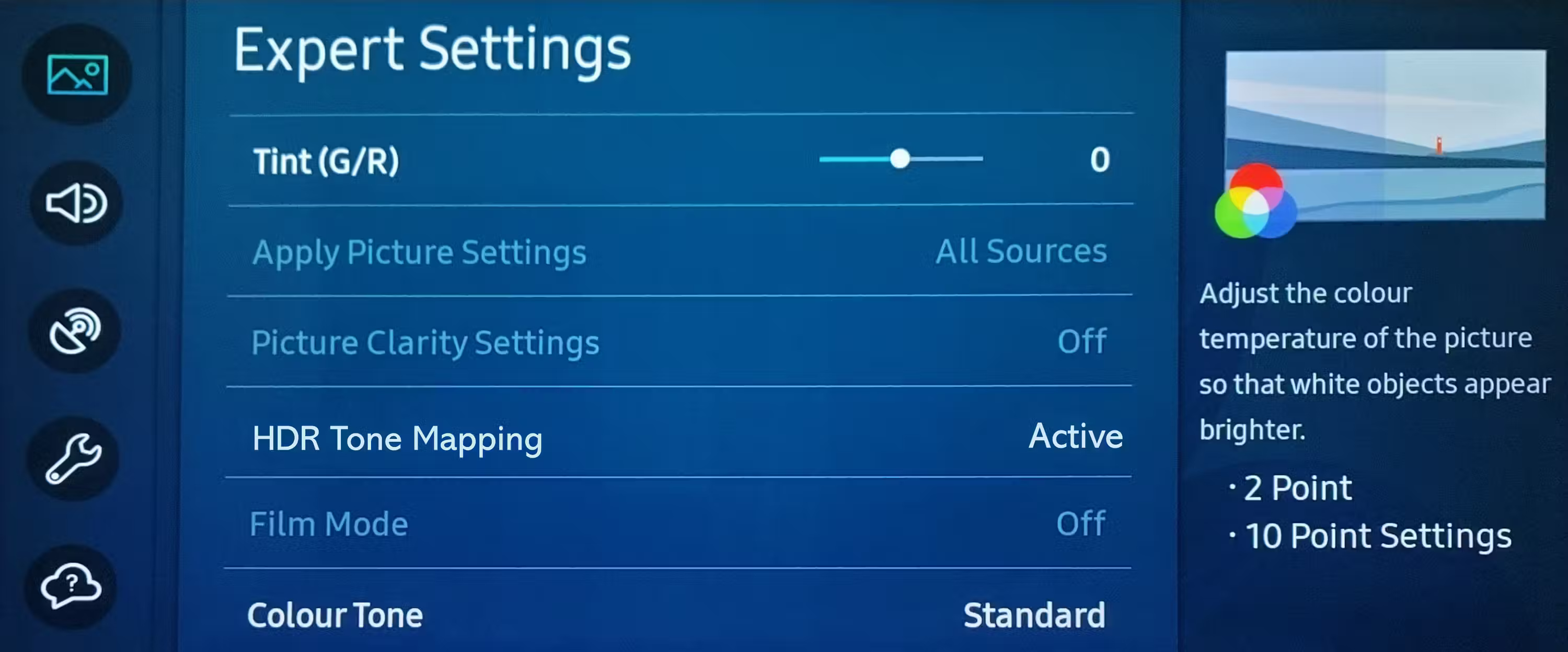
<p style="text-align: justify;">Vì các nhà sản xuất TV khác nhau áp dụng ánh xạ tông màu khác nhau, nên bạn sẽ cần thử nghiệm để tìm ra phương án phù hợp nhất với mình. Sau đây là cách điều chỉnh trên TV Samsung:</p>

<ol>
	<li style="text-align: justify;">Vào&nbsp;<strong>Settings &gt; Picture &gt; Expert Settings</strong>.</li>
	<li style="text-align: justify;">Chọn&nbsp;<strong>HDR Tone Mapping</strong>, sau đó chọn từ các tùy chọn&nbsp;<strong>Static</strong>&nbsp;và&nbsp;<strong>Active</strong>.</li>
</ol>

<figure>
<div style="text-align: justify;"><img alt="Ánh xạ tông màu HDR được đặt thành Active trên TV UHD Samsung" data-i="5" data-src="https://st.quantrimang.com/photos/image/2024/09/17/tan-dung-toi-da-hdr-tren-windows-11-6.jpg" data-was-processed="true" height="1247" src="https://st.quantrimang.com/photos/image/2024/09/17/tan-dung-toi-da-hdr-tren-windows-11-6.jpg" width="3000" /></div>

<figcaption>
<div style="text-align: justify;">Ánh xạ tông màu HDR được đặt thành Active trên TV UHD Samsung</div>
</figcaption>
</figure>

<p style="text-align: justify;">Một số TV, như LG C2, hỗ trợ chế độ HGiG tự động điều chỉnh màu nội dung trong game để đáp ứng ý định của người sáng tạo. Tương tự như vậy, TV Samsung sử dụng HDR theo tiêu chuẩn HGiG, vì vậy bạn có thể không cần phải loay hoay với các cài đặt ánh xạ tông màu trừ khi cần thiết.</p>

<p style="text-align: justify;">Sau khi bạn đã bật HDR trong Windows 11 và hiệu chỉnh màn hình của mình, hãy kiểm tra và bật HDR trong cài đặt game, nếu có. Ví dụ, để bật HDR10 trong Cyberpunk 2077, hãy vào&nbsp;<strong>Settings &gt; Video &gt; HDR Mode</strong>&nbsp;và ​​đặt thành&nbsp;<strong>HDR10 PQ</strong>&nbsp;hoặc&nbsp;<strong>HDR10 scRGB</strong>.</p>

<p style="text-align: justify;">Tối ưu hóa HDR trên Windows 11 cho phép bạn trải nghiệm game và phim theo cách mà người sáng tạo mong muốn. Với những mẹo này, bạn có thể tận dụng tối đa màn hình HDR đắt tiền của mình trong Windows 11.</p>
		</div>
				<div id="author">
						<p>
				<strong>Nguồn tin:</strong>
				Quantrimang.com:
			</p>
		</div>
	</div>
	<div id="footer" class="clearfix">
		<div id="url">
			<strong>URL của bản tin này: </strong><a href="https://www.nguoicodonvn2008.info/vi/news/savefile/kien-thuc-may-tinh/cach-tan-dung-toi-da-hdr-tren-windows-11-9006.html" title="Cách tận dụng tối đa HDR trên Windows 11">https://www.nguoicodonvn2008.info/vi/news/savefile/kien-thuc-may-tinh/cach-tan-dung-toi-da-hdr-tren-windows-11-9006.html</a>

		</div>
		<div class="clear"></div>
		<div class="copyright">
			&copy; .&#x3A; Nguoicodonvn2008.info - Cõi lòng người cô đơn &#x3A;.
		</div>
		<div id="contact">
			<a href="mailto:admin@nguoicodonvn2008.info">admin@nguoicodonvn2008.info</a>
		</div>
	</div>
</div>
        <div id="timeoutsess" class="chromeframe">
            Bạn đã không sử dụng Site, <a onclick="timeoutsesscancel();" href="https://nguoicodonvn2008.info/#">Bấm vào đây để duy trì trạng thái đăng nhập</a>. Thời gian chờ: <span id="secField"> 60 </span> giây
        </div>
        <div id="openidResult" class="nv-alert" style="display:none"></div>
        <div id="openidBt" data-result="" data-redirect=""></div>
		</script>
		<div class="car-top">
  <span><img src="https://nguoicodonvn2008.info/themes/default/images/car.png" alt=""></span>
</div>
<script src="https://nguoicodonvn2008.info/assets/js/jquery/jquery.min.js"></script>
<script>var nv_base_siteurl="/",nv_lang_data="vi",nv_lang_interface="vi",nv_name_variable="nv",nv_fc_variable="op",nv_lang_variable="language",nv_module_name="news",nv_func_name="savefile",nv_is_user=0, nv_my_ofs=-4,nv_my_abbr="EDT",nv_cookie_prefix="nv4c_e856T",nv_check_pass_mstime=1738000,nv_area_admin=0,nv_safemode=0,theme_responsive=0,nv_recaptcha_ver=2,nv_recaptcha_sitekey="",nv_recaptcha_type="image",XSSsanitize=1;</script>
<script src="https://nguoicodonvn2008.info/assets/js/language/vi.js"></script>
<script src="https://nguoicodonvn2008.info/assets/js/DOMPurify/purify3.js"></script>
<script src="https://nguoicodonvn2008.info/assets/js/global.js"></script>
<script src="https://nguoicodonvn2008.info/assets/js/site.js"></script>
<script src="https://nguoicodonvn2008.info/themes/default/js/news.js"></script>
<script src="https://nguoicodonvn2008.info/themes/default/js/main.js"></script>
<script src="https://nguoicodonvn2008.info/themes/default/js/custom.js"></script>
<script type="application/ld+json">
        {
            "@context": "https://schema.org",
            "@type": "Organization",
            "url": "https://nguoicodonvn2008.info",
            "logo": "https://nguoicodonvn2008.info/uploads/angel.gif"
        }
        </script>
<script src="https://nguoicodonvn2008.info/themes/default/js/bootstrap.min.js"></script>
<script type="text/javascript">
var $scrolltop = $('.car-top');
$scrolltop.on('click', function () {
    $('html,body').animate({
        scrollTop: 0
    }, 800);
    $(this).addClass("car-run");
    setTimeout(function(){ $scrolltop.removeClass('car-run');}, 1000);
    return false;
});
$(window).on('scroll', function ()
{ 
    if($(window).scrollTop() >= 200)
    {
        $scrolltop.addClass("show");
        $scrolltop.addClass("car-down");
    }
    else
    {
       $scrolltop.removeClass("show");
       setTimeout(function(){ $scrolltop.removeClass('car-down');}, 300);
    }
});
</script>
</body>
</html>