<!DOCTYPE html>
    <html lang="vi" xmlns="http://www.w3.org/1999/xhtml" prefix="og: http://ogp.me/ns#">
    <head>
<title>Cách tải và sử dụng Program Install and Uninstall Troubleshooter trong Windows</title>
<meta name="description" content="Cách tải và sử dụng Program Install and Uninstall Troubleshooter trong Windows - Savefile - Tin Tức -...">
<meta name="author" content=".: Nguoicodonvn2008.info - Cõi lòng người cô đơn :.">
<meta name="copyright" content=".: Nguoicodonvn2008.info - Cõi lòng người cô đơn :. [admin@nguoicodonvn2008.info]">
<meta name="robots" content="index, archive, follow, noodp">
<meta name="googlebot" content="index,archive,follow,noodp">
<meta name="msnbot" content="all,index,follow">
<meta name="generator" content="NukeViet v4.5">
<meta http-equiv="Content-Type" content="text/html; charset=utf-8">
<meta property="og:title" content="Cách tải và sử dụng Program Install and Uninstall Troubleshooter trong Windows">
<meta property="og:type" content="website">
<meta property="og:description" content="Savefile - Tin Tức -...">
<meta property="og:site_name" content=".&#x3A; Nguoicodonvn2008.info - Cõi lòng người cô đơn &#x3A;.">
<meta property="og:url" content="https://www.nguoicodonvn2008.info/vi/news/savefile/kien-thuc-may-tinh/cach-tai-va-su-dung-program-install-and-uninstall-troubleshooter-trong-windows-2604.html">
<link rel="shortcut icon" href="https://nguoicodonvn2008.info/favicon.ico">
<link rel="canonical" href="https://www.nguoicodonvn2008.info/vi/news/savefile/kien-thuc-may-tinh/cach-tai-va-su-dung-program-install-and-uninstall-troubleshooter-trong-windows-2604.html">
<link rel="alternate" href="https://nguoicodonvn2008.info/vi/news/rss/" title="Tin Tức" type="application/rss+xml">
<link rel="alternate" href="https://nguoicodonvn2008.info/vi/news/rss/karaoke-dual/" title="Tin Tức - Karaoke Dual" type="application/rss+xml">
<link rel="alternate" href="https://nguoicodonvn2008.info/vi/news/rss/nhac-tre/" title="Tin Tức - Nhạc trẻ" type="application/rss+xml">
<link rel="alternate" href="https://nguoicodonvn2008.info/vi/news/rss/tru-tinh/" title="Tin Tức - Trữ tình" type="application/rss+xml">
<link rel="alternate" href="https://nguoicodonvn2008.info/vi/news/rss/nuoc-ngoai/" title="Tin Tức - Nước ngoài" type="application/rss+xml">
<link rel="alternate" href="https://nguoicodonvn2008.info/vi/news/rss/remix/" title="Tin Tức - Remix" type="application/rss+xml">
<link rel="alternate" href="https://nguoicodonvn2008.info/vi/news/rss/tam-su-tinh-yeu/" title="Tin Tức - Tâm sự tình yêu" type="application/rss+xml">
<link rel="alternate" href="https://nguoicodonvn2008.info/vi/news/rss/tho-suu-tam/" title="Tin Tức - Thơ sưu tầm" type="application/rss+xml">
<link rel="alternate" href="https://nguoicodonvn2008.info/vi/news/rss/cuoc-song/" title="Tin Tức - Cuộc sống" type="application/rss+xml">
<link rel="alternate" href="https://nguoicodonvn2008.info/vi/news/rss/phan-mem/" title="Tin Tức - Phần mềm" type="application/rss+xml">
<link rel="alternate" href="https://nguoicodonvn2008.info/vi/news/rss/kien-thuc-may-tinh/" title="Tin Tức - Kiến thức máy tính" type="application/rss+xml">
<link rel="alternate" href="https://nguoicodonvn2008.info/vi/news/rss/hoc-tap/" title="Tin Tức - Học tập" type="application/rss+xml">
<link rel="alternate" href="https://nguoicodonvn2008.info/vi/news/rss/tai-lieu/" title="Tin Tức - Tài liệu" type="application/rss+xml">
<link rel="alternate" href="https://nguoicodonvn2008.info/vi/news/rss/de-thi/" title="Tin Tức - Đề thi" type="application/rss+xml">
<link rel="preload" as="style" href="https://nguoicodonvn2008.info/assets/css/font-awesome.min.css" type="text/css">
<link rel="preload" as="style" href="https://nguoicodonvn2008.info/themes/default/css/bootstrap.non-responsive.css" type="text/css">
<link rel="preload" as="style" href="https://nguoicodonvn2008.info/themes/default/css/style.css" type="text/css">
<link rel="preload" as="style" href="https://nguoicodonvn2008.info/themes/default/css/style.non-responsive.css" type="text/css">
<link rel="preload" as="style" href="https://nguoicodonvn2008.info/themes/default/css/news.css" type="text/css">
<link rel="preload" as="style" href="https://nguoicodonvn2008.info/themes/default/css/custom.css" type="text/css">
<link rel="preload" as="script" href="https://nguoicodonvn2008.info/assets/js/jquery/jquery.min.js" type="text/javascript">
<link rel="preload" as="script" href="https://nguoicodonvn2008.info/assets/js/language/vi.js" type="text/javascript">
<link rel="preload" as="script" href="https://nguoicodonvn2008.info/assets/js/DOMPurify/purify3.js" type="text/javascript">
<link rel="preload" as="script" href="https://nguoicodonvn2008.info/assets/js/global.js" type="text/javascript">
<link rel="preload" as="script" href="https://nguoicodonvn2008.info/assets/js/site.js" type="text/javascript">
<link rel="preload" as="script" href="https://nguoicodonvn2008.info/themes/default/js/news.js" type="text/javascript">
<link rel="preload" as="script" href="https://nguoicodonvn2008.info/themes/default/js/main.js" type="text/javascript">
<link rel="preload" as="script" href="https://nguoicodonvn2008.info/themes/default/js/custom.js" type="text/javascript">
<link rel="preload" as="script" href="https://nguoicodonvn2008.info/themes/default/js/bootstrap.min.js" type="text/javascript">
<link rel="stylesheet" href="https://nguoicodonvn2008.info/assets/css/font-awesome.min.css">
<link rel="stylesheet" href="https://nguoicodonvn2008.info/themes/default/css/bootstrap.non-responsive.css">
<link rel="stylesheet" href="https://nguoicodonvn2008.info/themes/default/css/style.css">
<link rel="stylesheet" href="https://nguoicodonvn2008.info/themes/default/css/style.non-responsive.css">
<link rel="StyleSheet" href="https://nguoicodonvn2008.info/themes/default/css/news.css">
<link rel="stylesheet" href="https://nguoicodonvn2008.info/themes/default/css/custom.css">
<style type="text/css">
	body{background: #fff;}
</style>
    </head>
    <body>
<div id="print">
	<div id="hd_print">
		<h2 class="pull-left">.&#x3A; Nguoicodonvn2008.info - Cõi lòng người cô đơn &#x3A;.</h2>
		<p class="pull-right"><a title=".&#x3A; Nguoicodonvn2008.info - Cõi lòng người cô đơn &#x3A;." href="https://nguoicodonvn2008.info/">https://nguoicodonvn2008.info</a></p>
	</div>
	<div class="clear"></div>
	<hr />
	<div id="content">
		<h1>Cách tải và sử dụng Program Install and Uninstall Troubleshooter trong Windows</h1>
		<ul class="list-inline">
			<li>Thứ năm - 27/08/2020 00:23</li>
			<li class="hidden-print txtrequired"><em class="fa fa-print">&nbsp;</em><a title="In ra" href="javascript:;" onclick="window.print()">In ra</a></li>
			<li class="hidden-print txtrequired"><em class="fa fa-power-off">&nbsp;</em><a title="Đóng cửa sổ này" href="javascript:;" onclick="window.close()">Đóng cửa sổ này</a></li>
		</ul>
		<div class="clear"></div>
		<div id="hometext">
		</div>
				<div class="imghome">
			<img alt="Cách tải và sử dụng Program Install and Uninstall Troubleshooter trong Windows" src="https://st.quantrimang.com/photos/image/2020/08/26/program-install-and-uninstall-troubleshooter-1.png" width="460" class="img-thumbnail" />
		</div>
		<div class="clear"></div>
		<div id="bodytext" class="clearfix">
			<p style="text-align: justify;">Hướng dẫn này chỉ cho bạn cách sử dụng Program Install and Uninstall Troubleshooter để khắc phục sự cố chặn cài đặt hoặc gỡ bỏ chương trình trong Windows 7, Windows 8 và Windows 10.</p>

<h2 style="text-align: justify;">Program Install and Uninstall Troubleshooter</h2>

<p style="text-align: justify;"><strong>Program Install and Uninstall Troubleshooter</strong>&nbsp;cho phép bạn tự động sửa chữa các sự cố bao gồm những registry key bị hỏng ngăn bạn cài đặt hoặc gỡ bỏ chương trình.</p>

<p style="text-align: justify;">Program Install and Uninstall Troubleshooter sửa lỗi:</p>

<ul>
	<li style="text-align: justify;">Registry key bị hỏng trên hệ điều hành 64-bit</li>
	<li style="text-align: justify;">Các registry key kiểm soát dữ liệu cập nhật bị hỏng</li>
	<li style="text-align: justify;">Sự cố khiến chương trình mới không được cài đặt</li>
	<li style="text-align: justify;">Sự cố khiến các chương trình hiện có không được gỡ cài đặt hoặc cập nhật hoàn toàn</li>
	<li style="text-align: justify;">Các sự cố ngăn bạn gỡ cài đặt một chương trình thông qua&nbsp;<strong>Add or Remove Programs</strong>(hay&nbsp;<strong>Programs and Features</strong>) trong&nbsp;Control Panel.</li>
</ul>

<div style="text-align: justify;">&nbsp;</div>

<h2 style="text-align: justify;">Cách sử dụng Program Install and Uninstall Troubleshooter trong Windows</h2>

<p style="text-align: justify;">Đây là cách thực hiện:</p>

<p style="text-align: justify;">1.&nbsp;Tải Program Install and Uninstall Troubleshooter:<br />
<span style="color:rgb(192, 57, 43);"><strong>quantrimang.com/photos/file/2020/08/26/MicrosoftProgram-Install-and-Uninstall-meta.zip</strong></span></p>

<p style="text-align: justify;">2. Bỏ chặn file ZIP đã tải xuống.</p>

<p style="text-align: justify;">3. Giải nén (kéo và thả) file&nbsp;<strong>MicrosoftProgram_Install_and_Uninstall.meta.diagcab</strong>&nbsp;từ trong file ZIP vào desktop.</p>

<p style="text-align: justify;">4. Chạy file&nbsp;<strong>MicrosoftProgram_Install_and_Uninstall.meta.diagcab</strong>.</p>

<p style="text-align: justify;">Trình khắc phục sự cố sẽ chỉ chạy và không được cài đặt.</p>

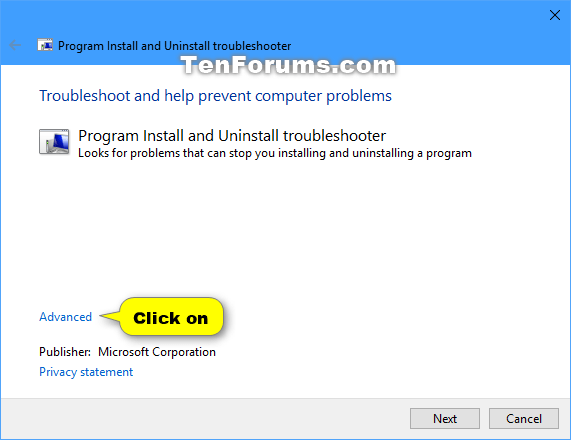
<p style="text-align: justify;">5. Nhấp vào liên kết&nbsp;<strong>Advanced</strong>&nbsp;trong trình khắc phục sự cố.</p>

<figure>
<div style="text-align: justify;"><img alt="Nhấp vào liên kết Advanced" data-i="0" data-src="https://st.quantrimang.com/photos/image/2020/08/26/program-install-and-uninstall-troubleshooter-1.png" data-was-processed="true" height="440" src="https://st.quantrimang.com/photos/image/2020/08/26/program-install-and-uninstall-troubleshooter-1.png" width="571" /></div>

<figcaption>
<div style="text-align: justify;">Nhấp vào liên kết Advanced</div>
</figcaption>
</figure>

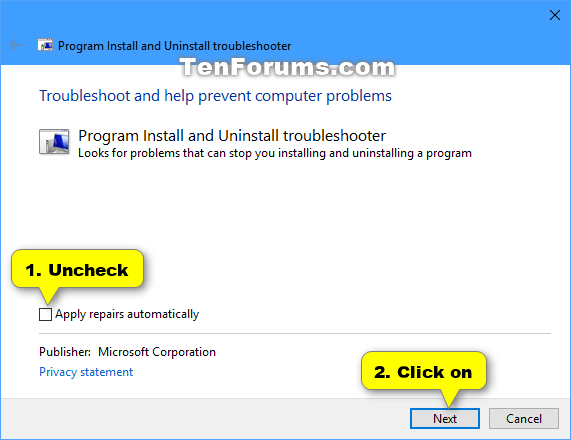
<p style="text-align: justify;">6. Bỏ chọn hộp&nbsp;<strong>Apply repairs automatically</strong>&nbsp;và nhấp vào&nbsp;<strong>Next.</strong></p>

<figure>
<div style="text-align: justify;"><img alt="Nhấp vào liên kết Advanced" data-i="1" data-src="https://st.quantrimang.com/photos/image/2020/08/26/program-install-and-uninstall-troubleshooter-2.png" data-was-processed="true" height="440" src="https://st.quantrimang.com/photos/image/2020/08/26/program-install-and-uninstall-troubleshooter-2.png" width="571" /></div>

<figcaption>
<div style="text-align: justify;">Nhấp vào liên kết Advanced</div>
</figcaption>
</figure>

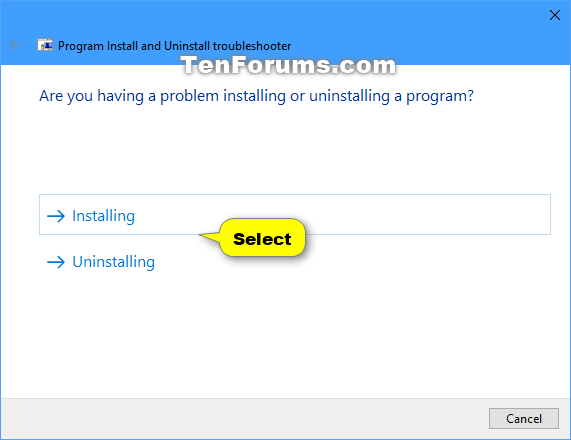
<p style="text-align: justify;">7. Tùy thuộc vào việc bạn gặp sự cố khi cài đặt hay gỡ cài đặt một chương trình, hãy chọn tùy chọn tương ứng.</p>

<figure>
<div style="text-align: justify;"><img alt="Chọn tùy chọn tương ứng khi gặp sự cố khi cài đặt hay gỡ cài đặt một chương trình" data-i="2" data-src="https://st.quantrimang.com/photos/image/2020/08/26/program-install-and-uninstall-troubleshooter-3.png" data-was-processed="true" height="440" src="https://st.quantrimang.com/photos/image/2020/08/26/program-install-and-uninstall-troubleshooter-3.png" width="571" /></div>

<figcaption>
<div style="text-align: justify;">Chọn tùy chọn tương ứng khi gặp sự cố khi cài đặt hay gỡ cài đặt một chương trình</div>
</figcaption>
</figure>

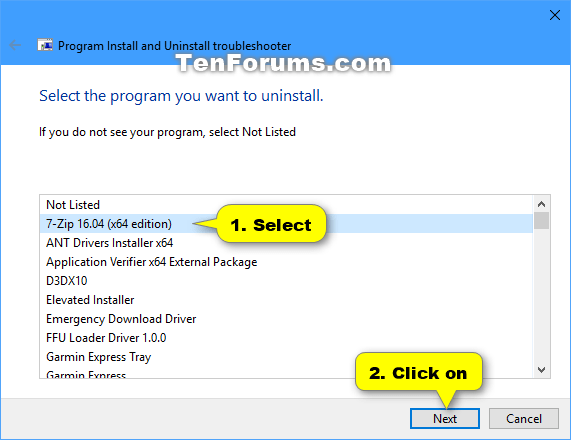
<p style="text-align: justify;">8. Chọn chương trình bạn muốn cài đặt hoặc gỡ cài đặt và nhấp vào&nbsp;<strong>Next.</strong></p>

<figure>
<div style="text-align: justify;"><img alt="Chọn chương trình bạn muốn cài đặt hoặc gỡ cài đặt" data-i="3" data-src="https://st.quantrimang.com/photos/image/2020/08/26/program-install-and-uninstall-troubleshooter-4.png" data-was-processed="true" height="440" src="https://st.quantrimang.com/photos/image/2020/08/26/program-install-and-uninstall-troubleshooter-4.png" width="571" /></div>

<figcaption>
<div style="text-align: justify;">Chọn chương trình bạn muốn cài đặt hoặc gỡ cài đặt</div>
</figcaption>
</figure>

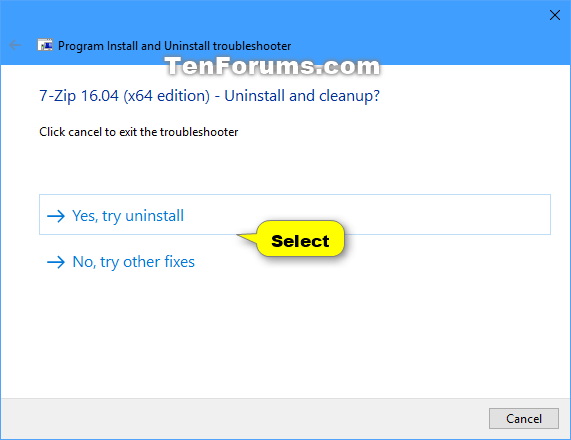
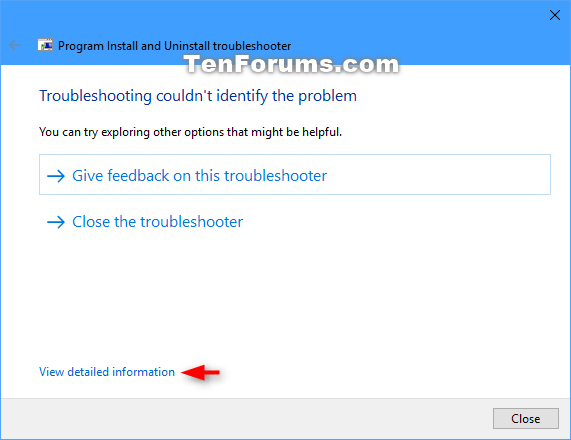
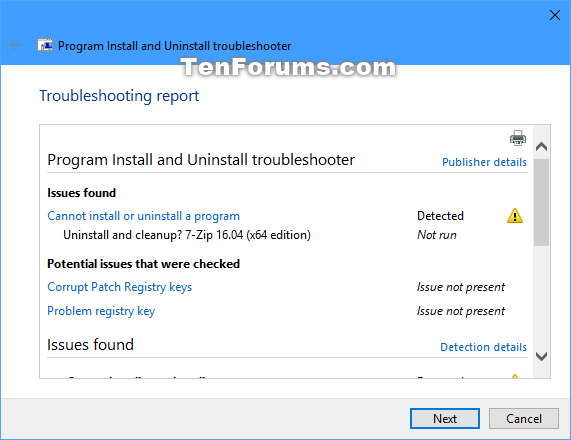
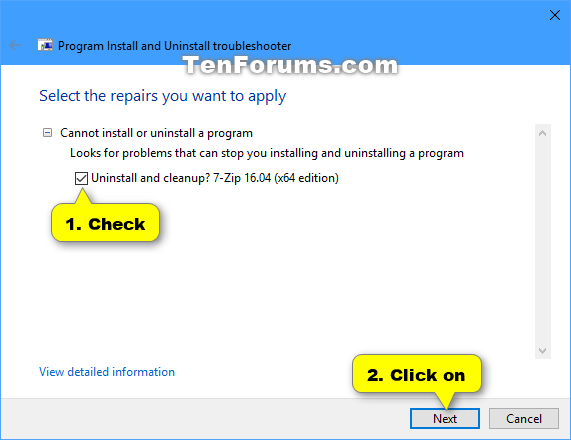
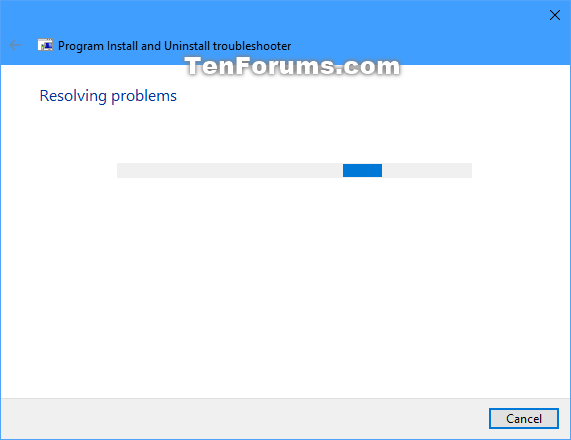
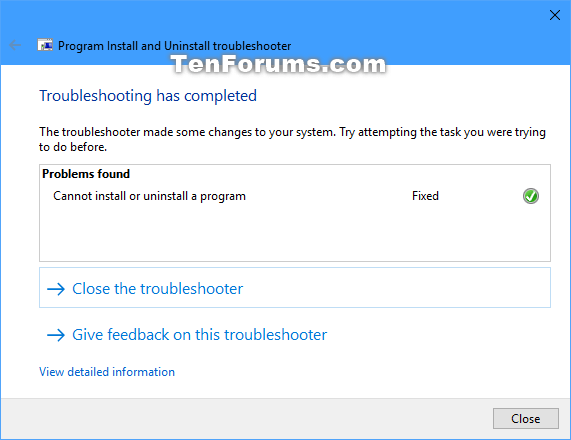
<p style="text-align: justify;">9. Thực hiện lựa chọn và làm theo bất kỳ hướng dẫn nào trong trình khắc phục sự cố, tùy thuộc vào những gì bạn muốn cho đến khi hoàn tất và hy vọng công cụ đã giúp khắc phục được sự cố.</p>

<figure>
<div style="text-align: justify;"><img alt="Hướng dẫn 1" data-i="4" data-src="https://st.quantrimang.com/photos/image/2020/08/26/program-install-and-uninstall-troubleshooter-5.png" data-was-processed="true" height="440" src="https://st.quantrimang.com/photos/image/2020/08/26/program-install-and-uninstall-troubleshooter-5.png" width="571" /></div>
</figure>

<figure>
<div style="text-align: justify;"><img alt="Hướng dẫn 2" data-i="5" data-src="https://st.quantrimang.com/photos/image/2020/08/26/program-install-and-uninstall-troubleshooter-6.png" data-was-processed="true" height="440" src="https://st.quantrimang.com/photos/image/2020/08/26/program-install-and-uninstall-troubleshooter-6.png" width="571" /></div>
</figure>

<figure>
<div style="text-align: justify;"><img alt="Hướng dẫn 3" data-i="6" data-src="https://st.quantrimang.com/photos/image/2020/08/26/program-install-and-uninstall-troubleshooter-7.png" data-was-processed="true" height="440" src="https://st.quantrimang.com/photos/image/2020/08/26/program-install-and-uninstall-troubleshooter-7.png" width="571" /></div>
</figure>

<figure>
<div style="text-align: justify;"><img alt="Hướng dẫn 4" data-i="7" data-src="https://st.quantrimang.com/photos/image/2020/08/26/program-install-and-uninstall-troubleshooter-8.png" data-was-processed="true" height="440" src="https://st.quantrimang.com/photos/image/2020/08/26/program-install-and-uninstall-troubleshooter-8.png" width="571" /></div>
</figure>

<figure>
<div style="text-align: justify;"><img alt="Hướng dẫn 5" data-i="8" data-src="https://st.quantrimang.com/photos/image/2020/08/26/program-install-and-uninstall-troubleshooter-9.png" data-was-processed="true" height="440" src="https://st.quantrimang.com/photos/image/2020/08/26/program-install-and-uninstall-troubleshooter-9.png" width="571" /></div>
</figure>

<figure>
<div style="text-align: justify;"><img alt="Hướng dẫn 6" data-i="9" data-src="https://st.quantrimang.com/photos/image/2020/08/26/program-install-and-uninstall-troubleshooter-10.png" data-was-processed="true" height="440" src="https://st.quantrimang.com/photos/image/2020/08/26/program-install-and-uninstall-troubleshooter-10.png" width="571" /></div>
</figure>

<div style="text-align: justify;">&nbsp;</div>
		</div>
				<div id="author">
						<p>
				<strong>Nguồn tin:</strong>
				Quantrimang.com
			</p>
		</div>
	</div>
	<div id="footer" class="clearfix">
		<div id="url">
			<strong>URL của bản tin này: </strong><a href="https://www.nguoicodonvn2008.info/vi/news/savefile/kien-thuc-may-tinh/cach-tai-va-su-dung-program-install-and-uninstall-troubleshooter-trong-windows-2604.html" title="Cách tải và sử dụng Program Install and Uninstall Troubleshooter trong Windows">https://www.nguoicodonvn2008.info/vi/news/savefile/kien-thuc-may-tinh/cach-tai-va-su-dung-program-install-and-uninstall-troubleshooter-trong-windows-2604.html</a>

		</div>
		<div class="clear"></div>
		<div class="copyright">
			&copy; .&#x3A; Nguoicodonvn2008.info - Cõi lòng người cô đơn &#x3A;.
		</div>
		<div id="contact">
			<a href="mailto:admin@nguoicodonvn2008.info">admin@nguoicodonvn2008.info</a>
		</div>
	</div>
</div>
        <div id="timeoutsess" class="chromeframe">
            Bạn đã không sử dụng Site, <a onclick="timeoutsesscancel();" href="https://nguoicodonvn2008.info/#">Bấm vào đây để duy trì trạng thái đăng nhập</a>. Thời gian chờ: <span id="secField"> 60 </span> giây
        </div>
        <div id="openidResult" class="nv-alert" style="display:none"></div>
        <div id="openidBt" data-result="" data-redirect=""></div>
		</script>
		<div class="car-top">
  <span><img src="https://nguoicodonvn2008.info/themes/default/images/car.png" alt=""></span>
</div>
<script src="https://nguoicodonvn2008.info/assets/js/jquery/jquery.min.js"></script>
<script>var nv_base_siteurl="/",nv_lang_data="vi",nv_lang_interface="vi",nv_name_variable="nv",nv_fc_variable="op",nv_lang_variable="language",nv_module_name="news",nv_func_name="savefile",nv_is_user=0, nv_my_ofs=-4,nv_my_abbr="EDT",nv_cookie_prefix="nv4c_e856T",nv_check_pass_mstime=1738000,nv_area_admin=0,nv_safemode=0,theme_responsive=0,nv_recaptcha_ver=2,nv_recaptcha_sitekey="",nv_recaptcha_type="image",XSSsanitize=1;</script>
<script src="https://nguoicodonvn2008.info/assets/js/language/vi.js"></script>
<script src="https://nguoicodonvn2008.info/assets/js/DOMPurify/purify3.js"></script>
<script src="https://nguoicodonvn2008.info/assets/js/global.js"></script>
<script src="https://nguoicodonvn2008.info/assets/js/site.js"></script>
<script src="https://nguoicodonvn2008.info/themes/default/js/news.js"></script>
<script src="https://nguoicodonvn2008.info/themes/default/js/main.js"></script>
<script src="https://nguoicodonvn2008.info/themes/default/js/custom.js"></script>
<script type="application/ld+json">
        {
            "@context": "https://schema.org",
            "@type": "Organization",
            "url": "https://nguoicodonvn2008.info",
            "logo": "https://nguoicodonvn2008.info/uploads/angel.gif"
        }
        </script>
<script src="https://nguoicodonvn2008.info/themes/default/js/bootstrap.min.js"></script>
<script type="text/javascript">
var $scrolltop = $('.car-top');
$scrolltop.on('click', function () {
    $('html,body').animate({
        scrollTop: 0
    }, 800);
    $(this).addClass("car-run");
    setTimeout(function(){ $scrolltop.removeClass('car-run');}, 1000);
    return false;
});
$(window).on('scroll', function ()
{ 
    if($(window).scrollTop() >= 200)
    {
        $scrolltop.addClass("show");
        $scrolltop.addClass("car-down");
    }
    else
    {
       $scrolltop.removeClass("show");
       setTimeout(function(){ $scrolltop.removeClass('car-down');}, 300);
    }
});
</script>
</body>
</html>