<!DOCTYPE html>
    <html lang="vi" xmlns="http://www.w3.org/1999/xhtml" prefix="og: http://ogp.me/ns#">
    <head>
<title>Cách tải driver Realtek High Definition Audio cho Windows 11</title>
<meta name="description" content="Cách tải driver Realtek High Definition Audio cho Windows 11 - Savefile - Tin Tức -...">
<meta name="author" content=".: Nguoicodonvn2008.info - Cõi lòng người cô đơn :.">
<meta name="copyright" content=".: Nguoicodonvn2008.info - Cõi lòng người cô đơn :. [admin@nguoicodonvn2008.info]">
<meta name="robots" content="index, archive, follow, noodp">
<meta name="googlebot" content="index,archive,follow,noodp">
<meta name="msnbot" content="all,index,follow">
<meta name="generator" content="NukeViet v4.5">
<meta http-equiv="Content-Type" content="text/html; charset=utf-8">
<meta property="og:title" content="Cách tải driver Realtek High Definition Audio cho Windows 11">
<meta property="og:type" content="website">
<meta property="og:description" content="Savefile - Tin Tức - https&#x3A;&#x002F;&#x002F;www.nguoicodonvn2008.info&#x002F;vi&#x002F;news&#x002F;savefile&#x002F;kien-thuc-may-tinh&#x002F;cach-tai-driver-realtek-high-definition-audio-cho-windows-11-8543.html">
<meta property="og:site_name" content=".&#x3A; Nguoicodonvn2008.info - Cõi lòng người cô đơn &#x3A;.">
<meta property="og:url" content="https://www.nguoicodonvn2008.info/vi/news/savefile/kien-thuc-may-tinh/cach-tai-driver-realtek-high-definition-audio-cho-windows-11-8543.html">
<link rel="shortcut icon" href="https://nguoicodonvn2008.info/favicon.ico">
<link rel="canonical" href="https://www.nguoicodonvn2008.info/vi/news/savefile/kien-thuc-may-tinh/cach-tai-driver-realtek-high-definition-audio-cho-windows-11-8543.html">
<link rel="alternate" href="https://nguoicodonvn2008.info/vi/news/rss/" title="Tin Tức" type="application/rss+xml">
<link rel="alternate" href="https://nguoicodonvn2008.info/vi/news/rss/karaoke-dual/" title="Tin Tức - Karaoke Dual" type="application/rss+xml">
<link rel="alternate" href="https://nguoicodonvn2008.info/vi/news/rss/nhac-tre/" title="Tin Tức - Nhạc trẻ" type="application/rss+xml">
<link rel="alternate" href="https://nguoicodonvn2008.info/vi/news/rss/tru-tinh/" title="Tin Tức - Trữ tình" type="application/rss+xml">
<link rel="alternate" href="https://nguoicodonvn2008.info/vi/news/rss/nuoc-ngoai/" title="Tin Tức - Nước ngoài" type="application/rss+xml">
<link rel="alternate" href="https://nguoicodonvn2008.info/vi/news/rss/remix/" title="Tin Tức - Remix" type="application/rss+xml">
<link rel="alternate" href="https://nguoicodonvn2008.info/vi/news/rss/tam-su-tinh-yeu/" title="Tin Tức - Tâm sự tình yêu" type="application/rss+xml">
<link rel="alternate" href="https://nguoicodonvn2008.info/vi/news/rss/tho-suu-tam/" title="Tin Tức - Thơ sưu tầm" type="application/rss+xml">
<link rel="alternate" href="https://nguoicodonvn2008.info/vi/news/rss/cuoc-song/" title="Tin Tức - Cuộc sống" type="application/rss+xml">
<link rel="alternate" href="https://nguoicodonvn2008.info/vi/news/rss/phan-mem/" title="Tin Tức - Phần mềm" type="application/rss+xml">
<link rel="alternate" href="https://nguoicodonvn2008.info/vi/news/rss/kien-thuc-may-tinh/" title="Tin Tức - Kiến thức máy tính" type="application/rss+xml">
<link rel="alternate" href="https://nguoicodonvn2008.info/vi/news/rss/hoc-tap/" title="Tin Tức - Học tập" type="application/rss+xml">
<link rel="alternate" href="https://nguoicodonvn2008.info/vi/news/rss/tai-lieu/" title="Tin Tức - Tài liệu" type="application/rss+xml">
<link rel="alternate" href="https://nguoicodonvn2008.info/vi/news/rss/de-thi/" title="Tin Tức - Đề thi" type="application/rss+xml">
<link rel="preload" as="style" href="https://nguoicodonvn2008.info/assets/css/font-awesome.min.css" type="text/css">
<link rel="preload" as="style" href="https://nguoicodonvn2008.info/themes/default/css/bootstrap.non-responsive.css" type="text/css">
<link rel="preload" as="style" href="https://nguoicodonvn2008.info/themes/default/css/style.css" type="text/css">
<link rel="preload" as="style" href="https://nguoicodonvn2008.info/themes/default/css/style.non-responsive.css" type="text/css">
<link rel="preload" as="style" href="https://nguoicodonvn2008.info/themes/default/css/news.css" type="text/css">
<link rel="preload" as="style" href="https://nguoicodonvn2008.info/themes/default/css/custom.css" type="text/css">
<link rel="preload" as="script" href="https://nguoicodonvn2008.info/assets/js/jquery/jquery.min.js" type="text/javascript">
<link rel="preload" as="script" href="https://nguoicodonvn2008.info/assets/js/language/vi.js" type="text/javascript">
<link rel="preload" as="script" href="https://nguoicodonvn2008.info/assets/js/DOMPurify/purify3.js" type="text/javascript">
<link rel="preload" as="script" href="https://nguoicodonvn2008.info/assets/js/global.js" type="text/javascript">
<link rel="preload" as="script" href="https://nguoicodonvn2008.info/assets/js/site.js" type="text/javascript">
<link rel="preload" as="script" href="https://nguoicodonvn2008.info/themes/default/js/news.js" type="text/javascript">
<link rel="preload" as="script" href="https://nguoicodonvn2008.info/themes/default/js/main.js" type="text/javascript">
<link rel="preload" as="script" href="https://nguoicodonvn2008.info/themes/default/js/custom.js" type="text/javascript">
<link rel="preload" as="script" href="https://nguoicodonvn2008.info/themes/default/js/bootstrap.min.js" type="text/javascript">
<link rel="stylesheet" href="https://nguoicodonvn2008.info/assets/css/font-awesome.min.css">
<link rel="stylesheet" href="https://nguoicodonvn2008.info/themes/default/css/bootstrap.non-responsive.css">
<link rel="stylesheet" href="https://nguoicodonvn2008.info/themes/default/css/style.css">
<link rel="stylesheet" href="https://nguoicodonvn2008.info/themes/default/css/style.non-responsive.css">
<link rel="StyleSheet" href="https://nguoicodonvn2008.info/themes/default/css/news.css">
<link rel="stylesheet" href="https://nguoicodonvn2008.info/themes/default/css/custom.css">
<style type="text/css">
	body{background: #fff;}
</style>
    </head>
    <body>
<div id="print">
	<div id="hd_print">
		<h2 class="pull-left">.&#x3A; Nguoicodonvn2008.info - Cõi lòng người cô đơn &#x3A;.</h2>
		<p class="pull-right"><a title=".&#x3A; Nguoicodonvn2008.info - Cõi lòng người cô đơn &#x3A;." href="https://nguoicodonvn2008.info/">https://nguoicodonvn2008.info</a></p>
	</div>
	<div class="clear"></div>
	<hr />
	<div id="content">
		<h1>Cách tải driver Realtek High Definition Audio cho Windows 11</h1>
		<ul class="list-inline">
			<li>Thứ hai - 24/06/2024 23:33</li>
			<li class="hidden-print txtrequired"><em class="fa fa-print">&nbsp;</em><a title="In ra" href="javascript:;" onclick="window.print()">In ra</a></li>
			<li class="hidden-print txtrequired"><em class="fa fa-power-off">&nbsp;</em><a title="Đóng cửa sổ này" href="javascript:;" onclick="window.close()">Đóng cửa sổ này</a></li>
		</ul>
		<div class="clear"></div>
		<div id="hometext">
		</div>
				<div class="imghome">
			<img alt="Cách tải driver Realtek High Definition Audio cho Windows 11" src="https://st.quantrimang.com/photos/image/2023/09/28/tai-driver-realtek-high-definition-audio-4.jpg" width="460" class="img-thumbnail" />
		</div>
		<div class="clear"></div>
		<div id="bodytext" class="clearfix">
			<p style="text-align: justify;">Bạn đang gặp vấn đề về âm thanh trên PC Windows của mình? Nếu vậy, có lẽ đã đến lúc cập nhật driver Realtek High Definition Audio của bạn.</p>

<p style="text-align: justify;">Cho dù bạn muốn cải thiện hiệu suất của thiết bị âm thanh hay khắc phục sự cố âm thanh hiện có, bạn nên tải xuống driver Realtek mới nhất cho máy tính của mình. Hãy đọc bài viết sau để biết chi tiết cách thực hiện việc này!</p>

<h2 style="text-align: justify;">Tải driver Realtek High Definition Audio từ trang web Realtek</h2>

<p style="text-align: justify;">Cách tốt nhất để tải xuống driver Realtek High Definition Audio trên máy tính của bạn là truy cập trang web chính thức của Realtek. Dưới đây là các bước để làm điều đó.</p>

<ol>
	<li style="text-align: justify;">Mở trang&nbsp;tải Realtek High Definition Audio Codec&nbsp;trên máy tính của bạn.</li>
</ol>

<div style="text-align: justify;"><span style="color:rgb(192, 57, 43);"><strong>https://www.realtek.com/en/component/zoo/category/pc-audio-codecs-high-definition-audio-codecs-software</strong></span></div>

<ol>
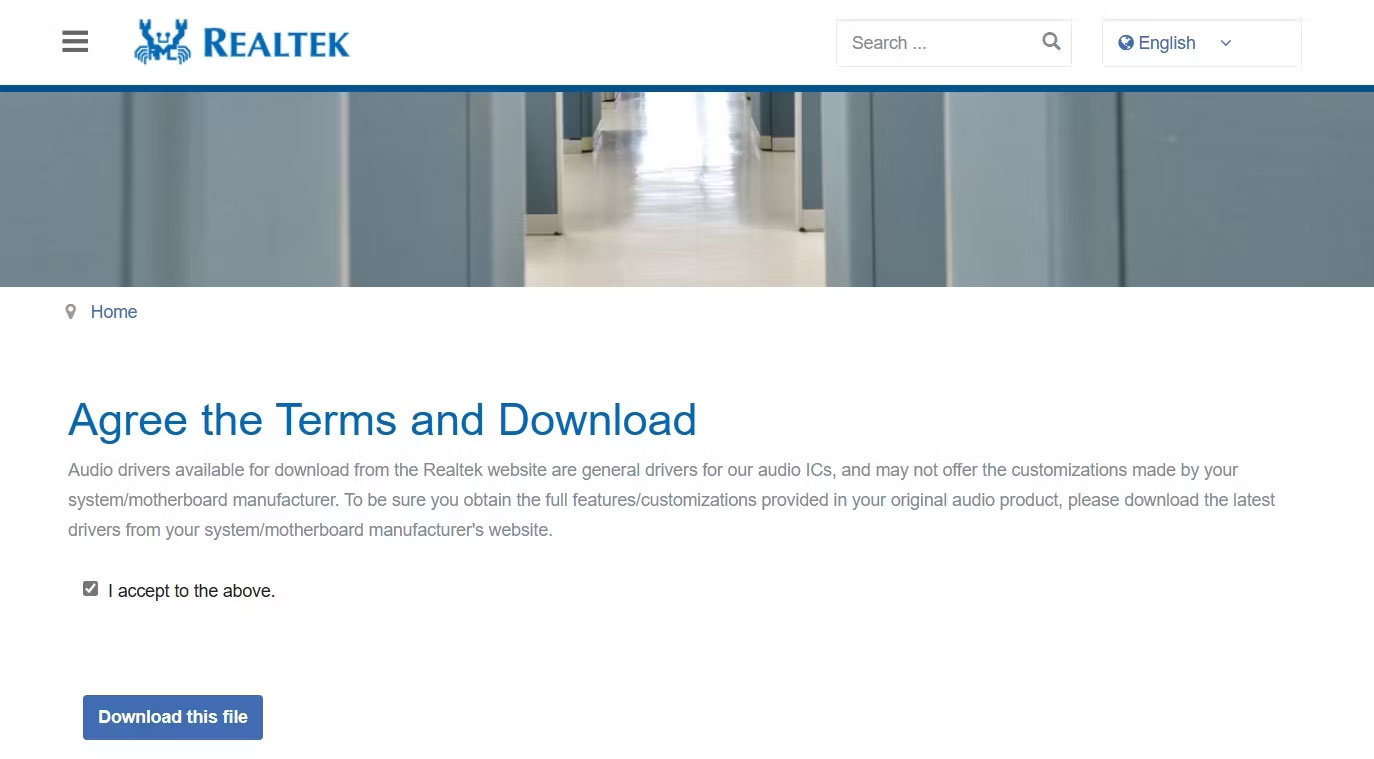
	<li style="text-align: justify;">Nhấp vào biểu tượng tải xuống trước file thực thi mới nhất.</li>
	<li style="text-align: justify;">Chọn hộp&nbsp;<strong>I accept to the above</strong>&nbsp;và nhấp vào&nbsp;<strong>Download this file</strong>.</li>
</ol>

<figure>
<div style="text-align: justify;"><img alt="Tùy chọn Download this file trong trang Realtek" data-i="0" data-src="https://st.quantrimang.com/photos/image/2023/09/28/tai-driver-realtek-high-definition-audio-1.jpg" data-was-processed="true" height="759" src="https://st.quantrimang.com/photos/image/2023/09/28/tai-driver-realtek-high-definition-audio-1.jpg" width="1374" /></div>

<figcaption>
<div style="text-align: justify;">Tùy chọn Download this file trong trang Realtek</div>
</figcaption>
</figure>

<div style="text-align: justify;"><iframe allow="autoplay" allowtransparency="true" aria-label="Advertisement" data-google-container-id="a!2" data-google-query-id="CLu09J_m9YYDFT6U6QUdLYEPrg" data-load-complete="true" frameborder="0" height="0" hspace="0" id="aswift_1" marginheight="0" marginwidth="0" name="aswift_1" sandbox="allow-scripts allow-same-origin allow-forms allow-presentation" scrolling="no" tabindex="0" title="Advertisement" vspace="0" width="694"></iframe></div>

<p style="text-align: justify;">Sau khi quá trình tải xuống hoàn tất, hãy chạy file thực thi để cài đặt driver Realtek High Definition Audio trên PC Windows của bạn.</p>

<h2 style="text-align: justify;">Tải driver Realtek High Definition Audio từ trang web của nhà sản xuất</h2>

<p style="text-align: justify;">Bạn cũng có thể truy cập trang web của nhà sản xuất PC để tải xuống driver Realtek High Definition Audio. Các bước để thực hiện việc này sẽ khác nhau tùy thuộc vào nhà sản xuất nhưng nguyên tắc chung là truy cập trang tải xuống driver của nhà sản xuất thiết bị rồi tìm kiếm và tải xuống driver âm thanh Realtek từ đó.</p>

<p style="text-align: justify;">Dưới đây là cách tải xuống driver Realtek High Definition Audio từ trang web của HP.</p>

<p style="text-align: justify;">1. Mở trang&nbsp;HP Software and Driver download&nbsp;trên thiết bị của bạn.<br />
<span style="color:rgb(192, 57, 43);"><strong>https://support.hp.com/us-en/drivers</strong></span></p>

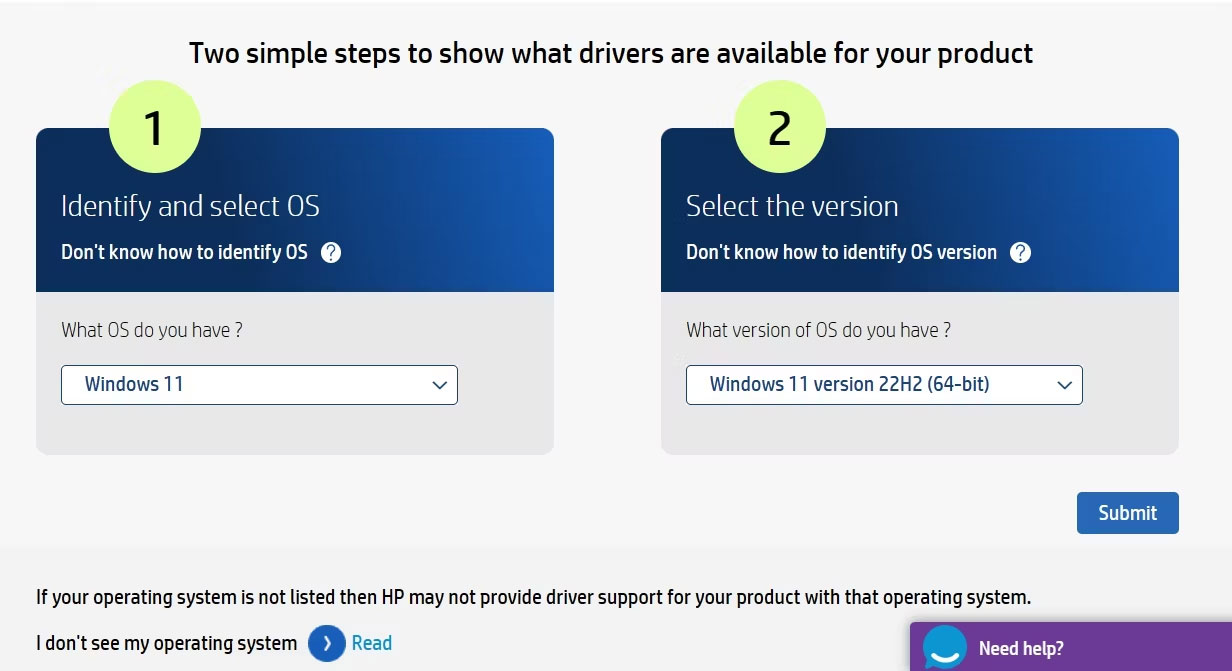
<p style="text-align: justify;">2. Chọn hệ điều hành và phiên bản hệ điều hành của bạn từ các menu drop-down tương ứng. Sau đó, nhấp vào&nbsp;<strong>Submit</strong>.</p>

<figure>
<div style="text-align: justify;"><br />
<img alt="Tùy chọn Submit trong trang HP Software and Driver download" data-adbro-processed="true" data-i="1" data-src="https://st.quantrimang.com/photos/image/2023/09/28/tai-driver-realtek-high-definition-audio-2.jpg" data-was-processed="true" height="671" src="https://st.quantrimang.com/photos/image/2023/09/28/tai-driver-realtek-high-definition-audio-2.jpg" width="1232" /></div>

<figcaption>
<div style="text-align: justify;">Tùy chọn Submit trong trang HP Software and Driver download</div>
</figcaption>
</figure>

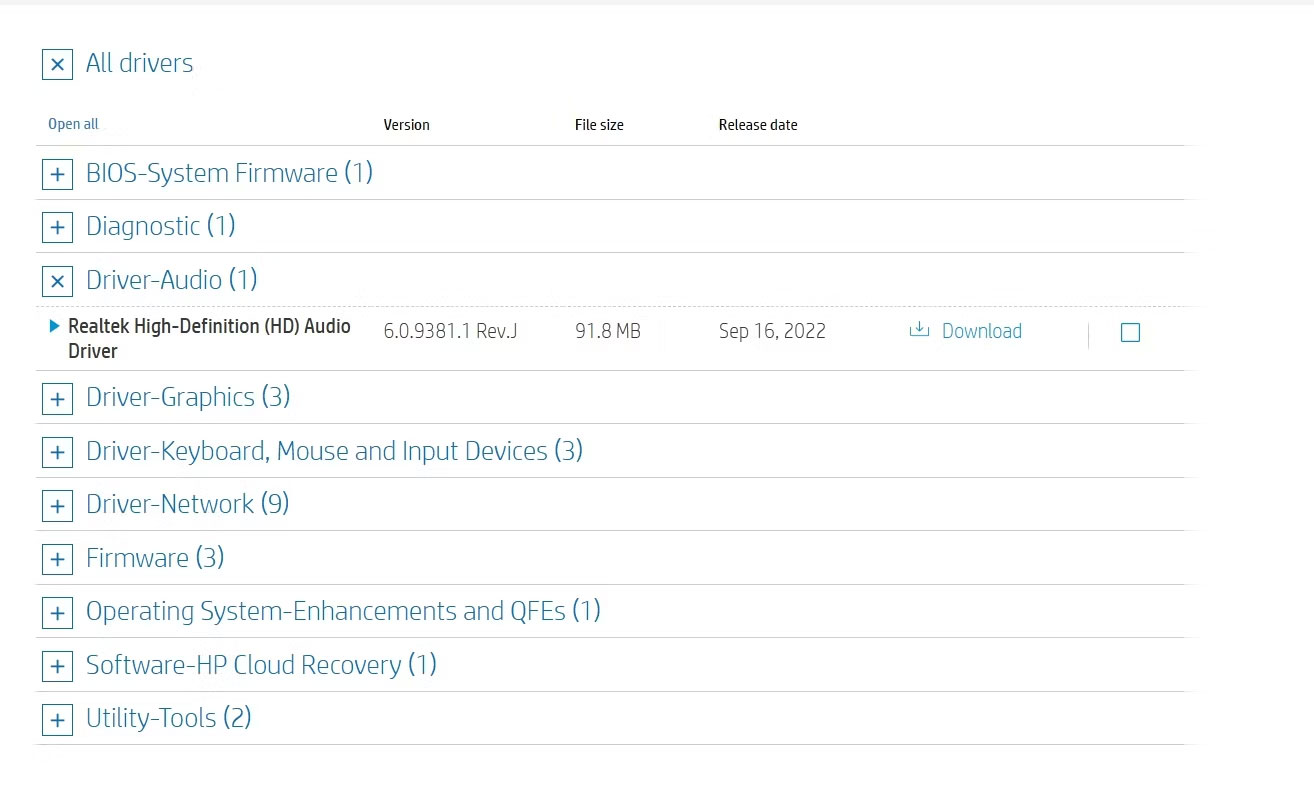
<p style="text-align: justify;">3. Nhấp vào&nbsp;<strong>All drivers</strong>&nbsp;&gt;&nbsp;<strong>Driver-Audio</strong>.</p>

<p style="text-align: justify;">4. Nhấp vào&nbsp;<strong>Download</strong>&nbsp;bên cạnh&nbsp;<strong>Realtek High-Definition (HD) Audio Driver</strong>.</p>

<div style="text-align: justify;"><iframe allow="autoplay" allowtransparency="true" aria-label="Advertisement" data-google-container-id="a!3" data-google-query-id="CPTi9J_m9YYDFSOR6QUdw6oDcg" data-load-complete="true" frameborder="0" height="0" hspace="0" id="aswift_2" marginheight="0" marginwidth="0" name="aswift_2" sandbox="allow-scripts allow-same-origin allow-forms allow-presentation" scrolling="no" tabindex="0" title="Advertisement" vspace="0" width="694"></iframe></div>

<figure>
<div style="text-align: justify;"><img alt="Tùy chọn Driver Audio trong trang HP Software and Driver download" data-i="2" data-src="https://st.quantrimang.com/photos/image/2023/09/28/tai-driver-realtek-high-definition-audio-3.jpg" data-was-processed="true" height="795" src="https://st.quantrimang.com/photos/image/2023/09/28/tai-driver-realtek-high-definition-audio-3.jpg" width="1314" /></div>

<figcaption>
<div style="text-align: justify;">Tùy chọn Driver Audio trong trang HP Software and Driver download</div>
</figcaption>
</figure>

<p style="text-align: justify;">Tương tự, bạn có thể sử dụng các liên kết bên dưới để truy cập trang tải xuống driver của nhà sản xuất PC của bạn và tải xuống driver Realtek High Definition Audio.</p>

<ul>
	<li style="text-align: justify;">Tải Realtek Audio Drivers cho Intel</li>
</ul>

<div style="text-align: justify;"><span style="color:rgb(192, 57, 43);"><strong>https://www.intel.com/content/www/us/en/download/19706/realtek-high-definition-audio-driver-for-windows-10-64-bit-windows-11-for-intel-nuc-11-enthusiast-kit-mini-pc-nuc11phki7.html</strong></span></div>

<ul>
	<li style="text-align: justify;">Tải Realtek Audio Drivers cho Asus</li>
</ul>

<div style="text-align: justify;"><span style="color:rgb(192, 57, 43);"><strong>https://www.asus.com/support/Download-Center/</strong></span></div>

<ul>
	<li style="text-align: justify;">Tải Realtek Audio Drivers cho Dell</li>
</ul>

<div style="text-align: justify;"><span style="color:rgb(192, 57, 43);"><strong>https://www.anrdoezrs.net/links/7251228/type/dlg/sid/UUmuoUeUpU2030178/https://www.dell.com/support/home/en-au/drivers/driversdetails?driverid=pwjd4</strong></span></div>

<ul>
	<li style="text-align: justify;">Tải Realtek Audio Drivers cho Lenovo</li>
</ul>

<div style="text-align: justify;"><span style="color:rgb(192, 57, 43);"><strong>https://support.lenovo.com/au/en/downloads/ds543933-realtek-audio-driver-for-windows-10-version-1809-or-later-thinkpad-x1-yoga-5th-gen-thinkpad-x1-carbon-8th-gen</strong></span></div>

<p style="text-align: justify;">Sau khi quá trình tải xuống hoàn tất, hãy nhấp đúp vào file thực thi và làm theo hướng dẫn trên màn hình để hoàn tất quá trình cài đặt.</p>

<h2 style="text-align: justify;">Cách cập nhật driver âm thanh Realtek trên Windows 11</h2>

<p style="text-align: justify;">Realtek thường xuyên phát hành các bản cập nhật driver mới để khắc phục các sự cố đã biết và cải thiện hiệu suất âm thanh tổng thể trên PC của bạn. Do đó, điều quan trọng là phải cài đặt driver âm thanh Realtek mới nhất trên máy tính của bạn.</p>

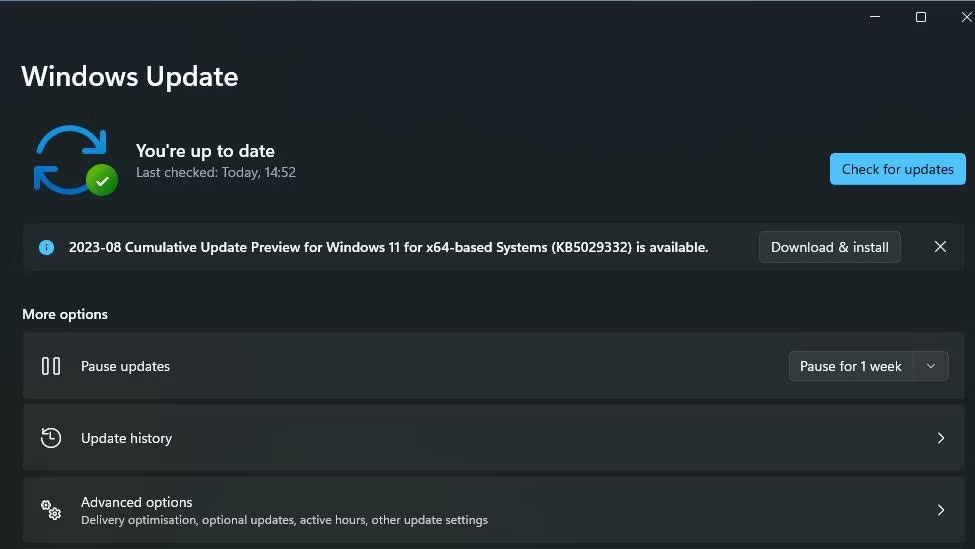
<p style="text-align: justify;">Để thực hiện việc này, nhấn&nbsp;<strong>Win + I&nbsp;</strong>để&nbsp;mở ứng dụng Settings, chọn&nbsp;<strong>Windows Update</strong>&nbsp;từ thanh bên trái và nhấp vào&nbsp;<strong>Check for updates</strong>&nbsp;ở bên phải.</p>

<figure>
<div style="text-align: justify;"><img alt="Nút Check for updates" data-i="3" data-src="https://st.quantrimang.com/photos/image/2023/09/28/tai-driver-realtek-high-definition-audio-4.jpg" data-was-processed="true" height="549" src="https://st.quantrimang.com/photos/image/2023/09/28/tai-driver-realtek-high-definition-audio-4.jpg" width="975" /></div>

<figcaption>
<div style="text-align: justify;">Nút Check for updates</div>
</figcaption>
</figure>

<p style="text-align: justify;">Máy tính của bạn sẽ tìm kiếm trực tuyến mọi bản cập nhật driver hoặc Windows có sẵn, bao gồm các bản cập nhật cho driver âm thanh Realtek. Nếu có bất kỳ bản cập nhật nào, Windows sẽ tự động tải xuống và cài đặt chúng.</p>

<p style="text-align: justify;">Driver Realtek High Definition Audio đảm bảo rằng các thiết bị âm thanh của bạn hoạt động bình thường trên PC Windows. Các driver này thường được cài đặt sẵn nhưng bạn cũng có thể cài đặt chúng theo cách thủ công từ trang web Realtek hoặc trang tải xuống driver của nhà sản xuất PC</p>
		</div>
				<div id="author">
						<p>
				<strong>Nguồn tin:</strong>
				Quantrimang.com:
			</p>
		</div>
	</div>
	<div id="footer" class="clearfix">
		<div id="url">
			<strong>URL của bản tin này: </strong><a href="https://www.nguoicodonvn2008.info/vi/news/savefile/kien-thuc-may-tinh/cach-tai-driver-realtek-high-definition-audio-cho-windows-11-8543.html" title="Cách tải driver Realtek High Definition Audio cho Windows 11">https://www.nguoicodonvn2008.info/vi/news/savefile/kien-thuc-may-tinh/cach-tai-driver-realtek-high-definition-audio-cho-windows-11-8543.html</a>

		</div>
		<div class="clear"></div>
		<div class="copyright">
			&copy; .&#x3A; Nguoicodonvn2008.info - Cõi lòng người cô đơn &#x3A;.
		</div>
		<div id="contact">
			<a href="mailto:admin@nguoicodonvn2008.info">admin@nguoicodonvn2008.info</a>
		</div>
	</div>
</div>
        <div id="timeoutsess" class="chromeframe">
            Bạn đã không sử dụng Site, <a onclick="timeoutsesscancel();" href="https://nguoicodonvn2008.info/#">Bấm vào đây để duy trì trạng thái đăng nhập</a>. Thời gian chờ: <span id="secField"> 60 </span> giây
        </div>
        <div id="openidResult" class="nv-alert" style="display:none"></div>
        <div id="openidBt" data-result="" data-redirect=""></div>
		</script>
		<div class="car-top">
  <span><img src="https://nguoicodonvn2008.info/themes/default/images/car.png" alt=""></span>
</div>
<script src="https://nguoicodonvn2008.info/assets/js/jquery/jquery.min.js"></script>
<script>var nv_base_siteurl="/",nv_lang_data="vi",nv_lang_interface="vi",nv_name_variable="nv",nv_fc_variable="op",nv_lang_variable="language",nv_module_name="news",nv_func_name="savefile",nv_is_user=0, nv_my_ofs=-4,nv_my_abbr="EDT",nv_cookie_prefix="nv4c_e856T",nv_check_pass_mstime=1738000,nv_area_admin=0,nv_safemode=0,theme_responsive=0,nv_recaptcha_ver=2,nv_recaptcha_sitekey="",nv_recaptcha_type="image",XSSsanitize=1;</script>
<script src="https://nguoicodonvn2008.info/assets/js/language/vi.js"></script>
<script src="https://nguoicodonvn2008.info/assets/js/DOMPurify/purify3.js"></script>
<script src="https://nguoicodonvn2008.info/assets/js/global.js"></script>
<script src="https://nguoicodonvn2008.info/assets/js/site.js"></script>
<script src="https://nguoicodonvn2008.info/themes/default/js/news.js"></script>
<script src="https://nguoicodonvn2008.info/themes/default/js/main.js"></script>
<script src="https://nguoicodonvn2008.info/themes/default/js/custom.js"></script>
<script type="application/ld+json">
        {
            "@context": "https://schema.org",
            "@type": "Organization",
            "url": "https://nguoicodonvn2008.info",
            "logo": "https://nguoicodonvn2008.info/uploads/angel.gif"
        }
        </script>
<script src="https://nguoicodonvn2008.info/themes/default/js/bootstrap.min.js"></script>
<script type="text/javascript">
var $scrolltop = $('.car-top');
$scrolltop.on('click', function () {
    $('html,body').animate({
        scrollTop: 0
    }, 800);
    $(this).addClass("car-run");
    setTimeout(function(){ $scrolltop.removeClass('car-run');}, 1000);
    return false;
});
$(window).on('scroll', function ()
{ 
    if($(window).scrollTop() >= 200)
    {
        $scrolltop.addClass("show");
        $scrolltop.addClass("car-down");
    }
    else
    {
       $scrolltop.removeClass("show");
       setTimeout(function(){ $scrolltop.removeClass('car-down');}, 300);
    }
});
</script>
</body>
</html>