<!DOCTYPE html>
    <html lang="vi" xmlns="http://www.w3.org/1999/xhtml" prefix="og: http://ogp.me/ns#">
    <head>
<title>Cách tải, cài đặt và sử dụng Google Fonts trên Ubuntu</title>
<meta name="description" content="Cách tải, cài đặt và sử dụng Google Fonts trên Ubuntu - Savefile - Tin Tức -...">
<meta name="author" content=".: Nguoicodonvn2008.info - Cõi lòng người cô đơn :.">
<meta name="copyright" content=".: Nguoicodonvn2008.info - Cõi lòng người cô đơn :. [admin@nguoicodonvn2008.info]">
<meta name="robots" content="index, archive, follow, noodp">
<meta name="googlebot" content="index,archive,follow,noodp">
<meta name="msnbot" content="all,index,follow">
<meta name="generator" content="NukeViet v4.5">
<meta http-equiv="Content-Type" content="text/html; charset=utf-8">
<meta property="og:title" content="Cách tải, cài đặt và sử dụng Google Fonts trên Ubuntu">
<meta property="og:type" content="website">
<meta property="og:description" content="Savefile - Tin Tức - https&#x3A;&#x002F;&#x002F;www.nguoicodonvn2008.info&#x002F;vi&#x002F;news&#x002F;savefile&#x002F;kien-thuc-may-tinh&#x002F;cach-tai-cai-dat-va-su-dung-google-fonts-tren-ubuntu-4886.html">
<meta property="og:site_name" content=".&#x3A; Nguoicodonvn2008.info - Cõi lòng người cô đơn &#x3A;.">
<meta property="og:url" content="https://www.nguoicodonvn2008.info/vi/news/savefile/kien-thuc-may-tinh/cach-tai-cai-dat-va-su-dung-google-fonts-tren-ubuntu-4886.html">
<link rel="shortcut icon" href="https://nguoicodonvn2008.info/favicon.ico">
<link rel="canonical" href="https://www.nguoicodonvn2008.info/vi/news/savefile/kien-thuc-may-tinh/cach-tai-cai-dat-va-su-dung-google-fonts-tren-ubuntu-4886.html">
<link rel="alternate" href="https://nguoicodonvn2008.info/vi/news/rss/" title="Tin Tức" type="application/rss+xml">
<link rel="alternate" href="https://nguoicodonvn2008.info/vi/news/rss/karaoke-dual/" title="Tin Tức - Karaoke Dual" type="application/rss+xml">
<link rel="alternate" href="https://nguoicodonvn2008.info/vi/news/rss/nhac-tre/" title="Tin Tức - Nhạc trẻ" type="application/rss+xml">
<link rel="alternate" href="https://nguoicodonvn2008.info/vi/news/rss/tru-tinh/" title="Tin Tức - Trữ tình" type="application/rss+xml">
<link rel="alternate" href="https://nguoicodonvn2008.info/vi/news/rss/nuoc-ngoai/" title="Tin Tức - Nước ngoài" type="application/rss+xml">
<link rel="alternate" href="https://nguoicodonvn2008.info/vi/news/rss/remix/" title="Tin Tức - Remix" type="application/rss+xml">
<link rel="alternate" href="https://nguoicodonvn2008.info/vi/news/rss/tam-su-tinh-yeu/" title="Tin Tức - Tâm sự tình yêu" type="application/rss+xml">
<link rel="alternate" href="https://nguoicodonvn2008.info/vi/news/rss/tho-suu-tam/" title="Tin Tức - Thơ sưu tầm" type="application/rss+xml">
<link rel="alternate" href="https://nguoicodonvn2008.info/vi/news/rss/cuoc-song/" title="Tin Tức - Cuộc sống" type="application/rss+xml">
<link rel="alternate" href="https://nguoicodonvn2008.info/vi/news/rss/phan-mem/" title="Tin Tức - Phần mềm" type="application/rss+xml">
<link rel="alternate" href="https://nguoicodonvn2008.info/vi/news/rss/kien-thuc-may-tinh/" title="Tin Tức - Kiến thức máy tính" type="application/rss+xml">
<link rel="alternate" href="https://nguoicodonvn2008.info/vi/news/rss/hoc-tap/" title="Tin Tức - Học tập" type="application/rss+xml">
<link rel="alternate" href="https://nguoicodonvn2008.info/vi/news/rss/tai-lieu/" title="Tin Tức - Tài liệu" type="application/rss+xml">
<link rel="alternate" href="https://nguoicodonvn2008.info/vi/news/rss/de-thi/" title="Tin Tức - Đề thi" type="application/rss+xml">
<link rel="preload" as="style" href="https://nguoicodonvn2008.info/assets/css/font-awesome.min.css" type="text/css">
<link rel="preload" as="style" href="https://nguoicodonvn2008.info/themes/default/css/bootstrap.non-responsive.css" type="text/css">
<link rel="preload" as="style" href="https://nguoicodonvn2008.info/themes/default/css/style.css" type="text/css">
<link rel="preload" as="style" href="https://nguoicodonvn2008.info/themes/default/css/style.non-responsive.css" type="text/css">
<link rel="preload" as="style" href="https://nguoicodonvn2008.info/themes/default/css/news.css" type="text/css">
<link rel="preload" as="style" href="https://nguoicodonvn2008.info/themes/default/css/custom.css" type="text/css">
<link rel="preload" as="script" href="https://nguoicodonvn2008.info/assets/js/jquery/jquery.min.js" type="text/javascript">
<link rel="preload" as="script" href="https://nguoicodonvn2008.info/assets/js/language/vi.js" type="text/javascript">
<link rel="preload" as="script" href="https://nguoicodonvn2008.info/assets/js/DOMPurify/purify3.js" type="text/javascript">
<link rel="preload" as="script" href="https://nguoicodonvn2008.info/assets/js/global.js" type="text/javascript">
<link rel="preload" as="script" href="https://nguoicodonvn2008.info/assets/js/site.js" type="text/javascript">
<link rel="preload" as="script" href="https://nguoicodonvn2008.info/themes/default/js/news.js" type="text/javascript">
<link rel="preload" as="script" href="https://nguoicodonvn2008.info/themes/default/js/main.js" type="text/javascript">
<link rel="preload" as="script" href="https://nguoicodonvn2008.info/themes/default/js/custom.js" type="text/javascript">
<link rel="preload" as="script" href="https://nguoicodonvn2008.info/themes/default/js/bootstrap.min.js" type="text/javascript">
<link rel="stylesheet" href="https://nguoicodonvn2008.info/assets/css/font-awesome.min.css">
<link rel="stylesheet" href="https://nguoicodonvn2008.info/themes/default/css/bootstrap.non-responsive.css">
<link rel="stylesheet" href="https://nguoicodonvn2008.info/themes/default/css/style.css">
<link rel="stylesheet" href="https://nguoicodonvn2008.info/themes/default/css/style.non-responsive.css">
<link rel="StyleSheet" href="https://nguoicodonvn2008.info/themes/default/css/news.css">
<link rel="stylesheet" href="https://nguoicodonvn2008.info/themes/default/css/custom.css">
<style type="text/css">
	body{background: #fff;}
</style>
    </head>
    <body>
<div id="print">
	<div id="hd_print">
		<h2 class="pull-left">.&#x3A; Nguoicodonvn2008.info - Cõi lòng người cô đơn &#x3A;.</h2>
		<p class="pull-right"><a title=".&#x3A; Nguoicodonvn2008.info - Cõi lòng người cô đơn &#x3A;." href="https://nguoicodonvn2008.info/">https://nguoicodonvn2008.info</a></p>
	</div>
	<div class="clear"></div>
	<hr />
	<div id="content">
		<h1>Cách tải, cài đặt và sử dụng Google Fonts trên Ubuntu</h1>
		<ul class="list-inline">
			<li>Thứ hai - 13/12/2021 23:51</li>
			<li class="hidden-print txtrequired"><em class="fa fa-print">&nbsp;</em><a title="In ra" href="javascript:;" onclick="window.print()">In ra</a></li>
			<li class="hidden-print txtrequired"><em class="fa fa-power-off">&nbsp;</em><a title="Đóng cửa sổ này" href="javascript:;" onclick="window.close()">Đóng cửa sổ này</a></li>
		</ul>
		<div class="clear"></div>
		<div id="hometext">
		</div>
				<div class="imghome">
			<img alt="Cách tải, cài đặt và sử dụng Google Fonts trên Ubuntu" src="https://st.quantrimang.com/photos/image/2021/12/13/su-dung-google-fonts-tren-ubuntu-5.jpg" width="460" class="img-thumbnail" />
		</div>
		<div class="clear"></div>
		<div id="bodytext" class="clearfix">
			<p style="text-align: justify;">Ubuntu&nbsp;là một trong những hệ điều hành mã nguồn mở tốt nhất trên thị trường hiện nay. Nó cung cấp một hệ sinh thái phần mềm thực sự với nhiều service cao cấp, những service mà bạn thường chỉ có thể mong đợi trong Windows hoặc macOS.</p>

<p style="text-align: justify;">Để đạt được hiệu quả này, Ubuntu cung cấp cho bạn một cache mặc định được sử dụng rộng rãi cho nhiều mục đích đánh máy khác nhau. Tuy nhiên, người dùng có thể tận dụng một số Google Fonts chất lượng cao nhất trên Ubuntu cho các mục đích xử lý văn bản khác nhau. Đây là cách thực hiện.</p>

<h2 style="text-align: justify;">Tải và cài đặt Google Fonts trên Ubuntu</h2>

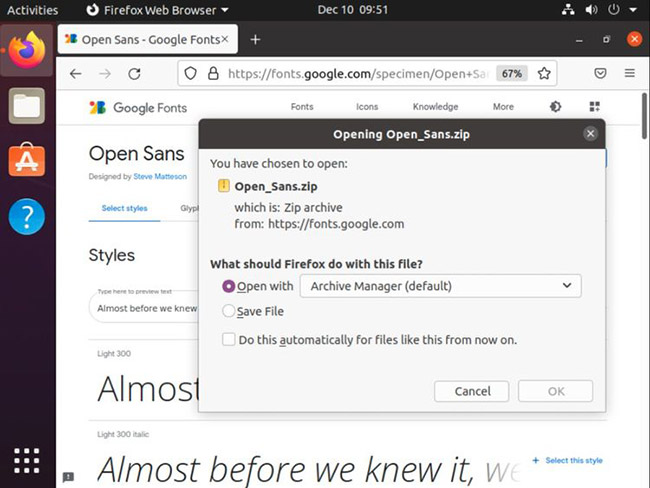
<p style="text-align: justify;">Để cài đặt Google Fonts trên Ubuntu theo cách thủ công, bước đầu tiên là tải xuống các phông chữ trực tiếp từ&nbsp;<em>fonts.google.com.</em></p>

<p style="text-align: justify;">Chọn họ phông chữ bạn muốn tải xuống. Trong hướng dẫn này, bài viết sẽ tải xuống phông chữ&nbsp;<strong>Open Sans</strong>. Nhấp vào nút&nbsp;<strong>Download Family</strong>&nbsp;ở góc trên cùng bên phải.</p>

<figure>
<div style="text-align: justify;"><img alt="Nhấp vào nút Download Family" data-i="0" data-src="https://st.quantrimang.com/photos/image/2021/12/13/su-dung-google-fonts-tren-ubuntu-1.jpg" data-was-processed="true" height="488" src="https://st.quantrimang.com/photos/image/2021/12/13/su-dung-google-fonts-tren-ubuntu-1.jpg" width="650" /></div>

<figcaption>
<div style="text-align: justify;">Nhấp vào nút Download Family</div>
</figcaption>
</figure>

<p style="text-align: justify;">Một kho lưu trữ nén chứa các phông chữ cần thiết sẽ được tải xuống máy. Bạn cần giải nén file đã tải xuống này và cài đặt các phông chữ thông qua Linux Terminal.</p>

<p style="text-align: justify;">Điều hướng đến thư mục phông chữ được cài đặt sẵn trong máy của bạn.</p>

<pre id="pre0">
<code>cd /usr/share/fonts</code></pre>

<p style="text-align: justify;">Tạo một folder trong thư mục bằng lệnh mkdir.</p>

<pre id="pre1">
<code>sudo mkdir googlefonts</code></pre>

<p style="text-align: justify;">Điều hướng đến thư mục&nbsp;<strong>googlefonts</strong>&nbsp;mới được tạo bằng lệnh cd.</p>

<pre id="pre2">
<code>cd googlefonts</code></pre>

<p style="text-align: justify;">Giải nén kho lưu trữ ZIP có chứa các phông chữ bạn cần cài đặt.</p>

<pre id="pre3">
<code>sudo unzip -d . ~/Downloads/Open_Sans.zip</code></pre>

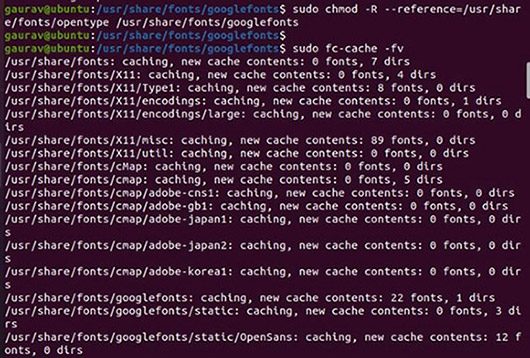
<p style="text-align: justify;">Khi bạn đã giải nén kho lưu trữ, hãy đăng ký phông chữ bằng lệnh sau:</p>

<pre id="pre4">
<code>sudo fc-cache -fv</code></pre>

<figure>
<div style="text-align: justify;"><img alt="Đăng ký phông chữ" data-i="1" data-src="https://st.quantrimang.com/photos/image/2021/12/13/su-dung-google-fonts-tren-ubuntu-2.jpg" data-was-processed="true" height="358" src="https://st.quantrimang.com/photos/image/2021/12/13/su-dung-google-fonts-tren-ubuntu-2.jpg" width="530" /></div>

<figcaption>
<div style="text-align: justify;">Đăng ký phông chữ</div>
</figcaption>
</figure>

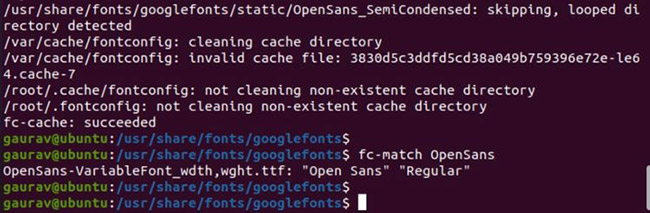
<p style="text-align: justify;">Cuối cùng, hãy kiểm tra xem phông chữ đã được cài đặt thành công hay chưa bằng cách gõ:</p>

<pre id="pre5">
<code>fc-match OpenSans</code></pre>

<figure>
<div style="text-align: justify;"><img alt="Kiểm tra xem phông chữ đã được cài đặt thành công hay chưa" data-i="2" data-src="https://st.quantrimang.com/photos/image/2021/12/13/su-dung-google-fonts-tren-ubuntu-3.jpg" data-was-processed="true" height="213" src="https://st.quantrimang.com/photos/image/2021/12/13/su-dung-google-fonts-tren-ubuntu-3.jpg" width="650" /></div>

<figcaption>
<div style="text-align: justify;">Kiểm tra xem phông chữ đã được cài đặt thành công hay chưa</div>
</figcaption>
</figure>

<p style="text-align: justify;">Vậy là xong, bạn đã sẵn sàng để bắt đầu sử dụng phông chữ ngay bây giờ.</p>

<h2 style="text-align: justify;">Cài đặt Google Fonts trên Ubuntu bằng TypeCatcher</h2>

<p style="text-align: justify;">Như đã trình bày ở trên, bạn có thể tải xuống và cài đặt bất kỳ phông chữ nào mình muốn trực tiếp từ web trên Ubuntu. Tuy nhiên, Google cung cấp các phông chữ cho nhiều trường hợp sử dụng khác nhau.</p>

<p style="text-align: justify;">Các phông chữ này có sẵn ở những định dạng khoảng cách chữ hẹp, đậm, nghiêng và nhạt, do đó cho phép bạn tải xuống và cài đặt chúng chỉ trong một lần. Tuy nhiên, tốt nhất là bạn nên nắm giữ TypeCatcher để dễ dàng cài đặt.</p>

<h3 style="text-align: justify;">Cách cài đặt và sử dụng TypeCatcher</h3>

<p style="text-align: justify;">TypeCatcher, như một kho lưu trữ phông chữ, tải xuống và cài đặt nhiều loại phông chữ trên các hệ thống Linux. Nó là một ứng dụng rất tiện lợi cần có, trong trường hợp bạn thường xuyên sử dụng Ubuntu để xử lý văn bản và thiết kế đồ họa.</p>

<p style="text-align: justify;">Cài đặt TypeCatcher từ Terminal dễ dàng hơn. Đầu tiên, hãy&nbsp;khởi chạy Terminal&nbsp;và cập nhật các gói hiện có bằng lệnh sau:</p>

<pre id="pre6">
<code>sudo apt install typecatcher</code></pre>

<p style="text-align: justify;">Bây giờ, để cài đặt TypeCatcher, hãy chạy lệnh sau:</p>

<pre id="pre7">
<code>sudo apt install typecatcher</code></pre>

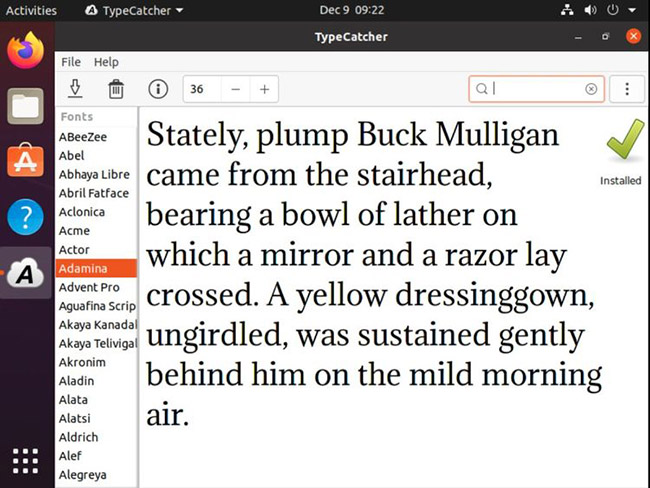
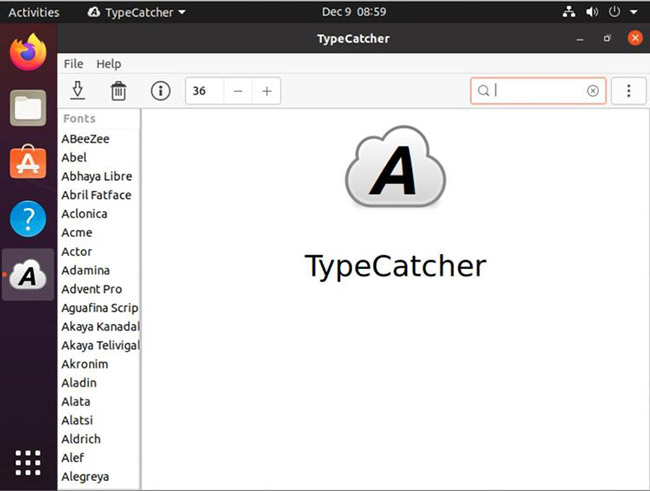
<p style="text-align: justify;">Sau khi hoàn tất, đóng Terminal và khởi chạy TypeCatcher từ menu&nbsp;<strong>Applications.</strong>&nbsp;Sau khi TypeCatcher khởi chạy, bạn có thể xem lại các phông chữ có sẵn được liệt kê trên bảng điều khiển bên trái.</p>

<figure>
<div style="text-align: justify;"><img alt="Giao diện Typecatcher trong Ubuntu" data-i="3" data-src="https://st.quantrimang.com/photos/image/2021/12/13/su-dung-google-fonts-tren-ubuntu-4.jpg" data-was-processed="true" height="491" src="https://st.quantrimang.com/photos/image/2021/12/13/su-dung-google-fonts-tren-ubuntu-4.jpg" width="650" /></div>

<figcaption>
<div style="text-align: justify;">Giao diện Typecatcher trong Ubuntu</div>
</figcaption>
</figure>

<p style="text-align: justify;">Ngay sau khi nhấp vào phông chữ mong muốn ở bên trái, bạn sẽ nhận được bản xem trước của phông chữ trên bảng điều khiển bên phải. Điều này sẽ làm cho nhiệm vụ của bạn dễ dàng hơn, vì bạn có thể xem trước phông chữ mình chọn trước khi cài đặt.</p>

<figure>
<div style="text-align: justify;"><img alt="Chọn và tải xuống phông chữ mong muốn" data-i="4" data-src="https://st.quantrimang.com/photos/image/2021/12/13/su-dung-google-fonts-tren-ubuntu-5.jpg" data-was-processed="true" height="488" src="https://st.quantrimang.com/photos/image/2021/12/13/su-dung-google-fonts-tren-ubuntu-5.jpg" width="650" /></div>

<figcaption>
<div style="text-align: justify;">Chọn và tải xuống phông chữ mong muốn</div>
</figcaption>
</figure>

<p style="text-align: justify;">Khi bạn đã chọn được một loại phông chữ cụ thể, hãy nhấp vào nút&nbsp;<strong>Download</strong>&nbsp;ở góc trên cùng bên trái. Ngoài ra, bạn có thể tìm kiếm các phông chữ bằng tên của chúng để nhanh chóng xác định vị trí chúng trong TypeCatcher.</p>

<p style="text-align: justify;">Để dễ dàng hơn nữa, bạn có thể chọn hàng loạt phông chữ Google cho Ubuntu và đặt chúng để cài đặt theo một trình tự tự động.</p>

<p style="text-align: justify;">Để kiểm tra các phông chữ, hãy sử dụng chúng trên&nbsp;LibreOffice&nbsp;hoặc bất kỳ ứng dụng xử lý văn bản nào khác mà bạn đã cài đặt trên hệ thống của mình. Các Google Fonts được tải xuống gần đây sẽ có sẵn trong mọi danh sách phông chữ của trình xử lý văn bản được cài đặt.</p>
		</div>
				<div id="author">
						<p>
				<strong>Nguồn tin:</strong>
				Quantrimang.com
			</p>
		</div>
	</div>
	<div id="footer" class="clearfix">
		<div id="url">
			<strong>URL của bản tin này: </strong><a href="https://www.nguoicodonvn2008.info/vi/news/savefile/kien-thuc-may-tinh/cach-tai-cai-dat-va-su-dung-google-fonts-tren-ubuntu-4886.html" title="Cách tải, cài đặt và sử dụng Google Fonts trên Ubuntu">https://www.nguoicodonvn2008.info/vi/news/savefile/kien-thuc-may-tinh/cach-tai-cai-dat-va-su-dung-google-fonts-tren-ubuntu-4886.html</a>

		</div>
		<div class="clear"></div>
		<div class="copyright">
			&copy; .&#x3A; Nguoicodonvn2008.info - Cõi lòng người cô đơn &#x3A;.
		</div>
		<div id="contact">
			<a href="mailto:admin@nguoicodonvn2008.info">admin@nguoicodonvn2008.info</a>
		</div>
	</div>
</div>
        <div id="timeoutsess" class="chromeframe">
            Bạn đã không sử dụng Site, <a onclick="timeoutsesscancel();" href="https://nguoicodonvn2008.info/#">Bấm vào đây để duy trì trạng thái đăng nhập</a>. Thời gian chờ: <span id="secField"> 60 </span> giây
        </div>
        <div id="openidResult" class="nv-alert" style="display:none"></div>
        <div id="openidBt" data-result="" data-redirect=""></div>
		</script>
		<div class="car-top">
  <span><img src="https://nguoicodonvn2008.info/themes/default/images/car.png" alt=""></span>
</div>
<script src="https://nguoicodonvn2008.info/assets/js/jquery/jquery.min.js"></script>
<script>var nv_base_siteurl="/",nv_lang_data="vi",nv_lang_interface="vi",nv_name_variable="nv",nv_fc_variable="op",nv_lang_variable="language",nv_module_name="news",nv_func_name="savefile",nv_is_user=0, nv_my_ofs=-4,nv_my_abbr="EDT",nv_cookie_prefix="nv4c_e856T",nv_check_pass_mstime=1738000,nv_area_admin=0,nv_safemode=0,theme_responsive=0,nv_recaptcha_ver=2,nv_recaptcha_sitekey="",nv_recaptcha_type="image",XSSsanitize=1;</script>
<script src="https://nguoicodonvn2008.info/assets/js/language/vi.js"></script>
<script src="https://nguoicodonvn2008.info/assets/js/DOMPurify/purify3.js"></script>
<script src="https://nguoicodonvn2008.info/assets/js/global.js"></script>
<script src="https://nguoicodonvn2008.info/assets/js/site.js"></script>
<script src="https://nguoicodonvn2008.info/themes/default/js/news.js"></script>
<script src="https://nguoicodonvn2008.info/themes/default/js/main.js"></script>
<script src="https://nguoicodonvn2008.info/themes/default/js/custom.js"></script>
<script type="application/ld+json">
        {
            "@context": "https://schema.org",
            "@type": "Organization",
            "url": "https://nguoicodonvn2008.info",
            "logo": "https://nguoicodonvn2008.info/uploads/angel.gif"
        }
        </script>
<script src="https://nguoicodonvn2008.info/themes/default/js/bootstrap.min.js"></script>
<script type="text/javascript">
var $scrolltop = $('.car-top');
$scrolltop.on('click', function () {
    $('html,body').animate({
        scrollTop: 0
    }, 800);
    $(this).addClass("car-run");
    setTimeout(function(){ $scrolltop.removeClass('car-run');}, 1000);
    return false;
});
$(window).on('scroll', function ()
{ 
    if($(window).scrollTop() >= 200)
    {
        $scrolltop.addClass("show");
        $scrolltop.addClass("car-down");
    }
    else
    {
       $scrolltop.removeClass("show");
       setTimeout(function(){ $scrolltop.removeClass('car-down');}, 300);
    }
});
</script>
</body>
</html>