<!DOCTYPE html>
    <html lang="vi" xmlns="http://www.w3.org/1999/xhtml" prefix="og: http://ogp.me/ns#">
    <head>
<title>Cách sửa lỗi Windows Update và Microsoft Store 0x80070424</title>
<meta name="description" content="Cách sửa lỗi Windows Update và Microsoft Store 0x80070424 - Savefile - Tin Tức -...">
<meta name="author" content=".: Nguoicodonvn2008.info - Cõi lòng người cô đơn :.">
<meta name="copyright" content=".: Nguoicodonvn2008.info - Cõi lòng người cô đơn :. [admin@nguoicodonvn2008.info]">
<meta name="robots" content="index, archive, follow, noodp">
<meta name="googlebot" content="index,archive,follow,noodp">
<meta name="msnbot" content="all,index,follow">
<meta name="generator" content="NukeViet v4.5">
<meta http-equiv="Content-Type" content="text/html; charset=utf-8">
<meta property="og:title" content="Cách sửa lỗi Windows Update và Microsoft Store 0x80070424">
<meta property="og:type" content="website">
<meta property="og:description" content="Savefile - Tin Tức - https&#x3A;&#x002F;&#x002F;www.nguoicodonvn2008.info&#x002F;vi&#x002F;news&#x002F;savefile&#x002F;kien-thuc-may-tinh&#x002F;cach-sua-loi-windows-update-va-microsoft-store-0x80070424-4683.html">
<meta property="og:site_name" content=".&#x3A; Nguoicodonvn2008.info - Cõi lòng người cô đơn &#x3A;.">
<meta property="og:url" content="https://www.nguoicodonvn2008.info/vi/news/savefile/kien-thuc-may-tinh/cach-sua-loi-windows-update-va-microsoft-store-0x80070424-4683.html">
<link rel="shortcut icon" href="https://nguoicodonvn2008.info/favicon.ico">
<link rel="canonical" href="https://www.nguoicodonvn2008.info/vi/news/savefile/kien-thuc-may-tinh/cach-sua-loi-windows-update-va-microsoft-store-0x80070424-4683.html">
<link rel="alternate" href="https://nguoicodonvn2008.info/vi/news/rss/" title="Tin Tức" type="application/rss+xml">
<link rel="alternate" href="https://nguoicodonvn2008.info/vi/news/rss/karaoke-dual/" title="Tin Tức - Karaoke Dual" type="application/rss+xml">
<link rel="alternate" href="https://nguoicodonvn2008.info/vi/news/rss/nhac-tre/" title="Tin Tức - Nhạc trẻ" type="application/rss+xml">
<link rel="alternate" href="https://nguoicodonvn2008.info/vi/news/rss/tru-tinh/" title="Tin Tức - Trữ tình" type="application/rss+xml">
<link rel="alternate" href="https://nguoicodonvn2008.info/vi/news/rss/nuoc-ngoai/" title="Tin Tức - Nước ngoài" type="application/rss+xml">
<link rel="alternate" href="https://nguoicodonvn2008.info/vi/news/rss/remix/" title="Tin Tức - Remix" type="application/rss+xml">
<link rel="alternate" href="https://nguoicodonvn2008.info/vi/news/rss/tam-su-tinh-yeu/" title="Tin Tức - Tâm sự tình yêu" type="application/rss+xml">
<link rel="alternate" href="https://nguoicodonvn2008.info/vi/news/rss/tho-suu-tam/" title="Tin Tức - Thơ sưu tầm" type="application/rss+xml">
<link rel="alternate" href="https://nguoicodonvn2008.info/vi/news/rss/cuoc-song/" title="Tin Tức - Cuộc sống" type="application/rss+xml">
<link rel="alternate" href="https://nguoicodonvn2008.info/vi/news/rss/phan-mem/" title="Tin Tức - Phần mềm" type="application/rss+xml">
<link rel="alternate" href="https://nguoicodonvn2008.info/vi/news/rss/kien-thuc-may-tinh/" title="Tin Tức - Kiến thức máy tính" type="application/rss+xml">
<link rel="alternate" href="https://nguoicodonvn2008.info/vi/news/rss/hoc-tap/" title="Tin Tức - Học tập" type="application/rss+xml">
<link rel="alternate" href="https://nguoicodonvn2008.info/vi/news/rss/tai-lieu/" title="Tin Tức - Tài liệu" type="application/rss+xml">
<link rel="alternate" href="https://nguoicodonvn2008.info/vi/news/rss/de-thi/" title="Tin Tức - Đề thi" type="application/rss+xml">
<link rel="preload" as="style" href="https://nguoicodonvn2008.info/assets/css/font-awesome.min.css" type="text/css">
<link rel="preload" as="style" href="https://nguoicodonvn2008.info/themes/default/css/bootstrap.non-responsive.css" type="text/css">
<link rel="preload" as="style" href="https://nguoicodonvn2008.info/themes/default/css/style.css" type="text/css">
<link rel="preload" as="style" href="https://nguoicodonvn2008.info/themes/default/css/style.non-responsive.css" type="text/css">
<link rel="preload" as="style" href="https://nguoicodonvn2008.info/themes/default/css/news.css" type="text/css">
<link rel="preload" as="style" href="https://nguoicodonvn2008.info/themes/default/css/custom.css" type="text/css">
<link rel="preload" as="script" href="https://nguoicodonvn2008.info/assets/js/jquery/jquery.min.js" type="text/javascript">
<link rel="preload" as="script" href="https://nguoicodonvn2008.info/assets/js/language/vi.js" type="text/javascript">
<link rel="preload" as="script" href="https://nguoicodonvn2008.info/assets/js/DOMPurify/purify3.js" type="text/javascript">
<link rel="preload" as="script" href="https://nguoicodonvn2008.info/assets/js/global.js" type="text/javascript">
<link rel="preload" as="script" href="https://nguoicodonvn2008.info/assets/js/site.js" type="text/javascript">
<link rel="preload" as="script" href="https://nguoicodonvn2008.info/themes/default/js/news.js" type="text/javascript">
<link rel="preload" as="script" href="https://nguoicodonvn2008.info/themes/default/js/main.js" type="text/javascript">
<link rel="preload" as="script" href="https://nguoicodonvn2008.info/themes/default/js/custom.js" type="text/javascript">
<link rel="preload" as="script" href="https://nguoicodonvn2008.info/themes/default/js/bootstrap.min.js" type="text/javascript">
<link rel="stylesheet" href="https://nguoicodonvn2008.info/assets/css/font-awesome.min.css">
<link rel="stylesheet" href="https://nguoicodonvn2008.info/themes/default/css/bootstrap.non-responsive.css">
<link rel="stylesheet" href="https://nguoicodonvn2008.info/themes/default/css/style.css">
<link rel="stylesheet" href="https://nguoicodonvn2008.info/themes/default/css/style.non-responsive.css">
<link rel="StyleSheet" href="https://nguoicodonvn2008.info/themes/default/css/news.css">
<link rel="stylesheet" href="https://nguoicodonvn2008.info/themes/default/css/custom.css">
<style type="text/css">
	body{background: #fff;}
</style>
    </head>
    <body>
<div id="print">
	<div id="hd_print">
		<h2 class="pull-left">.&#x3A; Nguoicodonvn2008.info - Cõi lòng người cô đơn &#x3A;.</h2>
		<p class="pull-right"><a title=".&#x3A; Nguoicodonvn2008.info - Cõi lòng người cô đơn &#x3A;." href="https://nguoicodonvn2008.info/">https://nguoicodonvn2008.info</a></p>
	</div>
	<div class="clear"></div>
	<hr />
	<div id="content">
		<h1>Cách sửa lỗi Windows Update và Microsoft Store 0x80070424</h1>
		<ul class="list-inline">
			<li>Thứ tư - 03/11/2021 00:44</li>
			<li class="hidden-print txtrequired"><em class="fa fa-print">&nbsp;</em><a title="In ra" href="javascript:;" onclick="window.print()">In ra</a></li>
			<li class="hidden-print txtrequired"><em class="fa fa-power-off">&nbsp;</em><a title="Đóng cửa sổ này" href="javascript:;" onclick="window.close()">Đóng cửa sổ này</a></li>
		</ul>
		<div class="clear"></div>
		<div id="hometext">
		</div>
				<div class="imghome">
			<img alt="Cách sửa lỗi Windows Update và Microsoft Store 0x80070424" src="https://st.quantrimang.com/photos/image/2021/11/03/sua-loi-windows-update-va-microsoft-store-0x80070424-1.jpg" width="460" class="img-thumbnail" />
		</div>
		<div class="clear"></div>
		<div id="bodytext" class="clearfix">
			<p style="text-align: justify;">Lỗi Windows Update 0x80070424 có thể ngăn bạn tải xuống và cài đặt các bản cập nhật Windows. Nó cũng có thể ảnh hưởng đến các ứng dụng của Microsoft, chẳng hạn như Xbox và ngăn bạn cài đặt phần mềm từ Microsoft Store.</p>

<p style="text-align: justify;">Việc thiếu các service Windows update thường gây ra lỗi này. Do đó, đây là một số bước khắc phục sự cố để sửa lỗi này nhanh nhất có thể.</p>

<h2 style="text-align: justify;">1. Chạy Windows Update Troubleshooter</h2>

<figure>
<div style="text-align: justify;"><img alt="Chạy Windows Update Troubleshooter" data-i="0" data-src="https://st.quantrimang.com/photos/image/2021/11/03/sua-loi-windows-update-va-microsoft-store-0x80070424-1.jpg" data-was-processed="true" height="380" src="https://st.quantrimang.com/photos/image/2021/11/03/sua-loi-windows-update-va-microsoft-store-0x80070424-1.jpg" width="650" /></div>

<figcaption>
<div style="text-align: justify;">Chạy Windows Update Troubleshooter</div>
</figcaption>
</figure>

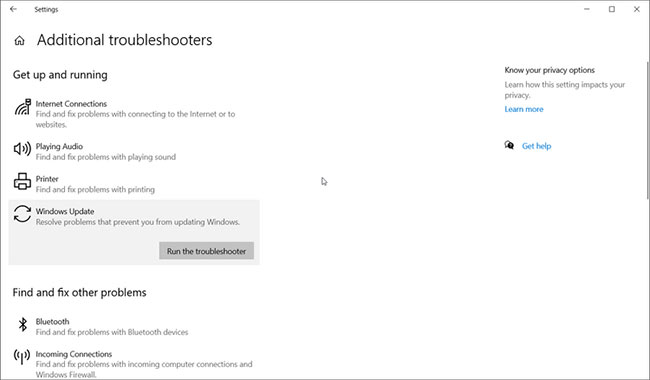
<p style="text-align: justify;">Windows Update Troubleshooter là một tiện ích tích hợp để quét và khắc phục các sự cố có thể ngăn PC cài đặt các bản cập nhật quan trọng.</p>

<p style="text-align: justify;">Để chạy Windows Update Troubleshooter:</p>

<p style="text-align: justify;"><strong>Bước 1</strong>: Nhấn&nbsp;<strong>Win + I</strong>&nbsp;để&nbsp;<a href="https://quantrimang.com/6-cach-truy-cap-nhanh-settings-tren-windows-10-130106" title="Tổng hợp 12 cách truy cập nhanh ứng dụng Settings trên Windows 10">mở Settings</a>.</p>

<p style="text-align: justify;"><strong>Bước 2</strong>: Đi tới&nbsp;<strong>Update and Security</strong>.</p>

<p style="text-align: justify;"><strong>Bước 3</strong>: Mở tab&nbsp;<strong>Troubleshoot</strong>&nbsp;từ bên trái.</p>

<p style="text-align: justify;"><strong>Bước 4</strong>: Ở bên phải, hãy kiểm tra xem có bất kỳ tùy chọn khắc phục sự cố nào không. Nếu không, hãy nhấp vào liên kết&nbsp;<strong>Additional troubleshooter.</strong></p>

<p style="text-align: justify;"><strong>Bước 5</strong>: Trong phần&nbsp;<strong>Get up and running</strong>, nhấp vào&nbsp;<strong>Windows Update.</strong></p>

<p style="text-align: justify;"><strong>Bước 6</strong>: Nhấp vào nút&nbsp;<strong>Run the troubleshooter</strong>. Hệ thống sẽ được quét để tìm các vấn đề ảnh hưởng đến các service Windows Update và đề xuất các bước cho phù hợp. Áp dụng các bản sửa lỗi được đề xuất và kiểm tra lại.</p>

<h2 style="text-align: justify;">2. Khởi động lại các service update</h2>

<figure>
<div style="text-align: justify;"><img alt="Khởi động lại các service update" data-i="1" data-src="https://st.quantrimang.com/photos/image/2021/11/03/sua-loi-windows-update-va-microsoft-store-0x80070424-2.jpg" data-was-processed="true" height="350" src="https://st.quantrimang.com/photos/image/2021/11/03/sua-loi-windows-update-va-microsoft-store-0x80070424-2.jpg" width="650" /></div>

<figcaption>
<div style="text-align: justify;">Khởi động lại các service update</div>
</figcaption>
</figure>

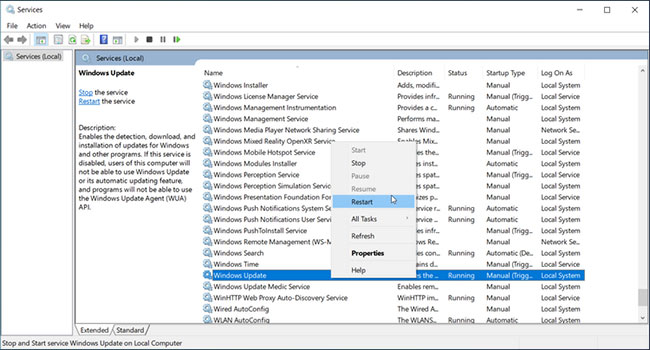
<p style="text-align: justify;">Bạn sẽ không thể cài đặt các bản cập nhật nếu service Windows Update bị thiếu hoặc không chạy trong nền. Microsoft cho phép bạn xác định thủ công trạng thái và khởi động lại service thông qua snap-in Services. Đây là cách thực hiện.</p>

<p style="text-align: justify;"><strong>Bước 1</strong>: Nhấn phím&nbsp;<strong>Windows + R</strong>&nbsp;để mở&nbsp;<strong>Run.</strong></p>

<p style="text-align: justify;"><strong>Bước 2</strong>: Nhập&nbsp;<strong>services.msc</strong>&nbsp;và nhấp vào&nbsp;<strong>OK</strong>&nbsp;để mở&nbsp;<strong>Services.</strong></p>

<p style="text-align: justify;"><strong>Bước 3</strong>: Trong cửa sổ&nbsp;<strong>Services</strong>, cuộn xuống và tìm service&nbsp;<strong>Windows Update.</strong></p>

<p style="text-align: justify;"><strong>Bước 4</strong>: Nhấp chuột phải vào service và chọn&nbsp;<strong>Restart</strong>&nbsp;nếu nó không chạy.</p>

<p style="text-align: justify;"><strong>Bước 5</strong>: Tiếp theo, nhấp đúp vào&nbsp;<strong>Service</strong>&nbsp;và đặt&nbsp;<strong>Startup type</strong>&nbsp;thành&nbsp;<strong>Automatic.</strong></p>

<p style="text-align: justify;"><strong>Bước 6</strong>: Nhấp vào&nbsp;<strong>Apply</strong>&nbsp;để lưu các thay đổi.</p>

<p style="text-align: justify;"><strong>Bước 7</strong>: Tiếp theo, hãy tìm&nbsp;<strong>Background Intelligent Transfer Service</strong>&nbsp;và&nbsp;<strong>Cryptographic Service</strong>, rồi lặp lại các bước để khởi động lại các service.</p>

<h2 style="text-align: justify;">3. Khôi phục các service Windows Update (wuaserv)</h2>

<figure>
<div style="text-align: justify;"><img alt="Khôi phục các service Windows Update (wuaserv)" data-i="2" data-src="https://st.quantrimang.com/photos/image/2021/11/03/sua-loi-windows-update-va-microsoft-store-0x80070424-3.jpg" data-was-processed="true" height="339" src="https://st.quantrimang.com/photos/image/2021/11/03/sua-loi-windows-update-va-microsoft-store-0x80070424-3.jpg" width="650" /></div>

<figcaption>
<div style="text-align: justify;">Khôi phục các service Windows Update (wuaserv)</div>
</figcaption>
</figure>

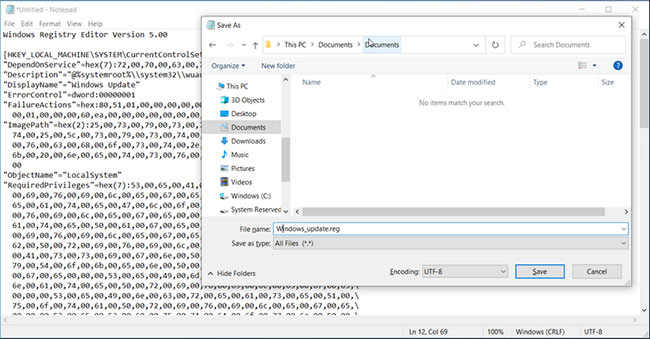
<p style="text-align: justify;">Nếu service Windows Update bị thiếu trong Services Snap-in, bạn có thể khôi phục các mục registry bị thiếu bằng cách chạy file registry với tư cách admin. Sao chép và dán code sau vào file Notepad, lưu nó với&nbsp;<a href="https://quantrimang.com/cach-mo-file-reg-tren-windows-145777" title="Tệp REG trong Windows là gì? Cách mở và đọc nội dung tệp REG">phần mở rộng reg</a>&nbsp;và sau đó thực thi để khôi phục các service Windows Update cần thiết. Đây là cách thực hiện.</p>

<p style="text-align: justify;"><strong>Bước 1</strong>: Nhập&nbsp;<strong>notepad</strong>&nbsp;vào thanh tìm kiếm Windows và nhấp vào kết quả liên quan để mở ứng dụng.</p>

<p style="text-align: justify;"><strong>Bước 2</strong>: Sao chép và dán code sau vào file Notepad:</p>

<pre id="pre0">
<code>Windows Registry Editor Version 5.00
&#91;HKEY_LOCAL_MACHINE\SYSTEM\CurrentControlSet\Services\wuauserv&#93;
&quot;DependOnService&quot;=hex(7):72,00,70,00,63,00,73,00,73,00,00,00,00,00
&quot;Description&quot;=&quot;@%systemroot%\
ystem32\\wuaueng.dll,-106&quot;
&quot;DisplayName&quot;=&quot;Windows Update&quot;
&quot;ErrorControl&quot;=dword:00000001
&quot;FailureActions&quot;=hex:80,51,01,00,00,00,00,00,00,00,00,00,03,00,00,00,14,00,00,\
00,01,00,00,00,60,ea,00,00,00,00,00,00,00,00,00,00,00,00,00,00,00,00,00,00
&quot;ImagePath&quot;=hex(2):25,00,73,00,79,00,73,00,74,00,65,00,6d,00,72,00,6f,00,6f,00,\
74,00,25,00,5c,00,73,00,79,00,73,00,74,00,65,00,6d,00,33,00,32,00,5c,00,73,\
00,76,00,63,00,68,00,6f,00,73,00,74,00,2e,00,65,00,78,00,65,00,20,00,2d,00,\
6b,00,20,00,6e,00,65,00,74,00,73,00,76,00,63,00,73,00,20,00,2d,00,70,00,00,\
00
&quot;ObjectName&quot;=&quot;LocalSystem&quot;
&quot;RequiredPrivileges&quot;=hex(7):53,00,65,00,41,00,75,00,64,00,69,00,74,00,50,00,72,\
00,69,00,76,00,69,00,6c,00,65,00,67,00,65,00,00,00,53,00,65,00,43,00,72,00,\
65,00,61,00,74,00,65,00,47,00,6c,00,6f,00,62,00,61,00,6c,00,50,00,72,00,69,\
00,76,00,69,00,6c,00,65,00,67,00,65,00,00,00,53,00,65,00,43,00,72,00,65,00,\
61,00,74,00,65,00,50,00,61,00,67,00,65,00,46,00,69,00,6c,00,65,00,50,00,72,\
00,69,00,76,00,69,00,6c,00,65,00,67,00,65,00,00,00,53,00,65,00,54,00,63,00,\
62,00,50,00,72,00,69,00,76,00,69,00,6c,00,65,00,67,00,65,00,00,00,53,00,65,\
00,41,00,73,00,73,00,69,00,67,00,6e,00,50,00,72,00,69,00,6d,00,61,00,72,00,\
79,00,54,00,6f,00,6b,00,65,00,6e,00,50,00,72,00,69,00,76,00,69,00,6c,00,65,\
00,67,00,65,00,00,00,53,00,65,00,49,00,6d,00,70,00,65,00,72,00,73,00,6f,00,\
6e,00,61,00,74,00,65,00,50,00,72,00,69,00,76,00,69,00,6c,00,65,00,67,00,65,\
00,00,00,53,00,65,00,49,00,6e,00,63,00,72,00,65,00,61,00,73,00,65,00,51,00,\
75,00,6f,00,74,00,61,00,50,00,72,00,69,00,76,00,69,00,6c,00,65,00,67,00,65,\
00,00,00,53,00,65,00,53,00,68,00,75,00,74,00,64,00,6f,00,77,00,6e,00,50,00,\
72,00,69,00,76,00,69,00,6c,00,65,00,67,00,65,00,00,00,53,00,65,00,44,00,65,\
00,62,00,75,00,67,00,50,00,72,00,69,00,76,00,69,00,6c,00,65,00,67,00,65,00,\
00,00,53,00,65,00,42,00,61,00,63,00,6b,00,75,00,70,00,50,00,72,00,69,00,76,\
00,69,00,6c,00,65,00,67,00,65,00,00,00,53,00,65,00,52,00,65,00,73,00,74,00,\
6f,00,72,00,65,00,50,00,72,00,69,00,76,00,69,00,6c,00,65,00,67,00,65,00,00,\
00,53,00,65,00,53,00,65,00,63,00,75,00,72,00,69,00,74,00,79,00,50,00,72,00,\
69,00,76,00,69,00,6c,00,65,00,67,00,65,00,00,00,53,00,65,00,54,00,61,00,6b,\
00,65,00,4f,00,77,00,6e,00,65,00,72,00,73,00,68,00,69,00,70,00,50,00,72,00,\
69,00,76,00,69,00,6c,00,65,00,67,00,65,00,00,00,53,00,65,00,4c,00,6f,00,61,\
00,64,00,44,00,72,00,69,00,76,00,65,00,72,00,50,00,72,00,69,00,76,00,69,00,\
6c,00,65,00,67,00,65,00,00,00,53,00,65,00,4d,00,61,00,6e,00,61,00,67,00,65,\
00,56,00,6f,00,6c,00,75,00,6d,00,65,00,50,00,72,00,69,00,76,00,69,00,6c,00,\
65,00,67,00,65,00,00,00,53,00,65,00,53,00,79,00,73,00,74,00,65,00,6d,00,45,\
00,6e,00,76,00,69,00,72,00,6f,00,6e,00,6d,00,65,00,6e,00,74,00,50,00,72,00,\
69,00,76,00,69,00,6c,00,65,00,67,00,65,00,00,00,53,00,65,00,43,00,72,00,65,\
00,61,00,74,00,65,00,53,00,79,00,6d,00,62,00,6f,00,6c,00,69,00,63,00,4c,00,\
69,00,6e,00,6b,00,50,00,72,00,69,00,76,00,69,00,6c,00,65,00,67,00,65,00,00,\
00,53,00,65,00,49,00,6e,00,63,00,72,00,65,00,61,00,73,00,65,00,42,00,61,00,\
73,00,65,00,50,00,72,00,69,00,6f,00,72,00,69,00,74,00,79,00,50,00,72,00,69,\
00,76,00,69,00,6c,00,65,00,67,00,65,00,00,00,00,00
&quot;ServiceSidType&quot;=dword:00000001
&quot;Start&quot;=dword:00000003
&quot;SvcMemHardLimitInMB&quot;=dword:000000f6
&quot;SvcMemMidLimitInMB&quot;=dword:000000a7
&quot;SvcMemSoftLimitInMB&quot;=dword:00000058
&quot;Type&quot;=dword:00000020
&#91;HKEY_LOCAL_MACHINE\SYSTEM\CurrentControlSet\Services\wuauserv\Parameters&#93;
&quot;ServiceDll&quot;=hex(2):25,00,73,00,79,00,73,00,74,00,65,00,6d,00,72,00,6f,00,6f,\
00,74,00,25,00,5c,00,73,00,79,00,73,00,74,00,65,00,6d,00,33,00,32,00,5c,00,\
77,00,75,00,61,00,75,00,65,00,6e,00,67,00,2e,00,64,00,6c,00,6c,00,00,00
&quot;ServiceDllUnloadOnStop&quot;=dword:00000001
&quot;ServiceMain&quot;=&quot;WUServiceMain&quot;
&#91;HKEY_LOCAL_MACHINE\SYSTEM\CurrentControlSet\Services\wuauserv\Security&#93;
&quot;Security&quot;=hex:01,00,14,80,78,00,00,00,84,00,00,00,14,00,00,00,30,00,00,00,02,\
00,1c,00,01,00,00,00,02,80,14,00,ff,00,0f,00,01,01,00,00,00,00,00,01,00,00,\
00,00,02,00,48,00,03,00,00,00,00,00,14,00,9d,00,02,00,01,01,00,00,00,00,00,\
05,0b,00,00,00,00,00,18,00,ff,01,0f,00,01,02,00,00,00,00,00,05,20,00,00,00,\
20,02,00,00,00,00,14,00,ff,01,0f,00,01,01,00,00,00,00,00,05,12,00,00,00,01,\
01,00,00,00,00,00,05,12,00,00,00,01,01,00,00,00,00,00,05,12,00,00,00
&#91;HKEY_LOCAL_MACHINE\SYSTEM\CurrentControlSet\Services\wuauserv\TriggerInfo&#93;
&#91;HKEY_LOCAL_MACHINE\SYSTEM\CurrentControlSet\Services\wuauserv\TriggerInfo\0&#93;
&quot;Type&quot;=dword:00000005
&quot;Action&quot;=dword:00000001
&quot;Guid&quot;=hex:e6,ca,9f,65,db,5b,a9,4d,b1,ff,ca,2a,17,8d,46,e0
&#91;HKEY_LOCAL_MACHINE\SYSTEM\CurrentControlSet\Services\wuauserv\TriggerInfo\1&#93;
&quot;Type&quot;=dword:00000005
&quot;Action&quot;=dword:00000001
&quot;Guid&quot;=hex:c8,46,fb,54,89,f0,4c,46,b1,fd,59,d1,b6,2c,3b,50</code></pre>

<p style="text-align: justify;"><strong>Bước 3</strong>: Tiếp theo, nhấp vào&nbsp;<strong>File</strong>&nbsp;và chọn&nbsp;<strong>Save as</strong>.</p>

<p style="text-align: justify;"><strong>Bước 4</strong>: Đổi tên file thành&nbsp;<strong>Windows_update.reg.</strong></p>

<p style="text-align: justify;"><strong>Bước 5</strong>: Nhấp vào menu drop-down&nbsp;<strong>Save as type&nbsp;</strong>và chọn<strong>&nbsp;All Files</strong>. Sau đó, nhấp vào&nbsp;<strong>Save</strong>&nbsp;để lưu file.</p>

<p style="text-align: justify;"><strong>Bước 6</strong>: Nhấp chuột vào file&nbsp;<strong>Windows_update.reg</strong>&nbsp;và nhấp vào&nbsp;<strong>Yes</strong>&nbsp;để cung cấp quyền cần thiết để chạy file registry. Khi thông báo thành công xuất hiện, hãy nhấp vào&nbsp;<strong>OK</strong>&nbsp;để&nbsp;khởi động lại PC.</p>

<p style="text-align: justify;">File registry sẽ khôi phục các registry key service Windows Update cho hệ thống của bạn. Để xác nhận, hãy điều hướng đến&nbsp;<strong>HKEY_LOCAL_MACHINE\SYSTEM\CurrentControlSet\Services\wuauserv</strong>&nbsp;trong Registry Editor.</p>

<p style="text-align: justify;">Sau khi khởi động lại, nhấn phím&nbsp;<strong>Windows + R</strong>, nhập&nbsp;<strong>services.msc</strong>&nbsp;và nhấp vào&nbsp;<strong>OK.</strong>&nbsp;Tiếp theo, xác định vị trí và nhấp chuột phải vào service&nbsp;<strong>Windows Update</strong>&nbsp;và chọn&nbsp;<strong>Restart/Start.</strong></p>

<p style="text-align: justify;">Tiếp theo, đi tới&nbsp;<strong>Settings &gt; Update &amp; Security</strong>&nbsp;và kiểm tra xem lỗi 0x80070424 đã được giải quyết chưa.</p>

<h2 style="text-align: justify;">4. Quét máy tính để tìm phần mềm độc hại</h2>

<p style="text-align: justify;">Nhiễm phần mềm độc hại có thể làm hỏng hoặc xóa các file hệ thống thiết yếu như service Windows Update và gây ra lỗi Microsoft Store 0x80070424. Nếu bạn có thể khôi phục các file Windows Update bằng bản hack registry và các service biến mất ngay sau khi lỗi tương tự xảy ra, hãy kiểm tra xem máy có nhiễm phần mềm độc hại hay không.</p>

<p style="text-align: justify;">Thực hiện quét toàn bộ để tìm dấu vết của bất kỳ loại virus nào trong máy tính. Nếu bạn chưa cài đặt phần mềm diệt virus, hãy&nbsp;tải xuống và cài đặt Malwarebytes. Nó là một&nbsp;phần mềm diệt virus tuyệt vời&nbsp;và đi kèm với một bản dùng thử đầy đủ chức năng.</p>

<h2 style="text-align: justify;">5. Reset các service Windows Update bằng file batch</h2>

<figure>
<div style="text-align: justify;"><img alt="Reset các service Windows Update bằng file batch" data-i="3" data-src="https://st.quantrimang.com/photos/image/2021/11/03/sua-loi-windows-update-va-microsoft-store-0x80070424-4.jpg" data-was-processed="true" height="339" src="https://st.quantrimang.com/photos/image/2021/11/03/sua-loi-windows-update-va-microsoft-store-0x80070424-4.jpg" width="650" /></div>

<figcaption>
<div style="text-align: justify;">Reset các service Windows Update bằng file batch</div>
</figcaption>
</figure>

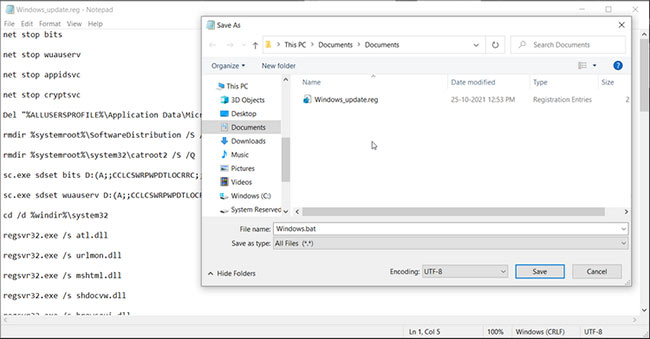
<p style="text-align: justify;">Nếu bạn xác định PC của mình không có vấn đề về phần mềm độc hại, hãy thử reset lại các service Windows Update quan trọng. Mặc dù bạn có thể reset lại các service này theo cách thủ công, nhưng việc sử dụng batch script sẽ đẩy nhanh quá trình này, nếu không bạn sẽ mất rất nhiều thời gian. Đây là cách thực hiện.</p>

<p style="text-align: justify;"><strong>Bước 1</strong>: Nhấn phím&nbsp;<strong>Windows + R&nbsp;</strong>để mở&nbsp;<strong>Run.</strong></p>

<p style="text-align: justify;"><strong>Bước 2</strong>: Nhập&nbsp;<strong>notepad</strong>&nbsp;và nhấp vào&nbsp;<strong>OK</strong>&nbsp;để mở ứng dụng.</p>

<p style="text-align: justify;"><strong>Bước 3</strong>: Sao chép và dán lệnh sau vào Notepad.</p>

<pre id="pre1">
<code>net stop bits
net stop wuauserv
net stop appidsvc
net stop cryptsvc
Del &quot;%ALLUSERSPROFILE%\Application Data\Microsoft\Network\Downloader\*.*&quot;
rmdir %systemroot%\SoftwareDistribution /S /Q
rmdir %systemroot%
ystem32\catroot2 /S /Q
sc.exe sdset bits D:(A;;CCLCSWRPWPDTLOCRRC;;;SY)(A;;CCDCLCSWRPWPDTLOCRSDRCWDWO;;;BA)(A;;CCLCSWLOCRRC;;;AU)(A;;CCLCSWRPWPDTLOCRRC;;;PU)
sc.exe sdset wuauserv D:(A;;CCLCSWRPWPDTLOCRRC;;;SY)(A;;CCDCLCSWRPWPDTLOCRSDRCWDWO;;;BA)(A;;CCLCSWLOCRRC;;;AU)(A;;CCLCSWRPWPDTLOCRRC;;;PU)
cd /d %windir%
ystem32
regsvr32.exe /s atl.dll
regsvr32.exe /s urlmon.dll
regsvr32.exe /s mshtml.dll
regsvr32.exe /s shdocvw.dll
regsvr32.exe /s browseui.dll
regsvr32.exe /s jscript.dll
regsvr32.exe /s vbscript.dll
regsvr32.exe /s scrrun.dll
regsvr32.exe /s msxml.dll
regsvr32.exe /s msxml3.dll
regsvr32.exe /s msxml6.dll
regsvr32.exe /s actxprxy.dll
regsvr32.exe /s softpub.dll
regsvr32.exe /s wintrust.dll
regsvr32.exe /s dssenh.dll
regsvr32.exe /s rsaenh.dll
regsvr32.exe /s gpkcsp.dll
regsvr32.exe /s sccbase.dll
regsvr32.exe /s slbcsp.dll
regsvr32.exe /s cryptdlg.dll
regsvr32.exe /s oleaut32.dll
regsvr32.exe /s ole32.dll
regsvr32.exe /s shell32.dll
regsvr32.exe /s initpki.dll
regsvr32.exe /s wuapi.dll
regsvr32.exe /s wuaueng.dll
regsvr32.exe /s wuaueng1.dll
regsvr32.exe /s wucltui.dll
regsvr32.exe /s wups.dll
regsvr32.exe /s wups2.dll
regsvr32.exe /s wuweb.dll
regsvr32.exe /s qmgr.dll
regsvr32.exe /s qmgrprxy.dll
regsvr32.exe /s wucltux.dll
regsvr32.exe /s muweb.dll
regsvr32.exe /s wuwebv.dll
netsh winsock reset
netsh winsock reset proxy
net start bits
net start wuauserv
net start appidsvc
net start cryptsvc</code></pre>

<p style="text-align: justify;"><strong>Bước 4</strong>: Nhấp vào&nbsp;<strong>File</strong>&nbsp;và chọn&nbsp;<strong>Save As</strong>.</p>

<p style="text-align: justify;"><strong>Bước 5</strong>: Đổi tên file thành&nbsp;<strong>Windows.bat.</strong></p>

<p style="text-align: justify;">Nhấp vào menu drop-down&nbsp;<strong>Save as type</strong>&nbsp;và chọn&nbsp;<strong>All Files</strong>. Sau đó, nhấp vào&nbsp;<strong>Save</strong>&nbsp;để lưu file.</p>

<p style="text-align: justify;"><strong>Bước 6</strong>: Nhấp chuột phải vào file&nbsp;<strong>Windows.bat</strong>&nbsp;và chọn&nbsp;<strong>Run as administrator</strong>. Bấm&nbsp;<strong>Yes</strong>&nbsp;nếu được nhắc bởi&nbsp;<strong>User Account Control</strong>.</p>

<p style="text-align: justify;">Chờ PC chạy script thành công rồi khởi động lại PC. Sau khi khởi động lại, hãy mở&nbsp;<strong>Update &amp; Security</strong>&nbsp;để xem lỗi có được giải quyết hay không.</p>

<h2 style="text-align: justify;">6. Thực hiện khôi phục cài đặt gốc cho Windows</h2>

<p style="text-align: justify;">Khôi phục cài đặt gốc cho Windows 10 sẽ cài đặt hệ điều hành, khôi phục các file service Windows Update bị thiếu. Bạn có thể sử dụng tùy chọn&nbsp;<strong>Reset</strong>&nbsp;được tích hợp sẵn để reset lại máy tính của mình mà không ảnh hưởng đến các file cá nhân. Tuy nhiên, điều này sẽ xóa các ứng dụng của bên thứ ba được cài đặt trên PC.&nbsp;</p>

<p style="text-align: justify;">Lỗi cập nhật Windows 0x80070424 thường xảy ra nếu service Windows Update quan trọng trên PC. Thử khởi động lại các service theo cách thủ công để giải quyết vấn đề. Nếu sự cố vẫn tiếp diễn, hãy thực hiện bản hack file registry để khôi phục các service cần thiết và sửa lỗi.</p>
		</div>
				<div id="author">
						<p>
				<strong>Nguồn tin:</strong>
				Quantrimang.com
			</p>
		</div>
	</div>
	<div id="footer" class="clearfix">
		<div id="url">
			<strong>URL của bản tin này: </strong><a href="https://www.nguoicodonvn2008.info/vi/news/savefile/kien-thuc-may-tinh/cach-sua-loi-windows-update-va-microsoft-store-0x80070424-4683.html" title="Cách sửa lỗi Windows Update và Microsoft Store 0x80070424">https://www.nguoicodonvn2008.info/vi/news/savefile/kien-thuc-may-tinh/cach-sua-loi-windows-update-va-microsoft-store-0x80070424-4683.html</a>

		</div>
		<div class="clear"></div>
		<div class="copyright">
			&copy; .&#x3A; Nguoicodonvn2008.info - Cõi lòng người cô đơn &#x3A;.
		</div>
		<div id="contact">
			<a href="mailto:admin@nguoicodonvn2008.info">admin@nguoicodonvn2008.info</a>
		</div>
	</div>
</div>
        <div id="timeoutsess" class="chromeframe">
            Bạn đã không sử dụng Site, <a onclick="timeoutsesscancel();" href="https://nguoicodonvn2008.info/#">Bấm vào đây để duy trì trạng thái đăng nhập</a>. Thời gian chờ: <span id="secField"> 60 </span> giây
        </div>
        <div id="openidResult" class="nv-alert" style="display:none"></div>
        <div id="openidBt" data-result="" data-redirect=""></div>
		</script>
		<div class="car-top">
  <span><img src="https://nguoicodonvn2008.info/themes/default/images/car.png" alt=""></span>
</div>
<script src="https://nguoicodonvn2008.info/assets/js/jquery/jquery.min.js"></script>
<script>var nv_base_siteurl="/",nv_lang_data="vi",nv_lang_interface="vi",nv_name_variable="nv",nv_fc_variable="op",nv_lang_variable="language",nv_module_name="news",nv_func_name="savefile",nv_is_user=0, nv_my_ofs=-4,nv_my_abbr="EDT",nv_cookie_prefix="nv4c_e856T",nv_check_pass_mstime=1738000,nv_area_admin=0,nv_safemode=0,theme_responsive=0,nv_recaptcha_ver=2,nv_recaptcha_sitekey="",nv_recaptcha_type="image",XSSsanitize=1;</script>
<script src="https://nguoicodonvn2008.info/assets/js/language/vi.js"></script>
<script src="https://nguoicodonvn2008.info/assets/js/DOMPurify/purify3.js"></script>
<script src="https://nguoicodonvn2008.info/assets/js/global.js"></script>
<script src="https://nguoicodonvn2008.info/assets/js/site.js"></script>
<script src="https://nguoicodonvn2008.info/themes/default/js/news.js"></script>
<script src="https://nguoicodonvn2008.info/themes/default/js/main.js"></script>
<script src="https://nguoicodonvn2008.info/themes/default/js/custom.js"></script>
<script type="application/ld+json">
        {
            "@context": "https://schema.org",
            "@type": "Organization",
            "url": "https://nguoicodonvn2008.info",
            "logo": "https://nguoicodonvn2008.info/uploads/angel.gif"
        }
        </script>
<script src="https://nguoicodonvn2008.info/themes/default/js/bootstrap.min.js"></script>
<script type="text/javascript">
var $scrolltop = $('.car-top');
$scrolltop.on('click', function () {
    $('html,body').animate({
        scrollTop: 0
    }, 800);
    $(this).addClass("car-run");
    setTimeout(function(){ $scrolltop.removeClass('car-run');}, 1000);
    return false;
});
$(window).on('scroll', function ()
{ 
    if($(window).scrollTop() >= 200)
    {
        $scrolltop.addClass("show");
        $scrolltop.addClass("car-down");
    }
    else
    {
       $scrolltop.removeClass("show");
       setTimeout(function(){ $scrolltop.removeClass('car-down');}, 300);
    }
});
</script>
</body>
</html>