<!DOCTYPE html>
    <html lang="vi" xmlns="http://www.w3.org/1999/xhtml" prefix="og: http://ogp.me/ns#">
    <head>
<title>Cách sửa lỗi Wdf01000.sys trong Windows</title>
<meta name="description" content="Cách sửa lỗi Wdf01000.sys trong Windows - Savefile - Tin Tức -...">
<meta name="author" content=".: Nguoicodonvn2008.info - Cõi lòng người cô đơn :.">
<meta name="copyright" content=".: Nguoicodonvn2008.info - Cõi lòng người cô đơn :. [admin@nguoicodonvn2008.info]">
<meta name="robots" content="index, archive, follow, noodp">
<meta name="googlebot" content="index,archive,follow,noodp">
<meta name="msnbot" content="all,index,follow">
<meta name="generator" content="NukeViet v4.5">
<meta http-equiv="Content-Type" content="text/html; charset=utf-8">
<meta property="og:title" content="Cách sửa lỗi Wdf01000.sys trong Windows">
<meta property="og:type" content="website">
<meta property="og:description" content="Savefile - Tin Tức - https&#x3A;&#x002F;&#x002F;www.nguoicodonvn2008.info&#x002F;vi&#x002F;news&#x002F;savefile&#x002F;kien-thuc-may-tinh&#x002F;cach-sua-loi-wdf01000-sys-trong-windows-2783.html">
<meta property="og:site_name" content=".&#x3A; Nguoicodonvn2008.info - Cõi lòng người cô đơn &#x3A;.">
<meta property="og:url" content="https://www.nguoicodonvn2008.info/vi/news/savefile/kien-thuc-may-tinh/cach-sua-loi-wdf01000-sys-trong-windows-2783.html">
<link rel="shortcut icon" href="https://nguoicodonvn2008.info/favicon.ico">
<link rel="canonical" href="https://www.nguoicodonvn2008.info/vi/news/savefile/kien-thuc-may-tinh/cach-sua-loi-wdf01000-sys-trong-windows-2783.html">
<link rel="alternate" href="https://nguoicodonvn2008.info/vi/news/rss/" title="Tin Tức" type="application/rss+xml">
<link rel="alternate" href="https://nguoicodonvn2008.info/vi/news/rss/karaoke-dual/" title="Tin Tức - Karaoke Dual" type="application/rss+xml">
<link rel="alternate" href="https://nguoicodonvn2008.info/vi/news/rss/nhac-tre/" title="Tin Tức - Nhạc trẻ" type="application/rss+xml">
<link rel="alternate" href="https://nguoicodonvn2008.info/vi/news/rss/tru-tinh/" title="Tin Tức - Trữ tình" type="application/rss+xml">
<link rel="alternate" href="https://nguoicodonvn2008.info/vi/news/rss/nuoc-ngoai/" title="Tin Tức - Nước ngoài" type="application/rss+xml">
<link rel="alternate" href="https://nguoicodonvn2008.info/vi/news/rss/remix/" title="Tin Tức - Remix" type="application/rss+xml">
<link rel="alternate" href="https://nguoicodonvn2008.info/vi/news/rss/tam-su-tinh-yeu/" title="Tin Tức - Tâm sự tình yêu" type="application/rss+xml">
<link rel="alternate" href="https://nguoicodonvn2008.info/vi/news/rss/tho-suu-tam/" title="Tin Tức - Thơ sưu tầm" type="application/rss+xml">
<link rel="alternate" href="https://nguoicodonvn2008.info/vi/news/rss/cuoc-song/" title="Tin Tức - Cuộc sống" type="application/rss+xml">
<link rel="alternate" href="https://nguoicodonvn2008.info/vi/news/rss/phan-mem/" title="Tin Tức - Phần mềm" type="application/rss+xml">
<link rel="alternate" href="https://nguoicodonvn2008.info/vi/news/rss/kien-thuc-may-tinh/" title="Tin Tức - Kiến thức máy tính" type="application/rss+xml">
<link rel="alternate" href="https://nguoicodonvn2008.info/vi/news/rss/hoc-tap/" title="Tin Tức - Học tập" type="application/rss+xml">
<link rel="alternate" href="https://nguoicodonvn2008.info/vi/news/rss/tai-lieu/" title="Tin Tức - Tài liệu" type="application/rss+xml">
<link rel="alternate" href="https://nguoicodonvn2008.info/vi/news/rss/de-thi/" title="Tin Tức - Đề thi" type="application/rss+xml">
<link rel="preload" as="style" href="https://nguoicodonvn2008.info/assets/css/font-awesome.min.css" type="text/css">
<link rel="preload" as="style" href="https://nguoicodonvn2008.info/themes/default/css/bootstrap.non-responsive.css" type="text/css">
<link rel="preload" as="style" href="https://nguoicodonvn2008.info/themes/default/css/style.css" type="text/css">
<link rel="preload" as="style" href="https://nguoicodonvn2008.info/themes/default/css/style.non-responsive.css" type="text/css">
<link rel="preload" as="style" href="https://nguoicodonvn2008.info/themes/default/css/news.css" type="text/css">
<link rel="preload" as="style" href="https://nguoicodonvn2008.info/themes/default/css/custom.css" type="text/css">
<link rel="preload" as="script" href="https://nguoicodonvn2008.info/assets/js/jquery/jquery.min.js" type="text/javascript">
<link rel="preload" as="script" href="https://nguoicodonvn2008.info/assets/js/language/vi.js" type="text/javascript">
<link rel="preload" as="script" href="https://nguoicodonvn2008.info/assets/js/DOMPurify/purify3.js" type="text/javascript">
<link rel="preload" as="script" href="https://nguoicodonvn2008.info/assets/js/global.js" type="text/javascript">
<link rel="preload" as="script" href="https://nguoicodonvn2008.info/assets/js/site.js" type="text/javascript">
<link rel="preload" as="script" href="https://nguoicodonvn2008.info/themes/default/js/news.js" type="text/javascript">
<link rel="preload" as="script" href="https://nguoicodonvn2008.info/themes/default/js/main.js" type="text/javascript">
<link rel="preload" as="script" href="https://nguoicodonvn2008.info/themes/default/js/custom.js" type="text/javascript">
<link rel="preload" as="script" href="https://nguoicodonvn2008.info/themes/default/js/bootstrap.min.js" type="text/javascript">
<link rel="stylesheet" href="https://nguoicodonvn2008.info/assets/css/font-awesome.min.css">
<link rel="stylesheet" href="https://nguoicodonvn2008.info/themes/default/css/bootstrap.non-responsive.css">
<link rel="stylesheet" href="https://nguoicodonvn2008.info/themes/default/css/style.css">
<link rel="stylesheet" href="https://nguoicodonvn2008.info/themes/default/css/style.non-responsive.css">
<link rel="StyleSheet" href="https://nguoicodonvn2008.info/themes/default/css/news.css">
<link rel="stylesheet" href="https://nguoicodonvn2008.info/themes/default/css/custom.css">
<style type="text/css">
	body{background: #fff;}
</style>
    </head>
    <body>
<div id="print">
	<div id="hd_print">
		<h2 class="pull-left">.&#x3A; Nguoicodonvn2008.info - Cõi lòng người cô đơn &#x3A;.</h2>
		<p class="pull-right"><a title=".&#x3A; Nguoicodonvn2008.info - Cõi lòng người cô đơn &#x3A;." href="https://nguoicodonvn2008.info/">https://nguoicodonvn2008.info</a></p>
	</div>
	<div class="clear"></div>
	<hr />
	<div id="content">
		<h1>Cách sửa lỗi Wdf01000.sys trong Windows</h1>
		<ul class="list-inline">
			<li>Thứ sáu - 25/09/2020 00:12</li>
			<li class="hidden-print txtrequired"><em class="fa fa-print">&nbsp;</em><a title="In ra" href="javascript:;" onclick="window.print()">In ra</a></li>
			<li class="hidden-print txtrequired"><em class="fa fa-power-off">&nbsp;</em><a title="Đóng cửa sổ này" href="javascript:;" onclick="window.close()">Đóng cửa sổ này</a></li>
		</ul>
		<div class="clear"></div>
		<div id="hometext">
		</div>
				<div class="imghome">
			<img alt="Cách sửa lỗi Wdf01000.sys trong Windows" src="https://st.quantrimang.com/photos/image/2020/09/25/loi-wdf01000-sys-2.jpg" width="460" class="img-thumbnail" />
		</div>
		<div class="clear"></div>
		<div id="bodytext" class="clearfix">
			<p style="text-align: justify;">Gặp lỗi wdf01000.sys trong Windows có thể khiến bạn bực bội. Tuy nhiên, việc sửa chữa rất đơn giản một khi bạn hiểu tại sao lỗi xảy ra. Dưới đây là giải thích ngắn gọn về việc wdf01000.sys là gì, nó bị lỗi như thế nào và cách khắc phục khi gặp sự cố này.</p>

<p style="text-align: justify;"><strong>Lưu ý</strong>: Các mẹo khắc phục sự cố trong bài viết này áp dụng cho Windows 10, Windows 8 và Windows 7.</p>

<h2 style="text-align: justify;">Wdf01000.sys là gì?</h2>

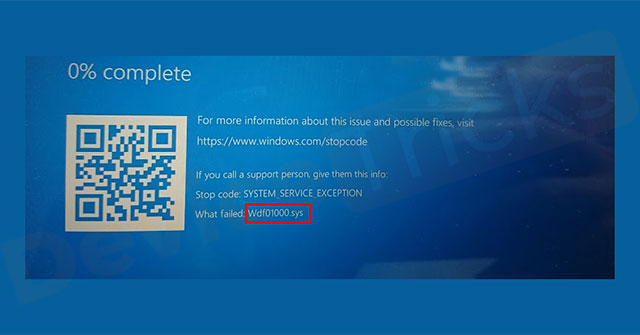
<p style="text-align: justify;">Wdf01000.sys là driver dành cho Windows, một phần của cái mà Microsoft gọi là Windows Driver Framework. Khi hoạt động bình thường, bạn không nhận ra nó đang được sử dụng. Tất cả người dùng hiện tại của Windows 10, Windows 8 và Windows 7 có thể sẽ tìm thấy ít nhất một số tham chiếu đến wdf01000.sys trong hệ thống.</p>

<figure data-inimage-loaded="true">
<div style="text-align: justify;"><br />
<img alt="Lỗi wdf01000.sys" data-i="0" data-src="https://st.quantrimang.com/photos/image/2020/09/25/loi-wdf01000-sys-2.jpg" data-was-processed="true" height="335" src="https://st.quantrimang.com/photos/image/2020/09/25/loi-wdf01000-sys-2.jpg" width="640" /></div>

<figcaption>
<div style="text-align: justify;">Lỗi wdf01000.sys</div>
</figcaption>
</figure>

<div style="text-align: justify;">&nbsp;</div>

<h2 style="text-align: justify;">Lỗi wdf01000.sys xảy ra như thế nào?</h2>

<p style="text-align: justify;">Lỗi này có thể xảy ra vì bất kỳ lý do nào, bao gồm driver đã lỗi thời trên thiết bị cũ, phần mềm độc hại được tải xuống do vô tình và các file bị hỏng. Ngoài ra, những lỗi này có thể xảy ra bất kỳ lúc nào, không chỉ khi khởi động chương trình, cắm thiết bị mà còn khi bạn thực hiện các hành động cụ thể.</p>

<p style="text-align: justify;">Mặc dù lỗi có có thể được liệt kê theo một số cách, nhưng wdf01000.sys thường nằm trong văn bản của crash dump hoặc mã lỗi, được trích dẫn ở cuối thông báo lỗi.</p>

<h2 style="text-align: justify;">Cách sửa lỗi wdf01000.sys</h2>

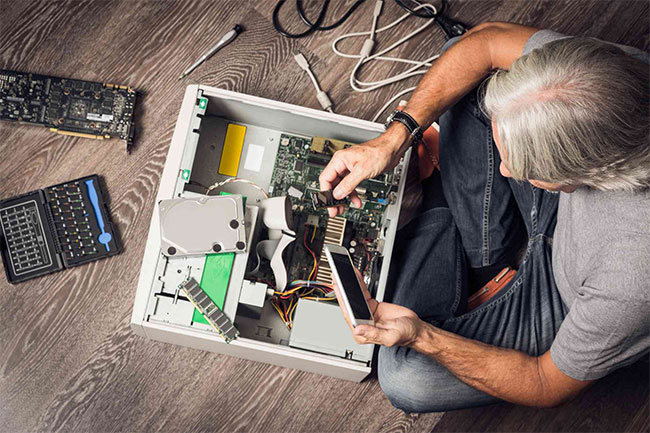
<p style="text-align: justify;">Driver wdf01000.sys là một phần mềm tiêu chuẩn và việc ngăn chặn hoặc sửa lỗi là nhất quán trên tất cả các phiên bản Windows.</p>

<div style="text-align: justify;">&nbsp;</div>

<h3 style="text-align: justify;">1.&nbsp;Sử dụng System Restore</h3>

<p style="text-align: justify;">Hãy khôi phục máy tính về điểm khôi phục hệ thống trước đó và cài đặt lại bất kỳ phần mềm hoặc driver mới nào bạn đã thêm. Bằng cách khôi phục hệ thống về thời gian trước đó, bạn có thể loại bỏ bản cập nhật hoặc code gây ra lỗi.</p>

<h3 style="text-align: justify;">2.&nbsp;Khởi động lại máy tính</h3>

<p style="text-align: justify;">Đầu tiên, ngắt kết nối tất cả các thiết bị. Sau khi máy tính khởi động lại, hãy kết nối lại từng thiết bị cho đến khi lỗi tái diễn, sau đó&nbsp;cập nhật driver của thiết bị đó. Điều này giúp cô lập driver gây ra lỗi. Mặc dù có thể mất thêm thời gian để kiểm tra từng thành phần, nhưng việc này sẽ đưa bạn đến ngay với nguồn gốc của vấn đề.</p>

<h3 style="text-align: justify;">3. Quét virus</h3>

<p style="text-align: justify;">Khi quá trình quét hoàn tất, hãy thực hiện bất kỳ hành động sửa chữa nào được yêu cầu. Phần mềm độc hại có thể gây ra tất cả các lỗi và sự cố với máy tính.&nbsp;Quét phần mềm độc hại&nbsp;kỹ càng và thường xuyên cũng có thể ngăn chặn nhiều vấn đề.</p>

<figure>
<div style="text-align: justify;"><img alt="Có nhiều cách sửa lỗi wdf01000.sys khác nhau" data-i="1" data-src="https://st.quantrimang.com/photos/image/2020/09/25/loi-wdf01000-sys-1.jpg" data-was-processed="true" height="433" src="https://st.quantrimang.com/photos/image/2020/09/25/loi-wdf01000-sys-1.jpg" width="650" /></div>

<figcaption>
<div style="text-align: justify;">Có nhiều cách sửa lỗi wdf01000.sys khác nhau</div>
</figcaption>
</figure>

<div style="text-align: justify;">&nbsp;</div>

<h3 style="text-align: justify;">4. Kiểm tra driver bị hỏng hoặc lỗi thời</h3>

<p style="text-align: justify;">Sử dụng Device Manager&nbsp;để hiển thị các driver được cài đặt trên máy tính. Driver bị hỏng và lỗi thời được đánh dấu bằng dấu chấm than màu vàng. Driver bị hỏng hoặc lỗi thời gây ra loại vấn đề này và việc cập nhật driver sẽ ngăn lỗi và bất kỳ sự cố nào liên quan đến nó.</p>

<h3 style="text-align: justify;">5. Sửa chữa các file hệ thống Windows</h3>

<p style="text-align: justify;">Sử dụng Windows System File Checker (SFC)&nbsp;để sửa các file bị hỏng. Các file bị hỏng cũng tệ (hoặc có thể tệ hơn) so với những file đã lỗi thời. Các file bị hỏng trên hệ thống có thể gây ra lỗi và sự cố với những phần mềm khác trên hệ thống.</p>

<h3 style="text-align: justify;">6.&nbsp;Chạy Check Disk</h3>

<p style="text-align: justify;">Lệnh này quét các file bị hỏng. Trong nhiều trường hợp, việc kiểm tra hệ thống bằng Check Disk sẽ cô lập và khắc phục những vấn đề này.</p>

<h3 style="text-align: justify;">7. Đăng ký lại wdf01000.sys</h3>

<p style="text-align: justify;">Sử dụng System Registry&nbsp;để thực hiện tác vụ này.</p>

<p style="text-align: justify;"><strong>Lưu ý quan trọng</strong>: Luôn xác định vị trí các file cài đặt lại và sao lưu hệ thống trước khi thực hiện các thay đổi đối với registry. Registry là một phần phức tạp của hệ điều hành Windows và việc thực hiện các thay đổi sai có thể gây ra nhiều vấn đề hơn.</p>

<h3 style="text-align: justify;">8. Cài đặt lại Windows</h3>

<p style="text-align: justify;">Khi các bước trên thất bại, lựa chọn cuối cùng này thường ngăn vấn đề xảy ra một lần nữa. Khi quá trình cài đặt lại hoàn tất, hãy khôi phục các file từ bản sao lưu. Cài đặt lại Windows có nghĩa là mọi thứ trên máy tính sẽ bị xóa, vì vậy hãy đảm bảo bạn có bản sao lưu hiện tại của các file và ứng dụng trước khi bắt đầu.</p>
		</div>
				<div id="author">
						<p>
				<strong>Nguồn tin:</strong>
				Quantrimang.com
			</p>
		</div>
	</div>
	<div id="footer" class="clearfix">
		<div id="url">
			<strong>URL của bản tin này: </strong><a href="https://www.nguoicodonvn2008.info/vi/news/savefile/kien-thuc-may-tinh/cach-sua-loi-wdf01000-sys-trong-windows-2783.html" title="Cách sửa lỗi Wdf01000.sys trong Windows">https://www.nguoicodonvn2008.info/vi/news/savefile/kien-thuc-may-tinh/cach-sua-loi-wdf01000-sys-trong-windows-2783.html</a>

		</div>
		<div class="clear"></div>
		<div class="copyright">
			&copy; .&#x3A; Nguoicodonvn2008.info - Cõi lòng người cô đơn &#x3A;.
		</div>
		<div id="contact">
			<a href="mailto:admin@nguoicodonvn2008.info">admin@nguoicodonvn2008.info</a>
		</div>
	</div>
</div>
        <div id="timeoutsess" class="chromeframe">
            Bạn đã không sử dụng Site, <a onclick="timeoutsesscancel();" href="https://nguoicodonvn2008.info/#">Bấm vào đây để duy trì trạng thái đăng nhập</a>. Thời gian chờ: <span id="secField"> 60 </span> giây
        </div>
        <div id="openidResult" class="nv-alert" style="display:none"></div>
        <div id="openidBt" data-result="" data-redirect=""></div>
		</script>
		<div class="car-top">
  <span><img src="https://nguoicodonvn2008.info/themes/default/images/car.png" alt=""></span>
</div>
<script src="https://nguoicodonvn2008.info/assets/js/jquery/jquery.min.js"></script>
<script>var nv_base_siteurl="/",nv_lang_data="vi",nv_lang_interface="vi",nv_name_variable="nv",nv_fc_variable="op",nv_lang_variable="language",nv_module_name="news",nv_func_name="savefile",nv_is_user=0, nv_my_ofs=-4,nv_my_abbr="EDT",nv_cookie_prefix="nv4c_e856T",nv_check_pass_mstime=1738000,nv_area_admin=0,nv_safemode=0,theme_responsive=0,nv_recaptcha_ver=2,nv_recaptcha_sitekey="",nv_recaptcha_type="image",XSSsanitize=1;</script>
<script src="https://nguoicodonvn2008.info/assets/js/language/vi.js"></script>
<script src="https://nguoicodonvn2008.info/assets/js/DOMPurify/purify3.js"></script>
<script src="https://nguoicodonvn2008.info/assets/js/global.js"></script>
<script src="https://nguoicodonvn2008.info/assets/js/site.js"></script>
<script src="https://nguoicodonvn2008.info/themes/default/js/news.js"></script>
<script src="https://nguoicodonvn2008.info/themes/default/js/main.js"></script>
<script src="https://nguoicodonvn2008.info/themes/default/js/custom.js"></script>
<script type="application/ld+json">
        {
            "@context": "https://schema.org",
            "@type": "Organization",
            "url": "https://nguoicodonvn2008.info",
            "logo": "https://nguoicodonvn2008.info/uploads/angel.gif"
        }
        </script>
<script src="https://nguoicodonvn2008.info/themes/default/js/bootstrap.min.js"></script>
<script type="text/javascript">
var $scrolltop = $('.car-top');
$scrolltop.on('click', function () {
    $('html,body').animate({
        scrollTop: 0
    }, 800);
    $(this).addClass("car-run");
    setTimeout(function(){ $scrolltop.removeClass('car-run');}, 1000);
    return false;
});
$(window).on('scroll', function ()
{ 
    if($(window).scrollTop() >= 200)
    {
        $scrolltop.addClass("show");
        $scrolltop.addClass("car-down");
    }
    else
    {
       $scrolltop.removeClass("show");
       setTimeout(function(){ $scrolltop.removeClass('car-down');}, 300);
    }
});
</script>
</body>
</html>