<!DOCTYPE html>
    <html lang="vi" xmlns="http://www.w3.org/1999/xhtml" prefix="og: http://ogp.me/ns#">
    <head>
<title>Cách sửa lỗi VCRUNTIME140_1.dll not found, is missing trong Windows</title>
<meta name="description" content="Cách sửa lỗi VCRUNTIME140_1.dll not found, is missing trong Windows - Savefile - Tin Tức -...">
<meta name="author" content=".: Nguoicodonvn2008.info - Cõi lòng người cô đơn :.">
<meta name="copyright" content=".: Nguoicodonvn2008.info - Cõi lòng người cô đơn :. [admin@nguoicodonvn2008.info]">
<meta name="robots" content="index, archive, follow, noodp">
<meta name="googlebot" content="index,archive,follow,noodp">
<meta name="msnbot" content="all,index,follow">
<meta name="generator" content="NukeViet v4.5">
<meta http-equiv="Content-Type" content="text/html; charset=utf-8">
<meta property="og:title" content="Cách sửa lỗi VCRUNTIME140_1.dll not found, is missing trong Windows">
<meta property="og:type" content="website">
<meta property="og:description" content="Savefile - Tin Tức - https&#x3A;&#x002F;&#x002F;www.nguoicodonvn2008.info&#x002F;vi&#x002F;news&#x002F;savefile&#x002F;kien-thuc-may-tinh&#x002F;cach-sua-loi-vcruntime140-1-dll-not-found-is-missing-trong-windows-4623.html">
<meta property="og:site_name" content=".&#x3A; Nguoicodonvn2008.info - Cõi lòng người cô đơn &#x3A;.">
<meta property="og:url" content="https://www.nguoicodonvn2008.info/vi/news/savefile/kien-thuc-may-tinh/cach-sua-loi-vcruntime140-1-dll-not-found-is-missing-trong-windows-4623.html">
<link rel="shortcut icon" href="https://nguoicodonvn2008.info/favicon.ico">
<link rel="canonical" href="https://www.nguoicodonvn2008.info/vi/news/savefile/kien-thuc-may-tinh/cach-sua-loi-vcruntime140-1-dll-not-found-is-missing-trong-windows-4623.html">
<link rel="alternate" href="https://nguoicodonvn2008.info/vi/news/rss/" title="Tin Tức" type="application/rss+xml">
<link rel="alternate" href="https://nguoicodonvn2008.info/vi/news/rss/karaoke-dual/" title="Tin Tức - Karaoke Dual" type="application/rss+xml">
<link rel="alternate" href="https://nguoicodonvn2008.info/vi/news/rss/nhac-tre/" title="Tin Tức - Nhạc trẻ" type="application/rss+xml">
<link rel="alternate" href="https://nguoicodonvn2008.info/vi/news/rss/tru-tinh/" title="Tin Tức - Trữ tình" type="application/rss+xml">
<link rel="alternate" href="https://nguoicodonvn2008.info/vi/news/rss/nuoc-ngoai/" title="Tin Tức - Nước ngoài" type="application/rss+xml">
<link rel="alternate" href="https://nguoicodonvn2008.info/vi/news/rss/remix/" title="Tin Tức - Remix" type="application/rss+xml">
<link rel="alternate" href="https://nguoicodonvn2008.info/vi/news/rss/tam-su-tinh-yeu/" title="Tin Tức - Tâm sự tình yêu" type="application/rss+xml">
<link rel="alternate" href="https://nguoicodonvn2008.info/vi/news/rss/tho-suu-tam/" title="Tin Tức - Thơ sưu tầm" type="application/rss+xml">
<link rel="alternate" href="https://nguoicodonvn2008.info/vi/news/rss/cuoc-song/" title="Tin Tức - Cuộc sống" type="application/rss+xml">
<link rel="alternate" href="https://nguoicodonvn2008.info/vi/news/rss/phan-mem/" title="Tin Tức - Phần mềm" type="application/rss+xml">
<link rel="alternate" href="https://nguoicodonvn2008.info/vi/news/rss/kien-thuc-may-tinh/" title="Tin Tức - Kiến thức máy tính" type="application/rss+xml">
<link rel="alternate" href="https://nguoicodonvn2008.info/vi/news/rss/hoc-tap/" title="Tin Tức - Học tập" type="application/rss+xml">
<link rel="alternate" href="https://nguoicodonvn2008.info/vi/news/rss/tai-lieu/" title="Tin Tức - Tài liệu" type="application/rss+xml">
<link rel="alternate" href="https://nguoicodonvn2008.info/vi/news/rss/de-thi/" title="Tin Tức - Đề thi" type="application/rss+xml">
<link rel="preload" as="style" href="https://nguoicodonvn2008.info/assets/css/font-awesome.min.css" type="text/css">
<link rel="preload" as="style" href="https://nguoicodonvn2008.info/themes/default/css/bootstrap.non-responsive.css" type="text/css">
<link rel="preload" as="style" href="https://nguoicodonvn2008.info/themes/default/css/style.css" type="text/css">
<link rel="preload" as="style" href="https://nguoicodonvn2008.info/themes/default/css/style.non-responsive.css" type="text/css">
<link rel="preload" as="style" href="https://nguoicodonvn2008.info/themes/default/css/news.css" type="text/css">
<link rel="preload" as="style" href="https://nguoicodonvn2008.info/themes/default/css/custom.css" type="text/css">
<link rel="preload" as="script" href="https://nguoicodonvn2008.info/assets/js/jquery/jquery.min.js" type="text/javascript">
<link rel="preload" as="script" href="https://nguoicodonvn2008.info/assets/js/language/vi.js" type="text/javascript">
<link rel="preload" as="script" href="https://nguoicodonvn2008.info/assets/js/DOMPurify/purify3.js" type="text/javascript">
<link rel="preload" as="script" href="https://nguoicodonvn2008.info/assets/js/global.js" type="text/javascript">
<link rel="preload" as="script" href="https://nguoicodonvn2008.info/assets/js/site.js" type="text/javascript">
<link rel="preload" as="script" href="https://nguoicodonvn2008.info/themes/default/js/news.js" type="text/javascript">
<link rel="preload" as="script" href="https://nguoicodonvn2008.info/themes/default/js/main.js" type="text/javascript">
<link rel="preload" as="script" href="https://nguoicodonvn2008.info/themes/default/js/custom.js" type="text/javascript">
<link rel="preload" as="script" href="https://nguoicodonvn2008.info/themes/default/js/bootstrap.min.js" type="text/javascript">
<link rel="stylesheet" href="https://nguoicodonvn2008.info/assets/css/font-awesome.min.css">
<link rel="stylesheet" href="https://nguoicodonvn2008.info/themes/default/css/bootstrap.non-responsive.css">
<link rel="stylesheet" href="https://nguoicodonvn2008.info/themes/default/css/style.css">
<link rel="stylesheet" href="https://nguoicodonvn2008.info/themes/default/css/style.non-responsive.css">
<link rel="StyleSheet" href="https://nguoicodonvn2008.info/themes/default/css/news.css">
<link rel="stylesheet" href="https://nguoicodonvn2008.info/themes/default/css/custom.css">
<style type="text/css">
	body{background: #fff;}
</style>
    </head>
    <body>
<div id="print">
	<div id="hd_print">
		<h2 class="pull-left">.&#x3A; Nguoicodonvn2008.info - Cõi lòng người cô đơn &#x3A;.</h2>
		<p class="pull-right"><a title=".&#x3A; Nguoicodonvn2008.info - Cõi lòng người cô đơn &#x3A;." href="https://nguoicodonvn2008.info/">https://nguoicodonvn2008.info</a></p>
	</div>
	<div class="clear"></div>
	<hr />
	<div id="content">
		<h1>Cách sửa lỗi VCRUNTIME140_1.dll not found, is missing trong Windows</h1>
		<ul class="list-inline">
			<li>Thứ sáu - 22/10/2021 23:03</li>
			<li class="hidden-print txtrequired"><em class="fa fa-print">&nbsp;</em><a title="In ra" href="javascript:;" onclick="window.print()">In ra</a></li>
			<li class="hidden-print txtrequired"><em class="fa fa-power-off">&nbsp;</em><a title="Đóng cửa sổ này" href="javascript:;" onclick="window.close()">Đóng cửa sổ này</a></li>
		</ul>
		<div class="clear"></div>
		<div id="hometext">
		</div>
				<div class="imghome">
			<img alt="Cách sửa lỗi VCRUNTIME140_1.dll not found, is missing trong Windows" src="https://st.quantrimang.com/photos/image/2021/10/14/sua-loi-vcruntime140-1-dll-not-found-6.jpg" width="460" class="img-thumbnail" />
		</div>
		<div class="clear"></div>
		<div id="bodytext" class="clearfix">
			<p style="text-align: justify;">Người dùng thường gặp phải lỗi VCRUNTIME140_1.dll was not found khi cố gắng chạy một chương trình cụ thể trên Windows 10, cũng như các phiên bản khác của hệ điều hành.</p>

<p style="text-align: justify;">Đặc biệt, người dùng gặp phải lỗi khi file bị thiếu trong hệ thống - do đó, nó ngăn cản việc khởi chạy và hoạt động của chương trình dựa vào file này. Những lỗi như vậy có thể tạo ra trải nghiệm người dùng rất khó chịu khi sử dụng thiết bị Windows.</p>

<p style="text-align: justify;">Phần tử VCRUNTIME140_1.dll chỉ ra rằng file DLL bị thiếu đến từ gói Microsoft Visual C++ Redistributable và ban đầu phải được cài đặt trên hệ thống. Tuy nhiên, do một số lý do, các file này có thể bị thay thế, xóa hoặc bị hỏng. Do đó, người dùng không thể khởi chạy các chương trình trên Windows.</p>

<p style="text-align: justify;">Trong bài viết dưới đây, bạn sẽ tìm thấy các phương pháp sẽ giúp giải quyết lỗi VCRUNTIME140_1.dll not found, is missing trong Windows một cách nhanh chóng.</p>

<h2 style="text-align: justify;">Giải pháp 1. Cài đặt tất cả các bản&nbsp;cập nhật Windows&nbsp;có sẵn</h2>

<p style="text-align: justify;">Microsoft tung ra các bản cập nhật thường xuyên để khắc phục những lỗi xuất hiện trong hệ điều hành Windows, trong đó có lỗi VCRUNTIME140_1.dll not found. Hãy xem máy tinh của bạn có sẵn bản cập nhật mới nào không và tiến hành quá trình update.</p>

<h2 style="text-align: justify;">Giải pháp 2. Cài đặt gói Microsoft Visual C++ Redistributable</h2>

<p style="text-align: justify;">Một số thành phần trong thư viện Visual C++ có thể bị hỏng, dẫn đến lỗi thiếu hoặc không tìm thấy&nbsp;file DLL. Do đó, cài đặt gói mới nhất có thể giúp bạn khắc phục sự cố.</p>

<ul>
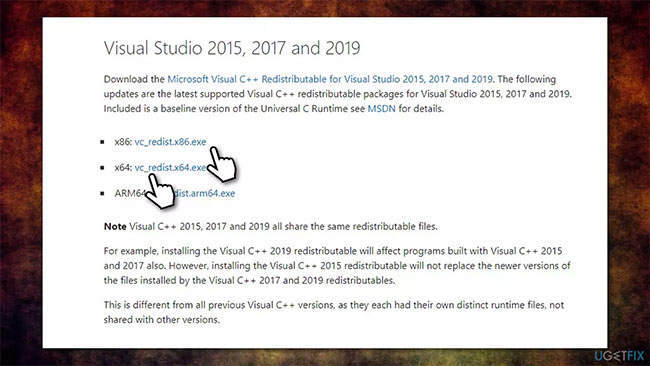
	<li style="text-align: justify;">Truy cập trang web chính thức của Microsoft&nbsp;: <span style="color:rgb(192, 57, 43);"><strong>https://docs.microsoft.com/en-US/cpp/windows/latest-supported-vc-redist?view=msvc-160</strong></span> cung cấp các trình cài đặt mới nhất của Visual C++.</li>
	<li style="text-align: justify;">Tải xuống và cài đặt cả phiên bản&nbsp;<strong>vc_redist.x86.exe (32-bit)</strong>&nbsp;và&nbsp;<strong>vc_redist.x64.exe (64-bit)</strong>.</li>
</ul>

<figure>
<div style="text-align: justify;"><img alt="Cài đặt gói Microsoft Visual C++ Redistributable" data-i="0" data-src="https://st.quantrimang.com/photos/image/2021/10/14/sua-loi-vcruntime140-1-dll-not-found-1.jpg" data-was-processed="true" height="366" src="https://st.quantrimang.com/photos/image/2021/10/14/sua-loi-vcruntime140-1-dll-not-found-1.jpg" width="650" /></div>

<figcaption>
<div style="text-align: justify;">Cài đặt gói Microsoft Visual C++ Redistributable</div>
</figcaption>
</figure>

<ul>
	<li style="text-align: justify;">Sau khi hoàn tất, hãy&nbsp;khởi động lại hệ thống.</li>
</ul>

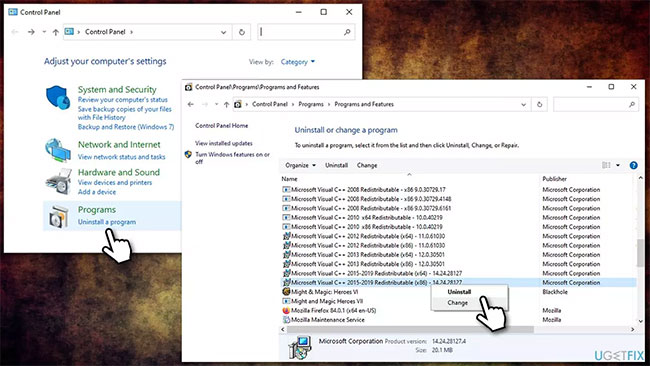
<p style="text-align: justify;"><strong>Lưu ý</strong>: Nếu bạn đã cài đặt tất cả các gói Visual C++ Redistributable, hãy gỡ cài đặt chúng trước khi cài đặt các gói mới - đây là cách thực hiện:</p>

<ul>
	<li style="text-align: justify;">Nhập&nbsp;<strong>Control Panel</strong>&nbsp;trong tìm kiếm của Windows và nhấn&nbsp;<strong>Enter.</strong></li>
	<li style="text-align: justify;">Đi tới&nbsp;<strong>Programs &gt; Uninstall a program</strong>.</li>
	<li style="text-align: justify;">Từ danh sách, tìm gói&nbsp;<strong>Visual C++ Redistributable</strong>.</li>
	<li style="text-align: justify;">Nhấp chuột phải vào từng gói trong số chúng và chọn&nbsp;<strong>Uninstall Visual C++</strong>.</li>
</ul>

<figure>
<div style="text-align: justify;"><img alt="Gỡ cài đặt tất cả các gói Visual C++ Redistributable trước khi cài đặt này" data-i="1" data-src="https://st.quantrimang.com/photos/image/2021/10/14/sua-loi-vcruntime140-1-dll-not-found-2.jpg" data-was-processed="true" height="366" src="https://st.quantrimang.com/photos/image/2021/10/14/sua-loi-vcruntime140-1-dll-not-found-2.jpg" width="650" /></div>

<figcaption>
<div style="text-align: justify;">Gỡ cài đặt tất cả các gói Visual C++ Redistributable trước khi cài đặt này</div>
</figcaption>
</figure>

<ul>
	<li style="text-align: justify;">Bây giờ, hãy cài đặt lại các gói như đã giải thích ở trên.</li>
</ul>

<h2 style="text-align: justify;">Giải pháp 3. Đăng ký lại thủ công VCRUNTIME140_1.dll bị thiếu</h2>

<ul>
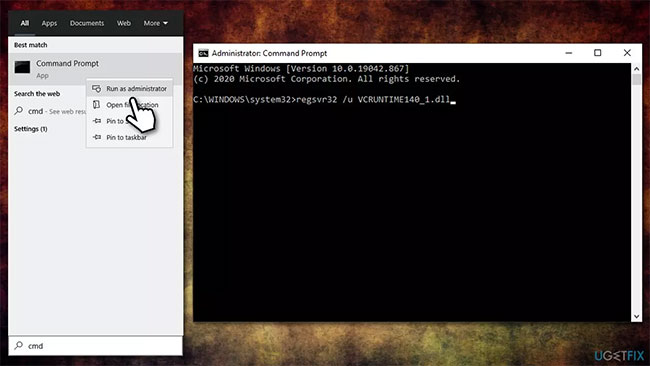
	<li style="text-align: justify;">Nhập&nbsp;<strong>cmd</strong>&nbsp;trong tìm kiếm Windows</li>
	<li style="text-align: justify;">Nhấp chuột phải vào&nbsp;<strong>Command Prompt&nbsp;</strong>và chọn&nbsp;<strong>Run as administrator&nbsp;</strong>để&nbsp;mở CMD với quyền admin.</li>
	<li style="text-align: justify;">Trong cửa sổ này, sao chép và dán các lệnh sau, nhấn&nbsp;<strong>Enter</strong>&nbsp;sau mỗi lệnh:</li>
</ul>

<pre id="pre0">
<code>regsvr32 /u VCRUNTIME140_1.dll
regsvr32 VCRUNTIME140_1.dll</code></pre>

<ul>
	<li style="text-align: justify;">Khởi động lại PC và kiểm tra xem sự cố đã được giải quyết chưa.</li>
</ul>

<figure>
<div style="text-align: justify;"><img alt="Đăng ký lại thủ công VCRUNTIME140_1.dll bị thiếu" data-i="2" data-src="https://st.quantrimang.com/photos/image/2021/10/14/sua-loi-vcruntime140-1-dll-not-found-3.jpg" data-was-processed="true" height="366" src="https://st.quantrimang.com/photos/image/2021/10/14/sua-loi-vcruntime140-1-dll-not-found-3.jpg" width="650" /></div>

<figcaption>
<div style="text-align: justify;">Đăng ký lại thủ công VCRUNTIME140_1.dll bị thiếu</div>
</figcaption>
</figure>

<h2 style="text-align: justify;">Giải pháp 4. Sao chép file DLL bị thiếu từ một vị trí khác</h2>

<p style="text-align: justify;">Vì VCRUNTIME140_1.dll được một số ứng dụng sử dụng và là một phần của gói Microsoft Visual C++ Redistributable nên nó có thể được sao chép dễ dàng. Đây là những gì bạn cần làm:</p>

<ul>
	<li style="text-align: justify;">Nhấn&nbsp;<strong>Win + E</strong>&nbsp;để&nbsp;<a href="https://quantrimang.com/9-cach-kich-hoat-file-explorer-trong-windows-10-118256" title="9 cách kích hoạt File Explorer trong Windows 10">mở File Explorer</a>.</li>
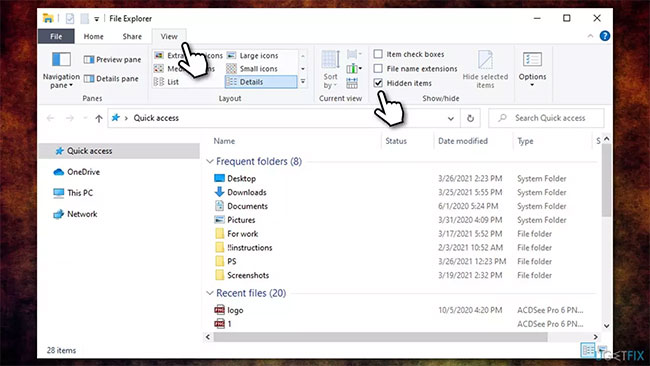
	<li style="text-align: justify;">Đi tới tab&nbsp;<strong>View</strong>&nbsp;và đảm bảo rằng hộp&nbsp;<strong>Hidden items</strong>&nbsp;được chọn.</li>
</ul>

<figure>
<div style="text-align: justify;"><img alt="Chọn hộp Hidden items " data-i="3" data-src="https://st.quantrimang.com/photos/image/2021/10/14/sua-loi-vcruntime140-1-dll-not-found-4.jpg" data-was-processed="true" height="366" src="https://st.quantrimang.com/photos/image/2021/10/14/sua-loi-vcruntime140-1-dll-not-found-4.jpg" width="650" /></div>

<figcaption>
<div style="text-align: justify;">Chọn hộp Hidden items</div>
</figcaption>
</figure>

<ul>
	<li style="text-align: justify;">Bây giờ điều hướng đến vị trí sau:</li>
</ul>

<pre id="pre1">
<code>C:\\Program Files\\WindowsApps</code></pre>

<ul>
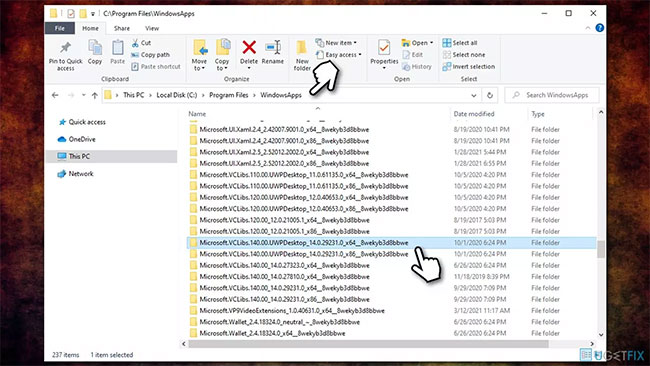
	<li style="text-align: justify;">Tại đây, bạn sẽ tìm một thư mục có tiêu đề như sau (lưu ý rằng&nbsp;<strong>14.0.29231.0_x64__</strong>&nbsp;là một biến thay đổi tùy thuộc vào phiên bản):</li>
</ul>

<pre id="pre2">
<code>Microsoft.VCLibs.140.00.UWPDesktop_14.0.29231.0_x64__8wekyb3d8bbwe</code></pre>

<figure>
<div style="text-align: justify;"><img alt="Tìm thư mục có tiêu đề trên" data-i="4" data-src="https://st.quantrimang.com/photos/image/2021/10/14/sua-loi-vcruntime140-1-dll-not-found-5.jpg" data-was-processed="true" height="366" src="https://st.quantrimang.com/photos/image/2021/10/14/sua-loi-vcruntime140-1-dll-not-found-5.jpg" width="650" /></div>

<figcaption>
<div style="text-align: justify;">Tìm thư mục có tiêu đề trên</div>
</figcaption>
</figure>

<ul>
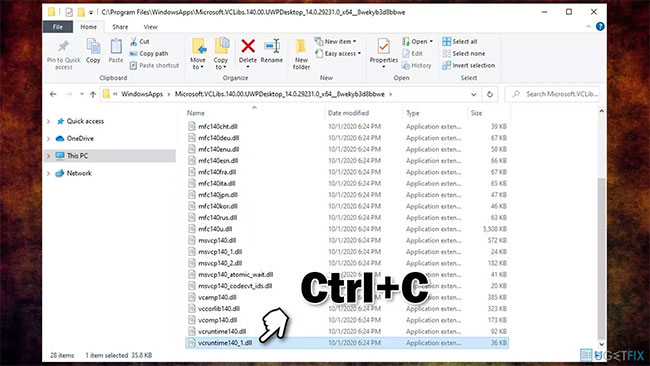
	<li style="text-align: justify;">Tại đây, cuộn xuống và tìm file&nbsp;<strong>VCRUNTIME140_1.dll</strong>&nbsp;- nhấn&nbsp;<strong>Ctrl + C&nbsp;</strong>để sao chép file đó.</li>
</ul>

<figure>
<div style="text-align: justify;"><img alt="Tìm và sao chép file VCRUNTIME140_1.dll" data-i="5" data-src="https://st.quantrimang.com/photos/image/2021/10/14/sua-loi-vcruntime140-1-dll-not-found-6.jpg" data-was-processed="true" height="366" src="https://st.quantrimang.com/photos/image/2021/10/14/sua-loi-vcruntime140-1-dll-not-found-6.jpg" width="650" /></div>

<figcaption>
<div style="text-align: justify;">Tìm và sao chép file VCRUNTIME140_1.dll</div>
</figcaption>
</figure>

<ul>
	<li style="text-align: justify;">Bây giờ, hãy chuyển đến thư mục của chương trình bạn đang gặp sự cố, ví dụ,&nbsp;<strong>C:\\Program Files\\Mozilla Firefox</strong>&nbsp;và dán file bằng&nbsp;<strong>Ctrl + V</strong>.</li>
</ul>

<p style="text-align: justify;">Chúc bạn khắc phục sự cố thành công!</p>
		</div>
				<div id="author">
						<p>
				<strong>Nguồn tin:</strong>
				Quantrimang.com
			</p>
		</div>
	</div>
	<div id="footer" class="clearfix">
		<div id="url">
			<strong>URL của bản tin này: </strong><a href="https://www.nguoicodonvn2008.info/vi/news/savefile/kien-thuc-may-tinh/cach-sua-loi-vcruntime140-1-dll-not-found-is-missing-trong-windows-4623.html" title="Cách sửa lỗi VCRUNTIME140_1.dll not found, is missing trong Windows">https://www.nguoicodonvn2008.info/vi/news/savefile/kien-thuc-may-tinh/cach-sua-loi-vcruntime140-1-dll-not-found-is-missing-trong-windows-4623.html</a>

		</div>
		<div class="clear"></div>
		<div class="copyright">
			&copy; .&#x3A; Nguoicodonvn2008.info - Cõi lòng người cô đơn &#x3A;.
		</div>
		<div id="contact">
			<a href="mailto:admin@nguoicodonvn2008.info">admin@nguoicodonvn2008.info</a>
		</div>
	</div>
</div>
        <div id="timeoutsess" class="chromeframe">
            Bạn đã không sử dụng Site, <a onclick="timeoutsesscancel();" href="https://nguoicodonvn2008.info/#">Bấm vào đây để duy trì trạng thái đăng nhập</a>. Thời gian chờ: <span id="secField"> 60 </span> giây
        </div>
        <div id="openidResult" class="nv-alert" style="display:none"></div>
        <div id="openidBt" data-result="" data-redirect=""></div>
		</script>
		<div class="car-top">
  <span><img src="https://nguoicodonvn2008.info/themes/default/images/car.png" alt=""></span>
</div>
<script src="https://nguoicodonvn2008.info/assets/js/jquery/jquery.min.js"></script>
<script>var nv_base_siteurl="/",nv_lang_data="vi",nv_lang_interface="vi",nv_name_variable="nv",nv_fc_variable="op",nv_lang_variable="language",nv_module_name="news",nv_func_name="savefile",nv_is_user=0, nv_my_ofs=-4,nv_my_abbr="EDT",nv_cookie_prefix="nv4c_e856T",nv_check_pass_mstime=1738000,nv_area_admin=0,nv_safemode=0,theme_responsive=0,nv_recaptcha_ver=2,nv_recaptcha_sitekey="",nv_recaptcha_type="image",XSSsanitize=1;</script>
<script src="https://nguoicodonvn2008.info/assets/js/language/vi.js"></script>
<script src="https://nguoicodonvn2008.info/assets/js/DOMPurify/purify3.js"></script>
<script src="https://nguoicodonvn2008.info/assets/js/global.js"></script>
<script src="https://nguoicodonvn2008.info/assets/js/site.js"></script>
<script src="https://nguoicodonvn2008.info/themes/default/js/news.js"></script>
<script src="https://nguoicodonvn2008.info/themes/default/js/main.js"></script>
<script src="https://nguoicodonvn2008.info/themes/default/js/custom.js"></script>
<script type="application/ld+json">
        {
            "@context": "https://schema.org",
            "@type": "Organization",
            "url": "https://nguoicodonvn2008.info",
            "logo": "https://nguoicodonvn2008.info/uploads/angel.gif"
        }
        </script>
<script src="https://nguoicodonvn2008.info/themes/default/js/bootstrap.min.js"></script>
<script type="text/javascript">
var $scrolltop = $('.car-top');
$scrolltop.on('click', function () {
    $('html,body').animate({
        scrollTop: 0
    }, 800);
    $(this).addClass("car-run");
    setTimeout(function(){ $scrolltop.removeClass('car-run');}, 1000);
    return false;
});
$(window).on('scroll', function ()
{ 
    if($(window).scrollTop() >= 200)
    {
        $scrolltop.addClass("show");
        $scrolltop.addClass("car-down");
    }
    else
    {
       $scrolltop.removeClass("show");
       setTimeout(function(){ $scrolltop.removeClass('car-down');}, 300);
    }
});
</script>
</body>
</html>