<!DOCTYPE html>
    <html lang="vi" xmlns="http://www.w3.org/1999/xhtml" prefix="og: http://ogp.me/ns#">
    <head>
<title>Cách sửa lỗi VCRUNTIME140_1.dll not found, is missing trong Windows</title>
<meta name="description" content="Cách sửa lỗi VCRUNTIME140_1.dll not found, is missing trong Windows - Savefile - Tin Tức -...">
<meta name="author" content=".: Nguoicodonvn2008.info - Cõi lòng người cô đơn :.">
<meta name="copyright" content=".: Nguoicodonvn2008.info - Cõi lòng người cô đơn :. [admin@nguoicodonvn2008.info]">
<meta name="robots" content="index, archive, follow, noodp">
<meta name="googlebot" content="index,archive,follow,noodp">
<meta name="msnbot" content="all,index,follow">
<meta name="generator" content="NukeViet v4.5">
<meta http-equiv="Content-Type" content="text/html; charset=utf-8">
<meta property="og:title" content="Cách sửa lỗi VCRUNTIME140_1.dll not found, is missing trong Windows">
<meta property="og:type" content="website">
<meta property="og:description" content="Savefile - Tin Tức - https&#x3A;&#x002F;&#x002F;www.nguoicodonvn2008.info&#x002F;vi&#x002F;news&#x002F;savefile&#x002F;kien-thuc-may-tinh&#x002F;cach-sua-loi-vcruntime140-1-dll-not-found-is-missing-trong-windows-11834.html">
<meta property="og:site_name" content=".&#x3A; Nguoicodonvn2008.info - Cõi lòng người cô đơn &#x3A;.">
<meta property="og:url" content="https://www.nguoicodonvn2008.info/vi/news/savefile/kien-thuc-may-tinh/cach-sua-loi-vcruntime140-1-dll-not-found-is-missing-trong-windows-11834.html">
<link rel="shortcut icon" href="https://nguoicodonvn2008.info/favicon.ico">
<link rel="canonical" href="https://www.nguoicodonvn2008.info/vi/news/savefile/kien-thuc-may-tinh/cach-sua-loi-vcruntime140-1-dll-not-found-is-missing-trong-windows-11834.html">
<link rel="alternate" href="https://nguoicodonvn2008.info/vi/news/rss/" title="Tin Tức" type="application/rss+xml">
<link rel="alternate" href="https://nguoicodonvn2008.info/vi/news/rss/karaoke-dual/" title="Tin Tức - Karaoke Dual" type="application/rss+xml">
<link rel="alternate" href="https://nguoicodonvn2008.info/vi/news/rss/nhac-tre/" title="Tin Tức - Nhạc trẻ" type="application/rss+xml">
<link rel="alternate" href="https://nguoicodonvn2008.info/vi/news/rss/tru-tinh/" title="Tin Tức - Trữ tình" type="application/rss+xml">
<link rel="alternate" href="https://nguoicodonvn2008.info/vi/news/rss/nuoc-ngoai/" title="Tin Tức - Nước ngoài" type="application/rss+xml">
<link rel="alternate" href="https://nguoicodonvn2008.info/vi/news/rss/remix/" title="Tin Tức - Remix" type="application/rss+xml">
<link rel="alternate" href="https://nguoicodonvn2008.info/vi/news/rss/tam-su-tinh-yeu/" title="Tin Tức - Tâm sự tình yêu" type="application/rss+xml">
<link rel="alternate" href="https://nguoicodonvn2008.info/vi/news/rss/tho-suu-tam/" title="Tin Tức - Thơ sưu tầm" type="application/rss+xml">
<link rel="alternate" href="https://nguoicodonvn2008.info/vi/news/rss/cuoc-song/" title="Tin Tức - Cuộc sống" type="application/rss+xml">
<link rel="alternate" href="https://nguoicodonvn2008.info/vi/news/rss/phan-mem/" title="Tin Tức - Phần mềm" type="application/rss+xml">
<link rel="alternate" href="https://nguoicodonvn2008.info/vi/news/rss/kien-thuc-may-tinh/" title="Tin Tức - Kiến thức máy tính" type="application/rss+xml">
<link rel="alternate" href="https://nguoicodonvn2008.info/vi/news/rss/hoc-tap/" title="Tin Tức - Học tập" type="application/rss+xml">
<link rel="alternate" href="https://nguoicodonvn2008.info/vi/news/rss/tai-lieu/" title="Tin Tức - Tài liệu" type="application/rss+xml">
<link rel="alternate" href="https://nguoicodonvn2008.info/vi/news/rss/de-thi/" title="Tin Tức - Đề thi" type="application/rss+xml">
<link rel="preload" as="style" href="https://nguoicodonvn2008.info/assets/css/font-awesome.min.css" type="text/css">
<link rel="preload" as="style" href="https://nguoicodonvn2008.info/themes/default/css/bootstrap.non-responsive.css" type="text/css">
<link rel="preload" as="style" href="https://nguoicodonvn2008.info/themes/default/css/style.css" type="text/css">
<link rel="preload" as="style" href="https://nguoicodonvn2008.info/themes/default/css/style.non-responsive.css" type="text/css">
<link rel="preload" as="style" href="https://nguoicodonvn2008.info/themes/default/css/news.css" type="text/css">
<link rel="preload" as="style" href="https://nguoicodonvn2008.info/themes/default/css/custom.css" type="text/css">
<link rel="preload" as="script" href="https://nguoicodonvn2008.info/assets/js/jquery/jquery.min.js" type="text/javascript">
<link rel="preload" as="script" href="https://nguoicodonvn2008.info/assets/js/language/vi.js" type="text/javascript">
<link rel="preload" as="script" href="https://nguoicodonvn2008.info/assets/js/DOMPurify/purify3.js" type="text/javascript">
<link rel="preload" as="script" href="https://nguoicodonvn2008.info/assets/js/global.js" type="text/javascript">
<link rel="preload" as="script" href="https://nguoicodonvn2008.info/assets/js/site.js" type="text/javascript">
<link rel="preload" as="script" href="https://nguoicodonvn2008.info/themes/default/js/news.js" type="text/javascript">
<link rel="preload" as="script" href="https://nguoicodonvn2008.info/themes/default/js/main.js" type="text/javascript">
<link rel="preload" as="script" href="https://nguoicodonvn2008.info/themes/default/js/custom.js" type="text/javascript">
<link rel="preload" as="script" href="https://nguoicodonvn2008.info/themes/default/js/bootstrap.min.js" type="text/javascript">
<link rel="stylesheet" href="https://nguoicodonvn2008.info/assets/css/font-awesome.min.css">
<link rel="stylesheet" href="https://nguoicodonvn2008.info/themes/default/css/bootstrap.non-responsive.css">
<link rel="stylesheet" href="https://nguoicodonvn2008.info/themes/default/css/style.css">
<link rel="stylesheet" href="https://nguoicodonvn2008.info/themes/default/css/style.non-responsive.css">
<link rel="StyleSheet" href="https://nguoicodonvn2008.info/themes/default/css/news.css">
<link rel="stylesheet" href="https://nguoicodonvn2008.info/themes/default/css/custom.css">
<style type="text/css">
	body{background: #fff;}
</style>
    </head>
    <body>
<div id="print">
	<div id="hd_print">
		<h2 class="pull-left">.&#x3A; Nguoicodonvn2008.info - Cõi lòng người cô đơn &#x3A;.</h2>
		<p class="pull-right"><a title=".&#x3A; Nguoicodonvn2008.info - Cõi lòng người cô đơn &#x3A;." href="https://nguoicodonvn2008.info/">https://nguoicodonvn2008.info</a></p>
	</div>
	<div class="clear"></div>
	<hr />
	<div id="content">
		<h1>Cách sửa lỗi VCRUNTIME140_1.dll not found, is missing trong Windows</h1>
		<ul class="list-inline">
			<li>Thứ tư - 10/12/2025 23:44</li>
			<li class="hidden-print txtrequired"><em class="fa fa-print">&nbsp;</em><a title="In ra" href="javascript:;" onclick="window.print()">In ra</a></li>
			<li class="hidden-print txtrequired"><em class="fa fa-power-off">&nbsp;</em><a title="Đóng cửa sổ này" href="javascript:;" onclick="window.close()">Đóng cửa sổ này</a></li>
		</ul>
		<div class="clear"></div>
		<div id="hometext">
		</div>
				<div class="imghome">
			<img alt="Cách sửa lỗi VCRUNTIME140_1.dll not found, is missing trong Windows" src="https://st.quantrimang.com/photos/image/2025/12/10/sua-loi-vcruntime140-1-dll-not-found-trong-windows-10.png" width="460" class="img-thumbnail" />
		</div>
		<div class="clear"></div>
		<div id="bodytext" class="clearfix">
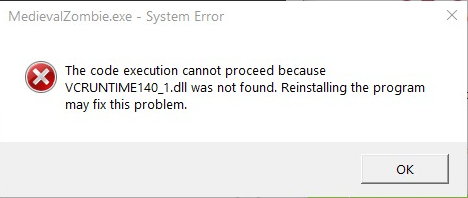
			<p style="text-align: justify;">Người dùng thường gặp lỗi &quot;VCRUNTIME140_1.dll was not found&quot; khi cố gắng chạy một chương trình cụ thể trên Windows, cũng như các phiên bản hệ điều hành khác.</p>

<p style="text-align: justify;">Cụ thể, người dùng gặp lỗi khi một file bị thiếu trong hệ thống – do đó, nó ngăn cản việc khởi chạy và hoạt động của các chương trình phụ thuộc vào file này. Những lỗi như vậy có thể tạo ra trải nghiệm người dùng rất khó chịu khi sử dụng thiết bị Windows.</p>

<figure>
<div style="text-align: justify;"><img alt="" data-i="0" data-src="https://st.quantrimang.com/photos/image/2025/12/10/sua-loi-vcruntime140-1-dll-not-found-trong-windows-1.png" data-was-processed="true" height="198" src="https://st.quantrimang.com/photos/image/2025/12/10/sua-loi-vcruntime140-1-dll-not-found-trong-windows-1.png" width="468" /></div>
</figure>

<p style="text-align: justify;">Thông tin về file VCRUNTIME140_1.dll cho biết file DLL bị thiếu đến từ gói Microsoft Visual C++ Redistributable và cần được cài đặt trên hệ thống ban đầu. Tuy nhiên, vì một số lý do, các file này có thể bị thay thế, xóa hoặc bị hỏng. Do đó, người dùng không thể khởi chạy chương trình trên Windows.</p>

<p style="text-align: justify;">Trong bài viết dưới đây, bạn sẽ tìm thấy các phương pháp giúp giải quyết nhanh chóng lỗi &quot;VCRUNTIME140_1.dll was not found&quot;, một lỗi thiếu file trong Windows.</p>

<h2 style="text-align: justify;">Phương pháp 1: Cài đặt/Cài đặt lại Microsoft Visual C++ Redistributable</h2>

<p style="text-align: justify;">Nếu chưa cài đặt Visual C++ Redistributable trên máy tính hay file VCRUNTIME140_1.dll bị hỏng hoặc bị xóa, bạn nên khắc phục sự cố bằng cách cài đặt hoặc cài đặt lại thư viện Visual C++ Redistributable.</p>

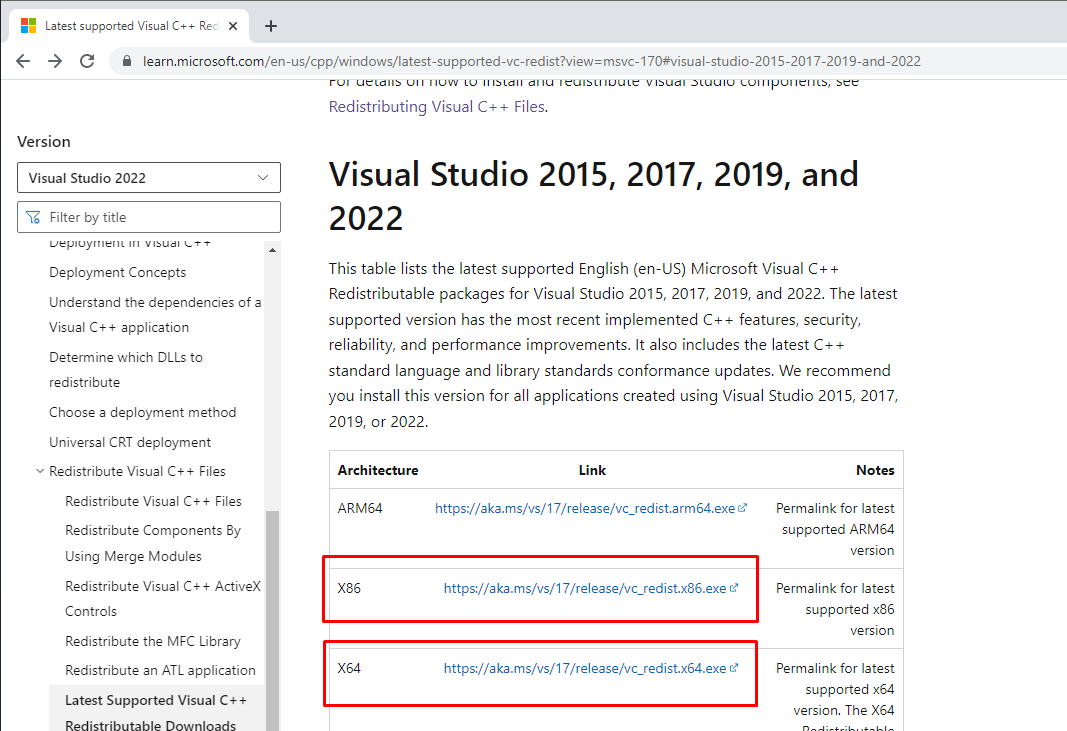
<p style="text-align: justify;">1. Mở trình duyệt web.&nbsp;Truy cập trang tải xuống Visual C++ Redistributable.<br />
<span style="color:rgb(192, 57, 43);">https://learn.microsoft.com/en-us/cpp/windows/latest-supported-vc-redist?view=msvc-170#visual-studio-2015-2017-2019-and-2022</span></p>

<figure>
<div style="text-align: justify;"><img alt="" data-adbro-processed="true" data-i="1" data-src="https://st.quantrimang.com/photos/image/2025/12/10/sua-loi-vcruntime140-1-dll-not-found-trong-windows-2.png" data-was-processed="true" height="731" src="https://st.quantrimang.com/photos/image/2025/12/10/sua-loi-vcruntime140-1-dll-not-found-trong-windows-2.png" width="1067" /></div>
</figure>

<p style="text-align: justify;">2. Nhấp vào các liên kết tải xuống cho&nbsp;<strong>vc_redist.x86.exe</strong>&nbsp;và&nbsp;<strong>vc_redist.x64.exe.</strong></p>

<p style="text-align: justify;">3. Sau đó, vào thư mục&nbsp;<strong>Downloads</strong>.</p>

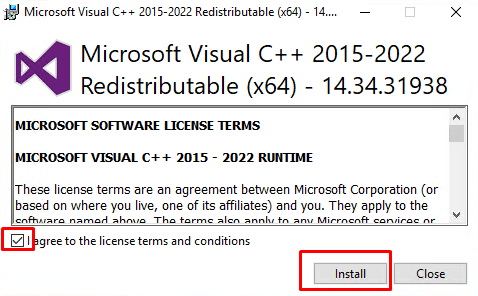
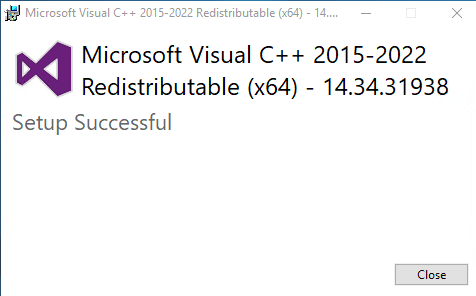
<p style="text-align: justify;">4. Chạy&nbsp;<strong>vc_redist.x64.exe.</strong></p>

<p style="text-align: justify;">5. Đánh dấu vào ô&nbsp;<strong>I agree to the license terms and conditions</strong>&nbsp;và nhấp vào&nbsp;<strong>Install</strong>.</p>

<figure>
<div style="text-align: justify;"><img alt="" data-i="2" data-src="https://st.quantrimang.com/photos/image/2025/12/10/sua-loi-vcruntime140-1-dll-not-found-trong-windows-3.png" data-was-processed="true" height="296" src="https://st.quantrimang.com/photos/image/2025/12/10/sua-loi-vcruntime140-1-dll-not-found-trong-windows-3.png" width="478" /></div>
</figure>

<p style="text-align: justify;">6. Nhấp vào&nbsp;<strong>Close</strong>.</p>

<figure>
<div style="text-align: justify;"><img alt="" data-i="3" data-src="https://st.quantrimang.com/photos/image/2025/12/10/sua-loi-vcruntime140-1-dll-not-found-trong-windows-4.png" data-was-processed="true" height="296" src="https://st.quantrimang.com/photos/image/2025/12/10/sua-loi-vcruntime140-1-dll-not-found-trong-windows-4.png" width="476" /></div>
</figure>

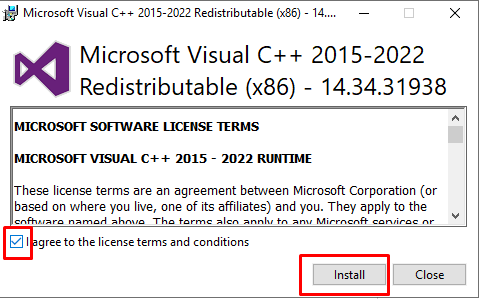
<p style="text-align: justify;">7. Chạy&nbsp;<strong>vc_redist.x86.exe.</strong></p>

<p style="text-align: justify;">8. Đánh dấu vào ô&nbsp;<strong>I agree to the license terms and conditions</strong>&nbsp;và nhấp vào&nbsp;<strong>Install</strong>.</p>

<figure>
<div style="text-align: justify;"><img alt="" data-i="4" data-src="https://st.quantrimang.com/photos/image/2025/12/10/sua-loi-vcruntime140-1-dll-not-found-trong-windows-5.png" data-was-processed="true" height="299" src="https://st.quantrimang.com/photos/image/2025/12/10/sua-loi-vcruntime140-1-dll-not-found-trong-windows-5.png" width="479" /></div>
</figure>

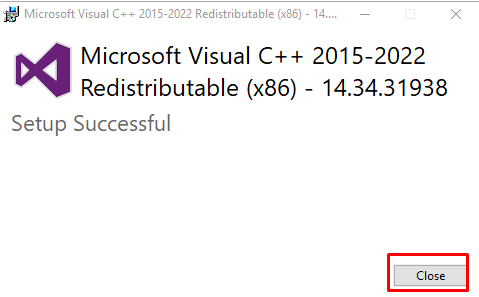
<p style="text-align: justify;">9. Nhấp vào&nbsp;<strong>Close.</strong></p>

<figure>
<div style="text-align: justify;"><img alt="" data-i="5" data-src="https://st.quantrimang.com/photos/image/2025/12/10/sua-loi-vcruntime140-1-dll-not-found-trong-windows-6.png" data-was-processed="true" height="297" src="https://st.quantrimang.com/photos/image/2025/12/10/sua-loi-vcruntime140-1-dll-not-found-trong-windows-6.png" width="479" /></div>
</figure>

<p style="text-align: justify;">10. Khởi động lại Windows, sau đó thử lại.</p>

<h2 style="text-align: justify;">Phương pháp 2: Chạy quét Deployment Image &amp; Servicing Management (DISM) và System File Checker (SFC)</h2>

<p style="text-align: justify;">Deployment Image Servicing and Management (DISM) là một công cụ dòng lệnh có thể sửa chữa image Windows của bạn nếu nó bị hỏng. System File Checker (SFC) là một tiện ích có thể sửa chữa các file hệ thống Windows bị hỏng bằng cách tải xuống những file mới từ máy chủ của Microsoft.</p>

<p style="text-align: justify;">1. Giữ phím&nbsp;<strong>Windows + R</strong>&nbsp;để&nbsp;<a data-type="internal" href="https://quantrimang.com/cong-nghe/cach-mo-hop-thoai-run-trong-windows-187019" title="7 cách mở hộp thoại Run trong Windows">mở Run</a>.</p>

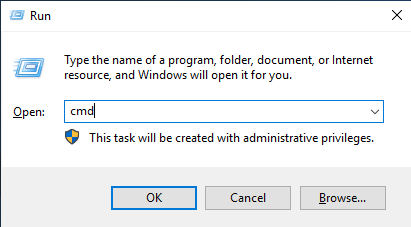
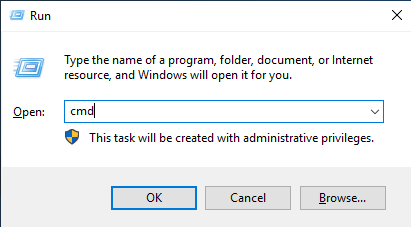
<p style="text-align: justify;">2. Trong hộp thoại Run, nhập&nbsp;<strong>CMD</strong>&nbsp;và giữ phím&nbsp;<strong>Ctrl + Shift + Enter</strong>&nbsp;để&nbsp;<a data-type="internal" href="https://quantrimang.com/cong-nghe/huong-dan-mo-command-prompt-duoi-quyen-admin-tren-windows-8-va-10-119884" title="Cách mở và chạy cmd với quyền Admin trên Windows">mở Command Prompt với quyền admin</a>.</p>

<figure>
<div style="text-align: justify;"><img alt="" data-i="6" data-src="https://st.quantrimang.com/photos/image/2025/12/10/sua-loi-vcruntime140-1-dll-not-found-trong-windows-7.png" data-was-processed="true" height="227" src="https://st.quantrimang.com/photos/image/2025/12/10/sua-loi-vcruntime140-1-dll-not-found-trong-windows-7.png" width="411" /></div>
</figure>

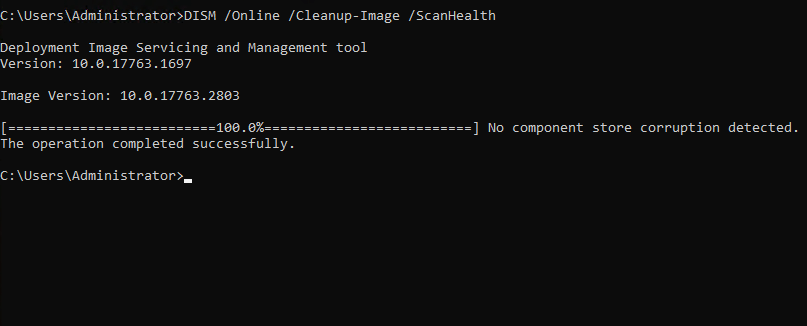
<p style="text-align: justify;">3. Trong cửa sổ Command Prompt, nhập lệnh sau&nbsp;và nhấn&nbsp;<strong>Enter</strong>.</p>

<pre id="pre0">
<code>DISM /Online /Cleanup-Image /ScanHealth</code></pre>

<figure>
<div style="text-align: justify;"><img alt="" data-i="7" data-src="https://st.quantrimang.com/photos/image/2025/12/10/sua-loi-vcruntime140-1-dll-not-found-trong-windows-8.png" data-was-processed="true" height="326" src="https://st.quantrimang.com/photos/image/2025/12/10/sua-loi-vcruntime140-1-dll-not-found-trong-windows-8.png" width="807" /></div>
</figure>

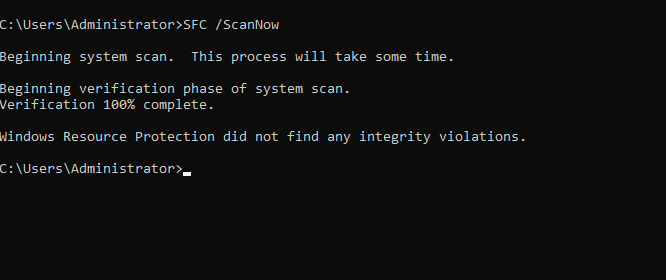
<p style="text-align: justify;">4. Sau đó, nhập lệnh sau và nhấn&nbsp;<strong>Enter</strong>.</p>

<pre id="pre1">
<code>SFC /ScanNow</code></pre>

<figure>
<div style="text-align: justify;"><img alt="" data-i="8" data-src="https://st.quantrimang.com/photos/image/2025/12/10/sua-loi-vcruntime140-1-dll-not-found-trong-windows-9.png" data-was-processed="true" height="280" src="https://st.quantrimang.com/photos/image/2025/12/10/sua-loi-vcruntime140-1-dll-not-found-trong-windows-9.png" width="666" /></div>
</figure>

<p style="text-align: justify;">5. Đóng Command Prompt và khởi động lại Windows, sau đó thử lại.</p>

<h2 style="text-align: justify;">Phương pháp 3: Đăng ký lại tất cả các file DLL trên hệ thống</h2>

<p style="text-align: justify;">1. Giữ phím&nbsp;<strong>Windows + R</strong>&nbsp;để mở Run.</p>

<p style="text-align: justify;">2. Trong hộp thoại Run, nhập&nbsp;<strong>CMD</strong>&nbsp;và giữ phím&nbsp;<strong>Ctrl + Shift + Enter&nbsp;</strong>để mở Command Prompt với quyền admin.</p>

<figure>
<div style="text-align: justify;"><img alt="" data-i="9" data-src="https://st.quantrimang.com/photos/image/2025/12/10/sua-loi-vcruntime140-1-dll-not-found-trong-windows-10.png" data-was-processed="true" height="227" src="https://st.quantrimang.com/photos/image/2025/12/10/sua-loi-vcruntime140-1-dll-not-found-trong-windows-10.png" width="411" /></div>
</figure>

<p style="text-align: justify;">3. Trong cửa sổ Command Prompt, nhập lệnh sau và nhấn&nbsp;<strong>Enter</strong>.</p>

<pre id="pre2">
<code>for %1 in (*.dll) do regsvr32 /s %1</code></pre>

<figure>
<div style="text-align: justify;"><img alt="" data-i="10" data-src="https://st.quantrimang.com/photos/image/2025/12/10/sua-loi-vcruntime140-1-dll-not-found-trong-windows-11.png" data-was-processed="true" height="107" src="https://st.quantrimang.com/photos/image/2025/12/10/sua-loi-vcruntime140-1-dll-not-found-trong-windows-11.png" width="607" /></div>
</figure>

<p style="text-align: justify;">4. Đóng Command Prompt và khởi động lại Windows, sau đó thử lại.</p>

<p style="text-align: justify;">Trong trường hợp này, sau khi thực hiện các bước trên, bạn sẽ không thấy lỗi nữa.</p>

<p style="text-align: justify;">Hy vọng bài viết này sẽ hữu ích cho bạn. Chúc bạn may mắn!</p>

<div style="text-align: justify;">&nbsp;</div>
		</div>
				<div id="author">
						<p>
				<strong>Nguồn tin:</strong>
				Quantrimang.com:
			</p>
		</div>
	</div>
	<div id="footer" class="clearfix">
		<div id="url">
			<strong>URL của bản tin này: </strong><a href="https://www.nguoicodonvn2008.info/vi/news/savefile/kien-thuc-may-tinh/cach-sua-loi-vcruntime140-1-dll-not-found-is-missing-trong-windows-11834.html" title="Cách sửa lỗi VCRUNTIME140_1.dll not found, is missing trong Windows">https://www.nguoicodonvn2008.info/vi/news/savefile/kien-thuc-may-tinh/cach-sua-loi-vcruntime140-1-dll-not-found-is-missing-trong-windows-11834.html</a>

		</div>
		<div class="clear"></div>
		<div class="copyright">
			&copy; .&#x3A; Nguoicodonvn2008.info - Cõi lòng người cô đơn &#x3A;.
		</div>
		<div id="contact">
			<a href="mailto:admin@nguoicodonvn2008.info">admin@nguoicodonvn2008.info</a>
		</div>
	</div>
</div>
        <div id="timeoutsess" class="chromeframe">
            Bạn đã không sử dụng Site, <a onclick="timeoutsesscancel();" href="https://nguoicodonvn2008.info/#">Bấm vào đây để duy trì trạng thái đăng nhập</a>. Thời gian chờ: <span id="secField"> 60 </span> giây
        </div>
        <div id="openidResult" class="nv-alert" style="display:none"></div>
        <div id="openidBt" data-result="" data-redirect=""></div>
		</script>
		<div class="car-top">
  <span><img src="https://nguoicodonvn2008.info/themes/default/images/car.png" alt=""></span>
</div>
<script src="https://nguoicodonvn2008.info/assets/js/jquery/jquery.min.js"></script>
<script>var nv_base_siteurl="/",nv_lang_data="vi",nv_lang_interface="vi",nv_name_variable="nv",nv_fc_variable="op",nv_lang_variable="language",nv_module_name="news",nv_func_name="savefile",nv_is_user=0, nv_my_ofs=-4,nv_my_abbr="EDT",nv_cookie_prefix="nv4c_e856T",nv_check_pass_mstime=1738000,nv_area_admin=0,nv_safemode=0,theme_responsive=0,nv_recaptcha_ver=2,nv_recaptcha_sitekey="",nv_recaptcha_type="image",XSSsanitize=1;</script>
<script src="https://nguoicodonvn2008.info/assets/js/language/vi.js"></script>
<script src="https://nguoicodonvn2008.info/assets/js/DOMPurify/purify3.js"></script>
<script src="https://nguoicodonvn2008.info/assets/js/global.js"></script>
<script src="https://nguoicodonvn2008.info/assets/js/site.js"></script>
<script src="https://nguoicodonvn2008.info/themes/default/js/news.js"></script>
<script src="https://nguoicodonvn2008.info/themes/default/js/main.js"></script>
<script src="https://nguoicodonvn2008.info/themes/default/js/custom.js"></script>
<script type="application/ld+json">
        {
            "@context": "https://schema.org",
            "@type": "Organization",
            "url": "https://nguoicodonvn2008.info",
            "logo": "https://nguoicodonvn2008.info/uploads/angel.gif"
        }
        </script>
<script src="https://nguoicodonvn2008.info/themes/default/js/bootstrap.min.js"></script>
<script type="text/javascript">
var $scrolltop = $('.car-top');
$scrolltop.on('click', function () {
    $('html,body').animate({
        scrollTop: 0
    }, 800);
    $(this).addClass("car-run");
    setTimeout(function(){ $scrolltop.removeClass('car-run');}, 1000);
    return false;
});
$(window).on('scroll', function ()
{ 
    if($(window).scrollTop() >= 200)
    {
        $scrolltop.addClass("show");
        $scrolltop.addClass("car-down");
    }
    else
    {
       $scrolltop.removeClass("show");
       setTimeout(function(){ $scrolltop.removeClass('car-down');}, 300);
    }
});
</script>
</body>
</html>