<!DOCTYPE html>
    <html lang="vi" xmlns="http://www.w3.org/1999/xhtml" prefix="og: http://ogp.me/ns#">
    <head>
<title>Cách sửa lỗi tính năng đồng bộ trên Windows 10 không hoạt động</title>
<meta name="description" content="Cách sửa lỗi tính năng đồng bộ trên Windows 10 không hoạt động - Savefile - Tin Tức -...">
<meta name="author" content=".: Nguoicodonvn2008.info - Cõi lòng người cô đơn :.">
<meta name="copyright" content=".: Nguoicodonvn2008.info - Cõi lòng người cô đơn :. [admin@nguoicodonvn2008.info]">
<meta name="robots" content="index, archive, follow, noodp">
<meta name="googlebot" content="index,archive,follow,noodp">
<meta name="msnbot" content="all,index,follow">
<meta name="generator" content="NukeViet v4.5">
<meta http-equiv="Content-Type" content="text/html; charset=utf-8">
<meta property="og:title" content="Cách sửa lỗi tính năng đồng bộ trên Windows 10 không hoạt động">
<meta property="og:type" content="website">
<meta property="og:description" content="Savefile - Tin Tức - https&#x3A;&#x002F;&#x002F;www.nguoicodonvn2008.info&#x002F;vi&#x002F;news&#x002F;savefile&#x002F;kien-thuc-may-tinh&#x002F;cach-sua-loi-tinh-nang-dong-bo-tren-windows-10-khong-hoat-dong-3393.html">
<meta property="og:site_name" content=".&#x3A; Nguoicodonvn2008.info - Cõi lòng người cô đơn &#x3A;.">
<meta property="og:url" content="https://www.nguoicodonvn2008.info/vi/news/savefile/kien-thuc-may-tinh/cach-sua-loi-tinh-nang-dong-bo-tren-windows-10-khong-hoat-dong-3393.html">
<link rel="shortcut icon" href="https://nguoicodonvn2008.info/favicon.ico">
<link rel="canonical" href="https://www.nguoicodonvn2008.info/vi/news/savefile/kien-thuc-may-tinh/cach-sua-loi-tinh-nang-dong-bo-tren-windows-10-khong-hoat-dong-3393.html">
<link rel="alternate" href="https://nguoicodonvn2008.info/vi/news/rss/" title="Tin Tức" type="application/rss+xml">
<link rel="alternate" href="https://nguoicodonvn2008.info/vi/news/rss/karaoke-dual/" title="Tin Tức - Karaoke Dual" type="application/rss+xml">
<link rel="alternate" href="https://nguoicodonvn2008.info/vi/news/rss/nhac-tre/" title="Tin Tức - Nhạc trẻ" type="application/rss+xml">
<link rel="alternate" href="https://nguoicodonvn2008.info/vi/news/rss/tru-tinh/" title="Tin Tức - Trữ tình" type="application/rss+xml">
<link rel="alternate" href="https://nguoicodonvn2008.info/vi/news/rss/nuoc-ngoai/" title="Tin Tức - Nước ngoài" type="application/rss+xml">
<link rel="alternate" href="https://nguoicodonvn2008.info/vi/news/rss/remix/" title="Tin Tức - Remix" type="application/rss+xml">
<link rel="alternate" href="https://nguoicodonvn2008.info/vi/news/rss/tam-su-tinh-yeu/" title="Tin Tức - Tâm sự tình yêu" type="application/rss+xml">
<link rel="alternate" href="https://nguoicodonvn2008.info/vi/news/rss/tho-suu-tam/" title="Tin Tức - Thơ sưu tầm" type="application/rss+xml">
<link rel="alternate" href="https://nguoicodonvn2008.info/vi/news/rss/cuoc-song/" title="Tin Tức - Cuộc sống" type="application/rss+xml">
<link rel="alternate" href="https://nguoicodonvn2008.info/vi/news/rss/phan-mem/" title="Tin Tức - Phần mềm" type="application/rss+xml">
<link rel="alternate" href="https://nguoicodonvn2008.info/vi/news/rss/kien-thuc-may-tinh/" title="Tin Tức - Kiến thức máy tính" type="application/rss+xml">
<link rel="alternate" href="https://nguoicodonvn2008.info/vi/news/rss/hoc-tap/" title="Tin Tức - Học tập" type="application/rss+xml">
<link rel="alternate" href="https://nguoicodonvn2008.info/vi/news/rss/tai-lieu/" title="Tin Tức - Tài liệu" type="application/rss+xml">
<link rel="alternate" href="https://nguoicodonvn2008.info/vi/news/rss/de-thi/" title="Tin Tức - Đề thi" type="application/rss+xml">
<link rel="preload" as="style" href="https://nguoicodonvn2008.info/assets/css/font-awesome.min.css" type="text/css">
<link rel="preload" as="style" href="https://nguoicodonvn2008.info/themes/default/css/bootstrap.non-responsive.css" type="text/css">
<link rel="preload" as="style" href="https://nguoicodonvn2008.info/themes/default/css/style.css" type="text/css">
<link rel="preload" as="style" href="https://nguoicodonvn2008.info/themes/default/css/style.non-responsive.css" type="text/css">
<link rel="preload" as="style" href="https://nguoicodonvn2008.info/themes/default/css/news.css" type="text/css">
<link rel="preload" as="style" href="https://nguoicodonvn2008.info/themes/default/css/custom.css" type="text/css">
<link rel="preload" as="script" href="https://nguoicodonvn2008.info/assets/js/jquery/jquery.min.js" type="text/javascript">
<link rel="preload" as="script" href="https://nguoicodonvn2008.info/assets/js/language/vi.js" type="text/javascript">
<link rel="preload" as="script" href="https://nguoicodonvn2008.info/assets/js/DOMPurify/purify3.js" type="text/javascript">
<link rel="preload" as="script" href="https://nguoicodonvn2008.info/assets/js/global.js" type="text/javascript">
<link rel="preload" as="script" href="https://nguoicodonvn2008.info/assets/js/site.js" type="text/javascript">
<link rel="preload" as="script" href="https://nguoicodonvn2008.info/themes/default/js/news.js" type="text/javascript">
<link rel="preload" as="script" href="https://nguoicodonvn2008.info/themes/default/js/main.js" type="text/javascript">
<link rel="preload" as="script" href="https://nguoicodonvn2008.info/themes/default/js/custom.js" type="text/javascript">
<link rel="preload" as="script" href="https://nguoicodonvn2008.info/themes/default/js/bootstrap.min.js" type="text/javascript">
<link rel="stylesheet" href="https://nguoicodonvn2008.info/assets/css/font-awesome.min.css">
<link rel="stylesheet" href="https://nguoicodonvn2008.info/themes/default/css/bootstrap.non-responsive.css">
<link rel="stylesheet" href="https://nguoicodonvn2008.info/themes/default/css/style.css">
<link rel="stylesheet" href="https://nguoicodonvn2008.info/themes/default/css/style.non-responsive.css">
<link rel="StyleSheet" href="https://nguoicodonvn2008.info/themes/default/css/news.css">
<link rel="stylesheet" href="https://nguoicodonvn2008.info/themes/default/css/custom.css">
<style type="text/css">
	body{background: #fff;}
</style>
    </head>
    <body>
<div id="print">
	<div id="hd_print">
		<h2 class="pull-left">.&#x3A; Nguoicodonvn2008.info - Cõi lòng người cô đơn &#x3A;.</h2>
		<p class="pull-right"><a title=".&#x3A; Nguoicodonvn2008.info - Cõi lòng người cô đơn &#x3A;." href="https://nguoicodonvn2008.info/">https://nguoicodonvn2008.info</a></p>
	</div>
	<div class="clear"></div>
	<hr />
	<div id="content">
		<h1>Cách sửa lỗi tính năng đồng bộ trên Windows 10 không hoạt động</h1>
		<ul class="list-inline">
			<li>Thứ tư - 06/01/2021 00:00</li>
			<li class="hidden-print txtrequired"><em class="fa fa-print">&nbsp;</em><a title="In ra" href="javascript:;" onclick="window.print()">In ra</a></li>
			<li class="hidden-print txtrequired"><em class="fa fa-power-off">&nbsp;</em><a title="Đóng cửa sổ này" href="javascript:;" onclick="window.close()">Đóng cửa sổ này</a></li>
		</ul>
		<div class="clear"></div>
		<div id="hometext">
		</div>
				<div class="imghome">
			<img alt="Cách sửa lỗi tính năng đồng bộ trên Windows 10 không hoạt động" src="https://st.quantrimang.com/photos/image/2021/01/06/cach-sua-loi-tinh-nang-dong-bo-tren-windows-10-khong-hoat-dong-2.jpg" width="460" class="img-thumbnail" />
		</div>
		<div class="clear"></div>
		<div id="bodytext" class="clearfix">
			<p style="text-align: justify;">Windows 10&nbsp;có tính năng đồng bộ nội dung giữa các thiết bị đăng nhập chung&nbsp;tài khoản Microsoft. Các nội dung được đồng bộ bao gồm theme, mật khẩu, ngôn ngữ...</p>

<p style="text-align: justify;">Tuy nhiên, đôi khi tính năng này không hoạt động hoặc bị lỗi. Trong bài viết này, Quantrimang sẽ hướng dẫn bạn cách khắc phục khi tính năng&nbsp;đồng bộ trên Windows 10&nbsp;không hoạt động.</p>

<div style="text-align: justify;">&nbsp;</div>

<p style="text-align: justify;">Có rất nhiều lý do khiến Windows 10 không thể đồng bộ nội dung giữa các thiết bị. Vấn đề có thể nằm ở tài khoản Microsoft của bạn hoặc có sự hạn chế từ quản trị viên trong mạng của bạn.</p>

<p style="text-align: justify;">Dưới đây là các cách khắc phục lỗi Windows 10 không thể đồng bộ nội dung giữa các thiết bị:</p>

<h2 style="text-align: justify;">1. Xác minh tài khoản Microsoft của bạn</h2>

<p style="text-align: justify;">Khi bạn mới lập tài khoản, bạn cần xác minh nó với Microsoft. Quá trình xác minh khá đơn giản, Microsoft sẽ gửi tới cho bạn một email xác thực hoặc một quy trình xác thực dạng pop-up. Nếu không thực hiện xác minh tài khoản, tính năng đồng bộ sẽ không hoạt động.</p>

<figure>
<div style="text-align: justify;"><img alt="Xác minh tài khoản Microsoft" data-i="0" data-src="https://st.quantrimang.com/photos/image/2021/01/06/cach-sua-loi-tinh-nang-dong-bo-tren-windows-10-khong-hoat-dong.jpg" data-was-processed="true" height="404" src="https://st.quantrimang.com/photos/image/2021/01/06/cach-sua-loi-tinh-nang-dong-bo-tren-windows-10-khong-hoat-dong.jpg" width="650" /></div>

<figcaption>
<div style="text-align: justify;">Xác minh tài khoản Microsoft</div>
</figcaption>
</figure>

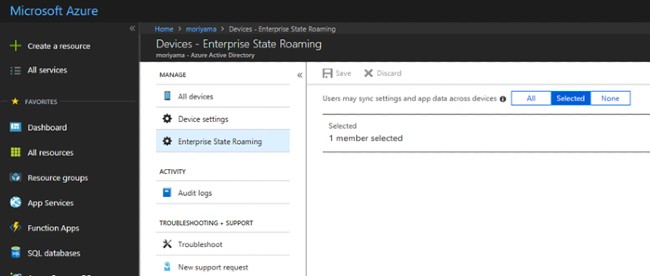
<p style="text-align: justify;">Để xác minh tài khoản bạn làm theo các bước sau:</p>

<ul>
	<li style="text-align: justify;">Truy cập&nbsp;<strong>Settings &gt; Accouts &gt; Your Info</strong></li>
	<li style="text-align: justify;">Tìm tới phần&nbsp;<strong>Verify yoru identity to sync passwords across your devices</strong>. và nhấn vào link&nbsp;<strong>Verify</strong></li>
	<li style="text-align: justify;">Sau đó, hệ thống sẽ nhắc bạn tiến hành xác minh bằng ứng dụng&nbsp;<strong>Authenticator</strong>, số điện thoại hoặc cách khác</li>
</ul>

<p style="text-align: justify;">Sau khi xác minh xong tính năng đồng bộ sẽ bắt đầu hoạt động.</p>

<h2 style="text-align: justify;">2. Đồng bộ trên tài khoản sinh viên hoặc doanh nghiệp</h2>

<p style="text-align: justify;">Khi bạn sử dụng tài khoản Microsoft dành cho sinh viên hoặc doanh nghiệp bạn sẽ không thể tự quyết định khả năng đồng bộ nội dung giữa các thiết bị. Thay vào đó, quản trị viên IT (admin) của trường hoặc của công ty sẽ kiểm soát tính năng này.&nbsp;</p>

<p style="text-align: justify;">Nhiều công ty và trường học cho phép đồng bộ thông tin giữa các thiết bị dành cho công việc, học tập và thiết bị cá nhân. Tuy nhiên, một số khác chỉ cho phép bạn dùng tài khoản đã được cấp trên thiết bị dành cho công việc, học tập mà thôi.</p>

<div style="text-align: justify;">&nbsp;</div>

<p style="text-align: justify;">Dẫu vậy, khi cần đồng bộ cho một trường hợp khẩn cấp, bạn có thể nhờ quản trị viên IT của công ty hoặc trường học hỗ trợ.</p>

<h2 style="text-align: justify;">3. Kích hoạt đồng bộ hóa trên Windows 10 bằng Registry Editor hoặc Group Policy</h2>

<p style="text-align: justify;">Nếu bạn sử dụng tài khoản cá nhân đã được xác minh mà tính năng đồng bộ vẫn không hoạt động thì bạn cần sử dụng&nbsp;Registry Editor&nbsp;hoặc&nbsp;Group Policy&nbsp;để can thiệp.</p>

<p style="text-align: justify;"><strong>Dùng Registry</strong></p>

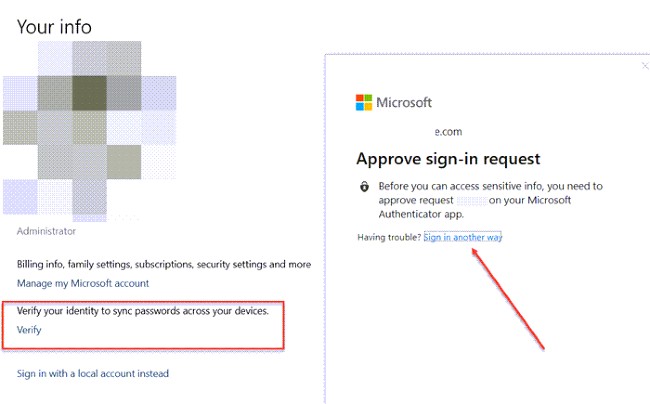
<p style="text-align: justify;">Bạn cần mở&nbsp;<strong>Registry Editor</strong>&nbsp;và tìm tới key sau:</p>

<pre id="pre0">
<code>HKEY_LOCAL_MACHINE\Software\Policies\Microsoft\Windows\SettingSync</code></pre>

<p style="text-align: justify;">Sau đó, tạo một giá trị&nbsp;<strong>DWORD</strong>&nbsp;mới với tên là&nbsp;<strong>DisableSettingSync</strong>&nbsp;và nhập giá trị cho nó là&nbsp;<strong>2</strong>.</p>

<figure>
<div style="text-align: justify;"><img alt="Sử dụng Registry để kích hoạt tính năng đồng bộ nội dung" data-i="1" data-src="https://st.quantrimang.com/photos/image/2021/01/06/cach-sua-loi-tinh-nang-dong-bo-tren-windows-10-khong-hoat-dong-3.jpg" data-was-processed="true" height="402" src="https://st.quantrimang.com/photos/image/2021/01/06/cach-sua-loi-tinh-nang-dong-bo-tren-windows-10-khong-hoat-dong-3.jpg" width="650" /></div>

<figcaption>
<div style="text-align: justify;">Sử dụng Registry để kích hoạt tính năng đồng bộ nội dung</div>
</figcaption>
</figure>

<p style="text-align: justify;">Nếu là một quản trị viên, bạn có thể tạo một giá trị&nbsp;<strong>DWORD</strong>&nbsp;khác có tên&nbsp;<strong>DisableSettingSyncUserOverride</strong>&nbsp;với giá trị là&nbsp;<strong>2</strong>&nbsp;để cho phép người dùng trong mạng kích hoạt tính năng đồng bộ.</p>

<p style="text-align: justify;"><strong>Dùng Group Policy</strong></p>

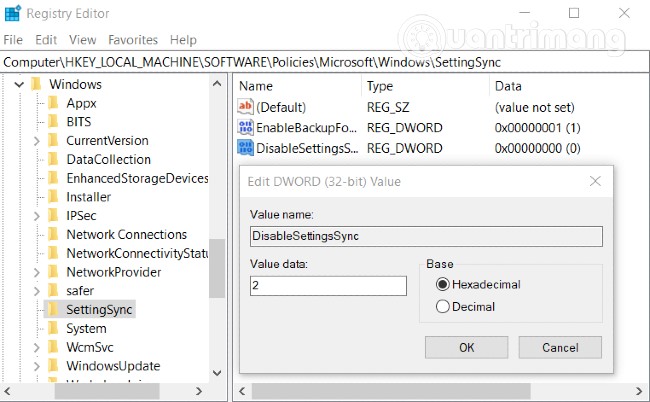
<p style="text-align: justify;">Mở&nbsp;<strong>Group Policy Editor</strong>&nbsp;và tìm tới đường dẫn sau:</p>

<p style="text-align: justify;"><strong>Administrative Templates &gt; Windows Components &gt; Sync your settings</strong></p>

<p style="text-align: justify;"><strong><img alt="" data-i="2" data-src="https://st.quantrimang.com/photos/image/2021/01/06/cach-sua-loi-tinh-nang-dong-bo-tren-windows-10-khong-hoat-dong-1.jpg" data-was-processed="true" height="486" src="https://st.quantrimang.com/photos/image/2021/01/06/cach-sua-loi-tinh-nang-dong-bo-tren-windows-10-khong-hoat-dong-1.jpg" width="650" /></strong></p>

<p style="text-align: justify;">Tìm tới chính sách&nbsp;<strong>Do not Sync</strong>, nhấp đúp vào để mở nó. Thiết lập nó ở chế độ&nbsp;<strong>Enable</strong>&nbsp;(kích hoạt) và lưu lại. Nếu là quản trị viên, bạn có thể đánh dấu vào ô&nbsp;<strong>Allowing users to turn sync on</strong>.</p>

<h2 style="text-align: justify;">4. Kích hoạt động bộ từ Azure Active Directory</h2>

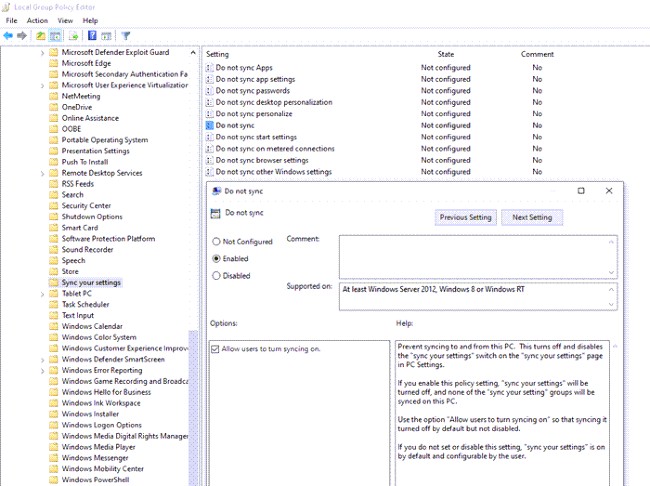
<p style="text-align: justify;">Nếu tham gia vào Azure Active Directory, bạn có thể nhờ quản trị viên cấp quyền đồng bộ giữa các thiết bị Windows 10 của mình. Các bước thực hiện như sau:</p>

<ul>
	<li style="text-align: justify;">Đăng nhập vào trung tâm quản trị của&nbsp;<strong>Azure Active Directory</strong></li>
	<li style="text-align: justify;">Chọn&nbsp;<strong>Azure Active Directory &gt; Devices &gt; Enterprise State Roaming</strong></li>
	<li style="text-align: justify;">Chọn những người dùng được phép đồng bộ nội dung</li>
</ul>

<figure>
<div style="text-align: justify;"><img alt="Kích hoạt đồng bộ bằng Azure Active Directory" data-i="3" data-src="https://st.quantrimang.com/photos/image/2021/01/06/cach-sua-loi-tinh-nang-dong-bo-tren-windows-10-khong-hoat-dong-2.jpg" data-was-processed="true" height="276" src="https://st.quantrimang.com/photos/image/2021/01/06/cach-sua-loi-tinh-nang-dong-bo-tren-windows-10-khong-hoat-dong-2.jpg" width="650" /></div>

<figcaption>
<div style="text-align: justify;">Kích hoạt đồng bộ bằng Azure Active Directory</div>
</figcaption>
</figure>

<h2 style="text-align: justify;">5. Các câu hỏi liên quan tới tính năng đồng bộ hóa trên Windows 10</h2>

<p style="text-align: justify;"><strong>Tính năng đồng bộ hóa trên Windows 10 có tác dụng gì?</strong></p>

<p style="text-align: justify;">Tính năng đồng bộ hóa trên Windows 10 giúp bạn đồng bộ các thiết lập Windows 10, theme, password, ngôn ngữ, cài đặt... giữa các thiết bị. Khi bạn đăng nhập trên một thiết bị mới bằng tài khoản Microsoft của mình, tất cả những thứ quen thuộc mà bạn thiết lập trên máy tính cũ sẽ xuất hiện do được đồng bộ.</p>

<div style="text-align: justify;">&nbsp;</div>

<p style="text-align: justify;"><strong>Làm cách nào để kích hoạt tính năng đồng bộ hóa trên Windows 10</strong></p>

<div style="text-align: justify;">&nbsp;</div>

<p style="text-align: justify;">Bạn cần truy cập&nbsp;<strong>Settings &gt; Accounts &gt; Sync your settings</strong>&nbsp;sau đó gạt nút ở tùy chọn&nbsp;<strong>Sync settings</strong>&nbsp;sang chế độ&nbsp;<strong>On</strong>. Ở phần bên dưới bạn có thể chọn các dữ liệu cá nhân mà mình muốn đồng bộ.</p>

<p style="text-align: justify;"><strong>Tại sao tài khoản Microsoft của tôi không thể đồng bộ</strong></p>

<p style="text-align: justify;">Có khả năng tính năng đồng bộ bị tắt hoặc bị vô hiệu hóa bởi quản trị viên hoặc bạn chưa xác minh tài khoản.</p>
		</div>
				<div id="author">
						<p>
				<strong>Nguồn tin:</strong>
				Quantrimang.com
			</p>
		</div>
	</div>
	<div id="footer" class="clearfix">
		<div id="url">
			<strong>URL của bản tin này: </strong><a href="https://www.nguoicodonvn2008.info/vi/news/savefile/kien-thuc-may-tinh/cach-sua-loi-tinh-nang-dong-bo-tren-windows-10-khong-hoat-dong-3393.html" title="Cách sửa lỗi tính năng đồng bộ trên Windows 10 không hoạt động">https://www.nguoicodonvn2008.info/vi/news/savefile/kien-thuc-may-tinh/cach-sua-loi-tinh-nang-dong-bo-tren-windows-10-khong-hoat-dong-3393.html</a>

		</div>
		<div class="clear"></div>
		<div class="copyright">
			&copy; .&#x3A; Nguoicodonvn2008.info - Cõi lòng người cô đơn &#x3A;.
		</div>
		<div id="contact">
			<a href="mailto:admin@nguoicodonvn2008.info">admin@nguoicodonvn2008.info</a>
		</div>
	</div>
</div>
        <div id="timeoutsess" class="chromeframe">
            Bạn đã không sử dụng Site, <a onclick="timeoutsesscancel();" href="https://nguoicodonvn2008.info/#">Bấm vào đây để duy trì trạng thái đăng nhập</a>. Thời gian chờ: <span id="secField"> 60 </span> giây
        </div>
        <div id="openidResult" class="nv-alert" style="display:none"></div>
        <div id="openidBt" data-result="" data-redirect=""></div>
		</script>
		<div class="car-top">
  <span><img src="https://nguoicodonvn2008.info/themes/default/images/car.png" alt=""></span>
</div>
<script src="https://nguoicodonvn2008.info/assets/js/jquery/jquery.min.js"></script>
<script>var nv_base_siteurl="/",nv_lang_data="vi",nv_lang_interface="vi",nv_name_variable="nv",nv_fc_variable="op",nv_lang_variable="language",nv_module_name="news",nv_func_name="savefile",nv_is_user=0, nv_my_ofs=-4,nv_my_abbr="EDT",nv_cookie_prefix="nv4c_e856T",nv_check_pass_mstime=1738000,nv_area_admin=0,nv_safemode=0,theme_responsive=0,nv_recaptcha_ver=2,nv_recaptcha_sitekey="",nv_recaptcha_type="image",XSSsanitize=1;</script>
<script src="https://nguoicodonvn2008.info/assets/js/language/vi.js"></script>
<script src="https://nguoicodonvn2008.info/assets/js/DOMPurify/purify3.js"></script>
<script src="https://nguoicodonvn2008.info/assets/js/global.js"></script>
<script src="https://nguoicodonvn2008.info/assets/js/site.js"></script>
<script src="https://nguoicodonvn2008.info/themes/default/js/news.js"></script>
<script src="https://nguoicodonvn2008.info/themes/default/js/main.js"></script>
<script src="https://nguoicodonvn2008.info/themes/default/js/custom.js"></script>
<script type="application/ld+json">
        {
            "@context": "https://schema.org",
            "@type": "Organization",
            "url": "https://nguoicodonvn2008.info",
            "logo": "https://nguoicodonvn2008.info/uploads/angel.gif"
        }
        </script>
<script src="https://nguoicodonvn2008.info/themes/default/js/bootstrap.min.js"></script>
<script type="text/javascript">
var $scrolltop = $('.car-top');
$scrolltop.on('click', function () {
    $('html,body').animate({
        scrollTop: 0
    }, 800);
    $(this).addClass("car-run");
    setTimeout(function(){ $scrolltop.removeClass('car-run');}, 1000);
    return false;
});
$(window).on('scroll', function ()
{ 
    if($(window).scrollTop() >= 200)
    {
        $scrolltop.addClass("show");
        $scrolltop.addClass("car-down");
    }
    else
    {
       $scrolltop.removeClass("show");
       setTimeout(function(){ $scrolltop.removeClass('car-down');}, 300);
    }
});
</script>
</body>
</html>