<!DOCTYPE html>
    <html lang="vi" xmlns="http://www.w3.org/1999/xhtml" prefix="og: http://ogp.me/ns#">
    <head>
<title>Cách sửa lỗi &quot;This App Can’t Be Activated When UAC Is Disabled&quot; trên Windows</title>
<meta name="description" content="Cách sửa lỗi &quot;This App Can’t Be Activated When UAC Is Disabled&quot; trên Windows - Savefile - Tin Tức -...">
<meta name="author" content=".: Nguoicodonvn2008.info - Cõi lòng người cô đơn :.">
<meta name="copyright" content=".: Nguoicodonvn2008.info - Cõi lòng người cô đơn :. [admin@nguoicodonvn2008.info]">
<meta name="robots" content="index, archive, follow, noodp">
<meta name="googlebot" content="index,archive,follow,noodp">
<meta name="msnbot" content="all,index,follow">
<meta name="generator" content="NukeViet v4.5">
<meta http-equiv="Content-Type" content="text/html; charset=utf-8">
<meta property="og:title" content="Cách sửa lỗi &quot;This App Can’t Be Activated When UAC Is Disabled&quot; trên Windows">
<meta property="og:type" content="website">
<meta property="og:description" content="Savefile - Tin Tức -...">
<meta property="og:site_name" content=".&#x3A; Nguoicodonvn2008.info - Cõi lòng người cô đơn &#x3A;.">
<meta property="og:url" content="https://www.nguoicodonvn2008.info/vi/news/savefile/kien-thuc-may-tinh/cach-sua-loi-this-app-can-t-be-activated-when-uac-is-disabled-tren-windows-5975.html">
<link rel="shortcut icon" href="https://nguoicodonvn2008.info/favicon.ico">
<link rel="canonical" href="https://www.nguoicodonvn2008.info/vi/news/savefile/kien-thuc-may-tinh/cach-sua-loi-this-app-can-t-be-activated-when-uac-is-disabled-tren-windows-5975.html">
<link rel="alternate" href="https://nguoicodonvn2008.info/vi/news/rss/" title="Tin Tức" type="application/rss+xml">
<link rel="alternate" href="https://nguoicodonvn2008.info/vi/news/rss/karaoke-dual/" title="Tin Tức - Karaoke Dual" type="application/rss+xml">
<link rel="alternate" href="https://nguoicodonvn2008.info/vi/news/rss/nhac-tre/" title="Tin Tức - Nhạc trẻ" type="application/rss+xml">
<link rel="alternate" href="https://nguoicodonvn2008.info/vi/news/rss/tru-tinh/" title="Tin Tức - Trữ tình" type="application/rss+xml">
<link rel="alternate" href="https://nguoicodonvn2008.info/vi/news/rss/nuoc-ngoai/" title="Tin Tức - Nước ngoài" type="application/rss+xml">
<link rel="alternate" href="https://nguoicodonvn2008.info/vi/news/rss/remix/" title="Tin Tức - Remix" type="application/rss+xml">
<link rel="alternate" href="https://nguoicodonvn2008.info/vi/news/rss/tam-su-tinh-yeu/" title="Tin Tức - Tâm sự tình yêu" type="application/rss+xml">
<link rel="alternate" href="https://nguoicodonvn2008.info/vi/news/rss/tho-suu-tam/" title="Tin Tức - Thơ sưu tầm" type="application/rss+xml">
<link rel="alternate" href="https://nguoicodonvn2008.info/vi/news/rss/cuoc-song/" title="Tin Tức - Cuộc sống" type="application/rss+xml">
<link rel="alternate" href="https://nguoicodonvn2008.info/vi/news/rss/phan-mem/" title="Tin Tức - Phần mềm" type="application/rss+xml">
<link rel="alternate" href="https://nguoicodonvn2008.info/vi/news/rss/kien-thuc-may-tinh/" title="Tin Tức - Kiến thức máy tính" type="application/rss+xml">
<link rel="alternate" href="https://nguoicodonvn2008.info/vi/news/rss/hoc-tap/" title="Tin Tức - Học tập" type="application/rss+xml">
<link rel="alternate" href="https://nguoicodonvn2008.info/vi/news/rss/tai-lieu/" title="Tin Tức - Tài liệu" type="application/rss+xml">
<link rel="alternate" href="https://nguoicodonvn2008.info/vi/news/rss/de-thi/" title="Tin Tức - Đề thi" type="application/rss+xml">
<link rel="preload" as="style" href="https://nguoicodonvn2008.info/assets/css/font-awesome.min.css" type="text/css">
<link rel="preload" as="style" href="https://nguoicodonvn2008.info/themes/default/css/bootstrap.non-responsive.css" type="text/css">
<link rel="preload" as="style" href="https://nguoicodonvn2008.info/themes/default/css/style.css" type="text/css">
<link rel="preload" as="style" href="https://nguoicodonvn2008.info/themes/default/css/style.non-responsive.css" type="text/css">
<link rel="preload" as="style" href="https://nguoicodonvn2008.info/themes/default/css/news.css" type="text/css">
<link rel="preload" as="style" href="https://nguoicodonvn2008.info/themes/default/css/custom.css" type="text/css">
<link rel="preload" as="script" href="https://nguoicodonvn2008.info/assets/js/jquery/jquery.min.js" type="text/javascript">
<link rel="preload" as="script" href="https://nguoicodonvn2008.info/assets/js/language/vi.js" type="text/javascript">
<link rel="preload" as="script" href="https://nguoicodonvn2008.info/assets/js/DOMPurify/purify3.js" type="text/javascript">
<link rel="preload" as="script" href="https://nguoicodonvn2008.info/assets/js/global.js" type="text/javascript">
<link rel="preload" as="script" href="https://nguoicodonvn2008.info/assets/js/site.js" type="text/javascript">
<link rel="preload" as="script" href="https://nguoicodonvn2008.info/themes/default/js/news.js" type="text/javascript">
<link rel="preload" as="script" href="https://nguoicodonvn2008.info/themes/default/js/main.js" type="text/javascript">
<link rel="preload" as="script" href="https://nguoicodonvn2008.info/themes/default/js/custom.js" type="text/javascript">
<link rel="preload" as="script" href="https://nguoicodonvn2008.info/themes/default/js/bootstrap.min.js" type="text/javascript">
<link rel="stylesheet" href="https://nguoicodonvn2008.info/assets/css/font-awesome.min.css">
<link rel="stylesheet" href="https://nguoicodonvn2008.info/themes/default/css/bootstrap.non-responsive.css">
<link rel="stylesheet" href="https://nguoicodonvn2008.info/themes/default/css/style.css">
<link rel="stylesheet" href="https://nguoicodonvn2008.info/themes/default/css/style.non-responsive.css">
<link rel="StyleSheet" href="https://nguoicodonvn2008.info/themes/default/css/news.css">
<link rel="stylesheet" href="https://nguoicodonvn2008.info/themes/default/css/custom.css">
<style type="text/css">
	body{background: #fff;}
</style>
    </head>
    <body>
<div id="print">
	<div id="hd_print">
		<h2 class="pull-left">.&#x3A; Nguoicodonvn2008.info - Cõi lòng người cô đơn &#x3A;.</h2>
		<p class="pull-right"><a title=".&#x3A; Nguoicodonvn2008.info - Cõi lòng người cô đơn &#x3A;." href="https://nguoicodonvn2008.info/">https://nguoicodonvn2008.info</a></p>
	</div>
	<div class="clear"></div>
	<hr />
	<div id="content">
		<h1>Cách sửa lỗi &quot;This App Can’t Be Activated When UAC Is Disabled&quot; trên Windows</h1>
		<ul class="list-inline">
			<li>Thứ ba - 16/08/2022 00:11</li>
			<li class="hidden-print txtrequired"><em class="fa fa-print">&nbsp;</em><a title="In ra" href="javascript:;" onclick="window.print()">In ra</a></li>
			<li class="hidden-print txtrequired"><em class="fa fa-power-off">&nbsp;</em><a title="Đóng cửa sổ này" href="javascript:;" onclick="window.close()">Đóng cửa sổ này</a></li>
		</ul>
		<div class="clear"></div>
		<div id="hometext">
		</div>
				<div class="imghome">
			<img alt="Cách sửa lỗi &quot;This App Can’t Be Activated When UAC Is Disabled&quot; trên Windows" src="https://st.quantrimang.com/photos/image/2022/08/12/sua-loi-this-app-can-t-be-activated-when-uac-is-disabled-5.jpg" width="460" class="img-thumbnail" />
		</div>
		<div class="clear"></div>
		<div id="bodytext" class="clearfix">
			<p style="text-align: justify;">Bạn đang cố gắng mở một ứng dụng trên thiết bị Windows của mình và đột nhiên thấy thông báo lỗi có nội dung “This App Can’t Be Activated When UAC Is Disabled”. Khi điều này xảy ra, ứng dụng được đề cập sẽ không chạy và bạn phải thử mở lại.</p>

<p style="text-align: justify;">Rất tiếc, lỗi này dường như không giải quyết được, cho dù bạn có thử mở lại ứng dụng của mình bao nhiêu lần. Trong bài viết này, Quantrimang.com sẽ chỉ cho bạn cách bạn có thể dễ dàng giải quyết vấn đề User Account Control (UAC) này, bao gồm cả UAC là gì và cách thức hoạt động của nó.</p>

<p style="text-align: justify;">Nếu bạn đang gặp phải lỗi này trên PC của mình, thì hãy xem cách bạn có thể giải quyết sự cố.</p>

<h2 style="text-align: justify;">1. Cách cấu hình cài đặt UAC bằng hộp thoại lệnh Run</h2>

<p style="text-align: justify;">Hộp thoại lệnh Run giúp bạn dễ dàng mở các chương trình khác nhau trên thiết bị Windows của mình. Trong trường hợp này, ta sẽ sử dụng công cụ này để nhanh chóng truy cập cài đặt UAC:</p>

<p style="text-align: justify;"><strong>B1:</strong>&nbsp;Nhấn&nbsp;<strong>Win + R</strong>&nbsp;để&nbsp;mở hộp lệnh Run.</p>

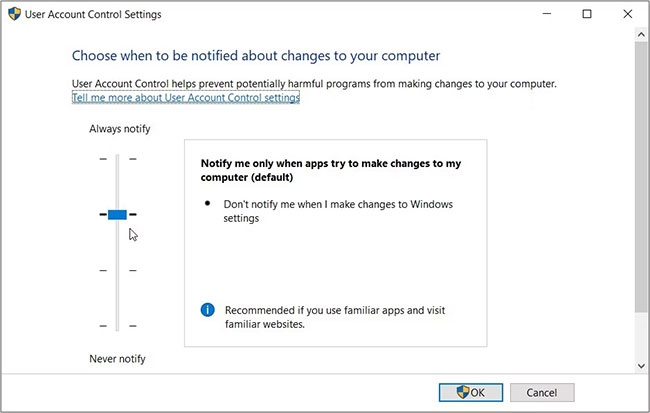
<p style="text-align: justify;"><strong>B2:</strong>&nbsp;Nhập&nbsp;<strong>useraccountcontrolsettings</strong>&nbsp;và nhấn&nbsp;<strong>Enter</strong>&nbsp;để mở cửa sổ cài đặt UAC. Trong cửa sổ tiếp theo, bạn sẽ thấy một thanh trượt UAC trên ngăn bên trái.</p>

<figure>
<div style="text-align: justify;"><img alt="Cấu hình cài đặt UAC bằng hộp thoại lệnh Run" data-i="0" data-src="https://st.quantrimang.com/photos/image/2022/08/12/sua-loi-this-app-can-t-be-activated-when-uac-is-disabled-1.jpg" data-was-processed="true" height="413" src="https://st.quantrimang.com/photos/image/2022/08/12/sua-loi-this-app-can-t-be-activated-when-uac-is-disabled-1.jpg" width="650" /></div>

<figcaption>
<div style="text-align: justify;">Cấu hình cài đặt UAC bằng hộp thoại lệnh Run</div>
</figcaption>
</figure>

<p style="text-align: justify;">Nếu nút trên thanh trượt ở dưới cùng (trên tùy chọn&nbsp;<strong>&quot;Never notify&quot;</strong>), thì công cụ UAC sẽ bị vô hiệu hóa. Trong trường hợp này, bạn không thể chạy hoặc tải xuống một số ứng dụng.</p>

<p style="text-align: justify;">Để loại bỏ vấn đề với UAC, hãy kéo nút trên thanh trượt đến tùy chọn&nbsp;<strong>&quot;Always notify&quot;</strong>&nbsp;ở trên cùng. Từ đó, nhấn&nbsp;<strong>OK</strong>&nbsp;và sau đó&nbsp;khởi động lại PC&nbsp;của bạn để áp dụng các thay đổi này.</p>

<h2 style="text-align: justify;">2. Cách cấu hình cài đặt UAC bằng Control Panel</h2>

<p style="text-align: justify;">Bạn có gặp sự cố khi truy cập cài đặt UAC bằng hộp thoại lệnh Run không? Trong trường hợp này, bạn có thể truy cập các cài đặt này trực tiếp trên Control Panel.</p>

<p style="text-align: justify;">Đây là các bước để cấu hình cài đặt UAC bằng&nbsp;Control Panel:</p>

<p style="text-align: justify;"><strong>B1:</strong>&nbsp;Gõ&nbsp;<strong>Control Panel</strong>&nbsp;vào thanh tìm kiếm menu Start và chọn kết quả phù hợp nhất.</p>

<p style="text-align: justify;"><strong>B2:</strong>&nbsp;Nhấp vào menu drop-down&nbsp;<strong>View by</strong>&nbsp;và chọn&nbsp;<strong>Large icons.</strong></p>

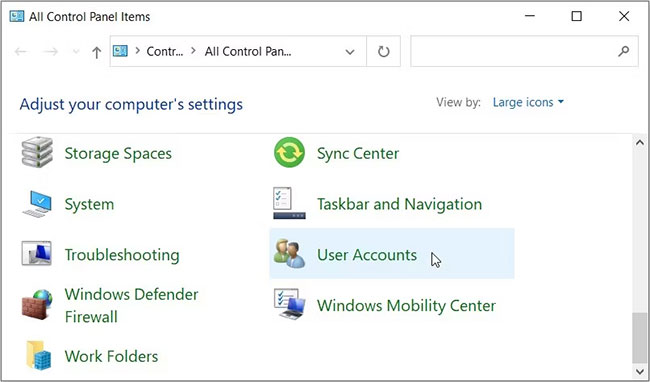
<p style="text-align: justify;"><strong>B3:</strong>&nbsp;Chọn&nbsp;<strong>User Accounts</strong>&nbsp;từ các mục menu.</p>

<figure>
<div style="text-align: justify;"><img alt="Cấu hình cài đặt UAC bằng Control Panel" data-i="1" data-src="https://st.quantrimang.com/photos/image/2022/08/12/sua-loi-this-app-can-t-be-activated-when-uac-is-disabled-2.jpg" data-was-processed="true" height="382" src="https://st.quantrimang.com/photos/image/2022/08/12/sua-loi-this-app-can-t-be-activated-when-uac-is-disabled-2.jpg" width="650" /></div>

<figcaption>
<div style="text-align: justify;">Cấu hình cài đặt UAC bằng Control Panel</div>
</figcaption>
</figure>

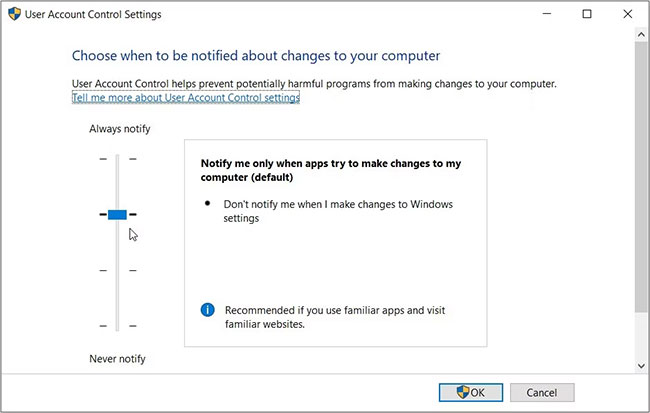
<p style="text-align: justify;">Tiếp theo, chọn&nbsp;<strong>Change User Account Control settings</strong>. Điều này sẽ hiển thị thanh trượt UAC và các tùy chọn khác nhau để lựa chọn.</p>

<p style="text-align: justify;">Kéo nút trên thanh trượt đến tùy chọn&nbsp;<strong>“Always notify”</strong>&nbsp;ở trên cùng rồi nhấn&nbsp;<strong>OK.</strong>&nbsp;Cuối cùng, khởi động lại thiết bị của bạn và xem liệu điều này có hữu ích hay không.</p>

<figure>
<div style="text-align: justify;"><img alt="Kéo nút trên thanh trượt đến tùy chọn “Always notify”" data-i="2" data-src="https://st.quantrimang.com/photos/image/2022/08/12/sua-loi-this-app-can-t-be-activated-when-uac-is-disabled-3.jpg" data-was-processed="true" height="413" src="https://st.quantrimang.com/photos/image/2022/08/12/sua-loi-this-app-can-t-be-activated-when-uac-is-disabled-3.jpg" width="650" /></div>

<figcaption>
<div style="text-align: justify;">Kéo nút trên thanh trượt đến tùy chọn “Always notify”</div>
</figcaption>
</figure>

<h2 style="text-align: justify;">3. Cách cấu hình cài đặt trong Local Group Policy Editor</h2>

<p style="text-align: justify;">Local Group Policy Editor (LGPE) là một công cụ đáng kinh ngạc có thể giúp bạn khắc phục các sự cố khác nhau trên thiết bị Windows của mình. Tuy nhiên, bạn chỉ có thể truy cập LGPE nếu đang sử dụng các phiên bản Windows Pro, Enterprise và Education.</p>

<p style="text-align: justify;">Nếu đang sử dụng Windows Home, trước tiên, bạn cần xem các mẹo về cách truy cập LGPE trên Windows Home.</p>

<p style="text-align: justify;">Nếu không, đây là cách bạn có thể khắc phục lỗi “This App Can’t Be Activated When UAC Is Disabled” bằng LGPE:</p>

<p style="text-align: justify;"><strong>B1:</strong>&nbsp;Nhập&nbsp;<strong>Edit group policy</strong>&nbsp;trong thanh tìm kiếm trên menu Start và chọn kết quả phù hợp nhất.</p>

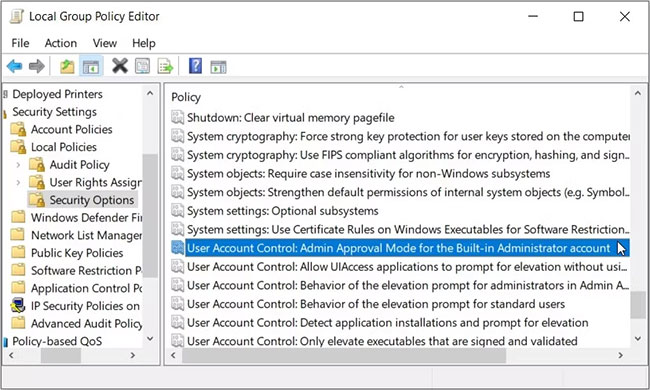
<p style="text-align: justify;"><strong>B2:</strong>&nbsp;Điều hướng đến&nbsp;<strong>Computer Configuration &gt; Windows Settings &gt; Security Settings &gt; Local Policies &gt; Security Options</strong>.</p>

<p style="text-align: justify;"><strong>B3:</strong>&nbsp;Cuộn xuống ở phía bên tay phải và nhấp đúp vào tùy chọn&nbsp;<strong>User Account Control: Admin Approval Mode for the Built-in Administrator account</strong>.</p>

<figure>
<div style="text-align: justify;"><img alt="Nhấp đúp vào tùy chọn User Account Control: Admin Approval Mode for the Built-in Administrator account" data-i="3" data-src="https://st.quantrimang.com/photos/image/2022/08/12/sua-loi-this-app-can-t-be-activated-when-uac-is-disabled-4.jpg" data-was-processed="true" height="390" src="https://st.quantrimang.com/photos/image/2022/08/12/sua-loi-this-app-can-t-be-activated-when-uac-is-disabled-4.jpg" width="650" /></div>

<figcaption>
<div style="text-align: justify;">Nhấp đúp vào tùy chọn User Account Control: Admin Approval Mode for the Built-in Administrator account</div>
</figcaption>
</figure>

<p style="text-align: justify;"><strong>B4:</strong>&nbsp;Chọn tùy chọn&nbsp;<strong>Enabled</strong>, nhấn&nbsp;<strong>Apply</strong>, rồi nhấn&nbsp;<strong>OK</strong>&nbsp;để áp dụng các thay đổi này.</p>

<p style="text-align: justify;">Tiếp theo, áp dụng các thay đổi tương tự cho tùy chọn&nbsp;<strong>User Account Control: Behavior of the elevation prompt for administrators in Admin Approval Mode</strong>. Cuối cùng, khởi động lại thiết bị của bạn để áp dụng các thay đổi này.</p>

<p style="text-align: justify;">Nếu sự cố vẫn tiếp diễn, đây là những gì bạn có thể làm:</p>

<p style="text-align: justify;"><strong>B1:</strong>&nbsp;Mở LGPE và điều hướng đến&nbsp;<strong>Security Options&nbsp;</strong>theo các bước trước đó.</p>

<p style="text-align: justify;"><strong>B2:</strong>&nbsp;Bật tất cả các tùy chọn có&nbsp;<strong>&quot;User Account Control:&quot;</strong>&nbsp;trong tên của chúng.</p>

<p style="text-align: justify;"><strong>B3:</strong>&nbsp;Đóng LGPE và khởi động lại thiết bị của bạn.</p>

<h2 style="text-align: justify;">4. Cách cấu hình cài đặt trong Registry Editor</h2>

<p style="text-align: justify;">Trong một số trường hợp, sự cố có thể do một số thay đổi trong Windows Registry gây ra. Vì vậy, bạn có thể giải quyết vấn đề bằng cách điều chỉnh một vài Registry key.</p>

<p style="text-align: justify;">Tuy nhiên, Registry Editor chứa dữ liệu Windows nhạy cảm. Vì vậy, bạn luôn cần phải cẩn thận khi xử lý nó. Trên thực tế, điều tốt nhất cần làm là sao lưu registry (hoặc thậm chí thiết lập sao lưu registry tự động) trước khi tiếp tục các bước này.</p>

<p style="text-align: justify;">Bây giờ, đây là cách bạn có thể khắc phục lỗi “UAC” bằng Registry Editor:</p>

<p style="text-align: justify;"><strong>B1:</strong>&nbsp;Gõ&nbsp;<strong>Registry Editor</strong>&nbsp;vào thanh tìm kiếm trong menu Start và chọn kết quả phù hợp nhất.</p>

<p style="text-align: justify;"><strong>B2:</strong>&nbsp;Xóa thanh địa chỉ. Từ đó, sao chép và dán lệnh sau vào thanh địa chỉ và nhấn&nbsp;<strong>Enter</strong>:</p>

<pre id="pre0">
<code>HKEY_LOCAL_MACHINE\Software\Microsoft\Windows\CurrentVersion\Policies\System</code></pre>

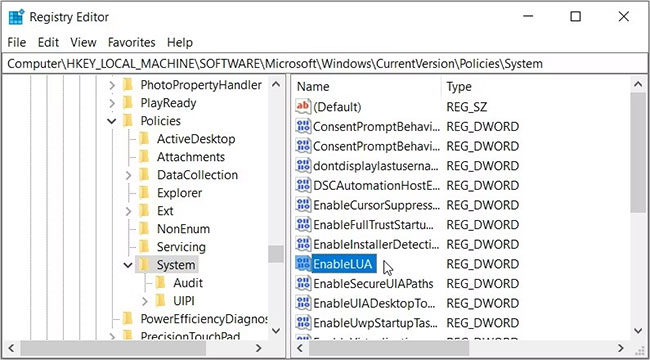
<p style="text-align: justify;">Thao tác này sẽ đưa bạn đến key&nbsp;<strong>System</strong>. Bây giờ, nhấp đúp vào giá trị&nbsp;<strong>EnableLUA</strong>&nbsp;ở phía bên tay phải.</p>

<figure>
<div style="text-align: justify;"><img alt="Cấu hình cài đặt trong Registry Editor" data-i="4" data-src="https://st.quantrimang.com/photos/image/2022/08/12/sua-loi-this-app-can-t-be-activated-when-uac-is-disabled-5.jpg" data-was-processed="true" height="360" src="https://st.quantrimang.com/photos/image/2022/08/12/sua-loi-this-app-can-t-be-activated-when-uac-is-disabled-5.jpg" width="650" /></div>

<figcaption>
<div style="text-align: justify;">Cấu hình cài đặt trong Registry Editor</div>
</figcaption>
</figure>

<p style="text-align: justify;">Đặt&nbsp;<strong>Value data</strong>&nbsp;thành<strong>&nbsp;1</strong>&nbsp;rồi nhấn&nbsp;<strong>OK.</strong>&nbsp;Cuối cùng, đóng Registry Editor và sau đó khởi động lại thiết bị của bạn để lưu những thay đổi này.</p>

<h2 style="text-align: justify;">5.&nbsp;Cài đặt các bản cập nhật Windows mới nhất</h2>

<p style="text-align: justify;">Cài đặt các bản cập nhật Windows mới nhất thường giúp giải quyết nhiều vấn đề hệ thống khác nhau. Vì vậy, biện pháp cuối cùng, hãy thử cập nhật thiết bị của bạn và xem cách này có giải quyết được sự cố hay không.</p>

<p style="text-align: justify;">Thật khó chịu khi bạn đột nhiên không thể mở một số ứng dụng trên thiết bị Windows của mình. May mắn thay, có một số bước bạn có thể áp dụng để thoát khỏi những vấn đề như vậy.</p>

<p style="text-align: justify;">Nếu bạn gặp phải thông báo lỗi có nội dung “This App Can’t Be Activated When UAC Is Disabled”, hãy thử bất kỳ bản sửa lỗi nào mà bài viết đã đề xuất. Nếu vẫn không thành công, bạn có thể phải thử&nbsp;reset lại thiết bị.</p>
		</div>
				<div id="author">
						<p>
				<strong>Nguồn tin:</strong>
				Quantrimang.com
			</p>
		</div>
	</div>
	<div id="footer" class="clearfix">
		<div id="url">
			<strong>URL của bản tin này: </strong><a href="https://www.nguoicodonvn2008.info/vi/news/savefile/kien-thuc-may-tinh/cach-sua-loi-this-app-can-t-be-activated-when-uac-is-disabled-tren-windows-5975.html" title="Cách sửa lỗi &quot;This App Can’t Be Activated When UAC Is Disabled&quot; trên Windows">https://www.nguoicodonvn2008.info/vi/news/savefile/kien-thuc-may-tinh/cach-sua-loi-this-app-can-t-be-activated-when-uac-is-disabled-tren-windows-5975.html</a>

		</div>
		<div class="clear"></div>
		<div class="copyright">
			&copy; .&#x3A; Nguoicodonvn2008.info - Cõi lòng người cô đơn &#x3A;.
		</div>
		<div id="contact">
			<a href="mailto:admin@nguoicodonvn2008.info">admin@nguoicodonvn2008.info</a>
		</div>
	</div>
</div>
        <div id="timeoutsess" class="chromeframe">
            Bạn đã không sử dụng Site, <a onclick="timeoutsesscancel();" href="https://nguoicodonvn2008.info/#">Bấm vào đây để duy trì trạng thái đăng nhập</a>. Thời gian chờ: <span id="secField"> 60 </span> giây
        </div>
        <div id="openidResult" class="nv-alert" style="display:none"></div>
        <div id="openidBt" data-result="" data-redirect=""></div>
		</script>
		<div class="car-top">
  <span><img src="https://nguoicodonvn2008.info/themes/default/images/car.png" alt=""></span>
</div>
<script src="https://nguoicodonvn2008.info/assets/js/jquery/jquery.min.js"></script>
<script>var nv_base_siteurl="/",nv_lang_data="vi",nv_lang_interface="vi",nv_name_variable="nv",nv_fc_variable="op",nv_lang_variable="language",nv_module_name="news",nv_func_name="savefile",nv_is_user=0, nv_my_ofs=-4,nv_my_abbr="EDT",nv_cookie_prefix="nv4c_e856T",nv_check_pass_mstime=1738000,nv_area_admin=0,nv_safemode=0,theme_responsive=0,nv_recaptcha_ver=2,nv_recaptcha_sitekey="",nv_recaptcha_type="image",XSSsanitize=1;</script>
<script src="https://nguoicodonvn2008.info/assets/js/language/vi.js"></script>
<script src="https://nguoicodonvn2008.info/assets/js/DOMPurify/purify3.js"></script>
<script src="https://nguoicodonvn2008.info/assets/js/global.js"></script>
<script src="https://nguoicodonvn2008.info/assets/js/site.js"></script>
<script src="https://nguoicodonvn2008.info/themes/default/js/news.js"></script>
<script src="https://nguoicodonvn2008.info/themes/default/js/main.js"></script>
<script src="https://nguoicodonvn2008.info/themes/default/js/custom.js"></script>
<script type="application/ld+json">
        {
            "@context": "https://schema.org",
            "@type": "Organization",
            "url": "https://nguoicodonvn2008.info",
            "logo": "https://nguoicodonvn2008.info/uploads/angel.gif"
        }
        </script>
<script src="https://nguoicodonvn2008.info/themes/default/js/bootstrap.min.js"></script>
<script type="text/javascript">
var $scrolltop = $('.car-top');
$scrolltop.on('click', function () {
    $('html,body').animate({
        scrollTop: 0
    }, 800);
    $(this).addClass("car-run");
    setTimeout(function(){ $scrolltop.removeClass('car-run');}, 1000);
    return false;
});
$(window).on('scroll', function ()
{ 
    if($(window).scrollTop() >= 200)
    {
        $scrolltop.addClass("show");
        $scrolltop.addClass("car-down");
    }
    else
    {
       $scrolltop.removeClass("show");
       setTimeout(function(){ $scrolltop.removeClass('car-down');}, 300);
    }
});
</script>
</body>
</html>