<!DOCTYPE html>
    <html lang="vi" xmlns="http://www.w3.org/1999/xhtml" prefix="og: http://ogp.me/ns#">
    <head>
<title>Cách sửa lỗi thiếu file cập nhật Windows 11</title>
<meta name="description" content="Cách sửa lỗi thiếu file cập nhật Windows 11 - Savefile - Tin Tức -...">
<meta name="author" content=".: Nguoicodonvn2008.info - Cõi lòng người cô đơn :.">
<meta name="copyright" content=".: Nguoicodonvn2008.info - Cõi lòng người cô đơn :. [admin@nguoicodonvn2008.info]">
<meta name="robots" content="index, archive, follow, noodp">
<meta name="googlebot" content="index,archive,follow,noodp">
<meta name="msnbot" content="all,index,follow">
<meta name="generator" content="NukeViet v4.5">
<meta http-equiv="Content-Type" content="text/html; charset=utf-8">
<meta property="og:title" content="Cách sửa lỗi thiếu file cập nhật Windows 11">
<meta property="og:type" content="website">
<meta property="og:description" content="Savefile - Tin Tức - https&#x3A;&#x002F;&#x002F;www.nguoicodonvn2008.info&#x002F;vi&#x002F;news&#x002F;savefile&#x002F;kien-thuc-may-tinh&#x002F;cach-sua-loi-thieu-file-cap-nhat-windows-11-10431.html">
<meta property="og:site_name" content=".&#x3A; Nguoicodonvn2008.info - Cõi lòng người cô đơn &#x3A;.">
<meta property="og:url" content="https://www.nguoicodonvn2008.info/vi/news/savefile/kien-thuc-may-tinh/cach-sua-loi-thieu-file-cap-nhat-windows-11-10431.html">
<link rel="shortcut icon" href="https://nguoicodonvn2008.info/favicon.ico">
<link rel="canonical" href="https://www.nguoicodonvn2008.info/vi/news/savefile/kien-thuc-may-tinh/cach-sua-loi-thieu-file-cap-nhat-windows-11-10431.html">
<link rel="alternate" href="https://nguoicodonvn2008.info/vi/news/rss/" title="Tin Tức" type="application/rss+xml">
<link rel="alternate" href="https://nguoicodonvn2008.info/vi/news/rss/karaoke-dual/" title="Tin Tức - Karaoke Dual" type="application/rss+xml">
<link rel="alternate" href="https://nguoicodonvn2008.info/vi/news/rss/nhac-tre/" title="Tin Tức - Nhạc trẻ" type="application/rss+xml">
<link rel="alternate" href="https://nguoicodonvn2008.info/vi/news/rss/tru-tinh/" title="Tin Tức - Trữ tình" type="application/rss+xml">
<link rel="alternate" href="https://nguoicodonvn2008.info/vi/news/rss/nuoc-ngoai/" title="Tin Tức - Nước ngoài" type="application/rss+xml">
<link rel="alternate" href="https://nguoicodonvn2008.info/vi/news/rss/remix/" title="Tin Tức - Remix" type="application/rss+xml">
<link rel="alternate" href="https://nguoicodonvn2008.info/vi/news/rss/tam-su-tinh-yeu/" title="Tin Tức - Tâm sự tình yêu" type="application/rss+xml">
<link rel="alternate" href="https://nguoicodonvn2008.info/vi/news/rss/tho-suu-tam/" title="Tin Tức - Thơ sưu tầm" type="application/rss+xml">
<link rel="alternate" href="https://nguoicodonvn2008.info/vi/news/rss/cuoc-song/" title="Tin Tức - Cuộc sống" type="application/rss+xml">
<link rel="alternate" href="https://nguoicodonvn2008.info/vi/news/rss/phan-mem/" title="Tin Tức - Phần mềm" type="application/rss+xml">
<link rel="alternate" href="https://nguoicodonvn2008.info/vi/news/rss/kien-thuc-may-tinh/" title="Tin Tức - Kiến thức máy tính" type="application/rss+xml">
<link rel="alternate" href="https://nguoicodonvn2008.info/vi/news/rss/hoc-tap/" title="Tin Tức - Học tập" type="application/rss+xml">
<link rel="alternate" href="https://nguoicodonvn2008.info/vi/news/rss/tai-lieu/" title="Tin Tức - Tài liệu" type="application/rss+xml">
<link rel="alternate" href="https://nguoicodonvn2008.info/vi/news/rss/de-thi/" title="Tin Tức - Đề thi" type="application/rss+xml">
<link rel="preload" as="style" href="https://nguoicodonvn2008.info/assets/css/font-awesome.min.css" type="text/css">
<link rel="preload" as="style" href="https://nguoicodonvn2008.info/themes/default/css/bootstrap.non-responsive.css" type="text/css">
<link rel="preload" as="style" href="https://nguoicodonvn2008.info/themes/default/css/style.css" type="text/css">
<link rel="preload" as="style" href="https://nguoicodonvn2008.info/themes/default/css/style.non-responsive.css" type="text/css">
<link rel="preload" as="style" href="https://nguoicodonvn2008.info/themes/default/css/news.css" type="text/css">
<link rel="preload" as="style" href="https://nguoicodonvn2008.info/themes/default/css/custom.css" type="text/css">
<link rel="preload" as="script" href="https://nguoicodonvn2008.info/assets/js/jquery/jquery.min.js" type="text/javascript">
<link rel="preload" as="script" href="https://nguoicodonvn2008.info/assets/js/language/vi.js" type="text/javascript">
<link rel="preload" as="script" href="https://nguoicodonvn2008.info/assets/js/DOMPurify/purify3.js" type="text/javascript">
<link rel="preload" as="script" href="https://nguoicodonvn2008.info/assets/js/global.js" type="text/javascript">
<link rel="preload" as="script" href="https://nguoicodonvn2008.info/assets/js/site.js" type="text/javascript">
<link rel="preload" as="script" href="https://nguoicodonvn2008.info/themes/default/js/news.js" type="text/javascript">
<link rel="preload" as="script" href="https://nguoicodonvn2008.info/themes/default/js/main.js" type="text/javascript">
<link rel="preload" as="script" href="https://nguoicodonvn2008.info/themes/default/js/custom.js" type="text/javascript">
<link rel="preload" as="script" href="https://nguoicodonvn2008.info/themes/default/js/bootstrap.min.js" type="text/javascript">
<link rel="stylesheet" href="https://nguoicodonvn2008.info/assets/css/font-awesome.min.css">
<link rel="stylesheet" href="https://nguoicodonvn2008.info/themes/default/css/bootstrap.non-responsive.css">
<link rel="stylesheet" href="https://nguoicodonvn2008.info/themes/default/css/style.css">
<link rel="stylesheet" href="https://nguoicodonvn2008.info/themes/default/css/style.non-responsive.css">
<link rel="StyleSheet" href="https://nguoicodonvn2008.info/themes/default/css/news.css">
<link rel="stylesheet" href="https://nguoicodonvn2008.info/themes/default/css/custom.css">
<style type="text/css">
	body{background: #fff;}
</style>
    </head>
    <body>
<div id="print">
	<div id="hd_print">
		<h2 class="pull-left">.&#x3A; Nguoicodonvn2008.info - Cõi lòng người cô đơn &#x3A;.</h2>
		<p class="pull-right"><a title=".&#x3A; Nguoicodonvn2008.info - Cõi lòng người cô đơn &#x3A;." href="https://nguoicodonvn2008.info/">https://nguoicodonvn2008.info</a></p>
	</div>
	<div class="clear"></div>
	<hr />
	<div id="content">
		<h1>Cách sửa lỗi thiếu file cập nhật Windows 11</h1>
		<ul class="list-inline">
			<li>Thứ năm - 22/05/2025 23:24</li>
			<li class="hidden-print txtrequired"><em class="fa fa-print">&nbsp;</em><a title="In ra" href="javascript:;" onclick="window.print()">In ra</a></li>
			<li class="hidden-print txtrequired"><em class="fa fa-power-off">&nbsp;</em><a title="Đóng cửa sổ này" href="javascript:;" onclick="window.close()">Đóng cửa sổ này</a></li>
		</ul>
		<div class="clear"></div>
		<div id="hometext">
		</div>
				<div class="imghome">
			<img alt="Cách sửa lỗi thiếu file cập nhật Windows 11" src="https://st.quantrimang.com/photos/image/2025/05/21/fix-loi-thieu-file-cap-nhat-Windows-11-1.jpg" width="460" class="img-thumbnail" />
		</div>
		<div class="clear"></div>
		<div id="bodytext" class="clearfix">
			<p style="text-align: justify;">Một số lỗi cập nhật&nbsp;&nbsp;Windows&nbsp;11 như báo thiếu file sẽ làm gián đoạn các bản cập nhật hệ thống quan trọng, gây ra lỗi cài đặt và khiến thiết bị của bạn không nhận đủ các tính năng mới khi cập nhật. Lỗi cập nhật Windows 11 thiếu file này thường xuất hiện với các mã lỗi như 0x80073712hoặc 0x8007000d. Dưới đây là một số cách sửa lỗi thiếu file cập nhật Windows 11.</p>

<h2 style="text-align: justify;">Khôi phục lại cài đặt cập nhật Windows 11</h2>

<p style="text-align: justify;">Phương pháp này sẽ cài đặt lại Windows 11 trên thiết lập hiện tại của máy tính, fix các file hệ thống và cập nhật thành phần mà không làm mất đi các file cá nhân hay ứng dụng.</p>

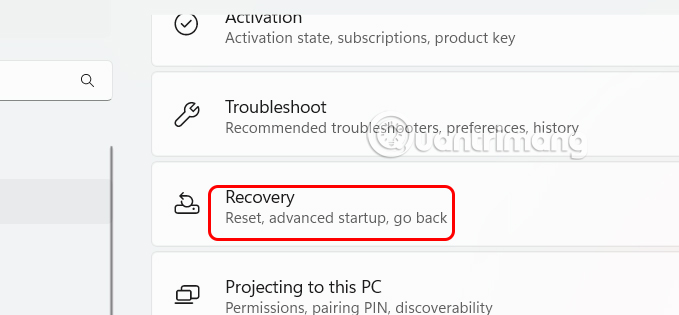
<p style="text-align: justify;">Bạn&nbsp;<strong>mở Settings&nbsp;</strong>sau đó nhấn vào&nbsp;<strong>mục System và chọn Recovery</strong>&nbsp;ở giao diện bên cạnh.</p>

<p style="text-align: justify;"><img alt="Chỉnh hệ thống Windows 11" data-i="0" data-src="https://st.quantrimang.com/photos/image/2025/05/21/fix-loi-thieu-file-cap-nhat-Windows-11-1.jpg" data-was-processed="true" height="278" src="https://st.quantrimang.com/photos/image/2025/05/21/fix-loi-thieu-file-cap-nhat-Windows-11-1.jpg" width="600" /></p>

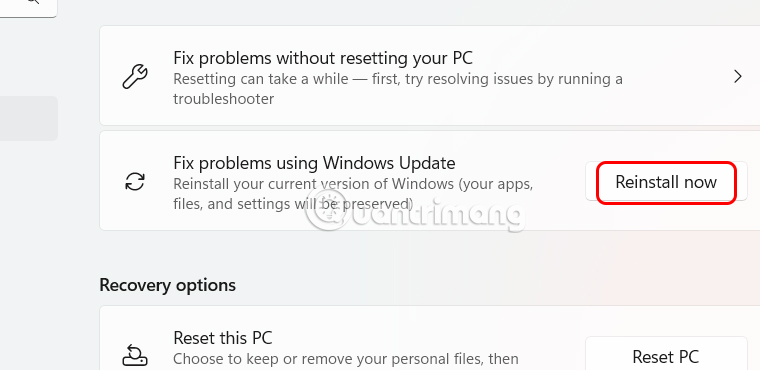
<p style="text-align: justify;">Trong giao diện mới<strong>&nbsp;tại Fix problems using Windows Update</strong>,&nbsp;<strong>nhấp vào Reinstall now</strong>&nbsp;rồi làm theo hướng dẫn để khắc phục lỗi thiếu file Some update files are missing or have problems. We&#039;ll try to download the update again later.</p>

<p style="text-align: justify;"><img alt="Fix lỗi Windows Update trên Windows 11" data-i="1" data-src="https://st.quantrimang.com/photos/image/2025/05/21/fix-loi-thieu-file-cap-nhat-Windows-11-2.jpg" data-was-processed="true" height="312" src="https://st.quantrimang.com/photos/image/2025/05/21/fix-loi-thieu-file-cap-nhat-Windows-11-2.jpg" width="640" /></p>

<h2 style="text-align: justify;">Sử dụng Windows Update Troubleshooter</h2>

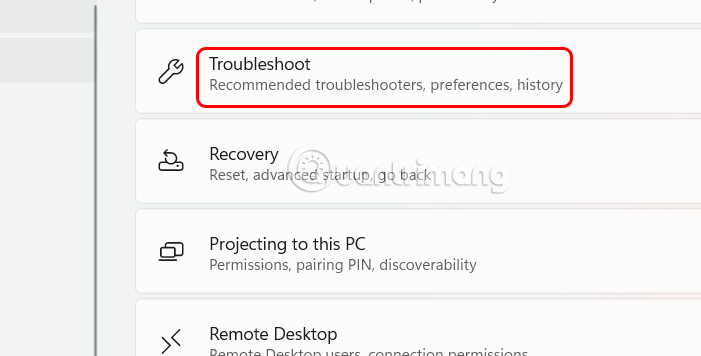
<p style="text-align: justify;">Cũng trong giao diện Settings bạn nhấn vào mục System rồi<strong>&nbsp;chọn Troubleshoot</strong>.</p>

<p style="text-align: justify;"><img alt="Troubleshoot trên Windows 11" data-i="2" data-src="https://st.quantrimang.com/photos/image/2025/05/21/fix-loi-thieu-file-cap-nhat-Windows-11-3.jpg" data-was-processed="true" height="325" src="https://st.quantrimang.com/photos/image/2025/05/21/fix-loi-thieu-file-cap-nhat-Windows-11-3.jpg" width="640" /></p>

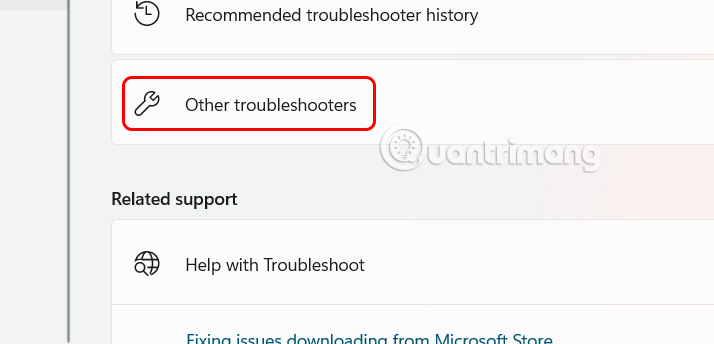
<p style="text-align: justify;">Lúc này bạn cần nhấn vào&nbsp;<strong>Other troubleshooters&nbsp;</strong>để xem các lỗi khác trên Windows.</p>

<p style="text-align: justify;"><img alt="Sử dụng Troubleshoot trên Windows 11" data-i="3" data-src="https://st.quantrimang.com/photos/image/2025/05/21/fix-loi-thieu-file-cap-nhat-Windows-11-4.jpg" data-was-processed="true" height="308" src="https://st.quantrimang.com/photos/image/2025/05/21/fix-loi-thieu-file-cap-nhat-Windows-11-4.jpg" width="640" /></p>

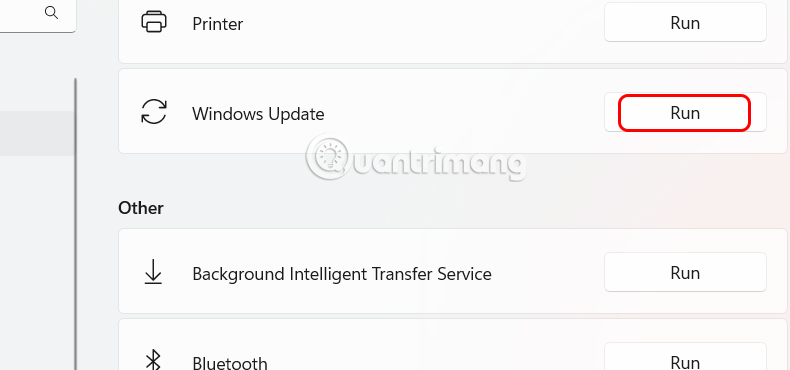
<p style="text-align: justify;">Tại đây chúng ta sẽ thấy&nbsp;<strong>Windows Update và nhấn vào nút Run</strong>&nbsp;để tiến hành sửa lỗi.</p>

<p style="text-align: justify;"><img alt="Tìm lỗi update trên Windows 11" data-i="4" data-src="https://st.quantrimang.com/photos/image/2025/05/21/fix-loi-thieu-file-cap-nhat-Windows-11-5.jpg" data-was-processed="true" height="281" src="https://st.quantrimang.com/photos/image/2025/05/21/fix-loi-thieu-file-cap-nhat-Windows-11-5.jpg" width="600" /></p>

<h2 style="text-align: justify;">Reset thành phần Windows Update</h2>

<p style="text-align: justify;">Khi tiến hành reset thành phần Windows Update sẽ có các tệp có vấn đề và khởi động lại các dịch vụ cần thiết để tiếp tục cập nhật.</p>

<p style="text-align: justify;"><strong>Bước 1:</strong></p>

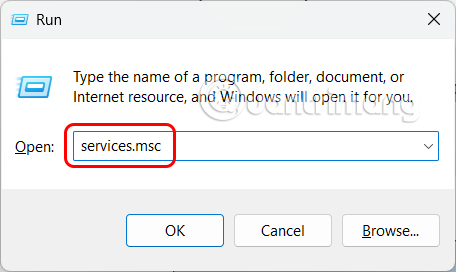
<p style="text-align: justify;">Bạn mở&nbsp;<strong>hộp thoại Run&nbsp;</strong>rồi&nbsp;<strong>nhập services.msc</strong>&nbsp;và nhấn OK để truy cập.</p>

<p style="text-align: justify;"><img alt="Mở dịch vụ trên Windows 11" data-i="5" data-src="https://st.quantrimang.com/photos/image/2025/05/21/fix-loi-thieu-file-cap-nhat-Windows-11-6.jpg" data-was-processed="true" height="272" src="https://st.quantrimang.com/photos/image/2025/05/21/fix-loi-thieu-file-cap-nhat-Windows-11-6.jpg" width="456" /></p>

<p style="text-align: justify;"><strong>Bước 2:</strong></p>

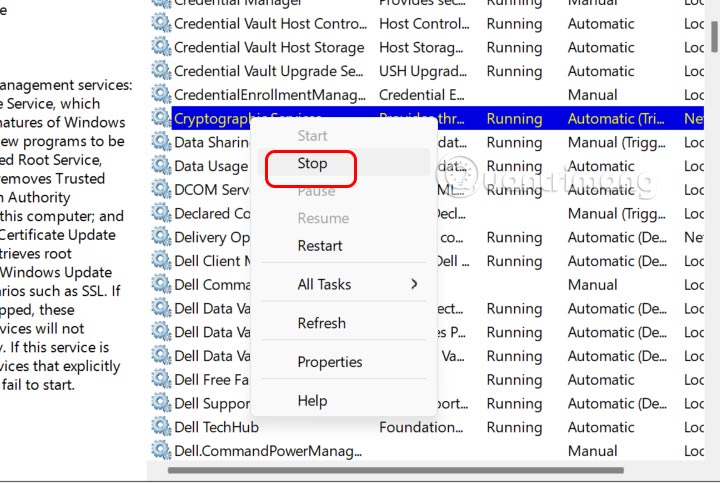
<p style="text-align: justify;">Trong giao diện mới, người dùng sẽ cần&nbsp;<strong>dừng hoạt động của tất cả các dịch vụ Windows Update, Background Intelligent Transfer Service (BITS), Cryptographic Services, Windows Installer</strong>.</p>

<p style="text-align: justify;"><img alt="Dừng hoạt động cập nhật Windows 11" data-i="6" data-src="https://st.quantrimang.com/photos/image/2025/05/21/fix-loi-thieu-file-cap-nhat-Windows-11-7.jpg" data-was-processed="true" height="335" src="https://st.quantrimang.com/photos/image/2025/05/21/fix-loi-thieu-file-cap-nhat-Windows-11-7.jpg" width="500" /></p>

<p style="text-align: justify;"><strong>Bước 3:</strong></p>

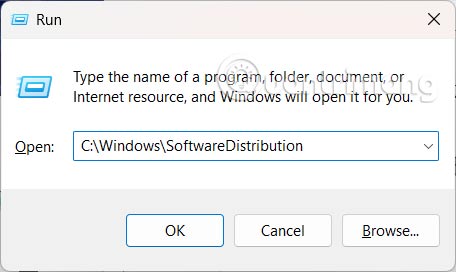
<p style="text-align: justify;">Tiếp trong&nbsp;<strong>hộp thoại Run nhập C:\Windows\SoftwareDistributio</strong>n và nhấn OK.</p>

<p style="text-align: justify;"><img alt="Fix lỗi thiếu file cập nhật Windows 11" data-i="7" data-src="https://st.quantrimang.com/photos/image/2025/05/21/fix-loi-thieu-file-cap-nhat-Windows-11-8.jpg" data-was-processed="true" height="272" src="https://st.quantrimang.com/photos/image/2025/05/21/fix-loi-thieu-file-cap-nhat-Windows-11-8.jpg" width="456" /></p>

<p style="text-align: justify;">Trong thư mục,&nbsp;<strong>chọn tất cả các tệp có và xóa chúng</strong>. Các tệp này sẽ được Windows Update tự động tạo lại.</p>

<p style="text-align: justify;"><strong>Bước 4:</strong></p>

<p style="text-align: justify;">Quay lại&nbsp;<strong>giao diện Services</strong>&nbsp;rồi tìm&nbsp;<strong>tới tất cả các dịch vụ bạn đã dừng trước đó rồi nhấn Start để bắt đầu lại</strong>.</p>

<h2 style="text-align: justify;">Sửa file hệ thống với SFC và DISM</h2>

<p style="text-align: justify;">Các tệp hệ thống bị lỗi hoặc bị thiếu có thể chặn các bản cập nhật hoặc khiến các tệp cập nhật bị hỏng. Các công cụ System File Checker (SFC) và Deployment Image Servicing and Management (DISM) sẽ quét và sửa các tệp này.</p>

<p style="text-align: justify;"><strong>Bước 1:</strong></p>

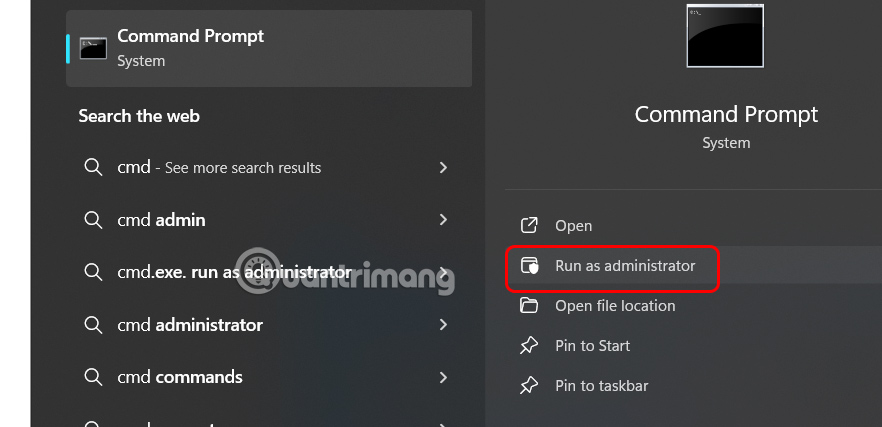
<p style="text-align: justify;">Bạn&nbsp;<strong>nhập cmd</strong>&nbsp;vào thanh tìm kiếm rồi mở bằng&nbsp;<strong>Run as administrator</strong>.</p>

<p style="text-align: justify;"><img alt="Mở cmd" data-i="8" data-src="https://st.quantrimang.com/photos/image/2025/05/21/fix-loi-thieu-file-cap-nhat-Windows-11-9.jpg" data-was-processed="true" height="290" src="https://st.quantrimang.com/photos/image/2025/05/21/fix-loi-thieu-file-cap-nhat-Windows-11-9.jpg" width="600" /></p>

<p style="text-align: justify;"><strong>Bước 2:</strong></p>

<p style="text-align: justify;">Chúng ta sẽ chạy lệnh dưới đây để tiến hành sửa lỗi.</p>

<pre id="pre0">
<code>DISM /Online /Cleanup-Image /RestoreHealth</code></pre>

<p style="text-align: justify;">Sau khi DISM hoàn tất, hãy chạy SFC theo lệnh dưới đây.</p>

<pre id="pre1">
<code>sfc /scannow</code></pre>

<p style="text-align: justify;">Đợi cả hai công cụ này hoàn thành việc tìm lỗi và sửa sự cố trên máy tính. Khi hoàn thành hãy khởi động lại máy tính.</p>

<h2 style="text-align: justify;">Tạm thời vô hiệu hóa phần mềm diệt vi-rút hoặc bảo mật</h2>

<div style="text-align: justify;">Phần mềm quản lý doanh nghiệp</div>

<p style="text-align: justify;">Các chương trình diệt vi-rút của bên thứ ba hoặc đặt tường lửa có thể chặn tải xuống Windows Update hoặc can thiệp vào các tệp hệ thống. Việc tắt tạm thời các công cụ bảo mật này có thể cho phép cài đặt bản cập nhật thành công.</p>

<div style="text-align: justify;">&nbsp;</div>
		</div>
				<div id="author">
						<p>
				<strong>Nguồn tin:</strong>
				Quantrimang.com:
			</p>
		</div>
	</div>
	<div id="footer" class="clearfix">
		<div id="url">
			<strong>URL của bản tin này: </strong><a href="https://www.nguoicodonvn2008.info/vi/news/savefile/kien-thuc-may-tinh/cach-sua-loi-thieu-file-cap-nhat-windows-11-10431.html" title="Cách sửa lỗi thiếu file cập nhật Windows 11">https://www.nguoicodonvn2008.info/vi/news/savefile/kien-thuc-may-tinh/cach-sua-loi-thieu-file-cap-nhat-windows-11-10431.html</a>

		</div>
		<div class="clear"></div>
		<div class="copyright">
			&copy; .&#x3A; Nguoicodonvn2008.info - Cõi lòng người cô đơn &#x3A;.
		</div>
		<div id="contact">
			<a href="mailto:admin@nguoicodonvn2008.info">admin@nguoicodonvn2008.info</a>
		</div>
	</div>
</div>
        <div id="timeoutsess" class="chromeframe">
            Bạn đã không sử dụng Site, <a onclick="timeoutsesscancel();" href="https://nguoicodonvn2008.info/#">Bấm vào đây để duy trì trạng thái đăng nhập</a>. Thời gian chờ: <span id="secField"> 60 </span> giây
        </div>
        <div id="openidResult" class="nv-alert" style="display:none"></div>
        <div id="openidBt" data-result="" data-redirect=""></div>
		</script>
		<div class="car-top">
  <span><img src="https://nguoicodonvn2008.info/themes/default/images/car.png" alt=""></span>
</div>
<div id="run_cronjobs" style="visibility:hidden;display:none;"><img alt="cron" src="/index.php?second=cronjobs&amp;p=d4hDYn1g" width="1" height="1" /></div>
<script src="https://nguoicodonvn2008.info/assets/js/jquery/jquery.min.js"></script>
<script>var nv_base_siteurl="/",nv_lang_data="vi",nv_lang_interface="vi",nv_name_variable="nv",nv_fc_variable="op",nv_lang_variable="language",nv_module_name="news",nv_func_name="savefile",nv_is_user=0, nv_my_ofs=-4,nv_my_abbr="EDT",nv_cookie_prefix="nv4c_e856T",nv_check_pass_mstime=1738000,nv_area_admin=0,nv_safemode=0,theme_responsive=0,nv_recaptcha_ver=2,nv_recaptcha_sitekey="",nv_recaptcha_type="image",XSSsanitize=1;</script>
<script src="https://nguoicodonvn2008.info/assets/js/language/vi.js"></script>
<script src="https://nguoicodonvn2008.info/assets/js/DOMPurify/purify3.js"></script>
<script src="https://nguoicodonvn2008.info/assets/js/global.js"></script>
<script src="https://nguoicodonvn2008.info/assets/js/site.js"></script>
<script src="https://nguoicodonvn2008.info/themes/default/js/news.js"></script>
<script src="https://nguoicodonvn2008.info/themes/default/js/main.js"></script>
<script src="https://nguoicodonvn2008.info/themes/default/js/custom.js"></script>
<script type="application/ld+json">
        {
            "@context": "https://schema.org",
            "@type": "Organization",
            "url": "https://nguoicodonvn2008.info",
            "logo": "https://nguoicodonvn2008.info/uploads/angel.gif"
        }
        </script>
<script src="https://nguoicodonvn2008.info/themes/default/js/bootstrap.min.js"></script>
<script type="text/javascript">
var $scrolltop = $('.car-top');
$scrolltop.on('click', function () {
    $('html,body').animate({
        scrollTop: 0
    }, 800);
    $(this).addClass("car-run");
    setTimeout(function(){ $scrolltop.removeClass('car-run');}, 1000);
    return false;
});
$(window).on('scroll', function ()
{ 
    if($(window).scrollTop() >= 200)
    {
        $scrolltop.addClass("show");
        $scrolltop.addClass("car-down");
    }
    else
    {
       $scrolltop.removeClass("show");
       setTimeout(function(){ $scrolltop.removeClass('car-down');}, 300);
    }
});
</script>
</body>
</html>