<!DOCTYPE html>
    <html lang="vi" xmlns="http://www.w3.org/1999/xhtml" prefix="og: http://ogp.me/ns#">
    <head>
<title>Cách sửa lỗi &quot;The File or Directory is Corrupted and Unreadable&quot;</title>
<meta name="description" content="Cách sửa lỗi &quot;The File or Directory is Corrupted and Unreadable&quot; - Savefile - Tin Tức -...">
<meta name="author" content=".: Nguoicodonvn2008.info - Cõi lòng người cô đơn :.">
<meta name="copyright" content=".: Nguoicodonvn2008.info - Cõi lòng người cô đơn :. [admin@nguoicodonvn2008.info]">
<meta name="robots" content="index, archive, follow, noodp">
<meta name="googlebot" content="index,archive,follow,noodp">
<meta name="msnbot" content="all,index,follow">
<meta name="generator" content="NukeViet v4.5">
<meta http-equiv="Content-Type" content="text/html; charset=utf-8">
<meta property="og:title" content="Cách sửa lỗi &quot;The File or Directory is Corrupted and Unreadable&quot;">
<meta property="og:type" content="website">
<meta property="og:description" content="Savefile - Tin Tức - https&#x3A;&#x002F;&#x002F;www.nguoicodonvn2008.info&#x002F;vi&#x002F;news&#x002F;savefile&#x002F;kien-thuc-may-tinh&#x002F;cach-sua-loi-the-file-or-directory-is-corrupted-and-unreadable-7456.html">
<meta property="og:site_name" content=".&#x3A; Nguoicodonvn2008.info - Cõi lòng người cô đơn &#x3A;.">
<meta property="og:url" content="https://www.nguoicodonvn2008.info/vi/news/savefile/kien-thuc-may-tinh/cach-sua-loi-the-file-or-directory-is-corrupted-and-unreadable-7456.html">
<link rel="shortcut icon" href="https://nguoicodonvn2008.info/favicon.ico">
<link rel="canonical" href="https://www.nguoicodonvn2008.info/vi/news/savefile/kien-thuc-may-tinh/cach-sua-loi-the-file-or-directory-is-corrupted-and-unreadable-7456.html">
<link rel="alternate" href="https://nguoicodonvn2008.info/vi/news/rss/" title="Tin Tức" type="application/rss+xml">
<link rel="alternate" href="https://nguoicodonvn2008.info/vi/news/rss/karaoke-dual/" title="Tin Tức - Karaoke Dual" type="application/rss+xml">
<link rel="alternate" href="https://nguoicodonvn2008.info/vi/news/rss/nhac-tre/" title="Tin Tức - Nhạc trẻ" type="application/rss+xml">
<link rel="alternate" href="https://nguoicodonvn2008.info/vi/news/rss/tru-tinh/" title="Tin Tức - Trữ tình" type="application/rss+xml">
<link rel="alternate" href="https://nguoicodonvn2008.info/vi/news/rss/nuoc-ngoai/" title="Tin Tức - Nước ngoài" type="application/rss+xml">
<link rel="alternate" href="https://nguoicodonvn2008.info/vi/news/rss/remix/" title="Tin Tức - Remix" type="application/rss+xml">
<link rel="alternate" href="https://nguoicodonvn2008.info/vi/news/rss/tam-su-tinh-yeu/" title="Tin Tức - Tâm sự tình yêu" type="application/rss+xml">
<link rel="alternate" href="https://nguoicodonvn2008.info/vi/news/rss/tho-suu-tam/" title="Tin Tức - Thơ sưu tầm" type="application/rss+xml">
<link rel="alternate" href="https://nguoicodonvn2008.info/vi/news/rss/cuoc-song/" title="Tin Tức - Cuộc sống" type="application/rss+xml">
<link rel="alternate" href="https://nguoicodonvn2008.info/vi/news/rss/phan-mem/" title="Tin Tức - Phần mềm" type="application/rss+xml">
<link rel="alternate" href="https://nguoicodonvn2008.info/vi/news/rss/kien-thuc-may-tinh/" title="Tin Tức - Kiến thức máy tính" type="application/rss+xml">
<link rel="alternate" href="https://nguoicodonvn2008.info/vi/news/rss/hoc-tap/" title="Tin Tức - Học tập" type="application/rss+xml">
<link rel="alternate" href="https://nguoicodonvn2008.info/vi/news/rss/tai-lieu/" title="Tin Tức - Tài liệu" type="application/rss+xml">
<link rel="alternate" href="https://nguoicodonvn2008.info/vi/news/rss/de-thi/" title="Tin Tức - Đề thi" type="application/rss+xml">
<link rel="preload" as="style" href="https://nguoicodonvn2008.info/assets/css/font-awesome.min.css" type="text/css">
<link rel="preload" as="style" href="https://nguoicodonvn2008.info/themes/default/css/bootstrap.non-responsive.css" type="text/css">
<link rel="preload" as="style" href="https://nguoicodonvn2008.info/themes/default/css/style.css" type="text/css">
<link rel="preload" as="style" href="https://nguoicodonvn2008.info/themes/default/css/style.non-responsive.css" type="text/css">
<link rel="preload" as="style" href="https://nguoicodonvn2008.info/themes/default/css/news.css" type="text/css">
<link rel="preload" as="style" href="https://nguoicodonvn2008.info/themes/default/css/custom.css" type="text/css">
<link rel="preload" as="script" href="https://nguoicodonvn2008.info/assets/js/jquery/jquery.min.js" type="text/javascript">
<link rel="preload" as="script" href="https://nguoicodonvn2008.info/assets/js/language/vi.js" type="text/javascript">
<link rel="preload" as="script" href="https://nguoicodonvn2008.info/assets/js/DOMPurify/purify3.js" type="text/javascript">
<link rel="preload" as="script" href="https://nguoicodonvn2008.info/assets/js/global.js" type="text/javascript">
<link rel="preload" as="script" href="https://nguoicodonvn2008.info/assets/js/site.js" type="text/javascript">
<link rel="preload" as="script" href="https://nguoicodonvn2008.info/themes/default/js/news.js" type="text/javascript">
<link rel="preload" as="script" href="https://nguoicodonvn2008.info/themes/default/js/main.js" type="text/javascript">
<link rel="preload" as="script" href="https://nguoicodonvn2008.info/themes/default/js/custom.js" type="text/javascript">
<link rel="preload" as="script" href="https://nguoicodonvn2008.info/themes/default/js/bootstrap.min.js" type="text/javascript">
<link rel="stylesheet" href="https://nguoicodonvn2008.info/assets/css/font-awesome.min.css">
<link rel="stylesheet" href="https://nguoicodonvn2008.info/themes/default/css/bootstrap.non-responsive.css">
<link rel="stylesheet" href="https://nguoicodonvn2008.info/themes/default/css/style.css">
<link rel="stylesheet" href="https://nguoicodonvn2008.info/themes/default/css/style.non-responsive.css">
<link rel="StyleSheet" href="https://nguoicodonvn2008.info/themes/default/css/news.css">
<link rel="stylesheet" href="https://nguoicodonvn2008.info/themes/default/css/custom.css">
<style type="text/css">
	body{background: #fff;}
</style>
    </head>
    <body>
<div id="print">
	<div id="hd_print">
		<h2 class="pull-left">.&#x3A; Nguoicodonvn2008.info - Cõi lòng người cô đơn &#x3A;.</h2>
		<p class="pull-right"><a title=".&#x3A; Nguoicodonvn2008.info - Cõi lòng người cô đơn &#x3A;." href="https://nguoicodonvn2008.info/">https://nguoicodonvn2008.info</a></p>
	</div>
	<div class="clear"></div>
	<hr />
	<div id="content">
		<h1>Cách sửa lỗi &quot;The File or Directory is Corrupted and Unreadable&quot;</h1>
		<ul class="list-inline">
			<li>Thứ năm - 24/08/2023 00:52</li>
			<li class="hidden-print txtrequired"><em class="fa fa-print">&nbsp;</em><a title="In ra" href="javascript:;" onclick="window.print()">In ra</a></li>
			<li class="hidden-print txtrequired"><em class="fa fa-power-off">&nbsp;</em><a title="Đóng cửa sổ này" href="javascript:;" onclick="window.close()">Đóng cửa sổ này</a></li>
		</ul>
		<div class="clear"></div>
		<div id="hometext">
		</div>
				<div class="imghome">
			<img alt="Cách sửa lỗi &quot;The File or Directory is Corrupted and Unreadable&quot;" src="https://st.quantrimang.com/photos/image/2020/09/26/loi-the-file-or-directory-is-corrupted-and-unreadable-1.jpg" width="460" class="img-thumbnail" />
		</div>
		<div class="clear"></div>
		<div id="bodytext" class="clearfix">
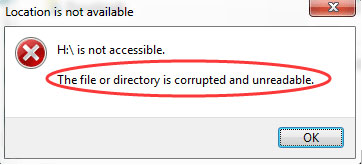
			<p style="text-align: justify;">Đây là một lỗi phổ biến thường gặp trên máy tính Windows khi hệ điều hành không thể truy cập dữ liệu trên ổ cứng ngoài:</p>

<pre id="pre0" style="text-align: justify;">
E:\ is not accessible. The file or directory is corrupted and unreadable.</pre>

<p style="text-align: justify;">(<em>Ổ E:\ không thể truy cập được. File hoặc thư mục bị hỏng và không thể đọc được</em>).</p>

<p style="text-align: justify;">Bạn có thể gặp lỗi này sau khi cố gắng mở thứ gì đó từ USB. Hoặc, tùy thuộc vào cách máy tính của bạn được thiết lập, lỗi có thể xuất hiện ngay sau khi lắp ổ cứng vào máy tính.</p>

<p style="text-align: justify;">Lỗi “not accessible” này có thể xảy ra bất cứ lúc nào, ngay cả khi bạn vừa mới sử dụng ổ gần đây. Đầu thông báo lỗi là vị trí không thể đọc được dữ liệu, vì vậy nó có thể là E:, H:, K:, v.v…</p>

<figure>
<div style="text-align: justify;"><img alt="Thông báo lỗi &#039;The File or Directory is Corrupted and Unreadable&#039;" data-i="0" data-src="https://st.quantrimang.com/photos/image/2020/09/26/loi-the-file-or-directory-is-corrupted-and-unreadable-1.jpg" data-was-processed="true" height="165" src="https://st.quantrimang.com/photos/image/2020/09/26/loi-the-file-or-directory-is-corrupted-and-unreadable-1.jpg" width="362" /></div>

<figcaption>
<div style="text-align: justify;">Thông báo lỗi &quot;The File or Directory is Corrupted and Unreadable&quot;</div>
</figcaption>
</figure>

<h2 style="text-align: justify;">&nbsp;</h2>

<h2 id="mcetoc_1h8ijsnjv26u" style="text-align: justify;">Nguyên nhân lỗi &quot;The File or Directory is Corrupted and Unreadable&quot;</h2>

<p style="text-align: justify;">Có một số lý do khiến bạn có thể gặp lỗi này:</p>

<ul>
	<li style="text-align: justify;"><strong>Ổ được lấy ra mà không ngắt kết nối một cách an toàn</strong></li>
	<li style="text-align: justify;"><strong>Phần mềm độc hại đã lây nhiễm vào ổ</strong>: Không có gì ngạc nhiên khi bạn có thể lây nhiễm virus hoặc phần mềm độc hại vào máy tính của mình khi tải xuống nội dung nào đó từ các nguồn không chính thức. Điều này có thể dẫn đến việc gây hỏng các thiết bị bên ngoài được kết nối và ngăn bạn truy cập vào các file của mình.</li>
	<li style="text-align: justify;"><strong>Ổ cứng ngoài bị hỏng về mặt vật lý</strong>: Nếu thiết bị lưu trữ bị hỏng vĩnh viễn, bạn không thể truy cập thông tin được lưu trữ. Ngoài ra, hãy kiểm tra tính toàn vẹn của kết nối phần cứng bằng cách tìm ra bất kỳ cổng hoặc cáp USB nào bị hỏng.</li>
	<li style="text-align: justify;"><strong>MFT hoặc FAT bị hỏng</strong>: MFT (Master File Table) chứa loại file hoặc thư mục, kích thước, thời gian tạo hoặc sửa đổi cùng với nhiều thông tin khác. Vì vậy, bạn sẽ không thể truy cập file của mình nếu MFT bị hỏng hoặc có vấn đề. FAT (File Allocation Table) là một hệ thống tương tự như MFT và nó được thiết kế cho ổ cứng. Nếu FAT bị trục trặc, nó cũng có thể dẫn đến lỗi tương tự.</li>
</ul>

<div style="text-align: justify;">&nbsp;</div>

<p style="text-align: justify;">Lỗi này có thể xảy ra trên bất kỳ hệ điều hành Windows nào. Các bước dưới đây áp dụng cho Windows 10 trở về trước.</p>

<h2 id="mcetoc_1h8ijsnjv26v" style="text-align: justify;">Cách sửa lỗi “The File or Directory is Corrupted and Unreadable”</h2>

<p style="text-align: justify;">Cách tốt nhất để khắc phục lỗi “The File or Directory is Corrupted and Unreadable” là thực hiện các bước khắc phục sự cố này, theo thứ tự:</p>

<h3 id="mcetoc_1h8ijsnjv270" style="text-align: justify;">1. Khởi động lại máy tính</h3>

<p style="text-align: justify;">Nếu bạn có thói quen đặt máy tính của mình ở chế độ Sleep thay vì tắt máy, bạn có thể gặp phải nhiều sự cố và vấn đề khác nhau. Vì vậy, có khả năng lỗi &quot;File or directory is corrupted and unreadable&quot; chỉ là một trục trặc tạm thời sẽ biến mất sau khi bạn khởi động lại máy tính.</p>

<p style="text-align: justify;">Nếu bạn vẫn gặp lỗi tương tự sau khi khởi động lại, hãy chuyển sang giải pháp tiếp theo.</p>

<h3 id="mcetoc_1h8ijsnjv271" style="text-align: justify;">2.&nbsp;Chạy lệnh chkdsk trên ổ cứng</h3>

<p style="text-align: justify;">Thực hiện việc này bằng cách&nbsp;mở Command Prompt với quyền admin&nbsp;và nhập lệnh sau, thay thế ký tự cuối cùng bằng ký tự của ổ đang hiển thị lỗi:</p>

<pre id="pre1" style="text-align: justify;">
chkdsk /r e:</pre>

<p style="text-align: justify;"><strong>Lưu ý</strong>: Chạy lệnh chkdsk là cách khắc phục có nhiều khả năng thành công nhất cho lỗi này. Nếu bạn bỏ qua bước này, có thể hai gợi ý tiếp theo dưới đây sẽ không hiệu quả vì ổ vẫn không thể đọc được.</p>

<h3 id="mcetoc_1h8ijsnjv272" style="text-align: justify;">3. Quét ổ cứng bằng chương trình loại bỏ phần mềm độc hại</h3>

<p style="text-align: justify;">Nếu phần mềm độc hại là nguyên nhân gây ra lỗi, việc xóa phần mềm đó có thể khôi phục quyền truy cập vào ổ. Tham khảo:&nbsp;Gỡ bỏ tận gốc phần mềm độc hại (malware) trên máy tính Windows 10&nbsp;để biết thêm chi tiết.</p>

<h3 id="mcetoc_1h8ijsnjv273" style="text-align: justify;">4. Thay đổi vị trí của file</h3>

<p style="text-align: justify;">Trong trường hợp bạn gặp lỗi khi cố mở một thư mục hoặc file cụ thể, hãy thử thay đổi vị trí của nó. Vì vậy, nếu bạn muốn mở một file hoặc thư mục từ ổ cứng ngoài, hãy sao chép nó vào ổ cứng trong và cố gắng truy cập từ đó.</p>

<h3 id="mcetoc_1h8ijsnjv274" style="text-align: justify;">5. Đặt một ký tự ổ mới</h3>

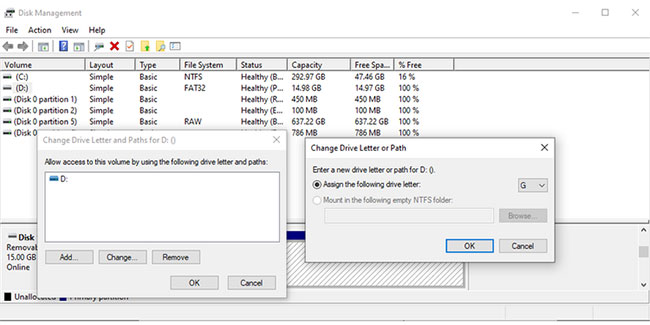
<p style="text-align: justify;">Mặc dù đây là một thủ thuật kỳ quặc nhưng nó có thể giúp bạn giải quyết lỗi &quot;The File or Directory is Corrupted and Unreadable&quot; trên máy tính Windows. Hãy làm theo các bước sau để thay đổi ký tự ổ đĩa:</p>

<p style="text-align: justify;"><strong>B1:</strong>&nbsp;Nhấn&nbsp;<strong>Win + R</strong>&nbsp;để khởi chạy hộp thoại&nbsp;<strong>Run.</strong></p>

<p style="text-align: justify;"><strong>B2:</strong>&nbsp;Nhập&nbsp;<strong>diskmgmt.msc</strong>&nbsp;và nhấp vào&nbsp;<strong>OK.</strong></p>

<p style="text-align: justify;"><strong>B3:</strong>&nbsp;Trong cửa sổ<strong>&nbsp;Disk Management</strong>, nhấp chuột phải vào ổ cứng ngoài và chọn&nbsp;<strong>Change Drive Letter and Paths</strong>.</p>

<div style="text-align: justify;">&nbsp;</div>

<p style="text-align: justify;"><strong>B4:</strong>&nbsp;Chọn ký tự ổ đĩa và nhấp vào nút&nbsp;<strong>Change.</strong></p>

<p style="text-align: justify;"><strong>B5:</strong>&nbsp;Trong cửa sổ&nbsp;<strong>Change Drive Letter or Path</strong>, chọn&nbsp;<strong>Assign the following drive letter</strong>&nbsp;và chọn một ký tự mới từ menu drop-down.</p>

<p style="text-align: justify;"><strong>B6:</strong>&nbsp;Xác nhận hành động.</p>

<figure>
<div style="text-align: justify;"><img alt="Thay đổi ký tự ổ trong Windows 10" data-adbro-processed="true" data-i="1" data-src="https://st.quantrimang.com/photos/image/2022/02/11/loi-the-file-or-directory-is-corrupted-and-unreadable-1.jpg" data-was-processed="true" height="325" src="https://st.quantrimang.com/photos/image/2022/02/11/loi-the-file-or-directory-is-corrupted-and-unreadable-1.jpg" width="650" /></div>

<figcaption>
<div style="text-align: justify;">Thay đổi ký tự ổ trong Windows 10</div>
</figcaption>
</figure>

<p style="text-align: justify;">Ổ cứng ngoài của bạn hiện có một ký tự mới và bạn có thể mở nó. Nếu bạn đang sử dụng script để mở file từ ổ, bạn cũng cần phải sửa đổi script đó.</p>

<h3 id="mcetoc_1h8ijsnjv275" style="text-align: justify;">6. Chạy công cụ Windows Memory Diagnostic</h3>

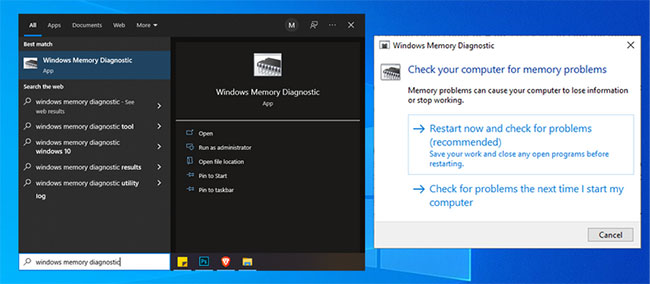
<p style="text-align: justify;">Có khả năng bạn không thể truy cập các file hoặc thư mục nhất định do những vấn đề liên quan đến bộ nhớ. Để khắc phục, bạn nên sử dụng công cụ Windows Memory Diagnostic. Cách dễ nhất để khởi chạy công cụ là nhập Windows Memory Diagnostic trong thanh tìm kiếm của menu Start và chọn kết quả phù hợp nhất. Sau đó, chọn&nbsp;<strong>Restart now</strong>&nbsp;và kiểm tra sự cố.</p>

<figure>
<div style="text-align: justify;"><img alt="Chạy công cụ Windows Memory Diagnostic trong Windows 10" data-i="2" data-src="https://st.quantrimang.com/photos/image/2022/02/11/loi-the-file-or-directory-is-corrupted-and-unreadable-2.jpg" data-was-processed="true" height="284" src="https://st.quantrimang.com/photos/image/2022/02/11/loi-the-file-or-directory-is-corrupted-and-unreadable-2.jpg" width="650" /></div>

<figcaption>
<div style="text-align: justify;">Chạy công cụ Windows Memory Diagnostic trong Windows 10</div>
</figcaption>
</figure>

<p style="text-align: justify;"><strong>Lưu ý</strong>: Trước khi bắt đầu quét, hãy lưu tất cả công việc của bạn và đóng mọi ứng dụng đang chạy.</p>

<h3 id="mcetoc_1h8ijsnjv276" style="text-align: justify;">7. Sử dụng công cụ Startup Repair</h3>

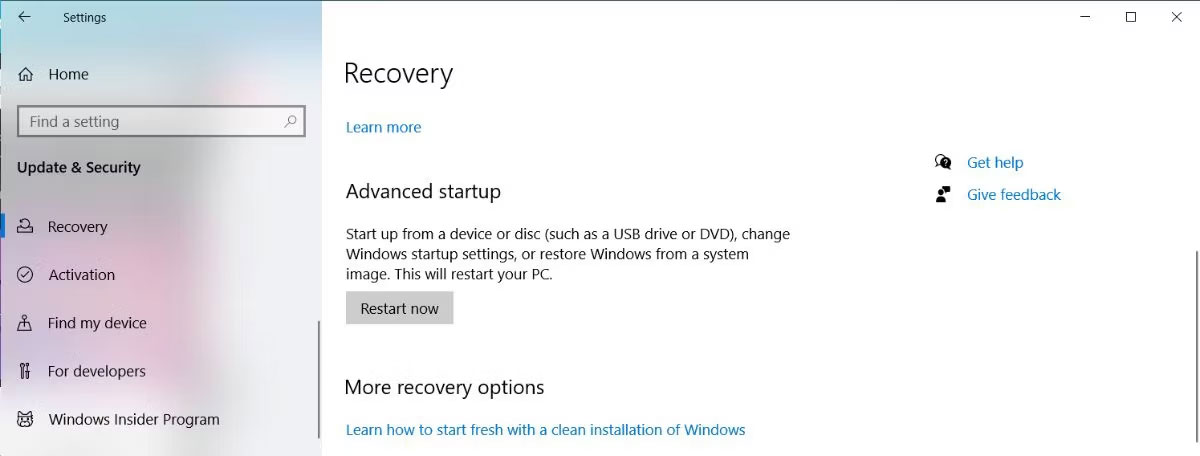
<p style="text-align: justify;">Nếu công cụ Windows Memory Diagnostic không giúp bạn khắc phục sự cố thì sẽ có một tính năng tích hợp khác mà bạn có thể sử dụng để giải quyết lỗi file bị hỏng và không thể đọc được. Để làm như vậy, nhấn phím&nbsp;<strong>Windows + I&nbsp;</strong>để khởi chạy Settings và đi tới&nbsp;<strong>Update &amp; security &gt; Recovery &gt; Restart now</strong>.</p>

<figure>
<div style="text-align: justify;"><img alt="Sử dụng tính năng Advanced Startup trong Windows 10" data-i="3" data-src="https://st.quantrimang.com/photos/image/2023/08/24/loi-the-file-or-directory-is-corrupted-and-unreadable-1.jpg" data-was-processed="true" height="456" src="https://st.quantrimang.com/photos/image/2023/08/24/loi-the-file-or-directory-is-corrupted-and-unreadable-1.jpg" width="1200" /></div>

<figcaption>
<div style="text-align: justify;">Sử dụng tính năng Advanced Startup trong Windows 10</div>
</figcaption>
</figure>

<div style="text-align: justify;">&nbsp;</div>

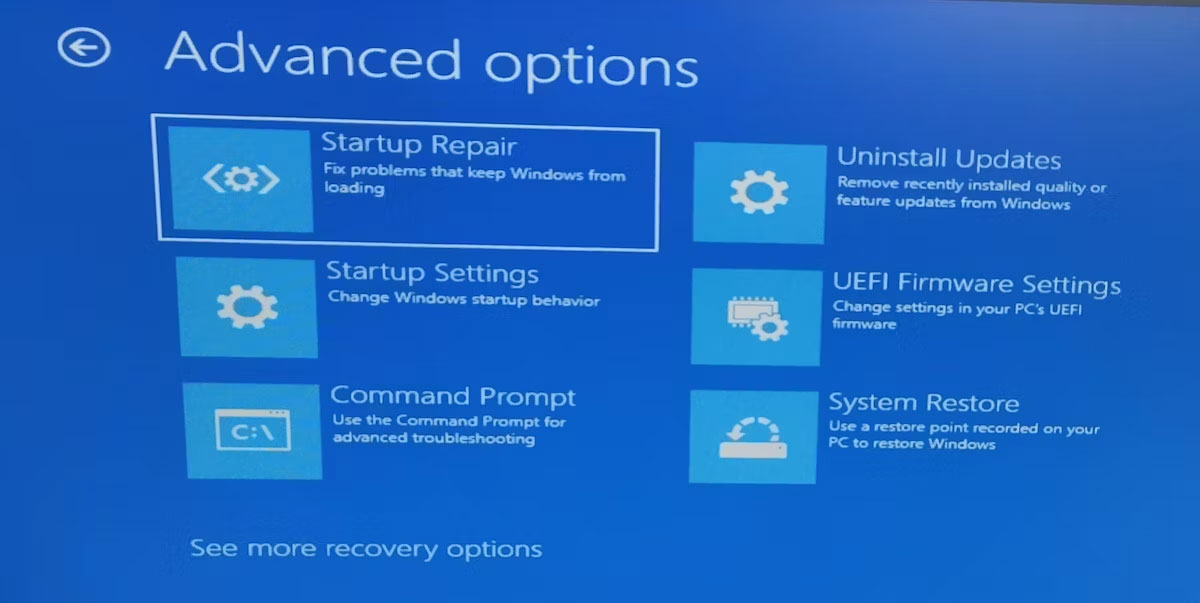
<p style="text-align: justify;">Sau đó, chọn&nbsp;<strong>Troubleshoot &gt; Advanced options</strong>. Sau đó, nhấp vào tùy chọn&nbsp;<strong>Startup Repair.</strong></p>

<figure>
<div style="text-align: justify;"><img alt="Tùy chọn Startup Repair" data-i="4" data-src="https://st.quantrimang.com/photos/image/2023/08/24/loi-the-file-or-directory-is-corrupted-and-unreadable-2.jpg" data-was-processed="true" height="603" src="https://st.quantrimang.com/photos/image/2023/08/24/loi-the-file-or-directory-is-corrupted-and-unreadable-2.jpg" width="1200" /></div>

<figcaption>
<div style="text-align: justify;">Tùy chọn Startup Repair</div>
</figcaption>
</figure>

<p style="text-align: justify;">Windows bây giờ sẽ tìm kiếm và sửa chữa tất cả các lỗi có thể xảy ra và khởi động lại sau đó. Khi quá trình hoàn tất, hãy thử truy cập lại các file của bạn.</p>

<h3 id="mcetoc_1h8ijsnjv277" style="text-align: justify;">8. Format ổ</h3>

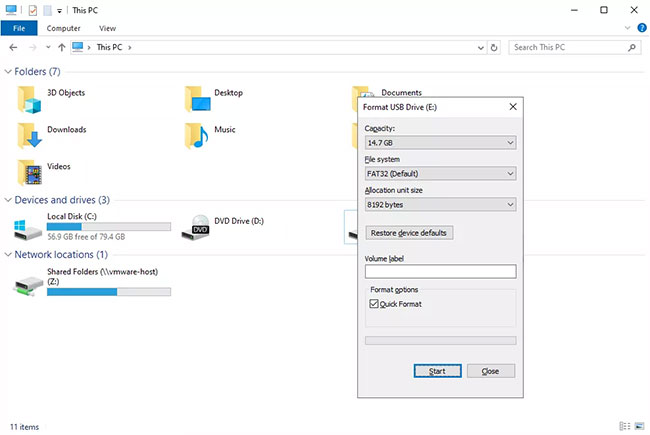
<p style="text-align: justify;">Nếu ổ không thể đọc được, việc bạn có thể format nó dường như không khả thi lắm, nhưng dù sao cũng hãy thử làm việc này.</p>

<figure>
<div style="text-align: justify;"><img alt="Có thể thử format ổ để khắc phục sự cố" data-i="5" data-src="https://st.quantrimang.com/photos/image/2020/09/26/loi-the-file-or-directory-is-corrupted-and-unreadable-2.jpg" data-was-processed="true" height="435" src="https://st.quantrimang.com/photos/image/2020/09/26/loi-the-file-or-directory-is-corrupted-and-unreadable-2.jpg" width="650" /></div>

<figcaption>
<div style="text-align: justify;">Có thể thử format ổ để khắc phục sự cố</div>
</figcaption>
</figure>

<p style="text-align: justify;"><strong>Lưu ý:</strong>&nbsp;Định dạng sẽ xóa mọi thứ khỏi ổ! Trước khi bạn hoàn thành bước này, hãy thử khôi phục file từ ổ bằng&nbsp;chương trình khôi phục file.</p>

<p style="text-align: justify;">Nếu lý do cho lỗi “The file or directory is corrupted and unreadable” là do ổ bị hỏng về mặt vật lý, việc sửa chữa ổ không đủ để khôi phục dữ liệu và ngăn lỗi. Trong trường hợp này, bạn sẽ cần phải thay thế ổ.</p>

<p style="text-align: justify;">Kiểm tra&nbsp;danh sách USB&nbsp;và&nbsp;ổ cứng ngoài tốt nhất&nbsp;của&nbsp;<strong>Quantrimang.com</strong>&nbsp;để biết các đề xuất.</p>

<p style="text-align: justify;">Gặp lỗi luôn khiến bạn khó chịu, đặc biệt là khi chúng ngăn bạn truy cập vào các file của mình. Nhưng chỉ cần một chút kiên nhẫn, bạn có thể giải quyết được hầu hết mọi lỗi trên máy tính của mình. Điều này có thể đóng vai trò như một lời nhắc nhở luôn sao lưu các file và thư mục quan trọng.</p>

<p style="text-align: justify;">Trong khi khắc phục sự cố, bạn có thể mất dữ liệu được lưu trữ trên máy tính hoặc thiết bị lưu trữ bên ngoài. Tuy nhiên, bạn vẫn có thể lấy lại dữ liệu nếu sử dụng công cụ khôi phục dữ liệu an toàn và hiệu quả.</p>

<div style="text-align: justify;">&nbsp;</div>
		</div>
				<div id="author">
						<p>
				<strong>Nguồn tin:</strong>
				Quantrimang.com
			</p>
		</div>
	</div>
	<div id="footer" class="clearfix">
		<div id="url">
			<strong>URL của bản tin này: </strong><a href="https://www.nguoicodonvn2008.info/vi/news/savefile/kien-thuc-may-tinh/cach-sua-loi-the-file-or-directory-is-corrupted-and-unreadable-7456.html" title="Cách sửa lỗi &quot;The File or Directory is Corrupted and Unreadable&quot;">https://www.nguoicodonvn2008.info/vi/news/savefile/kien-thuc-may-tinh/cach-sua-loi-the-file-or-directory-is-corrupted-and-unreadable-7456.html</a>

		</div>
		<div class="clear"></div>
		<div class="copyright">
			&copy; .&#x3A; Nguoicodonvn2008.info - Cõi lòng người cô đơn &#x3A;.
		</div>
		<div id="contact">
			<a href="mailto:admin@nguoicodonvn2008.info">admin@nguoicodonvn2008.info</a>
		</div>
	</div>
</div>
        <div id="timeoutsess" class="chromeframe">
            Bạn đã không sử dụng Site, <a onclick="timeoutsesscancel();" href="https://nguoicodonvn2008.info/#">Bấm vào đây để duy trì trạng thái đăng nhập</a>. Thời gian chờ: <span id="secField"> 60 </span> giây
        </div>
        <div id="openidResult" class="nv-alert" style="display:none"></div>
        <div id="openidBt" data-result="" data-redirect=""></div>
		</script>
		<div class="car-top">
  <span><img src="https://nguoicodonvn2008.info/themes/default/images/car.png" alt=""></span>
</div>
<script src="https://nguoicodonvn2008.info/assets/js/jquery/jquery.min.js"></script>
<script>var nv_base_siteurl="/",nv_lang_data="vi",nv_lang_interface="vi",nv_name_variable="nv",nv_fc_variable="op",nv_lang_variable="language",nv_module_name="news",nv_func_name="savefile",nv_is_user=0, nv_my_ofs=-4,nv_my_abbr="EDT",nv_cookie_prefix="nv4c_e856T",nv_check_pass_mstime=1738000,nv_area_admin=0,nv_safemode=0,theme_responsive=0,nv_recaptcha_ver=2,nv_recaptcha_sitekey="",nv_recaptcha_type="image",XSSsanitize=1;</script>
<script src="https://nguoicodonvn2008.info/assets/js/language/vi.js"></script>
<script src="https://nguoicodonvn2008.info/assets/js/DOMPurify/purify3.js"></script>
<script src="https://nguoicodonvn2008.info/assets/js/global.js"></script>
<script src="https://nguoicodonvn2008.info/assets/js/site.js"></script>
<script src="https://nguoicodonvn2008.info/themes/default/js/news.js"></script>
<script src="https://nguoicodonvn2008.info/themes/default/js/main.js"></script>
<script src="https://nguoicodonvn2008.info/themes/default/js/custom.js"></script>
<script type="application/ld+json">
        {
            "@context": "https://schema.org",
            "@type": "Organization",
            "url": "https://nguoicodonvn2008.info",
            "logo": "https://nguoicodonvn2008.info/uploads/angel.gif"
        }
        </script>
<script src="https://nguoicodonvn2008.info/themes/default/js/bootstrap.min.js"></script>
<script type="text/javascript">
var $scrolltop = $('.car-top');
$scrolltop.on('click', function () {
    $('html,body').animate({
        scrollTop: 0
    }, 800);
    $(this).addClass("car-run");
    setTimeout(function(){ $scrolltop.removeClass('car-run');}, 1000);
    return false;
});
$(window).on('scroll', function ()
{ 
    if($(window).scrollTop() >= 200)
    {
        $scrolltop.addClass("show");
        $scrolltop.addClass("car-down");
    }
    else
    {
       $scrolltop.removeClass("show");
       setTimeout(function(){ $scrolltop.removeClass('car-down');}, 300);
    }
});
</script>
</body>
</html>