<!DOCTYPE html>
    <html lang="vi" xmlns="http://www.w3.org/1999/xhtml" prefix="og: http://ogp.me/ns#">
    <head>
<title>Cách sửa lỗi &quot;The File or Directory is Corrupted and Unreadable&quot;</title>
<meta name="description" content="Cách sửa lỗi &quot;The File or Directory is Corrupted and Unreadable&quot; - Savefile - Tin Tức -...">
<meta name="author" content=".: Nguoicodonvn2008.info - Cõi lòng người cô đơn :.">
<meta name="copyright" content=".: Nguoicodonvn2008.info - Cõi lòng người cô đơn :. [admin@nguoicodonvn2008.info]">
<meta name="robots" content="index, archive, follow, noodp">
<meta name="googlebot" content="index,archive,follow,noodp">
<meta name="msnbot" content="all,index,follow">
<meta name="generator" content="NukeViet v4.5">
<meta http-equiv="Content-Type" content="text/html; charset=utf-8">
<meta property="og:title" content="Cách sửa lỗi &quot;The File or Directory is Corrupted and Unreadable&quot;">
<meta property="og:type" content="website">
<meta property="og:description" content="Savefile - Tin Tức - https&#x3A;&#x002F;&#x002F;www.nguoicodonvn2008.info&#x002F;vi&#x002F;news&#x002F;savefile&#x002F;kien-thuc-may-tinh&#x002F;cach-sua-loi-the-file-or-directory-is-corrupted-and-unreadable-2788.html">
<meta property="og:site_name" content=".&#x3A; Nguoicodonvn2008.info - Cõi lòng người cô đơn &#x3A;.">
<meta property="og:url" content="https://www.nguoicodonvn2008.info/vi/news/savefile/kien-thuc-may-tinh/cach-sua-loi-the-file-or-directory-is-corrupted-and-unreadable-2788.html">
<link rel="shortcut icon" href="https://nguoicodonvn2008.info/favicon.ico">
<link rel="canonical" href="https://www.nguoicodonvn2008.info/vi/news/savefile/kien-thuc-may-tinh/cach-sua-loi-the-file-or-directory-is-corrupted-and-unreadable-2788.html">
<link rel="alternate" href="https://nguoicodonvn2008.info/vi/news/rss/" title="Tin Tức" type="application/rss+xml">
<link rel="alternate" href="https://nguoicodonvn2008.info/vi/news/rss/karaoke-dual/" title="Tin Tức - Karaoke Dual" type="application/rss+xml">
<link rel="alternate" href="https://nguoicodonvn2008.info/vi/news/rss/nhac-tre/" title="Tin Tức - Nhạc trẻ" type="application/rss+xml">
<link rel="alternate" href="https://nguoicodonvn2008.info/vi/news/rss/tru-tinh/" title="Tin Tức - Trữ tình" type="application/rss+xml">
<link rel="alternate" href="https://nguoicodonvn2008.info/vi/news/rss/nuoc-ngoai/" title="Tin Tức - Nước ngoài" type="application/rss+xml">
<link rel="alternate" href="https://nguoicodonvn2008.info/vi/news/rss/remix/" title="Tin Tức - Remix" type="application/rss+xml">
<link rel="alternate" href="https://nguoicodonvn2008.info/vi/news/rss/tam-su-tinh-yeu/" title="Tin Tức - Tâm sự tình yêu" type="application/rss+xml">
<link rel="alternate" href="https://nguoicodonvn2008.info/vi/news/rss/tho-suu-tam/" title="Tin Tức - Thơ sưu tầm" type="application/rss+xml">
<link rel="alternate" href="https://nguoicodonvn2008.info/vi/news/rss/cuoc-song/" title="Tin Tức - Cuộc sống" type="application/rss+xml">
<link rel="alternate" href="https://nguoicodonvn2008.info/vi/news/rss/phan-mem/" title="Tin Tức - Phần mềm" type="application/rss+xml">
<link rel="alternate" href="https://nguoicodonvn2008.info/vi/news/rss/kien-thuc-may-tinh/" title="Tin Tức - Kiến thức máy tính" type="application/rss+xml">
<link rel="alternate" href="https://nguoicodonvn2008.info/vi/news/rss/hoc-tap/" title="Tin Tức - Học tập" type="application/rss+xml">
<link rel="alternate" href="https://nguoicodonvn2008.info/vi/news/rss/tai-lieu/" title="Tin Tức - Tài liệu" type="application/rss+xml">
<link rel="alternate" href="https://nguoicodonvn2008.info/vi/news/rss/de-thi/" title="Tin Tức - Đề thi" type="application/rss+xml">
<link rel="preload" as="style" href="https://nguoicodonvn2008.info/assets/css/font-awesome.min.css" type="text/css">
<link rel="preload" as="style" href="https://nguoicodonvn2008.info/themes/default/css/bootstrap.non-responsive.css" type="text/css">
<link rel="preload" as="style" href="https://nguoicodonvn2008.info/themes/default/css/style.css" type="text/css">
<link rel="preload" as="style" href="https://nguoicodonvn2008.info/themes/default/css/style.non-responsive.css" type="text/css">
<link rel="preload" as="style" href="https://nguoicodonvn2008.info/themes/default/css/news.css" type="text/css">
<link rel="preload" as="style" href="https://nguoicodonvn2008.info/themes/default/css/custom.css" type="text/css">
<link rel="preload" as="script" href="https://nguoicodonvn2008.info/assets/js/jquery/jquery.min.js" type="text/javascript">
<link rel="preload" as="script" href="https://nguoicodonvn2008.info/assets/js/language/vi.js" type="text/javascript">
<link rel="preload" as="script" href="https://nguoicodonvn2008.info/assets/js/DOMPurify/purify3.js" type="text/javascript">
<link rel="preload" as="script" href="https://nguoicodonvn2008.info/assets/js/global.js" type="text/javascript">
<link rel="preload" as="script" href="https://nguoicodonvn2008.info/assets/js/site.js" type="text/javascript">
<link rel="preload" as="script" href="https://nguoicodonvn2008.info/themes/default/js/news.js" type="text/javascript">
<link rel="preload" as="script" href="https://nguoicodonvn2008.info/themes/default/js/main.js" type="text/javascript">
<link rel="preload" as="script" href="https://nguoicodonvn2008.info/themes/default/js/custom.js" type="text/javascript">
<link rel="preload" as="script" href="https://nguoicodonvn2008.info/themes/default/js/bootstrap.min.js" type="text/javascript">
<link rel="stylesheet" href="https://nguoicodonvn2008.info/assets/css/font-awesome.min.css">
<link rel="stylesheet" href="https://nguoicodonvn2008.info/themes/default/css/bootstrap.non-responsive.css">
<link rel="stylesheet" href="https://nguoicodonvn2008.info/themes/default/css/style.css">
<link rel="stylesheet" href="https://nguoicodonvn2008.info/themes/default/css/style.non-responsive.css">
<link rel="StyleSheet" href="https://nguoicodonvn2008.info/themes/default/css/news.css">
<link rel="stylesheet" href="https://nguoicodonvn2008.info/themes/default/css/custom.css">
<style type="text/css">
	body{background: #fff;}
</style>
    </head>
    <body>
<div id="print">
	<div id="hd_print">
		<h2 class="pull-left">.&#x3A; Nguoicodonvn2008.info - Cõi lòng người cô đơn &#x3A;.</h2>
		<p class="pull-right"><a title=".&#x3A; Nguoicodonvn2008.info - Cõi lòng người cô đơn &#x3A;." href="https://nguoicodonvn2008.info/">https://nguoicodonvn2008.info</a></p>
	</div>
	<div class="clear"></div>
	<hr />
	<div id="content">
		<h1>Cách sửa lỗi &quot;The File or Directory is Corrupted and Unreadable&quot;</h1>
		<ul class="list-inline">
			<li>Thứ bảy - 26/09/2020 00:46</li>
			<li class="hidden-print txtrequired"><em class="fa fa-print">&nbsp;</em><a title="In ra" href="javascript:;" onclick="window.print()">In ra</a></li>
			<li class="hidden-print txtrequired"><em class="fa fa-power-off">&nbsp;</em><a title="Đóng cửa sổ này" href="javascript:;" onclick="window.close()">Đóng cửa sổ này</a></li>
		</ul>
		<div class="clear"></div>
		<div id="hometext">
		</div>
				<div class="imghome">
			<img alt="Cách sửa lỗi &quot;The File or Directory is Corrupted and Unreadable&quot;" src="https://st.quantrimang.com/photos/image/2020/09/26/loi-the-file-or-directory-is-corrupted-and-unreadable-2.jpg" width="460" class="img-thumbnail" />
		</div>
		<div class="clear"></div>
		<div id="bodytext" class="clearfix">
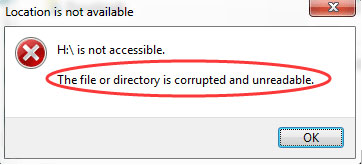
			<p style="text-align: justify;">Đây là một lỗi phổ biến thường gặp trên máy tính Windows khi hệ điều hành không thể truy cập dữ liệu trên ổ cứng ngoài:</p>

<pre id="pre0">
<code>E:\ is not accessible. The file or directory is corrupted and unreadable.</code></pre>

<p style="text-align: justify;">(<em>Ổ E:\ không thể truy cập được. File hoặc thư mục bị hỏng và không thể đọc được</em>).</p>

<p style="text-align: justify;">Bạn có thể gặp lỗi này sau khi cố gắng mở thứ gì đó từ USB. Hoặc, tùy thuộc vào cách máy tính của bạn được thiết lập, lỗi có thể xuất hiện ngay sau khi lắp ổ cứng vào máy tính.</p>

<p style="text-align: justify;">Lỗi “not accessible” này có thể xảy ra bất cứ lúc nào, ngay cả khi bạn vừa mới sử dụng ổ gần đây. Đầu thông báo lỗi là vị trí không thể đọc được dữ liệu, vì vậy nó có thể là E:, H:, K:, v.v…</p>

<figure>
<div style="text-align: justify;"><img alt="Thông báo lỗi &#039;The File or Directory is Corrupted and Unreadable&#039;" data-i="0" data-src="https://st.quantrimang.com/photos/image/2020/09/26/loi-the-file-or-directory-is-corrupted-and-unreadable-1.jpg" data-was-processed="true" height="165" src="https://st.quantrimang.com/photos/image/2020/09/26/loi-the-file-or-directory-is-corrupted-and-unreadable-1.jpg" width="362" /></div>

<figcaption>
<div style="text-align: justify;">Thông báo lỗi &quot;The File or Directory is Corrupted and Unreadable&quot;</div>
</figcaption>
</figure>

<h2 style="text-align: justify;">Nguyên nhân lỗi &quot;The File or Directory is Corrupted and Unreadable&quot;</h2>

<p style="text-align: justify;">Có một số lý do khiến bạn có thể gặp lỗi này:</p>

<ul>
	<li style="text-align: justify;">Ổ được lấy ra mà không ngắt kết nối một cách an toàn</li>
	<li style="text-align: justify;">Phần mềm độc hại đã lây nhiễm vào ổ</li>
	<li style="text-align: justify;">Ổ cứng ngoài bị hỏng về mặt vật lý</li>
</ul>

<p style="text-align: justify;">Lỗi này có thể xảy ra trên bất kỳ hệ điều hành Windows nào. Các bước dưới đây áp dụng cho Windows 10 trở về trước.</p>

<div style="text-align: justify;">&nbsp;</div>

<h2 style="text-align: justify;">Cách sửa lỗi “The File or Directory is Corrupted and Unreadable”</h2>

<p style="text-align: justify;">Cách tốt nhất để khắc phục lỗi “The File or Directory is Corrupted and Unreadable” là thực hiện các bước khắc phục sự cố này, theo thứ tự:</p>

<h3 style="text-align: justify;">1.&nbsp;Chạy lệnh chkdsk trên ổ cứng</h3>

<p style="text-align: justify;">Thực hiện việc này bằng cách&nbsp;mở Command Prompt với quyền admin&nbsp;và nhập lệnh sau, thay thế ký tự cuối cùng bằng ký tự của ổ đang hiển thị lỗi:</p>

<pre id="pre1">
<code>chkdsk /r e:</code></pre>

<p style="text-align: justify;"><strong>Lưu ý</strong>: Chạy lệnh chkdsk là cách khắc phục có nhiều khả năng thành công nhất cho lỗi này. Nếu bạn bỏ qua bước này, có thể hai gợi ý tiếp theo dưới đây sẽ không hiệu quả vì ổ vẫn không thể đọc được.</p>

<div style="text-align: justify;">&nbsp;</div>

<h3 style="text-align: justify;">2. Quét ổ cứng bằng chương trình loại bỏ phần mềm độc hại</h3>

<p style="text-align: justify;">Nếu phần mềm độc hại là nguyên nhân gây ra lỗi, việc xóa phần mềm đó có thể khôi phục quyền truy cập vào ổ. Tham khảo:&nbsp;Gỡ bỏ tận gốc phần mềm độc hại (malware) trên máy tính Windows 10&nbsp;để biết thêm chi tiết.</p>

<h3 style="text-align: justify;">3. Format ổ</h3>

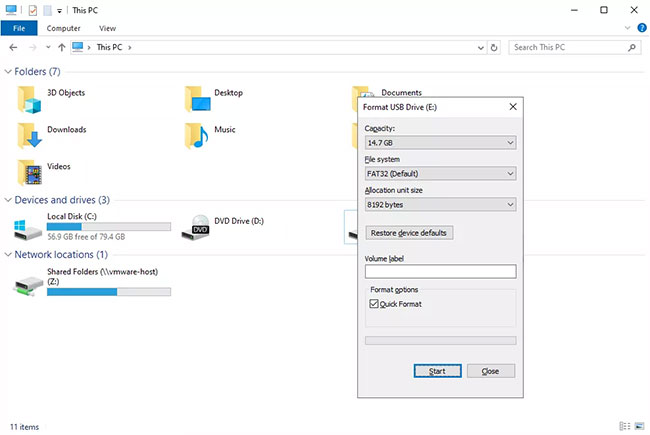
<p style="text-align: justify;">Nếu ổ không thể đọc được, việc bạn có thể format nó dường như không khả thi lắm, nhưng dù sao cũng hãy thử làm việc này.</p>

<figure>
<div style="text-align: justify;"><img alt="Có thể thử format ổ để khắc phục sự cố" data-i="1" data-src="https://st.quantrimang.com/photos/image/2020/09/26/loi-the-file-or-directory-is-corrupted-and-unreadable-2.jpg" data-was-processed="true" height="435" src="https://st.quantrimang.com/photos/image/2020/09/26/loi-the-file-or-directory-is-corrupted-and-unreadable-2.jpg" width="650" /></div>

<figcaption>
<div style="text-align: justify;">Có thể thử format ổ để khắc phục sự cố</div>
</figcaption>
</figure>

<p style="text-align: justify;"><strong>Lưu ý:</strong>&nbsp;Định dạng sẽ xóa mọi thứ khỏi ổ! Trước khi bạn hoàn thành bước này, hãy thử khôi phục file từ ổ bằng&nbsp;chương trình khôi phục file.</p>

<p style="text-align: justify;">Nếu lý do cho lỗi “The file or directory is corrupted and unreadable” là do ổ bị hỏng về mặt vật lý, việc sửa chữa ổ không đủ để khôi phục dữ liệu và ngăn lỗi. Trong trường hợp này, bạn sẽ cần phải thay thế ổ.</p>

<p style="text-align: justify;">Kiểm tra&nbsp;danh sách USB&nbsp;và&nbsp;ổ cứng ngoài tốt nhất&nbsp;của&nbsp;<strong>Quantrimang.com</strong>&nbsp;để biết các đề xuất.</p>
		</div>
				<div id="author">
						<p>
				<strong>Nguồn tin:</strong>
				Quantrimang.com
			</p>
		</div>
	</div>
	<div id="footer" class="clearfix">
		<div id="url">
			<strong>URL của bản tin này: </strong><a href="https://www.nguoicodonvn2008.info/vi/news/savefile/kien-thuc-may-tinh/cach-sua-loi-the-file-or-directory-is-corrupted-and-unreadable-2788.html" title="Cách sửa lỗi &quot;The File or Directory is Corrupted and Unreadable&quot;">https://www.nguoicodonvn2008.info/vi/news/savefile/kien-thuc-may-tinh/cach-sua-loi-the-file-or-directory-is-corrupted-and-unreadable-2788.html</a>

		</div>
		<div class="clear"></div>
		<div class="copyright">
			&copy; .&#x3A; Nguoicodonvn2008.info - Cõi lòng người cô đơn &#x3A;.
		</div>
		<div id="contact">
			<a href="mailto:admin@nguoicodonvn2008.info">admin@nguoicodonvn2008.info</a>
		</div>
	</div>
</div>
        <div id="timeoutsess" class="chromeframe">
            Bạn đã không sử dụng Site, <a onclick="timeoutsesscancel();" href="https://nguoicodonvn2008.info/#">Bấm vào đây để duy trì trạng thái đăng nhập</a>. Thời gian chờ: <span id="secField"> 60 </span> giây
        </div>
        <div id="openidResult" class="nv-alert" style="display:none"></div>
        <div id="openidBt" data-result="" data-redirect=""></div>
		</script>
		<div class="car-top">
  <span><img src="https://nguoicodonvn2008.info/themes/default/images/car.png" alt=""></span>
</div>
<script src="https://nguoicodonvn2008.info/assets/js/jquery/jquery.min.js"></script>
<script>var nv_base_siteurl="/",nv_lang_data="vi",nv_lang_interface="vi",nv_name_variable="nv",nv_fc_variable="op",nv_lang_variable="language",nv_module_name="news",nv_func_name="savefile",nv_is_user=0, nv_my_ofs=-4,nv_my_abbr="EDT",nv_cookie_prefix="nv4c_e856T",nv_check_pass_mstime=1738000,nv_area_admin=0,nv_safemode=0,theme_responsive=0,nv_recaptcha_ver=2,nv_recaptcha_sitekey="",nv_recaptcha_type="image",XSSsanitize=1;</script>
<script src="https://nguoicodonvn2008.info/assets/js/language/vi.js"></script>
<script src="https://nguoicodonvn2008.info/assets/js/DOMPurify/purify3.js"></script>
<script src="https://nguoicodonvn2008.info/assets/js/global.js"></script>
<script src="https://nguoicodonvn2008.info/assets/js/site.js"></script>
<script src="https://nguoicodonvn2008.info/themes/default/js/news.js"></script>
<script src="https://nguoicodonvn2008.info/themes/default/js/main.js"></script>
<script src="https://nguoicodonvn2008.info/themes/default/js/custom.js"></script>
<script type="application/ld+json">
        {
            "@context": "https://schema.org",
            "@type": "Organization",
            "url": "https://nguoicodonvn2008.info",
            "logo": "https://nguoicodonvn2008.info/uploads/angel.gif"
        }
        </script>
<script src="https://nguoicodonvn2008.info/themes/default/js/bootstrap.min.js"></script>
<script type="text/javascript">
var $scrolltop = $('.car-top');
$scrolltop.on('click', function () {
    $('html,body').animate({
        scrollTop: 0
    }, 800);
    $(this).addClass("car-run");
    setTimeout(function(){ $scrolltop.removeClass('car-run');}, 1000);
    return false;
});
$(window).on('scroll', function ()
{ 
    if($(window).scrollTop() >= 200)
    {
        $scrolltop.addClass("show");
        $scrolltop.addClass("car-down");
    }
    else
    {
       $scrolltop.removeClass("show");
       setTimeout(function(){ $scrolltop.removeClass('car-down');}, 300);
    }
});
</script>
</body>
</html>