<!DOCTYPE html>
    <html lang="vi" xmlns="http://www.w3.org/1999/xhtml" prefix="og: http://ogp.me/ns#">
    <head>
<title>Cách sửa lỗi Start PXE over IPv4 trong Windows 11&#x002F;10</title>
<meta name="description" content="Cách sửa lỗi Start PXE over IPv4 trong Windows 11&#x002F;10 - Savefile - Tin Tức -...">
<meta name="author" content=".: Nguoicodonvn2008.info - Cõi lòng người cô đơn :.">
<meta name="copyright" content=".: Nguoicodonvn2008.info - Cõi lòng người cô đơn :. [admin@nguoicodonvn2008.info]">
<meta name="robots" content="index, archive, follow, noodp">
<meta name="googlebot" content="index,archive,follow,noodp">
<meta name="msnbot" content="all,index,follow">
<meta name="generator" content="NukeViet v4.5">
<meta http-equiv="Content-Type" content="text/html; charset=utf-8">
<meta property="og:title" content="Cách sửa lỗi Start PXE over IPv4 trong Windows 11&#x002F;10">
<meta property="og:type" content="website">
<meta property="og:description" content="Savefile - Tin Tức - https&#x3A;&#x002F;&#x002F;www.nguoicodonvn2008.info&#x002F;vi&#x002F;news&#x002F;savefile&#x002F;kien-thuc-may-tinh&#x002F;cach-sua-loi-start-pxe-over-ipv4-trong-windows-11-10-4462.html">
<meta property="og:site_name" content=".&#x3A; Nguoicodonvn2008.info - Cõi lòng người cô đơn &#x3A;.">
<meta property="og:url" content="https://www.nguoicodonvn2008.info/vi/news/savefile/kien-thuc-may-tinh/cach-sua-loi-start-pxe-over-ipv4-trong-windows-11-10-4462.html">
<link rel="shortcut icon" href="https://nguoicodonvn2008.info/favicon.ico">
<link rel="canonical" href="https://www.nguoicodonvn2008.info/vi/news/savefile/kien-thuc-may-tinh/cach-sua-loi-start-pxe-over-ipv4-trong-windows-11-10-4462.html">
<link rel="alternate" href="https://nguoicodonvn2008.info/vi/news/rss/" title="Tin Tức" type="application/rss+xml">
<link rel="alternate" href="https://nguoicodonvn2008.info/vi/news/rss/karaoke-dual/" title="Tin Tức - Karaoke Dual" type="application/rss+xml">
<link rel="alternate" href="https://nguoicodonvn2008.info/vi/news/rss/nhac-tre/" title="Tin Tức - Nhạc trẻ" type="application/rss+xml">
<link rel="alternate" href="https://nguoicodonvn2008.info/vi/news/rss/tru-tinh/" title="Tin Tức - Trữ tình" type="application/rss+xml">
<link rel="alternate" href="https://nguoicodonvn2008.info/vi/news/rss/nuoc-ngoai/" title="Tin Tức - Nước ngoài" type="application/rss+xml">
<link rel="alternate" href="https://nguoicodonvn2008.info/vi/news/rss/remix/" title="Tin Tức - Remix" type="application/rss+xml">
<link rel="alternate" href="https://nguoicodonvn2008.info/vi/news/rss/tam-su-tinh-yeu/" title="Tin Tức - Tâm sự tình yêu" type="application/rss+xml">
<link rel="alternate" href="https://nguoicodonvn2008.info/vi/news/rss/tho-suu-tam/" title="Tin Tức - Thơ sưu tầm" type="application/rss+xml">
<link rel="alternate" href="https://nguoicodonvn2008.info/vi/news/rss/cuoc-song/" title="Tin Tức - Cuộc sống" type="application/rss+xml">
<link rel="alternate" href="https://nguoicodonvn2008.info/vi/news/rss/phan-mem/" title="Tin Tức - Phần mềm" type="application/rss+xml">
<link rel="alternate" href="https://nguoicodonvn2008.info/vi/news/rss/kien-thuc-may-tinh/" title="Tin Tức - Kiến thức máy tính" type="application/rss+xml">
<link rel="alternate" href="https://nguoicodonvn2008.info/vi/news/rss/hoc-tap/" title="Tin Tức - Học tập" type="application/rss+xml">
<link rel="alternate" href="https://nguoicodonvn2008.info/vi/news/rss/tai-lieu/" title="Tin Tức - Tài liệu" type="application/rss+xml">
<link rel="alternate" href="https://nguoicodonvn2008.info/vi/news/rss/de-thi/" title="Tin Tức - Đề thi" type="application/rss+xml">
<link rel="preload" as="style" href="https://nguoicodonvn2008.info/assets/css/font-awesome.min.css" type="text/css">
<link rel="preload" as="style" href="https://nguoicodonvn2008.info/themes/default/css/bootstrap.non-responsive.css" type="text/css">
<link rel="preload" as="style" href="https://nguoicodonvn2008.info/themes/default/css/style.css" type="text/css">
<link rel="preload" as="style" href="https://nguoicodonvn2008.info/themes/default/css/style.non-responsive.css" type="text/css">
<link rel="preload" as="style" href="https://nguoicodonvn2008.info/themes/default/css/news.css" type="text/css">
<link rel="preload" as="style" href="https://nguoicodonvn2008.info/themes/default/css/custom.css" type="text/css">
<link rel="preload" as="script" href="https://nguoicodonvn2008.info/assets/js/jquery/jquery.min.js" type="text/javascript">
<link rel="preload" as="script" href="https://nguoicodonvn2008.info/assets/js/language/vi.js" type="text/javascript">
<link rel="preload" as="script" href="https://nguoicodonvn2008.info/assets/js/DOMPurify/purify3.js" type="text/javascript">
<link rel="preload" as="script" href="https://nguoicodonvn2008.info/assets/js/global.js" type="text/javascript">
<link rel="preload" as="script" href="https://nguoicodonvn2008.info/assets/js/site.js" type="text/javascript">
<link rel="preload" as="script" href="https://nguoicodonvn2008.info/themes/default/js/news.js" type="text/javascript">
<link rel="preload" as="script" href="https://nguoicodonvn2008.info/themes/default/js/main.js" type="text/javascript">
<link rel="preload" as="script" href="https://nguoicodonvn2008.info/themes/default/js/custom.js" type="text/javascript">
<link rel="preload" as="script" href="https://nguoicodonvn2008.info/themes/default/js/bootstrap.min.js" type="text/javascript">
<link rel="stylesheet" href="https://nguoicodonvn2008.info/assets/css/font-awesome.min.css">
<link rel="stylesheet" href="https://nguoicodonvn2008.info/themes/default/css/bootstrap.non-responsive.css">
<link rel="stylesheet" href="https://nguoicodonvn2008.info/themes/default/css/style.css">
<link rel="stylesheet" href="https://nguoicodonvn2008.info/themes/default/css/style.non-responsive.css">
<link rel="StyleSheet" href="https://nguoicodonvn2008.info/themes/default/css/news.css">
<link rel="stylesheet" href="https://nguoicodonvn2008.info/themes/default/css/custom.css">
<style type="text/css">
	body{background: #fff;}
</style>
    </head>
    <body>
<div id="print">
	<div id="hd_print">
		<h2 class="pull-left">.&#x3A; Nguoicodonvn2008.info - Cõi lòng người cô đơn &#x3A;.</h2>
		<p class="pull-right"><a title=".&#x3A; Nguoicodonvn2008.info - Cõi lòng người cô đơn &#x3A;." href="https://nguoicodonvn2008.info/">https://nguoicodonvn2008.info</a></p>
	</div>
	<div class="clear"></div>
	<hr />
	<div id="content">
		<h1>Cách sửa lỗi Start PXE over IPv4 trong Windows 11&#x002F;10</h1>
		<ul class="list-inline">
			<li>Thứ hai - 19/07/2021 23:14</li>
			<li class="hidden-print txtrequired"><em class="fa fa-print">&nbsp;</em><a title="In ra" href="javascript:;" onclick="window.print()">In ra</a></li>
			<li class="hidden-print txtrequired"><em class="fa fa-power-off">&nbsp;</em><a title="Đóng cửa sổ này" href="javascript:;" onclick="window.close()">Đóng cửa sổ này</a></li>
		</ul>
		<div class="clear"></div>
		<div id="hometext">
		</div>
				<div class="imghome">
			<img alt="Cách sửa lỗi Start PXE over IPv4 trong Windows 11&#x002F;10" src="https://st.quantrimang.com/photos/image/2021/07/20/sua-loi-start-pxe-over-ipv4-2.jpg" width="460" class="img-thumbnail" />
		</div>
		<div class="clear"></div>
		<div id="bodytext" class="clearfix">
			<p style="text-align: justify;">Bạn có thể thấy lỗi “Start PXE over IPv4” khi cố gắng khởi động máy tính của mình vì hệ thống đang cố gắng boot từ PXE. Máy tính đang cố gắng khởi động qua mạng IPv4 và do đó, bạn thấy thông báo lỗi này. Trong bài viết hôm nay,&nbsp;<strong>Quantrimang.com</strong>&nbsp;sẽ hướng dẫn cách sửa lỗi Start PXE over IPv4 trong Windows 11/10 với sự trợ giúp của một số giải pháp đơn giản.</p>

<h2 style="text-align: justify;">PXE là gì?</h2>

<p style="text-align: justify;">PXE hay Preboot Execution Environment được sử dụng để boot máy tính có interface client-server trước khi triển khai image PC. Cả&nbsp;DHCP (Dynamic Host Configuration Protocol)&nbsp;và TFTP (Trivial File Transfer Protocol), đều được sử dụng để thực hiện boot mạng PXE. Thông thường, PXE được bật trên máy tính, nhưng bạn có thể tắt nó từ&nbsp;BIOS&nbsp;(sẽ được thảo luận trong phần sau).</p>

<h2 style="text-align: justify;">Lỗi Start PXE over IPv4 nghĩa là gì?</h2>

<p style="text-align: justify;">Bạn sẽ thấy thông báo lỗi “Start PXE over IPv4 ″ khi máy tính cố gắng boot trên&nbsp;mạng LAN. Máy tính của bạn thực hiện điều này khi nó không khởi động được từ ổ boot. Điều này thường xảy ra do cấu hình BIOS sai.</p>

<h2 style="text-align: justify;">Cách sửa lỗi Start PXE over IPv4</h2>

<p style="text-align: justify;">Lỗi này thường xảy ra do không có các thiết bị khởi động khác như ổ cứng. Vì vậy, ta sẽ đặt nó làm thiết bị khởi động mặc định. Bài viết cũng sẽ đề cập đến các giải pháp khác có thể khắc phục lỗi. Đây là những điều bạn có thể làm để sửa lỗi Start PXE over IPv4 trong Windows 11/10.</p>

<h3 style="text-align: justify;">1. Vô hiệu hóa Secure Boot và Legacy Support</h3>

<figure>
<div style="text-align: justify;"><img alt="Vô hiệu hóa Secure Boot và Legacy Support" data-i="0" data-src="https://st.quantrimang.com/photos/image/2021/07/20/sua-loi-start-pxe-over-ipv4-1.jpg" data-was-processed="true" height="377" src="https://st.quantrimang.com/photos/image/2021/07/20/sua-loi-start-pxe-over-ipv4-1.jpg" width="650" /></div>

<figcaption>
<div style="text-align: justify;">Vô hiệu hóa Secure Boot và Legacy Support</div>
</figcaption>
</figure>

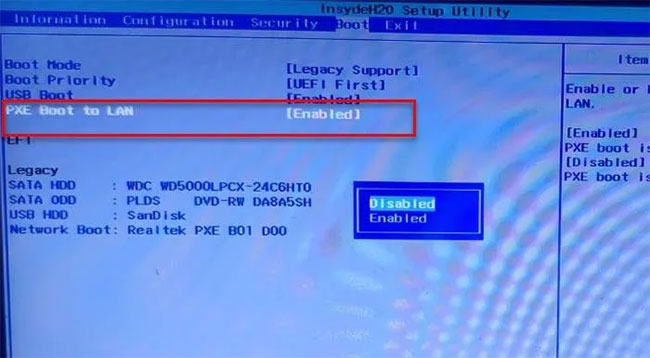
<p style="text-align: justify;"><strong>Secure Boot</strong>&nbsp;và&nbsp;<strong>Legacy Support</strong>&nbsp;là hai trong số những thủ phạm chính trong việc thay đổi thứ tự boot hệ thống. Do đó, vô hiệu hóa chúng sẽ khắc phục được sự cố. Bạn có thể làm theo các bước đã cho để vô hiệu hóa Secure Boot và Legacy Support.</p>

<p style="text-align: justify;"><strong>B1:</strong>&nbsp;<a href="https://quantrimang.com/huong-dan-vao-bios-tren-cac-dong-may-tinh-khac-nhau-117127" title="Hướng dẫn vào BIOS trên các dòng máy tính khác nhau">Khởi động vào BIOS của máy tính</a>.</p>

<p style="text-align: justify;"><strong>B2:</strong>&nbsp;Chuyển đến tab&nbsp;<strong>Security</strong>&nbsp;bằng các phím mũi tên.</p>

<p style="text-align: justify;"><strong>B3:</strong>&nbsp;Bây giờ, hãy vào&nbsp;<strong>Secure Boot</strong>&nbsp;và vô hiệu hóa nó.</p>

<p style="text-align: justify;"><strong>B4:</strong>&nbsp;Sau đó, chọn&nbsp;<strong>Legacy Support</strong>&nbsp;và vô hiệu hóa nó.</p>

<p style="text-align: justify;"><strong>B5:</strong>&nbsp;Cuối cùng, lưu cài đặt và thoát khỏi BIOS.</p>

<p style="text-align: justify;">Khi&nbsp;khởi động lại máy tính, bạn có thể thấy thông báo cho biết thứ tự boot đã được thay đổi và yêu cầu bạn nhập số được hiển thị.</p>

<p style="text-align: justify;">Nếu không nhìn thấy bất cứ điều gì, chỉ cần tiếp tục với quá trình boot thông thường. Nhưng nếu thấy thông báo, sau đây là những gì bạn cần làm:</p>

<div style="text-align: justify;">&nbsp;</div>

<p style="text-align: justify;"><strong>B1:</strong>&nbsp;Nhập các số này và nhấn&nbsp;<strong>Enter.</strong>&nbsp;(<strong>Lưu ý</strong>: Bạn sẽ không thể nhìn thấy số đã nhập).</p>

<p style="text-align: justify;"><strong>B2:</strong>&nbsp;Bây giờ, tắt máy tính từ nút nguồn.</p>

<p style="text-align: justify;"><strong>B3:</strong>&nbsp;Vào&nbsp;<strong>BIOS</strong>, chuyển đến tab&nbsp;<strong>Boot</strong>&nbsp;và chọn&nbsp;<strong>Boot from Hard Drive</strong>&nbsp;(một số cài đặt có thể khác nhau tùy thuộc vào OEM).</p>

<p style="text-align: justify;">Cuối cùng, khởi động lại máy tính và kiểm tra xem sự cố đã được khắc phục chưa.</p>

<h3 style="text-align: justify;">2. Vô hiệu hóa Boot to LAN</h3>

<figure>
<div style="text-align: justify;"><img alt="Vô hiệu hóa Boot to LAN" data-i="1" data-src="https://st.quantrimang.com/photos/image/2021/07/20/sua-loi-start-pxe-over-ipv4-2.jpg" data-was-processed="true" height="358" src="https://st.quantrimang.com/photos/image/2021/07/20/sua-loi-start-pxe-over-ipv4-2.jpg" width="650" /></div>

<figcaption>
<div style="text-align: justify;">Vô hiệu hóa Boot to LAN</div>
</figcaption>
</figure>

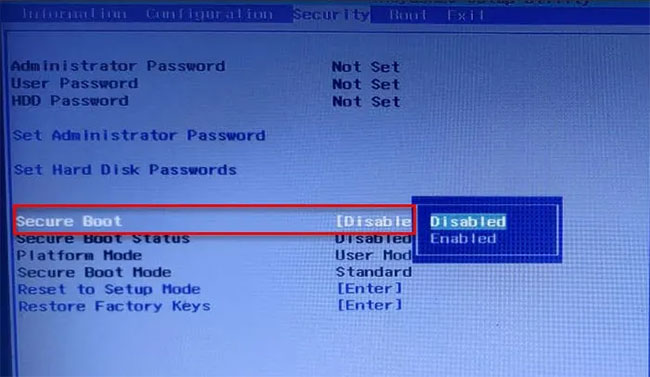
<p style="text-align: justify;">Một điều khác bạn có thể làm để sửa lỗi là vô hiệu hóa Boot to LAN. Hệ thống của bạn có thể có một tên khác, tùy thuộc vào thương hiệu laptop. Tuy nhiên, quy trình thường giống nhau.</p>

<p style="text-align: justify;">Vì vậy, hãy làm theo các bước đã cho để tắt tùy chọn Boot to LAN.</p>

<p style="text-align: justify;"><strong>B1:</strong>&nbsp;Khởi động vào BIOS.</p>

<p style="text-align: justify;"><strong>B2:</strong>&nbsp;Chuyển đến tab&nbsp;<strong>Boot.</strong></p>

<p style="text-align: justify;"><strong>B3:</strong>&nbsp;Tắt tùy chọn&nbsp;<strong>PXE Boot to LAN</strong>.</p>

<p style="text-align: justify;"><strong>B4:</strong>&nbsp;Lưu và thoát.</p>

<p style="text-align: justify;">Khởi động lại máy tính và kiểm tra xem sự cố đã được khắc phục chưa.</p>

<p style="text-align: justify;">Chúc bạn thực hiện thành công!</p>
		</div>
				<div id="author">
						<p>
				<strong>Nguồn tin:</strong>
				Quantrimang.com
			</p>
		</div>
	</div>
	<div id="footer" class="clearfix">
		<div id="url">
			<strong>URL của bản tin này: </strong><a href="https://www.nguoicodonvn2008.info/vi/news/savefile/kien-thuc-may-tinh/cach-sua-loi-start-pxe-over-ipv4-trong-windows-11-10-4462.html" title="Cách sửa lỗi Start PXE over IPv4 trong Windows 11&#x002F;10">https://www.nguoicodonvn2008.info/vi/news/savefile/kien-thuc-may-tinh/cach-sua-loi-start-pxe-over-ipv4-trong-windows-11-10-4462.html</a>

		</div>
		<div class="clear"></div>
		<div class="copyright">
			&copy; .&#x3A; Nguoicodonvn2008.info - Cõi lòng người cô đơn &#x3A;.
		</div>
		<div id="contact">
			<a href="mailto:admin@nguoicodonvn2008.info">admin@nguoicodonvn2008.info</a>
		</div>
	</div>
</div>
        <div id="timeoutsess" class="chromeframe">
            Bạn đã không sử dụng Site, <a onclick="timeoutsesscancel();" href="https://nguoicodonvn2008.info/#">Bấm vào đây để duy trì trạng thái đăng nhập</a>. Thời gian chờ: <span id="secField"> 60 </span> giây
        </div>
        <div id="openidResult" class="nv-alert" style="display:none"></div>
        <div id="openidBt" data-result="" data-redirect=""></div>
		</script>
		<div class="car-top">
  <span><img src="https://nguoicodonvn2008.info/themes/default/images/car.png" alt=""></span>
</div>
<script src="https://nguoicodonvn2008.info/assets/js/jquery/jquery.min.js"></script>
<script>var nv_base_siteurl="/",nv_lang_data="vi",nv_lang_interface="vi",nv_name_variable="nv",nv_fc_variable="op",nv_lang_variable="language",nv_module_name="news",nv_func_name="savefile",nv_is_user=0, nv_my_ofs=-4,nv_my_abbr="EDT",nv_cookie_prefix="nv4c_e856T",nv_check_pass_mstime=1738000,nv_area_admin=0,nv_safemode=0,theme_responsive=0,nv_recaptcha_ver=2,nv_recaptcha_sitekey="",nv_recaptcha_type="image",XSSsanitize=1;</script>
<script src="https://nguoicodonvn2008.info/assets/js/language/vi.js"></script>
<script src="https://nguoicodonvn2008.info/assets/js/DOMPurify/purify3.js"></script>
<script src="https://nguoicodonvn2008.info/assets/js/global.js"></script>
<script src="https://nguoicodonvn2008.info/assets/js/site.js"></script>
<script src="https://nguoicodonvn2008.info/themes/default/js/news.js"></script>
<script src="https://nguoicodonvn2008.info/themes/default/js/main.js"></script>
<script src="https://nguoicodonvn2008.info/themes/default/js/custom.js"></script>
<script type="application/ld+json">
        {
            "@context": "https://schema.org",
            "@type": "Organization",
            "url": "https://nguoicodonvn2008.info",
            "logo": "https://nguoicodonvn2008.info/uploads/angel.gif"
        }
        </script>
<script src="https://nguoicodonvn2008.info/themes/default/js/bootstrap.min.js"></script>
<script type="text/javascript">
var $scrolltop = $('.car-top');
$scrolltop.on('click', function () {
    $('html,body').animate({
        scrollTop: 0
    }, 800);
    $(this).addClass("car-run");
    setTimeout(function(){ $scrolltop.removeClass('car-run');}, 1000);
    return false;
});
$(window).on('scroll', function ()
{ 
    if($(window).scrollTop() >= 200)
    {
        $scrolltop.addClass("show");
        $scrolltop.addClass("car-down");
    }
    else
    {
       $scrolltop.removeClass("show");
       setTimeout(function(){ $scrolltop.removeClass('car-down');}, 300);
    }
});
</script>
</body>
</html>