<!DOCTYPE html>
    <html lang="vi" xmlns="http://www.w3.org/1999/xhtml" prefix="og: http://ogp.me/ns#">
    <head>
<title>Cách sửa lỗi &quot;Mmc.exe blocked for your protection&quot; trên Windows 10</title>
<meta name="description" content="Cách sửa lỗi &quot;Mmc.exe blocked for your protection&quot; trên Windows 10 - Savefile - Tin Tức -...">
<meta name="author" content=".: Nguoicodonvn2008.info - Cõi lòng người cô đơn :.">
<meta name="copyright" content=".: Nguoicodonvn2008.info - Cõi lòng người cô đơn :. [admin@nguoicodonvn2008.info]">
<meta name="robots" content="index, archive, follow, noodp">
<meta name="googlebot" content="index,archive,follow,noodp">
<meta name="msnbot" content="all,index,follow">
<meta name="generator" content="NukeViet v4.5">
<meta http-equiv="Content-Type" content="text/html; charset=utf-8">
<meta property="og:title" content="Cách sửa lỗi &quot;Mmc.exe blocked for your protection&quot; trên Windows 10">
<meta property="og:type" content="website">
<meta property="og:description" content="Savefile - Tin Tức - https&#x3A;&#x002F;&#x002F;www.nguoicodonvn2008.info&#x002F;vi&#x002F;news&#x002F;savefile&#x002F;kien-thuc-may-tinh&#x002F;cach-sua-loi-mmc-exe-blocked-for-your-protection-tren-windows-10-1587.html">
<meta property="og:site_name" content=".&#x3A; Nguoicodonvn2008.info - Cõi lòng người cô đơn &#x3A;.">
<meta property="og:url" content="https://www.nguoicodonvn2008.info/vi/news/savefile/kien-thuc-may-tinh/cach-sua-loi-mmc-exe-blocked-for-your-protection-tren-windows-10-1587.html">
<link rel="shortcut icon" href="https://nguoicodonvn2008.info/favicon.ico">
<link rel="canonical" href="https://www.nguoicodonvn2008.info/vi/news/savefile/kien-thuc-may-tinh/cach-sua-loi-mmc-exe-blocked-for-your-protection-tren-windows-10-1587.html">
<link rel="alternate" href="https://nguoicodonvn2008.info/vi/news/rss/" title="Tin Tức" type="application/rss+xml">
<link rel="alternate" href="https://nguoicodonvn2008.info/vi/news/rss/karaoke-dual/" title="Tin Tức - Karaoke Dual" type="application/rss+xml">
<link rel="alternate" href="https://nguoicodonvn2008.info/vi/news/rss/nhac-tre/" title="Tin Tức - Nhạc trẻ" type="application/rss+xml">
<link rel="alternate" href="https://nguoicodonvn2008.info/vi/news/rss/tru-tinh/" title="Tin Tức - Trữ tình" type="application/rss+xml">
<link rel="alternate" href="https://nguoicodonvn2008.info/vi/news/rss/nuoc-ngoai/" title="Tin Tức - Nước ngoài" type="application/rss+xml">
<link rel="alternate" href="https://nguoicodonvn2008.info/vi/news/rss/remix/" title="Tin Tức - Remix" type="application/rss+xml">
<link rel="alternate" href="https://nguoicodonvn2008.info/vi/news/rss/tam-su-tinh-yeu/" title="Tin Tức - Tâm sự tình yêu" type="application/rss+xml">
<link rel="alternate" href="https://nguoicodonvn2008.info/vi/news/rss/tho-suu-tam/" title="Tin Tức - Thơ sưu tầm" type="application/rss+xml">
<link rel="alternate" href="https://nguoicodonvn2008.info/vi/news/rss/cuoc-song/" title="Tin Tức - Cuộc sống" type="application/rss+xml">
<link rel="alternate" href="https://nguoicodonvn2008.info/vi/news/rss/phan-mem/" title="Tin Tức - Phần mềm" type="application/rss+xml">
<link rel="alternate" href="https://nguoicodonvn2008.info/vi/news/rss/kien-thuc-may-tinh/" title="Tin Tức - Kiến thức máy tính" type="application/rss+xml">
<link rel="alternate" href="https://nguoicodonvn2008.info/vi/news/rss/hoc-tap/" title="Tin Tức - Học tập" type="application/rss+xml">
<link rel="alternate" href="https://nguoicodonvn2008.info/vi/news/rss/tai-lieu/" title="Tin Tức - Tài liệu" type="application/rss+xml">
<link rel="alternate" href="https://nguoicodonvn2008.info/vi/news/rss/de-thi/" title="Tin Tức - Đề thi" type="application/rss+xml">
<link rel="preload" as="style" href="https://nguoicodonvn2008.info/assets/css/font-awesome.min.css" type="text/css">
<link rel="preload" as="style" href="https://nguoicodonvn2008.info/themes/default/css/bootstrap.non-responsive.css" type="text/css">
<link rel="preload" as="style" href="https://nguoicodonvn2008.info/themes/default/css/style.css" type="text/css">
<link rel="preload" as="style" href="https://nguoicodonvn2008.info/themes/default/css/style.non-responsive.css" type="text/css">
<link rel="preload" as="style" href="https://nguoicodonvn2008.info/themes/default/css/news.css" type="text/css">
<link rel="preload" as="style" href="https://nguoicodonvn2008.info/themes/default/css/custom.css" type="text/css">
<link rel="preload" as="script" href="https://nguoicodonvn2008.info/assets/js/jquery/jquery.min.js" type="text/javascript">
<link rel="preload" as="script" href="https://nguoicodonvn2008.info/assets/js/language/vi.js" type="text/javascript">
<link rel="preload" as="script" href="https://nguoicodonvn2008.info/assets/js/DOMPurify/purify3.js" type="text/javascript">
<link rel="preload" as="script" href="https://nguoicodonvn2008.info/assets/js/global.js" type="text/javascript">
<link rel="preload" as="script" href="https://nguoicodonvn2008.info/assets/js/site.js" type="text/javascript">
<link rel="preload" as="script" href="https://nguoicodonvn2008.info/themes/default/js/news.js" type="text/javascript">
<link rel="preload" as="script" href="https://nguoicodonvn2008.info/themes/default/js/main.js" type="text/javascript">
<link rel="preload" as="script" href="https://nguoicodonvn2008.info/themes/default/js/custom.js" type="text/javascript">
<link rel="preload" as="script" href="https://nguoicodonvn2008.info/themes/default/js/bootstrap.min.js" type="text/javascript">
<link rel="stylesheet" href="https://nguoicodonvn2008.info/assets/css/font-awesome.min.css">
<link rel="stylesheet" href="https://nguoicodonvn2008.info/themes/default/css/bootstrap.non-responsive.css">
<link rel="stylesheet" href="https://nguoicodonvn2008.info/themes/default/css/style.css">
<link rel="stylesheet" href="https://nguoicodonvn2008.info/themes/default/css/style.non-responsive.css">
<link rel="StyleSheet" href="https://nguoicodonvn2008.info/themes/default/css/news.css">
<link rel="stylesheet" href="https://nguoicodonvn2008.info/themes/default/css/custom.css">
<style type="text/css">
	body{background: #fff;}
</style>
    </head>
    <body>
<div id="print">
	<div id="hd_print">
		<h2 class="pull-left">.&#x3A; Nguoicodonvn2008.info - Cõi lòng người cô đơn &#x3A;.</h2>
		<p class="pull-right"><a title=".&#x3A; Nguoicodonvn2008.info - Cõi lòng người cô đơn &#x3A;." href="https://nguoicodonvn2008.info/">https://nguoicodonvn2008.info</a></p>
	</div>
	<div class="clear"></div>
	<hr />
	<div id="content">
		<h1>Cách sửa lỗi &quot;Mmc.exe blocked for your protection&quot; trên Windows 10</h1>
		<ul class="list-inline">
			<li>Thứ năm - 30/01/2020 08:17</li>
			<li class="hidden-print txtrequired"><em class="fa fa-print">&nbsp;</em><a title="In ra" href="javascript:;" onclick="window.print()">In ra</a></li>
			<li class="hidden-print txtrequired"><em class="fa fa-power-off">&nbsp;</em><a title="Đóng cửa sổ này" href="javascript:;" onclick="window.close()">Đóng cửa sổ này</a></li>
		</ul>
		<div class="clear"></div>
		<div id="hometext">
		</div>
				<div class="imghome">
			<img alt="Cách sửa lỗi &quot;Mmc.exe blocked for your protection&quot; trên Windows 10" src="https://st.quantrimang.com/photos/image/2020/01/22/sua-loi-mmc-exe-blocked-for-your-protection-tren-wins-10-3.jpg" width="460" class="img-thumbnail" />
		</div>
		<div class="clear"></div>
		<div id="bodytext" class="clearfix">
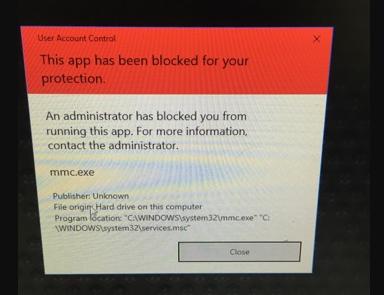
			<p style="text-align: justify;">Bạn có thể gặp phải lỗi “Mmc.exe blocked for your protection” trên&nbsp;Windows 10&nbsp;khi cố gắng chạy Computer Management. Tuy nhiên, đừng quá băn khoăn, đây không phải là một vấn đề quá lớn và có thể được xử lý chỉ bằng một vài điều chỉnh đối với các cài đặt.</p>

<figure>
<div style="text-align: justify;"><img alt="Thông báo lỗi “Mmc.exe blocked for your protection” trên Windows 10" data-i="0" data-src="https://st.quantrimang.com/photos/image/2020/01/22/sua-loi-mmc-exe-blocked-for-your-protection-tren-wins-10-5.jpg" data-was-processed="true" height="295" src="https://st.quantrimang.com/photos/image/2020/01/22/sua-loi-mmc-exe-blocked-for-your-protection-tren-wins-10-5.jpg" width="384" /></div>

<figcaption>
<div style="text-align: justify;">Thông báo lỗi “Mmc.exe blocked for your protection” trên Windows 10</div>
</figcaption>
</figure>

<h2 style="text-align: justify;">Cách 1: Kích hoạt Computer Management trong Group Policy</h2>

<p style="text-align: justify;">Lỗi “Mmc.exe blocked for your protection” có thể do cài đặt Group Policy gây ra và để khắc phục, bạn cần thực hiện một vài thay đổi như sau:</p>

<p style="text-align: justify;">1. Mở hộp thoại&nbsp;<strong>Run</strong>&nbsp;bằng cách nhấn phím&nbsp;<code>Windows</code>+<code>R</code>.</p>

<p style="text-align: justify;">2. Nhập&nbsp;<strong>mmc</strong>&nbsp;và nhấn&nbsp;<code>Enter</code>. Bước này sẽ khởi chạy cửa sổ&nbsp;<strong>Local Group Policy Editor</strong>.</p>

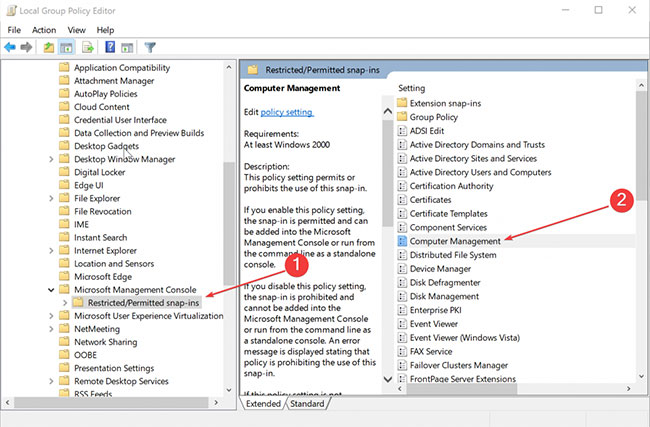
<p style="text-align: justify;">3. Từ danh sách các tùy chọn ở bên trái, nhấp vào&nbsp;<strong>User Configuration &gt; Administrative Templates &gt; Windows Components &gt; Microsoft Management Console &gt; Restricted/Permitted snap-ins</strong>.</p>

<figure>
<div style="text-align: justify;"><img alt="Nhấp chuột phải vào Computer Management" data-i="1" data-src="https://st.quantrimang.com/photos/image/2020/01/22/sua-loi-mmc-exe-blocked-for-your-protection-tren-wins-10-1.jpg" data-was-processed="true" height="427" src="https://st.quantrimang.com/photos/image/2020/01/22/sua-loi-mmc-exe-blocked-for-your-protection-tren-wins-10-1.jpg" width="650" /></div>

<figcaption>
<div style="text-align: justify;">Nhấp chuột phải vào Computer Management</div>
</figcaption>
</figure>

<p style="text-align: justify;">4. Trong bảng điều khiển bên phải, nhấp chuột phải vào&nbsp;<strong>Computer Management</strong>&nbsp;và chọn&nbsp;<strong>Edit.</strong></p>

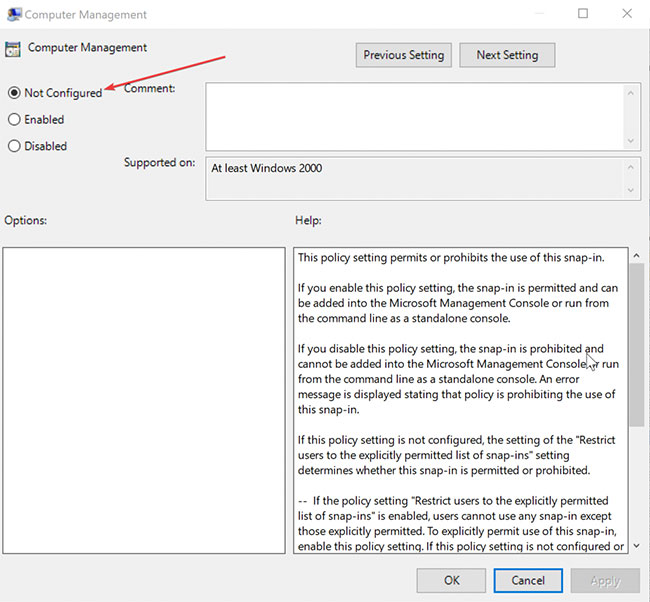
<p style="text-align: justify;">5. Chọn&nbsp;<strong>Not Configured</strong>&nbsp;hoặc&nbsp;<strong>Enabled.</strong></p>

<figure>
<div style="text-align: justify;"><img alt="Chọn Not Configured hoặc Enabled" data-i="2" data-src="https://st.quantrimang.com/photos/image/2020/01/22/sua-loi-mmc-exe-blocked-for-your-protection-tren-wins-10-2.jpg" data-was-processed="true" height="602" src="https://st.quantrimang.com/photos/image/2020/01/22/sua-loi-mmc-exe-blocked-for-your-protection-tren-wins-10-2.jpg" width="650" /></div>

<figcaption>
<div style="text-align: justify;">Chọn Not Configured hoặc Enabled</div>
</figcaption>
</figure>

<p style="text-align: justify;">6. Nhấn&nbsp;<strong>OK.</strong></p>

<p style="text-align: justify;">7. Tiếp theo, đóng&nbsp;<strong>Local Group Policy Editor</strong>.</p>

<p style="text-align: justify;">Khởi động lại PC và bạn sẽ thấy lỗi “Mmc.exe blocked for your protection” trong Windows 10 đã được giải quyết.</p>

<div style="text-align: justify;">&nbsp;</div>

<h2 style="text-align: justify;">Cách 2: Vô hiệu hóa SmartScreen</h2>

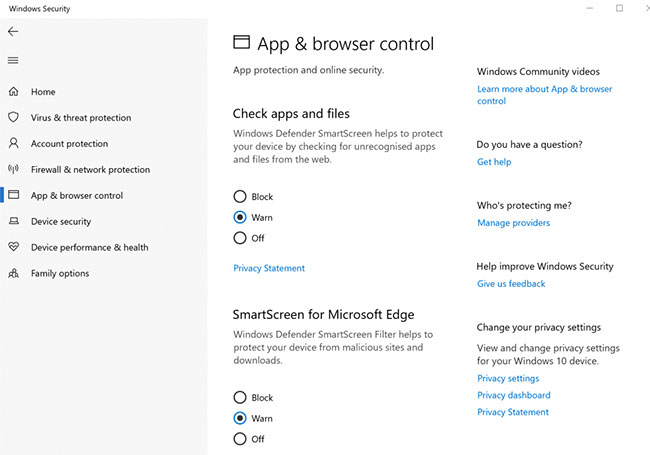
<p style="text-align: justify;">Có nhiều khả năng Computer Management bị SmartScreen chặn. Để sửa lỗi “Mmc.exe blocked for your protection”, hãy tắt SmartScreen và xem nó có hoạt động không. Đây là cách thực hiện:</p>

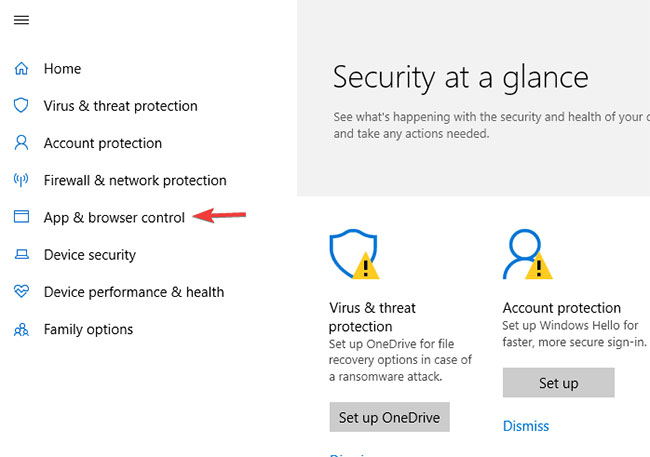
<p style="text-align: justify;">1. Khởi chạy&nbsp;<strong>Windows Security Center</strong>. Bạn có thể làm điều này đơn giản bằng cách nhấp vào biểu tượng khiên dọc bên trái&nbsp;<strong>Taskbar.</strong></p>

<p style="text-align: justify;">2. Nhấp vào&nbsp;<strong>App &amp; browser control</strong>&nbsp;từ danh sách các tùy chọn bên trái.</p>

<figure>
<div style="text-align: justify;"><img alt="Nhấp vào App &amp; browser control" data-i="3" data-src="https://st.quantrimang.com/photos/image/2020/01/22/sua-loi-mmc-exe-blocked-for-your-protection-tren-wins-10-3.jpg" data-was-processed="true" height="457" src="https://st.quantrimang.com/photos/image/2020/01/22/sua-loi-mmc-exe-blocked-for-your-protection-tren-wins-10-3.jpg" width="650" /></div>

<figcaption>
<div style="text-align: justify;">Nhấp vào App &amp; browser control</div>
</figcaption>
</figure>

<p style="text-align: justify;">3. Chọn cài đặt&nbsp;<strong>Off</strong>&nbsp;cho&nbsp;<strong>Windows Defender SmartScreen</strong>&nbsp;áp dụng cho từng khía cạnh, chẳng hạn như&nbsp;<strong>Check apps and files, SmartScreen for Microsoft Edge</strong>&nbsp;và<strong>&nbsp;SmartScreen for Microsoft Store apps</strong>.</p>

<figure>
<div style="text-align: justify;"><img alt="Chọn cài đặt Off cho Windows Defender SmartScreen" data-i="4" data-src="https://st.quantrimang.com/photos/image/2020/01/22/sua-loi-mmc-exe-blocked-for-your-protection-tren-wins-10-4.jpg" data-was-processed="true" height="455" src="https://st.quantrimang.com/photos/image/2020/01/22/sua-loi-mmc-exe-blocked-for-your-protection-tren-wins-10-4.jpg" width="650" /></div>

<figcaption>
<div style="text-align: justify;">Chọn cài đặt Off cho Windows Defender SmartScreen</div>
</figcaption>
</figure>

<p style="text-align: justify;">4. Sẽ có một cảnh báo về việc thiết bị có thể gặp nguy hiểm khi bạn tắt bảo vệ SmartScreen. Nếu muốn khắc phục lỗi, bạn phải sẵn sàng chấp nhận rủi ro.</p>

<p style="text-align: justify;">5. Đồng ý với bất kỳ hộp xác nhận nào xuất hiện.</p>

<p style="text-align: justify;">Mọi thao tác đã hoàn tất. Tuy nhiên, nếu PC được sử dụng bởi một người dùng khác cũng có quyền admin, bạn sẽ phải đảm bảo rằng tài khoản đã kích hoạt Computer Management trong Group Policy (làm theo cách 1).</p>
		</div>
				<div id="author">
						<p>
				<strong>Nguồn tin:</strong>
				Quantrimang.com
			</p>
		</div>
	</div>
	<div id="footer" class="clearfix">
		<div id="url">
			<strong>URL của bản tin này: </strong><a href="https://www.nguoicodonvn2008.info/vi/news/savefile/kien-thuc-may-tinh/cach-sua-loi-mmc-exe-blocked-for-your-protection-tren-windows-10-1587.html" title="Cách sửa lỗi &quot;Mmc.exe blocked for your protection&quot; trên Windows 10">https://www.nguoicodonvn2008.info/vi/news/savefile/kien-thuc-may-tinh/cach-sua-loi-mmc-exe-blocked-for-your-protection-tren-windows-10-1587.html</a>

		</div>
		<div class="clear"></div>
		<div class="copyright">
			&copy; .&#x3A; Nguoicodonvn2008.info - Cõi lòng người cô đơn &#x3A;.
		</div>
		<div id="contact">
			<a href="mailto:admin@nguoicodonvn2008.info">admin@nguoicodonvn2008.info</a>
		</div>
	</div>
</div>
        <div id="timeoutsess" class="chromeframe">
            Bạn đã không sử dụng Site, <a onclick="timeoutsesscancel();" href="https://nguoicodonvn2008.info/#">Bấm vào đây để duy trì trạng thái đăng nhập</a>. Thời gian chờ: <span id="secField"> 60 </span> giây
        </div>
        <div id="openidResult" class="nv-alert" style="display:none"></div>
        <div id="openidBt" data-result="" data-redirect=""></div>
		</script>
		<div class="car-top">
  <span><img src="https://nguoicodonvn2008.info/themes/default/images/car.png" alt=""></span>
</div>
<div id="run_cronjobs" style="visibility:hidden;display:none;"><img alt="cron" src="/index.php?second=cronjobs&amp;p=w6895mZC" width="1" height="1" /></div>
<script src="https://nguoicodonvn2008.info/assets/js/jquery/jquery.min.js"></script>
<script>var nv_base_siteurl="/",nv_lang_data="vi",nv_lang_interface="vi",nv_name_variable="nv",nv_fc_variable="op",nv_lang_variable="language",nv_module_name="news",nv_func_name="savefile",nv_is_user=0, nv_my_ofs=-4,nv_my_abbr="EDT",nv_cookie_prefix="nv4c_e856T",nv_check_pass_mstime=1738000,nv_area_admin=0,nv_safemode=0,theme_responsive=0,nv_recaptcha_ver=2,nv_recaptcha_sitekey="",nv_recaptcha_type="image",XSSsanitize=1;</script>
<script src="https://nguoicodonvn2008.info/assets/js/language/vi.js"></script>
<script src="https://nguoicodonvn2008.info/assets/js/DOMPurify/purify3.js"></script>
<script src="https://nguoicodonvn2008.info/assets/js/global.js"></script>
<script src="https://nguoicodonvn2008.info/assets/js/site.js"></script>
<script src="https://nguoicodonvn2008.info/themes/default/js/news.js"></script>
<script src="https://nguoicodonvn2008.info/themes/default/js/main.js"></script>
<script src="https://nguoicodonvn2008.info/themes/default/js/custom.js"></script>
<script type="application/ld+json">
        {
            "@context": "https://schema.org",
            "@type": "Organization",
            "url": "https://nguoicodonvn2008.info",
            "logo": "https://nguoicodonvn2008.info/uploads/angel.gif"
        }
        </script>
<script src="https://nguoicodonvn2008.info/themes/default/js/bootstrap.min.js"></script>
<script type="text/javascript">
var $scrolltop = $('.car-top');
$scrolltop.on('click', function () {
    $('html,body').animate({
        scrollTop: 0
    }, 800);
    $(this).addClass("car-run");
    setTimeout(function(){ $scrolltop.removeClass('car-run');}, 1000);
    return false;
});
$(window).on('scroll', function ()
{ 
    if($(window).scrollTop() >= 200)
    {
        $scrolltop.addClass("show");
        $scrolltop.addClass("car-down");
    }
    else
    {
       $scrolltop.removeClass("show");
       setTimeout(function(){ $scrolltop.removeClass('car-down');}, 300);
    }
});
</script>
</body>
</html>