<!DOCTYPE html>
    <html lang="vi" xmlns="http://www.w3.org/1999/xhtml" prefix="og: http://ogp.me/ns#">
    <head>
<title>Cách sửa lỗi Mac Homebrew &quot;zsh&#x3A; command not found&#x3A; brew&quot;</title>
<meta name="description" content="Cách sửa lỗi Mac Homebrew &quot;zsh&#x3A; command not found&#x3A; brew&quot; - Savefile - Tin Tức -...">
<meta name="author" content=".: Nguoicodonvn2008.info - Cõi lòng người cô đơn :.">
<meta name="copyright" content=".: Nguoicodonvn2008.info - Cõi lòng người cô đơn :. [admin@nguoicodonvn2008.info]">
<meta name="robots" content="index, archive, follow, noodp">
<meta name="googlebot" content="index,archive,follow,noodp">
<meta name="msnbot" content="all,index,follow">
<meta name="generator" content="NukeViet v4.5">
<meta http-equiv="Content-Type" content="text/html; charset=utf-8">
<meta property="og:title" content="Cách sửa lỗi Mac Homebrew &quot;zsh&#x3A; command not found&#x3A; brew&quot;">
<meta property="og:type" content="website">
<meta property="og:description" content="Savefile - Tin Tức - https&#x3A;&#x002F;&#x002F;www.nguoicodonvn2008.info&#x002F;vi&#x002F;news&#x002F;savefile&#x002F;kien-thuc-may-tinh&#x002F;cach-sua-loi-mac-homebrew-zsh-command-not-found-brew-8850.html">
<meta property="og:site_name" content=".&#x3A; Nguoicodonvn2008.info - Cõi lòng người cô đơn &#x3A;.">
<meta property="og:url" content="https://www.nguoicodonvn2008.info/vi/news/savefile/kien-thuc-may-tinh/cach-sua-loi-mac-homebrew-zsh-command-not-found-brew-8850.html">
<link rel="shortcut icon" href="https://nguoicodonvn2008.info/favicon.ico">
<link rel="canonical" href="https://www.nguoicodonvn2008.info/vi/news/savefile/kien-thuc-may-tinh/cach-sua-loi-mac-homebrew-zsh-command-not-found-brew-8850.html">
<link rel="alternate" href="https://nguoicodonvn2008.info/vi/news/rss/" title="Tin Tức" type="application/rss+xml">
<link rel="alternate" href="https://nguoicodonvn2008.info/vi/news/rss/karaoke-dual/" title="Tin Tức - Karaoke Dual" type="application/rss+xml">
<link rel="alternate" href="https://nguoicodonvn2008.info/vi/news/rss/nhac-tre/" title="Tin Tức - Nhạc trẻ" type="application/rss+xml">
<link rel="alternate" href="https://nguoicodonvn2008.info/vi/news/rss/tru-tinh/" title="Tin Tức - Trữ tình" type="application/rss+xml">
<link rel="alternate" href="https://nguoicodonvn2008.info/vi/news/rss/nuoc-ngoai/" title="Tin Tức - Nước ngoài" type="application/rss+xml">
<link rel="alternate" href="https://nguoicodonvn2008.info/vi/news/rss/remix/" title="Tin Tức - Remix" type="application/rss+xml">
<link rel="alternate" href="https://nguoicodonvn2008.info/vi/news/rss/tam-su-tinh-yeu/" title="Tin Tức - Tâm sự tình yêu" type="application/rss+xml">
<link rel="alternate" href="https://nguoicodonvn2008.info/vi/news/rss/tho-suu-tam/" title="Tin Tức - Thơ sưu tầm" type="application/rss+xml">
<link rel="alternate" href="https://nguoicodonvn2008.info/vi/news/rss/cuoc-song/" title="Tin Tức - Cuộc sống" type="application/rss+xml">
<link rel="alternate" href="https://nguoicodonvn2008.info/vi/news/rss/phan-mem/" title="Tin Tức - Phần mềm" type="application/rss+xml">
<link rel="alternate" href="https://nguoicodonvn2008.info/vi/news/rss/kien-thuc-may-tinh/" title="Tin Tức - Kiến thức máy tính" type="application/rss+xml">
<link rel="alternate" href="https://nguoicodonvn2008.info/vi/news/rss/hoc-tap/" title="Tin Tức - Học tập" type="application/rss+xml">
<link rel="alternate" href="https://nguoicodonvn2008.info/vi/news/rss/tai-lieu/" title="Tin Tức - Tài liệu" type="application/rss+xml">
<link rel="alternate" href="https://nguoicodonvn2008.info/vi/news/rss/de-thi/" title="Tin Tức - Đề thi" type="application/rss+xml">
<link rel="preload" as="style" href="https://nguoicodonvn2008.info/assets/css/font-awesome.min.css" type="text/css">
<link rel="preload" as="style" href="https://nguoicodonvn2008.info/themes/default/css/bootstrap.non-responsive.css" type="text/css">
<link rel="preload" as="style" href="https://nguoicodonvn2008.info/themes/default/css/style.css" type="text/css">
<link rel="preload" as="style" href="https://nguoicodonvn2008.info/themes/default/css/style.non-responsive.css" type="text/css">
<link rel="preload" as="style" href="https://nguoicodonvn2008.info/themes/default/css/news.css" type="text/css">
<link rel="preload" as="style" href="https://nguoicodonvn2008.info/themes/default/css/custom.css" type="text/css">
<link rel="preload" as="script" href="https://nguoicodonvn2008.info/assets/js/jquery/jquery.min.js" type="text/javascript">
<link rel="preload" as="script" href="https://nguoicodonvn2008.info/assets/js/language/vi.js" type="text/javascript">
<link rel="preload" as="script" href="https://nguoicodonvn2008.info/assets/js/DOMPurify/purify3.js" type="text/javascript">
<link rel="preload" as="script" href="https://nguoicodonvn2008.info/assets/js/global.js" type="text/javascript">
<link rel="preload" as="script" href="https://nguoicodonvn2008.info/assets/js/site.js" type="text/javascript">
<link rel="preload" as="script" href="https://nguoicodonvn2008.info/themes/default/js/news.js" type="text/javascript">
<link rel="preload" as="script" href="https://nguoicodonvn2008.info/themes/default/js/main.js" type="text/javascript">
<link rel="preload" as="script" href="https://nguoicodonvn2008.info/themes/default/js/custom.js" type="text/javascript">
<link rel="preload" as="script" href="https://nguoicodonvn2008.info/themes/default/js/bootstrap.min.js" type="text/javascript">
<link rel="stylesheet" href="https://nguoicodonvn2008.info/assets/css/font-awesome.min.css">
<link rel="stylesheet" href="https://nguoicodonvn2008.info/themes/default/css/bootstrap.non-responsive.css">
<link rel="stylesheet" href="https://nguoicodonvn2008.info/themes/default/css/style.css">
<link rel="stylesheet" href="https://nguoicodonvn2008.info/themes/default/css/style.non-responsive.css">
<link rel="StyleSheet" href="https://nguoicodonvn2008.info/themes/default/css/news.css">
<link rel="stylesheet" href="https://nguoicodonvn2008.info/themes/default/css/custom.css">
<style type="text/css">
	body{background: #fff;}
</style>
    </head>
    <body>
<div id="print">
	<div id="hd_print">
		<h2 class="pull-left">.&#x3A; Nguoicodonvn2008.info - Cõi lòng người cô đơn &#x3A;.</h2>
		<p class="pull-right"><a title=".&#x3A; Nguoicodonvn2008.info - Cõi lòng người cô đơn &#x3A;." href="https://nguoicodonvn2008.info/">https://nguoicodonvn2008.info</a></p>
	</div>
	<div class="clear"></div>
	<hr />
	<div id="content">
		<h1>Cách sửa lỗi Mac Homebrew &quot;zsh&#x3A; command not found&#x3A; brew&quot;</h1>
		<ul class="list-inline">
			<li>Thứ hai - 12/08/2024 23:56</li>
			<li class="hidden-print txtrequired"><em class="fa fa-print">&nbsp;</em><a title="In ra" href="javascript:;" onclick="window.print()">In ra</a></li>
			<li class="hidden-print txtrequired"><em class="fa fa-power-off">&nbsp;</em><a title="Đóng cửa sổ này" href="javascript:;" onclick="window.close()">Đóng cửa sổ này</a></li>
		</ul>
		<div class="clear"></div>
		<div id="hometext">
		</div>
				<div class="imghome">
			<img alt="Cách sửa lỗi Mac Homebrew &quot;zsh&#x3A; command not found&#x3A; brew&quot;" src="https://st.quantrimang.com/photos/image/2024/08/12/sua-loi-mac-homebrew-zsh-command-not-found-brew-3.jpg" width="460" class="img-thumbnail" />
		</div>
		<div class="clear"></div>
		<div id="bodytext" class="clearfix">
			<p style="text-align: justify;">Nếu bạn thấy lỗi &quot;zsh: command not found: brew&quot; khi sử dụng Homebrew, thì rất có thể ứng dụng Terminal không tìm thấy file thực thi Homebrew. Tuy nhiên, đừng lo lắng, vì chúng ta sẽ khám phá một số giải pháp tiềm năng để khắc phục sự cố này bên dưới.</p>

<h2 style="text-align: justify;">1. Thử cài đặt lại Homebrew</h2>

<figure>
<div style="text-align: justify;"><img alt="Cửa sổ Terminal macOS cài đặt Homebrew" data-i="0" data-src="https://st.quantrimang.com/photos/image/2024/08/12/sua-loi-mac-homebrew-zsh-command-not-found-brew-1.jpg" data-was-processed="true" height="733" src="https://st.quantrimang.com/photos/image/2024/08/12/sua-loi-mac-homebrew-zsh-command-not-found-brew-1.jpg" width="1500" /></div>

<figcaption>
<div style="text-align: justify;">Cửa sổ Terminal macOS cài đặt Homebrew</div>
</figcaption>
</figure>

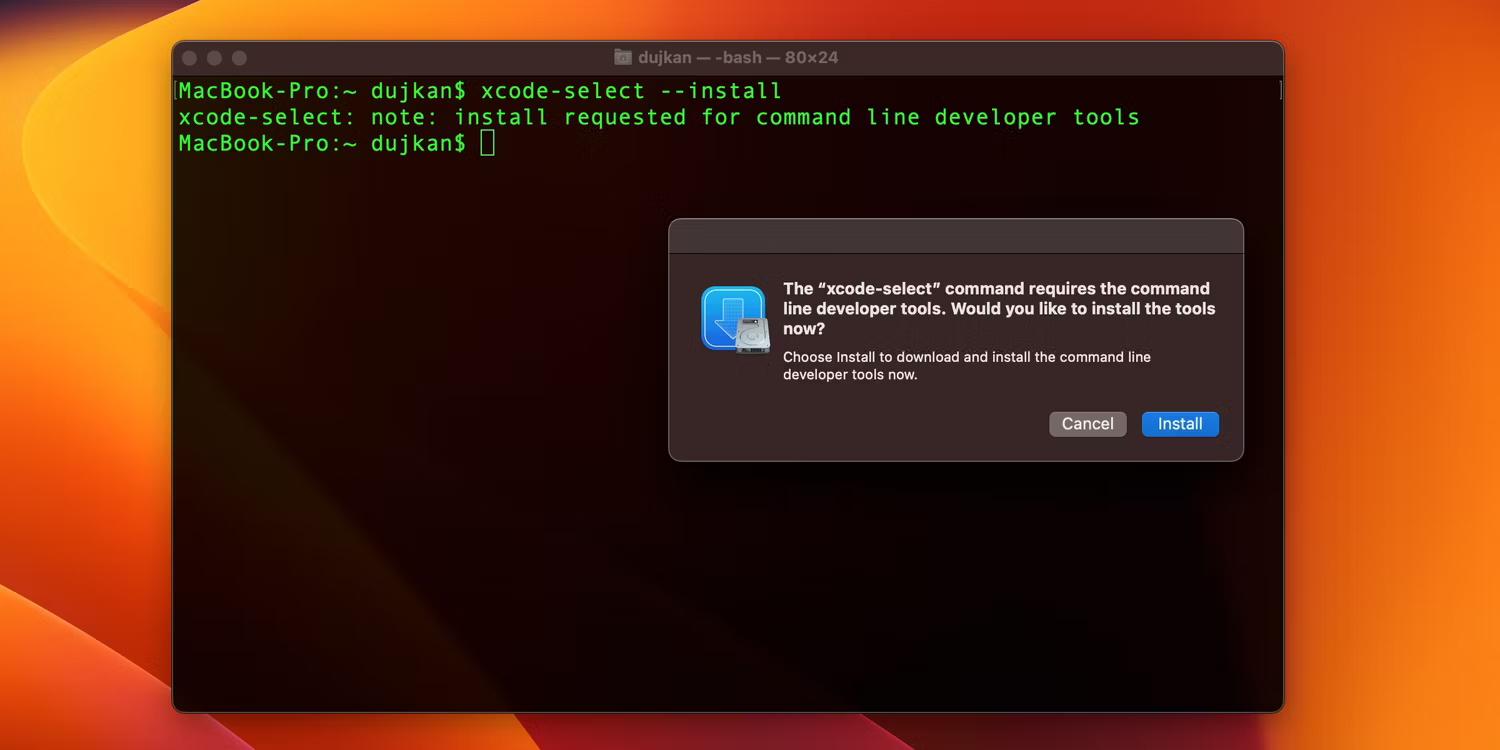
<p style="text-align: justify;">Cài đặt lại Homebrew có thể xóa mọi file bị hỏng hoặc lỗi thời và cài đặt bản sao mới của Homebrew. Để xóa Homebrew, bạn có thể làm theo các bước sau:</p>

<div style="text-align: justify;">&nbsp;</div>

<p style="text-align: justify;">a. Mở Terminal trên máy Mac và gỡ cài đặt Homebrew bằng cách nhập sau và nhấn phím&nbsp;<strong>Return</strong>:</p>

<pre id="pre0">
<code>brew uninstall --force homebrew</code></pre>

<p style="text-align: justify;">b. Nhập lệnh sau và nhấn&nbsp;<strong>Return</strong>&nbsp;để cài đặt lại Homebrew:</p>

<pre id="pre1">
<code>/bin/bash -c &quot;$(curl -fsSL https://raw.githubusercontent.com/Homebrew/install/HEAD/install.sh)&quot;</code></pre>

<p style="text-align: justify;">Lệnh này sẽ tải xuống và cài đặt phiên bản mới nhất của Homebrew. Sau khi khởi động lại ứng dụng Terminal, bạn sẽ có thể sử dụng lệnh brew mà không gặp bất kỳ sự cố nào.</p>

<h2 style="text-align: justify;">2. Thêm Brew vào biến môi trường PATH</h2>

<p style="text-align: justify;">Rất có thể Homebrew không thể được thêm vào biến PATH trong quá trình cài đặt, nghĩa là shell của bạn không thể định vị file thực thi Homebrew.</p>

<p style="text-align: justify;">Bạn có thể khắc phục sự cố này bằng cách thêm Homebrew thủ công vào PATH của mình thông qua Terminal. Lệnh thay đổi đôi chút tùy thuộc vào việc máy Mac có bộ xử lý Intel hay chip silicon của Apple. Chỉ cần sao chép và dán lệnh phù hợp cho máy Mac của bạn vào ứng dụng Terminal.</p>

<p style="text-align: justify;">Nếu bạn có máy Mac có chip silicon của Apple, hãy nhập lệnh này:</p>

<pre id="pre2">
<code>export PATH=&quot;/opt/homebrew/bin:$PATH&quot;</code></pre>

<p style="text-align: justify;">Nếu máy Mac có bộ xử lý Intel, hãy nhập lệnh này thay thế:</p>

<pre id="pre3">
<code>export PATH=&quot;/usr/local/bin:$PATH&quot;</code></pre>

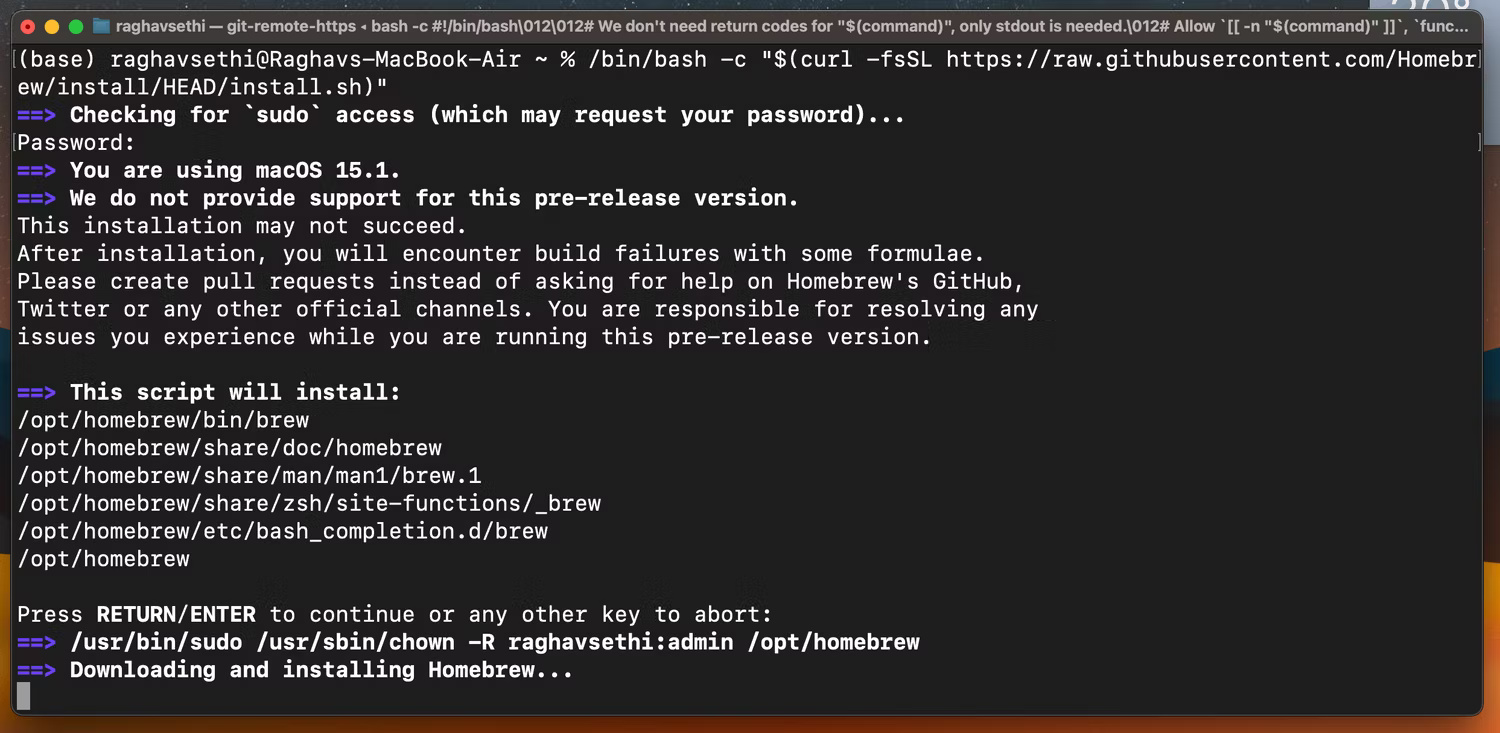
<p style="text-align: justify;">Bạn có thể kiểm tra xem Homebrew đã được thêm thành công vào biến PATH hay chưa bằng lệnh sau:</p>

<pre id="pre4">
<code>echo $PATH</code></pre>

<figure>
<div style="text-align: justify;"><img alt="Cửa sổ Terminal hiển thị tất cả các file thực thi khả dụng thông qua lệnh echo $PATH" data-adbro-processed="true" data-i="1" data-src="https://st.quantrimang.com/photos/image/2024/08/12/sua-loi-mac-homebrew-zsh-command-not-found-brew-2.jpg" data-was-processed="true" height="733" src="https://st.quantrimang.com/photos/image/2024/08/12/sua-loi-mac-homebrew-zsh-command-not-found-brew-2.jpg" width="1500" /></div>

<figcaption>
<div style="text-align: justify;">Cửa sổ Terminal hiển thị tất cả các file thực thi khả dụng thông qua lệnh echo $PATH</div>
</figcaption>
</figure>

<div style="text-align: justify;">&nbsp;</div>

<p style="text-align: justify;">Điều này sẽ hiển thị tất cả các file nhị phân thực thi mà Terminal có thể tìm thấy. Nếu Homebrew có trong danh sách, điều đó có nghĩa là Terminal có thể định vị thành công file thực thi Homebrew.</p>

<h2 style="text-align: justify;">3. Cài đặt Xcode Command Line Tools</h2>

<figure>
<div style="text-align: justify;"><img alt="Terminal nhắc nhở tải Xcode Command Line Tools" data-i="2" data-src="https://st.quantrimang.com/photos/image/2024/08/12/sua-loi-mac-homebrew-zsh-command-not-found-brew-3.jpg" data-was-processed="true" height="750" src="https://st.quantrimang.com/photos/image/2024/08/12/sua-loi-mac-homebrew-zsh-command-not-found-brew-3.jpg" width="1500" /></div>

<figcaption>
<div style="text-align: justify;">Terminal nhắc nhở tải Xcode Command Line Tools</div>
</figcaption>
</figure>

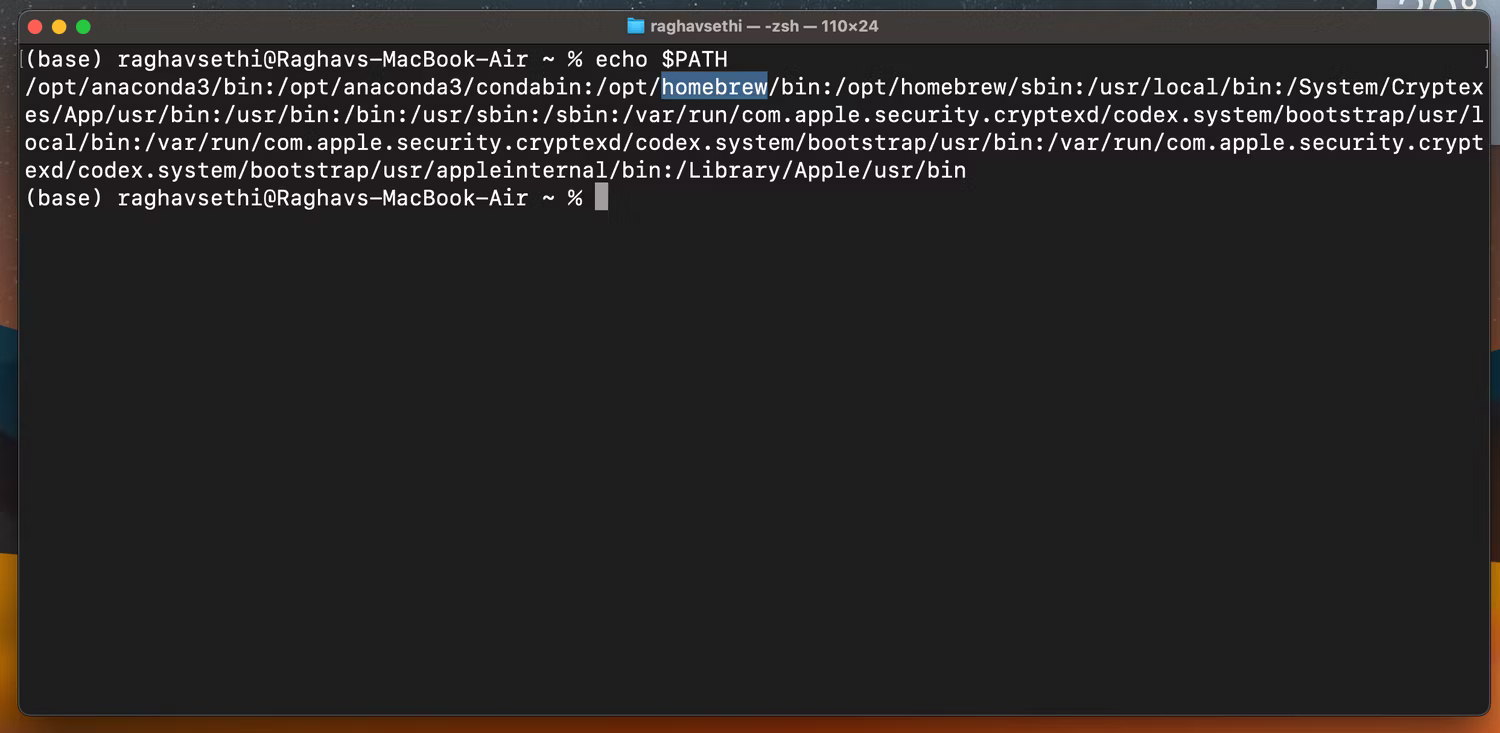
<p style="text-align: justify;">Xcode Command Line Tools là một gói do Apple phát triển và bảo trì, chứa tất cả các trình gỡ lỗi, trình biên dịch và công cụ đi kèm với toàn bộ Xcode IDE. Một số người dùng đã báo cáo rằng Homebrew không thể hoạt động nếu không cài đặt Xcode Command Line Tools. Bạn có thể cài đặt bằng cách nhập lệnh sau vào Terminal và nhấn&nbsp;<strong>Return</strong>:</p>

<pre id="pre5">
<code>xcode-select --install</code></pre>

<p style="text-align: justify;">Sau đó, bạn có thể xác minh cài đặt bằng lệnh sau:</p>

<pre id="pre6">
<code>xcode-select -p</code></pre>

<p style="text-align: justify;">Nếu cài đặt thành công, bạn sẽ nhận được đầu ra sau khi nhập lệnh:</p>

<pre id="pre7">
<code>/Library/Developer/CommandLineTools</code></pre>

<p style="text-align: justify;">Homebrew cung cấp một số ứng dụng hữu ích và là tiện ích không thể thiếu đối với mọi người dùng Mac thành thạo. Nếu bạn gặp lỗi &quot;zsh: command not found: brew&quot;, một trong các bước khắc phục sự cố mà bài viết đã thảo luận ở trên sẽ giải quyết được sự cố và cho phép bạn tận hưởng trình quản lý gói tốt nhất hiện có cho macOS.</p>
		</div>
				<div id="author">
						<p>
				<strong>Nguồn tin:</strong>
				Quantrimang.com:
			</p>
		</div>
	</div>
	<div id="footer" class="clearfix">
		<div id="url">
			<strong>URL của bản tin này: </strong><a href="https://www.nguoicodonvn2008.info/vi/news/savefile/kien-thuc-may-tinh/cach-sua-loi-mac-homebrew-zsh-command-not-found-brew-8850.html" title="Cách sửa lỗi Mac Homebrew &quot;zsh&#x3A; command not found&#x3A; brew&quot;">https://www.nguoicodonvn2008.info/vi/news/savefile/kien-thuc-may-tinh/cach-sua-loi-mac-homebrew-zsh-command-not-found-brew-8850.html</a>

		</div>
		<div class="clear"></div>
		<div class="copyright">
			&copy; .&#x3A; Nguoicodonvn2008.info - Cõi lòng người cô đơn &#x3A;.
		</div>
		<div id="contact">
			<a href="mailto:admin@nguoicodonvn2008.info">admin@nguoicodonvn2008.info</a>
		</div>
	</div>
</div>
        <div id="timeoutsess" class="chromeframe">
            Bạn đã không sử dụng Site, <a onclick="timeoutsesscancel();" href="https://nguoicodonvn2008.info/#">Bấm vào đây để duy trì trạng thái đăng nhập</a>. Thời gian chờ: <span id="secField"> 60 </span> giây
        </div>
        <div id="openidResult" class="nv-alert" style="display:none"></div>
        <div id="openidBt" data-result="" data-redirect=""></div>
		</script>
		<div class="car-top">
  <span><img src="https://nguoicodonvn2008.info/themes/default/images/car.png" alt=""></span>
</div>
<div id="run_cronjobs" style="visibility:hidden;display:none;"><img alt="cron" src="/index.php?second=cronjobs&amp;p=n2lyBxp1" width="1" height="1" /></div>
<script src="https://nguoicodonvn2008.info/assets/js/jquery/jquery.min.js"></script>
<script>var nv_base_siteurl="/",nv_lang_data="vi",nv_lang_interface="vi",nv_name_variable="nv",nv_fc_variable="op",nv_lang_variable="language",nv_module_name="news",nv_func_name="savefile",nv_is_user=0, nv_my_ofs=-4,nv_my_abbr="EDT",nv_cookie_prefix="nv4c_e856T",nv_check_pass_mstime=1738000,nv_area_admin=0,nv_safemode=0,theme_responsive=0,nv_recaptcha_ver=2,nv_recaptcha_sitekey="",nv_recaptcha_type="image",XSSsanitize=1;</script>
<script src="https://nguoicodonvn2008.info/assets/js/language/vi.js"></script>
<script src="https://nguoicodonvn2008.info/assets/js/DOMPurify/purify3.js"></script>
<script src="https://nguoicodonvn2008.info/assets/js/global.js"></script>
<script src="https://nguoicodonvn2008.info/assets/js/site.js"></script>
<script src="https://nguoicodonvn2008.info/themes/default/js/news.js"></script>
<script src="https://nguoicodonvn2008.info/themes/default/js/main.js"></script>
<script src="https://nguoicodonvn2008.info/themes/default/js/custom.js"></script>
<script type="application/ld+json">
        {
            "@context": "https://schema.org",
            "@type": "Organization",
            "url": "https://nguoicodonvn2008.info",
            "logo": "https://nguoicodonvn2008.info/uploads/angel.gif"
        }
        </script>
<script src="https://nguoicodonvn2008.info/themes/default/js/bootstrap.min.js"></script>
<script type="text/javascript">
var $scrolltop = $('.car-top');
$scrolltop.on('click', function () {
    $('html,body').animate({
        scrollTop: 0
    }, 800);
    $(this).addClass("car-run");
    setTimeout(function(){ $scrolltop.removeClass('car-run');}, 1000);
    return false;
});
$(window).on('scroll', function ()
{ 
    if($(window).scrollTop() >= 200)
    {
        $scrolltop.addClass("show");
        $scrolltop.addClass("car-down");
    }
    else
    {
       $scrolltop.removeClass("show");
       setTimeout(function(){ $scrolltop.removeClass('car-down');}, 300);
    }
});
</script>
</body>
</html>