<!DOCTYPE html>
    <html lang="vi" xmlns="http://www.w3.org/1999/xhtml" prefix="og: http://ogp.me/ns#">
    <head>
<title>Cách sửa lỗi &quot;Insufficient System Resources Exist&quot; trên Windows 10&#x002F;11</title>
<meta name="description" content="Cách sửa lỗi &quot;Insufficient System Resources Exist&quot; trên Windows 10&#x002F;11 - Savefile - Tin Tức -...">
<meta name="author" content=".: Nguoicodonvn2008.info - Cõi lòng người cô đơn :.">
<meta name="copyright" content=".: Nguoicodonvn2008.info - Cõi lòng người cô đơn :. [admin@nguoicodonvn2008.info]">
<meta name="robots" content="index, archive, follow, noodp">
<meta name="googlebot" content="index,archive,follow,noodp">
<meta name="msnbot" content="all,index,follow">
<meta name="generator" content="NukeViet v4.5">
<meta http-equiv="Content-Type" content="text/html; charset=utf-8">
<meta property="og:title" content="Cách sửa lỗi &quot;Insufficient System Resources Exist&quot; trên Windows 10&#x002F;11">
<meta property="og:type" content="website">
<meta property="og:description" content="Savefile - Tin Tức - https&#x3A;&#x002F;&#x002F;www.nguoicodonvn2008.info&#x002F;vi&#x002F;news&#x002F;savefile&#x002F;kien-thuc-may-tinh&#x002F;cach-sua-loi-insufficient-system-resources-exist-tren-windows-10-11-7179.html">
<meta property="og:site_name" content=".&#x3A; Nguoicodonvn2008.info - Cõi lòng người cô đơn &#x3A;.">
<meta property="og:url" content="https://www.nguoicodonvn2008.info/vi/news/savefile/kien-thuc-may-tinh/cach-sua-loi-insufficient-system-resources-exist-tren-windows-10-11-7179.html">
<link rel="shortcut icon" href="https://nguoicodonvn2008.info/favicon.ico">
<link rel="canonical" href="https://www.nguoicodonvn2008.info/vi/news/savefile/kien-thuc-may-tinh/cach-sua-loi-insufficient-system-resources-exist-tren-windows-10-11-7179.html">
<link rel="alternate" href="https://nguoicodonvn2008.info/vi/news/rss/" title="Tin Tức" type="application/rss+xml">
<link rel="alternate" href="https://nguoicodonvn2008.info/vi/news/rss/karaoke-dual/" title="Tin Tức - Karaoke Dual" type="application/rss+xml">
<link rel="alternate" href="https://nguoicodonvn2008.info/vi/news/rss/nhac-tre/" title="Tin Tức - Nhạc trẻ" type="application/rss+xml">
<link rel="alternate" href="https://nguoicodonvn2008.info/vi/news/rss/tru-tinh/" title="Tin Tức - Trữ tình" type="application/rss+xml">
<link rel="alternate" href="https://nguoicodonvn2008.info/vi/news/rss/nuoc-ngoai/" title="Tin Tức - Nước ngoài" type="application/rss+xml">
<link rel="alternate" href="https://nguoicodonvn2008.info/vi/news/rss/remix/" title="Tin Tức - Remix" type="application/rss+xml">
<link rel="alternate" href="https://nguoicodonvn2008.info/vi/news/rss/tam-su-tinh-yeu/" title="Tin Tức - Tâm sự tình yêu" type="application/rss+xml">
<link rel="alternate" href="https://nguoicodonvn2008.info/vi/news/rss/tho-suu-tam/" title="Tin Tức - Thơ sưu tầm" type="application/rss+xml">
<link rel="alternate" href="https://nguoicodonvn2008.info/vi/news/rss/cuoc-song/" title="Tin Tức - Cuộc sống" type="application/rss+xml">
<link rel="alternate" href="https://nguoicodonvn2008.info/vi/news/rss/phan-mem/" title="Tin Tức - Phần mềm" type="application/rss+xml">
<link rel="alternate" href="https://nguoicodonvn2008.info/vi/news/rss/kien-thuc-may-tinh/" title="Tin Tức - Kiến thức máy tính" type="application/rss+xml">
<link rel="alternate" href="https://nguoicodonvn2008.info/vi/news/rss/hoc-tap/" title="Tin Tức - Học tập" type="application/rss+xml">
<link rel="alternate" href="https://nguoicodonvn2008.info/vi/news/rss/tai-lieu/" title="Tin Tức - Tài liệu" type="application/rss+xml">
<link rel="alternate" href="https://nguoicodonvn2008.info/vi/news/rss/de-thi/" title="Tin Tức - Đề thi" type="application/rss+xml">
<link rel="preload" as="style" href="https://nguoicodonvn2008.info/assets/css/font-awesome.min.css" type="text/css">
<link rel="preload" as="style" href="https://nguoicodonvn2008.info/themes/default/css/bootstrap.non-responsive.css" type="text/css">
<link rel="preload" as="style" href="https://nguoicodonvn2008.info/themes/default/css/style.css" type="text/css">
<link rel="preload" as="style" href="https://nguoicodonvn2008.info/themes/default/css/style.non-responsive.css" type="text/css">
<link rel="preload" as="style" href="https://nguoicodonvn2008.info/themes/default/css/news.css" type="text/css">
<link rel="preload" as="style" href="https://nguoicodonvn2008.info/themes/default/css/custom.css" type="text/css">
<link rel="preload" as="script" href="https://nguoicodonvn2008.info/assets/js/jquery/jquery.min.js" type="text/javascript">
<link rel="preload" as="script" href="https://nguoicodonvn2008.info/assets/js/language/vi.js" type="text/javascript">
<link rel="preload" as="script" href="https://nguoicodonvn2008.info/assets/js/DOMPurify/purify3.js" type="text/javascript">
<link rel="preload" as="script" href="https://nguoicodonvn2008.info/assets/js/global.js" type="text/javascript">
<link rel="preload" as="script" href="https://nguoicodonvn2008.info/assets/js/site.js" type="text/javascript">
<link rel="preload" as="script" href="https://nguoicodonvn2008.info/themes/default/js/news.js" type="text/javascript">
<link rel="preload" as="script" href="https://nguoicodonvn2008.info/themes/default/js/main.js" type="text/javascript">
<link rel="preload" as="script" href="https://nguoicodonvn2008.info/themes/default/js/custom.js" type="text/javascript">
<link rel="preload" as="script" href="https://nguoicodonvn2008.info/themes/default/js/bootstrap.min.js" type="text/javascript">
<link rel="stylesheet" href="https://nguoicodonvn2008.info/assets/css/font-awesome.min.css">
<link rel="stylesheet" href="https://nguoicodonvn2008.info/themes/default/css/bootstrap.non-responsive.css">
<link rel="stylesheet" href="https://nguoicodonvn2008.info/themes/default/css/style.css">
<link rel="stylesheet" href="https://nguoicodonvn2008.info/themes/default/css/style.non-responsive.css">
<link rel="StyleSheet" href="https://nguoicodonvn2008.info/themes/default/css/news.css">
<link rel="stylesheet" href="https://nguoicodonvn2008.info/themes/default/css/custom.css">
<style type="text/css">
	body{background: #fff;}
</style>
    </head>
    <body>
<div id="print">
	<div id="hd_print">
		<h2 class="pull-left">.&#x3A; Nguoicodonvn2008.info - Cõi lòng người cô đơn &#x3A;.</h2>
		<p class="pull-right"><a title=".&#x3A; Nguoicodonvn2008.info - Cõi lòng người cô đơn &#x3A;." href="https://nguoicodonvn2008.info/">https://nguoicodonvn2008.info</a></p>
	</div>
	<div class="clear"></div>
	<hr />
	<div id="content">
		<h1>Cách sửa lỗi &quot;Insufficient System Resources Exist&quot; trên Windows 10&#x002F;11</h1>
		<ul class="list-inline">
			<li>Thứ sáu - 16/06/2023 02:15</li>
			<li class="hidden-print txtrequired"><em class="fa fa-print">&nbsp;</em><a title="In ra" href="javascript:;" onclick="window.print()">In ra</a></li>
			<li class="hidden-print txtrequired"><em class="fa fa-power-off">&nbsp;</em><a title="Đóng cửa sổ này" href="javascript:;" onclick="window.close()">Đóng cửa sổ này</a></li>
		</ul>
		<div class="clear"></div>
		<div id="hometext">
		</div>
				<div class="imghome">
			<img alt="Cách sửa lỗi &quot;Insufficient System Resources Exist&quot; trên Windows 10&#x002F;11" src="https://st.quantrimang.com/photos/image/2023/06/16/loi-insufficient-system-resources-exist-11.jpg" width="460" class="img-thumbnail" />
		</div>
		<div class="clear"></div>
		<div id="bodytext" class="clearfix">
			<p style="text-align: justify;">Lỗi &quot;Insufficient system resources&quot; được báo cáo là phát sinh trong các trường hợp hơi khác. Lỗi đó có thể xảy ra khi người dùng cố chạy chương trình, cài đặt phần mềm, mở thư mục hoặc truy cập file. Đây là nội dung của thông báo lỗi đầy đủ,&nbsp;<em>&quot;Insufficient system resources exist to complete the requested service&quot;</em>.</p>

<p style="text-align: justify;">Người dùng không thể chạy các chương trình hoặc truy cập các thư mục hoặc file xảy ra lỗi “Insufficient system resources”. Thông báo lỗi đó làm nổi bật việc thiếu tài nguyên hệ thống, chẳng hạn như RAM. Đây là cách bạn có thể khắc phục lỗi “Insufficient system resources” trên PC Windows.</p>

<h2 style="text-align: justify;">1. Thử một số bản sửa lỗi nhanh dựa trên Windows</h2>

<p style="text-align: justify;">Có một số cách phổ biến để sửa lỗi Windows này, vì vậy hãy thử những cách này trước khi tiếp tục.</p>

<h3 style="text-align: justify;">Chạy quét ổ đĩa</h3>

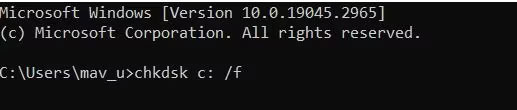
<p style="text-align: justify;">Mặc dù không phải là nguyên nhân tiềm ẩn nhất, nhưng không loại trừ khả năng lỗi này xảy ra do sự cố hệ thống file. Nếu các giải pháp khác không hoạt động, thì có thể đáng để&nbsp;chạy quét Check Disk (CHKDSK) trong Windows. Quá trình quét CHKDSK sẽ kiểm tra và sửa chữa các lỗi hệ thống file được phát hiện trên ổ.</p>

<figure>
<div style="text-align: justify;"><img alt="Lệnh Chkdsk" data-i="0" data-src="https://st.quantrimang.com/photos/image/2023/06/16/loi-insufficient-system-resources-exist-1.jpg" data-was-processed="true" height="110" src="https://st.quantrimang.com/photos/image/2023/06/16/loi-insufficient-system-resources-exist-1.jpg" width="517" /></div>

<figcaption>
<div style="text-align: justify;">Lệnh Chkdsk</div>
</figcaption>
</figure>

<h3 style="text-align: justify;">Cập nhật driver thiết bị</h3>

<p style="text-align: justify;">Driver thiết bị lỗi thời trên PC của bạn cũng có thể là một yếu tố khác gây ra lỗi “Insufficient system resources”. Bạn có thể giải quyết vấn đề bằng cách cập nhật driver chung trên PC của mình. Tuy nhiên, cập nhật driver thiết bị trên PC của bạn theo cách thủ công bằng cách tải xuống từ các trang web sẽ tốn nhiều thời gian.</p>

<div style="text-align: justify;"><iframe allowtransparency="true" data-google-container-id="a!2" data-google-query-id="CI2p7rSSx_8CFQamvAod5RoBvg" data-load-complete="true" frameborder="0" height="174" hspace="0" id="aswift_1" marginheight="0" marginwidth="0" name="aswift_1" sandbox="allow-forms allow-popups allow-popups-to-escape-sandbox allow-same-origin allow-scripts allow-top-navigation-by-user-activation" scrolling="no" vspace="0" width="694"></iframe></div>

<p style="text-align: justify;">Bài viết khuyên bạn nên sử dụng&nbsp;<a data-type="internal" href="https://quantrimang.com/cong-nghe/nhung-phan-mem-cap-nhat-driver-cho-may-tinh-tot-nhat-140169" title="Những phần mềm cập nhật driver cho máy tính tốt nhất">công cụ cập nhật driver</a>&nbsp;của bên thứ ba. Công cụ này sẽ quét PC của bạn và hiển thị thiết bị nào có driver lỗi thời. Sau đó, bạn có thể chọn một tùy chọn để cập nhật driver cho tất cả các thiết bị được liệt kê.</p>

<h2 style="text-align: justify;">2. Đóng các ứng dụng nền không cần thiết</h2>

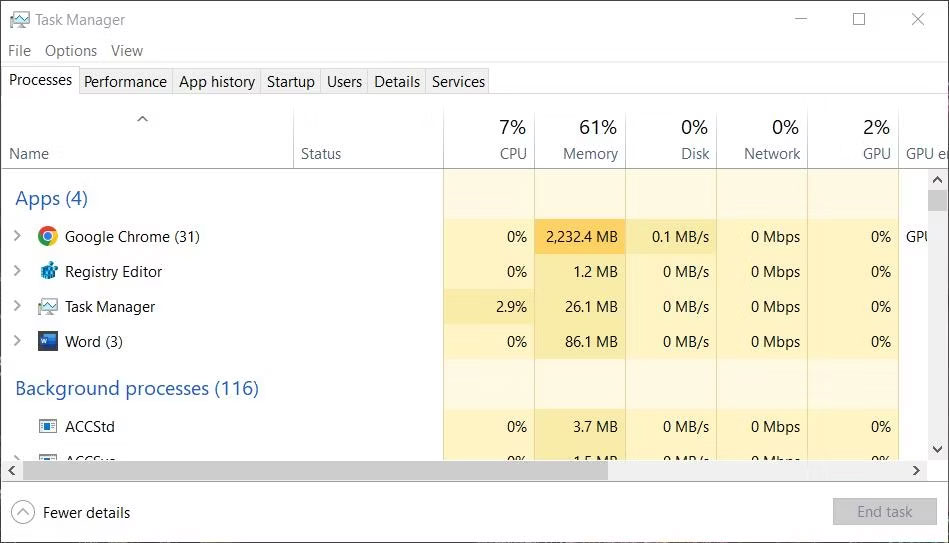
<p style="text-align: justify;">Thông báo lỗi này đưa ra gợi ý về tài nguyên hệ thống hạn chế. Vì vậy, hãy thử đóng các ứng dụng không cần thiết đang chạy trong nền để giải phóng một số RAM trước khi thử chạy một chương trình hay mở một thư mục hoặc file.</p>

<p style="text-align: justify;">Tốt nhất là đóng các ứng dụng không cần thiết bằng phương pháp Task Manager, phương pháp này cung cấp tổng quan về tất cả những chương trình nền đang chạy.</p>

<figure>
<div style="text-align: justify;"><img alt="Cửa sổ Task Manager" data-adbro-processed="true" data-i="1" data-src="https://st.quantrimang.com/photos/image/2023/06/16/loi-insufficient-system-resources-exist-2.jpg" data-was-processed="true" height="543" src="https://st.quantrimang.com/photos/image/2023/06/16/loi-insufficient-system-resources-exist-2.jpg" width="949" /></div>

<ul>
	<li data-block-reason="2" data-trans-vn="Không quan tâm" style="text-align: justify;">&nbsp;</li>
	<li data-block-reason="3" data-trans-vn="Không phù hợp" style="text-align: justify;">&nbsp;</li>
	<li data-block-reason="1" data-trans-vn="Thấy quá nhiều" style="text-align: justify;">&nbsp;</li>
</ul>

<figcaption>
<div style="text-align: justify;">Cửa sổ Task Manager</div>
</figcaption>
</figure>

<p style="text-align: justify;">Lưu ý rằng việc đóng các ứng dụng nền không cần thiết sẽ không vô hiệu hóa chúng vĩnh viễn. Để tắt các chương trình nền tự động chạy, bạn cần xóa chúng khỏi quá trình khởi động Windows. Hãy xem bài viết của Quantrimang.com về&nbsp;<a data-type="internal" href="https://quantrimang.com/cong-nghe/tat-cac-chuong-trinh-khoi-dong-cung-he-thong-tren-windows-10-127030" title="Tắt các chương trình khởi động cùng hệ thống trên Windows 10">việc vô hiệu hóa các mục khởi động</a>&nbsp;để biết thêm chi tiết.</p>

<h2 style="text-align: justify;">3. Tinh chỉnh registry key Memory Management</h2>

<p style="text-align: justify;">Nhiều người dùng đã có thể khắc phục lỗi “Insufficient system resources” bằng cách điều chỉnh một vài giá trị DWORD trong registry key Memory Management. Cách này nghe có vẻ khá phức tạp, nhưng sẽ không mất nhiều thời gian để thực hiện. Bạn có thể áp dụng cách khắc phục tiềm năng này cho lỗi “Insufficient system resources” như sau:</p>

<div style="text-align: justify;"><iframe allowtransparency="true" data-google-container-id="a!3" data-google-query-id="CJH97bSSx_8CFdIOXAodvJ8CYA" data-load-complete="true" frameborder="0" height="174" hspace="0" id="aswift_2" marginheight="0" marginwidth="0" name="aswift_2" sandbox="allow-forms allow-popups allow-popups-to-escape-sandbox allow-same-origin allow-scripts allow-top-navigation-by-user-activation" scrolling="no" vspace="0" width="694"></iframe></div>

<p style="text-align: justify;">1.&nbsp;<a data-type="internal" href="https://quantrimang.com/cong-nghe/cach-mo-registry-editor-tren-windows-143522" title="Cách mở Registry Editor trên Windows">Khởi chạy Registry Editor</a>&nbsp;bằng cách nhấn đồng thời&nbsp;<strong>Win + R</strong>, nhập lệnh&nbsp;<strong>regedit</strong>&nbsp;và nhấp vào nút&nbsp;<strong>OK</strong>&nbsp;của Run.</p>

<p style="text-align: justify;">2. Xóa đường dẫn hiện tại trong thanh địa chỉ của Registry Editor và nhập đường dẫn này:</p>

<pre id="pre0">
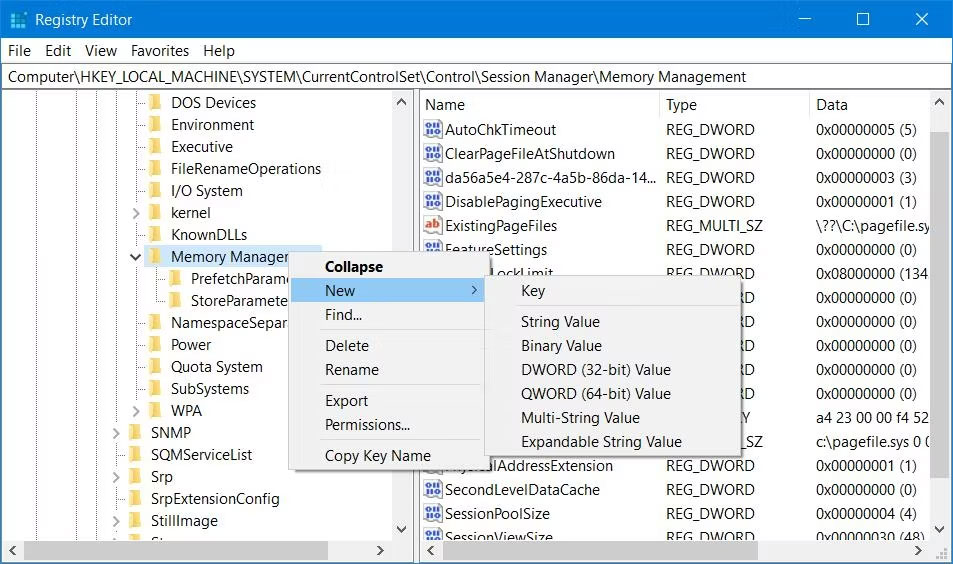
<code>HKEY_LOCAL_MACHINE\SYSTEM\CurrentControlSet\Control\Session Manager\Memory Management</code></pre>

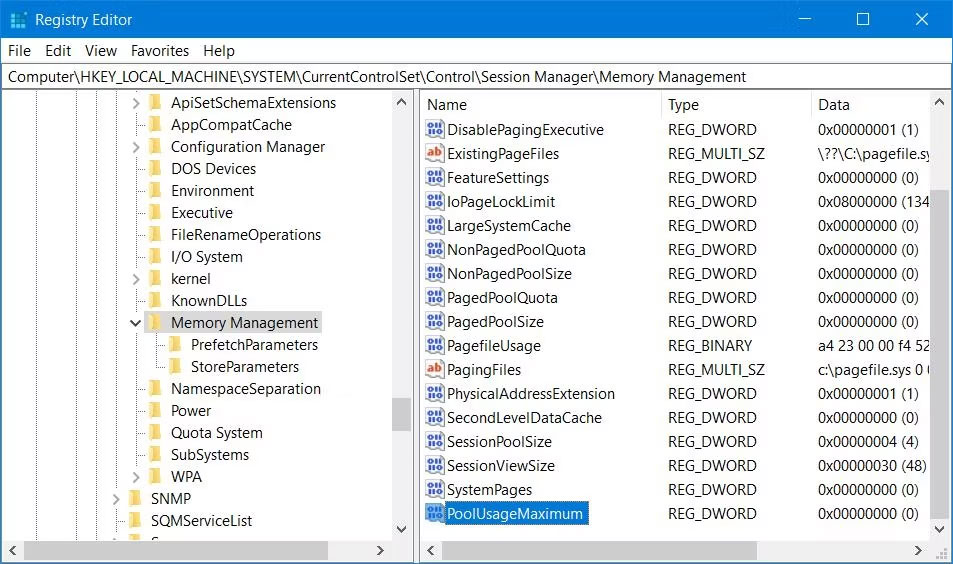
<p style="text-align: justify;">3. Nếu key đó không bao gồm DWORD PoolUsageMaximum, nhấp chuột phải vào&nbsp;<strong>Memory Management</strong>&nbsp;và chọn tùy chọn&nbsp;<strong>New</strong>&nbsp;&gt;&nbsp;<strong>DWORD</strong>.</p>

<figure>
<div style="text-align: justify;"><img alt="Tùy chọn New &gt; DWORD" data-i="2" data-src="https://st.quantrimang.com/photos/image/2023/06/16/loi-insufficient-system-resources-exist-3.jpg" data-was-processed="true" height="564" src="https://st.quantrimang.com/photos/image/2023/06/16/loi-insufficient-system-resources-exist-3.jpg" width="953" /></div>

<figcaption>
<div style="text-align: justify;">Tùy chọn New &gt; DWORD</div>
</figcaption>
</figure>

<p style="text-align: justify;">4. Nhập&nbsp;<strong>PoolUsageMaximum</strong>&nbsp;làm tiêu đề của DWORD.</p>

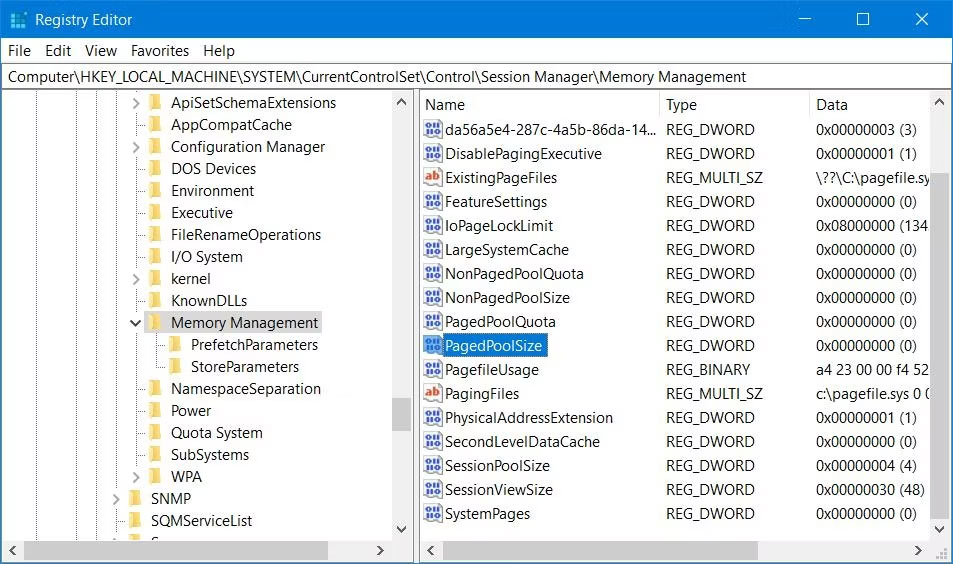
<p style="text-align: justify;">5. Tìm DWORD&nbsp;<strong>PagedPoolSize</strong>&nbsp;trong key Memory Management. Nếu không tìm thấy, bạn cần tạo nó bằng cách bấm chuột phải vào&nbsp;<strong>Memory Management</strong>, chọn&nbsp;<strong>New</strong>&nbsp;&gt;&nbsp;<strong>DWORD</strong>&nbsp;và nhập&nbsp;<strong>PagedPoolSize</strong>&nbsp;vào hộp văn bản.</p>

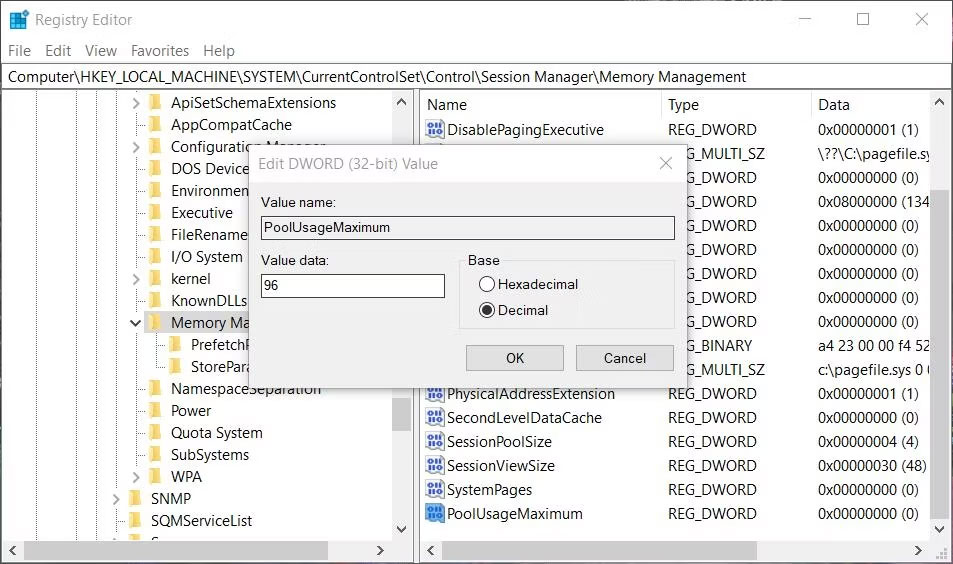
<p style="text-align: justify;">6. Bây giờ, nhấp đúp vào DWORD&nbsp;<strong>PoolUsageMaximum</strong>&nbsp;để hiển thị hộp&nbsp;<strong>Value data</strong>.</p>

<figure>
<div style="text-align: justify;"><img alt="DWORD PoolUsageMaximum " data-i="3" data-src="https://st.quantrimang.com/photos/image/2023/06/16/loi-insufficient-system-resources-exist-4.jpg" data-was-processed="true" height="564" src="https://st.quantrimang.com/photos/image/2023/06/16/loi-insufficient-system-resources-exist-4.jpg" width="953" /></div>

<figcaption>
<div style="text-align: justify;">DWORD PoolUsageMaximum</div>
</figcaption>
</figure>

<p style="text-align: justify;">7. Nhập&nbsp;<strong>60</strong>&nbsp;trong hộp&nbsp;<strong>Value data</strong>.</p>

<p style="text-align: justify;">8. Chọn&nbsp;<strong>Decimal</strong>&nbsp;để chuyển đổi giá trị&nbsp;<strong>60</strong>&nbsp;thành&nbsp;<strong>96.</strong></p>

<figure>
<div style="text-align: justify;"><img alt="Cửa sổ chỉnh sửa DWORD cho PageUsageMaximum" data-i="4" data-src="https://st.quantrimang.com/photos/image/2023/06/16/loi-insufficient-system-resources-exist-5.jpg" data-was-processed="true" height="564" src="https://st.quantrimang.com/photos/image/2023/06/16/loi-insufficient-system-resources-exist-5.jpg" width="953" /></div>

<figcaption>
<div style="text-align: justify;">Cửa sổ chỉnh sửa DWORD cho PageUsageMaximum</div>
</figcaption>
</figure>

<p style="text-align: justify;">9. Bấm&nbsp;<strong>OK</strong>&nbsp;để thiết lập giá trị PoolUsageMaximum.</p>

<p style="text-align: justify;">10. Nhấp đúp vào DWORD&nbsp;<strong>PagedPoolSize</strong>.</p>

<figure>
<div style="text-align: justify;"><img alt="DWORD PagedPoolSize " data-i="5" data-src="https://st.quantrimang.com/photos/image/2023/06/16/loi-insufficient-system-resources-exist-6.jpg" data-was-processed="true" height="564" src="https://st.quantrimang.com/photos/image/2023/06/16/loi-insufficient-system-resources-exist-6.jpg" width="953" /></div>

<figcaption>
<div style="text-align: justify;">DWORD PagedPoolSize</div>
</figcaption>
</figure>

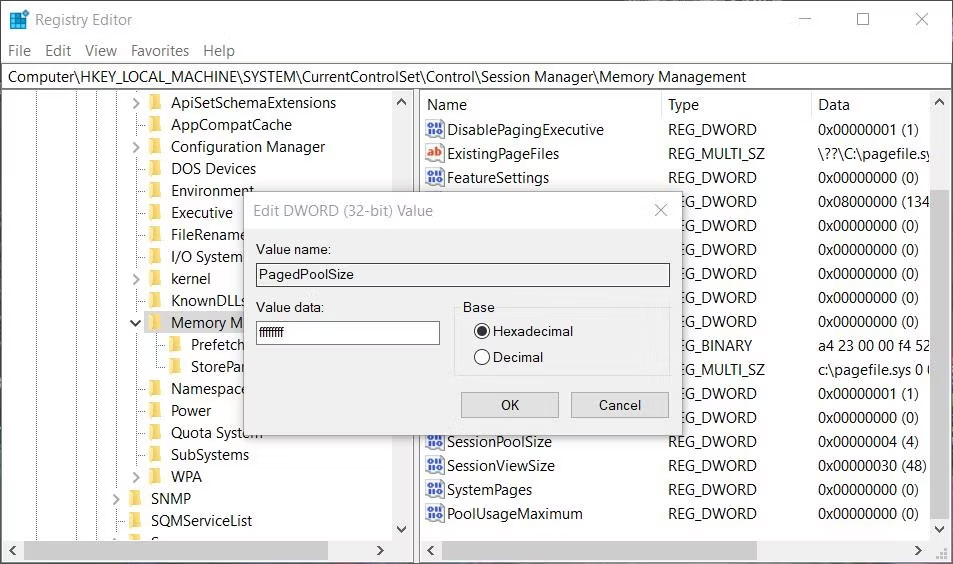
<p style="text-align: justify;">11. Xóa giá trị 0 trong hộp văn bản và nhập&nbsp;<strong>ffffffff</strong>&nbsp;vào đó.</p>

<figure>
<div style="text-align: justify;"><img alt="Cửa sổ chỉnh sửa DWORD cho PagedPoolSize" data-i="6" data-src="https://st.quantrimang.com/photos/image/2023/06/16/loi-insufficient-system-resources-exist-7.jpg" data-was-processed="true" height="564" src="https://st.quantrimang.com/photos/image/2023/06/16/loi-insufficient-system-resources-exist-7.jpg" width="953" /></div>

<figcaption>
<div style="text-align: justify;">Cửa sổ chỉnh sửa DWORD cho PagedPoolSize</div>
</figcaption>
</figure>

<p style="text-align: justify;">12. Chọn&nbsp;<strong>OK</strong>&nbsp;để đặt giá trị&nbsp;<strong>PagedPoolSize.</strong></p>

<p style="text-align: justify;">13. Sau đó thoát Registry Editor và chọn tùy chọn menu Start&nbsp;<strong>Restart.</strong></p>

<h2 style="text-align: justify;">4. Vô hiệu hóa hoặc gỡ bỏ phần mềm diệt virus của bên thứ ba</h2>

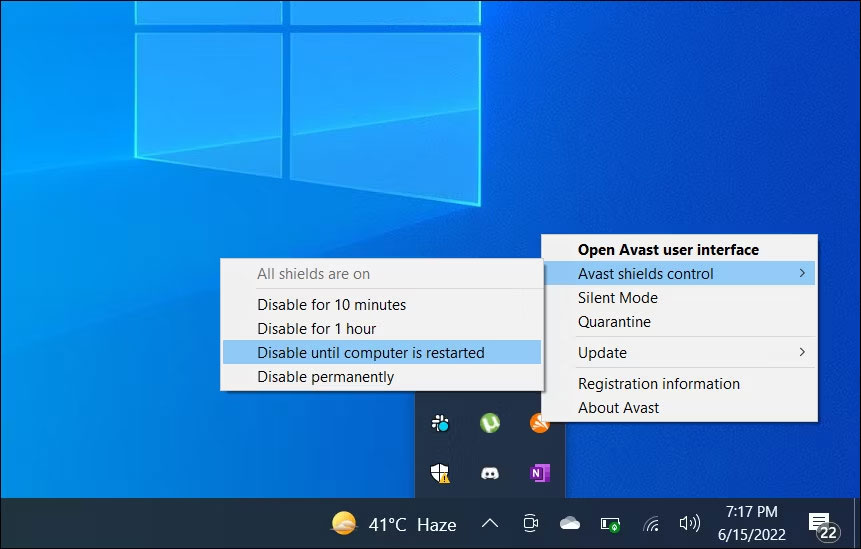
<p style="text-align: justify;">Vô hiệu hóa tính năng quét trong thời gian thực của ứng dụng diệt virus của bên thứ ba là một giải pháp khác mà người dùng đã xác nhận là có hiệu quả để khắc phục lỗi &quot;Insufficient system resources&quot;. McAfee Antivirus là phần mềm bảo mật cụ thể mà một số người dùng đã đề cập đến nguyên nhân gây ra sự cố này. Tạm thời vô hiệu hóa lá chắn diệt virus sẽ đảm bảo rằng chúng không thể gắn cờ sai cho các file hoặc thư mục bị ảnh hưởng và giảm mức tiêu thụ tài nguyên hệ thống của phần mềm bảo mật.</p>

<div style="text-align: justify;">&nbsp;</div>

<p style="text-align: justify;">Nếu có ứng dụng diệt virus của bên thứ ba trên PC của bạn, hãy nhấp chuột phải vào biểu tượng trên khay hệ thống của ứng dụng đó và chọn một tùy chọn để tắt tính năng bảo vệ trong thời gian thực. Sau đó thử chạy phần mềm hoặc mở thư mục hoặc file người dùng mà lỗi này ảnh hưởng. Nếu cách này hiệu quả, hãy cân nhắc việc gỡ cài đặt phần mềm diệt virus của bên thứ ba để đảm bảo phần mềm này không thể gây ra sự cố lần nữa.</p>

<figure>
<div style="text-align: justify;"><img alt="Tạm thời vô hiệu hóa phần mềm diệt virus" data-i="7" data-src="https://st.quantrimang.com/photos/image/2023/06/16/loi-insufficient-system-resources-exist-8.jpg" data-was-processed="true" height="549" src="https://st.quantrimang.com/photos/image/2023/06/16/loi-insufficient-system-resources-exist-8.jpg" width="861" /></div>

<figcaption>
<div style="text-align: justify;">Tạm thời vô hiệu hóa phần mềm diệt virus</div>
</figcaption>
</figure>

<p style="text-align: justify;">Một số ứng dụng bảo mật của bên thứ ba có các thành phần tường lửa. Bạn cũng nên tạm thời tắt tường lửa trong ứng dụng diệt virus của mình nếu có. Xem qua tab cài đặt trong phần mềm diệt virus của bạn để xem liệu bạn có thể tìm thấy bất kỳ tùy chọn tường lửa nào ở đó không.</p>

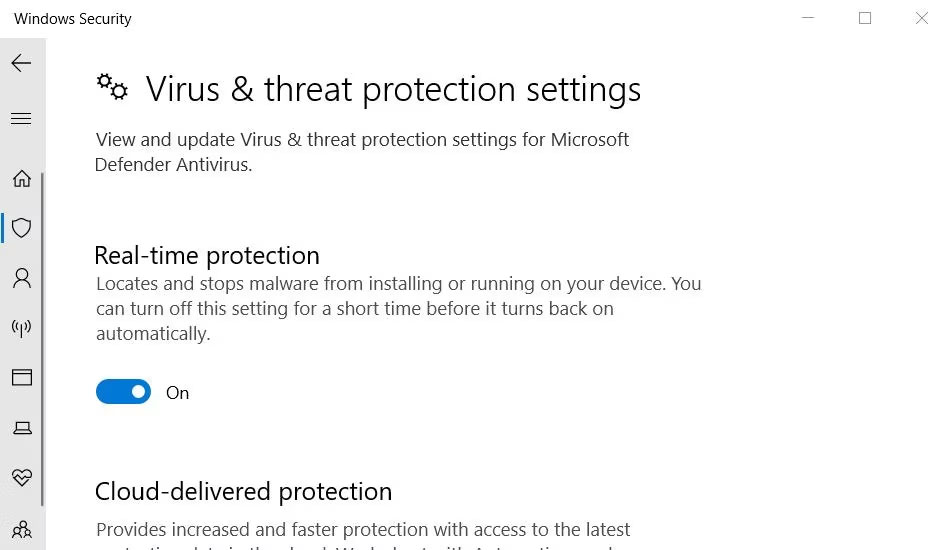
<p style="text-align: justify;">Windows Security là một ứng dụng được cài đặt sẵn cũng có chức năng quét diệt virus theo thời gian thực. Bạn có thể thử tắt tính năng đó nếu chưa cài đặt phần mềm diệt virus của bên thứ ba. Hướng dẫn về&nbsp;cách tắt Windows Security&nbsp;này bao gồm các hướng dẫn để tắt tính năng bảo vệ trong thời gian thực của ứng dụng.</p>

<figure>
<div style="text-align: justify;"><img alt="Cài đặt bảo vệ theo thời gian thực trong Windows Security" data-i="8" data-src="https://st.quantrimang.com/photos/image/2023/06/16/loi-insufficient-system-resources-exist-9.jpg" data-was-processed="true" height="550" src="https://st.quantrimang.com/photos/image/2023/06/16/loi-insufficient-system-resources-exist-9.jpg" width="946" /></div>

<figcaption>
<div style="text-align: justify;">Cài đặt bảo vệ theo thời gian thực trong Windows Security</div>
</figcaption>
</figure>

<h2 style="text-align: justify;">5. Thêm các file bị ảnh hưởng vào danh sách loại trừ của ứng dụng diệt virus</h2>

<figure>
<div style="text-align: justify;"><img alt="Nút Add an exclusion" data-i="9" data-src="https://st.quantrimang.com/photos/image/2023/06/16/loi-insufficient-system-resources-exist-10.jpg" data-was-processed="true" height="552" src="https://st.quantrimang.com/photos/image/2023/06/16/loi-insufficient-system-resources-exist-10.jpg" width="955" /></div>

<figcaption>
<div style="text-align: justify;">Nút Add an exclusion</div>
</figcaption>
</figure>

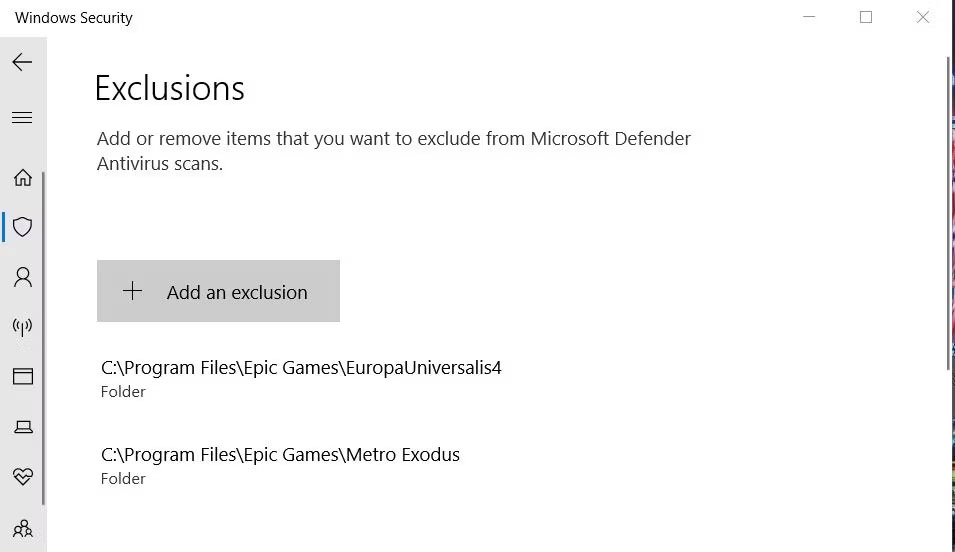
<p style="text-align: justify;">Nếu lỗi &quot;Insufficient system resources&quot; này chỉ ảnh hưởng đến một EXE chương trình cụ thể hoặc file người dùng, hãy thử thiết lập một loại trừ diệt virus cho nó. Cách bạn truy cập danh sách loại trừ khác nhau giữa các ứng dụng diệt virus của bên thứ ba, nhưng hầu hết đều có chúng. Vì vậy, bạn có thể tìm thấy hướng dẫn về cách đặt danh sách loại trừ file trong các trang trợ giúp cho phần mềm diệt virus của mình trên trang web của nhà xuất bản.</p>

<p style="text-align: justify;">Windows Security cũng có một danh sách loại trừ mà bạn có thể thêm các file và thư mục để loại trừ khỏi lá chắn diệt virus của nó. Tham khảo:&nbsp;<a data-type="internal" href="https://quantrimang.com/cong-nghe/them-ngoai-le-trong-windows-defender-172110" title="Cách thêm ngoại lệ trong Windows Defender trên Windows 10">Cách thêm ngoại lệ trong Windows Defender trên Windows 10</a>&nbsp;để biết thêm chi tiết.</p>

<div style="text-align: justify;">&nbsp;</div>

<h2 style="text-align: justify;">6. Sửa chữa các file của game</h2>

<figure>
<div style="text-align: justify;"><img alt="Nút Verify trong Epic Games Launcher" data-i="10" data-src="https://st.quantrimang.com/photos/image/2023/06/16/loi-insufficient-system-resources-exist-11.jpg" data-was-processed="true" height="553" src="https://st.quantrimang.com/photos/image/2023/06/16/loi-insufficient-system-resources-exist-11.jpg" width="958" /></div>

<figcaption>
<div style="text-align: justify;">Nút Verify trong Epic Games Launcher</div>
</figcaption>
</figure>

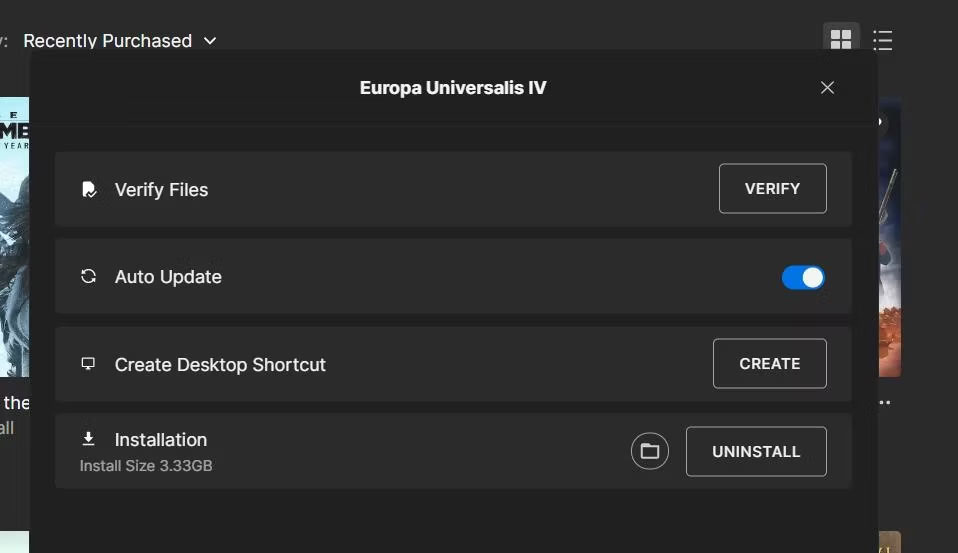
<p style="text-align: justify;">Nếu lỗi &quot;Insufficient system resources&quot; xảy ra đối với một game, hãy thử sửa các file của game bị ảnh hưởng. Một số người chơi cho biết họ đã giải quyết được lỗi “Insufficient system resources” bằng cách xác minh các file game.</p>

<p style="text-align: justify;">Các gói phần mềm Steam, Epic Games, Origin, EA Desktop, COG Galaxy, Battle.net và Ubisoft đều bao gồm những tùy chọn để xác minh (sửa chữa) file game.</p>

<div style="text-align: justify;">&nbsp;</div>
		</div>
				<div id="author">
						<p>
				<strong>Nguồn tin:</strong>
				Quantrimang.com
			</p>
		</div>
	</div>
	<div id="footer" class="clearfix">
		<div id="url">
			<strong>URL của bản tin này: </strong><a href="https://www.nguoicodonvn2008.info/vi/news/savefile/kien-thuc-may-tinh/cach-sua-loi-insufficient-system-resources-exist-tren-windows-10-11-7179.html" title="Cách sửa lỗi &quot;Insufficient System Resources Exist&quot; trên Windows 10&#x002F;11">https://www.nguoicodonvn2008.info/vi/news/savefile/kien-thuc-may-tinh/cach-sua-loi-insufficient-system-resources-exist-tren-windows-10-11-7179.html</a>

		</div>
		<div class="clear"></div>
		<div class="copyright">
			&copy; .&#x3A; Nguoicodonvn2008.info - Cõi lòng người cô đơn &#x3A;.
		</div>
		<div id="contact">
			<a href="mailto:admin@nguoicodonvn2008.info">admin@nguoicodonvn2008.info</a>
		</div>
	</div>
</div>
        <div id="timeoutsess" class="chromeframe">
            Bạn đã không sử dụng Site, <a onclick="timeoutsesscancel();" href="https://nguoicodonvn2008.info/#">Bấm vào đây để duy trì trạng thái đăng nhập</a>. Thời gian chờ: <span id="secField"> 60 </span> giây
        </div>
        <div id="openidResult" class="nv-alert" style="display:none"></div>
        <div id="openidBt" data-result="" data-redirect=""></div>
		</script>
		<div class="car-top">
  <span><img src="https://nguoicodonvn2008.info/themes/default/images/car.png" alt=""></span>
</div>
<script src="https://nguoicodonvn2008.info/assets/js/jquery/jquery.min.js"></script>
<script>var nv_base_siteurl="/",nv_lang_data="vi",nv_lang_interface="vi",nv_name_variable="nv",nv_fc_variable="op",nv_lang_variable="language",nv_module_name="news",nv_func_name="savefile",nv_is_user=0, nv_my_ofs=-4,nv_my_abbr="EDT",nv_cookie_prefix="nv4c_e856T",nv_check_pass_mstime=1738000,nv_area_admin=0,nv_safemode=0,theme_responsive=0,nv_recaptcha_ver=2,nv_recaptcha_sitekey="",nv_recaptcha_type="image",XSSsanitize=1;</script>
<script src="https://nguoicodonvn2008.info/assets/js/language/vi.js"></script>
<script src="https://nguoicodonvn2008.info/assets/js/DOMPurify/purify3.js"></script>
<script src="https://nguoicodonvn2008.info/assets/js/global.js"></script>
<script src="https://nguoicodonvn2008.info/assets/js/site.js"></script>
<script src="https://nguoicodonvn2008.info/themes/default/js/news.js"></script>
<script src="https://nguoicodonvn2008.info/themes/default/js/main.js"></script>
<script src="https://nguoicodonvn2008.info/themes/default/js/custom.js"></script>
<script type="application/ld+json">
        {
            "@context": "https://schema.org",
            "@type": "Organization",
            "url": "https://nguoicodonvn2008.info",
            "logo": "https://nguoicodonvn2008.info/uploads/angel.gif"
        }
        </script>
<script src="https://nguoicodonvn2008.info/themes/default/js/bootstrap.min.js"></script>
<script type="text/javascript">
var $scrolltop = $('.car-top');
$scrolltop.on('click', function () {
    $('html,body').animate({
        scrollTop: 0
    }, 800);
    $(this).addClass("car-run");
    setTimeout(function(){ $scrolltop.removeClass('car-run');}, 1000);
    return false;
});
$(window).on('scroll', function ()
{ 
    if($(window).scrollTop() >= 200)
    {
        $scrolltop.addClass("show");
        $scrolltop.addClass("car-down");
    }
    else
    {
       $scrolltop.removeClass("show");
       setTimeout(function(){ $scrolltop.removeClass('car-down');}, 300);
    }
});
</script>
</body>
</html>