<!DOCTYPE html>
    <html lang="vi" xmlns="http://www.w3.org/1999/xhtml" prefix="og: http://ogp.me/ns#">
    <head>
<title>Cách sửa lỗi &quot;HP Software Framework Is Not Installed&quot; trong Windows</title>
<meta name="description" content="Cách sửa lỗi &quot;HP Software Framework Is Not Installed&quot; trong Windows - Savefile - Tin Tức -...">
<meta name="author" content=".: Nguoicodonvn2008.info - Cõi lòng người cô đơn :.">
<meta name="copyright" content=".: Nguoicodonvn2008.info - Cõi lòng người cô đơn :. [admin@nguoicodonvn2008.info]">
<meta name="robots" content="index, archive, follow, noodp">
<meta name="googlebot" content="index,archive,follow,noodp">
<meta name="msnbot" content="all,index,follow">
<meta name="generator" content="NukeViet v4.5">
<meta http-equiv="Content-Type" content="text/html; charset=utf-8">
<meta property="og:title" content="Cách sửa lỗi &quot;HP Software Framework Is Not Installed&quot; trong Windows">
<meta property="og:type" content="website">
<meta property="og:description" content="Savefile - Tin Tức -...">
<meta property="og:site_name" content=".&#x3A; Nguoicodonvn2008.info - Cõi lòng người cô đơn &#x3A;.">
<meta property="og:url" content="https://www.nguoicodonvn2008.info/vi/news/savefile/kien-thuc-may-tinh/cach-sua-loi-hp-software-framework-is-not-installed-trong-windowscach-sua-loi-hp-software-framework-is-not-installed-trong-windows-3154.html">
<link rel="shortcut icon" href="https://nguoicodonvn2008.info/favicon.ico">
<link rel="canonical" href="https://www.nguoicodonvn2008.info/vi/news/savefile/kien-thuc-may-tinh/cach-sua-loi-hp-software-framework-is-not-installed-trong-windowscach-sua-loi-hp-software-framework-is-not-installed-trong-windows-3154.html">
<link rel="alternate" href="https://nguoicodonvn2008.info/vi/news/rss/" title="Tin Tức" type="application/rss+xml">
<link rel="alternate" href="https://nguoicodonvn2008.info/vi/news/rss/karaoke-dual/" title="Tin Tức - Karaoke Dual" type="application/rss+xml">
<link rel="alternate" href="https://nguoicodonvn2008.info/vi/news/rss/nhac-tre/" title="Tin Tức - Nhạc trẻ" type="application/rss+xml">
<link rel="alternate" href="https://nguoicodonvn2008.info/vi/news/rss/tru-tinh/" title="Tin Tức - Trữ tình" type="application/rss+xml">
<link rel="alternate" href="https://nguoicodonvn2008.info/vi/news/rss/nuoc-ngoai/" title="Tin Tức - Nước ngoài" type="application/rss+xml">
<link rel="alternate" href="https://nguoicodonvn2008.info/vi/news/rss/remix/" title="Tin Tức - Remix" type="application/rss+xml">
<link rel="alternate" href="https://nguoicodonvn2008.info/vi/news/rss/tam-su-tinh-yeu/" title="Tin Tức - Tâm sự tình yêu" type="application/rss+xml">
<link rel="alternate" href="https://nguoicodonvn2008.info/vi/news/rss/tho-suu-tam/" title="Tin Tức - Thơ sưu tầm" type="application/rss+xml">
<link rel="alternate" href="https://nguoicodonvn2008.info/vi/news/rss/cuoc-song/" title="Tin Tức - Cuộc sống" type="application/rss+xml">
<link rel="alternate" href="https://nguoicodonvn2008.info/vi/news/rss/phan-mem/" title="Tin Tức - Phần mềm" type="application/rss+xml">
<link rel="alternate" href="https://nguoicodonvn2008.info/vi/news/rss/kien-thuc-may-tinh/" title="Tin Tức - Kiến thức máy tính" type="application/rss+xml">
<link rel="alternate" href="https://nguoicodonvn2008.info/vi/news/rss/hoc-tap/" title="Tin Tức - Học tập" type="application/rss+xml">
<link rel="alternate" href="https://nguoicodonvn2008.info/vi/news/rss/tai-lieu/" title="Tin Tức - Tài liệu" type="application/rss+xml">
<link rel="alternate" href="https://nguoicodonvn2008.info/vi/news/rss/de-thi/" title="Tin Tức - Đề thi" type="application/rss+xml">
<link rel="preload" as="style" href="https://nguoicodonvn2008.info/assets/css/font-awesome.min.css" type="text/css">
<link rel="preload" as="style" href="https://nguoicodonvn2008.info/themes/default/css/bootstrap.non-responsive.css" type="text/css">
<link rel="preload" as="style" href="https://nguoicodonvn2008.info/themes/default/css/style.css" type="text/css">
<link rel="preload" as="style" href="https://nguoicodonvn2008.info/themes/default/css/style.non-responsive.css" type="text/css">
<link rel="preload" as="style" href="https://nguoicodonvn2008.info/themes/default/css/news.css" type="text/css">
<link rel="preload" as="style" href="https://nguoicodonvn2008.info/themes/default/css/custom.css" type="text/css">
<link rel="preload" as="script" href="https://nguoicodonvn2008.info/assets/js/jquery/jquery.min.js" type="text/javascript">
<link rel="preload" as="script" href="https://nguoicodonvn2008.info/assets/js/language/vi.js" type="text/javascript">
<link rel="preload" as="script" href="https://nguoicodonvn2008.info/assets/js/DOMPurify/purify3.js" type="text/javascript">
<link rel="preload" as="script" href="https://nguoicodonvn2008.info/assets/js/global.js" type="text/javascript">
<link rel="preload" as="script" href="https://nguoicodonvn2008.info/assets/js/site.js" type="text/javascript">
<link rel="preload" as="script" href="https://nguoicodonvn2008.info/themes/default/js/news.js" type="text/javascript">
<link rel="preload" as="script" href="https://nguoicodonvn2008.info/themes/default/js/main.js" type="text/javascript">
<link rel="preload" as="script" href="https://nguoicodonvn2008.info/themes/default/js/custom.js" type="text/javascript">
<link rel="preload" as="script" href="https://nguoicodonvn2008.info/themes/default/js/bootstrap.min.js" type="text/javascript">
<link rel="stylesheet" href="https://nguoicodonvn2008.info/assets/css/font-awesome.min.css">
<link rel="stylesheet" href="https://nguoicodonvn2008.info/themes/default/css/bootstrap.non-responsive.css">
<link rel="stylesheet" href="https://nguoicodonvn2008.info/themes/default/css/style.css">
<link rel="stylesheet" href="https://nguoicodonvn2008.info/themes/default/css/style.non-responsive.css">
<link rel="StyleSheet" href="https://nguoicodonvn2008.info/themes/default/css/news.css">
<link rel="stylesheet" href="https://nguoicodonvn2008.info/themes/default/css/custom.css">
<style type="text/css">
	body{background: #fff;}
</style>
    </head>
    <body>
<div id="print">
	<div id="hd_print">
		<h2 class="pull-left">.&#x3A; Nguoicodonvn2008.info - Cõi lòng người cô đơn &#x3A;.</h2>
		<p class="pull-right"><a title=".&#x3A; Nguoicodonvn2008.info - Cõi lòng người cô đơn &#x3A;." href="https://nguoicodonvn2008.info/">https://nguoicodonvn2008.info</a></p>
	</div>
	<div class="clear"></div>
	<hr />
	<div id="content">
		<h1>Cách sửa lỗi &quot;HP Software Framework Is Not Installed&quot; trong Windows</h1>
		<ul class="list-inline">
			<li>Chủ nhật - 29/11/2020 23:22</li>
			<li class="hidden-print txtrequired"><em class="fa fa-print">&nbsp;</em><a title="In ra" href="javascript:;" onclick="window.print()">In ra</a></li>
			<li class="hidden-print txtrequired"><em class="fa fa-power-off">&nbsp;</em><a title="Đóng cửa sổ này" href="javascript:;" onclick="window.close()">Đóng cửa sổ này</a></li>
		</ul>
		<div class="clear"></div>
		<div id="hometext">
		</div>
				<div class="imghome">
			<img alt="Cách sửa lỗi &quot;HP Software Framework Is Not Installed&quot; trong Windows" src="https://st.quantrimang.com/photos/image/2020/11/30/loi-hp-software-framework-is-not-installed-4.jpg" width="460" class="img-thumbnail" />
		</div>
		<div class="clear"></div>
		<div id="bodytext" class="clearfix">
			<p style="text-align: justify;">Bạn có sử dụng&nbsp;<strong>Fn</strong>&nbsp;<strong>+ phím đặc biệt</strong>&nbsp;trên laptop của mình để nhanh chóng thực hiện các chức năng như&nbsp;điều chỉnh âm lượng&nbsp;hoặc&nbsp;đưa máy tính vào chế độ ngủ&nbsp;không? Các chức năng đặc biệt đó có đột ngột ngừng hoạt động trên máy tính HP của bạn không?</p>

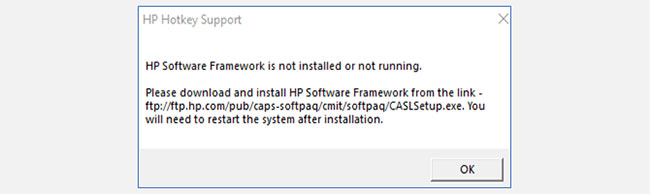
<p style="text-align: justify;">Có thể bạn đã thấy thông báo lỗi Hotkey Support này và bạn đang tự hỏi làm cách nào để khắc phục nó. Khi thông báo này xuất hiện, tiêu đề có thể là&nbsp;<strong>HP Hotkey Support</strong>&nbsp;hoặc<strong>&nbsp;HP Hotkey UWP Service</strong>. Cả hai đều đề cập đến các driver được cài đặt sẵn trên máy tính HP và cho phép các hotkey chạy.</p>

<figure>
<div style="text-align: justify;"><img alt="Lỗi &#039;HP Software Framework Is Not Installed&#039; trong Windows" data-i="0" data-src="https://st.quantrimang.com/photos/image/2020/11/30/loi-hp-software-framework-is-not-installed-1.jpg" data-was-processed="true" height="194" src="https://st.quantrimang.com/photos/image/2020/11/30/loi-hp-software-framework-is-not-installed-1.jpg" width="650" /></div>

<figcaption>
<div style="text-align: justify;">Lỗi &quot;HP Software Framework Is Not Installed&quot; trong Windows</div>
</figcaption>
</figure>

<p style="text-align: justify;">Đây là cách bạn sửa lỗi.</p>

<h2 style="text-align: justify;">Phương pháp 1: Cài đặt HP Support Assistant</h2>

<p style="text-align: justify;">Khi thông báo lỗi xuất hiện, người dùng được nhắc cài đặt HP Software Framework từ liên kết được cung cấp. Rất tiếc, liên kết này không còn được hỗ trợ và không hoạt động nữa. Tin tốt là HP Support Assistant vẫn hoạt động.</p>

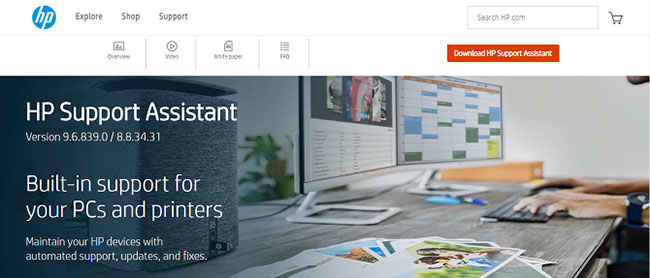
<p style="text-align: justify;">Truy cập trang HP Support Assistant:<br />
<span style="color:rgb(192, 57, 43);"><strong>https://www8.hp.com/us/en/campaigns/hpsupportassistant/hpsupport.html?jumpid=va_r602_us/en/any/psg/pl_ot_ob_ds_pd/hpsupportassistant_cc/dt</strong></span><br />
&nbsp;Nhấp vào nút&nbsp;<strong>HP Support Assistant</strong>&nbsp;màu đỏ để cài đặt.</p>

<figure>
<div style="text-align: justify;"><img alt="Nhấp vào nút HP Support Assistant màu đỏ để cài đặt" data-i="1" data-src="https://st.quantrimang.com/photos/image/2020/11/30/loi-hp-software-framework-is-not-installed-2.jpg" data-was-processed="true" height="278" src="https://st.quantrimang.com/photos/image/2020/11/30/loi-hp-software-framework-is-not-installed-2.jpg" width="650" /></div>

<figcaption>
<div style="text-align: justify;">Nhấp vào nút HP Support Assistant màu đỏ để cài đặt</div>
</figcaption>
</figure>

<p style="text-align: justify;">Sau khi file được cài đặt, hãy&nbsp;khởi động lại máy tính&nbsp;và các hotkey sẽ hoạt động trở lại.</p>

<div style="text-align: justify;">&nbsp;</div>

<h2 style="text-align: justify;">Phương pháp 2: Cài đặt driver HP Hotkey Support</h2>

<p style="text-align: justify;">Nếu các hotkey vẫn không hoạt động bình thường, hãy tìm các file driver cụ thể trên trang web của HP:&nbsp;<strong>HP Hotkey Service</strong>&nbsp;và<strong>&nbsp;HP Hotkey Service UWP</strong>.</p>

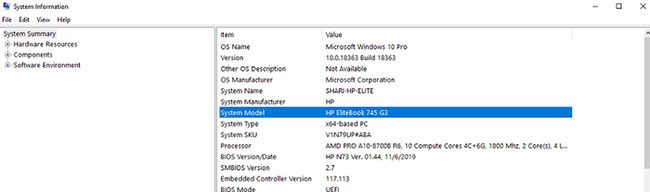
<p style="text-align: justify;">Để tìm đúng driver cho máy tính, bạn sẽ cần tìm chính xác model thiết bị. Nếu số model không được in ở bất kỳ đâu trên vỏ, bạn có thể dễ dàng tìm thấy số này trong thông tin hệ thống của mình.</p>

<p style="text-align: justify;">Chỉ cần nhập&nbsp;<strong>System</strong>&nbsp;vào hộp tìm kiếm của Windows. Sau đó, nhấp vào&nbsp;<strong>Open</strong>&nbsp;và xác định số model của bạn.</p>

<figure>
<div style="text-align: justify;"><img alt="Tìm số model của thiết bị" data-i="2" data-src="https://st.quantrimang.com/photos/image/2020/11/30/loi-hp-software-framework-is-not-installed-3.jpg" data-was-processed="true" height="192" src="https://st.quantrimang.com/photos/image/2020/11/30/loi-hp-software-framework-is-not-installed-3.jpg" width="650" /></div>

<figcaption>
<div style="text-align: justify;">Tìm số model của thiết bị</div>
</figcaption>
</figure>

<p style="text-align: justify;">Khi bạn đã tìm thấy số model máy tính của mình, hãy truy cập trang web hỗ trợ của HP để tìm driver bạn cần. Cuộn xuống để xác định sản phẩm và nhập số model của bạn. Sau đó nhấp vào tab&nbsp;<strong>Software, Drivers, and Firmware</strong>. Thao tác này sẽ hiển thị danh sách các driver tương thích với thiết bị của bạn.</p>

<figure>
<div style="text-align: justify;"><img alt="Tìm HP Hotkey Support và nhấp vào Download" data-i="3" data-src="https://st.quantrimang.com/photos/image/2020/11/30/loi-hp-software-framework-is-not-installed-4.jpg" data-was-processed="true" height="285" src="https://st.quantrimang.com/photos/image/2020/11/30/loi-hp-software-framework-is-not-installed-4.jpg" width="650" /></div>

<figcaption>
<div style="text-align: justify;">Tìm HP Hotkey Support và nhấp vào Download</div>
</figcaption>
</figure>

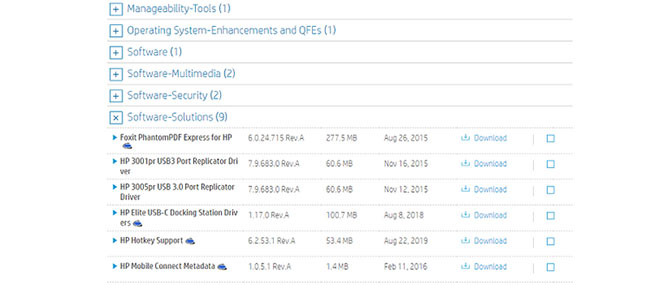
<p style="text-align: justify;">Nhấp vào&nbsp;<strong>Software-Solutions.</strong>&nbsp;Tìm&nbsp;<strong>HP Hotkey Support</strong>&nbsp;và nhấp vào&nbsp;<strong>Download.</strong>&nbsp;Làm theo hướng dẫn trên màn hình để cài đặt phần mềm.</p>

<p style="text-align: justify;">Khi quá trình cài đặt file hoàn tất, hãy khởi động lại máy tính và các hotkey của bạn sẽ hoạt động trở lại.</p>
		</div>
				<div id="author">
						<p>
				<strong>Nguồn tin:</strong>
				Quantrimang.com
			</p>
		</div>
	</div>
	<div id="footer" class="clearfix">
		<div id="url">
			<strong>URL của bản tin này: </strong><a href="https://www.nguoicodonvn2008.info/vi/news/savefile/kien-thuc-may-tinh/cach-sua-loi-hp-software-framework-is-not-installed-trong-windowscach-sua-loi-hp-software-framework-is-not-installed-trong-windows-3154.html" title="Cách sửa lỗi &quot;HP Software Framework Is Not Installed&quot; trong Windows">https://www.nguoicodonvn2008.info/vi/news/savefile/kien-thuc-may-tinh/cach-sua-loi-hp-software-framework-is-not-installed-trong-windowscach-sua-loi-hp-software-framework-is-not-installed-trong-windows-3154.html</a>

		</div>
		<div class="clear"></div>
		<div class="copyright">
			&copy; .&#x3A; Nguoicodonvn2008.info - Cõi lòng người cô đơn &#x3A;.
		</div>
		<div id="contact">
			<a href="mailto:admin@nguoicodonvn2008.info">admin@nguoicodonvn2008.info</a>
		</div>
	</div>
</div>
        <div id="timeoutsess" class="chromeframe">
            Bạn đã không sử dụng Site, <a onclick="timeoutsesscancel();" href="https://nguoicodonvn2008.info/#">Bấm vào đây để duy trì trạng thái đăng nhập</a>. Thời gian chờ: <span id="secField"> 60 </span> giây
        </div>
        <div id="openidResult" class="nv-alert" style="display:none"></div>
        <div id="openidBt" data-result="" data-redirect=""></div>
		</script>
		<div class="car-top">
  <span><img src="https://nguoicodonvn2008.info/themes/default/images/car.png" alt=""></span>
</div>
<script src="https://nguoicodonvn2008.info/assets/js/jquery/jquery.min.js"></script>
<script>var nv_base_siteurl="/",nv_lang_data="vi",nv_lang_interface="vi",nv_name_variable="nv",nv_fc_variable="op",nv_lang_variable="language",nv_module_name="news",nv_func_name="savefile",nv_is_user=0, nv_my_ofs=-4,nv_my_abbr="EDT",nv_cookie_prefix="nv4c_e856T",nv_check_pass_mstime=1738000,nv_area_admin=0,nv_safemode=0,theme_responsive=0,nv_recaptcha_ver=2,nv_recaptcha_sitekey="",nv_recaptcha_type="image",XSSsanitize=1;</script>
<script src="https://nguoicodonvn2008.info/assets/js/language/vi.js"></script>
<script src="https://nguoicodonvn2008.info/assets/js/DOMPurify/purify3.js"></script>
<script src="https://nguoicodonvn2008.info/assets/js/global.js"></script>
<script src="https://nguoicodonvn2008.info/assets/js/site.js"></script>
<script src="https://nguoicodonvn2008.info/themes/default/js/news.js"></script>
<script src="https://nguoicodonvn2008.info/themes/default/js/main.js"></script>
<script src="https://nguoicodonvn2008.info/themes/default/js/custom.js"></script>
<script type="application/ld+json">
        {
            "@context": "https://schema.org",
            "@type": "Organization",
            "url": "https://nguoicodonvn2008.info",
            "logo": "https://nguoicodonvn2008.info/uploads/angel.gif"
        }
        </script>
<script src="https://nguoicodonvn2008.info/themes/default/js/bootstrap.min.js"></script>
<script type="text/javascript">
var $scrolltop = $('.car-top');
$scrolltop.on('click', function () {
    $('html,body').animate({
        scrollTop: 0
    }, 800);
    $(this).addClass("car-run");
    setTimeout(function(){ $scrolltop.removeClass('car-run');}, 1000);
    return false;
});
$(window).on('scroll', function ()
{ 
    if($(window).scrollTop() >= 200)
    {
        $scrolltop.addClass("show");
        $scrolltop.addClass("car-down");
    }
    else
    {
       $scrolltop.removeClass("show");
       setTimeout(function(){ $scrolltop.removeClass('car-down');}, 300);
    }
});
</script>
</body>
</html>