<!DOCTYPE html>
    <html lang="vi" xmlns="http://www.w3.org/1999/xhtml" prefix="og: http://ogp.me/ns#">
    <head>
<title>Cách sửa lỗi Autofill trong Excel</title>
<meta name="description" content="Cách sửa lỗi Autofill trong Excel - Savefile - Tin Tức - https&#x3A;&#x002F;&#x002F;www.nguoicodonvn2008.info&#x002F;vi&#x002F;news&#x002F;savefile&#x002F;kien-thuc-may-tinh&#x002F;cach-sua-loi-autofill-trong-excel-7307.html">
<meta name="author" content=".: Nguoicodonvn2008.info - Cõi lòng người cô đơn :.">
<meta name="copyright" content=".: Nguoicodonvn2008.info - Cõi lòng người cô đơn :. [admin@nguoicodonvn2008.info]">
<meta name="robots" content="index, archive, follow, noodp">
<meta name="googlebot" content="index,archive,follow,noodp">
<meta name="msnbot" content="all,index,follow">
<meta name="generator" content="NukeViet v4.5">
<meta http-equiv="Content-Type" content="text/html; charset=utf-8">
<meta property="og:title" content="Cách sửa lỗi Autofill trong Excel">
<meta property="og:type" content="website">
<meta property="og:description" content="Savefile - Tin Tức - https&#x3A;&#x002F;&#x002F;www.nguoicodonvn2008.info&#x002F;vi&#x002F;news&#x002F;savefile&#x002F;kien-thuc-may-tinh&#x002F;cach-sua-loi-autofill-trong-excel-7307.html">
<meta property="og:site_name" content=".&#x3A; Nguoicodonvn2008.info - Cõi lòng người cô đơn &#x3A;.">
<meta property="og:url" content="https://www.nguoicodonvn2008.info/vi/news/savefile/kien-thuc-may-tinh/cach-sua-loi-autofill-trong-excel-7307.html">
<link rel="shortcut icon" href="https://nguoicodonvn2008.info/favicon.ico">
<link rel="canonical" href="https://www.nguoicodonvn2008.info/vi/news/savefile/kien-thuc-may-tinh/cach-sua-loi-autofill-trong-excel-7307.html">
<link rel="alternate" href="https://nguoicodonvn2008.info/vi/news/rss/" title="Tin Tức" type="application/rss+xml">
<link rel="alternate" href="https://nguoicodonvn2008.info/vi/news/rss/karaoke-dual/" title="Tin Tức - Karaoke Dual" type="application/rss+xml">
<link rel="alternate" href="https://nguoicodonvn2008.info/vi/news/rss/nhac-tre/" title="Tin Tức - Nhạc trẻ" type="application/rss+xml">
<link rel="alternate" href="https://nguoicodonvn2008.info/vi/news/rss/tru-tinh/" title="Tin Tức - Trữ tình" type="application/rss+xml">
<link rel="alternate" href="https://nguoicodonvn2008.info/vi/news/rss/nuoc-ngoai/" title="Tin Tức - Nước ngoài" type="application/rss+xml">
<link rel="alternate" href="https://nguoicodonvn2008.info/vi/news/rss/remix/" title="Tin Tức - Remix" type="application/rss+xml">
<link rel="alternate" href="https://nguoicodonvn2008.info/vi/news/rss/tam-su-tinh-yeu/" title="Tin Tức - Tâm sự tình yêu" type="application/rss+xml">
<link rel="alternate" href="https://nguoicodonvn2008.info/vi/news/rss/tho-suu-tam/" title="Tin Tức - Thơ sưu tầm" type="application/rss+xml">
<link rel="alternate" href="https://nguoicodonvn2008.info/vi/news/rss/cuoc-song/" title="Tin Tức - Cuộc sống" type="application/rss+xml">
<link rel="alternate" href="https://nguoicodonvn2008.info/vi/news/rss/phan-mem/" title="Tin Tức - Phần mềm" type="application/rss+xml">
<link rel="alternate" href="https://nguoicodonvn2008.info/vi/news/rss/kien-thuc-may-tinh/" title="Tin Tức - Kiến thức máy tính" type="application/rss+xml">
<link rel="alternate" href="https://nguoicodonvn2008.info/vi/news/rss/hoc-tap/" title="Tin Tức - Học tập" type="application/rss+xml">
<link rel="alternate" href="https://nguoicodonvn2008.info/vi/news/rss/tai-lieu/" title="Tin Tức - Tài liệu" type="application/rss+xml">
<link rel="alternate" href="https://nguoicodonvn2008.info/vi/news/rss/de-thi/" title="Tin Tức - Đề thi" type="application/rss+xml">
<link rel="preload" as="style" href="https://nguoicodonvn2008.info/assets/css/font-awesome.min.css" type="text/css">
<link rel="preload" as="style" href="https://nguoicodonvn2008.info/themes/default/css/bootstrap.non-responsive.css" type="text/css">
<link rel="preload" as="style" href="https://nguoicodonvn2008.info/themes/default/css/style.css" type="text/css">
<link rel="preload" as="style" href="https://nguoicodonvn2008.info/themes/default/css/style.non-responsive.css" type="text/css">
<link rel="preload" as="style" href="https://nguoicodonvn2008.info/themes/default/css/news.css" type="text/css">
<link rel="preload" as="style" href="https://nguoicodonvn2008.info/themes/default/css/custom.css" type="text/css">
<link rel="preload" as="script" href="https://nguoicodonvn2008.info/assets/js/jquery/jquery.min.js" type="text/javascript">
<link rel="preload" as="script" href="https://nguoicodonvn2008.info/assets/js/language/vi.js" type="text/javascript">
<link rel="preload" as="script" href="https://nguoicodonvn2008.info/assets/js/DOMPurify/purify3.js" type="text/javascript">
<link rel="preload" as="script" href="https://nguoicodonvn2008.info/assets/js/global.js" type="text/javascript">
<link rel="preload" as="script" href="https://nguoicodonvn2008.info/assets/js/site.js" type="text/javascript">
<link rel="preload" as="script" href="https://nguoicodonvn2008.info/themes/default/js/news.js" type="text/javascript">
<link rel="preload" as="script" href="https://nguoicodonvn2008.info/themes/default/js/main.js" type="text/javascript">
<link rel="preload" as="script" href="https://nguoicodonvn2008.info/themes/default/js/custom.js" type="text/javascript">
<link rel="preload" as="script" href="https://nguoicodonvn2008.info/themes/default/js/bootstrap.min.js" type="text/javascript">
<link rel="stylesheet" href="https://nguoicodonvn2008.info/assets/css/font-awesome.min.css">
<link rel="stylesheet" href="https://nguoicodonvn2008.info/themes/default/css/bootstrap.non-responsive.css">
<link rel="stylesheet" href="https://nguoicodonvn2008.info/themes/default/css/style.css">
<link rel="stylesheet" href="https://nguoicodonvn2008.info/themes/default/css/style.non-responsive.css">
<link rel="StyleSheet" href="https://nguoicodonvn2008.info/themes/default/css/news.css">
<link rel="stylesheet" href="https://nguoicodonvn2008.info/themes/default/css/custom.css">
<style type="text/css">
	body{background: #fff;}
</style>
    </head>
    <body>
<div id="print">
	<div id="hd_print">
		<h2 class="pull-left">.&#x3A; Nguoicodonvn2008.info - Cõi lòng người cô đơn &#x3A;.</h2>
		<p class="pull-right"><a title=".&#x3A; Nguoicodonvn2008.info - Cõi lòng người cô đơn &#x3A;." href="https://nguoicodonvn2008.info/">https://nguoicodonvn2008.info</a></p>
	</div>
	<div class="clear"></div>
	<hr />
	<div id="content">
		<h1>Cách sửa lỗi Autofill trong Excel</h1>
		<ul class="list-inline">
			<li>Thứ hai - 17/07/2023 00:55</li>
			<li class="hidden-print txtrequired"><em class="fa fa-print">&nbsp;</em><a title="In ra" href="javascript:;" onclick="window.print()">In ra</a></li>
			<li class="hidden-print txtrequired"><em class="fa fa-power-off">&nbsp;</em><a title="Đóng cửa sổ này" href="javascript:;" onclick="window.close()">Đóng cửa sổ này</a></li>
		</ul>
		<div class="clear"></div>
		<div id="hometext">
		</div>
				<div class="imghome">
			<img alt="Cách sửa lỗi Autofill trong Excel" src="https://st.quantrimang.com/photos/image/2023/07/17/sua-loi-autofill-excel-3.jpg" width="460" class="img-thumbnail" />
		</div>
		<div class="clear"></div>
		<div id="bodytext" class="clearfix">
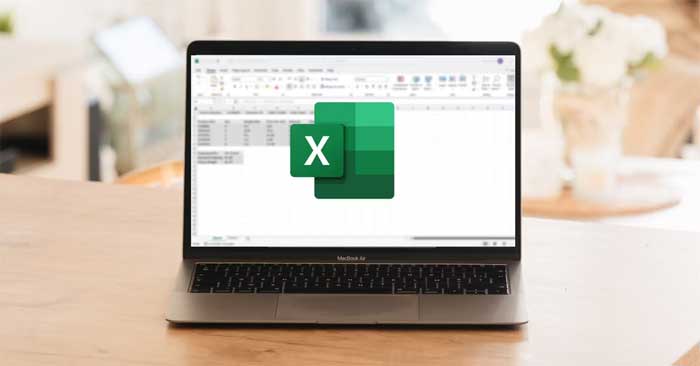
			<p style="text-align: justify;">Bạn đang gặp phải&nbsp;<strong>những vấn đề về AutoFill trong Excel</strong>? Dưới đây là một số&nbsp;<strong>cách giúp bạn sửa nhanh lỗi tự động điền dữ liệu trong Microsoft Excel</strong>.</p>

<p style="text-align: justify;"><img alt="AutoFill trong Excel" data-i="0" data-src="https://st.quantrimang.com/photos/image/2023/07/17/Excel-loi-Autofill-7.jpg" data-was-processed="true" height="340" src="https://st.quantrimang.com/photos/image/2023/07/17/Excel-loi-Autofill-7.jpg" width="650" /></p>

<p style="text-align: justify;">Dù AutoFill là một trong số tính năng Excel dễ dùng và phổ biến nhất, đôi khi nó vẫn phát sinh lỗi. Tuy nhiên, đừng quá lo lắng. Bạn có thể giải quyết vấn đề dễ dàng bằng những phương pháp dưới đây.</p>

<h2 style="text-align: justify;">Bật Fill Handle</h2>

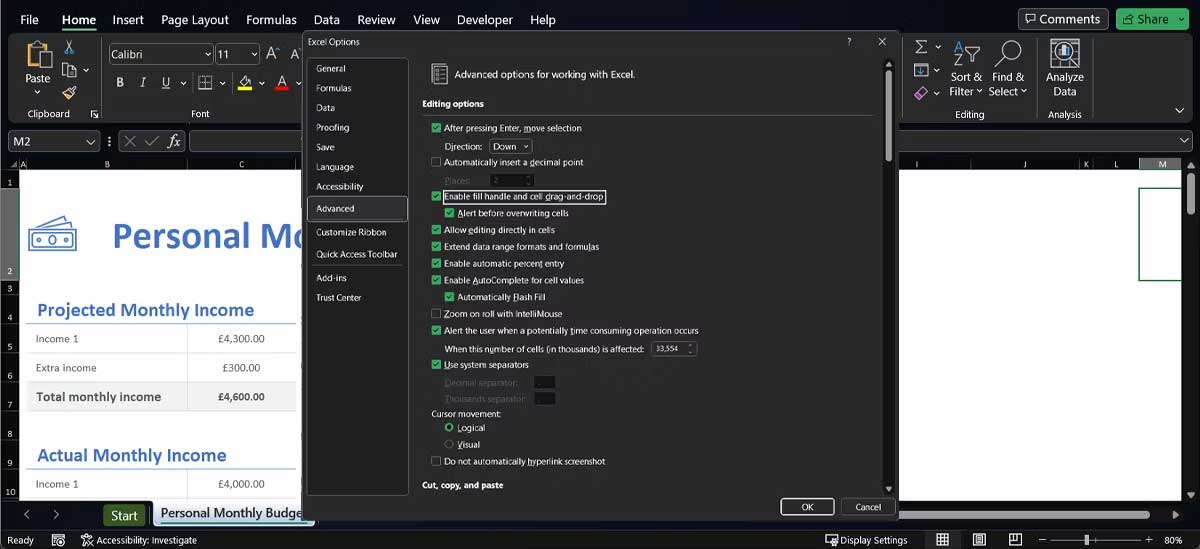
<p style="text-align: justify;">Thỉnh thoảng, tính năng AutoFill của Excel có thể dừng hoạt động mà không có bầy kỳ thông báo nào. Khi điều này xảy ra, bước đầu tiên bạn nên kiểm tra là liệu lựa chọn chọn AutoFill đã được kích hoạt hay chưa.</p>

<ol>
	<li style="text-align: justify;">Mở menu&nbsp;<strong>File</strong>&nbsp;&gt; tới<strong>&nbsp;Options</strong>.</li>
	<li style="text-align: justify;">Tại đây, chọn&nbsp;<strong>Advanced</strong>&nbsp;từ menu bên tay trái và cuộn xuống dưới tới phần Editint Options.</li>
	<li style="text-align: justify;">Kiểm tra<strong>&nbsp;Enable fill handle and cell drag-and-drop</strong>. Thêm vào đó, bạn nên kiểm tra&nbsp;<strong>Alert before overwriting cells&nbsp;</strong>để tránh vô tình chỉnh sửa thông tin quan trọng.</li>
</ol>

<p style="text-align: justify;"><img alt="Hướng dẫn sửa lỗi Autofill trong Excel" data-adbro-processed="true" data-i="1" data-src="https://st.quantrimang.com/photos/image/2023/07/17/sua-loi-autofill-excel-1.jpg" data-was-processed="true" height="297" src="https://st.quantrimang.com/photos/image/2023/07/17/sua-loi-autofill-excel-1.jpg" width="650" /></p>

<div style="text-align: justify;"><img alt="" height="0" src="https://bs.serving-sys.com/Serving/adServer.bs?cn=display&amp;c=19&amp;pli=1079282556&amp;gdpr=${GDPR}&amp;gdpr_consent=${GDPR_CONSENT_68}&amp;us_privacy=${US_PRIVACY}&amp;adid=1090559174&amp;ebaddid=b339b0b57e7946488d8484dd9652e07f&amp;ord=1689569726974" width="0" /></div>

<ul style="text-align: justify;">
</ul>

<h2 style="text-align: justify;">Cung cấp cho Excel nhiều dữ liệu hơn</h2>

<p style="text-align: justify;">Thỉnh thoảng, AutoFill không hoạt động như dự tính nếu bạn không cung cấp đủ dữ liệu cho công cụ này để phát hiện thuật toán. Hãy thử chọn nhiều ô hơn trước khi dùng AutoFill hoặc tự tay nhập nhiều dữ liệu hơn trước khi kích hoạt nút điều khiển AutoFill.</p>

<h2 style="text-align: justify;">Loại bỏ bộ lọc không cần thiết</h2>

<p style="text-align: justify;">Tính năng AutoFill có thể dừng hoạt động nếu có xung đột với công cụ Excel khác. Ví dụ, nếu đã thêm một bộ lọc để phân loại dữ liệu Excel, AutoFill không thể phát hiện thuật toán mà nó nên dùng.</p>

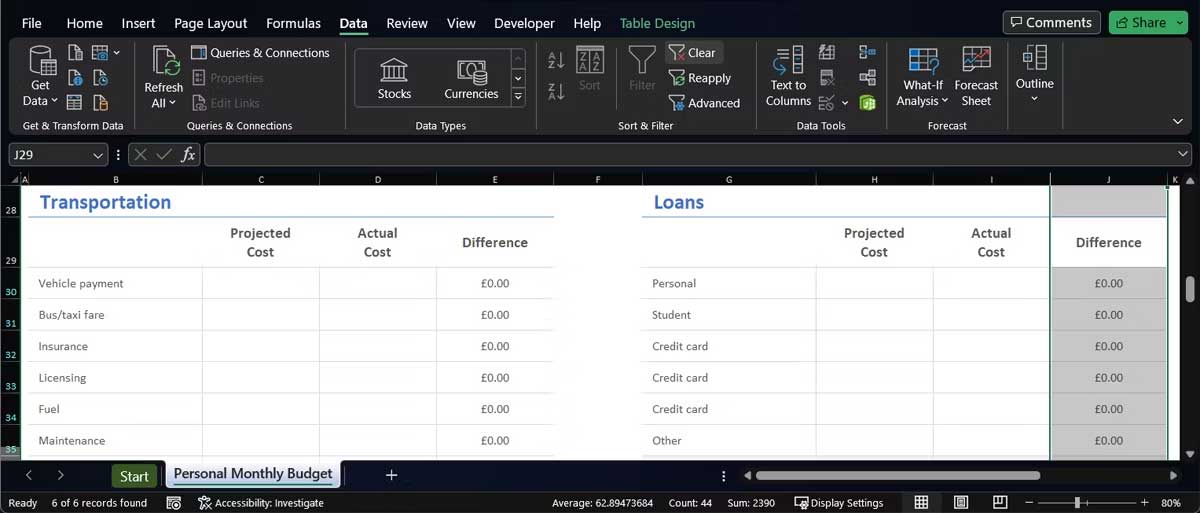
<p style="text-align: justify;">Các cột hoạt hàng được áp dụng bộ lọc thường có icon&nbsp;<strong>Filter</strong>&nbsp;ở ô phía trên cùng. Để xóa bộ lọc, hãy làm theo những bước bên dưới:</p>

<ol>
	<li style="text-align: justify;">Chọn hàng hoặc cột chứa bộ lọc.</li>
	<li style="text-align: justify;">Mở tab&nbsp;<strong>Data</strong>.</li>
	<li style="text-align: justify;">Từ menu&nbsp;<strong>Filter</strong>, click&nbsp;<strong>Clear</strong>.</li>
</ol>

<p style="text-align: justify;"><img alt="Menu bộ lọc trong Excel" data-i="2" data-src="https://st.quantrimang.com/photos/image/2023/07/17/sua-loi-autofill-excel-2.jpg" data-was-processed="true" height="278" src="https://st.quantrimang.com/photos/image/2023/07/17/sua-loi-autofill-excel-2.jpg" width="650" /></p>

<h2 style="text-align: justify;">Dừng nhấn Ctrl hoặc Cmd</h2>

<p style="text-align: justify;">Tính năng AutoFill hoạt động khác nhau mỗi lần bạn nhấn &amp; giữ Ctrl hoặc Cmd khi dùng nó. Nếu nhấn &amp; giữ phím trong khi điền dữ liệu vào ô, AutoFill sẽ lặp lại dữ liệu thay vì mở rộng chuỗi số, text hoặc ngày tháng.</p>

<p style="text-align: justify;">Bây giờ, nếu không chủ động nhấn phím Ctrl hoặc Cmd nhưng nó vẫn chạy, khả năng phím bị kẹt. Trong trường hợp này, bạn có thể thử một số lựa chọn:</p>

<ul>
	<li style="text-align: justify;">Lau sạch bàn phím để loại bỏ bụi bặm có thể can thiệp vào chức năng của phím.</li>
	<li style="text-align: justify;">Ngắt kết nối bàn phím nếu bạn đang dùng bàn phím USB hoặc Bule tooth.</li>
	<li style="text-align: justify;">Ánh xạ lại phím để vô hiệu hóa chức năng của phím Ctrl hoặc Cmd.</li>
</ul>

<h2 style="text-align: justify;">Bật tính toán tự động</h2>

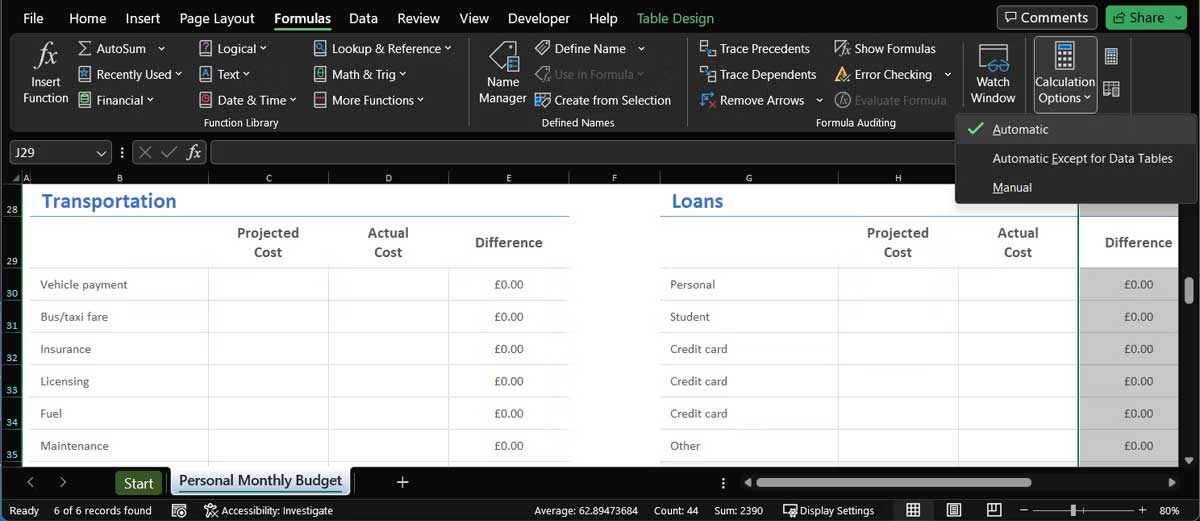
<p style="text-align: justify;">Cài đặt khác có thể chặn tính năng AutoFill hoạt động là lựa chọn tính toán. Trong Excel, mở tab&nbsp;<strong>Formulas&nbsp;</strong>&gt; menu&nbsp;<strong>Calculation Options</strong>. Tại đây, chọn&nbsp;<strong>Automatic</strong>.</p>

<p style="text-align: justify;"><img alt="Bật tính toán tự động trong Excel" data-i="3" data-src="https://st.quantrimang.com/photos/image/2023/07/17/sua-loi-autofill-excel-3.jpg" data-was-processed="true" height="282" src="https://st.quantrimang.com/photos/image/2023/07/17/sua-loi-autofill-excel-3.jpg" width="650" /></p>

<div style="text-align: justify;">&nbsp;</div>

<p style="text-align: justify;">Trên đây là&nbsp;<strong>những cách đơn giản nhất khắc lỗi AutoFill không hoạt động trên&nbsp;Microsoft Excel 2019</strong>. Hi vọng bài viết hữu ích với các bạn.</p>

<div style="text-align: justify;">&nbsp;</div>
		</div>
				<div id="author">
						<p>
				<strong>Nguồn tin:</strong>
				Quantrimang.com
			</p>
		</div>
	</div>
	<div id="footer" class="clearfix">
		<div id="url">
			<strong>URL của bản tin này: </strong><a href="https://www.nguoicodonvn2008.info/vi/news/savefile/kien-thuc-may-tinh/cach-sua-loi-autofill-trong-excel-7307.html" title="Cách sửa lỗi Autofill trong Excel">https://www.nguoicodonvn2008.info/vi/news/savefile/kien-thuc-may-tinh/cach-sua-loi-autofill-trong-excel-7307.html</a>

		</div>
		<div class="clear"></div>
		<div class="copyright">
			&copy; .&#x3A; Nguoicodonvn2008.info - Cõi lòng người cô đơn &#x3A;.
		</div>
		<div id="contact">
			<a href="mailto:admin@nguoicodonvn2008.info">admin@nguoicodonvn2008.info</a>
		</div>
	</div>
</div>
        <div id="timeoutsess" class="chromeframe">
            Bạn đã không sử dụng Site, <a onclick="timeoutsesscancel();" href="https://nguoicodonvn2008.info/#">Bấm vào đây để duy trì trạng thái đăng nhập</a>. Thời gian chờ: <span id="secField"> 60 </span> giây
        </div>
        <div id="openidResult" class="nv-alert" style="display:none"></div>
        <div id="openidBt" data-result="" data-redirect=""></div>
		</script>
		<div class="car-top">
  <span><img src="https://nguoicodonvn2008.info/themes/default/images/car.png" alt=""></span>
</div>
<script src="https://nguoicodonvn2008.info/assets/js/jquery/jquery.min.js"></script>
<script>var nv_base_siteurl="/",nv_lang_data="vi",nv_lang_interface="vi",nv_name_variable="nv",nv_fc_variable="op",nv_lang_variable="language",nv_module_name="news",nv_func_name="savefile",nv_is_user=0, nv_my_ofs=-4,nv_my_abbr="EDT",nv_cookie_prefix="nv4c_e856T",nv_check_pass_mstime=1738000,nv_area_admin=0,nv_safemode=0,theme_responsive=0,nv_recaptcha_ver=2,nv_recaptcha_sitekey="",nv_recaptcha_type="image",XSSsanitize=1;</script>
<script src="https://nguoicodonvn2008.info/assets/js/language/vi.js"></script>
<script src="https://nguoicodonvn2008.info/assets/js/DOMPurify/purify3.js"></script>
<script src="https://nguoicodonvn2008.info/assets/js/global.js"></script>
<script src="https://nguoicodonvn2008.info/assets/js/site.js"></script>
<script src="https://nguoicodonvn2008.info/themes/default/js/news.js"></script>
<script src="https://nguoicodonvn2008.info/themes/default/js/main.js"></script>
<script src="https://nguoicodonvn2008.info/themes/default/js/custom.js"></script>
<script type="application/ld+json">
        {
            "@context": "https://schema.org",
            "@type": "Organization",
            "url": "https://nguoicodonvn2008.info",
            "logo": "https://nguoicodonvn2008.info/uploads/angel.gif"
        }
        </script>
<script src="https://nguoicodonvn2008.info/themes/default/js/bootstrap.min.js"></script>
<script type="text/javascript">
var $scrolltop = $('.car-top');
$scrolltop.on('click', function () {
    $('html,body').animate({
        scrollTop: 0
    }, 800);
    $(this).addClass("car-run");
    setTimeout(function(){ $scrolltop.removeClass('car-run');}, 1000);
    return false;
});
$(window).on('scroll', function ()
{ 
    if($(window).scrollTop() >= 200)
    {
        $scrolltop.addClass("show");
        $scrolltop.addClass("car-down");
    }
    else
    {
       $scrolltop.removeClass("show");
       setTimeout(function(){ $scrolltop.removeClass('car-down');}, 300);
    }
});
</script>
</body>
</html>