<!DOCTYPE html>
    <html lang="vi" xmlns="http://www.w3.org/1999/xhtml" prefix="og: http://ogp.me/ns#">
    <head>
<title>Cách sửa lỗi 0xc0000221 trên Windows 10, máy tính không thể khởi động do thiếu driver hệ thống</title>
<meta name="description" content="Cách sửa lỗi 0xc0000221 trên Windows 10, máy tính không thể khởi động do thiếu driver hệ thống - Savefile - Tin Tức -...">
<meta name="author" content=".: Nguoicodonvn2008.info - Cõi lòng người cô đơn :.">
<meta name="copyright" content=".: Nguoicodonvn2008.info - Cõi lòng người cô đơn :. [admin@nguoicodonvn2008.info]">
<meta name="robots" content="index, archive, follow, noodp">
<meta name="googlebot" content="index,archive,follow,noodp">
<meta name="msnbot" content="all,index,follow">
<meta name="generator" content="NukeViet v4.5">
<meta http-equiv="Content-Type" content="text/html; charset=utf-8">
<meta property="og:title" content="Cách sửa lỗi 0xc0000221 trên Windows 10, máy tính không thể khởi động do thiếu driver hệ thống">
<meta property="og:type" content="website">
<meta property="og:description" content="Savefile - Tin Tức -...">
<meta property="og:site_name" content=".&#x3A; Nguoicodonvn2008.info - Cõi lòng người cô đơn &#x3A;.">
<meta property="og:url" content="https://www.nguoicodonvn2008.info/vi/news/savefile/kien-thuc-may-tinh/cach-sua-loi-0xc0000221-tren-windows-10-may-tinh-khong-the-khoi-dong-do-thieu-driver-he-thong-3513.html">
<link rel="shortcut icon" href="https://nguoicodonvn2008.info/favicon.ico">
<link rel="canonical" href="https://www.nguoicodonvn2008.info/vi/news/savefile/kien-thuc-may-tinh/cach-sua-loi-0xc0000221-tren-windows-10-may-tinh-khong-the-khoi-dong-do-thieu-driver-he-thong-3513.html">
<link rel="alternate" href="https://nguoicodonvn2008.info/vi/news/rss/" title="Tin Tức" type="application/rss+xml">
<link rel="alternate" href="https://nguoicodonvn2008.info/vi/news/rss/karaoke-dual/" title="Tin Tức - Karaoke Dual" type="application/rss+xml">
<link rel="alternate" href="https://nguoicodonvn2008.info/vi/news/rss/nhac-tre/" title="Tin Tức - Nhạc trẻ" type="application/rss+xml">
<link rel="alternate" href="https://nguoicodonvn2008.info/vi/news/rss/tru-tinh/" title="Tin Tức - Trữ tình" type="application/rss+xml">
<link rel="alternate" href="https://nguoicodonvn2008.info/vi/news/rss/nuoc-ngoai/" title="Tin Tức - Nước ngoài" type="application/rss+xml">
<link rel="alternate" href="https://nguoicodonvn2008.info/vi/news/rss/remix/" title="Tin Tức - Remix" type="application/rss+xml">
<link rel="alternate" href="https://nguoicodonvn2008.info/vi/news/rss/tam-su-tinh-yeu/" title="Tin Tức - Tâm sự tình yêu" type="application/rss+xml">
<link rel="alternate" href="https://nguoicodonvn2008.info/vi/news/rss/tho-suu-tam/" title="Tin Tức - Thơ sưu tầm" type="application/rss+xml">
<link rel="alternate" href="https://nguoicodonvn2008.info/vi/news/rss/cuoc-song/" title="Tin Tức - Cuộc sống" type="application/rss+xml">
<link rel="alternate" href="https://nguoicodonvn2008.info/vi/news/rss/phan-mem/" title="Tin Tức - Phần mềm" type="application/rss+xml">
<link rel="alternate" href="https://nguoicodonvn2008.info/vi/news/rss/kien-thuc-may-tinh/" title="Tin Tức - Kiến thức máy tính" type="application/rss+xml">
<link rel="alternate" href="https://nguoicodonvn2008.info/vi/news/rss/hoc-tap/" title="Tin Tức - Học tập" type="application/rss+xml">
<link rel="alternate" href="https://nguoicodonvn2008.info/vi/news/rss/tai-lieu/" title="Tin Tức - Tài liệu" type="application/rss+xml">
<link rel="alternate" href="https://nguoicodonvn2008.info/vi/news/rss/de-thi/" title="Tin Tức - Đề thi" type="application/rss+xml">
<link rel="preload" as="style" href="https://nguoicodonvn2008.info/assets/css/font-awesome.min.css" type="text/css">
<link rel="preload" as="style" href="https://nguoicodonvn2008.info/themes/default/css/bootstrap.non-responsive.css" type="text/css">
<link rel="preload" as="style" href="https://nguoicodonvn2008.info/themes/default/css/style.css" type="text/css">
<link rel="preload" as="style" href="https://nguoicodonvn2008.info/themes/default/css/style.non-responsive.css" type="text/css">
<link rel="preload" as="style" href="https://nguoicodonvn2008.info/themes/default/css/news.css" type="text/css">
<link rel="preload" as="style" href="https://nguoicodonvn2008.info/themes/default/css/custom.css" type="text/css">
<link rel="preload" as="script" href="https://nguoicodonvn2008.info/assets/js/jquery/jquery.min.js" type="text/javascript">
<link rel="preload" as="script" href="https://nguoicodonvn2008.info/assets/js/language/vi.js" type="text/javascript">
<link rel="preload" as="script" href="https://nguoicodonvn2008.info/assets/js/DOMPurify/purify3.js" type="text/javascript">
<link rel="preload" as="script" href="https://nguoicodonvn2008.info/assets/js/global.js" type="text/javascript">
<link rel="preload" as="script" href="https://nguoicodonvn2008.info/assets/js/site.js" type="text/javascript">
<link rel="preload" as="script" href="https://nguoicodonvn2008.info/themes/default/js/news.js" type="text/javascript">
<link rel="preload" as="script" href="https://nguoicodonvn2008.info/themes/default/js/main.js" type="text/javascript">
<link rel="preload" as="script" href="https://nguoicodonvn2008.info/themes/default/js/custom.js" type="text/javascript">
<link rel="preload" as="script" href="https://nguoicodonvn2008.info/themes/default/js/bootstrap.min.js" type="text/javascript">
<link rel="stylesheet" href="https://nguoicodonvn2008.info/assets/css/font-awesome.min.css">
<link rel="stylesheet" href="https://nguoicodonvn2008.info/themes/default/css/bootstrap.non-responsive.css">
<link rel="stylesheet" href="https://nguoicodonvn2008.info/themes/default/css/style.css">
<link rel="stylesheet" href="https://nguoicodonvn2008.info/themes/default/css/style.non-responsive.css">
<link rel="StyleSheet" href="https://nguoicodonvn2008.info/themes/default/css/news.css">
<link rel="stylesheet" href="https://nguoicodonvn2008.info/themes/default/css/custom.css">
<style type="text/css">
	body{background: #fff;}
</style>
    </head>
    <body>
<div id="print">
	<div id="hd_print">
		<h2 class="pull-left">.&#x3A; Nguoicodonvn2008.info - Cõi lòng người cô đơn &#x3A;.</h2>
		<p class="pull-right"><a title=".&#x3A; Nguoicodonvn2008.info - Cõi lòng người cô đơn &#x3A;." href="https://nguoicodonvn2008.info/">https://nguoicodonvn2008.info</a></p>
	</div>
	<div class="clear"></div>
	<hr />
	<div id="content">
		<h1>Cách sửa lỗi 0xc0000221 trên Windows 10, máy tính không thể khởi động do thiếu driver hệ thống</h1>
		<ul class="list-inline">
			<li>Thứ ba - 19/01/2021 23:58</li>
			<li class="hidden-print txtrequired"><em class="fa fa-print">&nbsp;</em><a title="In ra" href="javascript:;" onclick="window.print()">In ra</a></li>
			<li class="hidden-print txtrequired"><em class="fa fa-power-off">&nbsp;</em><a title="Đóng cửa sổ này" href="javascript:;" onclick="window.close()">Đóng cửa sổ này</a></li>
		</ul>
		<div class="clear"></div>
		<div id="hometext">
		</div>
				<div class="imghome">
			<img alt="Cách sửa lỗi 0xc0000221 trên Windows 10, máy tính không thể khởi động do thiếu driver hệ thống" src="https://st.quantrimang.com/photos/image/2021/01/19/sua-loi-windows-10-khong-the-khoi-dong-do-thieu-driver-he-thong-ma-0xc0000221.jpg" width="460" class="img-thumbnail" />
		</div>
		<div class="clear"></div>
		<div id="bodytext" class="clearfix">
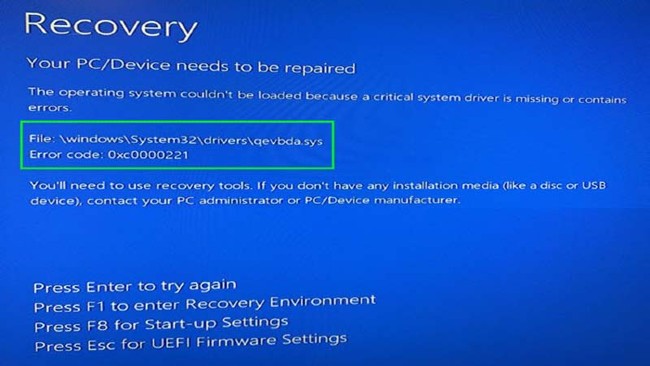
			<p style="text-align: justify;">Thông báo lỗi&nbsp;<em>&quot;The operating system couldn&#039;t be loaded because a critical system driver is missing or contains errors&quot;</em>&nbsp;thường xuất hiện khi&nbsp;máy tính của bạn không thể khởi động một cách bình thường. Một trong những file có thể gây ra lỗi này là qevbda.sys. File này nằm trong \%Windir%\%System%\drivers\ và nó có liên quan tới sản phẩm QLogic FastLinQ Ethernet của hãng Cavium. Inc/QLogic Corporation.</p>

<figure>
<div style="text-align: justify;"><img alt="Lỗi màn hình xanh 0xc0000221" data-i="0" data-src="https://st.quantrimang.com/photos/image/2021/01/19/sua-loi-windows-10-khong-the-khoi-dong-do-thieu-driver-he-thong-ma-0xc0000221.jpg" data-was-processed="true" height="366" src="https://st.quantrimang.com/photos/image/2021/01/19/sua-loi-windows-10-khong-the-khoi-dong-do-thieu-driver-he-thong-ma-0xc0000221.jpg" width="650" /></div>

<figcaption>
<div style="text-align: justify;">Lỗi màn hình xanh 0xc0000221</div>
</figcaption>
</figure>

<p style="text-align: justify;">Trong bài viết này, Quantrimang sẽ hướng dẫn bạn các giải pháp sửa lỗi&nbsp;Windows 10&nbsp;không thể khởi động do thiếu driver hệ thống, mã 0xc0000221. Bạn có thể thử bất cứ giải pháp nào mình thấy thích hợp để giải quyết vấn đề.</p>

<h2 style="text-align: justify;">1. Kiểm tra các thiết bị ngoại vi xem có vấn đề gì không</h2>

<p style="text-align: justify;">Lỗi này có thể xuất hiện khi các thiết bị ngoại vi như bàn phím gắn ngoài, USB... gặp trục trặc.</p>

<p style="text-align: justify;">Bạn có thể chẩn đoán bằng cách ngắt kết nối từng thiết bị một tìm ra thiết bị lỗi. Ngoài ra, bạn nên cập nhật driver tương thích cho các thiết bị để đảm bảo chúng hoạt động một cách ổn định nhất.</p>

<div style="text-align: justify;">&nbsp;</div>

<h2 style="text-align: justify;">2. Quét SFC</h2>

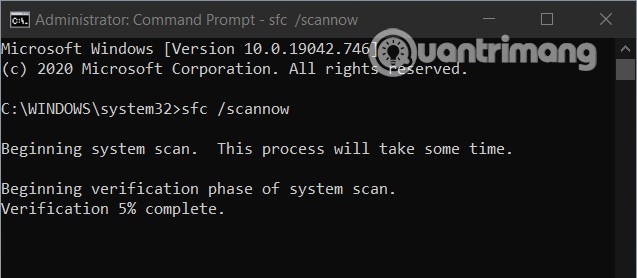
<p style="text-align: justify;">Để khắc phục vấn đề này, bạn cũng có thể dùng tính năng System File Checker (SFC) của Windows 10. Khi được kích hoạt, SFC sẽ tiến hành quét xem hệ thống có gặp trục trặc gì không. Nếu phát hiện lỗi, SFC sẽ tiến hành sửa chữa tự động.</p>

<p style="text-align: justify;">Cách kích hoạt SFC bạn có thể tham khảo trong bài viết dưới đây:</p>

<div style="text-align: justify;">&nbsp;</div>

<p style="text-align: justify;"><img alt="" data-i="1" data-src="https://st.quantrimang.com/photos/image/2021/01/19/sua-loi-windows-10-khong-the-khoi-dong-do-thieu-driver-he-thong-ma-0xc0000221-1.jpg" data-was-processed="true" height="278" src="https://st.quantrimang.com/photos/image/2021/01/19/sua-loi-windows-10-khong-the-khoi-dong-do-thieu-driver-he-thong-ma-0xc0000221-1.jpg" width="637" /></p>

<h2 style="text-align: justify;">3. Xóa driver bị lỗi</h2>

<p style="text-align: justify;">Để thực hiện phương pháp này, bạn cần&nbsp;truy cập Advanced Options&nbsp;và chọn&nbsp;<strong>Command Prompt</strong>. Trong cửa sổ Command Prompt bạn nhập dòng lệnh sau vào rồi nhấn Enter</p>

<pre id="pre0">
<code>cd..
 cd windows\system32
 del netqevbda.inf</code></pre>

<p style="text-align: justify;">Bạn cũng có thể dùng câu lệnh trên để xóa file qevbd.inf. Lưu ý rằng trước khi thực hiện các câu lệnh trong Command Prompt bạn nên sao lưu hệ thống Windows 10 để đề phòng rủi ro.</p>

<h2 style="text-align: justify;">4. Chạy Automatic Startup Repair</h2>

<p style="text-align: justify;">Giải pháp tiếp theo mà bạn có thể sử dụng đó là dùng công cụ Automatic Startup Repair của Windows 10. Đây là hệ thống sửa lỗi tự động mà Microsoft tích hợp vào Windows 10 và nó có thể giúp bạn khắc phục khá nhiều sự cố.</p>

<p style="text-align: justify;">Cách chạy Automatic Startup Repair bạn tham khảo trong bài viết dưới đây:</p>

<div style="text-align: justify;">&nbsp;</div>

<h2 style="text-align: justify;">5. Khôi phục lại hệ thống bằng file sao lưu</h2>

<p style="text-align: justify;">Nếu không một giải pháp nào phía trên giúp bạn giải quyết được vấn đề, bạn có thể thử giải pháp cuối cùng này. Điều kiện của giải pháp này là trước đó bạn từng sao lưu hệ thống Windows 10 của mình. Giải pháp này cũng có một nhược điểm đó là bạn sẽ mất các tập tin mà mình chưa kịp sao lưu.</p>
		</div>
				<div id="author">
						<p>
				<strong>Nguồn tin:</strong>
				Quantrimang.com
			</p>
		</div>
	</div>
	<div id="footer" class="clearfix">
		<div id="url">
			<strong>URL của bản tin này: </strong><a href="https://www.nguoicodonvn2008.info/vi/news/savefile/kien-thuc-may-tinh/cach-sua-loi-0xc0000221-tren-windows-10-may-tinh-khong-the-khoi-dong-do-thieu-driver-he-thong-3513.html" title="Cách sửa lỗi 0xc0000221 trên Windows 10, máy tính không thể khởi động do thiếu driver hệ thống">https://www.nguoicodonvn2008.info/vi/news/savefile/kien-thuc-may-tinh/cach-sua-loi-0xc0000221-tren-windows-10-may-tinh-khong-the-khoi-dong-do-thieu-driver-he-thong-3513.html</a>

		</div>
		<div class="clear"></div>
		<div class="copyright">
			&copy; .&#x3A; Nguoicodonvn2008.info - Cõi lòng người cô đơn &#x3A;.
		</div>
		<div id="contact">
			<a href="mailto:admin@nguoicodonvn2008.info">admin@nguoicodonvn2008.info</a>
		</div>
	</div>
</div>
        <div id="timeoutsess" class="chromeframe">
            Bạn đã không sử dụng Site, <a onclick="timeoutsesscancel();" href="https://nguoicodonvn2008.info/#">Bấm vào đây để duy trì trạng thái đăng nhập</a>. Thời gian chờ: <span id="secField"> 60 </span> giây
        </div>
        <div id="openidResult" class="nv-alert" style="display:none"></div>
        <div id="openidBt" data-result="" data-redirect=""></div>
		</script>
		<div class="car-top">
  <span><img src="https://nguoicodonvn2008.info/themes/default/images/car.png" alt=""></span>
</div>
<script src="https://nguoicodonvn2008.info/assets/js/jquery/jquery.min.js"></script>
<script>var nv_base_siteurl="/",nv_lang_data="vi",nv_lang_interface="vi",nv_name_variable="nv",nv_fc_variable="op",nv_lang_variable="language",nv_module_name="news",nv_func_name="savefile",nv_is_user=0, nv_my_ofs=-4,nv_my_abbr="EDT",nv_cookie_prefix="nv4c_e856T",nv_check_pass_mstime=1738000,nv_area_admin=0,nv_safemode=0,theme_responsive=0,nv_recaptcha_ver=2,nv_recaptcha_sitekey="",nv_recaptcha_type="image",XSSsanitize=1;</script>
<script src="https://nguoicodonvn2008.info/assets/js/language/vi.js"></script>
<script src="https://nguoicodonvn2008.info/assets/js/DOMPurify/purify3.js"></script>
<script src="https://nguoicodonvn2008.info/assets/js/global.js"></script>
<script src="https://nguoicodonvn2008.info/assets/js/site.js"></script>
<script src="https://nguoicodonvn2008.info/themes/default/js/news.js"></script>
<script src="https://nguoicodonvn2008.info/themes/default/js/main.js"></script>
<script src="https://nguoicodonvn2008.info/themes/default/js/custom.js"></script>
<script type="application/ld+json">
        {
            "@context": "https://schema.org",
            "@type": "Organization",
            "url": "https://nguoicodonvn2008.info",
            "logo": "https://nguoicodonvn2008.info/uploads/angel.gif"
        }
        </script>
<script src="https://nguoicodonvn2008.info/themes/default/js/bootstrap.min.js"></script>
<script type="text/javascript">
var $scrolltop = $('.car-top');
$scrolltop.on('click', function () {
    $('html,body').animate({
        scrollTop: 0
    }, 800);
    $(this).addClass("car-run");
    setTimeout(function(){ $scrolltop.removeClass('car-run');}, 1000);
    return false;
});
$(window).on('scroll', function ()
{ 
    if($(window).scrollTop() >= 200)
    {
        $scrolltop.addClass("show");
        $scrolltop.addClass("car-down");
    }
    else
    {
       $scrolltop.removeClass("show");
       setTimeout(function(){ $scrolltop.removeClass('car-down');}, 300);
    }
});
</script>
</body>
</html>