<!DOCTYPE html>
    <html lang="vi" xmlns="http://www.w3.org/1999/xhtml" prefix="og: http://ogp.me/ns#">
    <head>
<title>Cách sử dụng tính năng Windows Tiling trong macOS Sequoia</title>
<meta name="description" content="Cách sử dụng tính năng Windows Tiling trong macOS Sequoia - Savefile - Tin Tức -...">
<meta name="author" content=".: Nguoicodonvn2008.info - Cõi lòng người cô đơn :.">
<meta name="copyright" content=".: Nguoicodonvn2008.info - Cõi lòng người cô đơn :. [admin@nguoicodonvn2008.info]">
<meta name="robots" content="index, archive, follow, noodp">
<meta name="googlebot" content="index,archive,follow,noodp">
<meta name="msnbot" content="all,index,follow">
<meta name="generator" content="NukeViet v4.5">
<meta http-equiv="Content-Type" content="text/html; charset=utf-8">
<meta property="og:title" content="Cách sử dụng tính năng Windows Tiling trong macOS Sequoia">
<meta property="og:type" content="website">
<meta property="og:description" content="Savefile - Tin Tức - https&#x3A;&#x002F;&#x002F;www.nguoicodonvn2008.info&#x002F;vi&#x002F;news&#x002F;savefile&#x002F;kien-thuc-may-tinh&#x002F;cach-su-dung-tinh-nang-windows-tiling-trong-macos-sequoia-8700.html">
<meta property="og:site_name" content=".&#x3A; Nguoicodonvn2008.info - Cõi lòng người cô đơn &#x3A;.">
<meta property="og:url" content="https://www.nguoicodonvn2008.info/vi/news/savefile/kien-thuc-may-tinh/cach-su-dung-tinh-nang-windows-tiling-trong-macos-sequoia-8700.html">
<link rel="shortcut icon" href="https://nguoicodonvn2008.info/favicon.ico">
<link rel="canonical" href="https://www.nguoicodonvn2008.info/vi/news/savefile/kien-thuc-may-tinh/cach-su-dung-tinh-nang-windows-tiling-trong-macos-sequoia-8700.html">
<link rel="alternate" href="https://nguoicodonvn2008.info/vi/news/rss/" title="Tin Tức" type="application/rss+xml">
<link rel="alternate" href="https://nguoicodonvn2008.info/vi/news/rss/karaoke-dual/" title="Tin Tức - Karaoke Dual" type="application/rss+xml">
<link rel="alternate" href="https://nguoicodonvn2008.info/vi/news/rss/nhac-tre/" title="Tin Tức - Nhạc trẻ" type="application/rss+xml">
<link rel="alternate" href="https://nguoicodonvn2008.info/vi/news/rss/tru-tinh/" title="Tin Tức - Trữ tình" type="application/rss+xml">
<link rel="alternate" href="https://nguoicodonvn2008.info/vi/news/rss/nuoc-ngoai/" title="Tin Tức - Nước ngoài" type="application/rss+xml">
<link rel="alternate" href="https://nguoicodonvn2008.info/vi/news/rss/remix/" title="Tin Tức - Remix" type="application/rss+xml">
<link rel="alternate" href="https://nguoicodonvn2008.info/vi/news/rss/tam-su-tinh-yeu/" title="Tin Tức - Tâm sự tình yêu" type="application/rss+xml">
<link rel="alternate" href="https://nguoicodonvn2008.info/vi/news/rss/tho-suu-tam/" title="Tin Tức - Thơ sưu tầm" type="application/rss+xml">
<link rel="alternate" href="https://nguoicodonvn2008.info/vi/news/rss/cuoc-song/" title="Tin Tức - Cuộc sống" type="application/rss+xml">
<link rel="alternate" href="https://nguoicodonvn2008.info/vi/news/rss/phan-mem/" title="Tin Tức - Phần mềm" type="application/rss+xml">
<link rel="alternate" href="https://nguoicodonvn2008.info/vi/news/rss/kien-thuc-may-tinh/" title="Tin Tức - Kiến thức máy tính" type="application/rss+xml">
<link rel="alternate" href="https://nguoicodonvn2008.info/vi/news/rss/hoc-tap/" title="Tin Tức - Học tập" type="application/rss+xml">
<link rel="alternate" href="https://nguoicodonvn2008.info/vi/news/rss/tai-lieu/" title="Tin Tức - Tài liệu" type="application/rss+xml">
<link rel="alternate" href="https://nguoicodonvn2008.info/vi/news/rss/de-thi/" title="Tin Tức - Đề thi" type="application/rss+xml">
<link rel="preload" as="style" href="https://nguoicodonvn2008.info/assets/css/font-awesome.min.css" type="text/css">
<link rel="preload" as="style" href="https://nguoicodonvn2008.info/themes/default/css/bootstrap.non-responsive.css" type="text/css">
<link rel="preload" as="style" href="https://nguoicodonvn2008.info/themes/default/css/style.css" type="text/css">
<link rel="preload" as="style" href="https://nguoicodonvn2008.info/themes/default/css/style.non-responsive.css" type="text/css">
<link rel="preload" as="style" href="https://nguoicodonvn2008.info/themes/default/css/news.css" type="text/css">
<link rel="preload" as="style" href="https://nguoicodonvn2008.info/themes/default/css/custom.css" type="text/css">
<link rel="preload" as="script" href="https://nguoicodonvn2008.info/assets/js/jquery/jquery.min.js" type="text/javascript">
<link rel="preload" as="script" href="https://nguoicodonvn2008.info/assets/js/language/vi.js" type="text/javascript">
<link rel="preload" as="script" href="https://nguoicodonvn2008.info/assets/js/DOMPurify/purify3.js" type="text/javascript">
<link rel="preload" as="script" href="https://nguoicodonvn2008.info/assets/js/global.js" type="text/javascript">
<link rel="preload" as="script" href="https://nguoicodonvn2008.info/assets/js/site.js" type="text/javascript">
<link rel="preload" as="script" href="https://nguoicodonvn2008.info/themes/default/js/news.js" type="text/javascript">
<link rel="preload" as="script" href="https://nguoicodonvn2008.info/themes/default/js/main.js" type="text/javascript">
<link rel="preload" as="script" href="https://nguoicodonvn2008.info/themes/default/js/custom.js" type="text/javascript">
<link rel="preload" as="script" href="https://nguoicodonvn2008.info/themes/default/js/bootstrap.min.js" type="text/javascript">
<link rel="stylesheet" href="https://nguoicodonvn2008.info/assets/css/font-awesome.min.css">
<link rel="stylesheet" href="https://nguoicodonvn2008.info/themes/default/css/bootstrap.non-responsive.css">
<link rel="stylesheet" href="https://nguoicodonvn2008.info/themes/default/css/style.css">
<link rel="stylesheet" href="https://nguoicodonvn2008.info/themes/default/css/style.non-responsive.css">
<link rel="StyleSheet" href="https://nguoicodonvn2008.info/themes/default/css/news.css">
<link rel="stylesheet" href="https://nguoicodonvn2008.info/themes/default/css/custom.css">
<style type="text/css">
	body{background: #fff;}
</style>
    </head>
    <body>
<div id="print">
	<div id="hd_print">
		<h2 class="pull-left">.&#x3A; Nguoicodonvn2008.info - Cõi lòng người cô đơn &#x3A;.</h2>
		<p class="pull-right"><a title=".&#x3A; Nguoicodonvn2008.info - Cõi lòng người cô đơn &#x3A;." href="https://nguoicodonvn2008.info/">https://nguoicodonvn2008.info</a></p>
	</div>
	<div class="clear"></div>
	<hr />
	<div id="content">
		<h1>Cách sử dụng tính năng Windows Tiling trong macOS Sequoia</h1>
		<ul class="list-inline">
			<li>Thứ năm - 18/07/2024 23:28</li>
			<li class="hidden-print txtrequired"><em class="fa fa-print">&nbsp;</em><a title="In ra" href="javascript:;" onclick="window.print()">In ra</a></li>
			<li class="hidden-print txtrequired"><em class="fa fa-power-off">&nbsp;</em><a title="Đóng cửa sổ này" href="javascript:;" onclick="window.close()">Đóng cửa sổ này</a></li>
		</ul>
		<div class="clear"></div>
		<div id="hometext">
		</div>
				<div class="imghome">
			<img alt="Cách sử dụng tính năng Windows Tiling trong macOS Sequoia" src="https://st.quantrimang.com/photos/image/2024/07/18/dung-windows-tiling-trong-macos-sequoia-4.jpg" width="460" class="img-thumbnail" />
		</div>
		<div class="clear"></div>
		<div id="bodytext" class="clearfix">
			<p style="text-align: justify;">Apple đã ra mắt hệ điều hành Mac thế hệ tiếp theo, macOS Sequoia tại WWDC 2024. macOS 15 Sequoia mới nhất có rất nhiều tính năng mới và công cụ gốc, một trong số đó là Automatic Windows Tiling. Tính năng quản lý Windows Tiling mới giúp sắp xếp các cửa sổ đã mở thành bố cục phù hợp nhất với mình.</p>

<p style="text-align: justify;">Người dùng PC đã có tính năng này kể từ Windows 7 và Aero Snap. Trước đây, người dùng Mac phải dựa vào một số công cụ của bên thứ ba như Magnet và Rectangle để có được bố cục tương tự. Nhờ công cụ gốc mới trong macOS 15, bạn không cần bất kỳ ứng dụng của bên thứ ba nào. Hãy xem cách sử dụng tính năng Windows Tiling trong macOS 15 Sequoia qua bài viết sau đây nhé!</p>

<h2 style="text-align: justify;">Automatic Windows Tiling trong macOS Sequoia</h2>

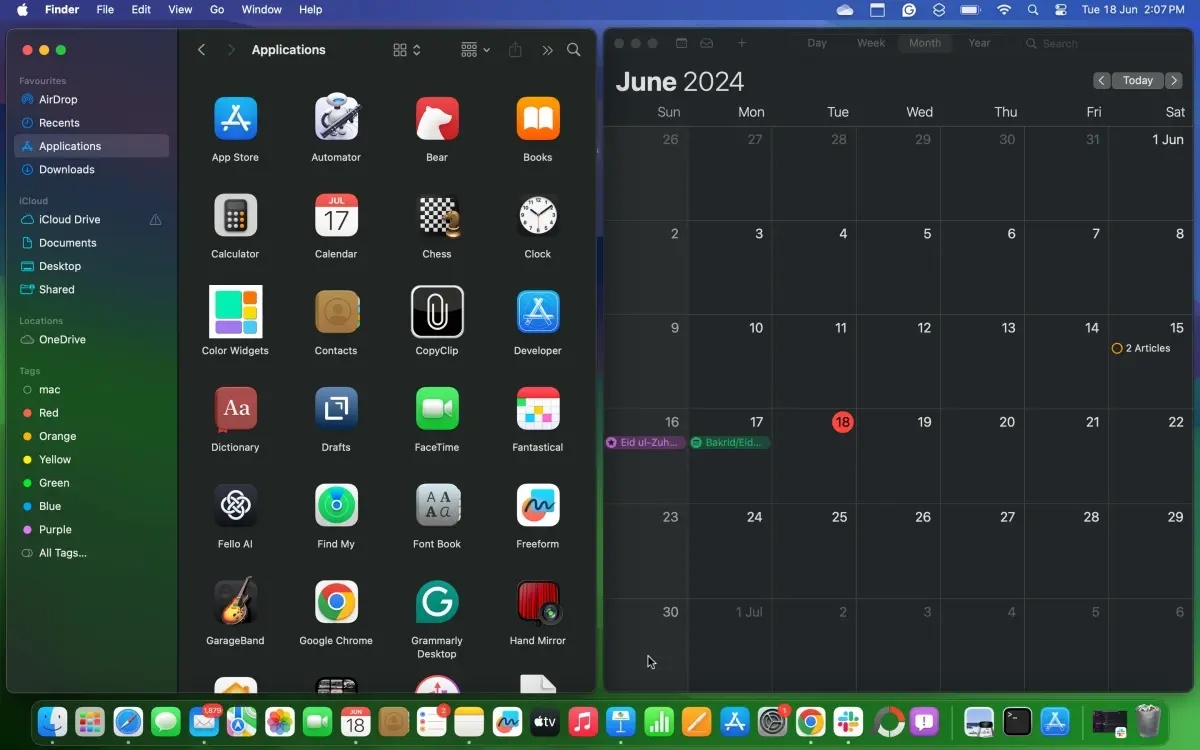
<p style="text-align: justify;">Bạn có thể gọi tính năng Windows Tiling mới theo nhiều cách khác nhau và nó cũng đi kèm với một số phím tắt. MacOS Sequoia của Apple sẽ tự động đề xuất các tùy chọn để sắp xếp lại những cửa sổ. Bạn có thể sắp xếp những tile cạnh nhau hoặc thậm chí đặt chúng ở các góc để chứa nhiều ứng dụng hơn trong tầm nhìn. Dưới đây là tất cả các bước để sử dụng tính năng Windows Tiling trong macOS Sequoia:</p>

<ul>
	<li style="text-align: justify;">Đảm bảo bạn đã&nbsp;cài đặt macOS Sequoia trên máy Mac&nbsp;của mình (hiện đang ở giai đoạn Beta dành cho nhà phát triển).</li>
	<li style="text-align: justify;">Bây giờ, hãy kéo một cửa sổ sang cạnh bên, cạnh trên hoặc dưới hay bất kỳ góc nào trên màn hình.</li>
	<li style="text-align: justify;">macOS Sequoia‌ sẽ hiển thị khung màu xám để gợi ý vị trí xếp kề nhau.</li>
	<li style="text-align: justify;">Khi bạn nhả cửa sổ, nó sẽ tự động thả vào đúng vị trí.</li>
</ul>

<figure>
<div style="text-align: justify;"><img alt="Tính năng Windows Tiling trong macOS Sequoia" data-i="0" data-src="https://st.quantrimang.com/photos/image/2024/07/18/dung-windows-tiling-trong-macos-sequoia-1.jpg" data-was-processed="true" height="750" src="https://st.quantrimang.com/photos/image/2024/07/18/dung-windows-tiling-trong-macos-sequoia-1.jpg" width="1200" /></div>

<figcaption>
<div style="text-align: justify;">Tính năng Windows Tiling trong macOS Sequoia</div>
</figcaption>
</figure>

<div style="text-align: justify;"><iframe allow="autoplay" allowtransparency="true" aria-label="Advertisement" data-google-container-id="a!2" data-google-query-id="CJLExNmUsocDFcOG6QUd57cBRA" data-load-complete="true" frameborder="0" height="0" hspace="0" id="aswift_1" marginheight="0" marginwidth="0" name="aswift_1" sandbox="allow-scripts allow-same-origin allow-forms allow-presentation" scrolling="no" tabindex="0" title="Advertisement" vspace="0" width="694"></iframe></div>

<ul>
	<li style="text-align: justify;">Ngoài ra còn có một số phím tắt có sẵn để tự động xếp các cửa sổ.</li>
	<li style="text-align: justify;">Bạn có thể nhấn&nbsp;<strong>Function + Control + mũi tên Trái, Phải, Lên</strong>&nbsp;hoặc&nbsp;<strong>Xuống</strong>.</li>
	<li style="text-align: justify;">Để sắp xếp lại tiêu đề của cửa sổ, nhấn&nbsp;<strong>Function + Control + Shift + mũi tên Trái, Phải, Lên</strong>&nbsp;hoặc&nbsp;<strong>Xuống</strong>.</li>
	<li style="text-align: justify;">Bạn có thể sử dụng&nbsp;<strong>Function + Control + R</strong>&nbsp;để trả tile cửa sổ về kích thước trước đó.</li>
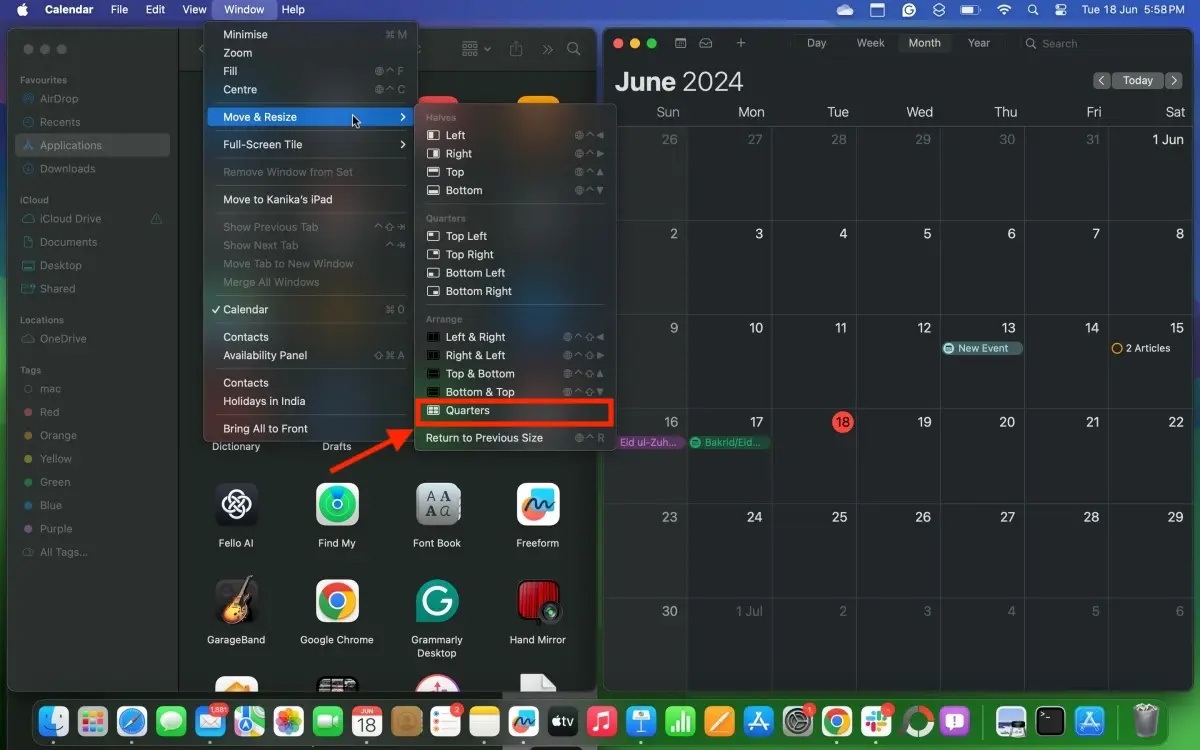
	<li style="text-align: justify;">Bạn cũng có thể vào thanh Menu trên cùng và chọn&nbsp;<strong>Window &gt; Move &amp; Resize</strong>&nbsp;để thay đổi kích thước cửa sổ.</li>
	<li style="text-align: justify;">Để chứa nhiều cửa sổ hơn, bạn có thể nhấp vào&nbsp;<strong>Window &gt; Move &amp; Resize &gt; Quarters</strong>.</li>
</ul>

<figure>
<div style="text-align: justify;"><img alt="Bố cục Quarters trong Automatic Windows Tiling trên macOS 15 Sequoia" data-adbro-processed="true" data-i="1" data-src="https://st.quantrimang.com/photos/image/2024/07/18/dung-windows-tiling-trong-macos-sequoia-2.jpg" data-was-processed="true" height="750" src="https://st.quantrimang.com/photos/image/2024/07/18/dung-windows-tiling-trong-macos-sequoia-2.jpg" width="1200" /></div>

<figcaption>
<div style="text-align: justify;">Bố cục Quarters trong Automatic Windows Tiling trên macOS 15 Sequoia</div>
</figcaption>
</figure>

<ul>
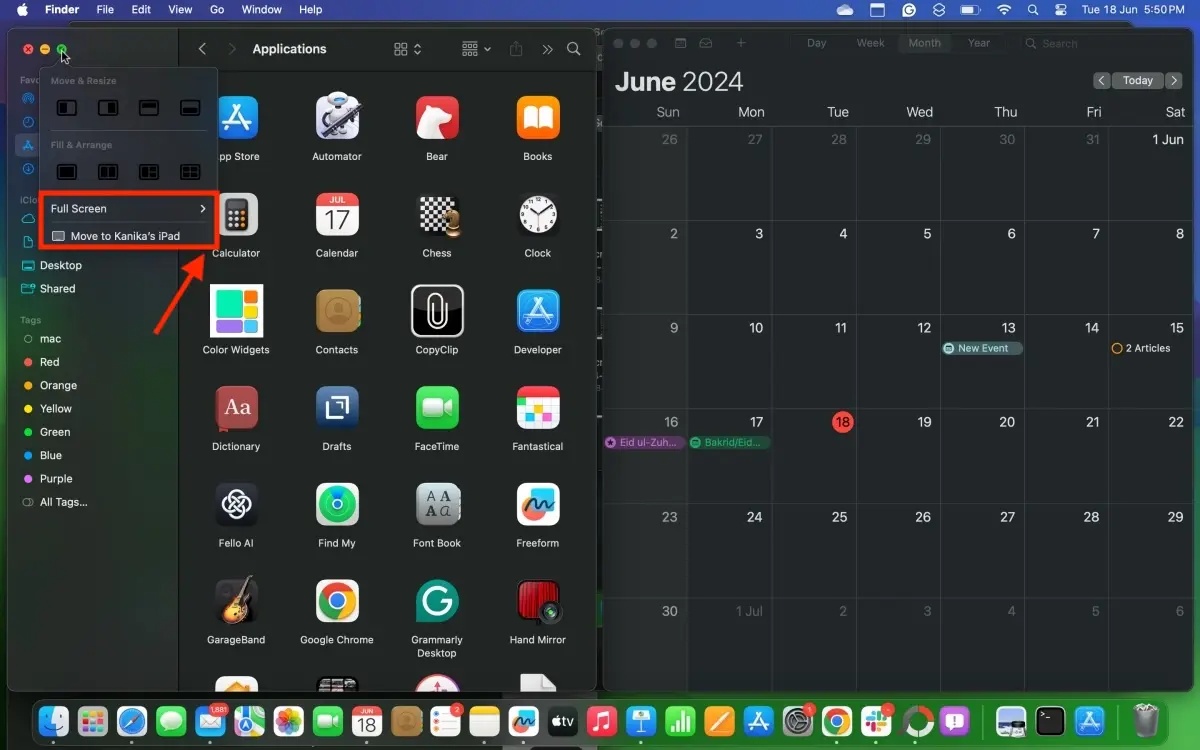
	<li style="text-align: justify;">Ngoài ra, bạn có thể chọn một cửa sổ và di chuột lên nút phóng to màu xanh lá cây ở góc trên cùng bên trái để thay đổi kích thước cửa sổ hoặc thậm chí di chuyển cửa sổ đó sang iPad (nơi bạn đã đăng nhập bằng cùng một ID Apple).</li>
</ul>

<div style="text-align: justify;"><iframe allow="autoplay" allowtransparency="true" aria-label="Advertisement" data-google-container-id="a!3" data-google-query-id="CN7mxNmUsocDFTGH6QUdLgQT9A" data-load-complete="true" frameborder="0" height="0" hspace="0" id="aswift_2" marginheight="0" marginwidth="0" name="aswift_2" sandbox="allow-scripts allow-same-origin allow-forms allow-presentation" scrolling="no" tabindex="0" title="Advertisement" vspace="0" width="694"></iframe></div>

<figure>
<div style="text-align: justify;"><img alt="Automatic Windows Tiling trên macOS Sequoia" data-i="2" data-src="https://st.quantrimang.com/photos/image/2024/07/18/dung-windows-tiling-trong-macos-sequoia-3.jpg" data-was-processed="true" height="750" src="https://st.quantrimang.com/photos/image/2024/07/18/dung-windows-tiling-trong-macos-sequoia-3.jpg" width="1200" /></div>

<figcaption>
<div style="text-align: justify;">Automatic Windows Tiling trên macOS Sequoia</div>
</figcaption>
</figure>

<p style="text-align: justify;">Bằng cách này, bạn có thể sắp xếp hai cửa sổ ứng dụng cạnh nhau hoặc giữ nhiều ứng dụng ở chế độ xem cùng lúc trên máy Mac. Sau khi sử dụng tính năng Auto tiling, nếu bạn di chuyển một cửa sổ theo cách thủ công, nó sẽ trở về kích thước ban đầu.</p>

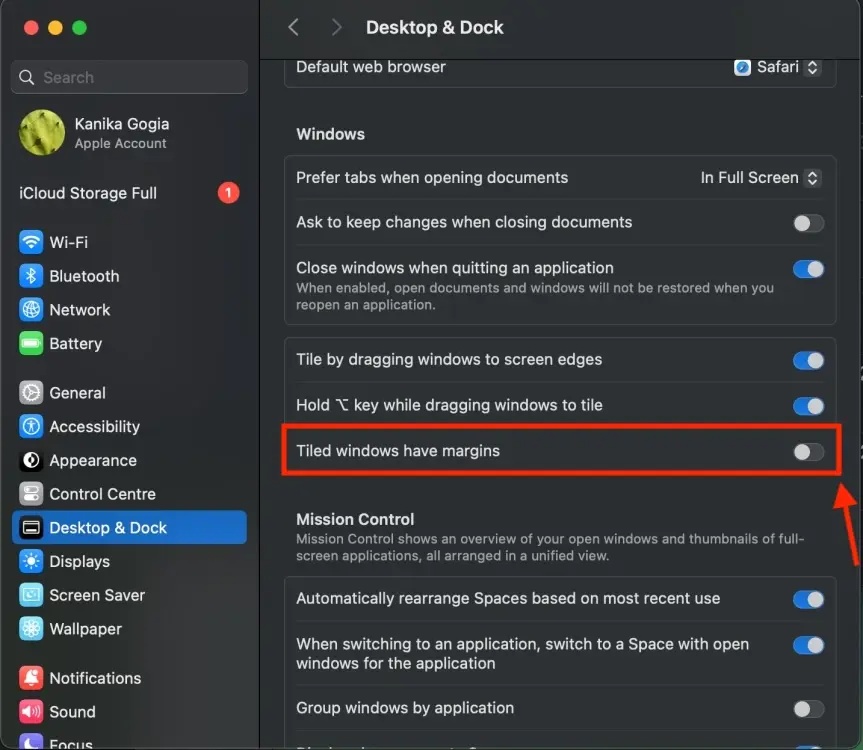
<p style="text-align: justify;">Lưu ý là một số ứng dụng theo thiết kế không thể giảm quá một kích thước nhất định. Do đó, bạn có thể gặp phải tình trạng các cửa sổ biến mất khỏi màn hình hoặc chồng lên nhau. Nếu hệ thống sắp xếp tự động để lại một số khoảng trống giữa các cửa sổ, bạn có thể đi tới&nbsp;<strong>System Settings &gt; Desktop and Dock</strong>, sau đó cuộn xuống và tắt tùy chọn&nbsp;<strong>“Tiled windows have margins”</strong>&nbsp;trong phần&nbsp;<strong>Windows.</strong>&nbsp;Điều này sẽ làm giảm khoảng cách giữa các cửa sổ.</p>

<figure>
<div style="text-align: justify;"><img alt="Tùy chọn Desktop and Dock trong cài đặt máy Mac" data-i="3" data-src="https://st.quantrimang.com/photos/image/2024/07/18/dung-windows-tiling-trong-macos-sequoia-4.jpg" data-was-processed="true" height="750" src="https://st.quantrimang.com/photos/image/2024/07/18/dung-windows-tiling-trong-macos-sequoia-4.jpg" width="863" /></div>

<figcaption>
<div style="text-align: justify;">Tùy chọn Desktop and Dock trong cài đặt máy Mac</div>
</figcaption>
</figure>

<p style="text-align: justify;">Trong phiên bản beta 2, tính năng Automatic Windows Tiling hiện đang hoạt động nhưng có một số độ trễ nhỏ và các cửa sổ không được hiển thị chính xác trong bố cục một phần tư. Tuy nhiên, chúng hoạt động bình thường khi được đặt cạnh nhau.</p>

<p style="text-align: justify;">Tất nhiên, Apple sẽ thực hiện một số cải tiến và hy vọng tất cả các tính năng sẽ hoạt động bình thường khi phiên bản ổn định của macOS Sequia ra mắt vào cuối năm nay.</p>
		</div>
				<div id="author">
						<p>
				<strong>Nguồn tin:</strong>
				Quantrimang.com:
			</p>
		</div>
	</div>
	<div id="footer" class="clearfix">
		<div id="url">
			<strong>URL của bản tin này: </strong><a href="https://www.nguoicodonvn2008.info/vi/news/savefile/kien-thuc-may-tinh/cach-su-dung-tinh-nang-windows-tiling-trong-macos-sequoia-8700.html" title="Cách sử dụng tính năng Windows Tiling trong macOS Sequoia">https://www.nguoicodonvn2008.info/vi/news/savefile/kien-thuc-may-tinh/cach-su-dung-tinh-nang-windows-tiling-trong-macos-sequoia-8700.html</a>

		</div>
		<div class="clear"></div>
		<div class="copyright">
			&copy; .&#x3A; Nguoicodonvn2008.info - Cõi lòng người cô đơn &#x3A;.
		</div>
		<div id="contact">
			<a href="mailto:admin@nguoicodonvn2008.info">admin@nguoicodonvn2008.info</a>
		</div>
	</div>
</div>
        <div id="timeoutsess" class="chromeframe">
            Bạn đã không sử dụng Site, <a onclick="timeoutsesscancel();" href="https://nguoicodonvn2008.info/#">Bấm vào đây để duy trì trạng thái đăng nhập</a>. Thời gian chờ: <span id="secField"> 60 </span> giây
        </div>
        <div id="openidResult" class="nv-alert" style="display:none"></div>
        <div id="openidBt" data-result="" data-redirect=""></div>
		</script>
		<div class="car-top">
  <span><img src="https://nguoicodonvn2008.info/themes/default/images/car.png" alt=""></span>
</div>
<script src="https://nguoicodonvn2008.info/assets/js/jquery/jquery.min.js"></script>
<script>var nv_base_siteurl="/",nv_lang_data="vi",nv_lang_interface="vi",nv_name_variable="nv",nv_fc_variable="op",nv_lang_variable="language",nv_module_name="news",nv_func_name="savefile",nv_is_user=0, nv_my_ofs=-4,nv_my_abbr="EDT",nv_cookie_prefix="nv4c_e856T",nv_check_pass_mstime=1738000,nv_area_admin=0,nv_safemode=0,theme_responsive=0,nv_recaptcha_ver=2,nv_recaptcha_sitekey="",nv_recaptcha_type="image",XSSsanitize=1;</script>
<script src="https://nguoicodonvn2008.info/assets/js/language/vi.js"></script>
<script src="https://nguoicodonvn2008.info/assets/js/DOMPurify/purify3.js"></script>
<script src="https://nguoicodonvn2008.info/assets/js/global.js"></script>
<script src="https://nguoicodonvn2008.info/assets/js/site.js"></script>
<script src="https://nguoicodonvn2008.info/themes/default/js/news.js"></script>
<script src="https://nguoicodonvn2008.info/themes/default/js/main.js"></script>
<script src="https://nguoicodonvn2008.info/themes/default/js/custom.js"></script>
<script type="application/ld+json">
        {
            "@context": "https://schema.org",
            "@type": "Organization",
            "url": "https://nguoicodonvn2008.info",
            "logo": "https://nguoicodonvn2008.info/uploads/angel.gif"
        }
        </script>
<script src="https://nguoicodonvn2008.info/themes/default/js/bootstrap.min.js"></script>
<script type="text/javascript">
var $scrolltop = $('.car-top');
$scrolltop.on('click', function () {
    $('html,body').animate({
        scrollTop: 0
    }, 800);
    $(this).addClass("car-run");
    setTimeout(function(){ $scrolltop.removeClass('car-run');}, 1000);
    return false;
});
$(window).on('scroll', function ()
{ 
    if($(window).scrollTop() >= 200)
    {
        $scrolltop.addClass("show");
        $scrolltop.addClass("car-down");
    }
    else
    {
       $scrolltop.removeClass("show");
       setTimeout(function(){ $scrolltop.removeClass('car-down');}, 300);
    }
});
</script>
</body>
</html>