<!DOCTYPE html>
    <html lang="vi" xmlns="http://www.w3.org/1999/xhtml" prefix="og: http://ogp.me/ns#">
    <head>
<title>Cách sử dụng TikTok trên Chromebook</title>
<meta name="description" content="Cách sử dụng TikTok trên Chromebook - Savefile - Tin Tức -...">
<meta name="author" content=".: Nguoicodonvn2008.info - Cõi lòng người cô đơn :.">
<meta name="copyright" content=".: Nguoicodonvn2008.info - Cõi lòng người cô đơn :. [admin@nguoicodonvn2008.info]">
<meta name="robots" content="index, archive, follow, noodp">
<meta name="googlebot" content="index,archive,follow,noodp">
<meta name="msnbot" content="all,index,follow">
<meta name="generator" content="NukeViet v4.5">
<meta http-equiv="Content-Type" content="text/html; charset=utf-8">
<meta property="og:title" content="Cách sử dụng TikTok trên Chromebook">
<meta property="og:type" content="website">
<meta property="og:description" content="Savefile - Tin Tức - https&#x3A;&#x002F;&#x002F;www.nguoicodonvn2008.info&#x002F;vi&#x002F;news&#x002F;savefile&#x002F;kien-thuc-may-tinh&#x002F;cach-su-dung-tiktok-tren-chromebook-5634.html">
<meta property="og:site_name" content=".&#x3A; Nguoicodonvn2008.info - Cõi lòng người cô đơn &#x3A;.">
<meta property="og:url" content="https://www.nguoicodonvn2008.info/vi/news/savefile/kien-thuc-may-tinh/cach-su-dung-tiktok-tren-chromebook-5634.html">
<link rel="shortcut icon" href="https://nguoicodonvn2008.info/favicon.ico">
<link rel="canonical" href="https://www.nguoicodonvn2008.info/vi/news/savefile/kien-thuc-may-tinh/cach-su-dung-tiktok-tren-chromebook-5634.html">
<link rel="alternate" href="https://nguoicodonvn2008.info/vi/news/rss/" title="Tin Tức" type="application/rss+xml">
<link rel="alternate" href="https://nguoicodonvn2008.info/vi/news/rss/karaoke-dual/" title="Tin Tức - Karaoke Dual" type="application/rss+xml">
<link rel="alternate" href="https://nguoicodonvn2008.info/vi/news/rss/nhac-tre/" title="Tin Tức - Nhạc trẻ" type="application/rss+xml">
<link rel="alternate" href="https://nguoicodonvn2008.info/vi/news/rss/tru-tinh/" title="Tin Tức - Trữ tình" type="application/rss+xml">
<link rel="alternate" href="https://nguoicodonvn2008.info/vi/news/rss/nuoc-ngoai/" title="Tin Tức - Nước ngoài" type="application/rss+xml">
<link rel="alternate" href="https://nguoicodonvn2008.info/vi/news/rss/remix/" title="Tin Tức - Remix" type="application/rss+xml">
<link rel="alternate" href="https://nguoicodonvn2008.info/vi/news/rss/tam-su-tinh-yeu/" title="Tin Tức - Tâm sự tình yêu" type="application/rss+xml">
<link rel="alternate" href="https://nguoicodonvn2008.info/vi/news/rss/tho-suu-tam/" title="Tin Tức - Thơ sưu tầm" type="application/rss+xml">
<link rel="alternate" href="https://nguoicodonvn2008.info/vi/news/rss/cuoc-song/" title="Tin Tức - Cuộc sống" type="application/rss+xml">
<link rel="alternate" href="https://nguoicodonvn2008.info/vi/news/rss/phan-mem/" title="Tin Tức - Phần mềm" type="application/rss+xml">
<link rel="alternate" href="https://nguoicodonvn2008.info/vi/news/rss/kien-thuc-may-tinh/" title="Tin Tức - Kiến thức máy tính" type="application/rss+xml">
<link rel="alternate" href="https://nguoicodonvn2008.info/vi/news/rss/hoc-tap/" title="Tin Tức - Học tập" type="application/rss+xml">
<link rel="alternate" href="https://nguoicodonvn2008.info/vi/news/rss/tai-lieu/" title="Tin Tức - Tài liệu" type="application/rss+xml">
<link rel="alternate" href="https://nguoicodonvn2008.info/vi/news/rss/de-thi/" title="Tin Tức - Đề thi" type="application/rss+xml">
<link rel="preload" as="style" href="https://nguoicodonvn2008.info/assets/css/font-awesome.min.css" type="text/css">
<link rel="preload" as="style" href="https://nguoicodonvn2008.info/themes/default/css/bootstrap.non-responsive.css" type="text/css">
<link rel="preload" as="style" href="https://nguoicodonvn2008.info/themes/default/css/style.css" type="text/css">
<link rel="preload" as="style" href="https://nguoicodonvn2008.info/themes/default/css/style.non-responsive.css" type="text/css">
<link rel="preload" as="style" href="https://nguoicodonvn2008.info/themes/default/css/news.css" type="text/css">
<link rel="preload" as="style" href="https://nguoicodonvn2008.info/themes/default/css/custom.css" type="text/css">
<link rel="preload" as="script" href="https://nguoicodonvn2008.info/assets/js/jquery/jquery.min.js" type="text/javascript">
<link rel="preload" as="script" href="https://nguoicodonvn2008.info/assets/js/language/vi.js" type="text/javascript">
<link rel="preload" as="script" href="https://nguoicodonvn2008.info/assets/js/DOMPurify/purify3.js" type="text/javascript">
<link rel="preload" as="script" href="https://nguoicodonvn2008.info/assets/js/global.js" type="text/javascript">
<link rel="preload" as="script" href="https://nguoicodonvn2008.info/assets/js/site.js" type="text/javascript">
<link rel="preload" as="script" href="https://nguoicodonvn2008.info/themes/default/js/news.js" type="text/javascript">
<link rel="preload" as="script" href="https://nguoicodonvn2008.info/themes/default/js/main.js" type="text/javascript">
<link rel="preload" as="script" href="https://nguoicodonvn2008.info/themes/default/js/custom.js" type="text/javascript">
<link rel="preload" as="script" href="https://nguoicodonvn2008.info/themes/default/js/bootstrap.min.js" type="text/javascript">
<link rel="stylesheet" href="https://nguoicodonvn2008.info/assets/css/font-awesome.min.css">
<link rel="stylesheet" href="https://nguoicodonvn2008.info/themes/default/css/bootstrap.non-responsive.css">
<link rel="stylesheet" href="https://nguoicodonvn2008.info/themes/default/css/style.css">
<link rel="stylesheet" href="https://nguoicodonvn2008.info/themes/default/css/style.non-responsive.css">
<link rel="StyleSheet" href="https://nguoicodonvn2008.info/themes/default/css/news.css">
<link rel="stylesheet" href="https://nguoicodonvn2008.info/themes/default/css/custom.css">
<style type="text/css">
	body{background: #fff;}
</style>
    </head>
    <body>
<div id="print">
	<div id="hd_print">
		<h2 class="pull-left">.&#x3A; Nguoicodonvn2008.info - Cõi lòng người cô đơn &#x3A;.</h2>
		<p class="pull-right"><a title=".&#x3A; Nguoicodonvn2008.info - Cõi lòng người cô đơn &#x3A;." href="https://nguoicodonvn2008.info/">https://nguoicodonvn2008.info</a></p>
	</div>
	<div class="clear"></div>
	<hr />
	<div id="content">
		<h1>Cách sử dụng TikTok trên Chromebook</h1>
		<ul class="list-inline">
			<li>Thứ năm - 19/05/2022 00:51</li>
			<li class="hidden-print txtrequired"><em class="fa fa-print">&nbsp;</em><a title="In ra" href="javascript:;" onclick="window.print()">In ra</a></li>
			<li class="hidden-print txtrequired"><em class="fa fa-power-off">&nbsp;</em><a title="Đóng cửa sổ này" href="javascript:;" onclick="window.close()">Đóng cửa sổ này</a></li>
		</ul>
		<div class="clear"></div>
		<div id="hometext">
		</div>
				<div class="imghome">
			<img alt="Cách sử dụng TikTok trên Chromebook" src="https://st.quantrimang.com/photos/image/2022/05/09/su-dung-tiktok-tren-chromebook4.jpg" width="460" class="img-thumbnail" />
		</div>
		<div class="clear"></div>
		<div id="bodytext" class="clearfix">
			<p style="text-align: justify;">TikTok được thiết kế để cho trải nghiệm tối ưu trên thiết bị màn hình dọc như điện thoại thông minh. Tuy nhiên, nếu bạn muốn sử dụng TikTok để giải trí ngay trên chiếc Chromebook mỏng, gọn của mình thì sao? Trên thực tế, có một số tùy chọn khi sử dụng TikTok trên ChromeOS cũng khá “hay ho”. Cùng tìm hiểu ngay sau đây.</p>

<h2 style="text-align: justify;">TikTok trên trình duyệt web</h2>

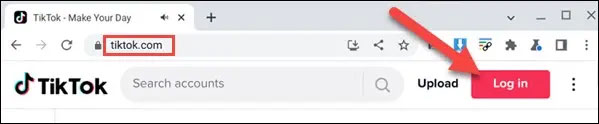
<p style="text-align: justify;">Tương tự như các nền tảng mạng xã hội khác, TikTok có một trang web trên máy tính hoạt động rất giống với các ứng dụng dành cho thiết bị di động. Truy cập tiktok.com trong trình duyệt Chrome trên Chromebook của bạn. Điều đầu tiên cần làm là “Đăng nhập”.</p>

<p style="text-align: justify;"><img alt="Điều đầu tiên cần làm là “Đăng nhập”" data-i="0" data-src="https://st.quantrimang.com/photos/image/2022/05/09/su-dung-tiktok-tren-chromebook1.jpg" data-was-processed="true" height="124" src="https://st.quantrimang.com/photos/image/2022/05/09/su-dung-tiktok-tren-chromebook1.jpg" width="599" /></p>

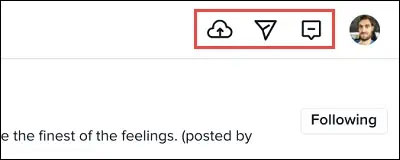
<p style="text-align: justify;">Sau đó, bạn sẽ thấy tất cả các tùy chọn TikTok quen thuộc trong một bố cục khác. Những mục chính như Tải lên (Upload), nhắn tin (message) và hộp thư đến (inbox) đều nằm ở góc trên cùng bên phải cửa sổ.</p>

<p style="text-align: justify;"><img alt="" data-i="1" data-src="https://st.quantrimang.com/photos/image/2022/05/09/su-dung-tiktok-tren-chromebook2.jpg" data-was-processed="true" height="160" src="https://st.quantrimang.com/photos/image/2022/05/09/su-dung-tiktok-tren-chromebook2.jpg" width="400" /></p>

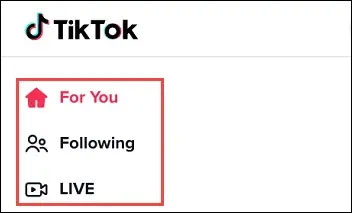
<p style="text-align: justify;">Các tab For You (Dành cho bạn), Following (Đang theo dõi) và Live (Trực tiếp) sẽ nằm ở bên trái.</p>

<p style="text-align: justify;"><img alt="Các tab quen thuộc" data-i="2" data-src="https://st.quantrimang.com/photos/image/2022/05/09/su-dung-tiktok-tren-chromebook3.jpg" data-was-processed="true" height="213" src="https://st.quantrimang.com/photos/image/2022/05/09/su-dung-tiktok-tren-chromebook3.jpg" width="352" /></p>

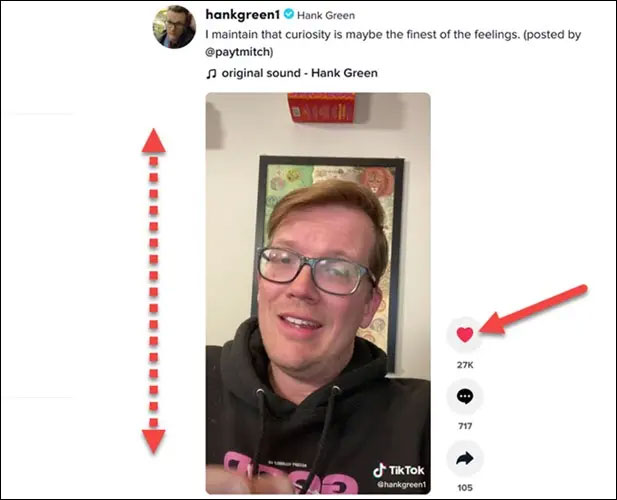
<p style="text-align: justify;">Bạn có thể cuộn lên và xuống qua video tương tự như các thao tác trong ứng dụng trên điện thoại. Các nút Like (Thích), Comment (Bình luận) và Share (Chia sẻ) vẫn sẽ nằm ở phía bên phải của video.</p>

<p style="text-align: justify;"><img alt="Các nút Like (Thích), Comment (Bình luận) và Share (Chia sẻ)" data-i="3" data-src="https://st.quantrimang.com/photos/image/2022/05/09/su-dung-tiktok-tren-chromebook4.jpg" data-was-processed="true" height="500" src="https://st.quantrimang.com/photos/image/2022/05/09/su-dung-tiktok-tren-chromebook4.jpg" width="617" /></p>

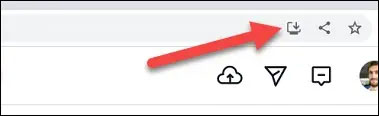
<p style="text-align: justify;">Nếu bạn muốn ứng dụng web TikTok xuất hiện trong ngăn xếp ứng dụng Chromebook của mình, có thể “install” ứng dụng đó từ thanh địa chỉ của Google Chrome.</p>

<p style="text-align: justify;"><img alt=" “install” ứng dụng đó từ thanh địa chỉ " data-i="4" data-src="https://st.quantrimang.com/photos/image/2022/05/09/su-dung-tiktok-tren-chromebook5.jpg" data-was-processed="true" height="116" src="https://st.quantrimang.com/photos/image/2022/05/09/su-dung-tiktok-tren-chromebook5.jpg" width="379" /></p>

<p style="text-align: justify;">Không quá khi nói rằng TikTok sở hữu một bố cục ứng dụng Web hoạt động tốt đáng ngạc nhiên trên PC.</p>

<h2 style="text-align: justify;">Tải TikTok từ Play Store</h2>

<p style="text-align: justify;">Nếu bạn sử dụng TikTok trên Chromebook nhưng muốn có giao diện giống hệt như trên điện thoại, chỉ cần cài đặt ứng dụng TikTok từ Play Store là xong.</p>

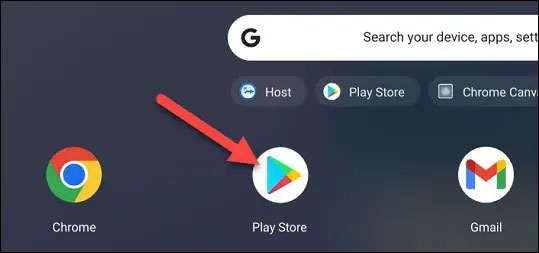
<p style="text-align: justify;">Trước tiên, hãy khởi chạy “Play Store”.</p>

<p style="text-align: justify;"><img alt="Khởi chạy “Play Store”" data-i="5" data-src="https://st.quantrimang.com/photos/image/2022/05/09/su-dung-tiktok-tren-chromebook6.jpg" data-was-processed="true" height="253" src="https://st.quantrimang.com/photos/image/2022/05/09/su-dung-tiktok-tren-chromebook6.jpg" width="539" /></p>

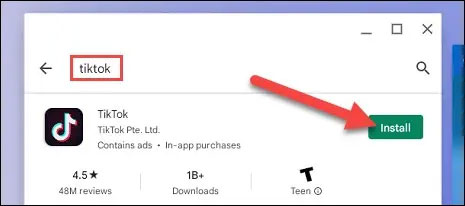
<p style="text-align: justify;">Trên giao diện Play Store hiện ra, bạn tìm từ khóa “<strong>TikTok</strong>” và nhấp vào nút “<strong>Install</strong>” trên kết quả trả về tương ứng.</p>

<p style="text-align: justify;"><img alt="Cài đặt ứng dụng" data-i="6" data-src="https://st.quantrimang.com/photos/image/2022/05/09/su-dung-tiktok-tren-chromebook7.jpg" data-was-processed="true" height="206" src="https://st.quantrimang.com/photos/image/2022/05/09/su-dung-tiktok-tren-chromebook7.jpg" width="465" /></p>

<p style="text-align: justify;">Sau khi ứng dụng cài đặt xong, bạn có thể nhấp vào “<strong>Open</strong>”. Ứng dụng TikTok bây giờ cũng sẽ nằm trong ngăn xếp ứng dụng trên Chromebook của bạn.</p>

<p style="text-align: justify;">Khi ứng dụng mở ra, bạn sẽ thấy một trải nghiệm giống hệt như trên điện thoại. Đăng nhập và bạn sẽ có giao diện TikTok theo chiều dọc trên Chromebook của mình.</p>

<p style="text-align: justify;"><img alt="Một trải nghiệm giống hệt như trên điện thoại" data-i="7" data-src="https://st.quantrimang.com/photos/image/2022/05/09/su-dung-tiktok-tren-chromebook8.jpg" data-was-processed="true" height="500" src="https://st.quantrimang.com/photos/image/2022/05/09/su-dung-tiktok-tren-chromebook8.jpg" width="391" /></p>

<p style="text-align: justify;">Về cơ bản, các mẫu Chromebook cấu hình thấp sẽ gặp nhiều khó khăn hơn khi chạy ứng dụng so với việc sử dụng phiên bản web. Chúc bạn có được trải nghiệm TikTok tốt nhất trên chiếc Chromebook của mình.</p>
		</div>
				<div id="author">
						<p>
				<strong>Nguồn tin:</strong>
				Quantrimang.com
			</p>
		</div>
	</div>
	<div id="footer" class="clearfix">
		<div id="url">
			<strong>URL của bản tin này: </strong><a href="https://www.nguoicodonvn2008.info/vi/news/savefile/kien-thuc-may-tinh/cach-su-dung-tiktok-tren-chromebook-5634.html" title="Cách sử dụng TikTok trên Chromebook">https://www.nguoicodonvn2008.info/vi/news/savefile/kien-thuc-may-tinh/cach-su-dung-tiktok-tren-chromebook-5634.html</a>

		</div>
		<div class="clear"></div>
		<div class="copyright">
			&copy; .&#x3A; Nguoicodonvn2008.info - Cõi lòng người cô đơn &#x3A;.
		</div>
		<div id="contact">
			<a href="mailto:admin@nguoicodonvn2008.info">admin@nguoicodonvn2008.info</a>
		</div>
	</div>
</div>
        <div id="timeoutsess" class="chromeframe">
            Bạn đã không sử dụng Site, <a onclick="timeoutsesscancel();" href="https://nguoicodonvn2008.info/#">Bấm vào đây để duy trì trạng thái đăng nhập</a>. Thời gian chờ: <span id="secField"> 60 </span> giây
        </div>
        <div id="openidResult" class="nv-alert" style="display:none"></div>
        <div id="openidBt" data-result="" data-redirect=""></div>
		</script>
		<div class="car-top">
  <span><img src="https://nguoicodonvn2008.info/themes/default/images/car.png" alt=""></span>
</div>
<script src="https://nguoicodonvn2008.info/assets/js/jquery/jquery.min.js"></script>
<script>var nv_base_siteurl="/",nv_lang_data="vi",nv_lang_interface="vi",nv_name_variable="nv",nv_fc_variable="op",nv_lang_variable="language",nv_module_name="news",nv_func_name="savefile",nv_is_user=0, nv_my_ofs=-4,nv_my_abbr="EDT",nv_cookie_prefix="nv4c_e856T",nv_check_pass_mstime=1738000,nv_area_admin=0,nv_safemode=0,theme_responsive=0,nv_recaptcha_ver=2,nv_recaptcha_sitekey="",nv_recaptcha_type="image",XSSsanitize=1;</script>
<script src="https://nguoicodonvn2008.info/assets/js/language/vi.js"></script>
<script src="https://nguoicodonvn2008.info/assets/js/DOMPurify/purify3.js"></script>
<script src="https://nguoicodonvn2008.info/assets/js/global.js"></script>
<script src="https://nguoicodonvn2008.info/assets/js/site.js"></script>
<script src="https://nguoicodonvn2008.info/themes/default/js/news.js"></script>
<script src="https://nguoicodonvn2008.info/themes/default/js/main.js"></script>
<script src="https://nguoicodonvn2008.info/themes/default/js/custom.js"></script>
<script type="application/ld+json">
        {
            "@context": "https://schema.org",
            "@type": "Organization",
            "url": "https://nguoicodonvn2008.info",
            "logo": "https://nguoicodonvn2008.info/uploads/angel.gif"
        }
        </script>
<script src="https://nguoicodonvn2008.info/themes/default/js/bootstrap.min.js"></script>
<script type="text/javascript">
var $scrolltop = $('.car-top');
$scrolltop.on('click', function () {
    $('html,body').animate({
        scrollTop: 0
    }, 800);
    $(this).addClass("car-run");
    setTimeout(function(){ $scrolltop.removeClass('car-run');}, 1000);
    return false;
});
$(window).on('scroll', function ()
{ 
    if($(window).scrollTop() >= 200)
    {
        $scrolltop.addClass("show");
        $scrolltop.addClass("car-down");
    }
    else
    {
       $scrolltop.removeClass("show");
       setTimeout(function(){ $scrolltop.removeClass('car-down');}, 300);
    }
});
</script>
</body>
</html>