<!DOCTYPE html>
    <html lang="vi" xmlns="http://www.w3.org/1999/xhtml" prefix="og: http://ogp.me/ns#">
    <head>
<title>Cách sử dụng Smart DNS Proxy để truy cập nội dung bị giới hạn địa lý</title>
<meta name="description" content="Cách sử dụng Smart DNS Proxy để truy cập nội dung bị giới hạn địa lý - Savefile - Tin Tức -...">
<meta name="author" content=".: Nguoicodonvn2008.info - Cõi lòng người cô đơn :.">
<meta name="copyright" content=".: Nguoicodonvn2008.info - Cõi lòng người cô đơn :. [admin@nguoicodonvn2008.info]">
<meta name="robots" content="index, archive, follow, noodp">
<meta name="googlebot" content="index,archive,follow,noodp">
<meta name="msnbot" content="all,index,follow">
<meta name="generator" content="NukeViet v4.5">
<meta http-equiv="Content-Type" content="text/html; charset=utf-8">
<meta property="og:title" content="Cách sử dụng Smart DNS Proxy để truy cập nội dung bị giới hạn địa lý">
<meta property="og:type" content="website">
<meta property="og:description" content="Savefile - Tin Tức - https&#x3A;&#x002F;&#x002F;www.nguoicodonvn2008.info&#x002F;vi&#x002F;news&#x002F;savefile&#x002F;kien-thuc-may-tinh&#x002F;cach-su-dung-smart-dns-proxy-de-truy-cap-noi-dung-bi-gioi-han-dia-ly-10072.html">
<meta property="og:site_name" content=".&#x3A; Nguoicodonvn2008.info - Cõi lòng người cô đơn &#x3A;.">
<meta property="og:url" content="https://www.nguoicodonvn2008.info/vi/news/savefile/kien-thuc-may-tinh/cach-su-dung-smart-dns-proxy-de-truy-cap-noi-dung-bi-gioi-han-dia-ly-10072.html">
<link rel="shortcut icon" href="https://nguoicodonvn2008.info/favicon.ico">
<link rel="canonical" href="https://www.nguoicodonvn2008.info/vi/news/savefile/kien-thuc-may-tinh/cach-su-dung-smart-dns-proxy-de-truy-cap-noi-dung-bi-gioi-han-dia-ly-10072.html">
<link rel="alternate" href="https://nguoicodonvn2008.info/vi/news/rss/" title="Tin Tức" type="application/rss+xml">
<link rel="alternate" href="https://nguoicodonvn2008.info/vi/news/rss/karaoke-dual/" title="Tin Tức - Karaoke Dual" type="application/rss+xml">
<link rel="alternate" href="https://nguoicodonvn2008.info/vi/news/rss/nhac-tre/" title="Tin Tức - Nhạc trẻ" type="application/rss+xml">
<link rel="alternate" href="https://nguoicodonvn2008.info/vi/news/rss/tru-tinh/" title="Tin Tức - Trữ tình" type="application/rss+xml">
<link rel="alternate" href="https://nguoicodonvn2008.info/vi/news/rss/nuoc-ngoai/" title="Tin Tức - Nước ngoài" type="application/rss+xml">
<link rel="alternate" href="https://nguoicodonvn2008.info/vi/news/rss/remix/" title="Tin Tức - Remix" type="application/rss+xml">
<link rel="alternate" href="https://nguoicodonvn2008.info/vi/news/rss/tam-su-tinh-yeu/" title="Tin Tức - Tâm sự tình yêu" type="application/rss+xml">
<link rel="alternate" href="https://nguoicodonvn2008.info/vi/news/rss/tho-suu-tam/" title="Tin Tức - Thơ sưu tầm" type="application/rss+xml">
<link rel="alternate" href="https://nguoicodonvn2008.info/vi/news/rss/cuoc-song/" title="Tin Tức - Cuộc sống" type="application/rss+xml">
<link rel="alternate" href="https://nguoicodonvn2008.info/vi/news/rss/phan-mem/" title="Tin Tức - Phần mềm" type="application/rss+xml">
<link rel="alternate" href="https://nguoicodonvn2008.info/vi/news/rss/kien-thuc-may-tinh/" title="Tin Tức - Kiến thức máy tính" type="application/rss+xml">
<link rel="alternate" href="https://nguoicodonvn2008.info/vi/news/rss/hoc-tap/" title="Tin Tức - Học tập" type="application/rss+xml">
<link rel="alternate" href="https://nguoicodonvn2008.info/vi/news/rss/tai-lieu/" title="Tin Tức - Tài liệu" type="application/rss+xml">
<link rel="alternate" href="https://nguoicodonvn2008.info/vi/news/rss/de-thi/" title="Tin Tức - Đề thi" type="application/rss+xml">
<link rel="preload" as="style" href="https://nguoicodonvn2008.info/assets/css/font-awesome.min.css" type="text/css">
<link rel="preload" as="style" href="https://nguoicodonvn2008.info/themes/default/css/bootstrap.non-responsive.css" type="text/css">
<link rel="preload" as="style" href="https://nguoicodonvn2008.info/themes/default/css/style.css" type="text/css">
<link rel="preload" as="style" href="https://nguoicodonvn2008.info/themes/default/css/style.non-responsive.css" type="text/css">
<link rel="preload" as="style" href="https://nguoicodonvn2008.info/themes/default/css/news.css" type="text/css">
<link rel="preload" as="style" href="https://nguoicodonvn2008.info/themes/default/css/custom.css" type="text/css">
<link rel="preload" as="script" href="https://nguoicodonvn2008.info/assets/js/jquery/jquery.min.js" type="text/javascript">
<link rel="preload" as="script" href="https://nguoicodonvn2008.info/assets/js/language/vi.js" type="text/javascript">
<link rel="preload" as="script" href="https://nguoicodonvn2008.info/assets/js/DOMPurify/purify3.js" type="text/javascript">
<link rel="preload" as="script" href="https://nguoicodonvn2008.info/assets/js/global.js" type="text/javascript">
<link rel="preload" as="script" href="https://nguoicodonvn2008.info/assets/js/site.js" type="text/javascript">
<link rel="preload" as="script" href="https://nguoicodonvn2008.info/themes/default/js/news.js" type="text/javascript">
<link rel="preload" as="script" href="https://nguoicodonvn2008.info/themes/default/js/main.js" type="text/javascript">
<link rel="preload" as="script" href="https://nguoicodonvn2008.info/themes/default/js/custom.js" type="text/javascript">
<link rel="preload" as="script" href="https://nguoicodonvn2008.info/themes/default/js/bootstrap.min.js" type="text/javascript">
<link rel="stylesheet" href="https://nguoicodonvn2008.info/assets/css/font-awesome.min.css">
<link rel="stylesheet" href="https://nguoicodonvn2008.info/themes/default/css/bootstrap.non-responsive.css">
<link rel="stylesheet" href="https://nguoicodonvn2008.info/themes/default/css/style.css">
<link rel="stylesheet" href="https://nguoicodonvn2008.info/themes/default/css/style.non-responsive.css">
<link rel="StyleSheet" href="https://nguoicodonvn2008.info/themes/default/css/news.css">
<link rel="stylesheet" href="https://nguoicodonvn2008.info/themes/default/css/custom.css">
<style type="text/css">
	body{background: #fff;}
</style>
    </head>
    <body>
<div id="print">
	<div id="hd_print">
		<h2 class="pull-left">.&#x3A; Nguoicodonvn2008.info - Cõi lòng người cô đơn &#x3A;.</h2>
		<p class="pull-right"><a title=".&#x3A; Nguoicodonvn2008.info - Cõi lòng người cô đơn &#x3A;." href="https://nguoicodonvn2008.info/">https://nguoicodonvn2008.info</a></p>
	</div>
	<div class="clear"></div>
	<hr />
	<div id="content">
		<h1>Cách sử dụng Smart DNS Proxy để truy cập nội dung bị giới hạn địa lý</h1>
		<ul class="list-inline">
			<li>Thứ tư - 26/03/2025 23:29</li>
			<li class="hidden-print txtrequired"><em class="fa fa-print">&nbsp;</em><a title="In ra" href="javascript:;" onclick="window.print()">In ra</a></li>
			<li class="hidden-print txtrequired"><em class="fa fa-power-off">&nbsp;</em><a title="Đóng cửa sổ này" href="javascript:;" onclick="window.close()">Đóng cửa sổ này</a></li>
		</ul>
		<div class="clear"></div>
		<div id="hometext">
		</div>
				<div class="imghome">
			<img alt="Cách sử dụng Smart DNS Proxy để truy cập nội dung bị giới hạn địa lý" src="https://st.quantrimang.com/photos/image/2025/03/26/su-dung-smart-dns-proxy-7.jpg" width="460" class="img-thumbnail" />
		</div>
		<div class="clear"></div>
		<div id="bodytext" class="clearfix">
			<p style="text-align: justify;">Truy cập nội dung bị giới hạn theo khu vực có thể gây khó chịu, đặc biệt là khi đi du lịch hoặc cố gắng xem nội dung media bị giới hạn theo khu vực. Mặc dù&nbsp;VPN&nbsp;là giải pháp phổ biến nhất, nhưng nhiều người thích sử dụng Smart DNS Proxy vì đây là cách đơn giản và hiệu quả hơn để truy cập nội dung không khả dụng tại địa phương.</p>

<h2 style="text-align: justify;">Tại sao nhiều người thích sử dụng Smart DNS Proxy hơn&nbsp;&nbsp;VPN?</h2>

<figure>
<div style="text-align: justify;"><img alt="" data-i="0" data-src="https://st.quantrimang.com/photos/image/2025/03/26/su-dung-smart-dns-proxy-1.jpg" data-was-processed="true" height="928" src="https://st.quantrimang.com/photos/image/2025/03/26/su-dung-smart-dns-proxy-1.jpg" width="1650" /></div>
</figure>

<p style="text-align: justify;">Smart DNS Proxy&nbsp;là giải pháp đơn giản và hiệu quả hơn vì nó chỉ chuyển hướng các truy vấn DNS thay vì định tuyến tất cả lưu lượng truy cập qua tunnel được mã hóa. Điều này cho phép bạn xem video chất lượng cao trực tuyến mà không bị buffering (quá trình tạm thời lưu trữ dữ liệu trước khi nó được xử lý hoặc phát lại), vì lưu lượng truy cập không phải trải qua các bước mã hóa bổ sung.</p>

<p style="text-align: justify;">Nó cũng không&nbsp;ẩn địa chỉ IP, ngăn chặn các sự cố như flag bảo mật trên những trang web ngân hàng hoặc CAPTCHA khó chịu. Bạn có thể truy cập nội dung bị giới hạn theo khu vực trong khi vẫn có thể truy cập liền mạch vào các dịch vụ trực tuyến khác.</p>

<p style="text-align: justify;">Không giống như VPN, yêu cầu cài đặt phần mềm và có thể không hoạt động trên TV thông minh hoặc game console, Smart DNS Proxy cũng có thể được thiết lập trực tiếp trên router và trình phát media, cho phép bạn truy cập các dịch vụ stream TV phổ biến bằng thiết bị bạn thích. Thêm vào đó, vì nó chỉ thay đổi các truy vấn DNS thay vì định tuyến lại lưu lượng truy cập, nên các dịch vụ stream khó phát hiện và chặn hơn, đảm bảo quyền truy cập đáng tin cậy hơn.</p>

<h2 style="text-align: justify;">Cách sử dụng Smart DNS Proxy để truy cập nội dung bị hạn chế theo vị trí địa lý</h2>

<figure>
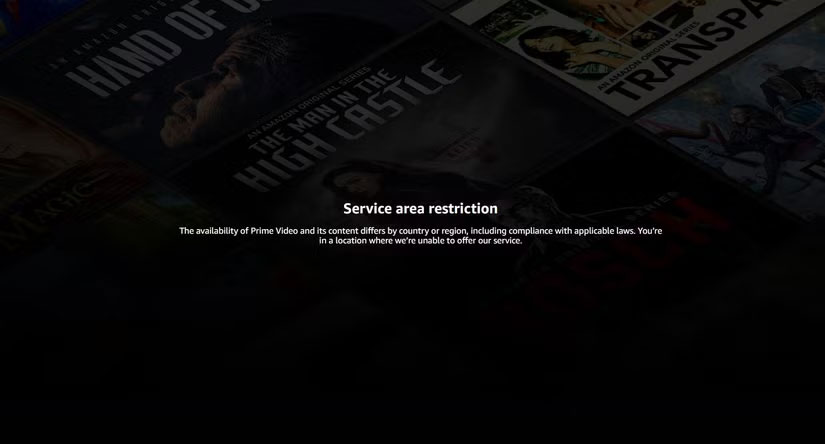
<div style="text-align: justify;"><img alt="Amazon Prime không khả dụng tại một số địa điểm" data-adbro-processed="true" data-i="1" data-src="https://st.quantrimang.com/photos/image/2025/03/26/su-dung-smart-dns-proxy-2.jpg" data-was-processed="true" height="444" src="https://st.quantrimang.com/photos/image/2025/03/26/su-dung-smart-dns-proxy-2.jpg" width="825" /><br />
&nbsp;&nbsp;&nbsp;&nbsp;</div>

<figcaption>
<div style="text-align: justify;">Amazon Prime không khả dụng tại một số địa điểm</div>
</figcaption>
</figure>

<p style="text-align: justify;">Thiết lập Smart DNS Proxy rất đơn giản và hoạt động trên nhiều thiết bị. Ví dụ đang sử dụng&nbsp;&nbsp;Windows&nbsp;11, nhưng Smart DNS Proxy có hướng dẫn dành cho macOS,&nbsp;TV thông minh, console, v.v...</p>

<h3 style="text-align: justify;">Bước 1: Tạo tài khoản SmartDNS</h3>

<figure>
<div style="text-align: justify;"><img alt="Tạo tài khoản SmartDNS" data-i="2" data-src="https://st.quantrimang.com/photos/image/2025/03/26/su-dung-smart-dns-proxy-3.jpg" data-was-processed="true" height="449" src="https://st.quantrimang.com/photos/image/2025/03/26/su-dung-smart-dns-proxy-3.jpg" width="825" /></div>

<figcaption>
<div style="text-align: justify;">Tạo tài khoản SmartDNS</div>
</figcaption>
</figure>

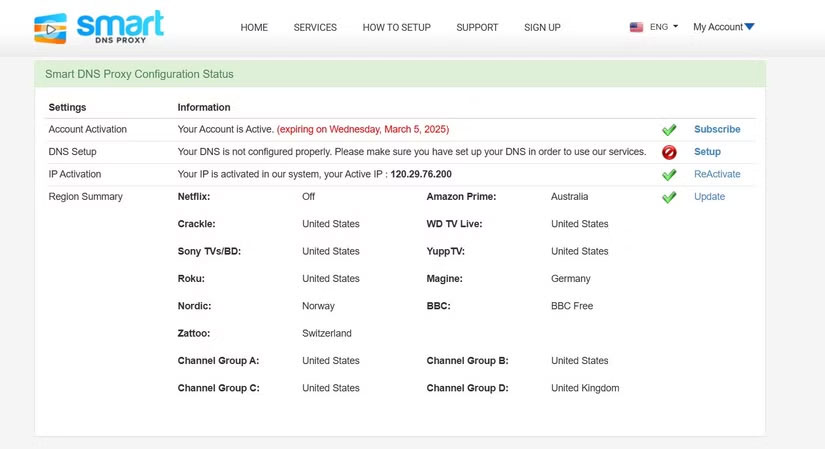
<p style="text-align: justify;">Trước tiên, bạn sẽ muốn tạo tài khoản Smart DNS Proxy bằng email của mình. Họ cung cấp bản dùng thử miễn phí hai tuần (không cần nhập thông tin thẻ tín dụng) với quyền truy cập đầy đủ vào các dịch vụ, ngoại trừ Netflix, chỉ có thể truy cập khi đăng ký trả phí. Vì vậy, trừ khi chủ yếu xem trên Netflix, bạn không cần đăng ký ngay lập tức.</p>

<h3 style="text-align: justify;">Bước 2: Cấu hình Proxy DNS trên thiết bị</h3>

<figure>
<div style="text-align: justify;"><img alt="" data-i="3" data-src="https://st.quantrimang.com/photos/image/2025/03/26/su-dung-smart-dns-proxy-4.jpg" data-was-processed="true" height="541" src="https://st.quantrimang.com/photos/image/2025/03/26/su-dung-smart-dns-proxy-4.jpg" width="960" /></div>
</figure>

<figure>
<div style="text-align: justify;"><img alt="" data-i="4" data-src="https://st.quantrimang.com/photos/image/2025/03/26/su-dung-smart-dns-proxy-5.jpg" data-was-processed="true" height="540" src="https://st.quantrimang.com/photos/image/2025/03/26/su-dung-smart-dns-proxy-5.jpg" width="960" /></div>
</figure>

<figure>
<div style="text-align: justify;"><img alt="" data-i="5" data-src="https://st.quantrimang.com/photos/image/2025/03/26/su-dung-smart-dns-proxy-6.jpg" data-was-processed="true" height="506" src="https://st.quantrimang.com/photos/image/2025/03/26/su-dung-smart-dns-proxy-6.jpg" width="960" /></div>
</figure>

<ul>
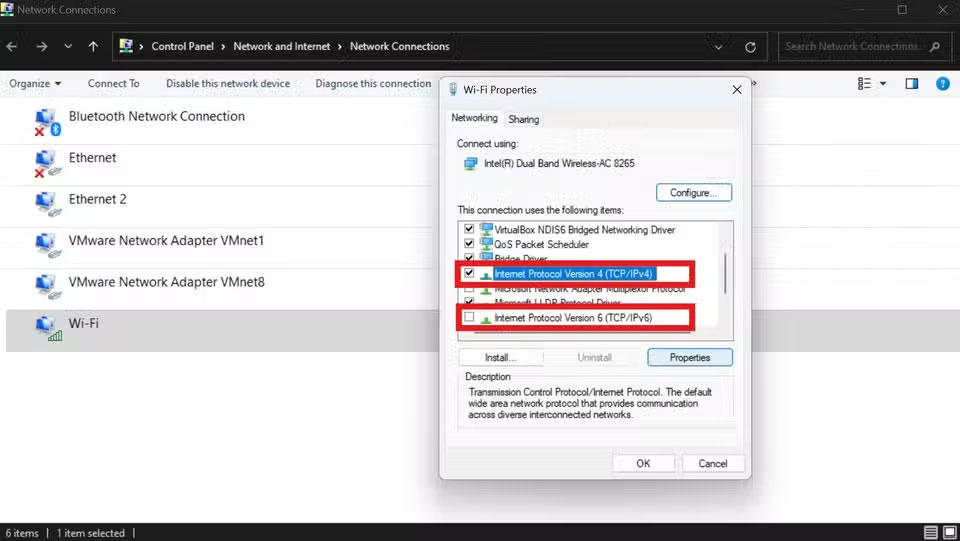
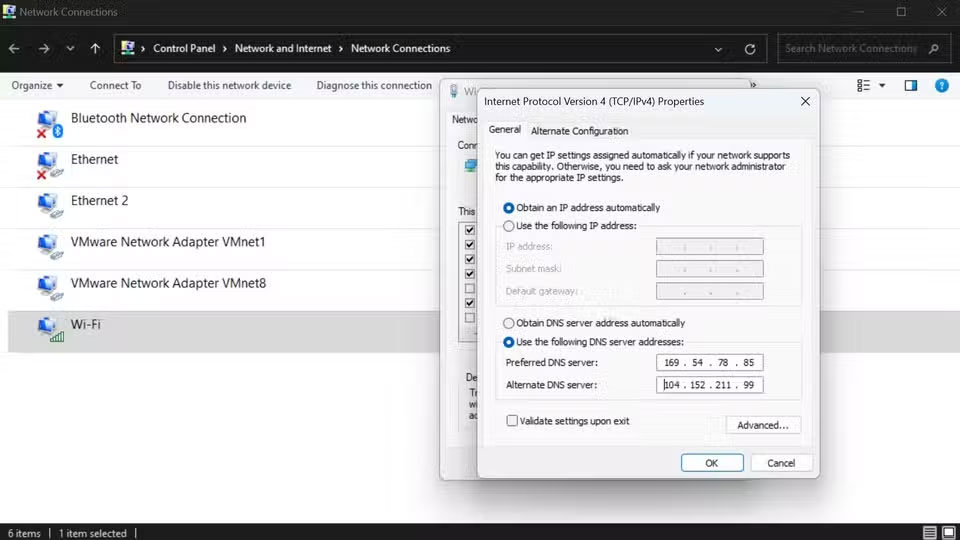
	<li style="text-align: justify;">Bắt đầu bằng cách mở&nbsp;<strong>View Network Connections</strong>&nbsp;bằng cách điều hướng đến&nbsp;<strong>Control Panel &gt; Network and Internet &gt; Network Connections</strong></li>
	<li style="text-align: justify;">Nhấp chuột phải vào adapter và chọn&nbsp;<strong>Properties</strong>, sau đó cuộn xuống để hiển thị các tùy chọn IPv4 và IPv6.</li>
	<li style="text-align: justify;">Bỏ chọn&nbsp;<strong>Internet Protocol Version 6 (TCP/IPv6)</strong>&nbsp;để đảm bảo SmartDNS Proxy chỉ hoạt động với IPv4.</li>
	<li style="text-align: justify;">Sau đó, bạn chọn&nbsp;<strong>Internet Protocol Version 4 (TCP/IPv4)</strong>&nbsp;và nhấp vào&nbsp;<strong>Properties.</strong></li>
	<li style="text-align: justify;">Bây giờ, hãy tích vào&nbsp;<strong>Use the following DNS server addresses</strong>. Sau đó, hãy truy cập danh sách các máy chủ DNS khả dụng của SmartDNS. Chọn bất kỳ hai máy chủ nào mà bạn cho rằng nội dung mình muốn xem không bị chặn và sao chép các địa chỉ IP. Bây giờ, hãy quay lại bảng cấu hình IPv4 và dán cả hai địa chỉ IP vào hộp được cung cấp.</li>
</ul>

<p style="text-align: justify;">Lưu ý rằng thiết bị của bạn sẽ mặc định sử dụng máy chủ DNS mà bạn đã đặt trong&nbsp;<strong>Preferred DNS server</strong>&nbsp;và sẽ chỉ sử dụng&nbsp;<strong>Alternative DNS server</strong>&nbsp;nếu máy chủ ưa thích không khả dụng. Sau khi thiết lập cấu hình mạng, hãy&nbsp;khởi động lại máy tính&nbsp;để đảm bảo rằng tất cả các thay đổi đã được thiết lập.</p>

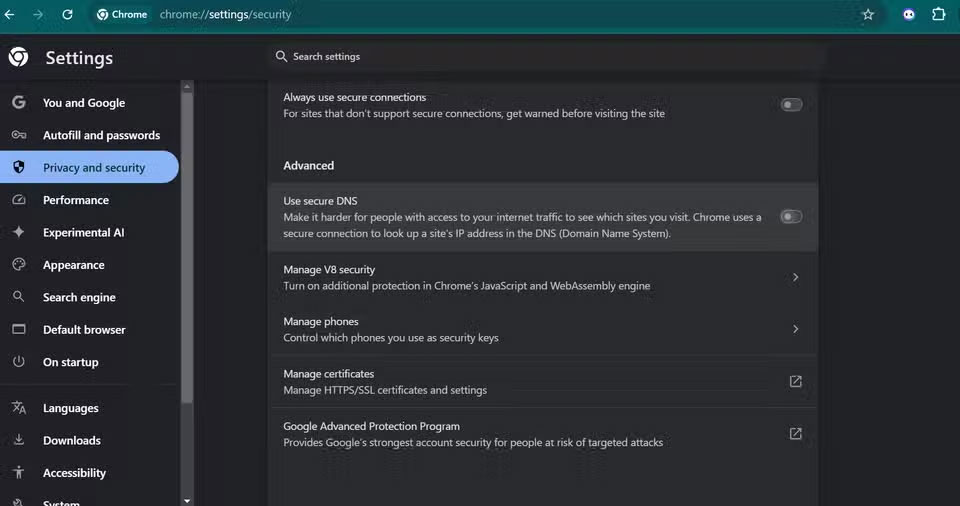
<p style="text-align: justify;">Đôi khi, Google Chrome chặn Smart DNS Proxy khi truy cập nội dung trực tuyến. Để đảm bảo bạn không gặp phải sự cố này, hãy vào&nbsp;<strong>Settings</strong>&nbsp;&gt;&nbsp;<strong>Privacy and security</strong>&nbsp;&gt;&nbsp;<strong>Security</strong>. Cuộn xuống&nbsp;<strong>Advanced</strong>&nbsp;và vô hiệu hóa&nbsp;<strong>Use secure DNS</strong>. Thao tác này sẽ khắc phục sự cố Chrome chặn các trang web do DNS proxy.</p>

<h3 style="text-align: justify;">Bước 3: Kích hoạt và xác minh Proxy DNS Service</h3>

<figure>
<div style="text-align: justify;"><img alt="Amazon prime không còn bị hạn chế về mặt địa lý" data-i="6" data-src="https://st.quantrimang.com/photos/image/2025/03/26/su-dung-smart-dns-proxy-7.jpg" data-was-processed="true" height="788" src="https://st.quantrimang.com/photos/image/2025/03/26/su-dung-smart-dns-proxy-7.jpg" width="1650" /></div>

<figcaption>
<div style="text-align: justify;">Amazon prime không còn bị hạn chế về mặt địa lý</div>
</figcaption>
</figure>

<div style="text-align: justify;">Máy tính</div>

<ul>
	<li style="text-align: justify;">Sau khi khởi động lại&nbsp;&nbsp;máy tính, hãy mở trình duyệt web và truy cập trang&nbsp;My Account&nbsp;trên Smart DNS Proxy.</li>
	<li style="text-align: justify;">Nhấp vào&nbsp;<strong>Update</strong>, sau đó chọn&nbsp;<strong>Activate/ReActivate</strong>&nbsp;để đăng ký địa chỉ IP của bạn với hệ thống.</li>
	<li style="text-align: justify;">Để xác minh rằng SmartDNS đang hoạt động, hãy kiểm tra trang&nbsp;<strong>Setup&nbsp;</strong>- nếu trang hiển thị dấu kiểm màu xanh lá cây, proxy DNS của bạn đang hoạt động bình thường.</li>
</ul>

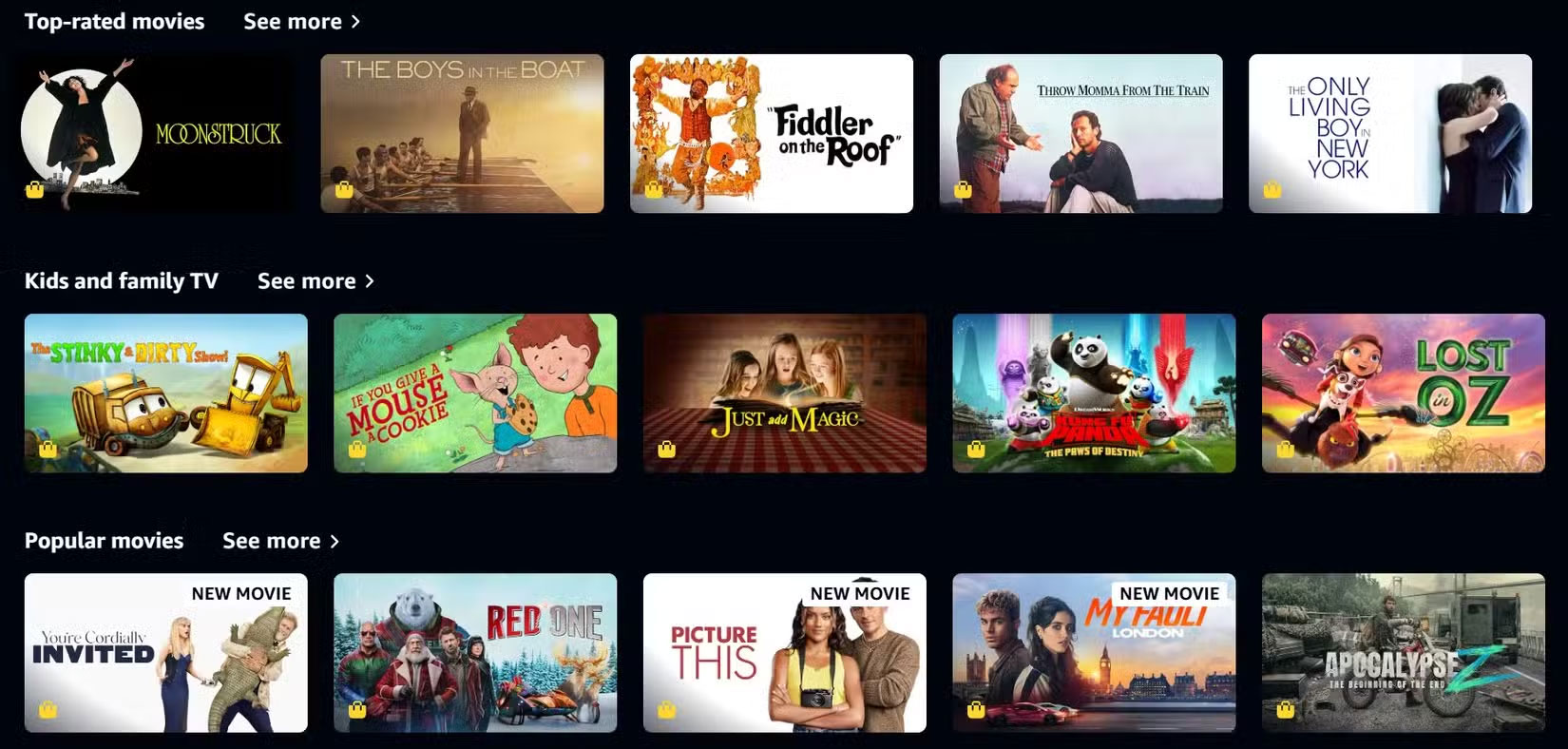
<p style="text-align: justify;">Sau khi kích hoạt, hãy mở dịch vụ stream yêu thích và kiểm tra bằng cách truy cập nội dung bị khóa theo khu vực. Nếu nội dung vẫn bị khóa, hãy đảm bảo kiểm tra xem IPV6 và DNS bảo mật đã bị vô hiệu hóa chưa. Bạn cũng có thể muốn thay đổi vùng máy chủ DNS của mình, vì có thể vùng bạn đang sử dụng proxy cũng đã chặn nội dung cụ thể mà bạn muốn truy cập.</p>

<div style="text-align: justify;">&nbsp;</div>
		</div>
				<div id="author">
						<p>
				<strong>Nguồn tin:</strong>
				Quantrimang.com:
			</p>
		</div>
	</div>
	<div id="footer" class="clearfix">
		<div id="url">
			<strong>URL của bản tin này: </strong><a href="https://www.nguoicodonvn2008.info/vi/news/savefile/kien-thuc-may-tinh/cach-su-dung-smart-dns-proxy-de-truy-cap-noi-dung-bi-gioi-han-dia-ly-10072.html" title="Cách sử dụng Smart DNS Proxy để truy cập nội dung bị giới hạn địa lý">https://www.nguoicodonvn2008.info/vi/news/savefile/kien-thuc-may-tinh/cach-su-dung-smart-dns-proxy-de-truy-cap-noi-dung-bi-gioi-han-dia-ly-10072.html</a>

		</div>
		<div class="clear"></div>
		<div class="copyright">
			&copy; .&#x3A; Nguoicodonvn2008.info - Cõi lòng người cô đơn &#x3A;.
		</div>
		<div id="contact">
			<a href="mailto:admin@nguoicodonvn2008.info">admin@nguoicodonvn2008.info</a>
		</div>
	</div>
</div>
        <div id="timeoutsess" class="chromeframe">
            Bạn đã không sử dụng Site, <a onclick="timeoutsesscancel();" href="https://nguoicodonvn2008.info/#">Bấm vào đây để duy trì trạng thái đăng nhập</a>. Thời gian chờ: <span id="secField"> 60 </span> giây
        </div>
        <div id="openidResult" class="nv-alert" style="display:none"></div>
        <div id="openidBt" data-result="" data-redirect=""></div>
		</script>
		<div class="car-top">
  <span><img src="https://nguoicodonvn2008.info/themes/default/images/car.png" alt=""></span>
</div>
<script src="https://nguoicodonvn2008.info/assets/js/jquery/jquery.min.js"></script>
<script>var nv_base_siteurl="/",nv_lang_data="vi",nv_lang_interface="vi",nv_name_variable="nv",nv_fc_variable="op",nv_lang_variable="language",nv_module_name="news",nv_func_name="savefile",nv_is_user=0, nv_my_ofs=-4,nv_my_abbr="EDT",nv_cookie_prefix="nv4c_e856T",nv_check_pass_mstime=1738000,nv_area_admin=0,nv_safemode=0,theme_responsive=0,nv_recaptcha_ver=2,nv_recaptcha_sitekey="",nv_recaptcha_type="image",XSSsanitize=1;</script>
<script src="https://nguoicodonvn2008.info/assets/js/language/vi.js"></script>
<script src="https://nguoicodonvn2008.info/assets/js/DOMPurify/purify3.js"></script>
<script src="https://nguoicodonvn2008.info/assets/js/global.js"></script>
<script src="https://nguoicodonvn2008.info/assets/js/site.js"></script>
<script src="https://nguoicodonvn2008.info/themes/default/js/news.js"></script>
<script src="https://nguoicodonvn2008.info/themes/default/js/main.js"></script>
<script src="https://nguoicodonvn2008.info/themes/default/js/custom.js"></script>
<script type="application/ld+json">
        {
            "@context": "https://schema.org",
            "@type": "Organization",
            "url": "https://nguoicodonvn2008.info",
            "logo": "https://nguoicodonvn2008.info/uploads/angel.gif"
        }
        </script>
<script src="https://nguoicodonvn2008.info/themes/default/js/bootstrap.min.js"></script>
<script type="text/javascript">
var $scrolltop = $('.car-top');
$scrolltop.on('click', function () {
    $('html,body').animate({
        scrollTop: 0
    }, 800);
    $(this).addClass("car-run");
    setTimeout(function(){ $scrolltop.removeClass('car-run');}, 1000);
    return false;
});
$(window).on('scroll', function ()
{ 
    if($(window).scrollTop() >= 200)
    {
        $scrolltop.addClass("show");
        $scrolltop.addClass("car-down");
    }
    else
    {
       $scrolltop.removeClass("show");
       setTimeout(function(){ $scrolltop.removeClass('car-down');}, 300);
    }
});
</script>
</body>
</html>