<!DOCTYPE html>
    <html lang="vi" xmlns="http://www.w3.org/1999/xhtml" prefix="og: http://ogp.me/ns#">
    <head>
<title>Cách sử dụng PuTTY trên router và switch của Cisco</title>
<meta name="description" content="Cách sử dụng PuTTY trên router và switch của Cisco - Savefile - Tin Tức -...">
<meta name="author" content=".: Nguoicodonvn2008.info - Cõi lòng người cô đơn :.">
<meta name="copyright" content=".: Nguoicodonvn2008.info - Cõi lòng người cô đơn :. [admin@nguoicodonvn2008.info]">
<meta name="robots" content="index, archive, follow, noodp">
<meta name="googlebot" content="index,archive,follow,noodp">
<meta name="msnbot" content="all,index,follow">
<meta name="generator" content="NukeViet v4.5">
<meta http-equiv="Content-Type" content="text/html; charset=utf-8">
<meta property="og:title" content="Cách sử dụng PuTTY trên router và switch của Cisco">
<meta property="og:type" content="website">
<meta property="og:description" content="Savefile - Tin Tức - https&#x3A;&#x002F;&#x002F;www.nguoicodonvn2008.info&#x002F;vi&#x002F;news&#x002F;savefile&#x002F;kien-thuc-may-tinh&#x002F;cach-su-dung-putty-tren-router-va-switch-cua-cisco-3490.html">
<meta property="og:site_name" content=".&#x3A; Nguoicodonvn2008.info - Cõi lòng người cô đơn &#x3A;.">
<meta property="og:url" content="https://www.nguoicodonvn2008.info/vi/news/savefile/kien-thuc-may-tinh/cach-su-dung-putty-tren-router-va-switch-cua-cisco-3490.html">
<link rel="shortcut icon" href="https://nguoicodonvn2008.info/favicon.ico">
<link rel="canonical" href="https://www.nguoicodonvn2008.info/vi/news/savefile/kien-thuc-may-tinh/cach-su-dung-putty-tren-router-va-switch-cua-cisco-3490.html">
<link rel="alternate" href="https://nguoicodonvn2008.info/vi/news/rss/" title="Tin Tức" type="application/rss+xml">
<link rel="alternate" href="https://nguoicodonvn2008.info/vi/news/rss/karaoke-dual/" title="Tin Tức - Karaoke Dual" type="application/rss+xml">
<link rel="alternate" href="https://nguoicodonvn2008.info/vi/news/rss/nhac-tre/" title="Tin Tức - Nhạc trẻ" type="application/rss+xml">
<link rel="alternate" href="https://nguoicodonvn2008.info/vi/news/rss/tru-tinh/" title="Tin Tức - Trữ tình" type="application/rss+xml">
<link rel="alternate" href="https://nguoicodonvn2008.info/vi/news/rss/nuoc-ngoai/" title="Tin Tức - Nước ngoài" type="application/rss+xml">
<link rel="alternate" href="https://nguoicodonvn2008.info/vi/news/rss/remix/" title="Tin Tức - Remix" type="application/rss+xml">
<link rel="alternate" href="https://nguoicodonvn2008.info/vi/news/rss/tam-su-tinh-yeu/" title="Tin Tức - Tâm sự tình yêu" type="application/rss+xml">
<link rel="alternate" href="https://nguoicodonvn2008.info/vi/news/rss/tho-suu-tam/" title="Tin Tức - Thơ sưu tầm" type="application/rss+xml">
<link rel="alternate" href="https://nguoicodonvn2008.info/vi/news/rss/cuoc-song/" title="Tin Tức - Cuộc sống" type="application/rss+xml">
<link rel="alternate" href="https://nguoicodonvn2008.info/vi/news/rss/phan-mem/" title="Tin Tức - Phần mềm" type="application/rss+xml">
<link rel="alternate" href="https://nguoicodonvn2008.info/vi/news/rss/kien-thuc-may-tinh/" title="Tin Tức - Kiến thức máy tính" type="application/rss+xml">
<link rel="alternate" href="https://nguoicodonvn2008.info/vi/news/rss/hoc-tap/" title="Tin Tức - Học tập" type="application/rss+xml">
<link rel="alternate" href="https://nguoicodonvn2008.info/vi/news/rss/tai-lieu/" title="Tin Tức - Tài liệu" type="application/rss+xml">
<link rel="alternate" href="https://nguoicodonvn2008.info/vi/news/rss/de-thi/" title="Tin Tức - Đề thi" type="application/rss+xml">
<link rel="preload" as="style" href="https://nguoicodonvn2008.info/assets/css/font-awesome.min.css" type="text/css">
<link rel="preload" as="style" href="https://nguoicodonvn2008.info/themes/default/css/bootstrap.non-responsive.css" type="text/css">
<link rel="preload" as="style" href="https://nguoicodonvn2008.info/themes/default/css/style.css" type="text/css">
<link rel="preload" as="style" href="https://nguoicodonvn2008.info/themes/default/css/style.non-responsive.css" type="text/css">
<link rel="preload" as="style" href="https://nguoicodonvn2008.info/themes/default/css/news.css" type="text/css">
<link rel="preload" as="style" href="https://nguoicodonvn2008.info/themes/default/css/custom.css" type="text/css">
<link rel="preload" as="script" href="https://nguoicodonvn2008.info/assets/js/jquery/jquery.min.js" type="text/javascript">
<link rel="preload" as="script" href="https://nguoicodonvn2008.info/assets/js/language/vi.js" type="text/javascript">
<link rel="preload" as="script" href="https://nguoicodonvn2008.info/assets/js/DOMPurify/purify3.js" type="text/javascript">
<link rel="preload" as="script" href="https://nguoicodonvn2008.info/assets/js/global.js" type="text/javascript">
<link rel="preload" as="script" href="https://nguoicodonvn2008.info/assets/js/site.js" type="text/javascript">
<link rel="preload" as="script" href="https://nguoicodonvn2008.info/themes/default/js/news.js" type="text/javascript">
<link rel="preload" as="script" href="https://nguoicodonvn2008.info/themes/default/js/main.js" type="text/javascript">
<link rel="preload" as="script" href="https://nguoicodonvn2008.info/themes/default/js/custom.js" type="text/javascript">
<link rel="preload" as="script" href="https://nguoicodonvn2008.info/themes/default/js/bootstrap.min.js" type="text/javascript">
<link rel="stylesheet" href="https://nguoicodonvn2008.info/assets/css/font-awesome.min.css">
<link rel="stylesheet" href="https://nguoicodonvn2008.info/themes/default/css/bootstrap.non-responsive.css">
<link rel="stylesheet" href="https://nguoicodonvn2008.info/themes/default/css/style.css">
<link rel="stylesheet" href="https://nguoicodonvn2008.info/themes/default/css/style.non-responsive.css">
<link rel="StyleSheet" href="https://nguoicodonvn2008.info/themes/default/css/news.css">
<link rel="stylesheet" href="https://nguoicodonvn2008.info/themes/default/css/custom.css">
<style type="text/css">
	body{background: #fff;}
</style>
    </head>
    <body>
<div id="print">
	<div id="hd_print">
		<h2 class="pull-left">.&#x3A; Nguoicodonvn2008.info - Cõi lòng người cô đơn &#x3A;.</h2>
		<p class="pull-right"><a title=".&#x3A; Nguoicodonvn2008.info - Cõi lòng người cô đơn &#x3A;." href="https://nguoicodonvn2008.info/">https://nguoicodonvn2008.info</a></p>
	</div>
	<div class="clear"></div>
	<hr />
	<div id="content">
		<h1>Cách sử dụng PuTTY trên router và switch của Cisco</h1>
		<ul class="list-inline">
			<li>Chủ nhật - 17/01/2021 23:49</li>
			<li class="hidden-print txtrequired"><em class="fa fa-print">&nbsp;</em><a title="In ra" href="javascript:;" onclick="window.print()">In ra</a></li>
			<li class="hidden-print txtrequired"><em class="fa fa-power-off">&nbsp;</em><a title="Đóng cửa sổ này" href="javascript:;" onclick="window.close()">Đóng cửa sổ này</a></li>
		</ul>
		<div class="clear"></div>
		<div id="hometext">
		</div>
				<div class="imghome">
			<img alt="Cách sử dụng PuTTY trên router và switch của Cisco" src="https://st.quantrimang.com/photos/image/2021/01/13/dung-putty-tren-cisco-router-va-switch-2.jpg" width="460" class="img-thumbnail" />
		</div>
		<div class="clear"></div>
		<div id="bodytext" class="clearfix">
			<p style="text-align: justify;">Trước đây, HyperTerminal là phần mềm giả lập giúp bạn giao tiếp với router hoặc switch và cung cấp giao diện dòng lệnh của router hoặc switch. Phần mềm HyperTerminal có sẵn cho các hệ điều hành từ Windows Vista trở về trước. Các phiên bản sau đó không còn HyperTerminal nữa. Do đó, cần có phần mềm giả lập mới để giao tiếp, cấu hình, quản lý và giám sát các router và switch của Cisco. PuTTY được tạo ra để phục vụ mục đích này.</p>

<p style="text-align: justify;">PuTTY, một mã nguồn mở, là một giao thức ứng dụng truyền file qua mạng. Nó hỗ trợ các giao thức như Telnet,&nbsp;SSH, SCP, rlogin, v.v... Ban đầu, Putty được thiết kế cho nền tảng Windows và sau đó nó được phát triển cho các hệ điều hành khác nhau.</p>

<div style="text-align: justify;">&nbsp;</div>

<p style="text-align: justify;">Sau đây là cách sử dụng PuTTY trên&nbsp;router&nbsp;và switch của Cisco.</p>

<h2 style="text-align: justify;">Chuẩn bị</h2>

<p style="text-align: justify;">- Nhấp vào liên kết sau để&nbsp;tải xuống PuTTY:&nbsp;<span style="color:rgb(192, 57, 43);"><strong>https://www.putty.org/</strong></span></p>

<p style="text-align: justify;">- Đảm bảo rằng bạn có kết nối console chính xác với router hoặc switch Cisco. Kết nối giắc RJ45 của cáp console với cổng console của router hoặc switch Cisco. Kết nối đầu kia với cổng Serial của máy tính.</p>

<div style="text-align: justify;">&nbsp;</div>

<h2 style="text-align: justify;">Cách sử dụng PuTTY trên router và switch của Cisco</h2>

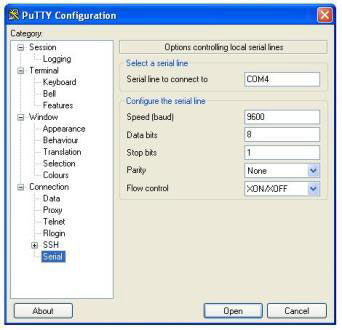
<p style="text-align: justify;">1) Sau khi tải xuống PuTTY, kết nối cáp console với router hoặc switch Cisco, nhấp đúp vào&nbsp;<strong>putty.exe</strong>&nbsp;để thực thi nó. Mở rộng&nbsp;<strong>Connection &gt; Serial</strong>. Nhập số cổng bên trong hộp văn bản&nbsp;<strong>&quot;Serial line to connect to&quot;</strong>. Số cổng là&nbsp;<strong>COM4</strong>&nbsp;trong ví dụ dưới đây. Số cổng có thể khác trên máy tính của bạn. Nhập số cổng chính xác khi bạn kết nối từ máy tính của mình. Nhập các giá trị khác như hình dưới đây.</p>

<ul>
	<li style="text-align: justify;">Bits per sec: 9600</li>
	<li style="text-align: justify;">Data bits: 8</li>
	<li style="text-align: justify;">Parity: none</li>
	<li style="text-align: justify;">Stop bits: 1</li>
	<li style="text-align: justify;">Flow control: none</li>
</ul>

<figure>
<div style="text-align: justify;"><img alt="Nhập các giá trị" data-i="0" data-src="https://st.quantrimang.com/photos/image/2021/01/13/dung-putty-tren-cisco-router-va-switch-1.jpg" data-was-processed="true" height="330" src="https://st.quantrimang.com/photos/image/2021/01/13/dung-putty-tren-cisco-router-va-switch-1.jpg" width="342" /></div>

<figcaption>
<div style="text-align: justify;">Nhập các giá trị</div>
</figcaption>
</figure>

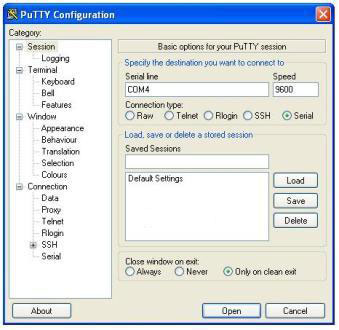
<p style="text-align: justify;">2) Nhấp vào&nbsp;<strong>Session</strong>&nbsp;và chọn&nbsp;<strong>Serial.</strong>&nbsp;Xác minh xem bạn có thể thấy số cổng và tốc độ truyền (<strong>9600</strong>) mà bạn đã chọn trước đó hay không. Nhấp vào&nbsp;<strong>&quot;Open&quot;</strong>&nbsp;để kết nối với router Cisco hoặc switch IOS.</p>

<figure>
<div style="text-align: justify;"><img alt="Nhấp vào &#039;Open&#039; để kết nối" data-i="1" data-src="https://st.quantrimang.com/photos/image/2021/01/13/dung-putty-tren-cisco-router-va-switch-2.jpg" data-was-processed="true" height="330" src="https://st.quantrimang.com/photos/image/2021/01/13/dung-putty-tren-cisco-router-va-switch-2.jpg" width="339" /></div>

<figcaption>
<div style="text-align: justify;">Nhấp vào &quot;Open&quot; để kết nối</div>
</figcaption>
</figure>

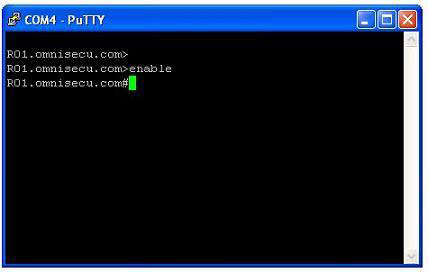
<p style="text-align: justify;">3) PuTTY hiện đã được kết nối với Cisco IOS và bây giờ bạn có thể cấu hình, giám sát hoặc quản lý router hoặc switch của Cisco bằng cách sử dụng PuTTY.</p>

<figure>
<div style="text-align: justify;"><img alt="PuTTY hiện đã được kết nối với Cisco IOS" data-i="2" data-src="https://st.quantrimang.com/photos/image/2021/01/13/dung-putty-tren-cisco-router-va-switch-3.jpg" data-was-processed="true" height="273" src="https://st.quantrimang.com/photos/image/2021/01/13/dung-putty-tren-cisco-router-va-switch-3.jpg" width="428" /></div>

<figcaption>
<div style="text-align: justify;">PuTTY hiện đã được kết nối với Cisco IOS</div>
</figcaption>
</figure>
		</div>
				<div id="author">
						<p>
				<strong>Nguồn tin:</strong>
				Quantrimang.com
			</p>
		</div>
	</div>
	<div id="footer" class="clearfix">
		<div id="url">
			<strong>URL của bản tin này: </strong><a href="https://www.nguoicodonvn2008.info/vi/news/savefile/kien-thuc-may-tinh/cach-su-dung-putty-tren-router-va-switch-cua-cisco-3490.html" title="Cách sử dụng PuTTY trên router và switch của Cisco">https://www.nguoicodonvn2008.info/vi/news/savefile/kien-thuc-may-tinh/cach-su-dung-putty-tren-router-va-switch-cua-cisco-3490.html</a>

		</div>
		<div class="clear"></div>
		<div class="copyright">
			&copy; .&#x3A; Nguoicodonvn2008.info - Cõi lòng người cô đơn &#x3A;.
		</div>
		<div id="contact">
			<a href="mailto:admin@nguoicodonvn2008.info">admin@nguoicodonvn2008.info</a>
		</div>
	</div>
</div>
        <div id="timeoutsess" class="chromeframe">
            Bạn đã không sử dụng Site, <a onclick="timeoutsesscancel();" href="https://nguoicodonvn2008.info/#">Bấm vào đây để duy trì trạng thái đăng nhập</a>. Thời gian chờ: <span id="secField"> 60 </span> giây
        </div>
        <div id="openidResult" class="nv-alert" style="display:none"></div>
        <div id="openidBt" data-result="" data-redirect=""></div>
		</script>
		<div class="car-top">
  <span><img src="https://nguoicodonvn2008.info/themes/default/images/car.png" alt=""></span>
</div>
<script src="https://nguoicodonvn2008.info/assets/js/jquery/jquery.min.js"></script>
<script>var nv_base_siteurl="/",nv_lang_data="vi",nv_lang_interface="vi",nv_name_variable="nv",nv_fc_variable="op",nv_lang_variable="language",nv_module_name="news",nv_func_name="savefile",nv_is_user=0, nv_my_ofs=-4,nv_my_abbr="EDT",nv_cookie_prefix="nv4c_e856T",nv_check_pass_mstime=1738000,nv_area_admin=0,nv_safemode=0,theme_responsive=0,nv_recaptcha_ver=2,nv_recaptcha_sitekey="",nv_recaptcha_type="image",XSSsanitize=1;</script>
<script src="https://nguoicodonvn2008.info/assets/js/language/vi.js"></script>
<script src="https://nguoicodonvn2008.info/assets/js/DOMPurify/purify3.js"></script>
<script src="https://nguoicodonvn2008.info/assets/js/global.js"></script>
<script src="https://nguoicodonvn2008.info/assets/js/site.js"></script>
<script src="https://nguoicodonvn2008.info/themes/default/js/news.js"></script>
<script src="https://nguoicodonvn2008.info/themes/default/js/main.js"></script>
<script src="https://nguoicodonvn2008.info/themes/default/js/custom.js"></script>
<script type="application/ld+json">
        {
            "@context": "https://schema.org",
            "@type": "Organization",
            "url": "https://nguoicodonvn2008.info",
            "logo": "https://nguoicodonvn2008.info/uploads/angel.gif"
        }
        </script>
<script src="https://nguoicodonvn2008.info/themes/default/js/bootstrap.min.js"></script>
<script type="text/javascript">
var $scrolltop = $('.car-top');
$scrolltop.on('click', function () {
    $('html,body').animate({
        scrollTop: 0
    }, 800);
    $(this).addClass("car-run");
    setTimeout(function(){ $scrolltop.removeClass('car-run');}, 1000);
    return false;
});
$(window).on('scroll', function ()
{ 
    if($(window).scrollTop() >= 200)
    {
        $scrolltop.addClass("show");
        $scrolltop.addClass("car-down");
    }
    else
    {
       $scrolltop.removeClass("show");
       setTimeout(function(){ $scrolltop.removeClass('car-down');}, 300);
    }
});
</script>
</body>
</html>