<!DOCTYPE html>
    <html lang="vi" xmlns="http://www.w3.org/1999/xhtml" prefix="og: http://ogp.me/ns#">
    <head>
<title>Cách sử dụng Lutris để phát Blu-Ray trên Linux</title>
<meta name="description" content="Cách sử dụng Lutris để phát Blu-Ray trên Linux - Savefile - Tin Tức -...">
<meta name="author" content=".: Nguoicodonvn2008.info - Cõi lòng người cô đơn :.">
<meta name="copyright" content=".: Nguoicodonvn2008.info - Cõi lòng người cô đơn :. [admin@nguoicodonvn2008.info]">
<meta name="robots" content="index, archive, follow, noodp">
<meta name="googlebot" content="index,archive,follow,noodp">
<meta name="msnbot" content="all,index,follow">
<meta name="generator" content="NukeViet v4.5">
<meta http-equiv="Content-Type" content="text/html; charset=utf-8">
<meta property="og:title" content="Cách sử dụng Lutris để phát Blu-Ray trên Linux">
<meta property="og:type" content="website">
<meta property="og:description" content="Savefile - Tin Tức - https&#x3A;&#x002F;&#x002F;www.nguoicodonvn2008.info&#x002F;vi&#x002F;news&#x002F;savefile&#x002F;kien-thuc-may-tinh&#x002F;cach-su-dung-lutris-de-phat-blu-ray-tren-linux-2160.html">
<meta property="og:site_name" content=".&#x3A; Nguoicodonvn2008.info - Cõi lòng người cô đơn &#x3A;.">
<meta property="og:url" content="https://www.nguoicodonvn2008.info/vi/news/savefile/kien-thuc-may-tinh/cach-su-dung-lutris-de-phat-blu-ray-tren-linux-2160.html">
<link rel="shortcut icon" href="https://nguoicodonvn2008.info/favicon.ico">
<link rel="canonical" href="https://www.nguoicodonvn2008.info/vi/news/savefile/kien-thuc-may-tinh/cach-su-dung-lutris-de-phat-blu-ray-tren-linux-2160.html">
<link rel="alternate" href="https://nguoicodonvn2008.info/vi/news/rss/" title="Tin Tức" type="application/rss+xml">
<link rel="alternate" href="https://nguoicodonvn2008.info/vi/news/rss/karaoke-dual/" title="Tin Tức - Karaoke Dual" type="application/rss+xml">
<link rel="alternate" href="https://nguoicodonvn2008.info/vi/news/rss/nhac-tre/" title="Tin Tức - Nhạc trẻ" type="application/rss+xml">
<link rel="alternate" href="https://nguoicodonvn2008.info/vi/news/rss/tru-tinh/" title="Tin Tức - Trữ tình" type="application/rss+xml">
<link rel="alternate" href="https://nguoicodonvn2008.info/vi/news/rss/nuoc-ngoai/" title="Tin Tức - Nước ngoài" type="application/rss+xml">
<link rel="alternate" href="https://nguoicodonvn2008.info/vi/news/rss/remix/" title="Tin Tức - Remix" type="application/rss+xml">
<link rel="alternate" href="https://nguoicodonvn2008.info/vi/news/rss/tam-su-tinh-yeu/" title="Tin Tức - Tâm sự tình yêu" type="application/rss+xml">
<link rel="alternate" href="https://nguoicodonvn2008.info/vi/news/rss/tho-suu-tam/" title="Tin Tức - Thơ sưu tầm" type="application/rss+xml">
<link rel="alternate" href="https://nguoicodonvn2008.info/vi/news/rss/cuoc-song/" title="Tin Tức - Cuộc sống" type="application/rss+xml">
<link rel="alternate" href="https://nguoicodonvn2008.info/vi/news/rss/phan-mem/" title="Tin Tức - Phần mềm" type="application/rss+xml">
<link rel="alternate" href="https://nguoicodonvn2008.info/vi/news/rss/kien-thuc-may-tinh/" title="Tin Tức - Kiến thức máy tính" type="application/rss+xml">
<link rel="alternate" href="https://nguoicodonvn2008.info/vi/news/rss/hoc-tap/" title="Tin Tức - Học tập" type="application/rss+xml">
<link rel="alternate" href="https://nguoicodonvn2008.info/vi/news/rss/tai-lieu/" title="Tin Tức - Tài liệu" type="application/rss+xml">
<link rel="alternate" href="https://nguoicodonvn2008.info/vi/news/rss/de-thi/" title="Tin Tức - Đề thi" type="application/rss+xml">
<link rel="preload" as="style" href="https://nguoicodonvn2008.info/assets/css/font-awesome.min.css" type="text/css">
<link rel="preload" as="style" href="https://nguoicodonvn2008.info/themes/default/css/bootstrap.non-responsive.css" type="text/css">
<link rel="preload" as="style" href="https://nguoicodonvn2008.info/themes/default/css/style.css" type="text/css">
<link rel="preload" as="style" href="https://nguoicodonvn2008.info/themes/default/css/style.non-responsive.css" type="text/css">
<link rel="preload" as="style" href="https://nguoicodonvn2008.info/themes/default/css/news.css" type="text/css">
<link rel="preload" as="style" href="https://nguoicodonvn2008.info/themes/default/css/custom.css" type="text/css">
<link rel="preload" as="script" href="https://nguoicodonvn2008.info/assets/js/jquery/jquery.min.js" type="text/javascript">
<link rel="preload" as="script" href="https://nguoicodonvn2008.info/assets/js/language/vi.js" type="text/javascript">
<link rel="preload" as="script" href="https://nguoicodonvn2008.info/assets/js/DOMPurify/purify3.js" type="text/javascript">
<link rel="preload" as="script" href="https://nguoicodonvn2008.info/assets/js/global.js" type="text/javascript">
<link rel="preload" as="script" href="https://nguoicodonvn2008.info/assets/js/site.js" type="text/javascript">
<link rel="preload" as="script" href="https://nguoicodonvn2008.info/themes/default/js/news.js" type="text/javascript">
<link rel="preload" as="script" href="https://nguoicodonvn2008.info/themes/default/js/main.js" type="text/javascript">
<link rel="preload" as="script" href="https://nguoicodonvn2008.info/themes/default/js/custom.js" type="text/javascript">
<link rel="preload" as="script" href="https://nguoicodonvn2008.info/themes/default/js/bootstrap.min.js" type="text/javascript">
<link rel="stylesheet" href="https://nguoicodonvn2008.info/assets/css/font-awesome.min.css">
<link rel="stylesheet" href="https://nguoicodonvn2008.info/themes/default/css/bootstrap.non-responsive.css">
<link rel="stylesheet" href="https://nguoicodonvn2008.info/themes/default/css/style.css">
<link rel="stylesheet" href="https://nguoicodonvn2008.info/themes/default/css/style.non-responsive.css">
<link rel="StyleSheet" href="https://nguoicodonvn2008.info/themes/default/css/news.css">
<link rel="stylesheet" href="https://nguoicodonvn2008.info/themes/default/css/custom.css">
<style type="text/css">
	body{background: #fff;}
</style>
    </head>
    <body>
<div id="print">
	<div id="hd_print">
		<h2 class="pull-left">.&#x3A; Nguoicodonvn2008.info - Cõi lòng người cô đơn &#x3A;.</h2>
		<p class="pull-right"><a title=".&#x3A; Nguoicodonvn2008.info - Cõi lòng người cô đơn &#x3A;." href="https://nguoicodonvn2008.info/">https://nguoicodonvn2008.info</a></p>
	</div>
	<div class="clear"></div>
	<hr />
	<div id="content">
		<h1>Cách sử dụng Lutris để phát Blu-Ray trên Linux</h1>
		<ul class="list-inline">
			<li>Thứ năm - 04/06/2020 01:01</li>
			<li class="hidden-print txtrequired"><em class="fa fa-print">&nbsp;</em><a title="In ra" href="javascript:;" onclick="window.print()">In ra</a></li>
			<li class="hidden-print txtrequired"><em class="fa fa-power-off">&nbsp;</em><a title="Đóng cửa sổ này" href="javascript:;" onclick="window.close()">Đóng cửa sổ này</a></li>
		</ul>
		<div class="clear"></div>
		<div id="hometext">
		</div>
				<div class="imghome">
			<img alt="Cách sử dụng Lutris để phát Blu-Ray trên Linux" src="https://st.quantrimang.com/photos/image/2020/06/03/dung-lutris-phat-blu-ray-tren-linux-3.jpg" width="460" class="img-thumbnail" />
		</div>
		<div class="clear"></div>
		<div id="bodytext" class="clearfix">
			<p style="text-align: justify;">Giờ đây, người dùng có thể phát đĩa Blu-ray trên hệ thống Linux chỉ bằng&nbsp;cách sử dụng phần mềm Windows thông qua Wine. Tuy nhiên, quá trình này có thể khiến nhiều người đau đầu và đó là nơi Lutris phát huy vai trò của mình.</p>

<h2 style="text-align: justify;">Chuẩn bị</h2>

<p style="text-align: justify;">Trước khi cài đặt Lutris, trang web khuyên bạn nên cài đặt một phiên bản Wine gần đây. Mặc dù bạn có thể cài đặt các chương trình thông qua Lutris, nhưng việc cài đặt các chương trình thông qua Wine trước, sau đó chạy các file thực thi của chúng qua Lutris sẽ dễ dàng hơn.</p>

<p style="text-align: justify;">Nếu may mắn, trình quản lý file của bạn sẽ có tích hợp Wine, cho phép bạn chỉ cần nhấp vào chương trình Windows để khởi chạy nó. Nếu không, bạn sẽ phải làm mọi thứ theo cách khó hơn, bằng cách mở một Terminal trong thư mục của chương trình và nhập:</p>

<pre id="pre0">
<code>wine your-installed-application.exe</code></pre>

<p style="text-align: justify;">Với Lutris, khi bạn cài đặt từng ứng dụng, hãy thử để chúng ở một nơi nào đó mà bạn có thể dễ dàng tìm thấy. Một thư mục đơn giản trong thư mục chính (hãy thử duyệt từ ổ Z:) sẽ giúp mọi việc dễ dàng hơn nhiều trong các bước tiếp theo.</p>

<p style="text-align: justify;">Tất nhiên, trình phát Blu-ray có thể chạy tốt thông qua Wine mà không cần Lutris. Tuy nhiên, nhiều khả năng hiệu suất không ổn định. Trong khi đó, Lutris lại cung cấp nhiều cách dễ dàng để tăng hiệu suất.</p>

<div style="text-align: justify;">&nbsp;</div>

<h2 style="text-align: justify;">Cấu hình Lutris</h2>

<p style="text-align: justify;">Nếu bạn chưa bao giờ sử dụng Lutris, thì đó là một hệ thống quản lý game dựa trên những chương trình được cấu hình sẵn “runners” để chạy các game từ bên trong Lutris. Đối với các chương trình Windows, Lutris có một bộ sưu tập các biến thể Wine, có thể hoạt động độc lập với phiên bản hệ thống của bạn - nhiều phiên bản có thể được sử dụng cùng một lúc và thậm chí bạn có thể sử dụng Proton nếu Steam được cài đặt.</p>

<p style="text-align: justify;">Để bắt đầu, đầu tiên bạn sẽ cần các Wine runner. Tùy thuộc vào phiên bản của bạn, menu chính phải ở đâu đó trên cùng bên trái. Nhấp vào&nbsp;<strong>Lutris &gt; Manage runners</strong>.</p>

<figure>
<div style="text-align: justify;"><img alt="Nhấp vào Manage versions" data-i="0" data-src="https://st.quantrimang.com/photos/image/2020/06/03/dung-lutris-phat-blu-ray-tren-linux-1.jpg" data-was-processed="true" height="451" src="https://st.quantrimang.com/photos/image/2020/06/03/dung-lutris-phat-blu-ray-tren-linux-1.jpg" width="500" /></div>

<figcaption>
<div style="text-align: justify;">Nhấp vào Manage versions</div>
</figcaption>
</figure>

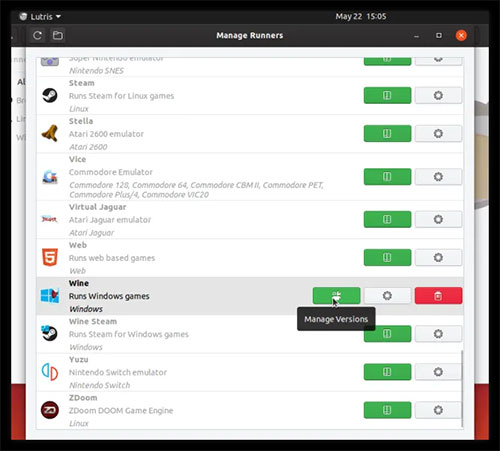
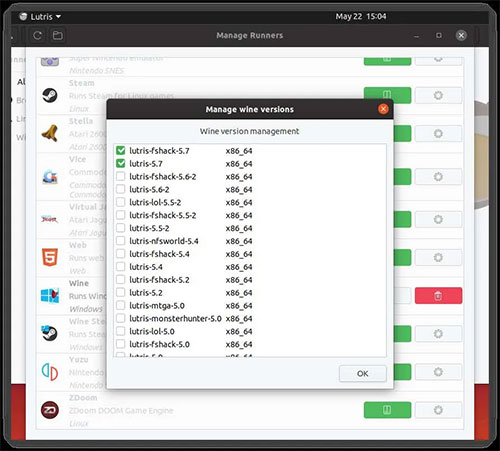
<p style="text-align: justify;">Một cửa sổ mới sẽ xuất hiện. Cuộn xuống danh sách cho đến khi bạn tìm thấy mục&nbsp;<strong>Wine</strong>, sau đó nhấp vào&nbsp;<strong>Manage versions</strong>. Thao tác này sẽ mở ra cửa sổ mới với một danh sách các phiên bản Wine, mỗi phiên bản có một số điều chỉnh riêng. Chọn phiên bản chính mới nhất trước tiên (lutris-5.7 tại thời điểm bài viết), cộng với bất kỳ biến thể nào của nó để thử sau. Nhấp vào hộp kiểm bên cạnh mục để bắt đầu tải xuống.</p>

<figure>
<div style="text-align: justify;"><img alt="Nhấp vào hộp kiểm bên cạnh mục để bắt đầu tải xuống" data-i="1" data-src="https://st.quantrimang.com/photos/image/2020/06/03/dung-lutris-phat-blu-ray-tren-linux-2.jpg" data-was-processed="true" height="451" src="https://st.quantrimang.com/photos/image/2020/06/03/dung-lutris-phat-blu-ray-tren-linux-2.jpg" width="500" /></div>

<figcaption>
<div style="text-align: justify;">Nhấp vào hộp kiểm bên cạnh mục để bắt đầu tải xuống</div>
</figcaption>
</figure>

<h2 style="text-align: justify;">Thêm trình phát</h2>

<p style="text-align: justify;">Quay trở lại màn hình chính, nhấp vào nút&nbsp;<strong>Add Game</strong>&nbsp;để tạo một mục menu mới (dấu&nbsp;<strong>+</strong>&nbsp;ở đầu cửa sổ).</p>

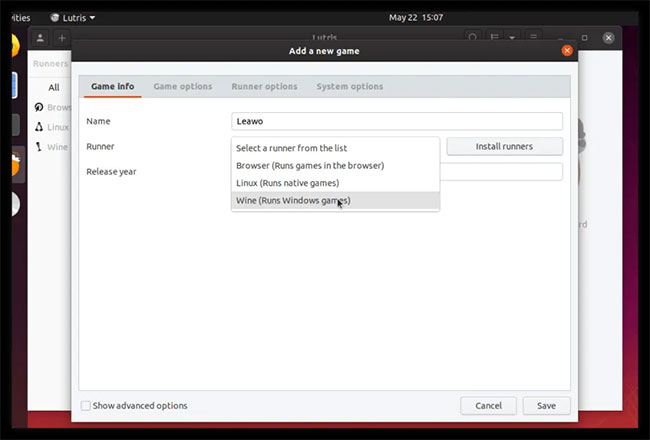
<p style="text-align: justify;">Một cửa sổ mới sẽ xuất hiện được mở tại tab&nbsp;<strong>Game info</strong>. Đặt tên cho mục nhập và chọn&nbsp;<strong>Wine</strong>&nbsp;từ danh sách&nbsp;<strong>Runner.</strong></p>

<figure>
<div style="text-align: justify;"><img alt="Đặt tên cho mục nhập và chọn Wine từ danh sách Runner" data-i="2" data-src="https://st.quantrimang.com/photos/image/2020/06/03/dung-lutris-phat-blu-ray-tren-linux-3.jpg" data-was-processed="true" height="440" src="https://st.quantrimang.com/photos/image/2020/06/03/dung-lutris-phat-blu-ray-tren-linux-3.jpg" width="650" /></div>

<figcaption>
<div style="text-align: justify;">Đặt tên cho mục nhập và chọn Wine từ danh sách Runner</div>
</figcaption>
</figure>

<p style="text-align: justify;">Chọn tab&nbsp;<strong>Game options</strong>. Đối với trường&nbsp;<strong>Executable</strong>, bấm&nbsp;<strong>Browse</strong>&nbsp;và chọn file .exe của chương trình Blu-ray bạn đã cài đặt.</p>

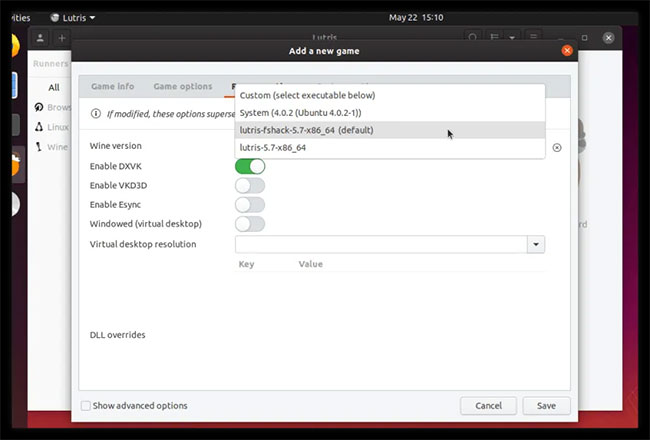
<p style="text-align: justify;">Nếu mở tab&nbsp;<strong>Runner options</strong>, bạn có thể chọn phiên bản Wine/Proton của mình và 3 tùy chọn quan trọng nhất cho hiệu suất:&nbsp;<strong>Enable DXVK, Enable VKD3D</strong>&nbsp;và<strong>&nbsp;Enable Esync</strong>.</p>

<p style="text-align: justify;">Mỗi tùy chọn này có thể tạo ra sự khác biệt lớn đến việc phát nhưng cũng có thể ảnh hưởng đến tính tương thích. Tốt nhất nên bắt đầu với phiên bản Lutris mới nhất của Wine, với tất cả các tùy chọn bị vô hiệu hóa. Nếu trình phát Blu-ray của bạn hoạt động khi khởi chạy, hiệu suất có thể sẽ tệ, nhưng ít nhất bạn cũng có điểm khởi đầu tốt. Nhấp vào&nbsp;<strong>Save</strong>&nbsp;sẽ đưa bạn trở lại màn hình chính.</p>

<figure>
<div style="text-align: justify;"><img alt="3 tùy chọn quan trọng nhất cho hiệu suất: Enable DXVK, Enable VKD3D và Enable Esync" data-i="3" data-src="https://st.quantrimang.com/photos/image/2020/06/03/dung-lutris-phat-blu-ray-tren-linux-4.jpg" data-was-processed="true" height="440" src="https://st.quantrimang.com/photos/image/2020/06/03/dung-lutris-phat-blu-ray-tren-linux-4.jpg" width="650" /></div>

<figcaption>
<div style="text-align: justify;">3 tùy chọn quan trọng nhất cho hiệu suất: Enable DXVK, Enable VKD3D và Enable Esync</div>
</figcaption>
</figure>

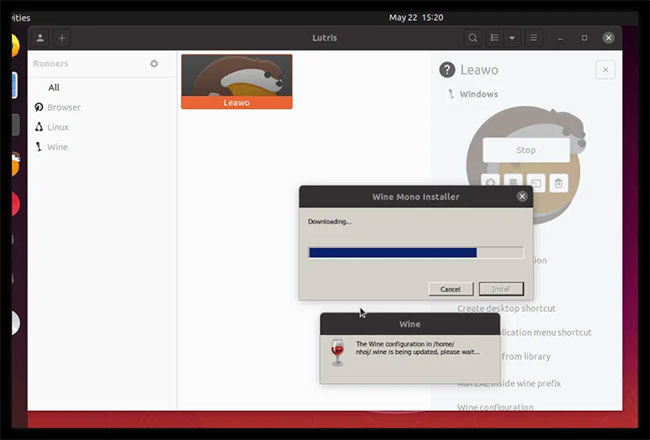
<p style="text-align: justify;">Hãy thử kiểm tra ứng dụng Blu-ray bằng cách nhấp đúp vào mục nhập hoặc nhấn nút&nbsp;<strong>Play.</strong>&nbsp;Lần đầu tiên chạy Wine qua Lutris, bạn sẽ nhận được một số cửa sổ cấu hình Wine, yêu cầu&nbsp;<strong>Download Mono and Gecko components</strong>&nbsp;(Tải xuống các thành phần Mono và Gecko). Chỉ cần tải chúng xuống 1 lần duy nhất.</p>

<figure>
<div style="text-align: justify;"><img alt="Tải xuống các thành phần Mono và Gecko" data-i="4" data-src="https://st.quantrimang.com/photos/image/2020/06/03/dung-lutris-phat-blu-ray-tren-linux-5.jpg" data-was-processed="true" height="440" src="https://st.quantrimang.com/photos/image/2020/06/03/dung-lutris-phat-blu-ray-tren-linux-5.jpg" width="650" /></div>

<figcaption>
<div style="text-align: justify;">Tải xuống các thành phần Mono và Gecko</div>
</figcaption>
</figure>

<p style="text-align: justify;">Cuối cùng, ứng dụng sẽ chạy. Nếu không có gì xảy ra, đừng hoảng sợ. Một số tùy chọn khác nhau có thể khiến nó hoạt động. Nhấp chuột phải vào mục Lutris của ứng dụng và chọn&nbsp;<strong>Configure.</strong>&nbsp;Mở tab&nbsp;<strong>Runner options</strong>&nbsp;và thử phiên bản khác của Wine hoặc phiên bản Proton. Nhấp vào&nbsp;<strong>Save</strong>&nbsp;và thử lại.</p>

<p style="text-align: justify;">Nếu quá trình phát bị tạm dừng hoặc có sai sót, hãy thử bật&nbsp;<strong>Esync.</strong>&nbsp;Các tùy chọn DXVK và VKD3D sẽ giúp tăng tốc phần cứng nếu được hỗ trợ. Có khả năng một hoặc nhiều tùy chọn trong số này đã ngăn trình phát của bạn hoạt động, nhưng sự kết hợp đúng sẽ giúp bạn tiến gần hơn đến một hiệu suất Blu-ray đáng tin cậy.</p>

<p style="text-align: justify;">Sau khi lựa chọn ngẫu nhiên một số trình phát miễn phí, tác giả bài viết đã thành công với Leawo, PotPlayer (32-bit), Aurora và Free Blu-ray Player. May mắn nhất là với Leawo, sử dụng lutris-fshack-5.7 và DXVK bị vô hiệu hóa.</p>
		</div>
				<div id="author">
						<p>
				<strong>Nguồn tin:</strong>
				Quantrimang.com
			</p>
		</div>
	</div>
	<div id="footer" class="clearfix">
		<div id="url">
			<strong>URL của bản tin này: </strong><a href="https://www.nguoicodonvn2008.info/vi/news/savefile/kien-thuc-may-tinh/cach-su-dung-lutris-de-phat-blu-ray-tren-linux-2160.html" title="Cách sử dụng Lutris để phát Blu-Ray trên Linux">https://www.nguoicodonvn2008.info/vi/news/savefile/kien-thuc-may-tinh/cach-su-dung-lutris-de-phat-blu-ray-tren-linux-2160.html</a>

		</div>
		<div class="clear"></div>
		<div class="copyright">
			&copy; .&#x3A; Nguoicodonvn2008.info - Cõi lòng người cô đơn &#x3A;.
		</div>
		<div id="contact">
			<a href="mailto:admin@nguoicodonvn2008.info">admin@nguoicodonvn2008.info</a>
		</div>
	</div>
</div>
        <div id="timeoutsess" class="chromeframe">
            Bạn đã không sử dụng Site, <a onclick="timeoutsesscancel();" href="https://nguoicodonvn2008.info/#">Bấm vào đây để duy trì trạng thái đăng nhập</a>. Thời gian chờ: <span id="secField"> 60 </span> giây
        </div>
        <div id="openidResult" class="nv-alert" style="display:none"></div>
        <div id="openidBt" data-result="" data-redirect=""></div>
		</script>
		<div class="car-top">
  <span><img src="https://nguoicodonvn2008.info/themes/default/images/car.png" alt=""></span>
</div>
<script src="https://nguoicodonvn2008.info/assets/js/jquery/jquery.min.js"></script>
<script>var nv_base_siteurl="/",nv_lang_data="vi",nv_lang_interface="vi",nv_name_variable="nv",nv_fc_variable="op",nv_lang_variable="language",nv_module_name="news",nv_func_name="savefile",nv_is_user=0, nv_my_ofs=-4,nv_my_abbr="EDT",nv_cookie_prefix="nv4c_e856T",nv_check_pass_mstime=1738000,nv_area_admin=0,nv_safemode=0,theme_responsive=0,nv_recaptcha_ver=2,nv_recaptcha_sitekey="",nv_recaptcha_type="image",XSSsanitize=1;</script>
<script src="https://nguoicodonvn2008.info/assets/js/language/vi.js"></script>
<script src="https://nguoicodonvn2008.info/assets/js/DOMPurify/purify3.js"></script>
<script src="https://nguoicodonvn2008.info/assets/js/global.js"></script>
<script src="https://nguoicodonvn2008.info/assets/js/site.js"></script>
<script src="https://nguoicodonvn2008.info/themes/default/js/news.js"></script>
<script src="https://nguoicodonvn2008.info/themes/default/js/main.js"></script>
<script src="https://nguoicodonvn2008.info/themes/default/js/custom.js"></script>
<script type="application/ld+json">
        {
            "@context": "https://schema.org",
            "@type": "Organization",
            "url": "https://nguoicodonvn2008.info",
            "logo": "https://nguoicodonvn2008.info/uploads/angel.gif"
        }
        </script>
<script src="https://nguoicodonvn2008.info/themes/default/js/bootstrap.min.js"></script>
<script type="text/javascript">
var $scrolltop = $('.car-top');
$scrolltop.on('click', function () {
    $('html,body').animate({
        scrollTop: 0
    }, 800);
    $(this).addClass("car-run");
    setTimeout(function(){ $scrolltop.removeClass('car-run');}, 1000);
    return false;
});
$(window).on('scroll', function ()
{ 
    if($(window).scrollTop() >= 200)
    {
        $scrolltop.addClass("show");
        $scrolltop.addClass("car-down");
    }
    else
    {
       $scrolltop.removeClass("show");
       setTimeout(function(){ $scrolltop.removeClass('car-down');}, 300);
    }
});
</script>
</body>
</html>