<!DOCTYPE html>
    <html lang="vi" xmlns="http://www.w3.org/1999/xhtml" prefix="og: http://ogp.me/ns#">
    <head>
<title>Cách sử dụng Hot Corner trên Mac</title>
<meta name="description" content="Cách sử dụng Hot Corner trên Mac - Savefile - Tin Tức - https&#x3A;&#x002F;&#x002F;www.nguoicodonvn2008.info&#x002F;vi&#x002F;news&#x002F;savefile&#x002F;kien-thuc-may-tinh&#x002F;cach-su-dung-hot-corner-tren-mac-1690.html">
<meta name="author" content=".: Nguoicodonvn2008.info - Cõi lòng người cô đơn :.">
<meta name="copyright" content=".: Nguoicodonvn2008.info - Cõi lòng người cô đơn :. [admin@nguoicodonvn2008.info]">
<meta name="robots" content="index, archive, follow, noodp">
<meta name="googlebot" content="index,archive,follow,noodp">
<meta name="msnbot" content="all,index,follow">
<meta name="generator" content="NukeViet v4.5">
<meta http-equiv="Content-Type" content="text/html; charset=utf-8">
<meta property="og:title" content="Cách sử dụng Hot Corner trên Mac">
<meta property="og:type" content="website">
<meta property="og:description" content="Savefile - Tin Tức - https&#x3A;&#x002F;&#x002F;www.nguoicodonvn2008.info&#x002F;vi&#x002F;news&#x002F;savefile&#x002F;kien-thuc-may-tinh&#x002F;cach-su-dung-hot-corner-tren-mac-1690.html">
<meta property="og:site_name" content=".&#x3A; Nguoicodonvn2008.info - Cõi lòng người cô đơn &#x3A;.">
<meta property="og:url" content="https://www.nguoicodonvn2008.info/vi/news/savefile/kien-thuc-may-tinh/cach-su-dung-hot-corner-tren-mac-1690.html">
<link rel="shortcut icon" href="https://nguoicodonvn2008.info/favicon.ico">
<link rel="canonical" href="https://www.nguoicodonvn2008.info/vi/news/savefile/kien-thuc-may-tinh/cach-su-dung-hot-corner-tren-mac-1690.html">
<link rel="alternate" href="https://nguoicodonvn2008.info/vi/news/rss/" title="Tin Tức" type="application/rss+xml">
<link rel="alternate" href="https://nguoicodonvn2008.info/vi/news/rss/karaoke-dual/" title="Tin Tức - Karaoke Dual" type="application/rss+xml">
<link rel="alternate" href="https://nguoicodonvn2008.info/vi/news/rss/nhac-tre/" title="Tin Tức - Nhạc trẻ" type="application/rss+xml">
<link rel="alternate" href="https://nguoicodonvn2008.info/vi/news/rss/tru-tinh/" title="Tin Tức - Trữ tình" type="application/rss+xml">
<link rel="alternate" href="https://nguoicodonvn2008.info/vi/news/rss/nuoc-ngoai/" title="Tin Tức - Nước ngoài" type="application/rss+xml">
<link rel="alternate" href="https://nguoicodonvn2008.info/vi/news/rss/remix/" title="Tin Tức - Remix" type="application/rss+xml">
<link rel="alternate" href="https://nguoicodonvn2008.info/vi/news/rss/tam-su-tinh-yeu/" title="Tin Tức - Tâm sự tình yêu" type="application/rss+xml">
<link rel="alternate" href="https://nguoicodonvn2008.info/vi/news/rss/tho-suu-tam/" title="Tin Tức - Thơ sưu tầm" type="application/rss+xml">
<link rel="alternate" href="https://nguoicodonvn2008.info/vi/news/rss/cuoc-song/" title="Tin Tức - Cuộc sống" type="application/rss+xml">
<link rel="alternate" href="https://nguoicodonvn2008.info/vi/news/rss/phan-mem/" title="Tin Tức - Phần mềm" type="application/rss+xml">
<link rel="alternate" href="https://nguoicodonvn2008.info/vi/news/rss/kien-thuc-may-tinh/" title="Tin Tức - Kiến thức máy tính" type="application/rss+xml">
<link rel="alternate" href="https://nguoicodonvn2008.info/vi/news/rss/hoc-tap/" title="Tin Tức - Học tập" type="application/rss+xml">
<link rel="alternate" href="https://nguoicodonvn2008.info/vi/news/rss/tai-lieu/" title="Tin Tức - Tài liệu" type="application/rss+xml">
<link rel="alternate" href="https://nguoicodonvn2008.info/vi/news/rss/de-thi/" title="Tin Tức - Đề thi" type="application/rss+xml">
<link rel="preload" as="style" href="https://nguoicodonvn2008.info/assets/css/font-awesome.min.css" type="text/css">
<link rel="preload" as="style" href="https://nguoicodonvn2008.info/themes/default/css/bootstrap.non-responsive.css" type="text/css">
<link rel="preload" as="style" href="https://nguoicodonvn2008.info/themes/default/css/style.css" type="text/css">
<link rel="preload" as="style" href="https://nguoicodonvn2008.info/themes/default/css/style.non-responsive.css" type="text/css">
<link rel="preload" as="style" href="https://nguoicodonvn2008.info/themes/default/css/news.css" type="text/css">
<link rel="preload" as="style" href="https://nguoicodonvn2008.info/themes/default/css/custom.css" type="text/css">
<link rel="preload" as="script" href="https://nguoicodonvn2008.info/assets/js/jquery/jquery.min.js" type="text/javascript">
<link rel="preload" as="script" href="https://nguoicodonvn2008.info/assets/js/language/vi.js" type="text/javascript">
<link rel="preload" as="script" href="https://nguoicodonvn2008.info/assets/js/DOMPurify/purify3.js" type="text/javascript">
<link rel="preload" as="script" href="https://nguoicodonvn2008.info/assets/js/global.js" type="text/javascript">
<link rel="preload" as="script" href="https://nguoicodonvn2008.info/assets/js/site.js" type="text/javascript">
<link rel="preload" as="script" href="https://nguoicodonvn2008.info/themes/default/js/news.js" type="text/javascript">
<link rel="preload" as="script" href="https://nguoicodonvn2008.info/themes/default/js/main.js" type="text/javascript">
<link rel="preload" as="script" href="https://nguoicodonvn2008.info/themes/default/js/custom.js" type="text/javascript">
<link rel="preload" as="script" href="https://nguoicodonvn2008.info/themes/default/js/bootstrap.min.js" type="text/javascript">
<link rel="stylesheet" href="https://nguoicodonvn2008.info/assets/css/font-awesome.min.css">
<link rel="stylesheet" href="https://nguoicodonvn2008.info/themes/default/css/bootstrap.non-responsive.css">
<link rel="stylesheet" href="https://nguoicodonvn2008.info/themes/default/css/style.css">
<link rel="stylesheet" href="https://nguoicodonvn2008.info/themes/default/css/style.non-responsive.css">
<link rel="StyleSheet" href="https://nguoicodonvn2008.info/themes/default/css/news.css">
<link rel="stylesheet" href="https://nguoicodonvn2008.info/themes/default/css/custom.css">
<style type="text/css">
	body{background: #fff;}
</style>
    </head>
    <body>
<div id="print">
	<div id="hd_print">
		<h2 class="pull-left">.&#x3A; Nguoicodonvn2008.info - Cõi lòng người cô đơn &#x3A;.</h2>
		<p class="pull-right"><a title=".&#x3A; Nguoicodonvn2008.info - Cõi lòng người cô đơn &#x3A;." href="https://nguoicodonvn2008.info/">https://nguoicodonvn2008.info</a></p>
	</div>
	<div class="clear"></div>
	<hr />
	<div id="content">
		<h1>Cách sử dụng Hot Corner trên Mac</h1>
		<ul class="list-inline">
			<li>Thứ ba - 18/02/2020 00:08</li>
			<li class="hidden-print txtrequired"><em class="fa fa-print">&nbsp;</em><a title="In ra" href="javascript:;" onclick="window.print()">In ra</a></li>
			<li class="hidden-print txtrequired"><em class="fa fa-power-off">&nbsp;</em><a title="Đóng cửa sổ này" href="javascript:;" onclick="window.close()">Đóng cửa sổ này</a></li>
		</ul>
		<div class="clear"></div>
		<div id="hometext">
		</div>
				<div class="imghome">
			<img alt="Cách sử dụng Hot Corner trên Mac" src="https://st.quantrimang.com/photos/image/2020/02/18/cach-dung-hot-corners-tren-mac-6.jpg" width="460" class="img-thumbnail" />
		</div>
		<div class="clear"></div>
		<div id="bodytext" class="clearfix">
			<p style="text-align: justify;">Nếu là một người hâm mộ bóng chày, bạn có thể đã từng nghe qua từ “hot corner”. Mac cũng có 4 hot corner ở mỗi góc của màn hình. Bạn có thể sử dụng các hot corner này để hoàn thành các nhiệm vụ chỉ bằng một thao tác chạm ngón tay, thay vì yêu cầu nhấp chuột chính xác vào biểu tượng dock hoặc đào sâu vào một vài cấp độ trong tùy chọn hệ thống.</p>

<h2 style="text-align: justify;">Cách thiết lập hot corner để kích hoạt screen saver</h2>

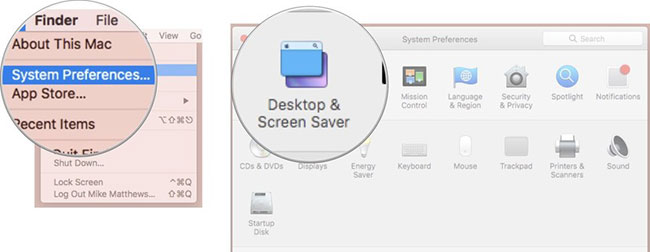
<p style="text-align: justify;">1. Từ menu&nbsp;<strong>Apple</strong>, chọn&nbsp;<strong>System Preferences.</strong></p>

<p style="text-align: justify;">2. Nhấp vào&nbsp;<strong>Desktop and Screen Saver.</strong></p>

<figure>
<div style="text-align: justify;"><img alt="Nhấp vào Desktop and Screen Saver" data-i="0" data-src="https://st.quantrimang.com/photos/image/2020/02/18/cach-dung-hot-corners-tren-mac-1.jpg" data-was-processed="true" height="252" src="https://st.quantrimang.com/photos/image/2020/02/18/cach-dung-hot-corners-tren-mac-1.jpg" width="650" /></div>

<figcaption>
<div style="text-align: justify;">Nhấp vào Desktop and Screen Saver</div>
</figcaption>
</figure>

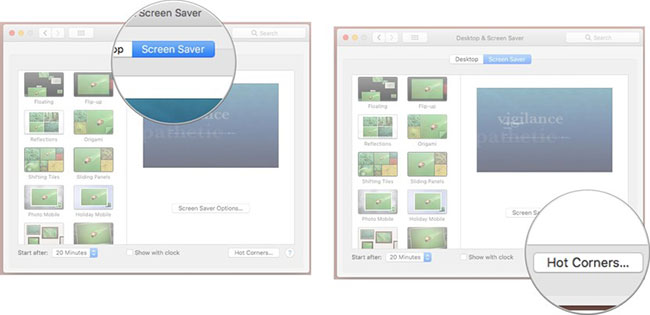
<p style="text-align: justify;">3. Nhấp vào tab&nbsp;<strong>Screen Saver.</strong></p>

<p style="text-align: justify;">4. Nhấp vào&nbsp;<strong>Hot Corners...</strong></p>

<figure>
<div style="text-align: justify;"><img alt="Nhấp vào Hot Corners..." data-i="1" data-src="https://st.quantrimang.com/photos/image/2020/02/18/cach-dung-hot-corners-tren-mac-2.jpg" data-was-processed="true" height="315" src="https://st.quantrimang.com/photos/image/2020/02/18/cach-dung-hot-corners-tren-mac-2.jpg" width="650" /></div>

<figcaption>
<div style="text-align: justify;">Nhấp vào Hot Corners...</div>
</figcaption>
</figure>

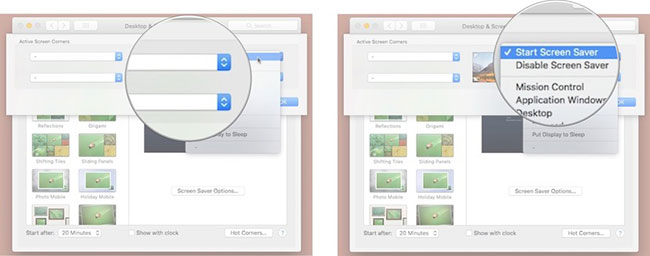
<p style="text-align: justify;">5. Trong trang xuất hiện, nhấp vào bất kỳ menu nào hiện ra và chọn&nbsp;<strong>Start Screen Saver</strong>.</p>

<figure>
<div style="text-align: justify;"><img alt="Chọn Start Screen Saver" data-i="2" data-src="https://st.quantrimang.com/photos/image/2020/02/18/cach-dung-hot-corners-tren-mac-3.jpg" data-was-processed="true" height="256" src="https://st.quantrimang.com/photos/image/2020/02/18/cach-dung-hot-corners-tren-mac-3.jpg" width="650" /></div>

<figcaption>
<div style="text-align: justify;">Chọn Start Screen Saver</div>
</figcaption>
</figure>

<p style="text-align: justify;">Bây giờ, khi bạn di chuyển con trỏ đến góc đã chọn,&nbsp;screen saver&nbsp;bạn chọn sẽ nhanh chóng và dễ dàng bắt đầu. Điều này khá tiện dụng, vì nó có thể giúp ngăn ngừa hiện tượng lưu ảnh màn hình.</p>

<p style="text-align: justify;">Như bạn có thể thấy từ menu pop-up hot corner, có nhiều thứ để làm hơn là chỉ kích hoạt screen saver với một hot corner. Trên thực tế, bạn thậm chí có thể đặt hành động tương tự ở nhiều hot corner. Vì vậy, nếu muốn kích hoạt screen saver khi bạn di chuyển con trỏ đến bất kỳ góc nào trong 4 hot corner, hãy thoải mái thực hiện điều bạn muốn.</p>

<div style="text-align: justify;">&nbsp;</div>

<h2 style="text-align: justify;">Cách yêu cầu mật khẩu để mở khóa screen saver</h2>

<p style="text-align: justify;">Nếu đặt tùy chọn hệ thống bảo mật yêu cầu mật khẩu để mở khóa screen saver, bạn có thể bật screen saver khi bạn rời khỏi máy Mac, nhằm đảm bảo rằng nội dung trong đó được bảo vệ khỏi những đôi mắt tò mò. Đây là cách thực hiện:</p>

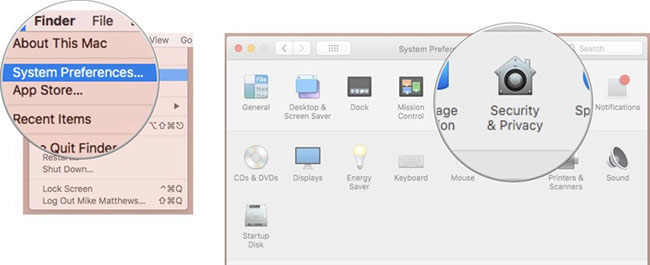
<p style="text-align: justify;">1. Từ menu&nbsp;<strong>Apple</strong>, chọn&nbsp;<strong>System Preferences.</strong></p>

<p style="text-align: justify;">2. Nhấp&nbsp;<strong>Security and Privacy.</strong></p>

<figure>
<div style="text-align: justify;"><img alt="Nhấp Security and Privacy" data-i="3" data-src="https://st.quantrimang.com/photos/image/2020/02/18/cach-dung-hot-corners-tren-mac-4.jpg" data-was-processed="true" height="265" src="https://st.quantrimang.com/photos/image/2020/02/18/cach-dung-hot-corners-tren-mac-4.jpg" width="650" /></div>

<figcaption>
<div style="text-align: justify;">Nhấp Security and Privacy</div>
</figcaption>
</figure>

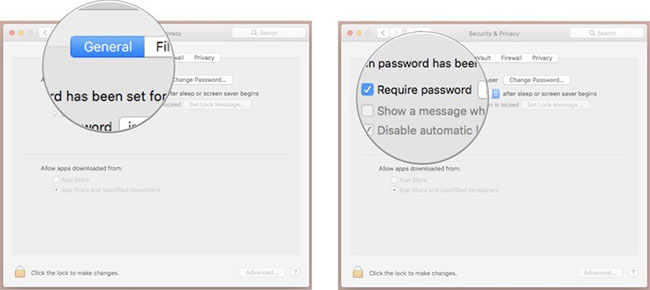
<p style="text-align: justify;">3. Nhấp vào tab&nbsp;<strong>General.</strong></p>

<p style="text-align: justify;">4. Chọn hộp&nbsp;<strong>Require password</strong>&nbsp;và đặt thời gian từ menu pop-up.</p>

<figure>
<div style="text-align: justify;"><img alt="Chọn hộp Require password" data-i="4" data-src="https://st.quantrimang.com/photos/image/2020/02/18/cach-dung-hot-corners-tren-mac-5.jpg" data-was-processed="true" height="290" src="https://st.quantrimang.com/photos/image/2020/02/18/cach-dung-hot-corners-tren-mac-5.jpg" width="650" /></div>

<figcaption>
<div style="text-align: justify;">Chọn hộp Require password</div>
</figcaption>
</figure>

<h2 style="text-align: justify;">Mẹo nhỏ với hot corner</h2>

<p style="text-align: justify;">Giả sử bạn đang cố gắng nhấp vào một menu hoặc nhấn một biểu tượng ở gần một trong các góc của màn hình, nhưng độ chính xác thông thường làm bạn thất vọng. Bạn vô tình chạm vào một hot corner bằng con trỏ và đột nhiên, screen saver bắt đầu hoạt động, yêu cầu bạn phải mở khóa để quay lại làm việc.</p>

<p style="text-align: justify;">May mắn thay, có một tính năng ẩn trong các hot corner giúp giải quyết vấn đề phổ biến này.</p>

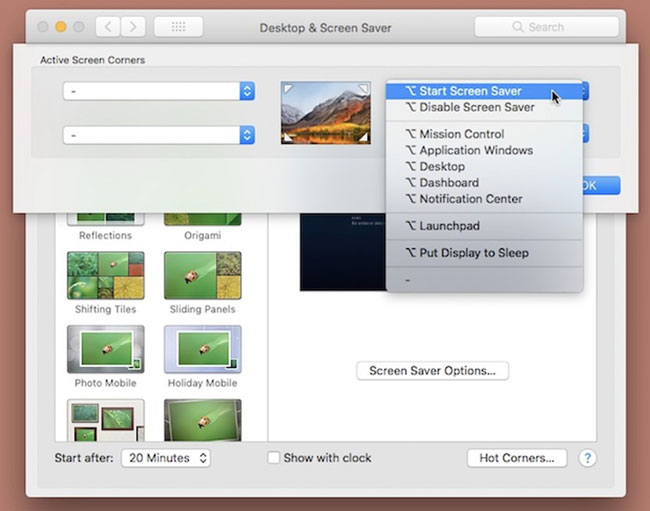
<p style="text-align: justify;">Trong khi mở một trong các menu pop-up ở hot corner, hãy giữ phím&nbsp;<code>Command</code>,&nbsp;<code>Options</code>,&nbsp;<code>Control</code>&nbsp;hoặc&nbsp;<code>Shift</code>&nbsp;(hoặc thậm chí dùng nhiều phím trong số này) để yêu cầu (các) phím đó (cộng với hành động di chuyển con trỏ đến góc màn hình) kích hoạt screen saver. Menu pop-up này sẽ thay đổi để phản ánh phím bổ sung bạn đã chọn.</p>

<figure>
<div style="text-align: justify;"><img alt="Thêm phím bổ sung cộng với việc di chuyển con trỏ để kích hoạt screen saver" data-i="5" data-src="https://st.quantrimang.com/photos/image/2020/02/18/cach-dung-hot-corners-tren-mac-6.jpg" data-was-processed="true" height="511" src="https://st.quantrimang.com/photos/image/2020/02/18/cach-dung-hot-corners-tren-mac-6.jpg" width="650" /></div>

<figcaption>
<div style="text-align: justify;">Thêm phím bổ sung cộng với việc di chuyển con trỏ để kích hoạt screen saver</div>
</figcaption>
</figure>

<p style="text-align: justify;">Và bây giờ, thay vì chỉ là một chuyển động chuột nhanh chóng, hành động sẽ được thực hiện có chủ ý hơn, với việc nhấn một phím trên bàn phím để kích hoạt screen saver.</p>
		</div>
				<div id="author">
						<p>
				<strong>Nguồn tin:</strong>
				Quantrimang.com
			</p>
		</div>
	</div>
	<div id="footer" class="clearfix">
		<div id="url">
			<strong>URL của bản tin này: </strong><a href="https://www.nguoicodonvn2008.info/vi/news/savefile/kien-thuc-may-tinh/cach-su-dung-hot-corner-tren-mac-1690.html" title="Cách sử dụng Hot Corner trên Mac">https://www.nguoicodonvn2008.info/vi/news/savefile/kien-thuc-may-tinh/cach-su-dung-hot-corner-tren-mac-1690.html</a>

		</div>
		<div class="clear"></div>
		<div class="copyright">
			&copy; .&#x3A; Nguoicodonvn2008.info - Cõi lòng người cô đơn &#x3A;.
		</div>
		<div id="contact">
			<a href="mailto:admin@nguoicodonvn2008.info">admin@nguoicodonvn2008.info</a>
		</div>
	</div>
</div>
        <div id="timeoutsess" class="chromeframe">
            Bạn đã không sử dụng Site, <a onclick="timeoutsesscancel();" href="https://nguoicodonvn2008.info/#">Bấm vào đây để duy trì trạng thái đăng nhập</a>. Thời gian chờ: <span id="secField"> 60 </span> giây
        </div>
        <div id="openidResult" class="nv-alert" style="display:none"></div>
        <div id="openidBt" data-result="" data-redirect=""></div>
		</script>
		<div class="car-top">
  <span><img src="https://nguoicodonvn2008.info/themes/default/images/car.png" alt=""></span>
</div>
<script src="https://nguoicodonvn2008.info/assets/js/jquery/jquery.min.js"></script>
<script>var nv_base_siteurl="/",nv_lang_data="vi",nv_lang_interface="vi",nv_name_variable="nv",nv_fc_variable="op",nv_lang_variable="language",nv_module_name="news",nv_func_name="savefile",nv_is_user=0, nv_my_ofs=-4,nv_my_abbr="EDT",nv_cookie_prefix="nv4c_e856T",nv_check_pass_mstime=1738000,nv_area_admin=0,nv_safemode=0,theme_responsive=0,nv_recaptcha_ver=2,nv_recaptcha_sitekey="",nv_recaptcha_type="image",XSSsanitize=1;</script>
<script src="https://nguoicodonvn2008.info/assets/js/language/vi.js"></script>
<script src="https://nguoicodonvn2008.info/assets/js/DOMPurify/purify3.js"></script>
<script src="https://nguoicodonvn2008.info/assets/js/global.js"></script>
<script src="https://nguoicodonvn2008.info/assets/js/site.js"></script>
<script src="https://nguoicodonvn2008.info/themes/default/js/news.js"></script>
<script src="https://nguoicodonvn2008.info/themes/default/js/main.js"></script>
<script src="https://nguoicodonvn2008.info/themes/default/js/custom.js"></script>
<script type="application/ld+json">
        {
            "@context": "https://schema.org",
            "@type": "Organization",
            "url": "https://nguoicodonvn2008.info",
            "logo": "https://nguoicodonvn2008.info/uploads/angel.gif"
        }
        </script>
<script src="https://nguoicodonvn2008.info/themes/default/js/bootstrap.min.js"></script>
<script type="text/javascript">
var $scrolltop = $('.car-top');
$scrolltop.on('click', function () {
    $('html,body').animate({
        scrollTop: 0
    }, 800);
    $(this).addClass("car-run");
    setTimeout(function(){ $scrolltop.removeClass('car-run');}, 1000);
    return false;
});
$(window).on('scroll', function ()
{ 
    if($(window).scrollTop() >= 200)
    {
        $scrolltop.addClass("show");
        $scrolltop.addClass("car-down");
    }
    else
    {
       $scrolltop.removeClass("show");
       setTimeout(function(){ $scrolltop.removeClass('car-down');}, 300);
    }
});
</script>
</body>
</html>