<!DOCTYPE html>
    <html lang="vi" xmlns="http://www.w3.org/1999/xhtml" prefix="og: http://ogp.me/ns#">
    <head>
<title>Cách sử dụng hàm TRUNC trong Excel</title>
<meta name="description" content="Cách sử dụng hàm TRUNC trong Excel - Savefile - Tin Tức -...">
<meta name="author" content=".: Nguoicodonvn2008.info - Cõi lòng người cô đơn :.">
<meta name="copyright" content=".: Nguoicodonvn2008.info - Cõi lòng người cô đơn :. [admin@nguoicodonvn2008.info]">
<meta name="robots" content="index, archive, follow, noodp">
<meta name="googlebot" content="index,archive,follow,noodp">
<meta name="msnbot" content="all,index,follow">
<meta name="generator" content="NukeViet v4.5">
<meta http-equiv="Content-Type" content="text/html; charset=utf-8">
<meta property="og:title" content="Cách sử dụng hàm TRUNC trong Excel">
<meta property="og:type" content="website">
<meta property="og:description" content="Savefile - Tin Tức - https&#x3A;&#x002F;&#x002F;www.nguoicodonvn2008.info&#x002F;vi&#x002F;news&#x002F;savefile&#x002F;kien-thuc-may-tinh&#x002F;cach-su-dung-ham-trunc-trong-excel-1830.html">
<meta property="og:site_name" content=".&#x3A; Nguoicodonvn2008.info - Cõi lòng người cô đơn &#x3A;.">
<meta property="og:url" content="https://www.nguoicodonvn2008.info/vi/news/savefile/kien-thuc-may-tinh/cach-su-dung-ham-trunc-trong-excel-1830.html">
<link rel="shortcut icon" href="https://nguoicodonvn2008.info/favicon.ico">
<link rel="canonical" href="https://www.nguoicodonvn2008.info/vi/news/savefile/kien-thuc-may-tinh/cach-su-dung-ham-trunc-trong-excel-1830.html">
<link rel="alternate" href="https://nguoicodonvn2008.info/vi/news/rss/" title="Tin Tức" type="application/rss+xml">
<link rel="alternate" href="https://nguoicodonvn2008.info/vi/news/rss/karaoke-dual/" title="Tin Tức - Karaoke Dual" type="application/rss+xml">
<link rel="alternate" href="https://nguoicodonvn2008.info/vi/news/rss/nhac-tre/" title="Tin Tức - Nhạc trẻ" type="application/rss+xml">
<link rel="alternate" href="https://nguoicodonvn2008.info/vi/news/rss/tru-tinh/" title="Tin Tức - Trữ tình" type="application/rss+xml">
<link rel="alternate" href="https://nguoicodonvn2008.info/vi/news/rss/nuoc-ngoai/" title="Tin Tức - Nước ngoài" type="application/rss+xml">
<link rel="alternate" href="https://nguoicodonvn2008.info/vi/news/rss/remix/" title="Tin Tức - Remix" type="application/rss+xml">
<link rel="alternate" href="https://nguoicodonvn2008.info/vi/news/rss/tam-su-tinh-yeu/" title="Tin Tức - Tâm sự tình yêu" type="application/rss+xml">
<link rel="alternate" href="https://nguoicodonvn2008.info/vi/news/rss/tho-suu-tam/" title="Tin Tức - Thơ sưu tầm" type="application/rss+xml">
<link rel="alternate" href="https://nguoicodonvn2008.info/vi/news/rss/cuoc-song/" title="Tin Tức - Cuộc sống" type="application/rss+xml">
<link rel="alternate" href="https://nguoicodonvn2008.info/vi/news/rss/phan-mem/" title="Tin Tức - Phần mềm" type="application/rss+xml">
<link rel="alternate" href="https://nguoicodonvn2008.info/vi/news/rss/kien-thuc-may-tinh/" title="Tin Tức - Kiến thức máy tính" type="application/rss+xml">
<link rel="alternate" href="https://nguoicodonvn2008.info/vi/news/rss/hoc-tap/" title="Tin Tức - Học tập" type="application/rss+xml">
<link rel="alternate" href="https://nguoicodonvn2008.info/vi/news/rss/tai-lieu/" title="Tin Tức - Tài liệu" type="application/rss+xml">
<link rel="alternate" href="https://nguoicodonvn2008.info/vi/news/rss/de-thi/" title="Tin Tức - Đề thi" type="application/rss+xml">
<link rel="preload" as="style" href="https://nguoicodonvn2008.info/assets/css/font-awesome.min.css" type="text/css">
<link rel="preload" as="style" href="https://nguoicodonvn2008.info/themes/default/css/bootstrap.non-responsive.css" type="text/css">
<link rel="preload" as="style" href="https://nguoicodonvn2008.info/themes/default/css/style.css" type="text/css">
<link rel="preload" as="style" href="https://nguoicodonvn2008.info/themes/default/css/style.non-responsive.css" type="text/css">
<link rel="preload" as="style" href="https://nguoicodonvn2008.info/themes/default/css/news.css" type="text/css">
<link rel="preload" as="style" href="https://nguoicodonvn2008.info/themes/default/css/custom.css" type="text/css">
<link rel="preload" as="script" href="https://nguoicodonvn2008.info/assets/js/jquery/jquery.min.js" type="text/javascript">
<link rel="preload" as="script" href="https://nguoicodonvn2008.info/assets/js/language/vi.js" type="text/javascript">
<link rel="preload" as="script" href="https://nguoicodonvn2008.info/assets/js/DOMPurify/purify3.js" type="text/javascript">
<link rel="preload" as="script" href="https://nguoicodonvn2008.info/assets/js/global.js" type="text/javascript">
<link rel="preload" as="script" href="https://nguoicodonvn2008.info/assets/js/site.js" type="text/javascript">
<link rel="preload" as="script" href="https://nguoicodonvn2008.info/themes/default/js/news.js" type="text/javascript">
<link rel="preload" as="script" href="https://nguoicodonvn2008.info/themes/default/js/main.js" type="text/javascript">
<link rel="preload" as="script" href="https://nguoicodonvn2008.info/themes/default/js/custom.js" type="text/javascript">
<link rel="preload" as="script" href="https://nguoicodonvn2008.info/themes/default/js/bootstrap.min.js" type="text/javascript">
<link rel="stylesheet" href="https://nguoicodonvn2008.info/assets/css/font-awesome.min.css">
<link rel="stylesheet" href="https://nguoicodonvn2008.info/themes/default/css/bootstrap.non-responsive.css">
<link rel="stylesheet" href="https://nguoicodonvn2008.info/themes/default/css/style.css">
<link rel="stylesheet" href="https://nguoicodonvn2008.info/themes/default/css/style.non-responsive.css">
<link rel="StyleSheet" href="https://nguoicodonvn2008.info/themes/default/css/news.css">
<link rel="stylesheet" href="https://nguoicodonvn2008.info/themes/default/css/custom.css">
<style type="text/css">
	body{background: #fff;}
</style>
    </head>
    <body>
<div id="print">
	<div id="hd_print">
		<h2 class="pull-left">.&#x3A; Nguoicodonvn2008.info - Cõi lòng người cô đơn &#x3A;.</h2>
		<p class="pull-right"><a title=".&#x3A; Nguoicodonvn2008.info - Cõi lòng người cô đơn &#x3A;." href="https://nguoicodonvn2008.info/">https://nguoicodonvn2008.info</a></p>
	</div>
	<div class="clear"></div>
	<hr />
	<div id="content">
		<h1>Cách sử dụng hàm TRUNC trong Excel</h1>
		<ul class="list-inline">
			<li>Thứ sáu - 13/03/2020 01:33</li>
			<li class="hidden-print txtrequired"><em class="fa fa-print">&nbsp;</em><a title="In ra" href="javascript:;" onclick="window.print()">In ra</a></li>
			<li class="hidden-print txtrequired"><em class="fa fa-power-off">&nbsp;</em><a title="Đóng cửa sổ này" href="javascript:;" onclick="window.close()">Đóng cửa sổ này</a></li>
		</ul>
		<div class="clear"></div>
		<div id="hometext">
		</div>
				<div class="imghome">
			<img alt="Cách sử dụng hàm TRUNC trong Excel" src="https://st.quantrimang.com/photos/image/2020/03/13/ham-trunc-trong-excel-6.png" width="460" class="img-thumbnail" />
		</div>
		<div class="clear"></div>
		<div id="bodytext" class="clearfix">
			<p style="text-align: justify;">Có nhiều cách khác nhau trong&nbsp;Excel&nbsp;để loại bỏ thập phân và rút ngắn giá trị số. Trong bài viết này,&nbsp;<strong>Quantrimang.com</strong>&nbsp;sẽ giải thích cách sử dụng hàm TRUNC và chỉ ra điều gì làm cho nó khác biệt với các kỹ thuật khác.</p>

<h2 style="text-align: justify;">Cách sử dụng hàm TRUNC</h2>

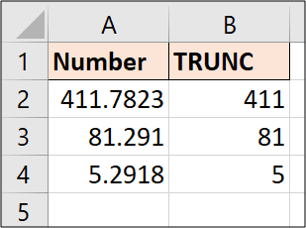
<p style="text-align: justify;">Hãy xem các ví dụ về hàm TRUNC với một số dữ liệu mẫu. Ví dụ dưới đây sử dụng hàm TRUNC sau.</p>

<pre id="pre0">
<code>=TRUNC(A2)</code></pre>

<p style="text-align: justify;">Nếu bạn không chỉ định có bao nhiêu chữ số cần cắt bớt, tất cả các vị trí trong phần thập phân sẽ bị loại bỏ.</p>

<figure>
<div style="text-align: justify;"><img alt="Nếu bạn không chỉ định có bao nhiêu chữ số cần cắt bớt, tất cả các vị trí trong phần thập phân sẽ bị loại bỏ" data-i="0" data-src="https://st.quantrimang.com/photos/image/2020/03/13/ham-trunc-trong-excel-1.png" data-was-processed="true" height="228" src="https://st.quantrimang.com/photos/image/2020/03/13/ham-trunc-trong-excel-1.png" width="306" /></div>

<figcaption>
<div style="text-align: justify;">Nếu bạn không chỉ định có bao nhiêu chữ số cần cắt bớt, tất cả các vị trí trong phần thập phân sẽ bị loại bỏ</div>
</figcaption>
</figure>

<p style="text-align: justify;">Bạn có thể thấy với giá trị trong ô&nbsp;<strong>A2</strong>&nbsp;rằng hàm TRUNC không áp dụng bất kỳ việc làm tròn nào. Nó chỉ đơn giản là cắt đến&nbsp;<strong>411.</strong></p>

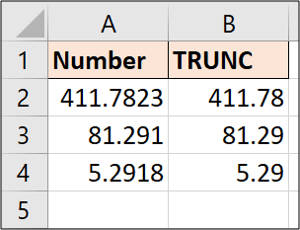
<p style="text-align: justify;">Hãy để xem một ví dụ khác. Lần này ví dụ sẽ giảm các giá trị xuống hai chữ số thập phân.</p>

<pre id="pre1">
<code>=TRUNC(A2,2)</code></pre>

<figure>
<div style="text-align: justify;"><img alt="Giảm các giá trị xuống hai chữ số thập phân" data-i="1" data-src="https://st.quantrimang.com/photos/image/2020/03/13/ham-trunc-trong-excel-2.png" data-was-processed="true" height="230" src="https://st.quantrimang.com/photos/image/2020/03/13/ham-trunc-trong-excel-2.png" width="300" /></div>

<figcaption>
<div style="text-align: justify;">Giảm các giá trị xuống hai chữ số thập phân</div>
</figcaption>
</figure>

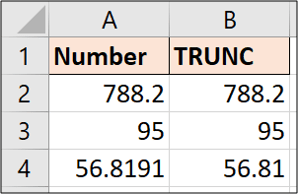
<p style="text-align: justify;">Hàm TRUNC sẽ không hiển thị thêm số thập phân nếu bạn yêu cầu nó hiển thị nhiều hơn số bạn có.</p>

<p style="text-align: justify;">Lấy ví dụ sau đây và cắt nó xuống còn 2 chữ số thập phân.</p>

<pre id="pre2">
<code>=TRUNC(A2,2)</code></pre>

<figure>
<div style="text-align: justify;"><img alt="Giá trị trong ô A4 được giảm xuống còn 2 chữ số thập phân" data-i="2" data-src="https://st.quantrimang.com/photos/image/2020/03/13/ham-trunc-trong-excel-3.png" data-was-processed="true" height="194" src="https://st.quantrimang.com/photos/image/2020/03/13/ham-trunc-trong-excel-3.png" width="298" /></div>

<figcaption>
<div style="text-align: justify;">Giá trị trong ô A4 được giảm xuống còn 2 chữ số thập phân</div>
</figcaption>
</figure>

<p style="text-align: justify;">Giá trị trong ô&nbsp;<strong>A4</strong>&nbsp;được giảm xuống còn 2 chữ số thập phân, nhưng các giá trị trong&nbsp;<strong>A2</strong>&nbsp;và&nbsp;<strong>A3</strong>&nbsp;vẫn giữ nguyên vì chúng có ít hơn hai chữ số thập phân.</p>

<p style="text-align: justify;">Nếu bạn muốn hiển thị hai số thập phân, các ô sẽ cần được định dạng để buộc phải hiển thị chúng.</p>

<div style="text-align: justify;">&nbsp;</div>

<h2 style="text-align: justify;">Xóa phần thời gian trong ngày và dấu thời gian</h2>

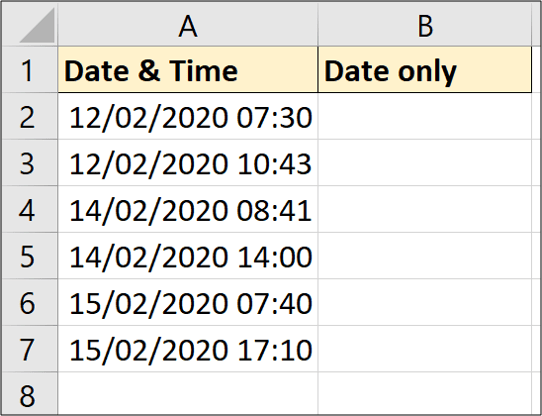
<p style="text-align: justify;">Một ví dụ hữu ích của TRUNC là xóa phần thời gian khỏi ngày và dấu thời gian trong Excel.</p>

<p style="text-align: justify;">Hãy tưởng tượng bạn có ngày và dấu thời gian sau đây, nhưng bạn chỉ muốn có phần ngày trong cột để phân tích.</p>

<figure>
<div style="text-align: justify;"><img alt="Xóa phần thời gian khỏi ngày và dấu thời gian trong Excel" data-i="3" data-src="https://st.quantrimang.com/photos/image/2020/03/13/ham-trunc-trong-excel-4.png" data-was-processed="true" height="416" src="https://st.quantrimang.com/photos/image/2020/03/13/ham-trunc-trong-excel-4.png" width="542" /></div>

<figcaption>
<div style="text-align: justify;">Xóa phần thời gian khỏi ngày và dấu thời gian trong Excel</div>
</figcaption>
</figure>

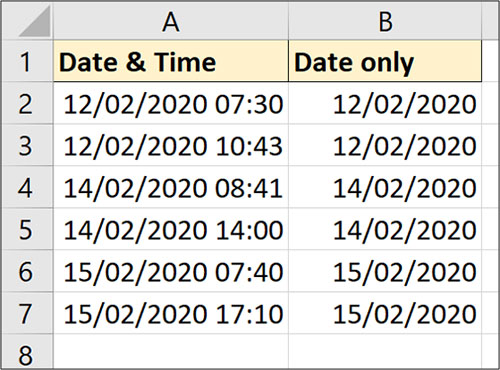
<p style="text-align: justify;">Công thức sau đây sẽ loại bỏ phần thời gian.</p>

<pre id="pre3">
<code>=TRUNC(A2)</code></pre>

<figure>
<div style="text-align: justify;"><img alt="Phần thời gian đã được loại bỏ" data-i="4" data-src="https://st.quantrimang.com/photos/image/2020/03/13/ham-trunc-trong-excel-5.jpg" data-was-processed="true" height="370" src="https://st.quantrimang.com/photos/image/2020/03/13/ham-trunc-trong-excel-5.jpg" width="500" /></div>

<figcaption>
<div style="text-align: justify;">Phần thời gian đã được loại bỏ</div>
</figcaption>
</figure>

<p style="text-align: justify;">Mặc dù phần thời gian đã được loại bỏ, các ô kết quả sẽ vẫn cần được định dạng dưới dạng ngày.</p>

<h2 style="text-align: justify;">Sử dụng TRUNC để rút ngắn số</h2>

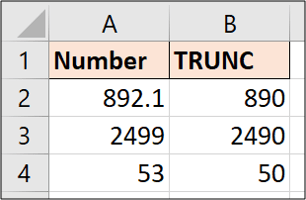
<p style="text-align: justify;">Đây là một kỹ thuật hiếm gặp. Khi bạn sử dụng số âm, hàm sẽ cắt các số ở bên trái dấu thập phân. Tuy nhiên, nó không thay đổi số lượng chữ số, mà thay thế chúng bằng số không.</p>

<p style="text-align: justify;">Hãy nhìn vào ví dụ sau đây.</p>

<pre id="pre4">
<code>=TRUNC(A2,-1)</code></pre>

<figure>
<div style="text-align: justify;"><img alt="Sử dụng TRUNC để rút ngắn số" data-i="5" data-src="https://st.quantrimang.com/photos/image/2020/03/13/ham-trunc-trong-excel-6.png" data-was-processed="true" height="200" src="https://st.quantrimang.com/photos/image/2020/03/13/ham-trunc-trong-excel-6.png" width="306" /></div>

<figcaption>
<div style="text-align: justify;">Sử dụng TRUNC để rút ngắn số</div>
</figcaption>
</figure>

<p style="text-align: justify;">Bạn có thể thấy trong mỗi ví dụ rằng số&nbsp;<strong>0</strong>&nbsp;được sử dụng để thay thế số bị xóa ở bên trái dấu thập phân.</p>

<p style="text-align: justify;">Có nhiều cách trong để xóa các vị trí thập phân, tuy nhiên, hầu hết các cách này sẽ&nbsp;làm tròn số trong Excel. Điểm mạnh của hàm TRUNC là nó không làm tròn các giá trị và chỉ đơn giản rút ngắn chúng về đúng số lượng vị trí thập phân được chỉ định mà thôi.</p>
		</div>
				<div id="author">
						<p>
				<strong>Nguồn tin:</strong>
				Quantrimang.com
			</p>
		</div>
	</div>
	<div id="footer" class="clearfix">
		<div id="url">
			<strong>URL của bản tin này: </strong><a href="https://www.nguoicodonvn2008.info/vi/news/savefile/kien-thuc-may-tinh/cach-su-dung-ham-trunc-trong-excel-1830.html" title="Cách sử dụng hàm TRUNC trong Excel">https://www.nguoicodonvn2008.info/vi/news/savefile/kien-thuc-may-tinh/cach-su-dung-ham-trunc-trong-excel-1830.html</a>

		</div>
		<div class="clear"></div>
		<div class="copyright">
			&copy; .&#x3A; Nguoicodonvn2008.info - Cõi lòng người cô đơn &#x3A;.
		</div>
		<div id="contact">
			<a href="mailto:admin@nguoicodonvn2008.info">admin@nguoicodonvn2008.info</a>
		</div>
	</div>
</div>
        <div id="timeoutsess" class="chromeframe">
            Bạn đã không sử dụng Site, <a onclick="timeoutsesscancel();" href="https://nguoicodonvn2008.info/#">Bấm vào đây để duy trì trạng thái đăng nhập</a>. Thời gian chờ: <span id="secField"> 60 </span> giây
        </div>
        <div id="openidResult" class="nv-alert" style="display:none"></div>
        <div id="openidBt" data-result="" data-redirect=""></div>
		</script>
		<div class="car-top">
  <span><img src="https://nguoicodonvn2008.info/themes/default/images/car.png" alt=""></span>
</div>
<script src="https://nguoicodonvn2008.info/assets/js/jquery/jquery.min.js"></script>
<script>var nv_base_siteurl="/",nv_lang_data="vi",nv_lang_interface="vi",nv_name_variable="nv",nv_fc_variable="op",nv_lang_variable="language",nv_module_name="news",nv_func_name="savefile",nv_is_user=0, nv_my_ofs=-4,nv_my_abbr="EDT",nv_cookie_prefix="nv4c_e856T",nv_check_pass_mstime=1738000,nv_area_admin=0,nv_safemode=0,theme_responsive=0,nv_recaptcha_ver=2,nv_recaptcha_sitekey="",nv_recaptcha_type="image",XSSsanitize=1;</script>
<script src="https://nguoicodonvn2008.info/assets/js/language/vi.js"></script>
<script src="https://nguoicodonvn2008.info/assets/js/DOMPurify/purify3.js"></script>
<script src="https://nguoicodonvn2008.info/assets/js/global.js"></script>
<script src="https://nguoicodonvn2008.info/assets/js/site.js"></script>
<script src="https://nguoicodonvn2008.info/themes/default/js/news.js"></script>
<script src="https://nguoicodonvn2008.info/themes/default/js/main.js"></script>
<script src="https://nguoicodonvn2008.info/themes/default/js/custom.js"></script>
<script type="application/ld+json">
        {
            "@context": "https://schema.org",
            "@type": "Organization",
            "url": "https://nguoicodonvn2008.info",
            "logo": "https://nguoicodonvn2008.info/uploads/angel.gif"
        }
        </script>
<script src="https://nguoicodonvn2008.info/themes/default/js/bootstrap.min.js"></script>
<script type="text/javascript">
var $scrolltop = $('.car-top');
$scrolltop.on('click', function () {
    $('html,body').animate({
        scrollTop: 0
    }, 800);
    $(this).addClass("car-run");
    setTimeout(function(){ $scrolltop.removeClass('car-run');}, 1000);
    return false;
});
$(window).on('scroll', function ()
{ 
    if($(window).scrollTop() >= 200)
    {
        $scrolltop.addClass("show");
        $scrolltop.addClass("car-down");
    }
    else
    {
       $scrolltop.removeClass("show");
       setTimeout(function(){ $scrolltop.removeClass('car-down');}, 300);
    }
});
</script>
</body>
</html>