<!DOCTYPE html>
    <html lang="vi" xmlns="http://www.w3.org/1999/xhtml" prefix="og: http://ogp.me/ns#">
    <head>
<title>Cách sử dụng hàm SEQUENCE&#40;&#41; trong Microsoft Excel 365</title>
<meta name="description" content="Cách sử dụng hàm SEQUENCE&#40;&#41; trong Microsoft Excel 365 - Savefile - Tin Tức -...">
<meta name="author" content=".: Nguoicodonvn2008.info - Cõi lòng người cô đơn :.">
<meta name="copyright" content=".: Nguoicodonvn2008.info - Cõi lòng người cô đơn :. [admin@nguoicodonvn2008.info]">
<meta name="robots" content="index, archive, follow, noodp">
<meta name="googlebot" content="index,archive,follow,noodp">
<meta name="msnbot" content="all,index,follow">
<meta name="generator" content="NukeViet v4.5">
<meta http-equiv="Content-Type" content="text/html; charset=utf-8">
<meta property="og:title" content="Cách sử dụng hàm SEQUENCE&#40;&#41; trong Microsoft Excel 365">
<meta property="og:type" content="website">
<meta property="og:description" content="Savefile - Tin Tức - https&#x3A;&#x002F;&#x002F;www.nguoicodonvn2008.info&#x002F;vi&#x002F;news&#x002F;savefile&#x002F;kien-thuc-may-tinh&#x002F;cach-su-dung-ham-sequence-trong-microsoft-excel-365-5343.html">
<meta property="og:site_name" content=".&#x3A; Nguoicodonvn2008.info - Cõi lòng người cô đơn &#x3A;.">
<meta property="og:url" content="https://www.nguoicodonvn2008.info/vi/news/savefile/kien-thuc-may-tinh/cach-su-dung-ham-sequence-trong-microsoft-excel-365-5343.html">
<link rel="shortcut icon" href="https://nguoicodonvn2008.info/favicon.ico">
<link rel="canonical" href="https://www.nguoicodonvn2008.info/vi/news/savefile/kien-thuc-may-tinh/cach-su-dung-ham-sequence-trong-microsoft-excel-365-5343.html">
<link rel="alternate" href="https://nguoicodonvn2008.info/vi/news/rss/" title="Tin Tức" type="application/rss+xml">
<link rel="alternate" href="https://nguoicodonvn2008.info/vi/news/rss/karaoke-dual/" title="Tin Tức - Karaoke Dual" type="application/rss+xml">
<link rel="alternate" href="https://nguoicodonvn2008.info/vi/news/rss/nhac-tre/" title="Tin Tức - Nhạc trẻ" type="application/rss+xml">
<link rel="alternate" href="https://nguoicodonvn2008.info/vi/news/rss/tru-tinh/" title="Tin Tức - Trữ tình" type="application/rss+xml">
<link rel="alternate" href="https://nguoicodonvn2008.info/vi/news/rss/nuoc-ngoai/" title="Tin Tức - Nước ngoài" type="application/rss+xml">
<link rel="alternate" href="https://nguoicodonvn2008.info/vi/news/rss/remix/" title="Tin Tức - Remix" type="application/rss+xml">
<link rel="alternate" href="https://nguoicodonvn2008.info/vi/news/rss/tam-su-tinh-yeu/" title="Tin Tức - Tâm sự tình yêu" type="application/rss+xml">
<link rel="alternate" href="https://nguoicodonvn2008.info/vi/news/rss/tho-suu-tam/" title="Tin Tức - Thơ sưu tầm" type="application/rss+xml">
<link rel="alternate" href="https://nguoicodonvn2008.info/vi/news/rss/cuoc-song/" title="Tin Tức - Cuộc sống" type="application/rss+xml">
<link rel="alternate" href="https://nguoicodonvn2008.info/vi/news/rss/phan-mem/" title="Tin Tức - Phần mềm" type="application/rss+xml">
<link rel="alternate" href="https://nguoicodonvn2008.info/vi/news/rss/kien-thuc-may-tinh/" title="Tin Tức - Kiến thức máy tính" type="application/rss+xml">
<link rel="alternate" href="https://nguoicodonvn2008.info/vi/news/rss/hoc-tap/" title="Tin Tức - Học tập" type="application/rss+xml">
<link rel="alternate" href="https://nguoicodonvn2008.info/vi/news/rss/tai-lieu/" title="Tin Tức - Tài liệu" type="application/rss+xml">
<link rel="alternate" href="https://nguoicodonvn2008.info/vi/news/rss/de-thi/" title="Tin Tức - Đề thi" type="application/rss+xml">
<link rel="preload" as="style" href="https://nguoicodonvn2008.info/assets/css/font-awesome.min.css" type="text/css">
<link rel="preload" as="style" href="https://nguoicodonvn2008.info/themes/default/css/bootstrap.non-responsive.css" type="text/css">
<link rel="preload" as="style" href="https://nguoicodonvn2008.info/themes/default/css/style.css" type="text/css">
<link rel="preload" as="style" href="https://nguoicodonvn2008.info/themes/default/css/style.non-responsive.css" type="text/css">
<link rel="preload" as="style" href="https://nguoicodonvn2008.info/themes/default/css/news.css" type="text/css">
<link rel="preload" as="style" href="https://nguoicodonvn2008.info/themes/default/css/custom.css" type="text/css">
<link rel="preload" as="script" href="https://nguoicodonvn2008.info/assets/js/jquery/jquery.min.js" type="text/javascript">
<link rel="preload" as="script" href="https://nguoicodonvn2008.info/assets/js/language/vi.js" type="text/javascript">
<link rel="preload" as="script" href="https://nguoicodonvn2008.info/assets/js/DOMPurify/purify3.js" type="text/javascript">
<link rel="preload" as="script" href="https://nguoicodonvn2008.info/assets/js/global.js" type="text/javascript">
<link rel="preload" as="script" href="https://nguoicodonvn2008.info/assets/js/site.js" type="text/javascript">
<link rel="preload" as="script" href="https://nguoicodonvn2008.info/themes/default/js/news.js" type="text/javascript">
<link rel="preload" as="script" href="https://nguoicodonvn2008.info/themes/default/js/main.js" type="text/javascript">
<link rel="preload" as="script" href="https://nguoicodonvn2008.info/themes/default/js/custom.js" type="text/javascript">
<link rel="preload" as="script" href="https://nguoicodonvn2008.info/themes/default/js/bootstrap.min.js" type="text/javascript">
<link rel="stylesheet" href="https://nguoicodonvn2008.info/assets/css/font-awesome.min.css">
<link rel="stylesheet" href="https://nguoicodonvn2008.info/themes/default/css/bootstrap.non-responsive.css">
<link rel="stylesheet" href="https://nguoicodonvn2008.info/themes/default/css/style.css">
<link rel="stylesheet" href="https://nguoicodonvn2008.info/themes/default/css/style.non-responsive.css">
<link rel="StyleSheet" href="https://nguoicodonvn2008.info/themes/default/css/news.css">
<link rel="stylesheet" href="https://nguoicodonvn2008.info/themes/default/css/custom.css">
<style type="text/css">
	body{background: #fff;}
</style>
    </head>
    <body>
<div id="print">
	<div id="hd_print">
		<h2 class="pull-left">.&#x3A; Nguoicodonvn2008.info - Cõi lòng người cô đơn &#x3A;.</h2>
		<p class="pull-right"><a title=".&#x3A; Nguoicodonvn2008.info - Cõi lòng người cô đơn &#x3A;." href="https://nguoicodonvn2008.info/">https://nguoicodonvn2008.info</a></p>
	</div>
	<div class="clear"></div>
	<hr />
	<div id="content">
		<h1>Cách sử dụng hàm SEQUENCE&#40;&#41; trong Microsoft Excel 365</h1>
		<ul class="list-inline">
			<li>Thứ bảy - 26/03/2022 00:52</li>
			<li class="hidden-print txtrequired"><em class="fa fa-print">&nbsp;</em><a title="In ra" href="javascript:;" onclick="window.print()">In ra</a></li>
			<li class="hidden-print txtrequired"><em class="fa fa-power-off">&nbsp;</em><a title="Đóng cửa sổ này" href="javascript:;" onclick="window.close()">Đóng cửa sổ này</a></li>
		</ul>
		<div class="clear"></div>
		<div id="hometext">
		</div>
				<div class="imghome">
			<img alt="Cách sử dụng hàm SEQUENCE&#40;&#41; trong Microsoft Excel 365" src="https://st.quantrimang.com/photos/image/2022/03/25/ham-sequence-trong-microsoft-excel-365-4.jpg" width="460" class="img-thumbnail" />
		</div>
		<div class="clear"></div>
		<div id="bodytext" class="clearfix">
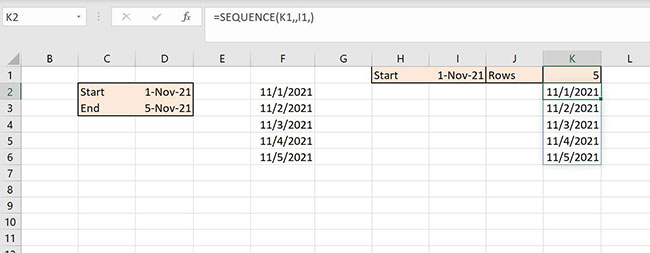
			<p style="text-align: justify;">Microsoft 365 cập nhật cách Excel xử lý các hàm động. Nếu bạn đã từng nhập một biểu thức bằng&nbsp;<strong>Ctrl + Shift + Enter</strong>, thì bạn đã quen thuộc với cách&nbsp;Excel&nbsp;sử dụng để làm việc với mảng động. Nhờ các hàm mảng động mới, việc tạo và duy trì những loại biểu thức này dễ dàng hơn nhiều. Bạn nhập hàm như bình thường - bằng một phím&nbsp;<strong>Enter</strong>&nbsp;đơn giản và kết quả sẽ được đưa vào các ô bên dưới, đủ để hoàn thành các phép tính của hàm. Trong bài viết này, Quantrimang.com sẽ hướng dẫn bạn cách dễ dàng tạo chuỗi ngày và cập nhật nhờ hàm SEQUENCE().</p>

<p style="text-align: justify;"><strong>Lưu ý</strong>: Tác giả bài viết đang sử dụng Microsoft 365 trên hệ thống Windows 10 64-bit. Tính năng này hiện chỉ có sẵn trong 365 và Excel Online. Để thuận tiện, bạn có thể tải xuống&nbsp;file .xlsx&nbsp;ví dụ:</p>

<pre id="pre0">
<code>https://www.techrepublic.com/resource-library/downloads/sample-file-how-to-use-microsoft-365-s-dynamic-array-function-sequence-to-create-a-list-of-dates-in-excel/</code></pre>

<h2 style="text-align: justify;">Giới thiệu về hàm SEQUENCE()</h2>

<p style="text-align: justify;">Một trong những hàm mảng động mới của 365 là SEQUENCE(), trả về một chuỗi giá trị bằng cú pháp sau:</p>

<pre id="pre1">
<code>=SEQUENCE(rows,&#91;columns&#93;,&#91;start&#93;,&#91;step&#93;)</code></pre>

<p style="text-align: justify;">Trong đó&nbsp;<strong>rows</strong>&nbsp;là bắt buộc và chỉ định số hàng cần điền (số lượng giá trị cần tính toán). Các đối số tùy chọn theo sau:</p>

<ul>
	<li style="text-align: justify;"><strong>column:</strong>&nbsp;Số cột trả về</li>
	<li style="text-align: justify;"><strong>start:</strong>&nbsp;Số đầu tiên trong dãy</li>
	<li style="text-align: justify;"><strong>step:</strong>&nbsp;Mức tăng dần</li>
</ul>

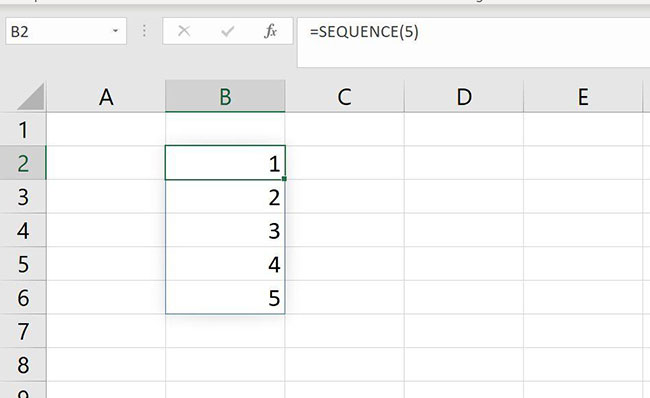
<p style="text-align: justify;">Ở dạng đơn giản nhất, bạn có thể sử dụng hàm này để trả về một loạt các giá trị cố định, như thể hiện trong Hình A. Kết quả được gọi là phạm vi tràn. Khi sử dụng một trong các hàm mảng động mới, hãy nhớ để lại nhiều khoảng trống bên dưới hàm cho các giá trị này.</p>

<figure>
<div style="text-align: justify;"><img alt="Hình A" data-i="0" data-src="https://st.quantrimang.com/photos/image/2022/03/25/ham-sequence-trong-microsoft-excel-365-1.jpg" data-was-processed="true" height="398" src="https://st.quantrimang.com/photos/image/2022/03/25/ham-sequence-trong-microsoft-excel-365-1.jpg" width="650" /></div>

<figcaption>
<div style="text-align: justify;">Hình A</div>
</figcaption>
</figure>

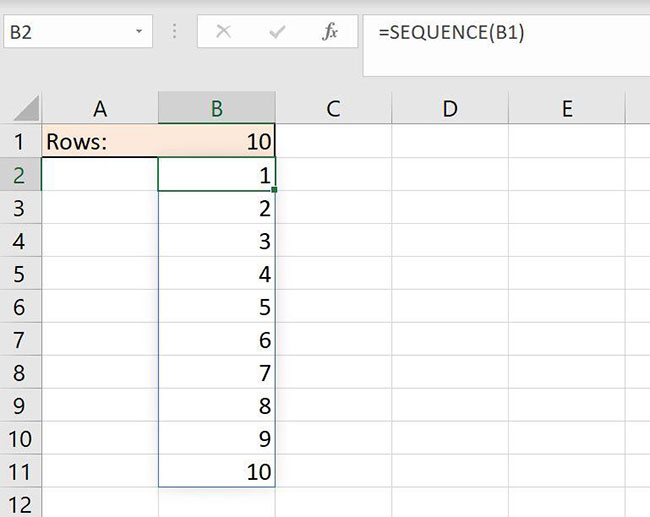
<p style="text-align: justify;">Đối số duy nhất, 5, trả về 5 giá trị bắt đầu bằng 1 và tăng dần lên 1. Hãy thêm một giá trị đầu vào để làm cho nó linh hoạt hơn. Bằng cách tham chiếu đến ô đầu vào (B1), bạn có thể tự động thay đổi số lượng giá trị mà SEQUENCE() trả về, như trong Hình B. Chỉ cần thay đổi giá trị đầu vào trong B1 để cập nhật kết quả. Nếu bạn muốn danh sách giảm dần, hãy bắt đầu bằng 10 và tăng dần -1 như sau:</p>

<pre id="pre2">
<code>=SEQUENCE(B1,,10,-1)</code></pre>

<figure>
<div style="text-align: justify;"><img alt="Hình B" data-i="1" data-src="https://st.quantrimang.com/photos/image/2022/03/25/ham-sequence-trong-microsoft-excel-365-2.jpg" data-was-processed="true" height="517" src="https://st.quantrimang.com/photos/image/2022/03/25/ham-sequence-trong-microsoft-excel-365-2.jpg" width="650" /></div>

<figcaption>
<div style="text-align: justify;">Hình B</div>
</figcaption>
</figure>

<h2 style="text-align: justify;">Cách trả về một chuỗi ngày trong Excel</h2>

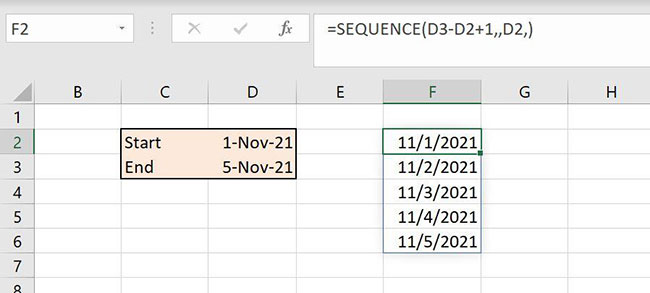
<p style="text-align: justify;">Fill handle của Excel có thể tạo danh sách ngày tháng nhanh chóng cho bạn, nhưng danh sách này là tĩnh; bạn phải tạo một danh sách mới nếu nhu cầu thay đổi. Hàm SEQUENCE(), như trong Hình C, cho phép bạn nhanh chóng tạo một danh sách ngày tháng thực sự động.</p>

<figure>
<div style="text-align: justify;"><img alt="Hình C" data-i="2" data-src="https://st.quantrimang.com/photos/image/2022/03/25/ham-sequence-trong-microsoft-excel-365-3.jpg" data-was-processed="true" height="293" src="https://st.quantrimang.com/photos/image/2022/03/25/ham-sequence-trong-microsoft-excel-365-3.jpg" width="650" /></div>

<figcaption>
<div style="text-align: justify;">Hình C</div>
</figcaption>
</figure>

<p style="text-align: justify;">Hãy xem xét các đối số của hàm:</p>

<pre id="pre3">
<code>=SEQUENCE(D3-D2+1,,D2,)</code></pre>

<p style="text-align: justify;">Biểu thức&nbsp;<strong>D3-D2+1</strong>&nbsp;cho chúng ta số hàng (hoặc giá trị). Từ ngày 1 tháng 11 đến ngày 5 tháng 11 là 4 ngày; thêm 1 để có 5 ngày: 1 tháng 11, 2 tháng 11, 3 tháng 11, 4 tháng 11 và 5 tháng 11. Đối số thứ ba tham chiếu D2 và chỉ định giá trị đầu tiên trong chuỗi. Do đó, giá trị đầu tiên trong chuỗi là ngày trong D2 và sẽ có tổng cộng 5 ngày trong chuỗi. Để cập nhật chuỗi ngày, hãy thay đổi một trong hai hoặc cả hai ngày trong&nbsp;<strong>D2:D3.</strong></p>

<p style="text-align: justify;">Hình D cho thấy một hàm tương tự tham chiếu đến hai giá trị đầu vào thay vì một. Làm như vậy giúp bạn linh hoạt hơn. Trên thực tế, điều tương tự cũng được thực hiện, nhưng trong ví dụ thứ hai, bạn không cần phải biết ngày kết thúc. Cả hai đều hữu ích, nhưng bạn sẽ sử dụng chúng trong các trường hợp khác nhau.</p>

<figure>
<div style="text-align: justify;"><img alt="Hình D" data-i="3" data-src="https://st.quantrimang.com/photos/image/2022/03/25/ham-sequence-trong-microsoft-excel-365-4.jpg" data-was-processed="true" height="253" src="https://st.quantrimang.com/photos/image/2022/03/25/ham-sequence-trong-microsoft-excel-365-4.jpg" width="650" /></div>

<figcaption>
<div style="text-align: justify;">Hình D</div>
</figcaption>
</figure>
		</div>
				<div id="author">
						<p>
				<strong>Nguồn tin:</strong>
				Quantrimang.com
			</p>
		</div>
	</div>
	<div id="footer" class="clearfix">
		<div id="url">
			<strong>URL của bản tin này: </strong><a href="https://www.nguoicodonvn2008.info/vi/news/savefile/kien-thuc-may-tinh/cach-su-dung-ham-sequence-trong-microsoft-excel-365-5343.html" title="Cách sử dụng hàm SEQUENCE&#40;&#41; trong Microsoft Excel 365">https://www.nguoicodonvn2008.info/vi/news/savefile/kien-thuc-may-tinh/cach-su-dung-ham-sequence-trong-microsoft-excel-365-5343.html</a>

		</div>
		<div class="clear"></div>
		<div class="copyright">
			&copy; .&#x3A; Nguoicodonvn2008.info - Cõi lòng người cô đơn &#x3A;.
		</div>
		<div id="contact">
			<a href="mailto:admin@nguoicodonvn2008.info">admin@nguoicodonvn2008.info</a>
		</div>
	</div>
</div>
        <div id="timeoutsess" class="chromeframe">
            Bạn đã không sử dụng Site, <a onclick="timeoutsesscancel();" href="https://nguoicodonvn2008.info/#">Bấm vào đây để duy trì trạng thái đăng nhập</a>. Thời gian chờ: <span id="secField"> 60 </span> giây
        </div>
        <div id="openidResult" class="nv-alert" style="display:none"></div>
        <div id="openidBt" data-result="" data-redirect=""></div>
		</script>
		<div class="car-top">
  <span><img src="https://nguoicodonvn2008.info/themes/default/images/car.png" alt=""></span>
</div>
<script src="https://nguoicodonvn2008.info/assets/js/jquery/jquery.min.js"></script>
<script>var nv_base_siteurl="/",nv_lang_data="vi",nv_lang_interface="vi",nv_name_variable="nv",nv_fc_variable="op",nv_lang_variable="language",nv_module_name="news",nv_func_name="savefile",nv_is_user=0, nv_my_ofs=-4,nv_my_abbr="EDT",nv_cookie_prefix="nv4c_e856T",nv_check_pass_mstime=1738000,nv_area_admin=0,nv_safemode=0,theme_responsive=0,nv_recaptcha_ver=2,nv_recaptcha_sitekey="",nv_recaptcha_type="image",XSSsanitize=1;</script>
<script src="https://nguoicodonvn2008.info/assets/js/language/vi.js"></script>
<script src="https://nguoicodonvn2008.info/assets/js/DOMPurify/purify3.js"></script>
<script src="https://nguoicodonvn2008.info/assets/js/global.js"></script>
<script src="https://nguoicodonvn2008.info/assets/js/site.js"></script>
<script src="https://nguoicodonvn2008.info/themes/default/js/news.js"></script>
<script src="https://nguoicodonvn2008.info/themes/default/js/main.js"></script>
<script src="https://nguoicodonvn2008.info/themes/default/js/custom.js"></script>
<script type="application/ld+json">
        {
            "@context": "https://schema.org",
            "@type": "Organization",
            "url": "https://nguoicodonvn2008.info",
            "logo": "https://nguoicodonvn2008.info/uploads/angel.gif"
        }
        </script>
<script src="https://nguoicodonvn2008.info/themes/default/js/bootstrap.min.js"></script>
<script type="text/javascript">
var $scrolltop = $('.car-top');
$scrolltop.on('click', function () {
    $('html,body').animate({
        scrollTop: 0
    }, 800);
    $(this).addClass("car-run");
    setTimeout(function(){ $scrolltop.removeClass('car-run');}, 1000);
    return false;
});
$(window).on('scroll', function ()
{ 
    if($(window).scrollTop() >= 200)
    {
        $scrolltop.addClass("show");
        $scrolltop.addClass("car-down");
    }
    else
    {
       $scrolltop.removeClass("show");
       setTimeout(function(){ $scrolltop.removeClass('car-down');}, 300);
    }
});
</script>
</body>
</html>