<!DOCTYPE html>
    <html lang="vi" xmlns="http://www.w3.org/1999/xhtml" prefix="og: http://ogp.me/ns#">
    <head>
<title>Cách sử dụng Foremost để khôi phục file đã xóa trong Linux</title>
<meta name="description" content="Cách sử dụng Foremost để khôi phục file đã xóa trong Linux - Savefile - Tin Tức -...">
<meta name="author" content=".: Nguoicodonvn2008.info - Cõi lòng người cô đơn :.">
<meta name="copyright" content=".: Nguoicodonvn2008.info - Cõi lòng người cô đơn :. [admin@nguoicodonvn2008.info]">
<meta name="robots" content="index, archive, follow, noodp">
<meta name="googlebot" content="index,archive,follow,noodp">
<meta name="msnbot" content="all,index,follow">
<meta name="generator" content="NukeViet v4.5">
<meta http-equiv="Content-Type" content="text/html; charset=utf-8">
<meta property="og:title" content="Cách sử dụng Foremost để khôi phục file đã xóa trong Linux">
<meta property="og:type" content="website">
<meta property="og:description" content="Savefile - Tin Tức - https&#x3A;&#x002F;&#x002F;www.nguoicodonvn2008.info&#x002F;vi&#x002F;news&#x002F;savefile&#x002F;kien-thuc-may-tinh&#x002F;cach-su-dung-foremost-de-khoi-phuc-file-da-xoa-trong-linux-1135.html">
<meta property="og:site_name" content=".&#x3A; Nguoicodonvn2008.info - Cõi lòng người cô đơn &#x3A;.">
<meta property="og:url" content="https://www.nguoicodonvn2008.info/vi/news/savefile/kien-thuc-may-tinh/cach-su-dung-foremost-de-khoi-phuc-file-da-xoa-trong-linux-1135.html">
<link rel="shortcut icon" href="https://nguoicodonvn2008.info/favicon.ico">
<link rel="canonical" href="https://www.nguoicodonvn2008.info/vi/news/savefile/kien-thuc-may-tinh/cach-su-dung-foremost-de-khoi-phuc-file-da-xoa-trong-linux-1135.html">
<link rel="alternate" href="https://nguoicodonvn2008.info/vi/news/rss/" title="Tin Tức" type="application/rss+xml">
<link rel="alternate" href="https://nguoicodonvn2008.info/vi/news/rss/karaoke-dual/" title="Tin Tức - Karaoke Dual" type="application/rss+xml">
<link rel="alternate" href="https://nguoicodonvn2008.info/vi/news/rss/nhac-tre/" title="Tin Tức - Nhạc trẻ" type="application/rss+xml">
<link rel="alternate" href="https://nguoicodonvn2008.info/vi/news/rss/tru-tinh/" title="Tin Tức - Trữ tình" type="application/rss+xml">
<link rel="alternate" href="https://nguoicodonvn2008.info/vi/news/rss/nuoc-ngoai/" title="Tin Tức - Nước ngoài" type="application/rss+xml">
<link rel="alternate" href="https://nguoicodonvn2008.info/vi/news/rss/remix/" title="Tin Tức - Remix" type="application/rss+xml">
<link rel="alternate" href="https://nguoicodonvn2008.info/vi/news/rss/tam-su-tinh-yeu/" title="Tin Tức - Tâm sự tình yêu" type="application/rss+xml">
<link rel="alternate" href="https://nguoicodonvn2008.info/vi/news/rss/tho-suu-tam/" title="Tin Tức - Thơ sưu tầm" type="application/rss+xml">
<link rel="alternate" href="https://nguoicodonvn2008.info/vi/news/rss/cuoc-song/" title="Tin Tức - Cuộc sống" type="application/rss+xml">
<link rel="alternate" href="https://nguoicodonvn2008.info/vi/news/rss/phan-mem/" title="Tin Tức - Phần mềm" type="application/rss+xml">
<link rel="alternate" href="https://nguoicodonvn2008.info/vi/news/rss/kien-thuc-may-tinh/" title="Tin Tức - Kiến thức máy tính" type="application/rss+xml">
<link rel="alternate" href="https://nguoicodonvn2008.info/vi/news/rss/hoc-tap/" title="Tin Tức - Học tập" type="application/rss+xml">
<link rel="alternate" href="https://nguoicodonvn2008.info/vi/news/rss/tai-lieu/" title="Tin Tức - Tài liệu" type="application/rss+xml">
<link rel="alternate" href="https://nguoicodonvn2008.info/vi/news/rss/de-thi/" title="Tin Tức - Đề thi" type="application/rss+xml">
<link rel="preload" as="style" href="https://nguoicodonvn2008.info/assets/css/font-awesome.min.css" type="text/css">
<link rel="preload" as="style" href="https://nguoicodonvn2008.info/themes/default/css/bootstrap.non-responsive.css" type="text/css">
<link rel="preload" as="style" href="https://nguoicodonvn2008.info/themes/default/css/style.css" type="text/css">
<link rel="preload" as="style" href="https://nguoicodonvn2008.info/themes/default/css/style.non-responsive.css" type="text/css">
<link rel="preload" as="style" href="https://nguoicodonvn2008.info/themes/default/css/news.css" type="text/css">
<link rel="preload" as="style" href="https://nguoicodonvn2008.info/themes/default/css/custom.css" type="text/css">
<link rel="preload" as="script" href="https://nguoicodonvn2008.info/assets/js/jquery/jquery.min.js" type="text/javascript">
<link rel="preload" as="script" href="https://nguoicodonvn2008.info/assets/js/language/vi.js" type="text/javascript">
<link rel="preload" as="script" href="https://nguoicodonvn2008.info/assets/js/DOMPurify/purify3.js" type="text/javascript">
<link rel="preload" as="script" href="https://nguoicodonvn2008.info/assets/js/global.js" type="text/javascript">
<link rel="preload" as="script" href="https://nguoicodonvn2008.info/assets/js/site.js" type="text/javascript">
<link rel="preload" as="script" href="https://nguoicodonvn2008.info/themes/default/js/news.js" type="text/javascript">
<link rel="preload" as="script" href="https://nguoicodonvn2008.info/themes/default/js/main.js" type="text/javascript">
<link rel="preload" as="script" href="https://nguoicodonvn2008.info/themes/default/js/custom.js" type="text/javascript">
<link rel="preload" as="script" href="https://nguoicodonvn2008.info/themes/default/js/bootstrap.min.js" type="text/javascript">
<link rel="stylesheet" href="https://nguoicodonvn2008.info/assets/css/font-awesome.min.css">
<link rel="stylesheet" href="https://nguoicodonvn2008.info/themes/default/css/bootstrap.non-responsive.css">
<link rel="stylesheet" href="https://nguoicodonvn2008.info/themes/default/css/style.css">
<link rel="stylesheet" href="https://nguoicodonvn2008.info/themes/default/css/style.non-responsive.css">
<link rel="StyleSheet" href="https://nguoicodonvn2008.info/themes/default/css/news.css">
<link rel="stylesheet" href="https://nguoicodonvn2008.info/themes/default/css/custom.css">
<style type="text/css">
	body{background: #fff;}
</style>
    </head>
    <body>
<div id="print">
	<div id="hd_print">
		<h2 class="pull-left">.&#x3A; Nguoicodonvn2008.info - Cõi lòng người cô đơn &#x3A;.</h2>
		<p class="pull-right"><a title=".&#x3A; Nguoicodonvn2008.info - Cõi lòng người cô đơn &#x3A;." href="https://nguoicodonvn2008.info/">https://nguoicodonvn2008.info</a></p>
	</div>
	<div class="clear"></div>
	<hr />
	<div id="content">
		<h1>Cách sử dụng Foremost để khôi phục file đã xóa trong Linux</h1>
		<ul class="list-inline">
			<li>Thứ tư - 09/10/2019 07:58</li>
			<li class="hidden-print txtrequired"><em class="fa fa-print">&nbsp;</em><a title="In ra" href="javascript:;" onclick="window.print()">In ra</a></li>
			<li class="hidden-print txtrequired"><em class="fa fa-power-off">&nbsp;</em><a title="Đóng cửa sổ này" href="javascript:;" onclick="window.close()">Đóng cửa sổ này</a></li>
		</ul>
		<div class="clear"></div>
		<div id="hometext">
		</div>
				<div class="imghome">
			<img alt="Cách sử dụng Foremost để khôi phục file đã xóa trong Linux" src="https://st.quantrimang.com/photos/image/2019/10/09/dung-foremost-khoi-phuc-cac-file-da-xoa-trong-linux-4.jpg" width="460" class="img-thumbnail" />
		</div>
		<div class="clear"></div>
		<div id="bodytext" class="clearfix">
			<p style="text-align: justify;">Lệnh&nbsp;<code>rm</code>&nbsp;là một trong&nbsp;những lệnh nguy hiểm nhất đối với người dùng Linux. Nếu xóa file hoặc thư mục sai, bạn có thể khiến toàn bộ hệ điều hành của mình không thể hoạt động được nữa. Việc khôi phục các file bị mất không phải là chuyện dễ dàng, nhưng cũng không phải là không thể thực hiện được. Foremost được thiết kế để chẩn đoán ổ cứng nhằm phục hồi bất kỳ file nào bạn đã xóa. Bài viết này cung cấp một hướng dẫn về cách sử dụng công cụ Foremost.</p>

<h2 style="text-align: justify;">Foremost là gì?</h2>

<p style="text-align: justify;">Được phát triển bởi các cơ quan liên bang Hoa Kỳ, Foremost (link tham khảo:&nbsp;<em>http://foremost.sourceforge.net/</em>) là phần mềm có mã nguồn mở. Thay vì cố gắng truy xuất file từ trong hệ thống file của ổ cứng, Foremost cố gắng trực tiếp tạo lại các file đó.</p>

<p style="text-align: justify;"><img alt="Foremost là gì?" data-i="0" data-src="https://st.quantrimang.com/photos/image/2019/10/09/dung-foremost-khoi-phuc-cac-file-da-xoa-trong-linux-1.jpg" data-was-processed="true" height="411" src="https://st.quantrimang.com/photos/image/2019/10/09/dung-foremost-khoi-phuc-cac-file-da-xoa-trong-linux-1.jpg" width="650" /></p>

<p style="text-align: justify;">Hầu hết mọi hệ điều hành đều không xóa các file hoàn toàn khỏi hệ thống file. Chúng chỉ xóa siêu dữ liệu (metadata) và để lại dữ liệu được ghi bên dưới. Sau đó, Foremost sẽ sao chép và phân tích ổ đĩa để biết thông tin này.</p>

<p style="text-align: justify;">Foremost sẽ lưu trữ thông tin tạm thời bằng bộ nhớ trong PC. Từ đó, nó sẽ tìm kiếm các segment (phân đoạn) file nhất định cho đến khi khớp với những segment khác, ghép chúng lại với nhau (giống như trò chơi ghép hình).</p>

<p style="text-align: justify;">Foremost hỗ trợ một số kiểu file nhất định. Các file hình ảnh như&nbsp;JPG và GIF, những file nhị phân Windows như EXE, file tài liệu như DOC và PDF, cũng như&nbsp;các định dạng file nén&nbsp;như ZIP hoặc RAR đều được hỗ trợ.</p>

<h2 style="text-align: justify;">Cài đặt Foremost trong Linux</h2>

<p style="text-align: justify;">Foremost có sẵn dưới dạng gói để cài đặt trong hầu hết các kho&nbsp;Linux&nbsp;mặc định. Bạn có thể cài đặt nó từ terminal bằng trình quản lý gói mà bản phân phối Linux sử dụng.</p>

<p style="text-align: justify;"><img alt="Cài đặt Foremost trong Linux" data-i="1" data-src="https://st.quantrimang.com/photos/image/2019/10/09/dung-foremost-khoi-phuc-cac-file-da-xoa-trong-linux-2.jpg" data-was-processed="true" height="321" src="https://st.quantrimang.com/photos/image/2019/10/09/dung-foremost-khoi-phuc-cac-file-da-xoa-trong-linux-2.jpg" width="650" /></p>

<p style="text-align: justify;">Các bản phân phối dựa trên Debian và&nbsp;<a href="https://quantrimang.com/meo-va-thu-thuat-sau-khi-cai-dat-ubuntu-84487" title="Mẹo và thủ thuật sau khi cài đặt Ubuntu">Ubuntu</a>&nbsp;có thể cài đặt Foremost bằng cách mở terminal và gõ như sau:</p>

<pre id="pre0">
<code>sudo apt install foremost</code></pre>

<p style="text-align: justify;">Nếu đang chạy&nbsp;<a href="https://quantrimang.com/co-nen-cai-dat-arch-linux-khong-163221" title="Có nên cài đặt Arch Linux không?">Arch Linux</a>, bạn có thể cài đặt Foremost bằng cách nhập:</p>

<pre id="pre1">
<code>pacman -S foremost</code></pre>

<p style="text-align: justify;">Người dùng Fedora có thể cài đặt Foremost từ terminal bằng cách nhập:</p>

<pre id="pre2">
<code>dnf install foremost</code></pre>

<div style="text-align: justify;">&nbsp;</div>

<h2 style="text-align: justify;">Cách sử dụng Foremost</h2>

<p style="text-align: justify;">Nếu bạn đã xóa một file và muốn truy xuất file đó, bạn có thể sử dụng Foremost để tìm kiếm tất cả các file có cùng loại đã bị xóa trước đó.</p>

<p style="text-align: justify;">Trước tiên, bạn sẽ cần biết tên phân vùng ổ của mình trong Linux, ví dụ&nbsp;<strong>“/dev/sda1”.</strong>&nbsp;Nếu bạn không biết phân vùng của mình, hãy nhập thông tin sau vào terminal:</p>

<pre id="pre3">
<code>df -h</code></pre>

<p style="text-align: justify;">Bạn sẽ thấy một danh sách các phân vùng ổ cứng được liệt kê. Xác định vị trí ổ bạn muốn Foremost tìm kiếm, được liệt kê trong&nbsp;<strong>“Filesystem”.</strong></p>

<p style="text-align: justify;"><strong><img alt="Xác định vị trí ổ bạn muốn Foremost tìm kiếm, được liệt kê trong “Filesystem”" data-i="2" data-src="https://st.quantrimang.com/photos/image/2019/10/09/dung-foremost-khoi-phuc-cac-file-da-xoa-trong-linux-3.jpg" data-was-processed="true" height="236" src="https://st.quantrimang.com/photos/image/2019/10/09/dung-foremost-khoi-phuc-cac-file-da-xoa-trong-linux-3.jpg" width="650" /></strong></p>

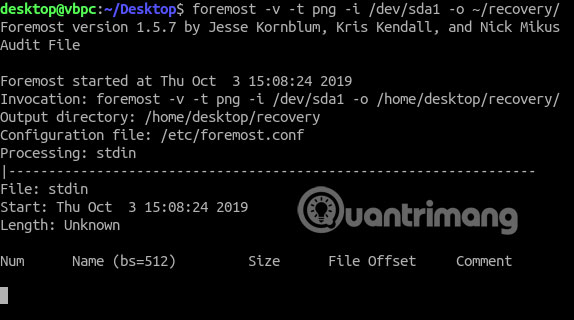
<p style="text-align: justify;">Khi đã biết phân vùng ổ cứng của mình, bạn có thể sử dụng Foremost để tìm kiếm ổ. Ví dụ, nếu bạn đang tìm kiếm một file PNG đã bị xóa, hãy mở một cửa sổ terminal và gõ như sau:</p>

<pre id="pre4">
<code>foremost -v -t png -i /dev/sda1 -o ~/recovery/</code></pre>

<p style="text-align: justify;">Thay thế&nbsp;<strong>“/dev/sda1”</strong>&nbsp;bằng phân vùng ổ cứng của bạn. Flag&nbsp;<strong>-t</strong>&nbsp;cho phép bạn chọn loại file muốn tìm để khôi phục. Flag&nbsp;<strong>-i</strong>&nbsp;chọn ổ bạn muốn tìm kiếm, trong khi flag&nbsp;<strong>-o</strong>&nbsp;liệt kê thư mục lưu bất kỳ file nào được khôi phục.</p>

<p style="text-align: justify;"><img alt="Thay thế “/dev/sda1” bằng phân vùng ổ cứng của bạn" data-i="3" data-src="https://st.quantrimang.com/photos/image/2019/10/09/dung-foremost-khoi-phuc-cac-file-da-xoa-trong-linux-4.jpg" data-was-processed="true" height="320" src="https://st.quantrimang.com/photos/image/2019/10/09/dung-foremost-khoi-phuc-cac-file-da-xoa-trong-linux-4.jpg" width="574" /></p>

<p style="text-align: justify;">Bạn có thể sử dụng một quy trình tương tự cho bất kỳ loại file nào muốn sử dụng. Thay thế&nbsp;<strong>png</strong>&nbsp;bằng loại file của bạn. Bạn có thể tìm kiếm toàn bộ ổ hoặc thông qua các thư mục cụ thể.</p>

<p style="text-align: justify;">Khi Forecast hoàn thành tìm kiếm, mọi file mà nó định vị sẽ được lưu trong thư mục đầu ra bạn đã liệt kê dưới flag&nbsp;<strong>-o.</strong>&nbsp;Nếu gặp khó khăn, bạn có thể tìm kiếm thông qua hướng dẫn sử dụng của Forecast bằng cách nhập vào terminal:</p>

<pre id="pre5">
<code>man foremost</code></pre>

<h2 style="text-align: justify;">Truy xuất dữ liệu đã xóa trong Linux</h2>

<p style="text-align: justify;">Không có gì đảm bảo rằng Foremost có thể khôi phục bất kỳ dữ liệu nào bạn đã làm mất hoặc xóa bỏ. Tuy nhiên, đây vẫn là một trong&nbsp;những công cụ miễn phí tốt nhất để truy xuất dữ liệu.</p>

<p style="text-align: justify;">Trừ khi bạn sẵn sàng chi tiền cho một công cụ khác tốt hơn, còn không Foremost là một trong những tùy chọn tốt nhất có sẵn để truy xuất dữ liệu trong Linux. Nếu Foremost không có tác dụng trong trường hợp của bạn, có những công cụ khôi phục Linux khác có sẵn mà bạn có thể thử thay thế.</p>

<p style="text-align: justify;">Chúc bạn thực hiện thành công!</p>
		</div>
				<div id="author">
						<p>
				<strong>Nguồn tin:</strong>
				Quantrimang.com
			</p>
		</div>
	</div>
	<div id="footer" class="clearfix">
		<div id="url">
			<strong>URL của bản tin này: </strong><a href="https://www.nguoicodonvn2008.info/vi/news/savefile/kien-thuc-may-tinh/cach-su-dung-foremost-de-khoi-phuc-file-da-xoa-trong-linux-1135.html" title="Cách sử dụng Foremost để khôi phục file đã xóa trong Linux">https://www.nguoicodonvn2008.info/vi/news/savefile/kien-thuc-may-tinh/cach-su-dung-foremost-de-khoi-phuc-file-da-xoa-trong-linux-1135.html</a>

		</div>
		<div class="clear"></div>
		<div class="copyright">
			&copy; .&#x3A; Nguoicodonvn2008.info - Cõi lòng người cô đơn &#x3A;.
		</div>
		<div id="contact">
			<a href="mailto:admin@nguoicodonvn2008.info">admin@nguoicodonvn2008.info</a>
		</div>
	</div>
</div>
        <div id="timeoutsess" class="chromeframe">
            Bạn đã không sử dụng Site, <a onclick="timeoutsesscancel();" href="https://nguoicodonvn2008.info/#">Bấm vào đây để duy trì trạng thái đăng nhập</a>. Thời gian chờ: <span id="secField"> 60 </span> giây
        </div>
        <div id="openidResult" class="nv-alert" style="display:none"></div>
        <div id="openidBt" data-result="" data-redirect=""></div>
		</script>
		<div class="car-top">
  <span><img src="https://nguoicodonvn2008.info/themes/default/images/car.png" alt=""></span>
</div>
<script src="https://nguoicodonvn2008.info/assets/js/jquery/jquery.min.js"></script>
<script>var nv_base_siteurl="/",nv_lang_data="vi",nv_lang_interface="vi",nv_name_variable="nv",nv_fc_variable="op",nv_lang_variable="language",nv_module_name="news",nv_func_name="savefile",nv_is_user=0, nv_my_ofs=-4,nv_my_abbr="EDT",nv_cookie_prefix="nv4c_e856T",nv_check_pass_mstime=1738000,nv_area_admin=0,nv_safemode=0,theme_responsive=0,nv_recaptcha_ver=2,nv_recaptcha_sitekey="",nv_recaptcha_type="image",XSSsanitize=1;</script>
<script src="https://nguoicodonvn2008.info/assets/js/language/vi.js"></script>
<script src="https://nguoicodonvn2008.info/assets/js/DOMPurify/purify3.js"></script>
<script src="https://nguoicodonvn2008.info/assets/js/global.js"></script>
<script src="https://nguoicodonvn2008.info/assets/js/site.js"></script>
<script src="https://nguoicodonvn2008.info/themes/default/js/news.js"></script>
<script src="https://nguoicodonvn2008.info/themes/default/js/main.js"></script>
<script src="https://nguoicodonvn2008.info/themes/default/js/custom.js"></script>
<script type="application/ld+json">
        {
            "@context": "https://schema.org",
            "@type": "Organization",
            "url": "https://nguoicodonvn2008.info",
            "logo": "https://nguoicodonvn2008.info/uploads/angel.gif"
        }
        </script>
<script src="https://nguoicodonvn2008.info/themes/default/js/bootstrap.min.js"></script>
<script type="text/javascript">
var $scrolltop = $('.car-top');
$scrolltop.on('click', function () {
    $('html,body').animate({
        scrollTop: 0
    }, 800);
    $(this).addClass("car-run");
    setTimeout(function(){ $scrolltop.removeClass('car-run');}, 1000);
    return false;
});
$(window).on('scroll', function ()
{ 
    if($(window).scrollTop() >= 200)
    {
        $scrolltop.addClass("show");
        $scrolltop.addClass("car-down");
    }
    else
    {
       $scrolltop.removeClass("show");
       setTimeout(function(){ $scrolltop.removeClass('car-down');}, 300);
    }
});
</script>
</body>
</html>