<!DOCTYPE html>
    <html lang="vi" xmlns="http://www.w3.org/1999/xhtml" prefix="og: http://ogp.me/ns#">
    <head>
<title>Cách sử dụng emoji trong tên file trên Windows 10</title>
<meta name="description" content="Cách sử dụng emoji trong tên file trên Windows 10 - Savefile - Tin Tức -...">
<meta name="author" content=".: Nguoicodonvn2008.info - Cõi lòng người cô đơn :.">
<meta name="copyright" content=".: Nguoicodonvn2008.info - Cõi lòng người cô đơn :. [admin@nguoicodonvn2008.info]">
<meta name="robots" content="index, archive, follow, noodp">
<meta name="googlebot" content="index,archive,follow,noodp">
<meta name="msnbot" content="all,index,follow">
<meta name="generator" content="NukeViet v4.5">
<meta http-equiv="Content-Type" content="text/html; charset=utf-8">
<meta property="og:title" content="Cách sử dụng emoji trong tên file trên Windows 10">
<meta property="og:type" content="website">
<meta property="og:description" content="Savefile - Tin Tức - https&#x3A;&#x002F;&#x002F;www.nguoicodonvn2008.info&#x002F;vi&#x002F;news&#x002F;savefile&#x002F;kien-thuc-may-tinh&#x002F;cach-su-dung-emoji-trong-ten-file-tren-windows-10-2440.html">
<meta property="og:site_name" content=".&#x3A; Nguoicodonvn2008.info - Cõi lòng người cô đơn &#x3A;.">
<meta property="og:url" content="https://www.nguoicodonvn2008.info/vi/news/savefile/kien-thuc-may-tinh/cach-su-dung-emoji-trong-ten-file-tren-windows-10-2440.html">
<link rel="shortcut icon" href="https://nguoicodonvn2008.info/favicon.ico">
<link rel="canonical" href="https://www.nguoicodonvn2008.info/vi/news/savefile/kien-thuc-may-tinh/cach-su-dung-emoji-trong-ten-file-tren-windows-10-2440.html">
<link rel="alternate" href="https://nguoicodonvn2008.info/vi/news/rss/" title="Tin Tức" type="application/rss+xml">
<link rel="alternate" href="https://nguoicodonvn2008.info/vi/news/rss/karaoke-dual/" title="Tin Tức - Karaoke Dual" type="application/rss+xml">
<link rel="alternate" href="https://nguoicodonvn2008.info/vi/news/rss/nhac-tre/" title="Tin Tức - Nhạc trẻ" type="application/rss+xml">
<link rel="alternate" href="https://nguoicodonvn2008.info/vi/news/rss/tru-tinh/" title="Tin Tức - Trữ tình" type="application/rss+xml">
<link rel="alternate" href="https://nguoicodonvn2008.info/vi/news/rss/nuoc-ngoai/" title="Tin Tức - Nước ngoài" type="application/rss+xml">
<link rel="alternate" href="https://nguoicodonvn2008.info/vi/news/rss/remix/" title="Tin Tức - Remix" type="application/rss+xml">
<link rel="alternate" href="https://nguoicodonvn2008.info/vi/news/rss/tam-su-tinh-yeu/" title="Tin Tức - Tâm sự tình yêu" type="application/rss+xml">
<link rel="alternate" href="https://nguoicodonvn2008.info/vi/news/rss/tho-suu-tam/" title="Tin Tức - Thơ sưu tầm" type="application/rss+xml">
<link rel="alternate" href="https://nguoicodonvn2008.info/vi/news/rss/cuoc-song/" title="Tin Tức - Cuộc sống" type="application/rss+xml">
<link rel="alternate" href="https://nguoicodonvn2008.info/vi/news/rss/phan-mem/" title="Tin Tức - Phần mềm" type="application/rss+xml">
<link rel="alternate" href="https://nguoicodonvn2008.info/vi/news/rss/kien-thuc-may-tinh/" title="Tin Tức - Kiến thức máy tính" type="application/rss+xml">
<link rel="alternate" href="https://nguoicodonvn2008.info/vi/news/rss/hoc-tap/" title="Tin Tức - Học tập" type="application/rss+xml">
<link rel="alternate" href="https://nguoicodonvn2008.info/vi/news/rss/tai-lieu/" title="Tin Tức - Tài liệu" type="application/rss+xml">
<link rel="alternate" href="https://nguoicodonvn2008.info/vi/news/rss/de-thi/" title="Tin Tức - Đề thi" type="application/rss+xml">
<link rel="preload" as="style" href="https://nguoicodonvn2008.info/assets/css/font-awesome.min.css" type="text/css">
<link rel="preload" as="style" href="https://nguoicodonvn2008.info/themes/default/css/bootstrap.non-responsive.css" type="text/css">
<link rel="preload" as="style" href="https://nguoicodonvn2008.info/themes/default/css/style.css" type="text/css">
<link rel="preload" as="style" href="https://nguoicodonvn2008.info/themes/default/css/style.non-responsive.css" type="text/css">
<link rel="preload" as="style" href="https://nguoicodonvn2008.info/themes/default/css/news.css" type="text/css">
<link rel="preload" as="style" href="https://nguoicodonvn2008.info/themes/default/css/custom.css" type="text/css">
<link rel="preload" as="script" href="https://nguoicodonvn2008.info/assets/js/jquery/jquery.min.js" type="text/javascript">
<link rel="preload" as="script" href="https://nguoicodonvn2008.info/assets/js/language/vi.js" type="text/javascript">
<link rel="preload" as="script" href="https://nguoicodonvn2008.info/assets/js/DOMPurify/purify3.js" type="text/javascript">
<link rel="preload" as="script" href="https://nguoicodonvn2008.info/assets/js/global.js" type="text/javascript">
<link rel="preload" as="script" href="https://nguoicodonvn2008.info/assets/js/site.js" type="text/javascript">
<link rel="preload" as="script" href="https://nguoicodonvn2008.info/themes/default/js/news.js" type="text/javascript">
<link rel="preload" as="script" href="https://nguoicodonvn2008.info/themes/default/js/main.js" type="text/javascript">
<link rel="preload" as="script" href="https://nguoicodonvn2008.info/themes/default/js/custom.js" type="text/javascript">
<link rel="preload" as="script" href="https://nguoicodonvn2008.info/themes/default/js/bootstrap.min.js" type="text/javascript">
<link rel="stylesheet" href="https://nguoicodonvn2008.info/assets/css/font-awesome.min.css">
<link rel="stylesheet" href="https://nguoicodonvn2008.info/themes/default/css/bootstrap.non-responsive.css">
<link rel="stylesheet" href="https://nguoicodonvn2008.info/themes/default/css/style.css">
<link rel="stylesheet" href="https://nguoicodonvn2008.info/themes/default/css/style.non-responsive.css">
<link rel="StyleSheet" href="https://nguoicodonvn2008.info/themes/default/css/news.css">
<link rel="stylesheet" href="https://nguoicodonvn2008.info/themes/default/css/custom.css">
<style type="text/css">
	body{background: #fff;}
</style>
    </head>
    <body>
<div id="print">
	<div id="hd_print">
		<h2 class="pull-left">.&#x3A; Nguoicodonvn2008.info - Cõi lòng người cô đơn &#x3A;.</h2>
		<p class="pull-right"><a title=".&#x3A; Nguoicodonvn2008.info - Cõi lòng người cô đơn &#x3A;." href="https://nguoicodonvn2008.info/">https://nguoicodonvn2008.info</a></p>
	</div>
	<div class="clear"></div>
	<hr />
	<div id="content">
		<h1>Cách sử dụng emoji trong tên file trên Windows 10</h1>
		<ul class="list-inline">
			<li>Thứ sáu - 31/07/2020 00:25</li>
			<li class="hidden-print txtrequired"><em class="fa fa-print">&nbsp;</em><a title="In ra" href="javascript:;" onclick="window.print()">In ra</a></li>
			<li class="hidden-print txtrequired"><em class="fa fa-power-off">&nbsp;</em><a title="Đóng cửa sổ này" href="javascript:;" onclick="window.close()">Đóng cửa sổ này</a></li>
		</ul>
		<div class="clear"></div>
		<div id="hometext">
		</div>
				<div class="imghome">
			<img alt="Cách sử dụng emoji trong tên file trên Windows 10" src="https://st.quantrimang.com/photos/image/2020/07/30/dung-emoji-trong-ten-file-4.jpg" width="460" class="img-thumbnail" />
		</div>
		<div class="clear"></div>
		<div id="bodytext" class="clearfix">
			<p style="text-align: justify;">Bạn có biết rằng hiện này&nbsp;biểu tượng cảm xúc (emoji)&nbsp;hoạt động gần như ở bất cứ nơi nào không? Bạn có thể sử dụng chúng trong gần như bất kỳ ứng dụng nào trên máy tính, thậm chí chèn vào tên file và thư mục trên Windows 10.</p>

<h2 style="text-align: justify;">Cách sử dụng emoji trong tên file</h2>

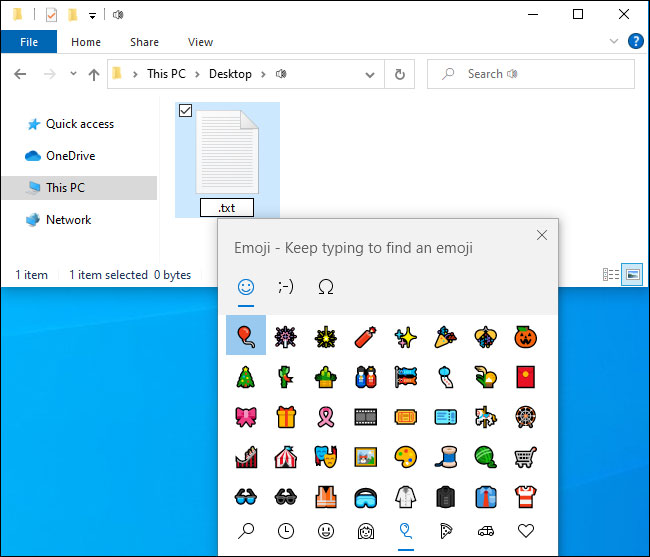
<p style="text-align: justify;">Điều này thật dễ dàng nhờ emoji picker tích hợp trong Windows 10. Để mở nó, bạn phải nhấn&nbsp;<code>Win</code>+<code>.</code>&nbsp;hoặc&nbsp;<code>Win</code>+<code>;</code>.</p>

<figure>
<div style="text-align: justify;"><img alt="Mở emoji picker tích hợp trong Windows 10" data-i="0" data-src="https://st.quantrimang.com/photos/image/2020/07/30/dung-emoji-trong-ten-file-1.jpg" data-was-processed="true" height="557" src="https://st.quantrimang.com/photos/image/2020/07/30/dung-emoji-trong-ten-file-1.jpg" width="650" /></div>

<figcaption>
<div style="text-align: justify;">Mở emoji picker tích hợp trong Windows 10</div>
</figcaption>
</figure>

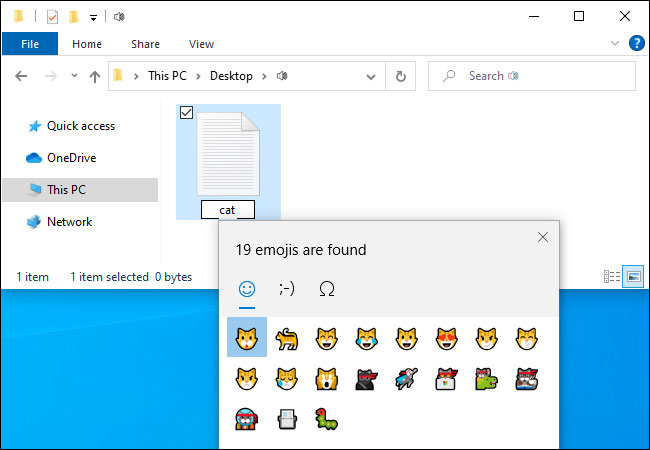
<p style="text-align: justify;">Để chèn biểu tượng cảm xúc vào tên file hoặc thư mục, chỉ cần nhấn phím tắt trong khi đổi tên file để mở emoji picker. Bắt đầu nhập cụm từ để tìm kiếm biểu tượng cảm xúc, ví dụ&nbsp;<strong>“dog”</strong>&nbsp;để tìm kiếm emoji liên quan đến chó hoặc&nbsp;<strong>“cat”</strong>&nbsp;để tìm kiếm biểu tượng cảm xúc liên quan đến mèo, hay sử dụng chuột để nhấp và cuộn qua danh sách. Nhấn&nbsp;<code>Enter</code>&nbsp;hoặc nhấp vào biểu tượng cảm xúc để chèn nó.</p>

<figure>
<div style="text-align: justify;"><img alt="Nhấn Enter hoặc nhấp vào biểu tượng cảm xúc để chèn nó" data-i="1" data-src="https://st.quantrimang.com/photos/image/2020/07/30/dung-emoji-trong-ten-file-2.jpg" data-was-processed="true" height="450" src="https://st.quantrimang.com/photos/image/2020/07/30/dung-emoji-trong-ten-file-2.jpg" width="650" /></div>

<figcaption>
<div style="text-align: justify;">Nhấn Enter hoặc nhấp vào biểu tượng cảm xúc để chèn nó</div>
</figcaption>
</figure>

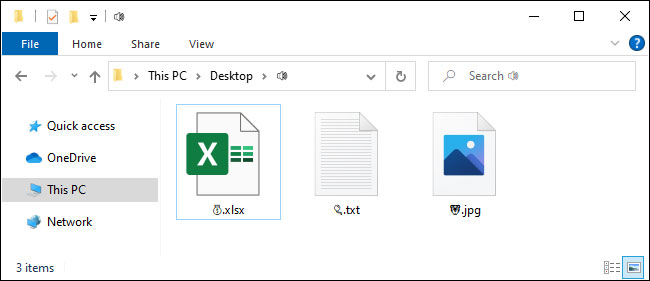
<p style="text-align: justify;">Mọi thao tác đã hoàn tất! Thật đơn giản!</p>

<figure>
<div style="text-align: justify;"><img alt="Tên file chứa emoji" data-i="2" data-src="https://st.quantrimang.com/photos/image/2020/07/30/dung-emoji-trong-ten-file-3.jpg" data-was-processed="true" height="281" src="https://st.quantrimang.com/photos/image/2020/07/30/dung-emoji-trong-ten-file-3.jpg" width="650" /></div>

<figcaption>
<div style="text-align: justify;">Tên file chứa emoji</div>
</figcaption>
</figure>

<div style="text-align: justify;">&nbsp;</div>

<h2 style="text-align: justify;">Bạn có thể dùng emoji trong tên file là nhờ Unicode</h2>

<p style="text-align: justify;">Tất cả đều có thể nhờ Unicode. Unicode bao gồm “các ký tự cho tất cả các hệ thống chữ viết trên thế giới, hiện đại và cổ đại”, theo Unicode Consortium. Nó cũng bao gồm biểu tượng cảm xúc và những biểu tượng khác nhau.</p>

<p style="text-align: justify;">Bạn có thể nhận thấy rằng, khi sử dụng biểu tượng cảm xúc trong tên file và thư mục, bạn sẽ không nhận được emoji đủ màu như có ở những nơi khác trong Windows. Bạn nhận được các ký tự nhỏ, đen trắng giống như khi chèn biểu tượng cảm xúc vào Notepad.</p>

<p style="text-align: justify;">Nhờ có Unicode, bất kỳ ứng dụng nào hỗ trợ các ký tự Unicode tiêu chuẩn, ngay cả khi nó không hỗ trợ biểu tượng cảm xúc đầy đủ màu sắc, cũng có thể sử dụng các ký tự biểu tượng cảm xúc được tìm thấy trong những phông chữ tiêu chuẩn. Sử dụng biểu tượng cảm xúc trong tên file cũng giống như sử dụng ký tự hoặc biểu tượng từ một ngôn ngữ khác.</p>

<h2 style="text-align: justify;">Thêm emoji vào tên file có gây lỗi gì không?</h2>

<p style="text-align: justify;">Về lý thuyết, một số ứng dụng có thể không thích những biểu tượng cảm xúc này, nếu chúng không hỗ trợ các ký tự Unicode. Tuy nhiên, các ứng dụng hiện đại được thiết kế để hoạt động với một bộ ngôn ngữ rộng, nên sẽ hỗ trợ đúng cách cho biểu tượng cảm xúc.</p>

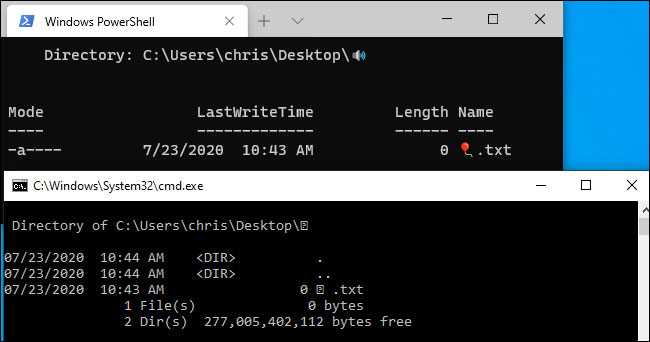
<p style="text-align: justify;">Ví dụ,&nbsp;Windows Command Prompt&nbsp;cổ điển không thể nhìn thấy các ký tự biểu tượng cảm xúc trong tên file một cách chính xác, nhưng cả Windows Terminal mới của Microsoft và&nbsp;PowerShell&nbsp;đều có thể hiển thị chúng đúng cách.</p>

<figure>
<div style="text-align: justify;"><img alt="Windows Terminal mới của Microsoft và PowerShell đều có thể hiển thị emoji đúng cách" data-i="3" data-src="https://st.quantrimang.com/photos/image/2020/07/30/dung-emoji-trong-ten-file-4.jpg" data-was-processed="true" height="342" src="https://st.quantrimang.com/photos/image/2020/07/30/dung-emoji-trong-ten-file-4.jpg" width="650" /></div>

<figcaption>
<div style="text-align: justify;">Windows Terminal mới của Microsoft và PowerShell đều có thể hiển thị emoji đúng cách</div>
</figcaption>
</figure>

<p style="text-align: justify;">Nếu gặp sự cố, bạn luôn có thể&nbsp;mở File Explorer, sau đó đổi tên các file và thư mục bị ảnh hưởng để xóa những ký tự biểu tượng cảm xúc. Sau đó, bạn lại có thể sử dụng các file đó trong những ứng dụng không hỗ trợ tên file chứa biểu tượng cảm xúc đúng cách.</p>
		</div>
				<div id="author">
						<p>
				<strong>Nguồn tin:</strong>
				Quantrimang.com
			</p>
		</div>
	</div>
	<div id="footer" class="clearfix">
		<div id="url">
			<strong>URL của bản tin này: </strong><a href="https://www.nguoicodonvn2008.info/vi/news/savefile/kien-thuc-may-tinh/cach-su-dung-emoji-trong-ten-file-tren-windows-10-2440.html" title="Cách sử dụng emoji trong tên file trên Windows 10">https://www.nguoicodonvn2008.info/vi/news/savefile/kien-thuc-may-tinh/cach-su-dung-emoji-trong-ten-file-tren-windows-10-2440.html</a>

		</div>
		<div class="clear"></div>
		<div class="copyright">
			&copy; .&#x3A; Nguoicodonvn2008.info - Cõi lòng người cô đơn &#x3A;.
		</div>
		<div id="contact">
			<a href="mailto:admin@nguoicodonvn2008.info">admin@nguoicodonvn2008.info</a>
		</div>
	</div>
</div>
        <div id="timeoutsess" class="chromeframe">
            Bạn đã không sử dụng Site, <a onclick="timeoutsesscancel();" href="https://nguoicodonvn2008.info/#">Bấm vào đây để duy trì trạng thái đăng nhập</a>. Thời gian chờ: <span id="secField"> 60 </span> giây
        </div>
        <div id="openidResult" class="nv-alert" style="display:none"></div>
        <div id="openidBt" data-result="" data-redirect=""></div>
		</script>
		<div class="car-top">
  <span><img src="https://nguoicodonvn2008.info/themes/default/images/car.png" alt=""></span>
</div>
<script src="https://nguoicodonvn2008.info/assets/js/jquery/jquery.min.js"></script>
<script>var nv_base_siteurl="/",nv_lang_data="vi",nv_lang_interface="vi",nv_name_variable="nv",nv_fc_variable="op",nv_lang_variable="language",nv_module_name="news",nv_func_name="savefile",nv_is_user=0, nv_my_ofs=-4,nv_my_abbr="EDT",nv_cookie_prefix="nv4c_e856T",nv_check_pass_mstime=1738000,nv_area_admin=0,nv_safemode=0,theme_responsive=0,nv_recaptcha_ver=2,nv_recaptcha_sitekey="",nv_recaptcha_type="image",XSSsanitize=1;</script>
<script src="https://nguoicodonvn2008.info/assets/js/language/vi.js"></script>
<script src="https://nguoicodonvn2008.info/assets/js/DOMPurify/purify3.js"></script>
<script src="https://nguoicodonvn2008.info/assets/js/global.js"></script>
<script src="https://nguoicodonvn2008.info/assets/js/site.js"></script>
<script src="https://nguoicodonvn2008.info/themes/default/js/news.js"></script>
<script src="https://nguoicodonvn2008.info/themes/default/js/main.js"></script>
<script src="https://nguoicodonvn2008.info/themes/default/js/custom.js"></script>
<script type="application/ld+json">
        {
            "@context": "https://schema.org",
            "@type": "Organization",
            "url": "https://nguoicodonvn2008.info",
            "logo": "https://nguoicodonvn2008.info/uploads/angel.gif"
        }
        </script>
<script src="https://nguoicodonvn2008.info/themes/default/js/bootstrap.min.js"></script>
<script type="text/javascript">
var $scrolltop = $('.car-top');
$scrolltop.on('click', function () {
    $('html,body').animate({
        scrollTop: 0
    }, 800);
    $(this).addClass("car-run");
    setTimeout(function(){ $scrolltop.removeClass('car-run');}, 1000);
    return false;
});
$(window).on('scroll', function ()
{ 
    if($(window).scrollTop() >= 200)
    {
        $scrolltop.addClass("show");
        $scrolltop.addClass("car-down");
    }
    else
    {
       $scrolltop.removeClass("show");
       setTimeout(function(){ $scrolltop.removeClass('car-down');}, 300);
    }
});
</script>
</body>
</html>