<!DOCTYPE html>
    <html lang="vi" xmlns="http://www.w3.org/1999/xhtml" prefix="og: http://ogp.me/ns#">
    <head>
<title>Cách sử dụng Chrome profiles để sắp xếp các tab</title>
<meta name="description" content="Cách sử dụng Chrome profiles để sắp xếp các tab - Savefile - Tin Tức -...">
<meta name="author" content=".: Nguoicodonvn2008.info - Cõi lòng người cô đơn :.">
<meta name="copyright" content=".: Nguoicodonvn2008.info - Cõi lòng người cô đơn :. [admin@nguoicodonvn2008.info]">
<meta name="robots" content="index, archive, follow, noodp">
<meta name="googlebot" content="index,archive,follow,noodp">
<meta name="msnbot" content="all,index,follow">
<meta name="generator" content="NukeViet v4.5">
<meta http-equiv="Content-Type" content="text/html; charset=utf-8">
<meta property="og:title" content="Cách sử dụng Chrome profiles để sắp xếp các tab">
<meta property="og:type" content="website">
<meta property="og:description" content="Savefile - Tin Tức - https&#x3A;&#x002F;&#x002F;www.nguoicodonvn2008.info&#x002F;vi&#x002F;news&#x002F;savefile&#x002F;kien-thuc-may-tinh&#x002F;cach-su-dung-chrome-profiles-de-sap-xep-cac-tab-11126.html">
<meta property="og:site_name" content=".&#x3A; Nguoicodonvn2008.info - Cõi lòng người cô đơn &#x3A;.">
<meta property="og:url" content="https://www.nguoicodonvn2008.info/vi/news/savefile/kien-thuc-may-tinh/cach-su-dung-chrome-profiles-de-sap-xep-cac-tab-11126.html">
<link rel="shortcut icon" href="https://nguoicodonvn2008.info/favicon.ico">
<link rel="canonical" href="https://www.nguoicodonvn2008.info/vi/news/savefile/kien-thuc-may-tinh/cach-su-dung-chrome-profiles-de-sap-xep-cac-tab-11126.html">
<link rel="alternate" href="https://nguoicodonvn2008.info/vi/news/rss/" title="Tin Tức" type="application/rss+xml">
<link rel="alternate" href="https://nguoicodonvn2008.info/vi/news/rss/karaoke-dual/" title="Tin Tức - Karaoke Dual" type="application/rss+xml">
<link rel="alternate" href="https://nguoicodonvn2008.info/vi/news/rss/nhac-tre/" title="Tin Tức - Nhạc trẻ" type="application/rss+xml">
<link rel="alternate" href="https://nguoicodonvn2008.info/vi/news/rss/tru-tinh/" title="Tin Tức - Trữ tình" type="application/rss+xml">
<link rel="alternate" href="https://nguoicodonvn2008.info/vi/news/rss/nuoc-ngoai/" title="Tin Tức - Nước ngoài" type="application/rss+xml">
<link rel="alternate" href="https://nguoicodonvn2008.info/vi/news/rss/remix/" title="Tin Tức - Remix" type="application/rss+xml">
<link rel="alternate" href="https://nguoicodonvn2008.info/vi/news/rss/tam-su-tinh-yeu/" title="Tin Tức - Tâm sự tình yêu" type="application/rss+xml">
<link rel="alternate" href="https://nguoicodonvn2008.info/vi/news/rss/tho-suu-tam/" title="Tin Tức - Thơ sưu tầm" type="application/rss+xml">
<link rel="alternate" href="https://nguoicodonvn2008.info/vi/news/rss/cuoc-song/" title="Tin Tức - Cuộc sống" type="application/rss+xml">
<link rel="alternate" href="https://nguoicodonvn2008.info/vi/news/rss/phan-mem/" title="Tin Tức - Phần mềm" type="application/rss+xml">
<link rel="alternate" href="https://nguoicodonvn2008.info/vi/news/rss/kien-thuc-may-tinh/" title="Tin Tức - Kiến thức máy tính" type="application/rss+xml">
<link rel="alternate" href="https://nguoicodonvn2008.info/vi/news/rss/hoc-tap/" title="Tin Tức - Học tập" type="application/rss+xml">
<link rel="alternate" href="https://nguoicodonvn2008.info/vi/news/rss/tai-lieu/" title="Tin Tức - Tài liệu" type="application/rss+xml">
<link rel="alternate" href="https://nguoicodonvn2008.info/vi/news/rss/de-thi/" title="Tin Tức - Đề thi" type="application/rss+xml">
<link rel="preload" as="style" href="https://nguoicodonvn2008.info/assets/css/font-awesome.min.css" type="text/css">
<link rel="preload" as="style" href="https://nguoicodonvn2008.info/themes/default/css/bootstrap.non-responsive.css" type="text/css">
<link rel="preload" as="style" href="https://nguoicodonvn2008.info/themes/default/css/style.css" type="text/css">
<link rel="preload" as="style" href="https://nguoicodonvn2008.info/themes/default/css/style.non-responsive.css" type="text/css">
<link rel="preload" as="style" href="https://nguoicodonvn2008.info/themes/default/css/news.css" type="text/css">
<link rel="preload" as="style" href="https://nguoicodonvn2008.info/themes/default/css/custom.css" type="text/css">
<link rel="preload" as="script" href="https://nguoicodonvn2008.info/assets/js/jquery/jquery.min.js" type="text/javascript">
<link rel="preload" as="script" href="https://nguoicodonvn2008.info/assets/js/language/vi.js" type="text/javascript">
<link rel="preload" as="script" href="https://nguoicodonvn2008.info/assets/js/DOMPurify/purify3.js" type="text/javascript">
<link rel="preload" as="script" href="https://nguoicodonvn2008.info/assets/js/global.js" type="text/javascript">
<link rel="preload" as="script" href="https://nguoicodonvn2008.info/assets/js/site.js" type="text/javascript">
<link rel="preload" as="script" href="https://nguoicodonvn2008.info/themes/default/js/news.js" type="text/javascript">
<link rel="preload" as="script" href="https://nguoicodonvn2008.info/themes/default/js/main.js" type="text/javascript">
<link rel="preload" as="script" href="https://nguoicodonvn2008.info/themes/default/js/custom.js" type="text/javascript">
<link rel="preload" as="script" href="https://nguoicodonvn2008.info/themes/default/js/bootstrap.min.js" type="text/javascript">
<link rel="stylesheet" href="https://nguoicodonvn2008.info/assets/css/font-awesome.min.css">
<link rel="stylesheet" href="https://nguoicodonvn2008.info/themes/default/css/bootstrap.non-responsive.css">
<link rel="stylesheet" href="https://nguoicodonvn2008.info/themes/default/css/style.css">
<link rel="stylesheet" href="https://nguoicodonvn2008.info/themes/default/css/style.non-responsive.css">
<link rel="StyleSheet" href="https://nguoicodonvn2008.info/themes/default/css/news.css">
<link rel="stylesheet" href="https://nguoicodonvn2008.info/themes/default/css/custom.css">
<style type="text/css">
	body{background: #fff;}
</style>
    </head>
    <body>
<div id="print">
	<div id="hd_print">
		<h2 class="pull-left">.&#x3A; Nguoicodonvn2008.info - Cõi lòng người cô đơn &#x3A;.</h2>
		<p class="pull-right"><a title=".&#x3A; Nguoicodonvn2008.info - Cõi lòng người cô đơn &#x3A;." href="https://nguoicodonvn2008.info/">https://nguoicodonvn2008.info</a></p>
	</div>
	<div class="clear"></div>
	<hr />
	<div id="content">
		<h1>Cách sử dụng Chrome profiles để sắp xếp các tab</h1>
		<ul class="list-inline">
			<li>Thứ năm - 11/09/2025 22:52</li>
			<li class="hidden-print txtrequired"><em class="fa fa-print">&nbsp;</em><a title="In ra" href="javascript:;" onclick="window.print()">In ra</a></li>
			<li class="hidden-print txtrequired"><em class="fa fa-power-off">&nbsp;</em><a title="Đóng cửa sổ này" href="javascript:;" onclick="window.close()">Đóng cửa sổ này</a></li>
		</ul>
		<div class="clear"></div>
		<div id="hometext">
		</div>
				<div class="imghome">
			<img alt="Cách sử dụng Chrome profiles để sắp xếp các tab" src="https://st.quantrimang.com/photos/image/2025/09/11/dung-chrome-profiles-sap-xep-cac-tab-1.jpg" width="460" class="img-thumbnail" />
		</div>
		<div class="clear"></div>
		<div id="bodytext" class="clearfix">
			<p style="text-align: justify;">Có rất nhiều cách thiết thực để sắp xếp các tab trình duyệt và tăng năng suất, nhưng có thể bạn chưa sử dụng công cụ năng suất ít được chú ý, cho phép bạn tách biệt hoàn toàn công việc và duyệt web cá nhân: Chrome profiles. Hầu hết mọi người đều để các tab công việc lẫn lộn với dữ liệu cá nhân, những dấu trang lộn xộn, và cùng một tiện ích mở rộng chạy dù đang họp hay chỉ lướt web.</p>

<div style="text-align: justify;">&nbsp;</div>

<p style="text-align: justify;">Chrome profiles giúp tách biệt mọi thứ - các tab, dấu trang, tiện ích mở rộng khác nhau cho công việc và cá nhân. Khi làm việc, bạn có thể chọn profile phù hợp với công việc và duy trì sự tập trung.</p>

<h2 style="text-align: justify;">Tại sao nên sử dụng nhiều Chrome profile?</h2>

<h3 style="text-align: justify;">Việc tích trữ tab đang làm giảm năng suất</h3>

<figure>
<div style="text-align: justify;"><img alt="Trình duyệt Microsoft Edge mở nhiều tab" data-adbro-processed="true" data-i="0" data-src="https://st.quantrimang.com/photos/image/2025/09/11/dung-chrome-profiles-sap-xep-cac-tab-1.jpg" data-was-processed="true" height="1101" src="https://st.quantrimang.com/photos/image/2025/09/11/dung-chrome-profiles-sap-xep-cac-tab-1.jpg" width="1650" /></div>

<figcaption>
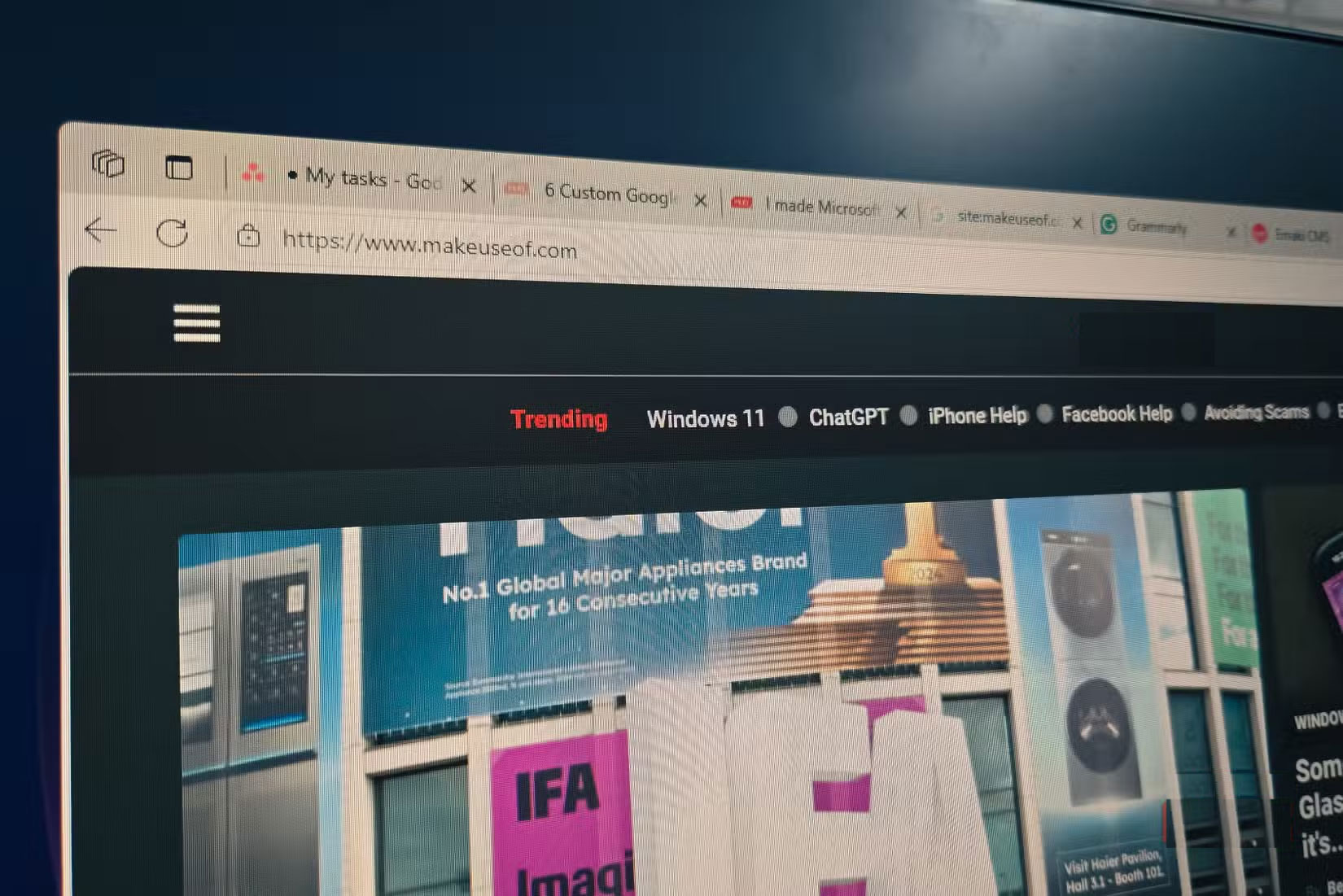
<div style="text-align: justify;">Trình duyệt Microsoft Edge mở nhiều tab</div>
</figcaption>
</figure>

<p style="text-align: justify;">Như đa phần mọi người, có lẽ bạn sẽ giữ các tab mở để đọc sau. Một bài viết thú vị ở đây, một cơ hội tiềm năng ở kia, có thể là một sản phẩm bạn đang nghiên cứu. Chẳng mấy chốc, bạn đã có 30 tab trên nhiều cửa sổ, và việc tìm kiếm bất cứ thứ gì trở nên thật khó khăn. Mặc dù&nbsp;Tab Groups&nbsp;có thể giúp bạn sắp xếp việc duyệt web, nhưng chúng vẫn không giải quyết được vấn đề cốt lõi là trộn lẫn công việc và cá nhân trong cùng một phiên duyệt web.</p>

<p style="text-align: justify;">Bookmark là một lựa chọn khác, nhưng hầu hết chúng ta hiếm khi truy cập lại các thư mục dấu trang khi chúng bắt đầu lấp đầy thư mục. Ngay cả danh sách đọc tích hợp của Chrome cũng không giải quyết được vấn đề này. Vì vậy, các tab vẫn mở, chồng chất lên nhau cho đến khi trình duyệt chậm như rùa bò, hoặc bạn bỏ cuộc và đóng tất cả chỉ để giải phóng bộ nhớ.</p>

<p style="text-align: justify;">Đây chính là lúc tính năng Chrome profiles phát huy tác dụng. Thay vì trộn lẫn mọi thứ lại với nhau, bạn có thể tách biệt hoàn toàn việc duyệt web công việc với việc duyệt web cá nhân. Khi hoàn thành công việc, bạn có thể đóng profile đó mà không mất bất kỳ thông tin nghiên cứu nào.</p>

<h2 style="text-align: justify;">Profile trình duyệt không chia sẻ bất kỳ thông tin nào</h2>

<h3 style="text-align: justify;">Tiện ích mở rộng, thông tin đăng nhập, lịch sử - mọi thứ đều riêng biệt</h3>

<figure>
<div style="text-align: justify;"><img alt="Tab Extensions được mở trong Google Chrome trên Windows 11" data-i="1" data-src="https://st.quantrimang.com/photos/image/2025/09/11/dung-chrome-profiles-sap-xep-cac-tab-2.jpg" data-was-processed="true" height="1101" src="https://st.quantrimang.com/photos/image/2025/09/11/dung-chrome-profiles-sap-xep-cac-tab-2.jpg" width="1650" /></div>

<figcaption>
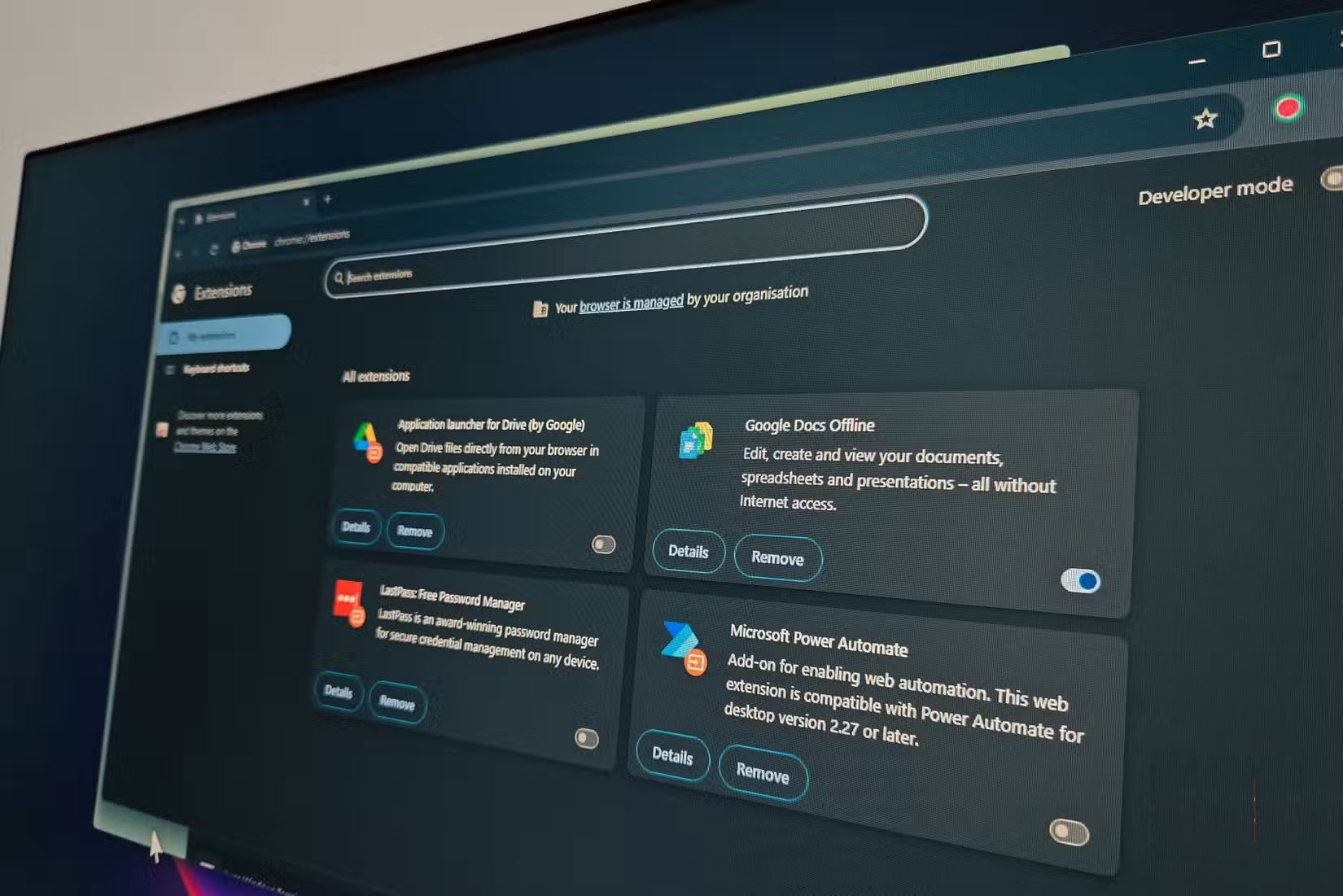
<div style="text-align: justify;">Tab Extensions được mở trong Google Chrome trên Windows 11</div>
</figcaption>
</figure>

<p style="text-align: justify;">Mỗi Chrome profile đều có bộ tiện ích mở rộng riêng. Profile công việc chạy một plugin phiên tập trung tùy chỉnh để chặn&nbsp;mạng xã hội,&nbsp;YouTube&nbsp;và các mục tiêu tốn thời gian khác. Cài đặt một vài tiện ích mở rộng năng suất cho Chrome, chẳng hạn như&nbsp;Session Buddy&nbsp;để quản lý tab, trình chặn quảng cáo và&nbsp;Just Read, giúp loại bỏ sự lộn xộn của trang web. Sau giờ làm việc, bạn có thể chuyển sang trang cá nhân, nơi không có bất kỳ hạn chế nào trong số này.</p>

<p style="text-align: justify;">Chrome profiles chỉ cho phép bạn đăng nhập vào các tài khoản liên quan, điều này rất quan trọng khi làm việc tại nhà. X (trước đây là Twitter), YouTube và&nbsp;Netflix&nbsp;vẫn nằm trong profile cá nhân của bạn. Chuyển sang profile công việc, và những tài khoản đó sẽ không tồn tại. Bạn sẽ không bị cám dỗ kiểm tra mạng xã hội nhanh chóng chỉ vì chưa đăng nhập. Sự khác biệt nhỏ đó sẽ hạn chế hầu hết các hoạt động duyệt web bốc đồng.</p>

<p style="text-align: justify;">Các profile riêng biệt cũng giúp loại bỏ sự lộn xộn của dấu trang. Dấu trang công việc và dấu trang cá nhân sẽ có không gian riêng. Việc tách biệt này giúp dấu trang hữu ích hơn so với việc dồn tất cả mọi thứ vào cùng một thư mục. Lịch sử tìm kiếm cũng vậy. Không còn phải cuộn qua hàng tá liên kết YouTube và X (trước đây là Twitter) để tìm một bài viết từ tuần trước. Mọi thứ sẽ được giữ nguyên trong phần dành riêng cho nó.</p>

<h2 style="text-align: justify;">Cách thêm Chrome profile mới</h2>

<h3 style="text-align: justify;">Chỉ mất 2 phút để duyệt web tốt hơn</h3>

<figure>
<div style="text-align: justify;"><img alt="" data-i="2" data-src="https://st.quantrimang.com/photos/image/2025/09/11/dung-chrome-profiles-sap-xep-cac-tab-3.jpg" data-was-processed="true" height="422" src="https://st.quantrimang.com/photos/image/2025/09/11/dung-chrome-profiles-sap-xep-cac-tab-3.jpg" width="750" /></div>
</figure>

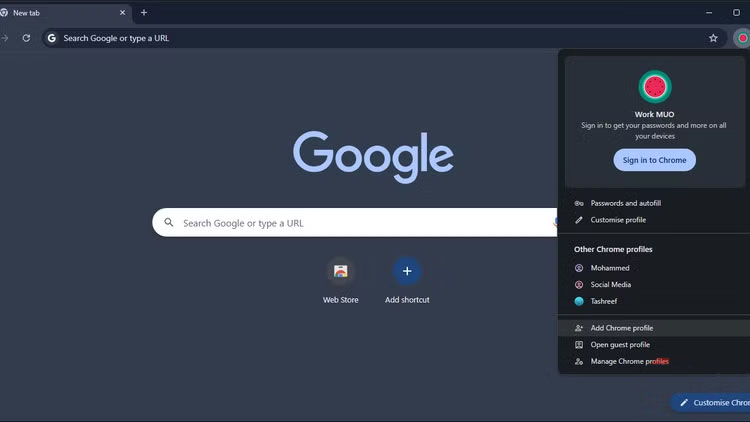
<p style="text-align: justify;">Tạo profile mới trong Chrome thật dễ dàng. Nhấp vào biểu tượng&nbsp;<strong>Profile</strong>&nbsp;ở góc trên bên phải và chọn&nbsp;<strong>Add</strong>&nbsp;<strong>Chrome profile</strong>&nbsp;từ menu. Bạn sẽ thấy 2 tùy chọn:&nbsp;<strong>Sign in with a Google account</strong>&nbsp;hoặc&nbsp;<strong>&nbsp;Continue without one</strong>.</p>

<p style="text-align: justify;">Bạn nên sử dụng các tài khoản Google riêng biệt để đồng bộ đầy đủ trên mọi thiết bị, nhưng profile vẫn hoạt động tốt mà không cần đăng nhập. Hãy chọn tùy chọn phù hợp với tình huống của bạn.</p>

<p style="text-align: justify;">Nhập tên cho profile. Bạn có thể chọn tên dựa trên mục đích sử dụng, chẳng hạn như &quot;<strong>Work</strong>&quot; cho công việc và &quot;<strong>Personal</strong>&quot; cho việc cá nhân. Chọn màu theme để làm cho profile nổi bật. Nhấp vào&nbsp;<strong>Done</strong>&nbsp;để lưu profile.</p>

<p style="text-align: justify;">Để tùy chỉnh thêm, hãy nhấp lại vào biểu tượng&nbsp;<strong>Profile</strong>&nbsp;và chọn&nbsp;<strong>Customize profile</strong>. Chọn ảnh đại diện nếu muốn, nhưng quan trọng hơn, hãy tạo desktop shortcut. Bằng cách này, bạn có thể truy cập trực tiếp vào profile công việc mà không cần xem các tab cá nhân trước.</p>
		</div>
				<div id="author">
						<p>
				<strong>Nguồn tin:</strong>
				Quantrimang.com:
			</p>
		</div>
	</div>
	<div id="footer" class="clearfix">
		<div id="url">
			<strong>URL của bản tin này: </strong><a href="https://www.nguoicodonvn2008.info/vi/news/savefile/kien-thuc-may-tinh/cach-su-dung-chrome-profiles-de-sap-xep-cac-tab-11126.html" title="Cách sử dụng Chrome profiles để sắp xếp các tab">https://www.nguoicodonvn2008.info/vi/news/savefile/kien-thuc-may-tinh/cach-su-dung-chrome-profiles-de-sap-xep-cac-tab-11126.html</a>

		</div>
		<div class="clear"></div>
		<div class="copyright">
			&copy; .&#x3A; Nguoicodonvn2008.info - Cõi lòng người cô đơn &#x3A;.
		</div>
		<div id="contact">
			<a href="mailto:admin@nguoicodonvn2008.info">admin@nguoicodonvn2008.info</a>
		</div>
	</div>
</div>
        <div id="timeoutsess" class="chromeframe">
            Bạn đã không sử dụng Site, <a onclick="timeoutsesscancel();" href="https://nguoicodonvn2008.info/#">Bấm vào đây để duy trì trạng thái đăng nhập</a>. Thời gian chờ: <span id="secField"> 60 </span> giây
        </div>
        <div id="openidResult" class="nv-alert" style="display:none"></div>
        <div id="openidBt" data-result="" data-redirect=""></div>
		</script>
		<div class="car-top">
  <span><img src="https://nguoicodonvn2008.info/themes/default/images/car.png" alt=""></span>
</div>
<script src="https://nguoicodonvn2008.info/assets/js/jquery/jquery.min.js"></script>
<script>var nv_base_siteurl="/",nv_lang_data="vi",nv_lang_interface="vi",nv_name_variable="nv",nv_fc_variable="op",nv_lang_variable="language",nv_module_name="news",nv_func_name="savefile",nv_is_user=0, nv_my_ofs=-4,nv_my_abbr="EDT",nv_cookie_prefix="nv4c_e856T",nv_check_pass_mstime=1738000,nv_area_admin=0,nv_safemode=0,theme_responsive=0,nv_recaptcha_ver=2,nv_recaptcha_sitekey="",nv_recaptcha_type="image",XSSsanitize=1;</script>
<script src="https://nguoicodonvn2008.info/assets/js/language/vi.js"></script>
<script src="https://nguoicodonvn2008.info/assets/js/DOMPurify/purify3.js"></script>
<script src="https://nguoicodonvn2008.info/assets/js/global.js"></script>
<script src="https://nguoicodonvn2008.info/assets/js/site.js"></script>
<script src="https://nguoicodonvn2008.info/themes/default/js/news.js"></script>
<script src="https://nguoicodonvn2008.info/themes/default/js/main.js"></script>
<script src="https://nguoicodonvn2008.info/themes/default/js/custom.js"></script>
<script type="application/ld+json">
        {
            "@context": "https://schema.org",
            "@type": "Organization",
            "url": "https://nguoicodonvn2008.info",
            "logo": "https://nguoicodonvn2008.info/uploads/angel.gif"
        }
        </script>
<script src="https://nguoicodonvn2008.info/themes/default/js/bootstrap.min.js"></script>
<script type="text/javascript">
var $scrolltop = $('.car-top');
$scrolltop.on('click', function () {
    $('html,body').animate({
        scrollTop: 0
    }, 800);
    $(this).addClass("car-run");
    setTimeout(function(){ $scrolltop.removeClass('car-run');}, 1000);
    return false;
});
$(window).on('scroll', function ()
{ 
    if($(window).scrollTop() >= 200)
    {
        $scrolltop.addClass("show");
        $scrolltop.addClass("car-down");
    }
    else
    {
       $scrolltop.removeClass("show");
       setTimeout(function(){ $scrolltop.removeClass('car-down');}, 300);
    }
});
</script>
</body>
</html>