<!DOCTYPE html>
    <html lang="vi" xmlns="http://www.w3.org/1999/xhtml" prefix="og: http://ogp.me/ns#">
    <head>
<title>Cách reset cài đặt Windows Security trên Windows</title>
<meta name="description" content="Cách reset cài đặt Windows Security trên Windows - Savefile - Tin Tức -...">
<meta name="author" content=".: Nguoicodonvn2008.info - Cõi lòng người cô đơn :.">
<meta name="copyright" content=".: Nguoicodonvn2008.info - Cõi lòng người cô đơn :. [admin@nguoicodonvn2008.info]">
<meta name="robots" content="index, archive, follow, noodp">
<meta name="googlebot" content="index,archive,follow,noodp">
<meta name="msnbot" content="all,index,follow">
<meta name="generator" content="NukeViet v4.5">
<meta http-equiv="Content-Type" content="text/html; charset=utf-8">
<meta property="og:title" content="Cách reset cài đặt Windows Security trên Windows">
<meta property="og:type" content="website">
<meta property="og:description" content="Savefile - Tin Tức - https&#x3A;&#x002F;&#x002F;www.nguoicodonvn2008.info&#x002F;vi&#x002F;news&#x002F;savefile&#x002F;kien-thuc-may-tinh&#x002F;cach-reset-cai-dat-windows-security-tren-windows-10938.html">
<meta property="og:site_name" content=".&#x3A; Nguoicodonvn2008.info - Cõi lòng người cô đơn &#x3A;.">
<meta property="og:url" content="https://www.nguoicodonvn2008.info/vi/news/savefile/kien-thuc-may-tinh/cach-reset-cai-dat-windows-security-tren-windows-10938.html">
<link rel="shortcut icon" href="https://nguoicodonvn2008.info/favicon.ico">
<link rel="canonical" href="https://www.nguoicodonvn2008.info/vi/news/savefile/kien-thuc-may-tinh/cach-reset-cai-dat-windows-security-tren-windows-10938.html">
<link rel="alternate" href="https://nguoicodonvn2008.info/vi/news/rss/" title="Tin Tức" type="application/rss+xml">
<link rel="alternate" href="https://nguoicodonvn2008.info/vi/news/rss/karaoke-dual/" title="Tin Tức - Karaoke Dual" type="application/rss+xml">
<link rel="alternate" href="https://nguoicodonvn2008.info/vi/news/rss/nhac-tre/" title="Tin Tức - Nhạc trẻ" type="application/rss+xml">
<link rel="alternate" href="https://nguoicodonvn2008.info/vi/news/rss/tru-tinh/" title="Tin Tức - Trữ tình" type="application/rss+xml">
<link rel="alternate" href="https://nguoicodonvn2008.info/vi/news/rss/nuoc-ngoai/" title="Tin Tức - Nước ngoài" type="application/rss+xml">
<link rel="alternate" href="https://nguoicodonvn2008.info/vi/news/rss/remix/" title="Tin Tức - Remix" type="application/rss+xml">
<link rel="alternate" href="https://nguoicodonvn2008.info/vi/news/rss/tam-su-tinh-yeu/" title="Tin Tức - Tâm sự tình yêu" type="application/rss+xml">
<link rel="alternate" href="https://nguoicodonvn2008.info/vi/news/rss/tho-suu-tam/" title="Tin Tức - Thơ sưu tầm" type="application/rss+xml">
<link rel="alternate" href="https://nguoicodonvn2008.info/vi/news/rss/cuoc-song/" title="Tin Tức - Cuộc sống" type="application/rss+xml">
<link rel="alternate" href="https://nguoicodonvn2008.info/vi/news/rss/phan-mem/" title="Tin Tức - Phần mềm" type="application/rss+xml">
<link rel="alternate" href="https://nguoicodonvn2008.info/vi/news/rss/kien-thuc-may-tinh/" title="Tin Tức - Kiến thức máy tính" type="application/rss+xml">
<link rel="alternate" href="https://nguoicodonvn2008.info/vi/news/rss/hoc-tap/" title="Tin Tức - Học tập" type="application/rss+xml">
<link rel="alternate" href="https://nguoicodonvn2008.info/vi/news/rss/tai-lieu/" title="Tin Tức - Tài liệu" type="application/rss+xml">
<link rel="alternate" href="https://nguoicodonvn2008.info/vi/news/rss/de-thi/" title="Tin Tức - Đề thi" type="application/rss+xml">
<link rel="preload" as="style" href="https://nguoicodonvn2008.info/assets/css/font-awesome.min.css" type="text/css">
<link rel="preload" as="style" href="https://nguoicodonvn2008.info/themes/default/css/bootstrap.non-responsive.css" type="text/css">
<link rel="preload" as="style" href="https://nguoicodonvn2008.info/themes/default/css/style.css" type="text/css">
<link rel="preload" as="style" href="https://nguoicodonvn2008.info/themes/default/css/style.non-responsive.css" type="text/css">
<link rel="preload" as="style" href="https://nguoicodonvn2008.info/themes/default/css/news.css" type="text/css">
<link rel="preload" as="style" href="https://nguoicodonvn2008.info/themes/default/css/custom.css" type="text/css">
<link rel="preload" as="script" href="https://nguoicodonvn2008.info/assets/js/jquery/jquery.min.js" type="text/javascript">
<link rel="preload" as="script" href="https://nguoicodonvn2008.info/assets/js/language/vi.js" type="text/javascript">
<link rel="preload" as="script" href="https://nguoicodonvn2008.info/assets/js/DOMPurify/purify3.js" type="text/javascript">
<link rel="preload" as="script" href="https://nguoicodonvn2008.info/assets/js/global.js" type="text/javascript">
<link rel="preload" as="script" href="https://nguoicodonvn2008.info/assets/js/site.js" type="text/javascript">
<link rel="preload" as="script" href="https://nguoicodonvn2008.info/themes/default/js/news.js" type="text/javascript">
<link rel="preload" as="script" href="https://nguoicodonvn2008.info/themes/default/js/main.js" type="text/javascript">
<link rel="preload" as="script" href="https://nguoicodonvn2008.info/themes/default/js/custom.js" type="text/javascript">
<link rel="preload" as="script" href="https://nguoicodonvn2008.info/themes/default/js/bootstrap.min.js" type="text/javascript">
<link rel="stylesheet" href="https://nguoicodonvn2008.info/assets/css/font-awesome.min.css">
<link rel="stylesheet" href="https://nguoicodonvn2008.info/themes/default/css/bootstrap.non-responsive.css">
<link rel="stylesheet" href="https://nguoicodonvn2008.info/themes/default/css/style.css">
<link rel="stylesheet" href="https://nguoicodonvn2008.info/themes/default/css/style.non-responsive.css">
<link rel="StyleSheet" href="https://nguoicodonvn2008.info/themes/default/css/news.css">
<link rel="stylesheet" href="https://nguoicodonvn2008.info/themes/default/css/custom.css">
<style type="text/css">
	body{background: #fff;}
</style>
    </head>
    <body>
<div id="print">
	<div id="hd_print">
		<h2 class="pull-left">.&#x3A; Nguoicodonvn2008.info - Cõi lòng người cô đơn &#x3A;.</h2>
		<p class="pull-right"><a title=".&#x3A; Nguoicodonvn2008.info - Cõi lòng người cô đơn &#x3A;." href="https://nguoicodonvn2008.info/">https://nguoicodonvn2008.info</a></p>
	</div>
	<div class="clear"></div>
	<hr />
	<div id="content">
		<h1>Cách reset cài đặt Windows Security trên Windows</h1>
		<ul class="list-inline">
			<li>Thứ sáu - 08/08/2025 03:09</li>
			<li class="hidden-print txtrequired"><em class="fa fa-print">&nbsp;</em><a title="In ra" href="javascript:;" onclick="window.print()">In ra</a></li>
			<li class="hidden-print txtrequired"><em class="fa fa-power-off">&nbsp;</em><a title="Đóng cửa sổ này" href="javascript:;" onclick="window.close()">Đóng cửa sổ này</a></li>
		</ul>
		<div class="clear"></div>
		<div id="hometext">
		</div>
				<div class="imghome">
			<img alt="Cách reset cài đặt Windows Security trên Windows" src="https://st.quantrimang.com/photos/image/2025/08/06/reset-Windows-Security-Windows-2.jpg" width="460" class="img-thumbnail" />
		</div>
		<div class="clear"></div>
		<div id="bodytext" class="clearfix">
			<p style="text-align: justify;">Trên Windows đôi khi bạn cũng cần reset cài đặt Windows Security về trạng thái mặc định để khắc phục một số lỗi kết nối, ngừng hoạt động hay chỉ đơn giản muốn quay trở về trạng thái ban đầu… Chúng ta có một số cách để reset Defender Firewall, theo bài hướng dẫn dưới đây.<br />
<br />
Reset Windows Security trong ứng dụng</p>

<div style="text-align: justify;">&nbsp;</div>

<p style="text-align: justify;"><strong>Bước 1:</strong></p>

<p style="text-align: justify;">Bạn mở ứng dụng&nbsp;<strong>Windows Security</strong>&nbsp;trên máy tính, sau đó&nbsp;<strong>nhấn Firewall &amp; network protection</strong>.</p>

<p style="text-align: justify;"><img alt="Firewall &amp; network protection" data-i="0" data-src="https://st.quantrimang.com/photos/image/2025/08/06/reset-Windows-Security-Windows-1.jpg" data-was-processed="true" height="503" src="https://st.quantrimang.com/photos/image/2025/08/06/reset-Windows-Security-Windows-1.jpg" width="400" /></p>

<p style="text-align: justify;"><strong>Bước 2:</strong></p>

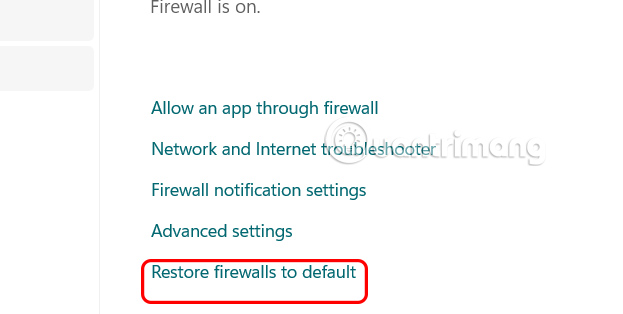
<p style="text-align: justify;">Tiếp đến nhìn sang bên cạnh, người dùng<strong>&nbsp;nhấn chọn Restore firewall to default&nbsp;</strong>để thực hiện.</p>

<p style="text-align: justify;"><img alt=" Restore firewall to default " data-i="1" data-src="https://st.quantrimang.com/photos/image/2025/08/06/reset-Windows-Security-Windows-2.jpg" data-was-processed="true" height="302" src="https://st.quantrimang.com/photos/image/2025/08/06/reset-Windows-Security-Windows-2.jpg" width="600" /></p>

<p style="text-align: justify;">Chuyển sang giao diện mới, chúng ta nhấn chọn&nbsp;<strong>mục Restore default</strong>&nbsp;để thực hiện reset Reset Windows Security trong ứng dụng.</p>

<p style="text-align: justify;"><img alt="Reset Windows Security" data-i="2" data-src="https://st.quantrimang.com/photos/image/2025/08/06/reset-Windows-Security-Windows-3.jpg" data-was-processed="true" height="280" src="https://st.quantrimang.com/photos/image/2025/08/06/reset-Windows-Security-Windows-3.jpg" width="615" /></p>

<h2 style="text-align: justify;">Cách reset Windows Security trong Advanced Security</h2>

<p style="text-align: justify;"><strong>Bước 1:</strong></p>

<p style="text-align: justify;">Bạn cũng mở ứng dụng Windows Security trên máy tính rồi nhấn vào mục Firewall &amp; network protection. Tiếp tục&nbsp;<strong>nhấn vào Advanced settings</strong>.</p>

<p style="text-align: justify;"><img alt="Advanced settings" data-adbro-processed="true" data-i="3" data-src="https://st.quantrimang.com/photos/image/2025/08/06/reset-Windows-Security-Windows-4.jpg" data-was-processed="true" height="314" src="https://st.quantrimang.com/photos/image/2025/08/06/reset-Windows-Security-Windows-4.jpg" width="623" /></p>

<p style="text-align: justify;"><strong>Bước 2:</strong></p>

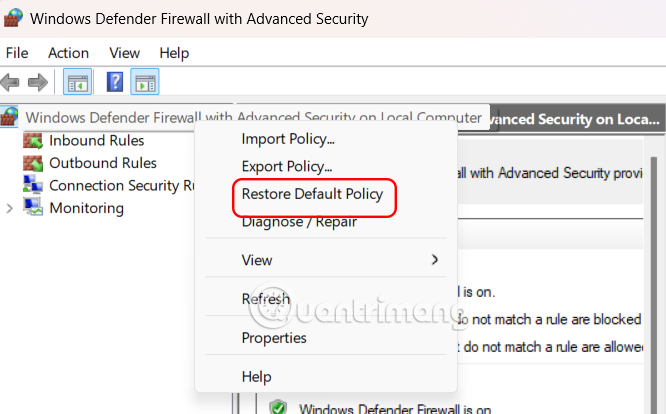
<p style="text-align: justify;">Người dùng nhấn&nbsp;<strong>chuột phải vào Windows Defender Firewall with Advanced Security on Local Computer</strong>&nbsp;rồi&nbsp;<strong>chọn Restore Default Policy.</strong></p>

<p style="text-align: justify;"><strong><img alt="Restore Default Policy" data-i="4" data-src="https://st.quantrimang.com/photos/image/2025/08/06/reset-Windows-Security-Windows-5.jpg" data-was-processed="true" height="342" src="https://st.quantrimang.com/photos/image/2025/08/06/reset-Windows-Security-Windows-5.jpg" width="550" /></strong></p>

<p style="text-align: justify;">Sau đó&nbsp;<strong>nhấn Yes</strong>&nbsp;để tiến hành cài đặt lại Windows Security.</p>

<p style="text-align: justify;"><strong><img alt="Restore Default Policy" data-i="5" data-src="https://st.quantrimang.com/photos/image/2025/08/06/reset-Windows-Security-Windows-5.jpg" data-was-processed="true" height="342" src="https://st.quantrimang.com/photos/image/2025/08/06/reset-Windows-Security-Windows-5.jpg" width="550" /></strong></p>

<h2 style="text-align: justify;">Cài đặt lại Windows Security bằng PowerShell</h2>

<p style="text-align: justify;"><strong>Bước 1:</strong></p>

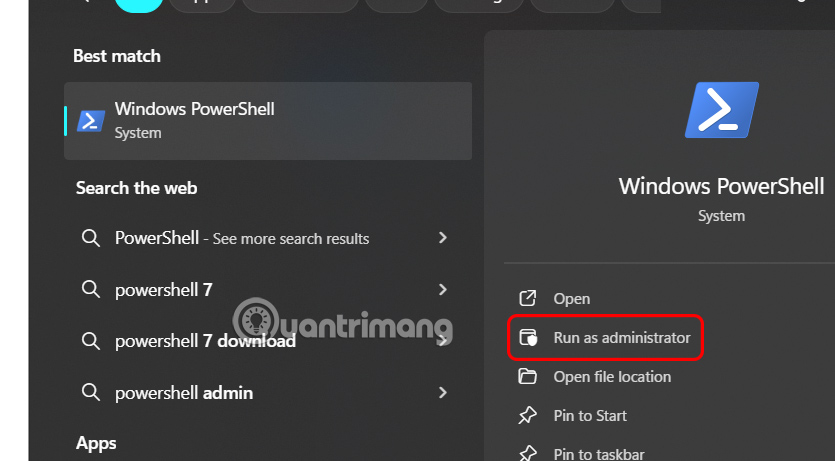
<p style="text-align: justify;">Bạn nhập PowerShell trong thanh tìm kiếm rồi<strong>&nbsp;nhấn vào Run as administrator&nbsp;</strong>để mở PowerShell bằng quyền Admin.</p>

<p style="text-align: justify;"><img alt="Mở PowerShell bằng quyền Admin" data-i="6" data-src="https://st.quantrimang.com/photos/image/2025/08/06/reset-Windows-Security-Windows-7.jpg" data-was-processed="true" height="304" src="https://st.quantrimang.com/photos/image/2025/08/06/reset-Windows-Security-Windows-7.jpg" width="550" /></p>

<p style="text-align: justify;"><strong>Bước 2:</strong></p>

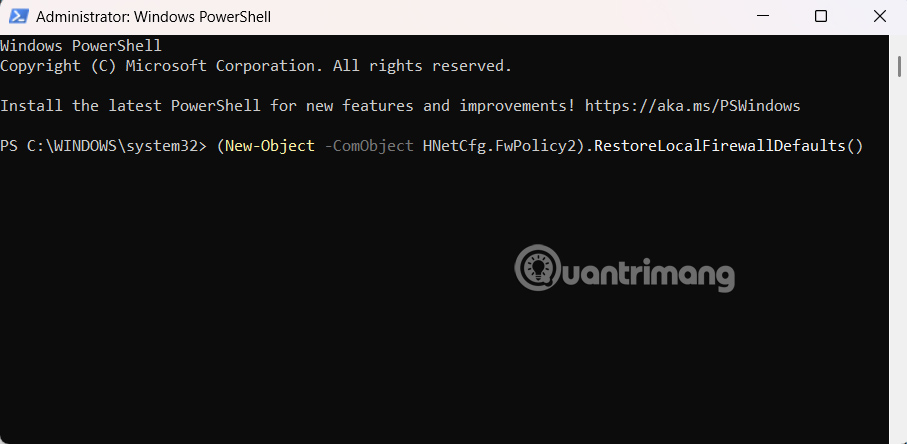
<p style="text-align: justify;">Hiển thị giao diện mới, người dùng nhập lệnh dưới đây để thực hiện.</p>

<pre id="pre0">
<code>(New-Object -ComObject HNetCfg.FwPolicy2).RestoreLocalFirewallDefaults()</code></pre>

<p style="text-align: justify;"><img alt="Cài đặt lại Windows Security bằng PowerShell" data-i="7" data-src="https://st.quantrimang.com/photos/image/2025/08/06/reset-Windows-Security-Windows-10.jpg" data-was-processed="true" height="294" src="https://st.quantrimang.com/photos/image/2025/08/06/reset-Windows-Security-Windows-10.jpg" width="600" /></p>

<p style="text-align: justify;">Sau khi hoàn thành các bước, lệnh PowerShell sẽ xóa mọi thay đổi bạn đã thực hiện đối với Windows Security.</p>

<h2 style="text-align: justify;">Cách reset Windows Security bằng Command Prompt</h2>

<p style="text-align: justify;"><strong>Bước 1:</strong></p>

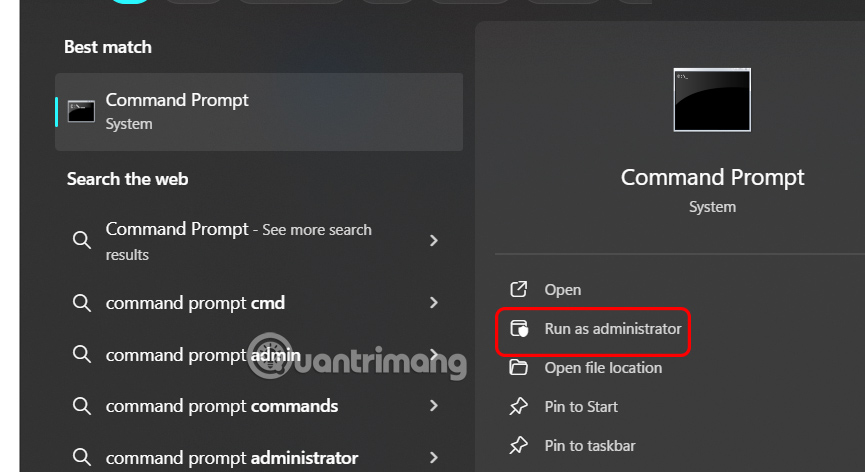
<p style="text-align: justify;">Bạn nhập Command Prompt trong thanh tìm kiếm rồi<strong>&nbsp;chọn Run as administrator</strong>&nbsp;để mở.</p>

<p style="text-align: justify;"><img alt="Mở Command Prompt bằng quyền Admin" data-i="8" data-src="https://st.quantrimang.com/photos/image/2025/08/06/reset-Windows-Security-Windows-8.jpg" data-was-processed="true" height="327" src="https://st.quantrimang.com/photos/image/2025/08/06/reset-Windows-Security-Windows-8.jpg" width="600" /></p>

<p style="text-align: justify;"><strong>Bước 2:</strong></p>

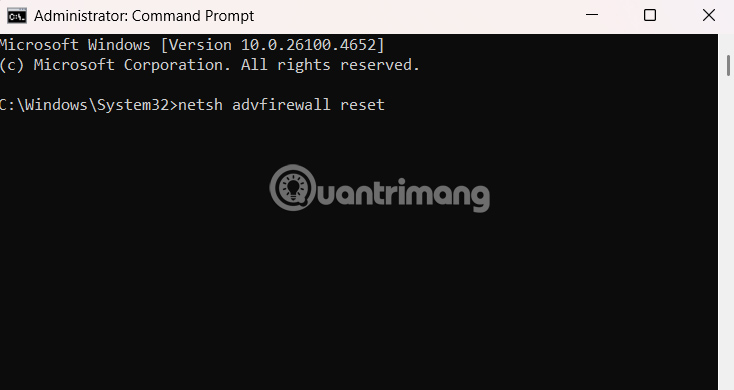
<p style="text-align: justify;">Bạn nhập lệnh dưới đây vào giao diện sau đó nhấn Enter để thực hiện lệnh.</p>

<pre id="pre1">
<code>netsh advfirewall reset</code></pre>

<p style="text-align: justify;"><img alt="Cách reset Windows Security bằng Command Prompt" data-i="9" data-src="https://st.quantrimang.com/photos/image/2025/08/06/reset-Windows-Security-Windows-9.jpg" data-was-processed="true" height="319" src="https://st.quantrimang.com/photos/image/2025/08/06/reset-Windows-Security-Windows-9.jpg" width="600" /></p>

<div style="text-align: justify;"><br />
T</div>
		</div>
				<div id="author">
						<p>
				<strong>Nguồn tin:</strong>
				Quantrimang.com:
			</p>
		</div>
	</div>
	<div id="footer" class="clearfix">
		<div id="url">
			<strong>URL của bản tin này: </strong><a href="https://www.nguoicodonvn2008.info/vi/news/savefile/kien-thuc-may-tinh/cach-reset-cai-dat-windows-security-tren-windows-10938.html" title="Cách reset cài đặt Windows Security trên Windows">https://www.nguoicodonvn2008.info/vi/news/savefile/kien-thuc-may-tinh/cach-reset-cai-dat-windows-security-tren-windows-10938.html</a>

		</div>
		<div class="clear"></div>
		<div class="copyright">
			&copy; .&#x3A; Nguoicodonvn2008.info - Cõi lòng người cô đơn &#x3A;.
		</div>
		<div id="contact">
			<a href="mailto:admin@nguoicodonvn2008.info">admin@nguoicodonvn2008.info</a>
		</div>
	</div>
</div>
        <div id="timeoutsess" class="chromeframe">
            Bạn đã không sử dụng Site, <a onclick="timeoutsesscancel();" href="https://nguoicodonvn2008.info/#">Bấm vào đây để duy trì trạng thái đăng nhập</a>. Thời gian chờ: <span id="secField"> 60 </span> giây
        </div>
        <div id="openidResult" class="nv-alert" style="display:none"></div>
        <div id="openidBt" data-result="" data-redirect=""></div>
		</script>
		<div class="car-top">
  <span><img src="https://nguoicodonvn2008.info/themes/default/images/car.png" alt=""></span>
</div>
<div id="run_cronjobs" style="visibility:hidden;display:none;"><img alt="cron" src="/index.php?second=cronjobs&amp;p=g12p7w1W" width="1" height="1" /></div>
<script src="https://nguoicodonvn2008.info/assets/js/jquery/jquery.min.js"></script>
<script>var nv_base_siteurl="/",nv_lang_data="vi",nv_lang_interface="vi",nv_name_variable="nv",nv_fc_variable="op",nv_lang_variable="language",nv_module_name="news",nv_func_name="savefile",nv_is_user=0, nv_my_ofs=-4,nv_my_abbr="EDT",nv_cookie_prefix="nv4c_e856T",nv_check_pass_mstime=1738000,nv_area_admin=0,nv_safemode=0,theme_responsive=0,nv_recaptcha_ver=2,nv_recaptcha_sitekey="",nv_recaptcha_type="image",XSSsanitize=1;</script>
<script src="https://nguoicodonvn2008.info/assets/js/language/vi.js"></script>
<script src="https://nguoicodonvn2008.info/assets/js/DOMPurify/purify3.js"></script>
<script src="https://nguoicodonvn2008.info/assets/js/global.js"></script>
<script src="https://nguoicodonvn2008.info/assets/js/site.js"></script>
<script src="https://nguoicodonvn2008.info/themes/default/js/news.js"></script>
<script src="https://nguoicodonvn2008.info/themes/default/js/main.js"></script>
<script src="https://nguoicodonvn2008.info/themes/default/js/custom.js"></script>
<script type="application/ld+json">
        {
            "@context": "https://schema.org",
            "@type": "Organization",
            "url": "https://nguoicodonvn2008.info",
            "logo": "https://nguoicodonvn2008.info/uploads/angel.gif"
        }
        </script>
<script src="https://nguoicodonvn2008.info/themes/default/js/bootstrap.min.js"></script>
<script type="text/javascript">
var $scrolltop = $('.car-top');
$scrolltop.on('click', function () {
    $('html,body').animate({
        scrollTop: 0
    }, 800);
    $(this).addClass("car-run");
    setTimeout(function(){ $scrolltop.removeClass('car-run');}, 1000);
    return false;
});
$(window).on('scroll', function ()
{ 
    if($(window).scrollTop() >= 200)
    {
        $scrolltop.addClass("show");
        $scrolltop.addClass("car-down");
    }
    else
    {
       $scrolltop.removeClass("show");
       setTimeout(function(){ $scrolltop.removeClass('car-down');}, 300);
    }
});
</script>
</body>
</html>